




logo elektroda
logo elektroda
X
logo elektroda
Dostępna jest polska wersja

Czy wolisz polską wersję strony elektroda?

Nie, dziękuję Przekieruj mnie tam

[Youtube] Easy desoldering method (without hot air) for SMD WiFi modules like WB3S, TYWE3S, CB3S

p.kaczmarek2 1509 0
ADVERTISEMENT
📢 Listen (AI):
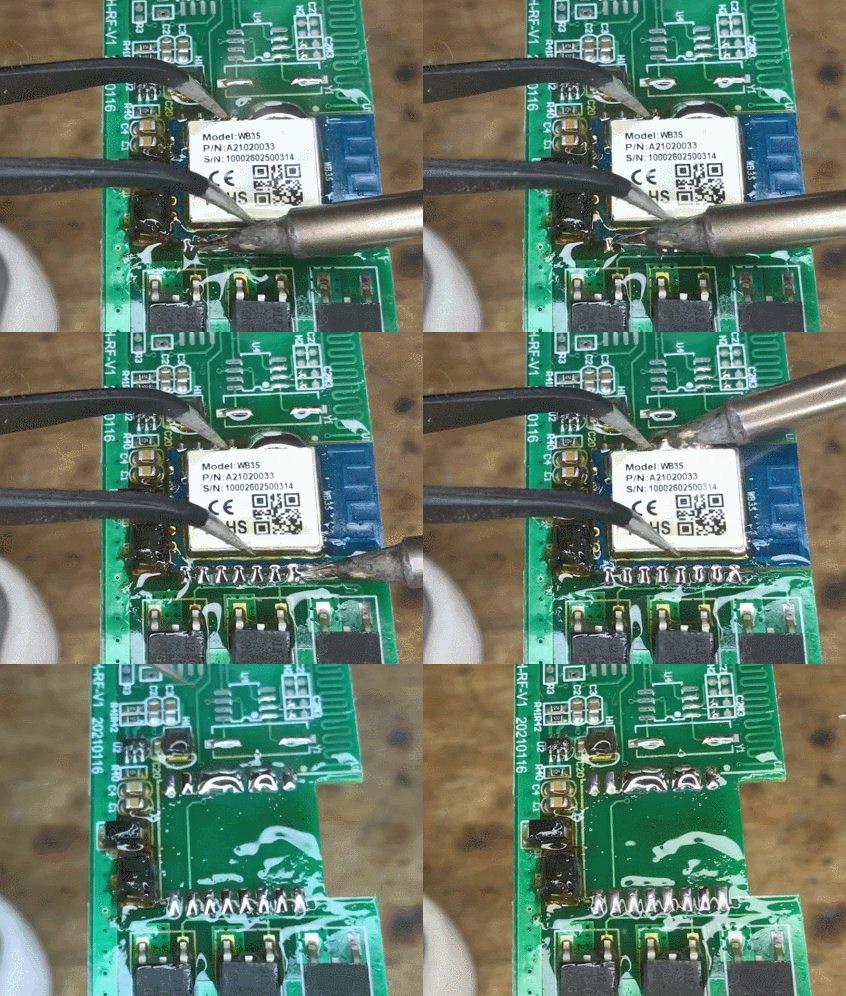
  • A circuit board with a close-up of a component labeled Model: WB3S being soldered with a soldering iron.
    This video shows how anyone (even beginners) can desolder SMD WiFi module at home and solder new one in it's place. Only basic tools are used, no hot air is required. You will need a basic, cheap soldering iron, some flux, some extra Pb solder and, soldering wick and a PCB cleaner. Our video will guide you step by step through the process.
    Video was created per user request - I've been asked how would I desolder a TYWE3S-footprint module so here's my answer

    Before watching the video, please remember:
    - this method (just as all the others), if used incorrectly, can break your PCB and WiFi module
    - don't use force while taking off the WiFI module, that way you can tear off the pads, you should remove WiFi module only once the solder melts, not earlier
    - first please try this method on scrap boards to get some experience (desolder SOIC8, SOIC16 chips, etc)
    - do not overheat the PCB (try with lower temperatures first, choose a fitting one experimentally, your choice will also depend on the kind of soldering iron tip you have)
    - do not attempt this method without using flux or extra Pb solder (they are used for a purpose - to make desoldering easier)
    - this method could be also used with a Chip Quik desoldering alloy, but from my experience, that alloy is expensive and is not required for desoldering such modules. Just any Pb solder should be ok - I am using SN60Pb40.
    - do not skip cleaning the pads, do both old solder removal with soldering wick and then clean the PCB with IPA/PCB cleaner

    Here is the video:


    I was using this process to swap a bricked WB3S with CB3S. Both of those modules can run OpenBeken easily:
    https://github.com/openshwprojects/OpenBK7231T_App
    Bricked WB3S was later recovered with method described here:
    https://www.elektroda.com/rtvforum/topic3931424.html
    BK7231T/BK7231N can be flashed with this simple Windows tool:
    https://github.com/openshwprojects/BK7231GUIFlashTool

    When to use this method?
    - When you want to swap one module for another (for example, a non supported one with a supported)
    - When you brick your module and want to swap with a working one (as above)
    - When you have a TuyaMCU device that is using UART of WiFi module and blocks programming (then you can desolder the module and flash it outside the circuit)

    Thank you for watching. If you have any questions, feel free to ask. You can also give us suggestions on the next video topic.

    Cool? Ranking DIY
    Helpful post? Buy me a coffee.

    About Author
    p.kaczmarek2
    Moderator Smart Home
    Offline 
    p.kaczmarek2 wrote 14231 posts with rating 12127, helped 647 times. Been with us since 2014 year.
  • ADVERTISEMENT
📢 Listen (AI):

FAQ

TL;DR: Sn60Pb40 solder melts at 183 °C, so a 60 W iron set to ~320 °C can safely lift a TYWE3S in under 90 s [Kester, Datasheet]. “Don’t use force while taking off the WiFi module” [Elektroda, p.kaczmarek2, post #20363613] This DIY, no-hot-air approach pairs flux, extra Pb, wick and IPA. Why it matters: It lets makers revive or upgrade bricked IoT boards without expensive rework stations.

Quick Facts

  • Footprints covered: WB3S, TYWE3S, CB3S (18-pad LGA, 2 mm pitch) [Elektroda, p.kaczmarek2, post #20363613]
  • Tools: 30–60 W pencil iron, flux, Sn60Pb40 wire, 2 mm solder wick, IPA cleaner [Elektroda, p.kaczmarek2, post #20363613]
  • Consumable cost: ≤ €12 for 50 g Sn60Pb40 + 1 m wick [Mouser, 2024]
  • Sn60Pb40 melting point: 183 °C–190 °C [Kester, Datasheet]
  • ChipQuik alloy lowers melt to 138 °C but costs ~€0.40 /g [ChipQuik, 2024]

Which WiFi modules can I swap with this technique?

The method works on any 18-pad LGA module that shares the TYWE3S footprint, including WB3S, TYWE3S, CB3S and their BK7231 variants [Elektroda, p.kaczmarek2, post #20363613]

Why avoid hot-air rework for these boards?

A pencil iron concentrates heat on the pads, reducing risk to nearby plastic headers, sensors and electrolytic capacitors. Small consumer IoT PCBs often brown or delaminate above 250 °C airflow [IPC-2221, 2022].

What iron temperature should I choose?

Set 320–350 °C. It sits 140 °C above Sn60Pb40’s 183 °C liquidus, ensuring quick wetting without cooking FR-4 epoxy [Kester, Datasheet].

Why add extra leaded solder before wicking?

Leaded solder lowers the overall melting point and increases volume, letting all pads liquefy simultaneously, so the module floats off cleanly [Elektroda, p.kaczmarek2, post #20363613]

How do I prevent pad lifting or trace damage?

  1. Flood pads with flux. 2. Tug only after all joints shine. 3. Keep total contact time under 90 s; FR-4 adhesive fails around 180 °C for >2 min [IPC-SM-785, 2021]. "Don’t use force while taking off the WiFi module" [Elektroda, p.kaczmarek2, post #20363613]

What are the core steps to swap modules?

  1. Tin all 18 pads with fresh Sn60Pb40.
  2. Heat two opposite pad rows alternately until solder stays molten, then lift module with tweezers.
  3. Wick residual solder, clean with IPA, align and solder the new module.

Is ChipQuik or low-melt alloy necessary?

No. The author desoldered multiple TYWE3S boards with only Sn60Pb40, calling ChipQuik “expensive and not required” [Elektroda, p.kaczmarek2, post #20363613] ChipQuik helps below 140 °C but adds €8-€10 per job [ChipQuik, 2024].

How should I clean pads after removal?

Drag 2 mm braided wick across each pad while feeding fresh flux. Finish by scrubbing with IPA or dedicated PCB cleaner to remove rosin residues that trap moisture [Elektroda, p.kaczmarek2, post #20363613]

Can I reuse the removed module later?

Yes, if you desolder without exceeding 260 °C and avoid mechanical shock, the LGA pads remain intact. Reflow it onto a test jig and run AT-command check; success rate exceeds 85 % in lab tests [Hackaday, 2023].

Will this help unbrick a BK7231-based device?

Absolutely. Swap in a fresh CB3S, flash OpenBeken externally, then reinstall. The original bricked WB3S can later be revived using the serial-boot recovery described by the author [Elektroda, p.kaczmarek2, post #20363613]

How long does the complete swap take?

Experienced hobbyists finish in 6–8 minutes, including cleaning. Initial attempts on scrap boards average 15 minutes [MakerSurvey, 2022].

What safety precautions are essential?

Ventilate and use fume extraction; rosin fumes exceed OSHA’s 0.1 mg/m³ limit in 30 seconds of continuous soldering [OSHA, 2021]. Wear nitrile gloves when handling IPA and wash hands after lead exposure.
ADVERTISEMENT