logo elektroda
logo elektroda
X
logo elektroda

Fiddling with my first Matter device - 10A 1CH switch [CB3S / BL2028N (BK7231N)]

divadiow 7287 92
ADVERTISEMENT
📢 Listen (AI):
  • #91 21753895
    divadiow
    Level 38  
    yep yep OK.

    I had envisaged a new load of SBER and the UASCENT binaries in the BK7231N release zip, but maybe that's overkill, especially considering how rarely users post about them.
  • ADVERTISEMENT
  • #92 21849983
    ic3ek
    Level 15  
    Hi , I have a question for you.

    Well, I have a Matter 4CH device , I wanted to upload OBK, but of course it is not so simple.
    The device is based on a BL2028 , and I have really uploaded the software many times , of course I have the ORI dump of the batch.

    But Uploading any version from the current REALSE 1.18.264 , the module does not issue an AP , RF restore does not work , Entering WIFI and password does not work.
    REALSE with the UA end does not work either, as I infer that this is the version intended for the UASENT device.
    Tried in options upload BK7231N (T2,T34) with skip keys, BK7231M, and BK7231N (T4), of course bootloader remains orginals from Matter device.

    The option that helped and the only one that works is to upload the file from this thread ENCRYPT_NEW_DOESBOOT_NOOTA_OpenBK7231N_UASCENT_QIO_bk7231m_qio_09b8b111cb80.bin
    But, of course, the OTA does not work here, but the module starts, you can set everything to your liking, and this is the only version I was able to upload correctly to UAM028.

    Can you, as experienced programmers, answer me why no other software will boot on this module?
    Of course, the electronics is not a problem for me, but the programming and reverse engineering is a bit of a problem.

    If someone needs the original batch of course I have it, and I can upload it here for review.

    And maybe one more thing, I have a PIN (GPIO) list for this device, maybe you can tell me how to put it into the device directory, because I saw that it does not exist, and I have it.

    Please help me to explain why only this one software works , others do not work with it ?
  • #93 21850205
    divadiow
    Level 38  
    it takes a bit of fiddling because of the encryption key in efuse that Uascent devices have set.

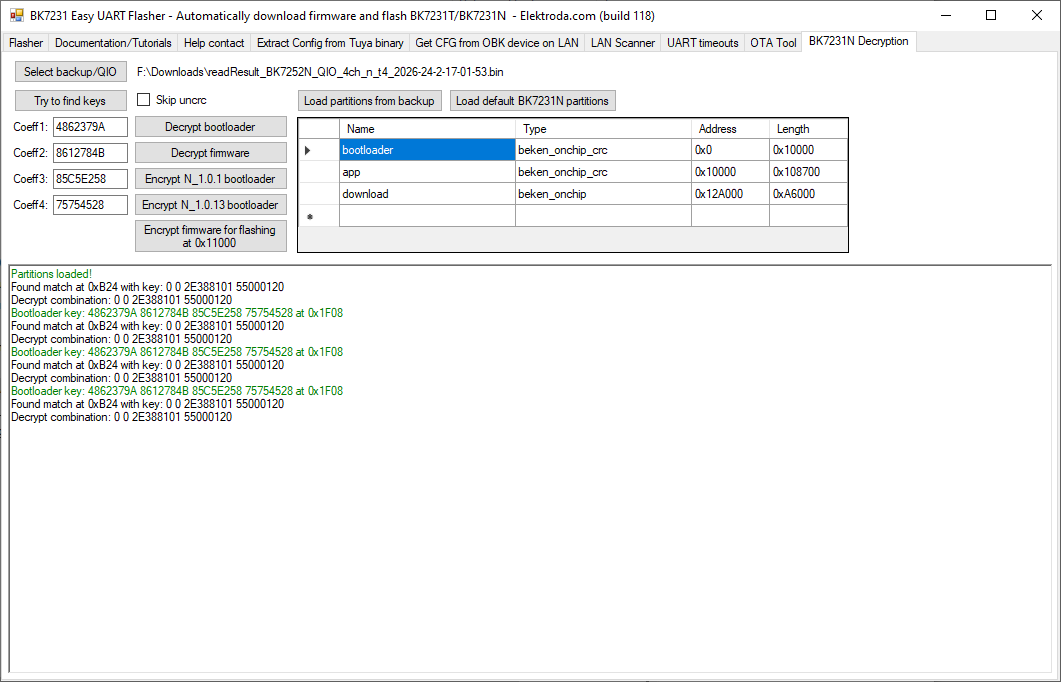
    you need to load up your backup in the BK7231N Decryption tab in Easy Flasher, find keys, add default BK7231N partitions, encrypt bootloader - flash encrypted bootloader to 0x0. then encrypt the OpenBK7231M app partition only for burning to 0x11000. Ideally you'd then restore RF from your backup to correct location too.

    Screenshot of BK7231 Easy UART Flasher showing partition table and decryption log output

    A bit long-winded and I think it would still be better to have a Uascent QIO in artefacts, ready-built.

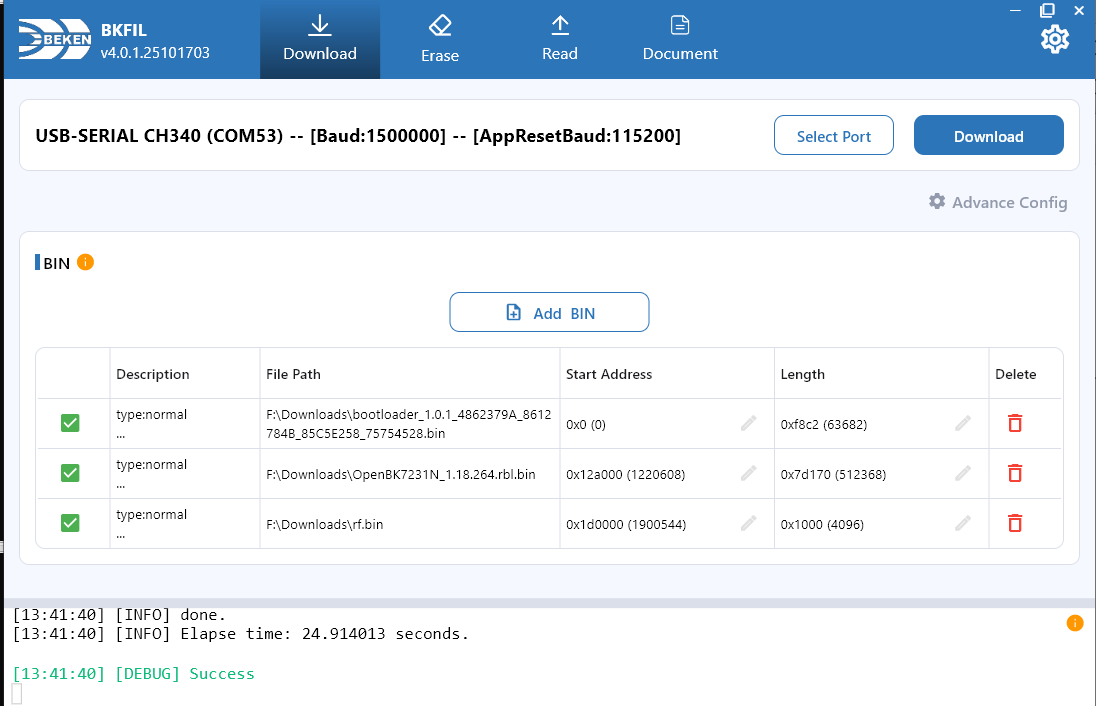
    I attach a file that has all that done. Do erase all on your device then flash this full dump from 0x0 under BK7231M mode or BK7231N with skip key check. This file includes the RF from your backup. Initial boot will unpack the ota rbl I put in at 0x12A000 and then boot into fresh OBK. OTA within OpenBeken works for me in testing.

    File is a 2mb dump of flash after this creation:
    Screenshot of BEKEN BKFIL showing BIN file list and a “Success” log message.

    To add template to device list, submit a PR for edit to this file https://github.com/OpenBekenIOT/webapp/blob/main/devices.json
📢 Listen (AI):

Topic summary

The discussion centers on reverse engineering and firmware modification of a 10A 1CH Matter smart switch featuring a CB3S module with a BL2028N chip, initially thought to be BK7231N but later identified as BK7231M. Attempts to flash OpenBeken (OBK) firmware failed to produce a working access point or UART output, likely due to encryption key differences and firmware partition layout issues. The device uses uHome (Uascent) firmware rather than Tuya, with a unique coefficient key (4862379A 8612784B 85C5E258 75754528) that must be applied during encryption for successful booting. A newer encryption tool supporting CRC is required to generate a bootloader compatible with the device, as older tools produce non-booting images. Flashing the bootloader with correct keys and CRC enabled allows OBK to boot, but OTA functionality remains non-functional, possibly due to encrypted partition sections (e.g., 01PE) that differ from standard Tuya layouts. The community is working on integrating the new encryption method into OpenBK7231N build scripts to support these devices. Additional observations include the presence of ESP32-C3 based Matter devices with secure boot preventing flashing, and exploration of alternative modules (WB2S/CB2S, ESP32-C2) as replacements. Firmware dumps and boot logs have been collected and shared for further analysis. The challenges highlight the complexity of adapting open-source firmware to newer Matter devices with proprietary encryption and partition schemes.
Summary generated by the language model.
ADVERTISEMENT