FAQ 
TL;DR: This FAQ is for OpenBeken users converting a CB3S/BK7231N Tuya TH01-style sensor: it measured about 5µA in MCU sleep, and the key warning is "disconnect the UART" before flashing or testing. It explains TuyaMCU dpIDs, OpenBeken autoexec.bat, Home Assistant MQTT, and common zero-reading failures. [#20564338]
Why it matters: Battery Tuya sensors combine cloud firmware, short wake windows, and MCU-controlled power, so one wrong UART or dpID setting can make Home Assistant show only zeros.
| Approach |
Hardware path |
Sleep behavior |
OpenBeken impact |
| TuyaMCU battery sensor |
Separate MCU + CB3S/BK7231N over UART |
MCU sleep measured about 5µA |
Needs TuyaMCU, tmSensor, dpID mapping, and often dpCache |
| BK7231 deep sleep device |
WiFi SoC handles sleep itself |
BK7231 deep sleep measured about 6µA |
Uses PinDeepSleep, not TuyaMCU dpIDs |
| Non-TuyaMCU PIR example |
GPIO/ADC directly on BK7231 |
Script-controlled wake and sleep |
Needs pin template, not TuyaMCU UART |
Key insight: Treat the MCU as the real always-on controller. OpenBeken must answer its TuyaMCU handshake quickly, publish MQTT, then let the MCU cut CB3S power.
Quick Facts
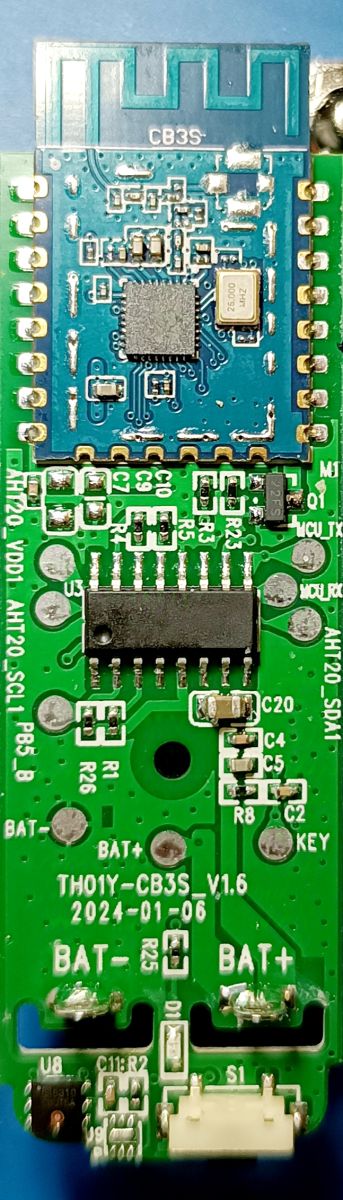
- The analyzed sensor uses a CB3S WiFi module based on BK7231N, a separate unidentified MCU, and an SHT30 temperature/humidity sensor read over I2C. [#20564338]
- The measured sleep current with the WiFi module powered off was about 5µA; a BK7231-only deep sleep comparison measured about 6µA. [#20564338]
- The captured product information string was
{ "p":"byusvumeme5iicad", "v":"1.0.0" }, exchanged through TuyaMCU command 0x01. [#20564338]
- Reporting interval control used dpID 17 for temperature and dpID 18 for humidity; tested values included 1 minute, and the thread mentions 1–120 minutes on suitable products. [#20973055]
- Some visually similar TH01 sensors use different dpIDs, such as 27 for temperature, 46 for humidity, and 101 for battery, so the original autoexec.bat can fail. [#21778134]
What is TuyaMCU and how does it communicate with a CB3S/BK7231N WiFi module in a battery temperature and humidity sensor?
TuyaMCU is the UART protocol between the always-on MCU and the CB3S/BK7231N WiFi module.
"TuyaMCU is a UART based protocol that lets the product MCU exchange dpID status and configuration frames with the WiFi module, while the MCU can also control WiFi power in battery devices." In this sensor, the MCU reads the SHT30 over I2C, turns CB3S power on through a MOSFET, then exchanges
55 AA frames at wake-up.
[#20564338]
How do I flash OpenBeken on a CB3S/BK7231N Tuya temperature and humidity sensor without keeping it tied to the Tuya cloud?
Flash OpenBeken by isolating the CB3S UART, powering the module with 3.3V, and writing a BK7231N OpenBeken binary. 1. Disconnect MCU-to-CB3S UART resistors or tracks. 2. Power CB3S directly from a stable 3.3V programmer supply. 3. Flash with BK7231 GUI Flash Tool, then restore UART and add
autoexec.bat in LittleFS. The thread’s final setup used MQTT and Home Assistant Discovery after flashing.
[#20564338]
Why do I need to disconnect or cut the UART lines between the MCU and CB3S before flashing OpenBeken?
You disconnect the UART because the same CB3S UART port serves both TuyaMCU communication and firmware flashing. If the MCU stays connected, it can drive RX/TX during programming or testing. One user found the sensor showed no values until power, ground, RX, and TX programming wires were removed. The module can also receive parasitic power from the programmer, which changes wake and power behavior.
[#20739869]
Which TuyaMCU dpIDs are used for temperature, humidity, battery level, reporting interval, and unit settings in the TH01-style sensor?
The original TH01-style mapping uses dpID 1 for temperature times 10, dpID 2 for humidity percent, and dpID 3 for battery state. dpID 9 selects Celsius or Fahrenheit, with 0 for °C and 1 for °F. dpID 17 controls temperature reporting interval, and dpID 18 controls humidity reporting interval. Similar-looking devices may instead use dpID 27, 46, and 101, so UART capture confirms the real map.
[#20564338]
How should I write the OpenBeken autoexec.bat for a TuyaMCU temperature and humidity sensor with Home Assistant MQTT discovery?
Use
TuyaMCU,
tmSensor, and explicit dpID-to-channel links in
autoexec.bat. A minimal setup starts both drivers, maps dpID 1 as
Temperature_Div10, dpID 2 as
Humidity, and dpID 3 as
ReadOnlyLowMidHigh battery. Add
linkTuyaMCUOutputToChannel 17 val 5 1 and
18 val 6 1 only when the device supports dpCache intervals. Home Assistant Discovery then exposes the scripted channels through MQTT.
[#20564338]
What does the TuyaMCU ObtainDPCache command 0x10 do, and how is it used to change the reporting interval?
Command
0x10 lets the MCU ask the WiFi module for cached settings, such as reporting intervals. The WiFi module replies with dpID, type, and value records. In OpenBeken, the extra
1 in
linkTuyaMCUOutputToChannel 17 val 5 1 marks that channel as dpCache data. The MCU can then store values like 1 minute or 60 minutes and use them for future wake cycles.
[#20584330]
Why does my OpenBeken-flashed Tuya temperature sensor show 0 values for temperature and humidity even though MQTT is connected?
Zero readings mean OpenBeken is not receiving or decoding the correct TuyaMCU data frames. Check four concrete items: UART restored after flashing, correct baud rate such as 9600 or 115200, correct dpIDs, and working MQTT before the MCU sleeps. Some boards use dpID 27 and 46 instead of 1 and 2. Also avoid flashing old backup images; use current OpenBeken binaries and configure the device separately.
[#20922287]
How can I save an OpenBeken channel value in flash memory so it survives reboot or deep sleep wake cycles?
Set the channel start value to
-1, which tells OpenBeken to remember the previous channel value in flash. For example,
SetStartValue 5 -1 keeps channel 5 across reboots. The thread uses this for report interval fields and later confirms it works for cached values. This helps battery devices reuse settings after the MCU powers the CB3S off.
[#20973103]
How can I publish the current date and time to MQTT from an OpenBeken device?
The thread asks this question but does not provide a working date-and-time MQTT command. The same post later confirms the basic sensor setup was working, but no complete time-publish script appears there. Use only documented OpenBeken commands for production, and test during the sensor’s short wake window, which was about 11 seconds in the report-cycle test.
[#20917074]
What is the difference between a TuyaMCU battery-powered sensor and a non-TuyaMCU deep sleep sensor in OpenBeken?
A TuyaMCU battery sensor uses a separate low-power MCU to control CB3S power and report dpID data over UART. A non-TuyaMCU deep sleep sensor connects signals directly to BK7231 GPIO or ADC and uses
PinDeepSleep. The thread warns that PIR scripts using
Rel,
dInput,
ADC, and
PinDeepSleep are for devices without TuyaMCU, not the first TH01 sensor.
[#20585154]
BK7231N deep sleep vs separate low-power MCU power control — which approach gives better battery life for Tuya sensors?
The measured results were very close: the TuyaMCU sensor drew about 5µA with CB3S VDD disconnected, while BK7231 deep sleep measured about 6µA. The separate MCU design keeps WiFi fully unpowered until reporting, then the MCU turns it on through a MOSFET. The BK7231-only design can wake from GPIO but keeps the WiFi SoC in deep sleep.
[#20564338]
How can I sniff and decode TuyaMCU UART communication using BK7231 GUI Flash Tool, MCUAnalyzer, or SniffUART?
Capture both UART directions, then decode
55 AA TuyaMCU frames into commands, dpIDs, types, and values. BK7231 GUI Flash Tool can do dual UART capture, MCUAnalyzer comments frames, and SniffUART added decoder forms and protocol choices. For TuyaMCU, select the correct protocol family, such as standard MCU serial, low-power MCU, or HomeKit MCU serial. A read timeout near 100 ms was suggested for SniffUART.
[#20645958]
Why can dual UART captures show packets in the wrong order, and how do USB serial adapters like CH340, CP2102, and FTDI affect logging?
Dual captures can misorder packets because USB serial and software polling add enough latency to disturb timestamps. The thread reports CH340 dongles, CP2102, and FTDI adapters showing different capture behavior. One user measured Realterm rates of 20 CPS on CP2102 and 5 CPS on FTDI232. The author also noted that even dual capture may need human post-processing.
[#20584759]
Which chip on the TH01 temperature and humidity sensor PCB actually measures temperature and humidity, such as SHT30, CHT8310, or U4?
The temperature and humidity sensor is the small sensor IC marked as U4 on the PCB photo, and the original analysis identifies the measured device as SHT30 over I2C. Later variants may use a CHT8310 T/H sensor. The MCU, not the CB3S, reads this sensor and then sends values through TuyaMCU dpIDs.
[#21330698]
How can I add an external temperature or humidity probe to a Tuya TH01-style sensor, and which pins or sensor types would be compatible?
The thread does not confirm a working external probe mod for the TuyaMCU TH01 board. The key requirement is firmware and hardware support from the MCU that reads the existing U4/SHT30 or CHT8310 sensor. OpenBeken on CB3S cannot directly replace that reading unless the external sensor connects to supported BK7231 pins and the MCU power design still permits it. The author first asked for the MCU marking, such as PHY62220C.
[#21333979]
AI summary based on the discussion. May contain errors.