logo elektroda
logo elektroda
X
logo elektroda

OpenBeken configuration for WiFi universal IR remotes from aliexpress (S06, S18, IRC02) with BK7231

Lexcis 16704 50

TL;DR

  • OpenBeken configurations target AliExpress WiFi universal IR remotes: TUYA Home Smart Life Mini Universal IR Remote S06, S18, and Intelligent WiFi IR Remote Control IRC02.
  • The main value is board-specific pinout guidance for button, WiFi LED, IR RX, and IR TX wiring.
  • S06 uses BK7231T [WB3S] with GPIOP_6 button, GPIOP_8 IR RX, GPIOP_9 WiFi LED, and GPIOP_26 IR TX.
  • S18 uses BK7231N [CB3S] with GPIOP_6 button, GPIOP_7 IR RX, GPIOP_8 WiFi LED, and GPIOP_26 IR TX.
  • IRC02 uses BK7231N [CB3S] with GPIOP_6 button, GPIOP_7 WiFi LED, GPIOP_24 IR RX, and GPIOP_26 IR TX, but the PCB mixed up the Rx and Tx labels.
Generated by the language model.
ADVERTISEMENT
📢 Listen (AI):
  • #31 21499802
    Qua8824
    Level 4  
    Posts: 8
    >>21161550
    Hi @carlig833 , have you ever solved this problem? I'm facing exactly the same problem with my ISKA (so-called..) AC. I have 2 IR Blaster units of model S06-Pro. I burned one with OpenBeken and the other kept with the original Tuya. Tuya, using the SmartLife app works out of the box (identified the AC as "Whirlpool"). The OpenBeken one just keeps identifying "IR_UNKNOWN 0x0 0" - from the remote control or from the Tuya S06-Pro.
  • ADVERTISEMENT
  • #32 21506509
    danialbazman
    Level 3  
    Posts: 4
    Hi,

    I'm having an issue with the S06. I have successfully flashed OpenBeken onto the device and it works perfectly to receive the codes of 1 remote (Fan) but not able to receive the codes on my Air Conditioner (AC) remote at all.

    My understanding is that if the device is unknown, RAW IR Codes would be captured/received in the logs, and this happened with the Fan Remote IR Codes but the AC codes are not captured at all in the logs.

    Can someone help me with this? Is there a solution available or is it better to just return the remote?

    Thank you for your response.
  • #33 21506612
    p.kaczmarek2
    Moderator Smart Home
    Posts: 14615
    Help: 655
    Rate: 12632
    I think we have a fork of OBK with alternate IR library that has AC support
    Helpful post? Buy me a coffee.
  • ADVERTISEMENT
  • #34 21507150
    danialbazman
    Level 3  
    Posts: 4
    >>21506612

    Hi,

    Thanks for the quick response. Could you send the link to this forked OBK? Can't seem to find it anywhere through Google.
  • #35 21507156
    p.kaczmarek2
    Moderator Smart Home
    Posts: 14615
    Help: 655
    Rate: 12632
    https://github.com/openshwprojects/OpenBK7231T_App/pull/723

    Added after 17 [seconds]:

    i may try to update it if i get more time
    Helpful post? Buy me a coffee.
  • #36 21507351
    danialbazman
    Level 3  
    Posts: 4
    >>21507156

    Thank you!
  • #37 21539237
    ysdiego
    Level 1  
    Posts: 1
    Hi people

    First and foremost, I want to thank you for your contributions to the open domotics community. I read a lot, thought a lot, and pulled lots of hair out of my head.. and I could finally flash my S18 mini remote.
    Sadly my happiness waned on the testing face. Although it reads and sends IR codes successfully, it practically has no range. I don't know if I shorted something when soldering the signal wires or if there's some obscure setting to increase the transmit power.

    Thanks in advance!
  • #38 21539309
    p.kaczmarek2
    Moderator Smart Home
    Posts: 14615
    Help: 655
    Rate: 12632
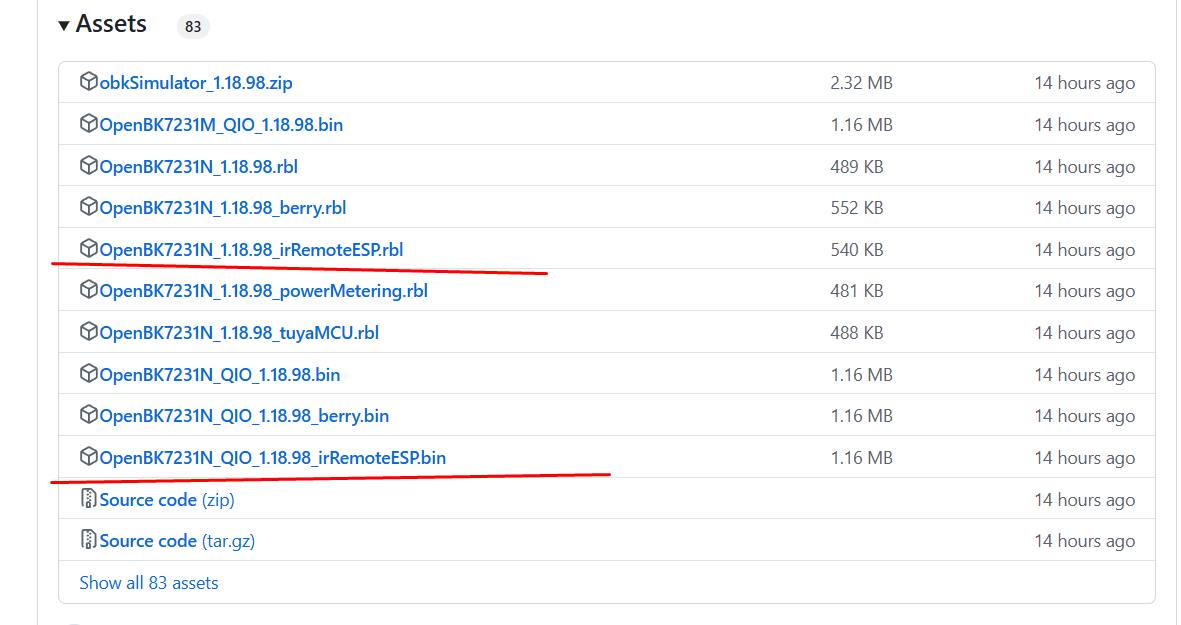
    Important update - obk irremoteesp fork is in builds now:
    https://github.com/openshwprojects/OpenBK7231T_App/releases
    A list of downloadable files from a repository, mainly binary and RBL files for OpenBK7231N versions, highlighted by red lines.

    @ysdiego what is the tuya config of your device?maybe you need to set one pin to high to enable sending?
    Helpful post? Buy me a coffee.
  • ADVERTISEMENT
  • #39 21713105
    leonardocapone
    Level 5  
    Posts: 11
    Hi there, I've received and successfully fleshed am S18 with a T1-3S chip with BK7238 firmware.
    T1-3S module on PCB with connected cable and surrounding LEDs

    GPIO's were a bit different. Here below what I found:


    Code: JSON
    Log in, to see the code


    Hope that helps!
  • #40 21714593
    wenhuazhang2018
    Level 2  
    Posts: 3
    Thanks for the information, I was able to flash my S18, it works. But I have following problems:

    I am trying to trigger an event with IR signal (from power button of Roku remote), once it triggered, I want to do an IRsend of Power signal of a VANKYO projector.

    following is the recorded IR code for both remote:

    roku power button:
    Info:IR:IR IR_NEC 0xC7EA 0x17 0 (32 bits)
    Info:IR:IR IR_NEC2 0xC7EA 0x97 1 (32 bits)

    VANKYO power button:
    Info:IR:IR IR_NEC 0x0 0xA8 0 (32 bits)
    Info:IR:IR IR_NEC 0x0 0xA8 1 (0 bits)

    When I send command like this: IRSend NEC 0x0 0xA8, it does turn the Vankyo on and off.
    Then I put this in the startup command line:
    """
    startDriver IR
    setFlag 1 1
    addEventHandler2 IR_NEC 0xC7EA 0x17 IRSend NEC 0x0 0xA8
    """
    When I point the roku remote to the IR blaster and press the power button, I can see in logs the event is trigger, and here is the log:
    Info:IR:IR IR_NEC 0xC7EA 0x17 0 (32 bits)
    Info:MQTT:Publishing val {"IrReceived":{"Protocol":"NEC","Bits":32,"Data":"0xE817C7EA"}} to IR/RESULT retain=0
    Info:EVENT:EventHandlers_FireEvent3: executing command IRSend NEC 0x0 0xA8
    Info:IR:Delay 100ms
    Info:IR:IR send NEC 0x0 0xA8 protocol 7 addr 0x0 cmd 0xA8 repeats 0 bits override 0

    But the Vankyo do not respond.

    Why the command line works, but when triggered it's not working?
  • #41 21714890
    leonardocapone
    Level 5  
    Posts: 11
    I'm not really into the commands/scripting so I might be very mistaken, but I guess you should go for a condition where for a trigger input 0 or 1, it's going to send a command to the other IR device....so I would try something like that...
    Again...I'm just gessing

    addEventHandle OnIR_NEC 0xC7EA 0x17 1 IRSend NEC 0x0 0xA8 1

    addEventHandle OnIR_NEC 0xC7EA 0x17 0 IRSend NEC 0x0 0xA8 0
  • #42 21750212
    sanychlxg60989
    Level 3  
    Posts: 3
    Hello.
    I install 1.18.210_irRemoteESP
    config 7 and 26 pins. her is result.
    ----------
    Info:IR:IR Unknown ffffffff,0x74423315,99
    Info:IR:IR MQTT publish IR Unknown ffffffff,0x74423315,99 took 0ms
    Info:IR:IR GOODWEATHER 0 0 1
    Info:IR:IR GOODWEATHER,48,0x552134000000
    Info:IR:IR MQTT publish IR GOODWEATHER,48,0x552134000000 took 0ms
    Debug:IR:IR fire event took 0ms
    Info:MQTT:mqtt_host empty, not starting mqtt
    Info:IR:IR Unknown ffffffff,0xC5182B21,98
    Info:IR:IR MQTT publish IR Unknown ffffffff,0xC5182B21,98 took 0ms
    Info:IR:IR Unknown ffffffff,0xDF6196CA,99
    Info:IR:IR MQTT publish IR Unknown ffffffff,0xDF6196CA,99 took 0ms
    Info:IR:IR Unknown ffffffff,0xFDB93C5F,99
    Info:IR:IR MQTT publish IR Unknown ffffffff,0xFDB93C5F,99 took 0ms
    Info:MQTT:mqtt_host empty, not starting mqtt
    Info:IR:IR Unknown ffffffff,0xCC8EA58E,98
    Info:IR:IR MQTT publish IR Unknown ffffffff,0xCC8EA58E,98 took 0ms
    Info:IR:IR Unknown ffffffff,0x2E8327B0,99
    Info:IR:IR MQTT publish IR Unknown ffffffff,0x2E8327B0,99 took 0ms
    Info:IR:IR GOODWEATHER 0 0 1
    Info:IR:IR GOODWEATHER,48,0x552134000000
    Info:IR:IR MQTT publish IR GOODWEATHER,48,0x552134000000 took 0ms
    Debug:IR:IR fire event took 0ms
    Info:MQTT:mqtt_host empty, not starting mqtt
    ------
    how to fix this?
    Attachments:
    • OpenBeken configuration for WiFi universal IR remotes from aliexpress (S06, S18, IRC02) with BK7231 photo_2025-11-13_17-58-19.jpg (113.32 KB) You must be logged in to download this attachment.
    • OpenBeken configuration for WiFi universal IR remotes from aliexpress (S06, S18, IRC02) with BK7231 photo_2025-11-13_17-58-15.jpg (113.62 KB) You must be logged in to download this attachment.
    • OpenBeken configuration for WiFi universal IR remotes from aliexpress (S06, S18, IRC02) with BK7231 photo_2025-11-13_17-58-06.jpg (77.55 KB) You must be logged in to download this attachment.
  • ADVERTISEMENT
  • #43 21758950
    rauno123
    Level 2  
    Posts: 2
    Rate: 2
    >>21750212

    Indeed. Today i started checking out the irESPRemote driver and eventually tried the 1.18.98 version that was on a screenshot in this thread and that worked alot better than current last relase of 1.18.214 or master version. SO there's something broken in later releases.
  • #44 21760775
    sanychlxg60989
    Level 3  
    Posts: 3
    Ok. I Try later- today\yesterday to flash on 98.
  • #45 21761116
    p.kaczmarek2
    Moderator Smart Home
    Posts: 14615
    Help: 655
    Rate: 12632
    Hey, can you try to narrow down which release/commit might have broken irRemoteESP variant?
    Helpful post? Buy me a coffee.
  • #46 21812435
    pc1246
    Level 3  
    Posts: 5
    Hello
    I have just entered into this forum.
    I have bought two of these S18 IR remotes.
    I wanted to flash them with cloudcutter OTA, as I did not want to disassemble them.
    Unfortunately it ends with: "[!] The profile you selected did not result in a successful exploit."
    As it seems, all the templates have an higher MCU version than mine have.
    My device shows MCU 1.0.2.
    I wonder if there is a possibility to flash a simple/empty openbeken which then could be updated with a correct firmware?
    If not I need to tear down one and will do the necessary steps.
    Thank you in advance and regards
    Christoph

    Edith: BTW. I did allready use cloudcutter to flash some LEDVANCE Twist!
  • #47 21813801
    p.kaczmarek2
    Moderator Smart Home
    Posts: 14615
    Help: 655
    Rate: 12632
    The cloudcutter method is not reliable, they require a per-build exploit and devices comes with different versions, builds, etc. I'd just suggest the soldering approach. You can try multiple profiles, but success is not guaranted that way.

    I didn't have any issues with accessing PCB for Tuya IR Remotes, is your S18 glued or somewhat problematic in that regard?
    Helpful post? Buy me a coffee.
  • #48 21817103
    pc1246
    Level 3  
    Posts: 5
    Hello
    I am not quite sure if it is glued or not.
    As I did the Ledvance via cloudcutter, I expected the S18 to work in this way as well.
    When I look to the other pictures where the device is opened it is not that easy to opene it, without any harms.
    This I wanted to avoid, but I will try one!
    Regards Christoph
  • #49 21817177
    p.kaczmarek2
    Moderator Smart Home
    Posts: 14615
    Help: 655
    Rate: 12632
    Opening device physically is not that bad. It allows you, for example, to install extra sensor, like DS18B20 or DT11. It's a very easy but also very fun modification.
    Helpful post? Buy me a coffee.
  • #51 21905896
    leonardojc
    Level 10  
    Posts: 9
    Rate: 1
    I've a S06 IR blaster
    with OpenBK7231T_1.18.288_irRemoteESP

    "pins": {
    "6": "Btn;0",
    "8": "IRRecv;0",
    "9": "LED;0",
    "26": "IRSend;0"
    },

    It sends and receives fine, except that with an Samsung AC remote control, pressing the power On/off button displays random values.
    
    Info:IR:IR Unknown ffffffff,0x43F0B7B9,175
    Info:IR:IR MQTT publish IR Unknown ffffffff,0x43F0B7B9,175 took 5ms
    Info:IR:IR Unknown ffffffff,0xC69C36C9,175
    Info:IR:IR MQTT publish IR Unknown ffffffff,0xC69C36C9,175 took 5ms
    Info:IR:IR Unknown ffffffff,0xE97AB1D,175
    Info:IR:IR MQTT publish IR Unknown ffffffff,0xE97AB1D,175 took 5ms
    Info:IR:IR Unknown ffffffff,0x36947B0C,174
    Info:IR:IR MQTT publish IR Unknown ffffffff,0x36947B0C,174 took 5ms
    Info:IR:IR Unknown ffffffff,0x2D5D4651,175
    Info:IR:IR MQTT publish IR Unknown ffffffff,0x2D5D4651,175 took 9ms
    Info:IR:IR Unknown ffffffff,0x2F11CC6B,175
    Info:IR:IR MQTT publish IR Unknown ffffffff,0x2F11CC6B,175 took 5ms
    Info:IR:IR Unknown ffffffff,0x3D36A174,174
    Info:IR:IR MQTT publish IR Unknown ffffffff,0x3D36A174,174 took 5ms
    Info:IR:IR Unknown ffffffff,0x8E58D55,175
    Info:IR:IR MQTT publish IR Unknown ffffffff,0x8E58D55,175 took 5ms
    Info:IR:IR Unknown ffffffff,0xE419DB60,174
    Info:IR:IR MQTT publish IR Unknown ffffffff,0xE419DB60,174 took 5ms
    Info:IR:IR Unknown ffffffff,0x6B7188DF,175
    Info:IR:IR MQTT publish IR Unknown ffffffff,0x6B7188DF,175 took 5ms
    Info:IR:IR Unknown ffffffff,0x83FE434A,173
    Info:IR:IR MQTT publish IR Unknown ffffffff,0x83FE434A,173 took 5ms
    Info:IR:IR Unknown ffffffff,0x81B00BFD,175
    Info:IR:IR MQTT publish IR Unknown ffffffff,0x81B00BFD,175 took 5ms
    Info:IR:IR Unknown ffffffff,0x2C746590,175
    Info:IR:IR MQTT publish IR Unknown ffffffff,0x2C746590,175 took 5ms
    Info:IR:IR Unknown ffffffff,0x1941D7C8,175
    Info:IR:IR MQTT publish IR Unknown ffffffff,0x1941D7C8,175 took 5ms
    Info:IR:IR Unknown ffffffff,0x17EA2194,175
    Info:IR:IR MQTT publish IR Unknown ffffffff,0x17EA2194,175 took 5ms
    Info:IR:IR Unknown ffffffff,0x4150FDC2,175
    Info:IR:IR MQTT publish IR Unknown ffffffff,0x4150FDC2,175 took 9ms
    Info:IR:IR Unknown ffffffff,0x9947846D,174
    Info:IR:IR MQTT publish IR Unknown ffffffff,0x9947846D,174 took 9ms
    Info:IR:IR Unknown ffffffff,0x6B40B32D,175
    Info:IR:IR MQTT publish IR Unknown ffffffff,0x6B40B32D,175 took 5ms
    Info:IR:IR Unknown ffffffff,0x85FF1140,175
    Info:IR:IR MQTT publish IR Unknown ffffffff,0x85FF1140,175 took 4ms
    Info:IR:IR Unknown ffffffff,0x9593089C,175
    Info:IR:IR MQTT publish IR Unknown ffffffff,0x9593089C,175 took 5ms
    Info:IR:IR Unknown ffffffff,0xE8ECEE41,175
    Info:IR:IR MQTT publish IR Unknown ffffffff,0xE8ECEE41,175 took 5ms
    Info:IR:IR Unknown ffffffff,0xFD7B5EFE,175
    Info:IR:IR MQTT publish IR Unknown ffffffff,0xFD7B5EFE,175 took 13ms
    
📢 Listen (AI):

Topic summary

✨ The discussion centers on configuring and flashing OpenBeken firmware on WiFi universal IR remotes purchased from AliExpress, specifically models S06, S18, and IRC02 equipped with BK7231 series chips (BK7231T and BK7231N). Pinout mappings for buttons, IR RX/TX, and WiFi LEDs were shared for these devices, with clarifications on module types (WB3S vs CB3S) and corrections on chip identification. Users exchanged JSON configuration files for easy import into OpenBeken, contributing to a growing device database. Flashing challenges were addressed, including bootloader entry issues requiring CEN pin grounding and power supply considerations (external 3.3V recommended over USB-to-UART power). Troubleshooting IR reception revealed that some remotes, especially older or AC-specific ones, show IR_UNKNOWN codes or fail to capture signals, prompting suggestions to use a forked OpenBeken firmware with enhanced IR library support for air conditioner remotes. Discussions also covered difficulties in locating solder pads for flashing on certain models with CBU modules, and the need to probe chip pins directly. Users reported successful flashing and integration with HomeAssistant, with some noting limited IR transmission range possibly due to hardware or configuration issues. Links to firmware dumps, flashing tools, and updated OpenBeken releases with IR improvements were shared to aid the community.
Generated by the language model.

FAQ

TL;DR: For owners of Tuya WiFi IR remotes, this thread gives 3 proven GPIO maps and one blunt rule: “choose the correct platform.” It solves the main OpenBeken problems for S06, S18, and IRC02 units: wrong module ID, failed UART flashing, and AC remotes that decode as unknown instead of usable IR data. [#20717335]

Why it matters: These remotes ship with different modules, pin maps, and firmware versions, so the same AliExpress model name does not guarantee the same OpenBeken setup.

Model / variant Module / chip reported in thread Confirmed core pins Flashing notes
S06 WB3S, BK7231T Btn P6, IR RX P8, LED P9, IR TX P26 Standard mapping from teardown
S18 CB3S, BK7231N Btn P6, IR RX P7, LED P8, IR TX P26 One board had swapped RX/TX labels
IRC02 CB3S, BK7231N Btn P6, LED P7, IR RX P24, IR TX P26 Some boards lack labeled flash pads
Newer S18 variant CBU / BK7231N Btn P26, LED P24, IR RX P8, IR TX P7 Different from original S18 mapping
Later S18 variant T1-3S / BK7238 IRSend P6, input P9, LED P24, IRRecv P26 Needs BK7238 path, not BK7231

Key insight: Do not trust the product name or PCB silkscreen alone. Verify the actual Wi-Fi module and extracted Tuya pin map before flashing or importing a template.

Quick Facts

  • The thread started with 3 usable pinouts, then later added at least 2 more hardware variants, including a CBU-based S18 and a T1-3S BK7238 S18. [#21713105]
  • One user bought an S18 for 1.80 euros and flashed it over OTA with Tuya firmware 2.0, showing that some low-cost batches still accept CloudCutter-style workflows. [#20892177]
  • OpenBeken’s device database passed 400 devices after the JSON templates from this teardown were added, which makes these mappings reusable beyond a single post. [#20760495]
  • A practical serial-flashing constraint appears repeatedly: use an external 3.3V supply, because a USB-to-UART adapter may not provide enough current for reliable flashing. [#21156442]
  • One OpenBeken user referenced a 73 kB Tuya config download from the web app for extracting mapping data on a CBU variant, which helps verify pins before full reconfiguration. [#21315480]

How do I configure OpenBeken GPIO pins for the Tuya S06, S18, and IRC02 WiFi IR remotes with BK7231 modules?

Use the model-specific mapping, not a generic IR profile. S06 uses Btn P6, IR RX P8, LED P9, IR TX P26. The original S18 uses Btn P6, IR RX P7, LED P8, IR TX P26. IRC02 uses Btn P6, LED P7, IR RX P24, IR TX P26. One S18 board also had RX and TX silkscreen labels swapped, so verify with the board or extracted config before flashing. [#20717083]

Where do I import the OpenBeken JSON template file like s18.json.txt, and how do I use the template importer web app?

Import the JSON through the OpenBeken web interface or paste it into the standalone template importer. 1. Open the device web app and use the pin-import function. 2. If needed, open the standalone template importer page mentioned in the thread. 3. Paste the JSON from files like s18.json.txt and apply the generated pin setup to the device. A video and the web importer were both linked for this exact task. [#20858630]

Why does BK7231 Easy UART Flasher keep showing "Getting bus failed" when flashing a CB3S or CBU IR remote, and how can I fix it?

That error usually means the device did not enter bootloader mode or the serial wiring is bad. In the thread, one case was fixed by correcting bad TX/RX soldering. Another reply suggested trying CEN-to-GND if auto-entry fails. Also avoid relying on the USB-to-UART adapter for power alone; an external 3.3V supply is the recommended setup for stable flashing on these IR remotes. [#21160214]

What is Tuya CloudCutter, and how does it differ from serial flashing for S06, S18, and IRC02 IR remotes?

CloudCutter is an OTA exploit method that flashes supported Tuya firmware builds without opening the device, while serial flashing uses RX, TX, GND, and power over UART. "CloudCutter" is an OTA flashing method that targets specific Tuya firmware builds, avoids soldering, and depends on a matching exploit profile for the exact device firmware. In this thread, CloudCutter worked on some S18 units with firmware 2.0 or 2.0.0, but failed on others running 1.0.2. [#21813801]

What is the difference between WB3S, CB3S, CBU, and T1-3S modules in Tuya IR blasters, and why does it matter for OpenBeken flashing?

They are different Tuya Wi-Fi modules, and the module determines the chip family, platform choice, and sometimes the GPIO map. The thread corrected an early WB3S/CB3S mix-up because WB3S usually means BK7231T, while CB3S means BK7231N. Later posts also showed CBU-based S18 units and a T1-3S unit that needed BK7238 firmware. If you pick the wrong platform at flash time, the process and pin template can both fail. [#20717191]

Which is more reliable for these Tuya IR remotes: CloudCutter OTA or UART solder flashing?

UART solder flashing is more reliable. The thread states that CloudCutter needs a per-build exploit, and success is not guaranteed because devices ship with different firmware versions and builds. By contrast, serial access works across more hardware revisions if you can reach RX and TX. Even users who preferred OTA ended up opening the case when profiles failed on MCU 1.0.2 devices. [#21813801]

How can I publish received IR codes from OpenBeken to MQTT instead of only seeing them in the device logs?

Enable Flag 14 in OpenBeken. After that, received IR codes publish to the MQTT topic <device id>/ir/get instead of staying only in logs. This was given as the direct fix for a Home Assistant user who already had the Tuya IR remote working and wanted incoming codes over MQTT for automation, not just live log viewing. [#20997557]

Why does OpenBeken detect some remotes correctly but show only IR_UNKNOWN 0x0 0 or random unknown values for AC remotes?

Because some AC remotes use protocols the current build does not decode correctly. In the thread, one remote produced valid Sony logs, while an old TECO AC remote showed only IR_UNKNOWN 0x0 0. Later users reported Samsung AC remotes producing changing unknown values around 173 to 175 bits. Tuya learning mode could still recognize some of those remotes, which shows the hardware may receive the signal even when OpenBeken cannot decode it cleanly. [#21905896]

What can I do to troubleshoot an air conditioner remote that works in Tuya learning mode but is not decoded properly by OpenBeken?

Switch to the irRemoteESP build and inspect raw or alternate decode output. The thread first pointed to a fork with AC support, then reported that this IR variant was added to official builds. If OpenBeken logs only IR_UNKNOWN, compare behavior across versions, because one later discussion said 1.18.98 worked better than 1.18.214 or master for irRemoteESP decoding. That gives you a concrete A/B test path before replacing hardware. [#21758950]

How do I find RX, TX, GND, and power points on an IRC02 or S18 board when there are no labeled flashing pads?

Probe the board and use the module pins if the PCB exposes no clear header. On one IRC02-style board, the advice was to solder RX and TX directly to the CBU pads, use a large verified ground pad for GND, and power the board through its USB connector from the same machine as the USB-to-UART adapter. That avoids guessing unlabeled pads and limits soldering to only the essential serial lines. [#21282250]

Why might an S18 or S06 have a different Wi-Fi module or pin mapping than the one shown in the original teardown, and how can I verify the real mapping?

Because Tuya remotes ship in multiple hardware batches under the same retail name. The thread shows an S06 with PCB silkscreen S06-CB3S-V1.1 that actually had a WB3S module, plus a newer S18 with CBU whose pins changed to Btn P26, LED P24, IR RX P8, and IR TX P7. Verify the real mapping by checking the installed module, reading the Tuya config, or extracting mapping data with BK7231Flasher before applying any template. [#21315300]

How can I back up the original Tuya firmware from an S06, S18, or CBU-based IR remote before flashing OpenBeken?

Dump the factory firmware before reflash, either from serial tools or from a backup someone posted for the same hardware. In the thread, one user dumped stock firmware from a CBU-based unit with ltchiptool, and another shared original firmware from an S06-class device in a related post. If the board has several variants, confirm the module first, because firmware from WB3S and CB3S hardware is not interchangeable just because the shell looks identical. [#21299443]

What is the irRemoteESP OpenBeken build, and when should I use it instead of the standard firmware for AC remote support?

Use irRemoteESP when the standard build receives basic remotes but fails on AC protocols. "irRemoteESP" is an OpenBeken firmware variant that integrates an alternate IR library, adds broader air-conditioner protocol support, and can improve decode results for remotes that appear as unknown in standard builds. The thread first referenced it as a forked build, then confirmed it was added to OpenBeken releases in May 2025. [#21539309]

How do I create an OpenBeken event so one IR remote button triggers an IRSend command to control another device?

Create an event handler that matches the received protocol and code, then calls IRSend. One working example in the thread used startDriver IR, setFlag 1 1, and addEventHandler2 IR_NEC 0xC7EA 0x17 IRSend NEC 0x0 0xA8. The trigger side logged a Roku NEC code, and the destination device accepted IRSend NEC 0x0 0xA8 manually. If the event fires but the target device does not react, test repeat bits or the exact pressed/released variant. [#21714593]

Why does IR transmission range become very short after flashing an S18 mini remote, and what settings or pin states should I check?

Short range can mean the transmit hardware is not being fully enabled, not just weak firmware. The thread’s most concrete advice was to inspect the extracted Tuya config and check whether an extra GPIO must be driven high to enable sending. That matters because one user reported an S18 that could read and send IR codes, yet only over a very short distance after flashing. [#21539309]
Generated by the language model.
ADVERTISEMENT