logo elektroda
logo elektroda
X
logo elektroda

Internet radio and audio file player on ESP32-S3

MAJSTER XXL 207261 2206
ADVERTISEMENT
Treść została przetłumaczona polish » english Zobacz oryginalną wersję tematu
📢 Listen (AI):
  • #2191 21825437
    RonAd
    Level 10  
    >>21825434
    Please!
    Because compiling the main file in the Arduino environment and manning the Equalizer libraries in the subdirectories gives the following errors
    'class Audio' has no member named 'setGraphicEQ16
  • ADVERTISEMENT
  • #2192 21825444
    robgold
    Level 22  
    @ejcon VS - Platformio keeps once defined versions of libraries inside the project. Because as I guess you have an audio library modified by you for this FFT. This makes those who use Arduino either have to manually download such a library from you from GitHub and on top of that know how to replace it and delete the pre-compiled sketch otherwise the Arduino will "hang up".

    Each tool has its own characteristics. Once you know it, a "compiler" is basically a "compiler". Whether it be Eclipse or VS or Arduino. Problems similar to those with AVR Studio and GCC, or Hitech and MPLab ;)

    Provided the entire project folder with the libraries. Then it will be all ready to compile on Platformio along with the platformio.ini file. Otherwise it is difficult to do on Arduino for someone who has never swapped libraries.
  • ADVERTISEMENT
  • #2193 21825456
    ejcon
    Level 15  
    robgold wrote:
    @ejcon VS - Platformio keeps once defined versions of libraries inside the project. Because as I'm guessing you have an audio library modified by you for this FFT. This makes those who use Arduino either have to manually download such a library from you from GitHub and on top of that still know how to replace it and delete the pre-compiled sketch otherwise Arduino will "hang up".

    Each tool has its own characteristics. Once you know it, a "compiler" is basically a "compiler". Whether it be Eclipse or VS or Arduino. Problems similar to those with AVR Studio and GCC, or Hitech and MPLab ;)

    Provided the entire project folder with the libraries. Then it will be all ready to compile on Platformio along with the platformio.ini file. Otherwise it is difficult to do on Arduino for someone who has never swapped libraries.

    I just did this
  • #2194 21825500
    simw
    Level 27  
    ejcon wrote:
    I use vc programming and platform. There I have no such problems I probably have to make the whole project available in patformio

    Maybe it is enough to publish the versions of the libraries, because some versions went in without problems.
  • #2195 21825589
    ejcon
    Level 15  
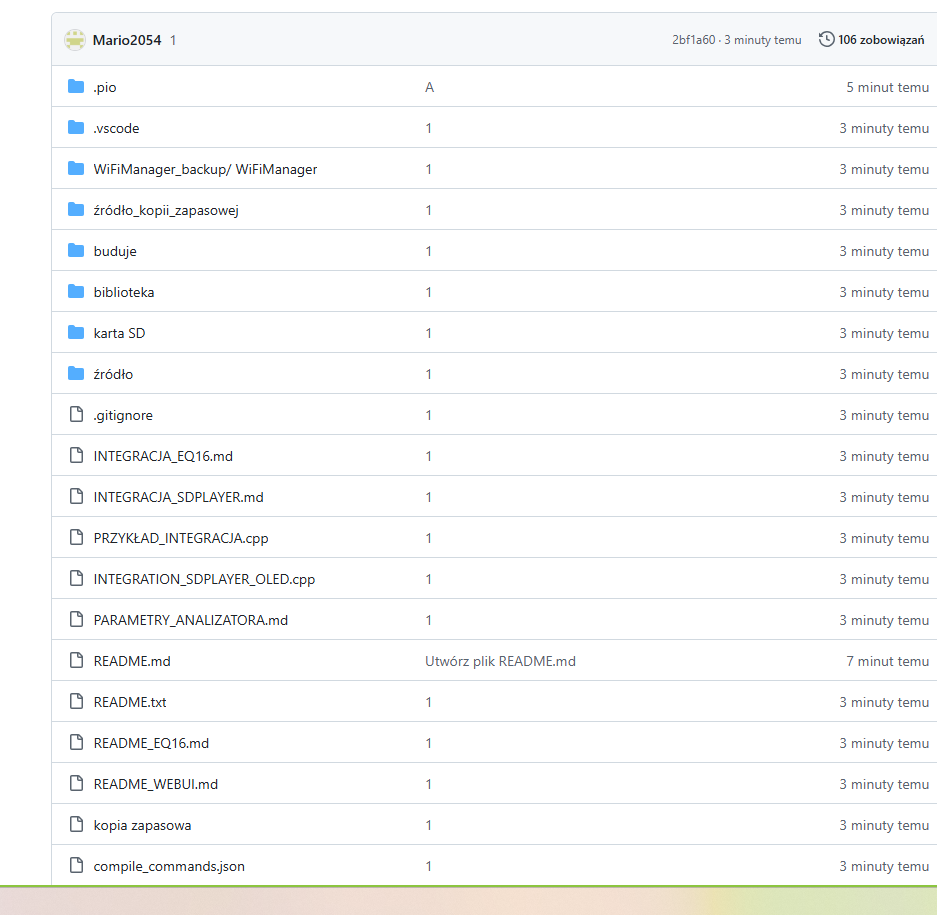
    I have added the whole platform project now it should be ok check it out


    PlatformIO project directory view with source files and documentation
  • #2196 21825631
    Slawek K.
    Level 35  
    The difference between platformio and Arduino is that in pltaformio you can define libraries for each project separately, and in Arduino vice versa, one for all projects, hence the constant problems of people in this thread with compilation errors. Platformio itself downloads the appropriate versions of the libraries that are defined in platformio.ini so the user does not have to do anything :)
    I therefore recommend Visual Studio Code with platformio, it is great to write and use.

    Best regards
  • ADVERTISEMENT
  • #2197 21825646
    JohnNagy
    Level 2  
    >>21825437

    Added after 42 [seconds]:

    Same for me.
  • #2198 21825726
    DJCheester
    Level 27  
    Hello unfortunately it doesn't and won't work on Arduino, the problem is the EQ16 code after removing the 16 point equalizer from the previous code the analyser works correctly and compiles on Arduino.

    The code with the EQ16 from Ejcon removed compiles on the Arduino.
    It lacks the BT option because it is not the latest Ejcon code
    It is based on Robgold col 3.19.53

    For the analyser I left only style 5 and 6 (in the original there were 5 and 10) flying peaks and classics

    Greetings ...
  • #2199 21825739
    efi222
    Level 21  
    Slawek K. wrote:
    The difference between platform and Arduino is that in pltaformio you can define libraries for each project separately, and in Arduino vice versa, one for all projects

    In the Arduino IDE, the problem of different versions of libraries (the more modified) can be circumvented by placing the library in the local directory of the sketch in the "src" subdirectory
    #include "src/library/library.h"
    The disadvantage of this solution is the greater occupancy of the sketch directory on disk.
  • #2200 21825848
    JohnNagy
    Level 2  
    >>21825726 This is exactly what I wanted to do yesterday. It works, thanks.

    Added after 43 [minutes]:

    >>21825848 No, it's still not good. If I change the screen mode in the menu, it resets the analyzer settings.
  • ADVERTISEMENT
  • #2201 21826160
    RonAd
    Level 10  
    >>21825848

    Yes yes compilation in Arduino OK, but unfortunately it does not load the memory bank on startup, no communication with SD card / remote control
    and "crashes" after a while.
  • #2202 21826164
    DJCheester
    Level 27  
    I've been using it for three weeks now and it hasn't crashed once I use it on SPIFFS memory and that's where I keep all my files and read banks from SPIFFS because I have my station.

    The question is whether you changed the declaration at the beginning of the soft because I made SPIFFS available by default hence you can't see the card.

    Greetings...
  • #2203 21826217
    RonAd
    Level 10  
    >>21826164
    Mea Culpa -- I didn't notice the SD card blocked!

    Thanks to DJChester for sharing the sketch!
  • #2204 21826800
    dawidkosciesza
    Level 9  
    Is it possible to run an encoder for the Majster version? I would like to build myself his radio now, but I'm worried about the lack of manual operation, only by remote control. You know how it is with the remote control, it always sows somewhere.
  • #2206 21826803
    DJCheester
    Level 27  
    Majster does not yet have encoder support in the code, maybe he will add such an option in the future. We will wait and see. Maybe the author of the project himself will have his say.

    hevet wrote:
    This is not a topic about Yoradio.


    A colleague is asking about the Major project and not YoRadio.

    Greetings...
  • #2207 21828364
    kula350
    Level 12  
    Redesigned weather features for radio @MAJSTER XXL on open-meteo.com. This is for Ruda Śląska. Easy to change. Latitude and longitude swapped into their own.

    // Function to retrieve API data from the Open-Meteo weather server

    void getWeatherData() {
    if (WiFi.status() != WL_CONNECTED) {
    Serial.println("[WEATHER] No WiFi");
    weatherServerConnection = false;
    return;
    }

    HTTPClient http;
    String url = "https://api.open-meteo.com/v1/forecast"
    "?latitude=50.25&longitude=18.85" // ← Rudy Śląska, change if you want another city
    "&current=temperature_2m,relative_humidity_2m,apparent_temperature,"
    "surface_pressure,wind_speed_10m,wind_gusts_10m,weather_code"
    "&timezone=Europe%2FWarsaw"
    "&forecast_days=1";

    Serial.println("[WEATHER] Sending request: " + url);

    http.begin(url);
    http.setTimeout(8000); // 8 second timeout - safer
    int httpCode = http.GET();

    Serial.print("[WEATHER] HTTP Code: ");
    Serial.println(httpCode);


    if (httpCode == HTTP_CODE_OK) {
    String payload = http.getString();
    //Serial.println("[WEATHER] Answer (first 300 characters): " + payload.substring(0,300));

    DynamicJsonDocument doc(1536); // I increased to 1.5 KB - just in case
    DeserializationError error = deserializeJson(doc, payload);

    if (!error) {
    JsonObject current = doc["current"];
    if (!current.isNull()) {
    float t = current["temperature_2m"];
    float tf = current["apparent_temperature"];
    int h = current["relative_humidity_2m"];
    float p = current["surface_pressure"];
    float w = current["wind_speed_10m"];
    float wg = current["wind_gusts_10m"];

    // Writing to the variables displayed on the TFT
    tempStr = "Temperature: " + String(t, 1) + " °C";
    feels_likeStr = "Feeling: " + String(tf, 1) + " °C";
    humidityStr = "Humidity: " + String(h) + " %";
    humidityStr = NormalizePolish(humidityStr);
    pressureStr = "Pressure: " + String(p, 0) + " hPa";
    pressureStr = normalisePolish( pressureStr);
    windStr = "Wind: " + String(w, 1) + " km/h";
    windGustStr = "Gust: " + String(wg, 1) + " km/h";

    weatherServerConnection = true;

    // The most important debug - shows what really came in
    Serial.println("[WEATHER] SUCCESS!");
    Serial.printf(" Temp: %.1f °C Read: %.1f °C", t, tf);
    Serial.printf(" Humidity: %d %% Pressure: %.0f hPan", h, p);
    Serial.printf(" Wind: %.1f km/h Gust: %.1f km/h", w, wg);
    } else {
    Serial.println("[WEATHER] No 'current' key in JSON");
    }
    } else {
    Serial.print("[WEATHER] JSON parsing error: ");
    Serial.println(error.c_str());
    }
    } else {
    Serial.print("[WEATHER] HTTP error: ");
    Serial.print(httpCode);
    Serial.print(" → ");
    Serial.println(http.errorToString(httpCode));
    weatherServerConnection = false;
    }

    http.end();
    }


    // Function to update weather data
    void updateWeather() {
    JsonObject root = doc.as<JsonObject>(); // Converts a JSON document to an object of type JsonObject

    JsonObject main = root["main"]; // Retrieves a "main" object containing master data such as temperature, humidity, pressure
    JsonObject weather = root["weather_code"][0]; // Retrieves first an element from the 'weather' array that contains weather data
    JsonObject wind = root["wind_speed_10m"]; // Retrieves a "wind" object containing wind data

    unsigned long timestamp = root["dt"]; // Retrieves timestamp (time in seconds) from JSON
    String formattedDate = convertTimestampToDate(timestamp); // Converts timestamp to formatted date and time

    float temp = main["temperature_2m"].as<float>() - 273.15; // Takes the temperature in Kelvins and converts it to °C
    float feels_like = main["apparent_temperature"].as<float>() - 273.15; // Takes the felt temperature and converts it to °C

    int humidity = main["relative_humidity_2m"]; // Retrieves the humidity of the air
    String weatherDescription = weather["description"].as<String>(); // Retrieves a description of the weather (e.g. "light rain")
    String icon = weather["icon"].as<String>(); // Retrieves the weather icon code (e.g. "10d" for rain)
    float windSpeed = wind["wind_speed"]; // Retrieves the wind speed in m/s
    float windGust = wind["wind_gusts_10m"]; // Retrieves wind gust speed in m/s
    float pressure = main["surface_pressure"].as<float>(); // Retrieves air pressure in hPa

    Serial.println("Data from JSON:");
    Serial.print("Data ");
    Serial.println(formattedDate);
    Serial.print("Temperature ");
    Serial.print(temp, 2);
    Serial.println(" °C");
    tempStr = "Temperature " + String(temp, 2) + " C."


    Serial.print("Feels like temperature ");
    Serial.print(feels_like, 2);
    Serial.println(" °C");
    feels_likeStr = "Feels " + String(feels_like, 2) + " C";

    Serial.print("humidity ");
    Serial.print(humidity);
    Serial.println(" %");
    humidityStr = "Humidity " + String(humidity) + " %";
    humidityStr = NormalizePolish(humidityStr);

    Serial.print("Pressure ");
    Serial.print(pressure);
    Serial.println(" hPa");
    pressureStr = "Pressure " + String(pressure, 2) + " hPa";
    pressureStr = NormalizePolish(pressureStr);

    Serial.print("Description of the weather ");
    Serial.println(weatherDescription);
    Serial.print("Icon ");
    Serial.println(icon);

    Serial.print("Wind speed ");
    Serial.print(windSpeed, 2);
    Serial.println(" m/s");
    windStr = "Wind " + String(windSpeed) + " m/s";

    Serial.print("Wind gusts ");
    Serial.print(windGust, 2);
    Serial.println(" m/s");
    windGustStr = "In gusts " + String(windGust) + " m/s";
    //******
    }
📢 Listen (AI):

Topic summary

The discussion centers on the development of an internet radio and audio file player based on the ESP32-S3-WROOM-1 module, featuring a custom-designed prototype PCB with OLED display and user controls including rotary encoders and buttons. Key challenges addressed include pin spacing discrepancies in the ESP32-S3 module footprint, integration of Wi-Fi connectivity with dynamic station list updates, and handling of Polish character encoding on the OLED display. The project uses Arduino IDE (version 2.3.2) with ESP-IDF support and requires enabling PSRAM. Audio playback supports MP3, AAC, and FLAC streams, with the ESP32-audioI2S library recommended over the incompatible Audio library. Users reported issues with SPI MISO pin assignment causing bootloader conflicts, resolved by reassigning MISO to pin 35. The project incorporates WiFiManager for network configuration, EEPROM and SD card storage for saving last played station and settings, and includes plans for tone control via an external KA2107 equalizer and a CS8673 amplifier module. Problems with encoder input stability and memory limitations for Bluetooth A2DP on ESP32-S3 were noted. The community suggested alternatives like KaRadio and ESP32-MiniWebRadio projects. Debugging tips include serial terminal logs for HTTP errors and flash memory erasure to resolve boot loops. The project is open-source on GitHub, encouraging forks and modifications. Additional features under development include browser-based updates, directory navigation, and potential audio recording to SD card.
Summary generated by the language model.
ADVERTISEMENT