logo elektroda
logo elektroda
X
logo elektroda

How to flash TR6260 with open source Tasmota/Esphome style firmware? Guide, pinout, booting

p.kaczmarek2 5379 63

TL;DR

  • TR6260 WiFi chips in Tuya-style smart devices can be flashed with OpenTR6260/OpenBeken firmware for fully local, cloud-free control and Home Assistant Discovery.
  • Flashing uses a USB-to-UART adapter and the UTP tool, not esptool; GPIO14/TOUT2 must be grounded at power-on to enter SPI-flash boot mode.
  • The backup procedure reads the full 1MB flash image, producing a 1,048,576-byte dump with boot_nocrc.bin and the correct partition layout.
  • Firmware is written by loading boot_nocrc.bin at 0x0000, new_partition_0x6000.bin at 0x6000, and OpenTR6260_xxxx.bin at 0x7000.
  • After flashing, the chip broadcasts an open AP; connecting to 192.168.4.1 exposes configuration, and demos show DHT11 plus BME280/BMP280 sensor support.
Generated by the language model.
ADVERTISEMENT
📢 Listen (AI):
  • #31 21725879
    divadiow
    Level 38  
    Posts: 4859
    Help: 424
    Rate: 860
    p.kaczmarek2 wrote:
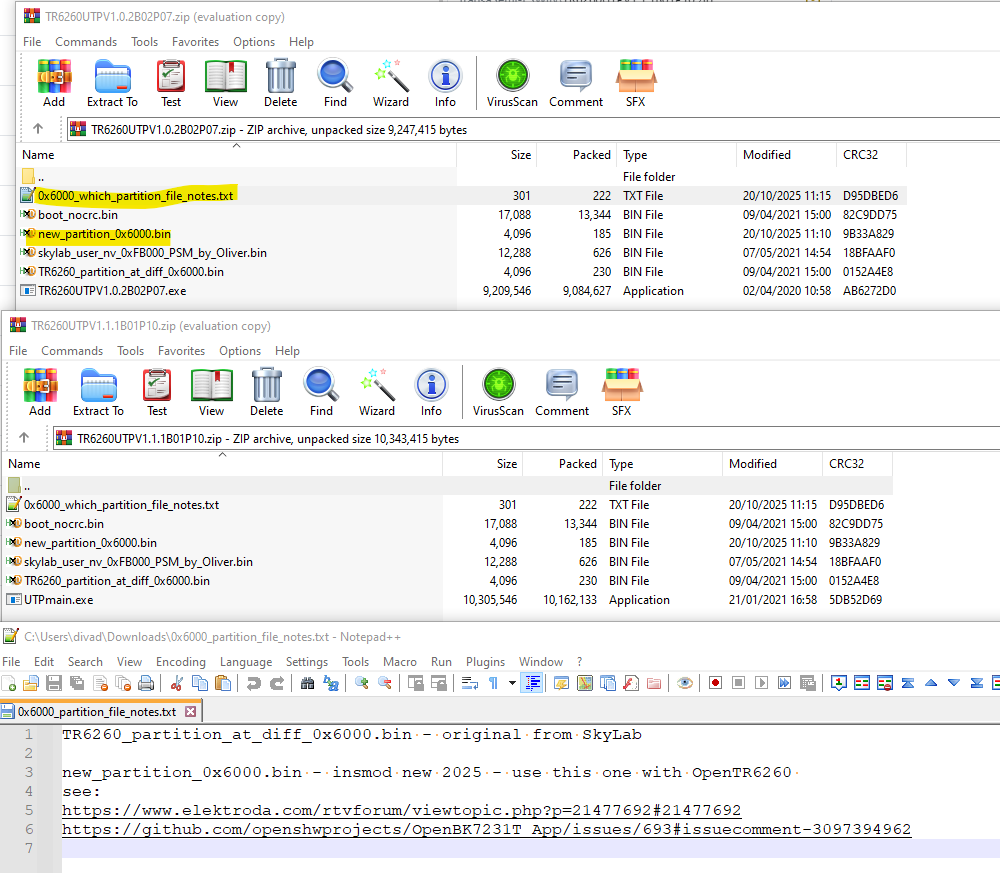
    File_2 : TR6260_partition_at_diff_0x6000.bin | Address: 0x6000

    new partition file added to each flash tool zip along with a note

    Screenshot of two ZIP archives with binary files and a note open in Notepad++

    https://github.com/openshwprojects/FlashTools/pull/12

    Added after 8 [minutes]:

    and maybe this line in post 1 could be changed to new file name?

    File_2 : TR6260_partition_at_diff_0x6000.bin | Address: 0x6000
  • ADVERTISEMENT
  • #32 21727158
    divadiow
    Level 38  
    Posts: 4859
    Help: 424
    Rate: 860
    2nd HLK-M20 module dump added. different

    https://github.com/openshwprojects/FlashDumps/pull/44/files

    Added after 17 [minutes]:

    divadiow wrote:
    and maybe this line in post 1 could be changed to new file name?

    File_2 : TR6260_partition_at_diff_0x6000.bin | Address: 0x6000


    @p.kaczmarek2
    and remove File_4 line?

    I'm sending you a new pic to replace that bad Downloader one.

    Added after 1 [hours] 56 [minutes]:

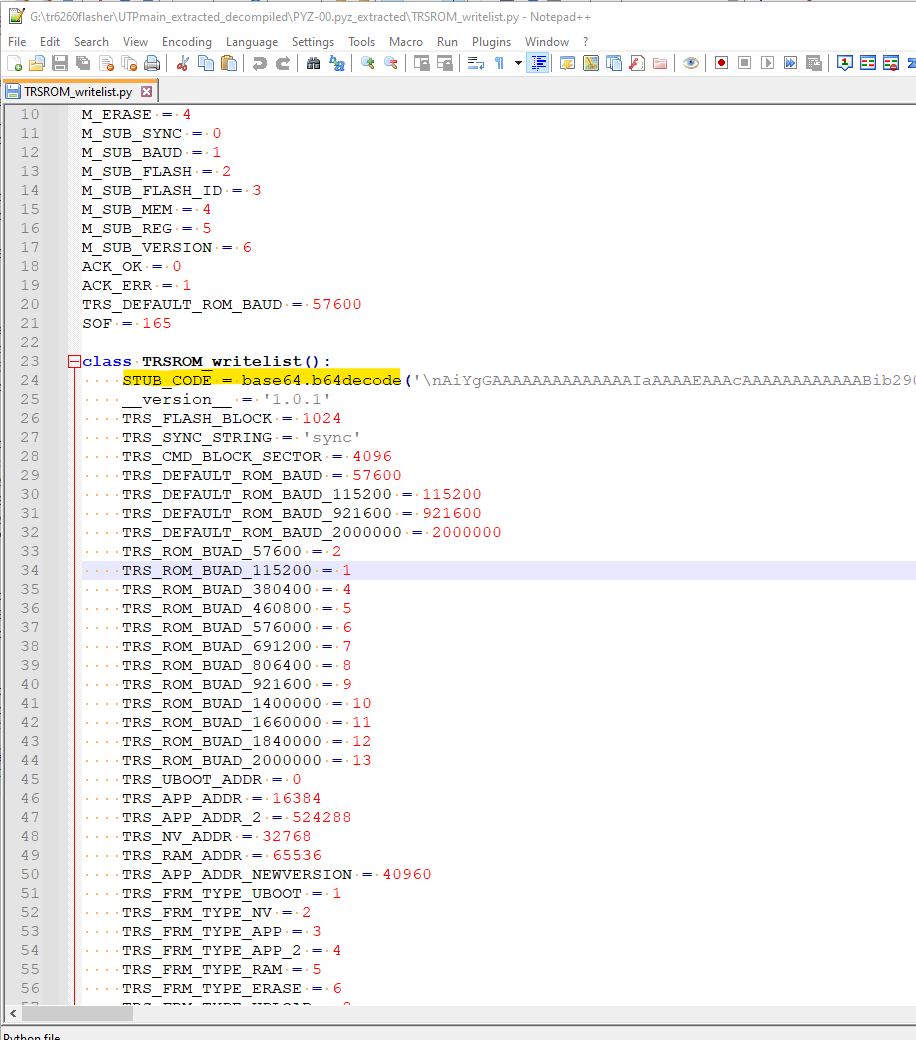
    TR flasher Python guts

    Screenshot of Python source code defining class TRSROM_writelist and constant values
    Attachments:
    • UTPmainPython.zip (11.01 MB) You must be logged in to download this attachment.
  • ADVERTISEMENT
  • #34 21728980
    divadiow
    Level 38  
    Posts: 4859
    Help: 424
    Rate: 860
    newer libs? anything else in there of interest? ota_tool looks the same as ECR6600?
  • #35 21729034
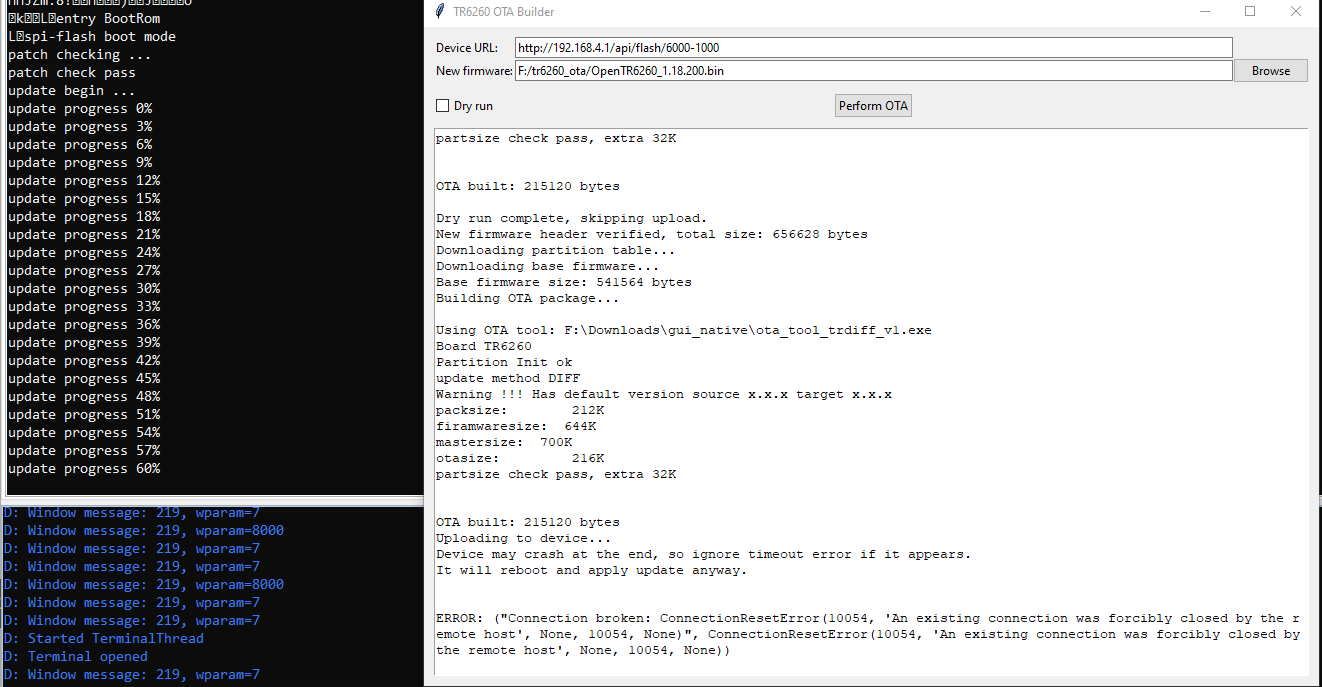
    insmod
    Level 31  
    Posts: 1353
    Help: 160
    Rate: 425
    >>21728980
    Nothing interesting and SDK is older.
    Plus, almost everything is in static libraries.
  • #37 21820378
    divadiow
    Level 38  
    Posts: 4859
    Help: 424
    Rate: 860
    tiny TR6260 OTA file relating to Tuya_Nedis_WMS10WT_Breaker_(schemaID-000004f9cj)_keykpjhxnnskdcqp_shoyx238jhhnxbef_2.2.4.bin
    http://s3-us-west-2.amazonaws.com/airtake-pub...8-tr6260_smart_outlet_wf_en_user_ug_2.1.3.bin

    Added after 5 [minutes]:

    some kind of differential? how does this compare to the ota file(s) you were creating when experimenting with OpenTR6260 @insmod?
  • #38 21820385
    insmod
    Level 31  
    Posts: 1353
    Help: 160
    Rate: 425
    >>21820378
    Base is BSDIFF40 in both this patch and my experiments. But in mine it was a single patch (only one BSDIFF header), while there are many of them in this file. And before the first one, there are some weird "cpu1" segments.

    I also tried creating tertiary bootloader (rom->boot->my->app), but i haven't figured out how to chainload.
  • #40 21823860
    divadiow
    Level 38  
    Posts: 4859
    Help: 424
    Rate: 860
    >>21820385

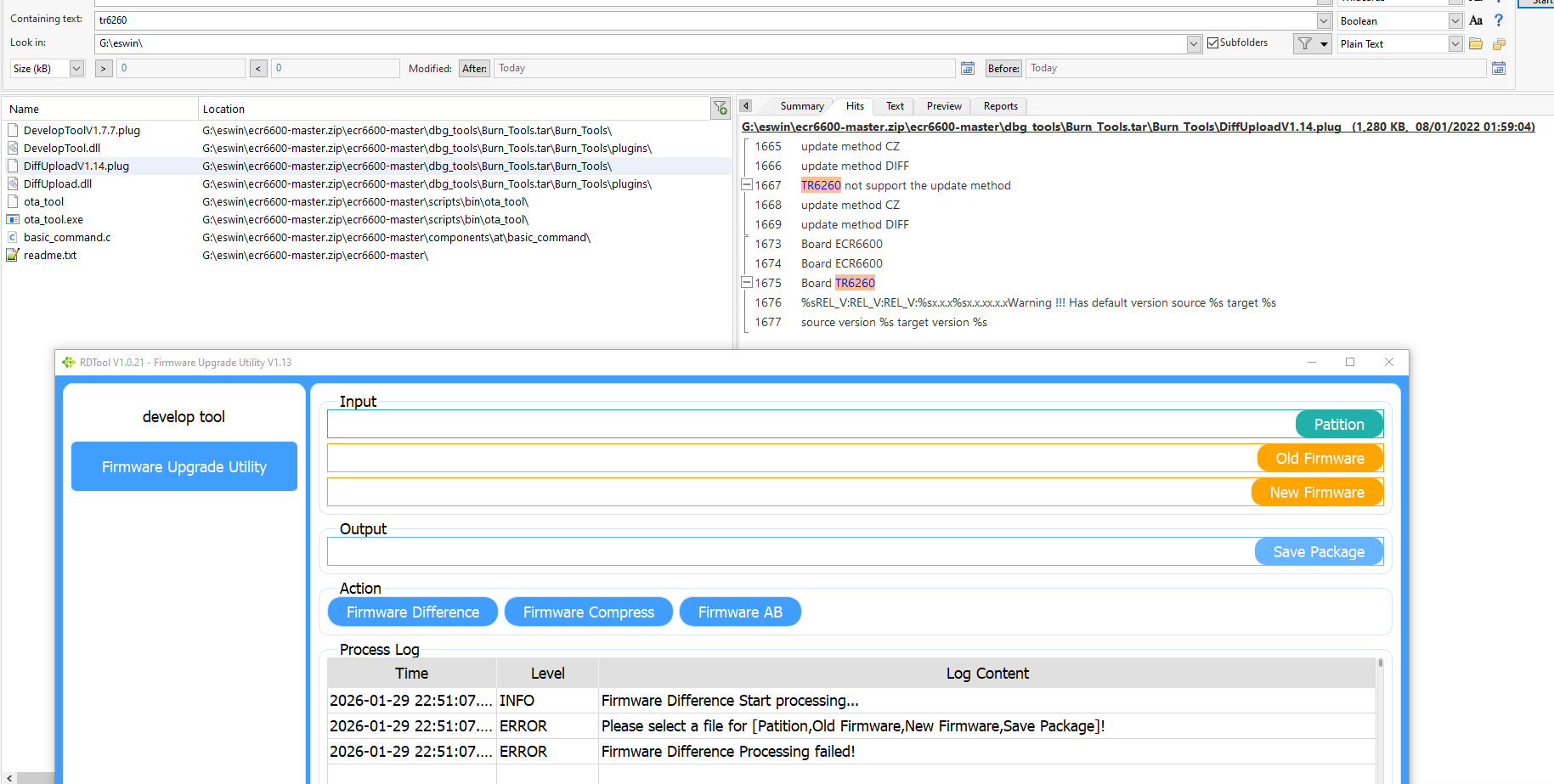
    was all your ota stuff with ota_tool? just wondering if this has any use. there's tr6260 mention in the plugin for RDTool

    Screenshot of RDTool firmware utility and a file explorer showing TR6260 search
  • #41 21841502
    divadiow
    Level 38  
    Posts: 4859
    Help: 424
    Rate: 860
    TR6260 SDK versions we've seen
    Screenshot of a table listing BIN filenames, TR6260 versions, compile dates, and notes.

    we could add additional nv bits to OpenTR6260 to match? https://github.com/NonPIayerCharacter/OpenTR6260/pull/1
    No sign of version in a dump of OpenTR6260 currently
    Attachments:
    • withsdkveropentr6260dumpbooted.bin (1 MB) You must be logged in to download this attachment.
  • #42 21841523
    insmod
    Level 31  
    Posts: 1353
    Help: 160
    Rate: 425
    Is it really needed?
    And would it break existing configs?
  • #43 21841524
    divadiow
    Level 38  
    Posts: 4859
    Help: 424
    Rate: 860
    insmod wrote:
    Is it really needed?

    nope. closed :)

    Added after 4 [hours] 43 [minutes]:

    Code: Text
    Log in, to see the code


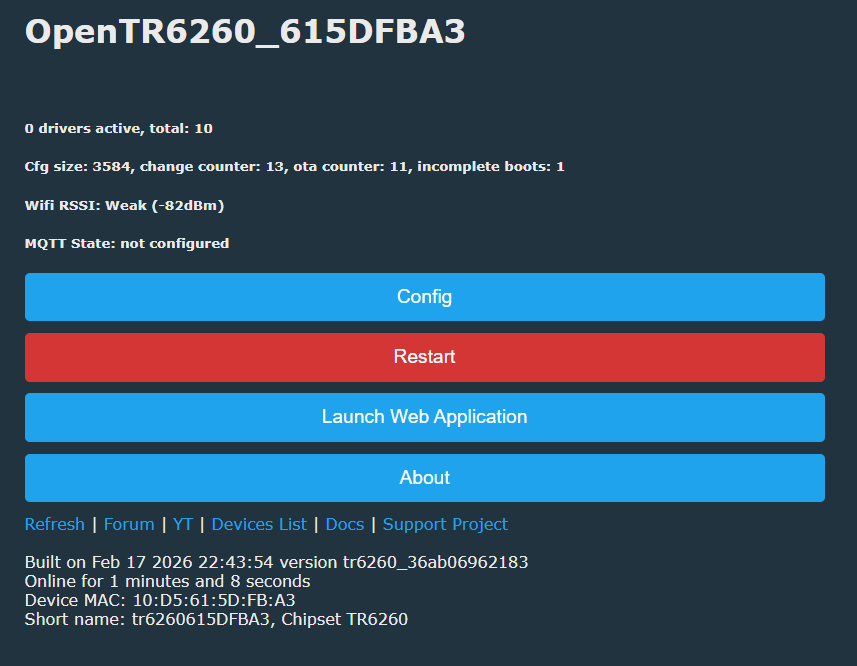
    OpenTR6260 status page with buttons: Config, Restart, Launch Web Application, and About.

    to see in action, use OpenTR6260_tr6260_8c58ec0735b3.bin as main flash then ota to OpenTR6260_tr6260_36ab06962183_ota.img

    ota_tool replacement https://github.com/divadiow/OpenBK7231T_App/b...99e00a3c1f91a4/tools/tr6260_ota_v1_builder.py

    posting here after first success. not done anything further. submodule contains other unrelated general stuff, not really reviewed, but I neglected to make new branch for ota-only testing. don't know what impact the changes to ota code have had, if any, on ota img success https://github.com/NonPIayerCharacter/OpenTR6...cdef0d85d66a42ced04aea1e866d5156bca6adf5f9a59
    Attachments:
    • OpenTR6260_tr6260_36ab06962183_ota.img.rename.bin (6.69 KB) You must be logged in to download this attachment.
    • OpenTR6260_tr6260_8c58ec0735b3.bin (645.96 KB) You must be logged in to download this attachment.
  • ADVERTISEMENT
  • #44 21841833
    divadiow
    Level 38  
    Posts: 4859
    Help: 424
    Rate: 860
    if this is a decent solution, what does it mean for how and what to offer ota updates for TR6260?
    -run a diff on the last 20, 50 (?) every main release so users can choose their current version and go to latest - present diffs package as single zip artefact?
    --- how long does this take, what's the most efficient way to retrieve each 'current.bin' to perform diff on?
    -keep a stash of single-build increment diffs and users have to ota one-by-one to the latest
  • ADVERTISEMENT
  • #45 21841904
    insmod
    Level 31  
    Posts: 1353
    Help: 160
    Rate: 425
    >>21841833
    Somehow integrate it in web app? This would require adding some heavy dependencies (bsdiff and lzma).
    User drops full cpu1 image, web app then reads header at 0x7000 (xip and ram sections length in ascii), calculates cpu1 length, reads it, reads partitions and generates patch?

    Or make GUI app?


    Nothing in pr should've impacted ota

    Added after 5 [hours] 2 [minutes]:

    Not feasible for big changes?

    python tr6260_ota_v1_builder.py --partition tr_partitions.bin --current custom_7000-666848.bin --new OpenTR6260_1995_merge_a74b01c439c9.bin --out OpenTR6260_test.img
    Wrote: OpenTR6260_test.img (626416 bytes)

    python tr6260_ota_v1_builder.py --partition tr_partitions.bin --current OpenTR6260_1.18.261.bin --new OpenTR6260_1995_merge_a74b01c439c9.bin --out OpenTR6260_test.img
    Wrote: OpenTR6260_test.img (415932 bytes)

    python tr6260_ota_v1_builder.py --partition tr_partitions.bin --current OpenTR6260_1.18.261.bin --new OpenTR6260_1.18.260.bin --out OpenTR6260_test.img
    Wrote: OpenTR6260_test.img (24076 bytes)

    Downgrade patch is small enough, but patch from last version to NEC IR pr is too big
  • #46 21842370
    divadiow
    Level 38  
    Posts: 4859
    Help: 424
    Rate: 860
    damn :(

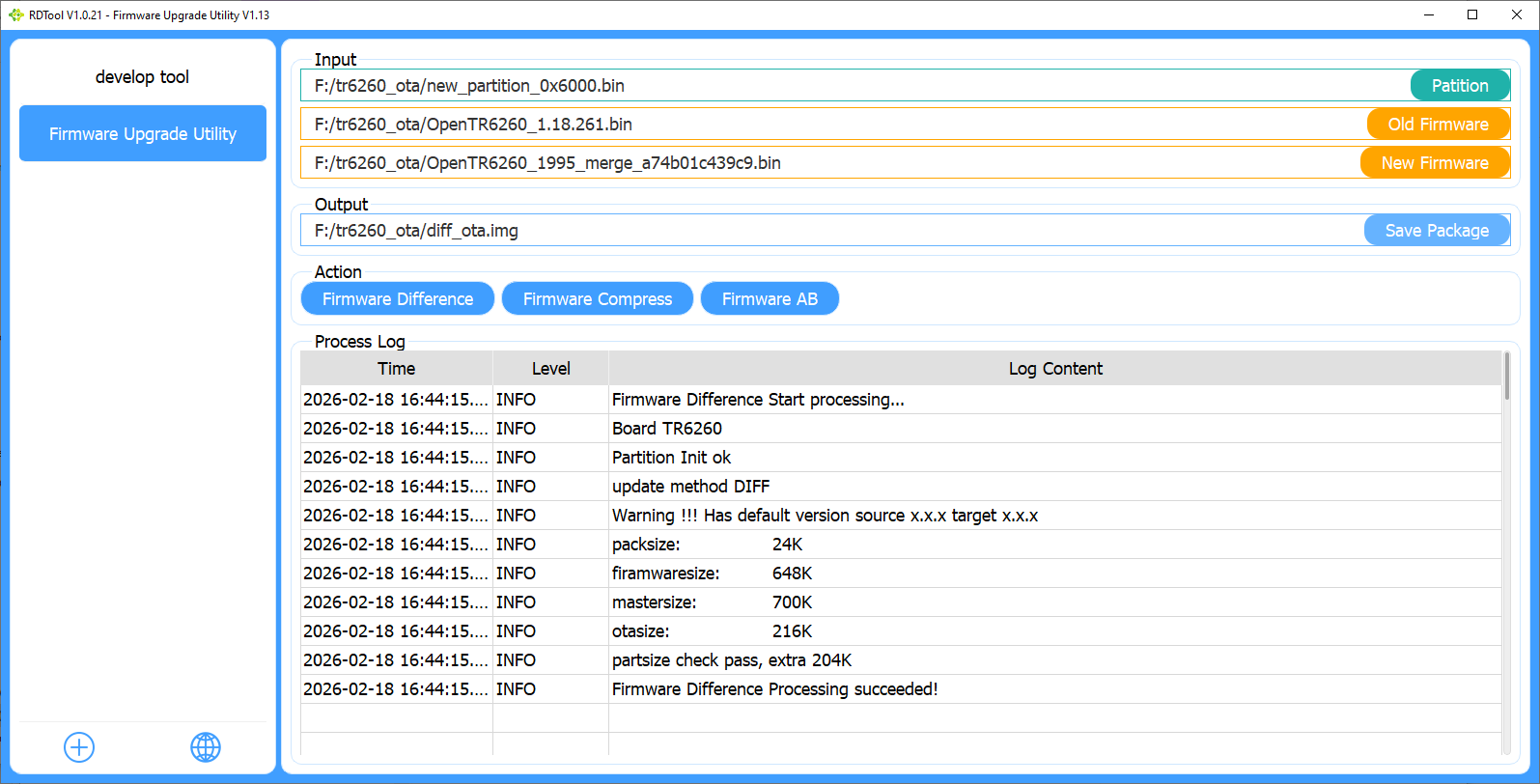
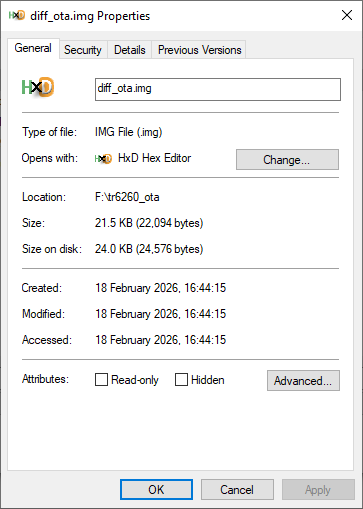
    and yet, with v3

    Screenshot of RDTool showing TR6260 firmware diff inputs, output path, and a process log

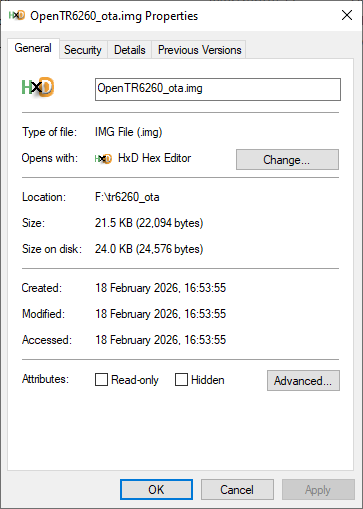
    Windows file properties window for diff_ota.img showing type, size, location, and timestamps.

    Added after 8 [minutes]:

    Terminal screenshot showing ota_tool DIFF output and firmware package size values
    Windows file Properties window for OpenTR6260_ota.img showing type, location, size, and timestamps

    Added after 2 [hours] 46 [minutes]:

    Code: Text
    Log in, to see the code


    OpenTR6260_1.18.261.bin -> a74b01c439c9

    with ota file OpenTR6260_ota_v1.img (39,872 bytes)

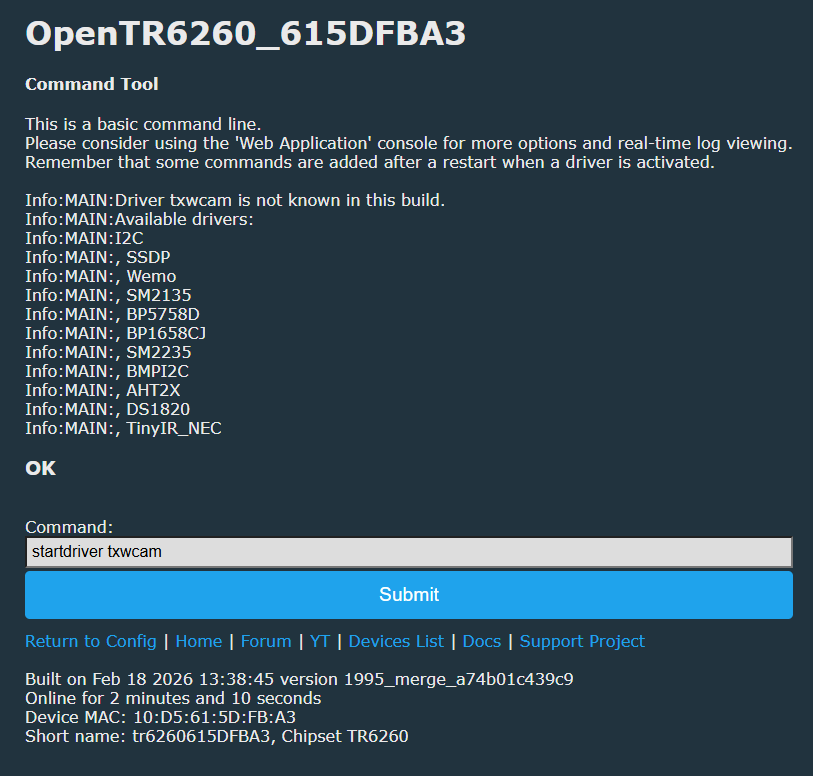
    Screenshot of OpenTR6260 showing available drivers and the command field “startdriver txwcam”.

    Code: Bash
    Log in, to see the code


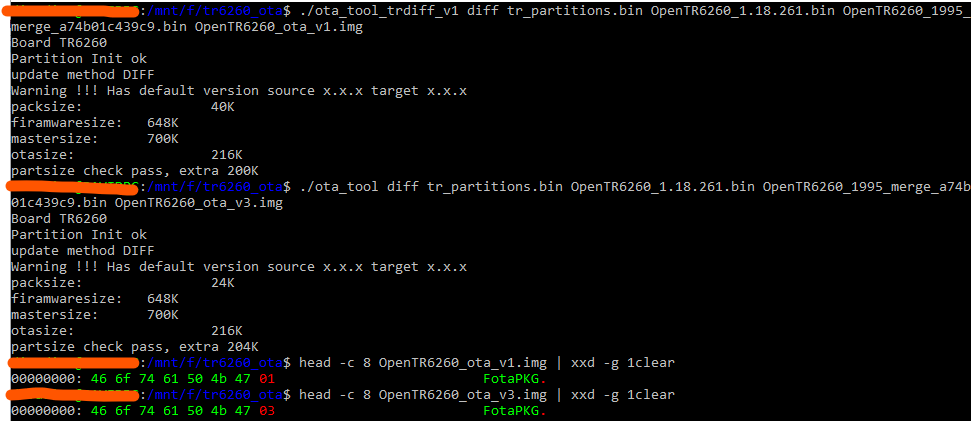
    Terminal output with ota_tool diff commands and xxd header showing “FotaPKG”, with orange underlines highlighting lines
    Attachments:
    • ota_tool_trdiff_v1.zip (50.11 KB) You must be logged in to download this attachment.
    • OpenTR6260_ota_v1.img.rename.bin (38.94 KB) You must be logged in to download this attachment.
  • #47 21842600
    divadiow
    Level 38  
    Posts: 4859
    Help: 424
    Rate: 860
    what/how/why:

    ota_tool
    Internal flow:
    1) Detect board type from first 4 bytes of *target* firmware:
    if u32 == 0x02262018 OR 0x48787032 -> board = ECR6600
    else -> board = TR6260
    (also enforces src/tgt board match for diff/ab)

    2) Parse infilelist/partition-config with board_type:
    sw_partition_config_init(infilelist, board_type)

    3) Validate method vs firmware header marker at offset 0x70 (ECR only):
    cmz (method 4): checks target[0x70] is one of 0x22/0x42
    diff (method 3/1): checks src[0x70] and tgt[0x70] are one of 0x22/0x42
    ab (method 2): checks src[0x70] and tgt[0x70] are 0x82

    4) Select packer by (board_type, method):
    TR6260:
    method 1 -> sw_pack_file_trdiff_package() -> writes FotaPKG + 0x01 (TR “v1” OTA)
    method 3 -> sw_pack_file_trdiff_package_new() -> writes FotaPKG + 0x03 (TR “v3” OTA)

    ECR6600:
    method 2 -> sw_pack_file_ab_create()
    method 4 -> sw_pack_file_ecrcmz_package()
    method 3 -> sw_pack_file_ecrdiff_package_new()
    method 1 -> sw_pack_file_ecrdiff_package() (older ECR diff path)

    Why TR6260 keeps getting “v3”:
    The original ota_tool hard-maps CLI "diff" -> method = 3, so TR6260 always goes through
    trdiff_package_new() and emits FotaPKG 03.

    What was changed to force TR “v1” pipeline:
    Patched one byte in main(): for CLI "diff", change method constant 0x03 -> 0x01
    (file offset 0x4f46 in ota_tool).
    Effect:
    - TR6260 "diff" now uses trdiff_package() and outputs FotaPKG 01 (v1 container)
    - ECR6600 "diff" also switches from ecrdiff_new() to ecrdiff_old() (method 1)
  • #48 21842834
    insmod
    Level 31  
    Posts: 1353
    Help: 160
    Rate: 425
    Can you reverse sw_pack_file_trdiff_package?
  • #49 21842841
    divadiow
    Level 38  
    Posts: 4859
    Help: 424
    Rate: 860
    yes. am trying to get a working Python version of sw_pack_file_trdiff_package for use without, or as well as, modified ota_tool
  • #50 21843642
    divadiow
    Level 38  
    Posts: 4859
    Help: 424
    Rate: 860
    this is tricky. ota_tool appears to use 7-Zip. Getting byte-identical Python-only is proving tough. Even getting close to ota_tool size diff files output has been a slog.

    Code: Text
    Log in, to see the code


    Added after 14 [minutes]:

    damn. 107kb and latest python version - 60kb diff file - both fail on ota

    Code: Text
    Log in, to see the code


    Added after 7 [minutes]:

    RDTool's DiffUploadV1.14.plug can be extracted with

    Code: Python
    Log in, to see the code


    similar looking magic in DiffUpload.dll
    Attachments:
    • DiffUploadV1.14_extracted.zip (767.76 KB) You must be logged in to download this attachment.
  • #51 21843672
    divadiow
    Level 38  
    Posts: 4859
    Help: 424
    Rate: 860
    working 107k version

    Code: Text
    Log in, to see the code
    Attachments:
    • tr6260_ota_107k.zip (113.36 KB) You must be logged in to download this attachment.
  • #52 21843773
    divadiow
    Level 38  
    Posts: 4859
    Help: 424
    Rate: 860
    working 40k (40,736 bytes) - takes 12s to generate diff. 864 bytes larger than ota_tool_trdiff_v1
    Code: Text
    Log in, to see the code
    Attachments:
    • tr6260_ota_40k_12s.zip (48 KB) You must be logged in to download this attachment.
  • #53 21843800
    divadiow
    Level 38  
    Posts: 4859
    Help: 424
    Rate: 860
    working 40k (40,544 bytes) - takes 15s to generate diff. 672 bytes larger than ota_tool_trdiff_v1
    Code: Text
    Log in, to see the code


    not sure we can go much smaller. Python’s stdlib lzma raw encoder always writes EOS, and it doesn’t expose a knob to disable it. Apparently the next “big win” for size parity is replacing the Python LZMA encoder with a no-EOS raw LZMA1 encoder (SDK/helper).

    Added after 3 [minutes]:

    I wonder if an additional step to remove the end of stream marker can be added
    Attachments:
    • tr6260_ota_40k_40544_15s.zip (48.17 KB) You must be logged in to download this attachment.
  • #54 21844134
    insmod
    Level 31  
    Posts: 1353
    Help: 160
    Rate: 425
    Sometimes it produces corrupted (?) output, making device unbootable.
    1.18.60 to 1.18.200
    New firmware header verified, total size: 656628 bytes
    Downloading partition table...
    Downloading base firmware...
    Base firmware size: 541564 bytes
    Building OTA package...
    
    cpu1:     addr=0x7000 len=0xAF000
    data_ota: addr=0xB6000 len=0x36000
    old_fw: 541564 bytes, new_fw: 656628 bytes, chunks: 33
    [ 1/33] off=0x000000 old=0x5000 new=0x5000 patch=0x438 triples=   1 aligned
    [ 2/33] off=0x005000 old=0x5000 new=0x5000 patch=0x55D triples=   1 aligned
    [ 3/33] off=0x00A000 old=0x5000 new=0x5000 patch=0x413 triples=   1 aligned
    [ 4/33] off=0x00F000 old=0x5000 new=0x5000 patch=0x3F6 triples=   1 aligned
    [ 5/33] off=0x014000 old=0x5000 new=0x5000 patch=0x3CA triples=   1 aligned
    [ 6/33] off=0x019000 old=0x5000 new=0x5000 patch=0x347 triples=   1 aligned
    [ 7/33] off=0x01E000 old=0x5000 new=0x5000 patch=0x56F triples=   1 aligned
    [ 8/33] off=0x023000 old=0x5000 new=0x5000 patch=0x1B3 triples=   1 aligned
    [ 9/33] off=0x028000 old=0x5000 new=0x5000 patch=0x155 triples=   1 aligned
    [10/33] off=0x02D000 old=0x5000 new=0x5000 patch=0x1F0 triples=   1 aligned
    [11/33] off=0x032000 old=0x5000 new=0x5000 patch=0x4D2 triples=   1 aligned
    [12/33] off=0x037000 old=0x5000 new=0x5000 patch=0x1CC2 triples=  13 delta(a12,w256,s0.26)
    [13/33] off=0x03C000 old=0x5000 new=0x5000 patch=0x273D triples=  23 delta(a16,w256,s0.26)
    [14/33] off=0x041000 old=0x5000 new=0x5000 patch=0x1F16 triples=  19 delta(a12,w256,s0.26)
    [15/33] off=0x046000 old=0x5000 new=0x5000 patch=0x252D triples=  23 delta_deep(a8,w192,s0.18)
    [16/33] off=0x04B000 old=0x5000 new=0x5000 patch=0x3050 triples=   3 delta(a12,w256,s0.18)
    [17/33] off=0x050000 old=0x5000 new=0x5000 patch=0x1E0C triples=   6 delta(a16,w256,s0.18)
    [18/33] off=0x055000 old=0x5000 new=0x5000 patch=0x2D00 triples=   1 delta(a12,w256,s0.18)
    [19/33] off=0x05A000 old=0x5000 new=0x5000 patch=0x3150 triples=   1 delta(a12,w512,s0.18)
    [20/33] off=0x05F000 old=0x5000 new=0x5000 patch=0x2E2D triples=   1 delta(a12,w256,s0.18)
    [21/33] off=0x064000 old=0x5000 new=0x5000 patch=0x2D24 triples=   1 delta(a12,w256,s0.18)
    [22/33] off=0x069000 old=0x5000 new=0x5000 patch=0x33D7 triples=   1 delta(a12,w256,s0.18)
    [23/33] off=0x06E000 old=0x5000 new=0x5000 patch=0x2850 triples=   1 delta(a12,w256,s0.22)
    [24/33] off=0x073000 old=0x5000 new=0x5000 patch=0x1435 triples=   1 delta(a12,w256,s0.18)
    [25/33] off=0x078000 old=0x5000 new=0x5000 patch=0x187A triples=   1 delta(a12,w256,s0.18)
    [26/33] off=0x07D000 old=0x5000 new=0x5000 patch=0x2636 triples=   1 delta(a12,w256,s0.18)
    [27/33] off=0x082000 old=0x237C new=0x5000 patch=0x1DD0 triples=   1 delta(a12,w256,s0.18)
    [28/33] off=0x087000 old=0x0 new=0x5000 patch=0x22C8 triples=   1 aligned
    [29/33] off=0x08C000 old=0x0 new=0x5000 patch=0x1B06 triples=   1 aligned
    [30/33] off=0x091000 old=0x0 new=0x5000 patch=0x2301 triples=   1 aligned
    [31/33] off=0x096000 old=0x0 new=0x5000 patch=0x320E triples=   1 aligned
    [32/33] off=0x09B000 old=0x0 new=0x5000 patch=0x2785 triples=   1 aligned
    [33/33] off=0x0A0000 old=0x0 new=0x4F4 patch=0x2F3 triples=   1 aligned
    Wrote: C:\Users\-\AppData\Local\Temp\tmp_47sepu9\ota.img (217584 bytes) crc32=0x396DD450 build_time=2.23s
    
    OTA built: 217584 bytes
    Uploading to device...
    Device may crash at the end, so ignore timeout error if it appears.
    It will reboot and apply update anyway.
    
    
    ERROR: HTTPConnectionPool(host='192.168.1.217', port=80): Read timed out.

    patch checking ...
    patch check pass
    update begin ...
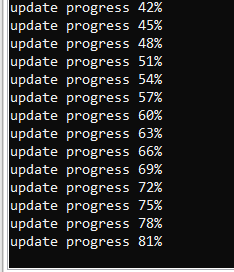
    update progress 0%
    update progress 3%
    update progress 6%
    update progress 9%
    update progress 12%
    update progress 15%
    update progress 18%
    update progress 21%
    update progress 24%
    update progress 27%
    update progress 30%
    update progress 33%
    update progress 36%
    update progress 39%
    update progress 42%
    update progress 45%
    update progress 48%
    update progress 51%
    update progress 54%
    update progress 57%
    update progress 60%
    update progress 63%
    update progress 66%
    update progress 69%
    update progress 72%
    update progress 75%
    update progress 78%
    update progress 81%


    GUI
    #!/usr/bin/env python3
    # -*- coding: utf-8 -*-
    
    import threading
    import requests
    import tkinter as tk
    from tkinter import filedialog, messagebox, ttk
    from pathlib import Path
    import tempfile
    import sys
    import io
    import json
    from urllib.parse import urlparse, urlunparse
    from tr6260_ota_v1_builder import build_fotapkg_v1_diff
    
    def http_read_range(base_url: str, start: int, length: int) -> bytes:
        url = f"{base_url}/api/flash/{start:X}-{length:X}"
        r = requests.get(url, timeout=15)
        r.raise_for_status()
        return r.content
    
    def read_partition_table(base_url: str) -> bytes:
        return http_read_range(base_url, 0x6000, 0x1000)
    
    def read_base_firmware(base_url: str) -> bytes:
        header = http_read_range(base_url, 0x7000, 16)
    
        try:
            size1 = int(header[0:8].decode())
            size2 = int(header[8:16].decode())
        except Exception:
            raise RuntimeError("Invalid firmware header at 0x7000")
    
        total_size = size1 + size2 + 16
        return http_read_range(base_url, 0x7000, total_size)
    
    def push_ota(base_url: str, ota_bytes: bytes) -> str:
        url = f"{base_url}/api/ota"
        headers = {"Content-Type": "application/octet-stream"}
        r = requests.post(url, data=ota_bytes, headers=headers, timeout=15)
        r.raise_for_status()
        return r.text
    
    def verify_firmware_header(fw_bytes: bytes) -> int:
        if len(fw_bytes) < 16:
            raise RuntimeError("Firmware too small")
    
        header = fw_bytes[:16]
        try:
            size1 = int(header[:8].decode("ascii"))
            size2 = int(header[8:16].decode("ascii"))
        except Exception:
            raise RuntimeError("Firmware firmware header")
    
        total_size = size1 + size2 + 16
        return total_size
    
    def get_base_url(user_url: str) -> str:
        parsed = urlparse(user_url.strip())
        base_url = urlunparse((parsed.scheme, parsed.netloc, "", "", "", ""))
        return base_url
    
    class TextRedirector(io.StringIO):
        def __init__(self, widget):
            super().__init__()
            self.widget = widget
    
        def write(self, s):
            self.widget.insert("end", s)
            self.widget.see("end")
            self.widget.update()
    
        def flush(self):
            pass
    
    class OTAGui(tk.Tk):
    
        def __init__(self):
            super().__init__()
            self.title("TR6260 OTA Builder")
            self.geometry("800x550")
    
            self.base_url_var = tk.StringVar()
            self.new_fw_path = tk.StringVar()
    
            self.create_widgets()
    
        def create_widgets(self):
    
            frame = ttk.Frame(self, padding=10)
            frame.pack(fill="both", expand=True)
    
            ttk.Label(frame, text="Device URL:").grid(row=0, column=0, sticky="w")
            ttk.Entry(frame, textvariable=self.base_url_var, width=60).grid(row=0, column=1, sticky="we")
    
            ttk.Label(frame, text="New firmware:").grid(row=1, column=0, sticky="w")
            ttk.Entry(frame, textvariable=self.new_fw_path, width=60).grid(row=1, column=1, sticky="we")
            ttk.Button(frame, text="Browse", command=self.select_new_fw).grid(row=1, column=2)
    
            self.dry_run_var = tk.BooleanVar(value=False)
            ttk.Checkbutton(frame, text="Dry run", variable=self.dry_run_var).grid(row=2, column=0, sticky="w")
    
            ttk.Button(frame, text="Perform OTA", command=self.start_build).grid(row=2, column=1, pady=10)
    
            self.log_text = tk.Text(frame, height=22)
            self.log_text.grid(row=4, column=0, columnspan=3, sticky="nsew")
    
            frame.rowconfigure(4, weight=1)
            frame.columnconfigure(1, weight=1)
    
        def select_new_fw(self):
            path = filedialog.askopenfilename()
            if path:
                self.new_fw_path.set(path)
    
        def start_build(self):
            threading.Thread(target=self.build_and_push, daemon=True).start()
    
        def build_and_push(self):
            sys.stdout = TextRedirector(app.log_text)
    
            if not self.base_url_var.get().strip():
                messagebox.showerror("Error", "Device HTTP URL")
                return
    
            if not Path(self.new_fw_path.get()).exists():
                messagebox.showerror("Error", "New firmware")
                return
    
            try:
                total_size = verify_firmware_header(Path(self.new_fw_path.get()).read_bytes())
                print(f"New firmware header verified, total size: {total_size} bytes")
            except RuntimeError as e:
                messagebox.showerror("Firmware Error", str(e))
                return
    
            try:
                dry_run = self.dry_run_var.get()
                if dry_run:
                    print("\n--- DRY RUN MODE ENABLED ---")
                    print("Firmware will not uploaded.\n")
    
                base_url = get_base_url(self.base_url_var.get())
                new_fw = Path(self.new_fw_path.get())
    
                print("Downloading partition table...")
                partitions = read_partition_table(base_url)
    
                print("Downloading base firmware...")
                old_fw = read_base_firmware(base_url)
                print(f"Base firmware size: {len(old_fw)} bytes")
    
                tmp_dir = tempfile.mkdtemp()
    
                infilelist_path = Path(tmp_dir) / "infilelist.bin"
                old_fw_path = Path(tmp_dir) / "old_fw.bin"
                out_path = Path(tmp_dir) / "ota.img"
    
                infilelist_path.write_bytes(partitions)
                old_fw_path.write_bytes(old_fw)
    
                print("Building OTA package...\n")
    
                build_fotapkg_v1_diff(
                    infilelist_path,
                    old_fw_path,
                    new_fw,
                    out_path,
                    chunk_size=0x5000,
                    patch_align=0x10,
                    dict_size=0x2000,
                    lc=0,
                    lp=0,
                    pb=0,
                    nice_len=32,
                    aligned_skip_threshold=0x700,
                    mode="tight",
                    self_check=True,
                    compare_to=None,
                    verbose=True,
                )
    
                ota_data = out_path.read_bytes()
                print(f"\nOTA built: {len(ota_data)} bytes")
    
                for f in [infilelist_path, old_fw_path, out_path]:
                    if f.exists():
                        f.unlink()
                tmp_dir_path = Path(tmp_dir)
                if tmp_dir_path.exists():
                    tmp_dir_path.rmdir()
    
                if dry_run:
                    print("\nDry run complete, skipping upload.")
                    return
    
                print("Uploading to device...")
                print("Device may crash at the end, so ignore timeout error if it appears.")
                print("It will reboot and apply update anyway.\n")
                response = push_ota(base_url, ota_data)
    
                print("Device response:")
                print(response)
                
                try:
                    resp_json = json.loads(response)
                    if "size" in resp_json:
                        print("\nOTA success detected, rebooting device...")
                        r = requests.post(f"{base_url}/api/reboot", timeout=5)
                        r.raise_for_status()
                except json.JSONDecodeError:
                    print("\nResponse not JSON.")
                except Exception as e:
                    print("\nReboot failed:", e)
                
                print("\nDONE")
    
            except Exception as e:
                print("\nERROR:", e)
    
            finally:
                sys.stdout = sys.__stdout__
    
    
    if __name__ == "__main__":
        app = OTAGui()
        app.mainloop()


    Added after 16 [minutes]:

    Original tool produced a working patch, only 2464 bytes lighter.
  • #55 21844174
    divadiow
    Level 38  
    Posts: 4859
    Help: 424
    Rate: 860
    darn. confirmed. OK. will see what can be tweaked
    Black screen listing “update progress” messages with percentages increasing up to 81%
  • #56 21844290
    insmod
    Level 31  
    Posts: 1353
    Help: 160
    Rate: 425
    Interesting bug
    ERROR: ('Connection aborted.', BadStatusLine('HTTP/1.1 -1 OK\n'))

    Status code -1, not 200

    1.18.60 -> 1.18.80 is fine
    1.18.80 -> 1.18.261 - 81% again
  • #57 21844320
    divadiow
    Level 38  
    Posts: 4859
    Help: 424
    Rate: 860
    I haven't progressed. Or used the Python GUI thing you posted yet. I am OTAing through web gui while it's in AP mode.

    Not sure if this proves anything, because the starting position isn't 1.18.60 (plus the changes in https://github.com/divadiow/OpenBK7231T_App/tree/refs/heads/tr6260), but, with the last posted Python script above used to create OTA image to go from PR OpenTR6260_tr6260_36ab06962183.bin (as base image flashed with UTPMain) to OpenTR6260_1.18.60.bin ota.img, OTA does succeed in the downgrade to 1.18.60.

    Code: Text
    Log in, to see the code


    ota.img 158,592 bytes

    my thinking was maybe the standard OTA code is doing something to the file, something the changes in OpenTR6260_tr6260_36ab06962183.bin will be fixed for. Just guesses.
    Attachments:
    • ota.img.bin (154.88 KB) You must be logged in to download this attachment.
    • OpenTR6260_tr6260_36ab06962183.bin (645.96 KB) You must be logged in to download this attachment.
  • #58 21844322
    divadiow
    Level 38  
    Posts: 4859
    Help: 424
    Rate: 860
    insmod wrote:
    ERROR: ('Connection aborted.', BadStatusLine('HTTP/1.1 -1 OK\n'))


    this is from log in tkinter gui?
  • #59 21844325
    insmod
    Level 31  
    Posts: 1353
    Help: 160
    Rate: 425
    >>21844322
    Yep.

    Anyway, i've done the same thing to windows ota tool as you've done to linux one.
    Plus adapted gui tool to use it.

    But the limitation is that it's only windows and x86_64 linux. Can't ota from android for example.
    New firmware header verified, total size: 661312 bytes
    
    --- DRY RUN MODE ENABLED ---
    Firmware will not uploaded.
    
    Downloading partition table...
    Downloading base firmware...
    Base firmware size: 662688 bytes
    Building OTA package...
    
    Using OTA tool: C:\SourceCodes\OpenBK7231T_App\sdk\OpenTR6260\out\tr6260s1\standalone\ota_tool_trdiff_v1.exe
    Board TR6260
    Partition Init ok 
    update method DIFF
    Warning !!! Has default version source x.x.x target x.x.x
    packsize:		 40K
    firamwaresize:	 648K
    mastersize:	 700K
    otasize:		 216K
    partsize check pass, extra 200K
    
    
    OTA built: 39600 bytes
    
    Dry run complete, skipping upload.


    Iike i said earlier, the ideal would be doing everything inside a browser
    Attachments:
    • gui_native.zip (100.37 KB) You must be logged in to download this attachment.
  • #60 21844334
    divadiow
    Level 38  
    Posts: 4859
    Help: 424
    Rate: 860
    ahh. I see, yeh, that's handy 👍🏻

    Screenshot: console showing update progress and “TR6260 OTA Builder” window with logs

    Added after 2 [minutes]:

    insmod wrote:
    Iike i said earlier, the ideal would be doing everything inside a browser

    👍🏻

    Added after 4 [minutes]:

    oh this is better. im jumping between releases with ease now
📢 Listen (AI):

Topic summary

✨ The discussion focuses on flashing the TR6260 WiFi SoC, commonly found in Tuya smart home devices, with open-source firmware such as Tasmota and Esphome-style alternatives to enable local control without reliance on Tuya cloud services. TR6260 is a 32-bit, 2.4GHz WiFi-enabled chip with 1MB flash, 6 PWM channels, ADC, and flexible IO interfaces. Users share detailed flashing procedures including erasing flash with GPIO14 grounded, using boot_nocrc.bin for successful boot, and backing up/restoring firmware. The XY-WE2S-A V1.1 module is highlighted with pinout tracing and FCC documentation. OpenTR6260 SDK development is ongoing, with references to related Skylab and ECR6600 modules. Issues such as enabling multicast in LWIP for SSDP, GPIO13 relay control fixes merged into OpenBK7231T_App, and power-saving modes are discussed. MQTT integration with Home Assistant is demonstrated, noting some sensor data (e.g., temperature) may be missing or disabled in firmware. WiFi signal strength concerns are raised, possibly due to RF configuration loss during flashing, with suggestions to recover settings from backups. The thread includes links to firmware backups, SDK repositories, and flashing tools, emphasizing community collaboration for TR6260-based device customization and local automation.
Generated by the language model.

FAQ

TL;DR: TR6260 flashing works locally with OpenBeken: the chip has 1 MB flash, and one contributor confirmed, "TR6260 can now be flashed via UART" using UTP, boot_nocrc.bin, a partition file at 0x6000, and OpenTR6260 at 0x7000. This FAQ is for repairers and Home Assistant users who need the real boot procedure, pinout, backup method, and OTA caveats. [#21351236]

Why it matters: This thread turns TR6260 from a poorly documented Tuya module into a repeatable, cloud-free platform for local automation.

Topic TR6260 / TR6260S1 ECR6600 / AXY family
Main flashing path discussed UTP over UART with boot_nocrc.bin SDK mentioned, but no equivalent flashing guide completed
Confirmed OpenBeken work Yes, with OpenTR6260 builds Related SDK mentions exist, but support is less mature in-thread
Typical modules named HLK-M20, XY-WE2S-A V1.1 AXY3L, AXY2S, WG236
OTA discussion depth Extensive, including FotaPKG v1/v3 and diff tooling Mostly tooling comparison and SDK relation

Key insight: The critical step is choosing the right boot strap and file layout. Grounding the correct boot pin before power-on decides whether TR6260 enters normal SPI boot, UART flashing mode, SDIO mode, or an unsupported state. [#21405320]

Quick Facts

  • TR6260 is described as a 32-bit, 2.4 GHz Wi‑Fi SoC with 6 PWM, 1 ADC, and 1 MB flash, which sets the practical backup size and OpenBeken image layout. [#21351236]
  • A valid full factory dump is exactly 1,048,576 bytes; the read operation was reported to take about 2–3 minutes in UTP. [#21351236]
  • The proven OpenTR6260 write layout is: boot_nocrc.bin at 0x0000, partition binary at 0x6000, and firmware at 0x7000. [#21351236]
  • On one real XY-WE2S-A module, boot logs were readable at about 58,000–59,000 baud rather than standard 57,600, which helped confirm the selected boot mode. [#21405320]
  • One module showed a reported RSSI drop from about -56/-57 dBm on original firmware to -71 dBm on OpenTR6260 at 1.5 m from the router. [#21421792]

1. How do I flash a TR6260 or TR6260S1 device with OpenBeken using the UTP flash tool and a USB-to-UART adapter?

Use UTP with a 3.3 V USB-to-UART adapter and the TR6260 boot pin grounded at power-on. 1. Solder TX, RX, GND, 3.3 V, and the boot pin connection. 2. Power on with GPIO14/TOUT2 grounded, then load boot_nocrc.bin, the partition file, and OpenTR6260_xxxx.bin into UTP. 3. Flash, remove the boot strap, reboot, join the new AP, and open 192.168.4.1. The thread says TR6260 can be flashed fully locally and paired with Home Assistant without Tuya cloud access. [#21351236]

2. What is the correct boot mode procedure for TR6260, and how do GPIO14/TOUT2, BT0, and BT1 affect spi-flash, UART, SDIO, and unsupported boot modes?

TR6260 enters different boot modes solely from the boot strap pins at startup. On HLK-M20, grounding GPIO14/TOUT2 before power-on was used for the documented flashing workflow. On XY-WE2S-A, BT0 low gave UART boot, both pins floating gave SPI-flash boot, BT1 low gave SDIO boot, and BT0+BT1 low produced unsupported boot mode with bootrom startup err. The same post also notes readable boot logs around 59,000 baud when checking these states. [#21405320]

3. Where can I download the TR6260 UTP flash tool, boot_nocrc.bin, and the partition files needed for OpenTR6260 flashing?

Download them from the FlashTools package linked in the thread. The UTP utility is not esptool, because TR6260 is not an ESP chip. The post points to the TransaSemi-ESWIN FlashTools repository and an alternate TR6260 resource pack, and it states that boot_nocrc.bin comes from the same zip as UTP. That same package also includes the partition binaries used at address 0x6000. [#21351236]

4. Which files and flash addresses should I use in UTP for TR6260 flashing, including boot_nocrc.bin, the partition binary at 0x6000, and the OpenTR6260 firmware at 0x7000?

Use three files in UTP: boot_nocrc.bin at 0x0000, the partition binary at 0x6000, and OpenTR6260_xxxx.bin at 0x7000. The flashing guide originally named new_partition_0x6000.bin, and a later thread update says a new partition filename was added to each FlashTools zip for the same 0x6000 slot. Do not rely on an old extra File_4 entry; the thread later says that advice needs revision. [#21725879]

5. How can I make a full 1MB factory backup dump from a TR6260 before flashing OpenBeken, and how do I verify the dump is valid?

Make the dump in UTP with the device in the documented boot state and set the read length to 0x100000. 1. Ground GPIO14/TOUT2 before power-on. 2. In UTP, select boot_nocrc.bin, choose a PC save path, and read the full flash. 3. Verify that the resulting file is exactly 1,048,576 bytes. The guide states the flash is 1 MB, and the read may appear stalled for 2–3 minutes before finishing. [#21351236]

6. Why does restoring a full TR6260 backup fail unless boot_nocrc.bin is also selected first at address 0x0000 in UTP?

It fails because UTP first needs the RAM-loaded boot helper before it can write the rest of the image. A later confirmation showed you can restore the whole 1 MB backup from 0x0000, but only if boot_nocrc.bin is also selected first at 0x0000. With only the backup file chosen, UTP returned RAM Download uboot file fail;. That error explains why whole-image restores looked broken until the boot file was added back into the list. [#21407688]

7. What is the real pinout of the XY-WE2S-A V1.1 TR6260S1 module, and why does it differ from the published TR6260 and TR6260S1 datasheets?

The real XY-WE2S-A V1.1 pinout was traced from the PCB and does not match the published datasheets. The mapped functions were TX0=UART0_TXD, RX0=UART0_RXD, BT1=TOUT3, BT0=TOUT2, PWM2=GPIO22, PWM1=GPIO4, PWM0=GPIO13, CEN=RESETB, PWM5=GPIO0, PWM4=GPIO1, ITX=GPIO3, and IRX=GPIO2. The author explicitly says the chip pinout on real modules conflicts with both the TR6260 and TR6260S1 documents, and even with earlier forum images. [#21405320]

8. Can someone find a TR6260S1 datasheet that matches the real pinout seen on HLK-M20 and XY-WE2S-A modules?

No matching TR6260S1 datasheet was found in the thread. One contributor explicitly said they tried and failed to find a datasheet consistent with the traced “real” pinout. Another earlier note says HLK-M20 showed the same mismatch problem. So the practical guidance in this thread is to trust traced module pads and boot logs over the published TR6260 pin tables when flashing real hardware. [#21405320]

9. What is SSDP in OpenBeken on TR6260, and why did enabling multicast in LWIP fix SSDP and Wemo discovery?

"SSDP is a network discovery protocol that advertises devices over multicast, enabling local services such as Wemo and Alexa discovery on the LAN." On TR6260, SSDP initially failed because setsockopt IP_ADD_MEMBERSHIP failed, which means multicast join did not work. After enabling multicast in LWIP, the log changed to Socket created, waiting for packets, and Wemo discovery succeeded, including Alexa finding the device. The thread links that fix directly to the multicast setting change. [#21367101]

10. What is the FotaPKG v1 versus v3 OTA format on TR6260, and how does ota_tool choose between the different TR6260 and ECR6600 packaging methods?

TR6260 uses two discussed diff OTA containers: FotaPKG 0x01 as “v1” and FotaPKG 0x03 as “v3”. A reverse-engineered summary in the thread says ota_tool detects the board from the target firmware header, then maps diff to method 3 by default. That makes TR6260 use sw_pack_file_trdiff_package_new() and emit FotaPKG v3. Patching one byte changed diff to method 1, forcing the older TR6260 v1 path instead. ECR6600 uses different packers for AB, CMZ, and diff modes. [#21842600]

11. TR6260 vs ECR6600/AXY modules: what are the differences in SDK support, module availability, and firmware tooling discussed in the thread?

TR6260 had a working OpenBeken flashing path in-thread, while ECR6600 discussion stayed closer to SDKs and module sourcing. The thread names ECR6600-based AXY modules such as AXY3L and AXY2S and mentions Skylab WG236 hardware. It also says an SDK readme mentioned TR6260 support, but that support seemed removed later. Price comments show ECR6600 modules were harder to justify, with examples around $14.5 + ~$8 shipping, $18 + $10 shipping, and $26 shipped. [#21358543]

12. Why does Wi-Fi RSSI look much weaker on OpenTR6260 than on the original Tuya firmware, even when the device is close to the router?

The thread reports the issue, but it does not give a confirmed root cause. One tested switch showed about -71 dBm on OpenTR6260 versus -56 to -57 dBm on original firmware at only 1.5 meters from the router. Reflashing the original full 1 MB backup and then OpenTR6260 again did not fix the lower reported RSSI. The open question was whether RF calibration data, measurement reporting, or another firmware setting caused the difference. [#21421792]

13. How do I configure DHT11, BME280/BMP280, DS18B20, or SHT3X sensors on OpenTR6260, and what should I check if a driver is missing from the build?

DHT11 and BME280/BMP280 were shown working, while DS18B20 was noted as unchanged and SHT3X prompted build-option discussion. For BME280/BMP280, the thread gives startdriver bmpi2c 0 1 2 3 4 in autoexec.bat. If a sensor driver is missing, check whether it is enabled in obk_config.h; that was stated directly for BMPI2C. A later post also asks why SHT3X was not exposed as ENABLE_DRIVER_SHT3X, linking it to a pull request. [#21367101]

14. What's going on with GPIO13, GPIO16, and GPIO17 on TR6260, including the relay fix PR and the SDK limitation that says some pins cannot be used as normal GPIO?

GPIO13 needed a relay-output fix, and that pull request was later merged, after which the affected switch worked correctly on official builds. GPIO16 and GPIO17 are different: the SDK code says they cannot be used as normal GPIO, and one contributor confirmed there is no general initialization path for them. The thread also notes special functions exist such as gpio16_write, gpio17_write, and gpio17_read, which suggests limited, nonstandard handling rather than full GPIO support. [#21419965]

15. How can I build and apply OTA updates for TR6260 with Python or ota_tool, and why do some OTA patches fail around 81% or produce an unbootable device?

You can build TR6260 OTA diffs with either patched ota_tool or later Python builders, but large version jumps remained fragile. One contributor reported successful Python-generated packages as small as 40,544 bytes, while another saw failures around 81% during updates such as 1.18.80 -> 1.18.261. The thread also records cases where a generated patch passed self-check yet left the device unbootable. The likely cause is package-format or compression edge cases, since the original tool produced a working patch only 2,464 bytes lighter than the failing Python one. [#21844134]
Generated by the language model.
ADVERTISEMENT