

logo elektroda
logo elektroda
X
logo elektroda
Dostępna jest polska wersja

Czy wolisz polską wersję strony elektroda?

Nie, dziękuję Przekieruj mnie tam

[BK7231N] (DIY) Mini Smart Switch UNSH SS8839-16A-W

riskorja 19350 51
ADVERTISEMENT
📢 Listen (AI):
  • This is a short teardown of the DIY Mini Smart Switch 2-way from UNSH model SS8839-16A-W based on BK7231N.
    It uses custom PCB, so no Tuya module to replace, already bought one :-)

    Basic Information


    Brand: UNSH - Tuya
    Model: DIY Smart Switch SS8839-16A-W
    Chip: BK7231N on board
    Seller: AliExpress 16A Tuya WiFi Smart Switch 2-way

    Photos


    The switch is very easy to open so i wont go into details, but remember, this device it's using high voltage, so make sure it's not connected to the mains.

    [BK7231N] (DIY) Mini Smart Switch UNSH SS8839-16A-W
    [BK7231N] (DIY) Mini Smart Switch UNSH SS8839-16A-W [BK7231N] (DIY) Mini Smart Switch UNSH SS8839-16A-W [BK7231N] (DIY) Mini Smart Switch UNSH SS8839-16A-W

    Flashing-Uploading OpenBeken firmware


    Used tuya-cloudcutter to flash OpenBK (had to setup in SmartLife/Tuya app - after first flash device did not connect to cloudcutterflash AP)
    Followed this instructions tuya-cloudcutter INSTRUCTIONS.md
    and video Flash OTA using tuya-cloudcutter
    > By firmware version and name
    > ~ Mini Smart Switch
    > 1.2.1 - BK7231N / oem_bk7231n_control_switch
    OpenBK7231N_UG_1.15.648.bin (CCtr flash)

    Requirements:

    RPi to install GitHub tuya-cloudcutter
    Firmware OpenBK7231N_UG_1.15.648.bin
    Router/AccesPoint for temporary local cloudcutterfalsh AP
    some patience and persistence :-)

    Device could not connect to cloudcutterflash AP after reboot,
    so I needed to create a "second" cloudcutterflash AP on spare Router with internet connection as stated in Note: of INSTRUCTIONS.md.
    Had to disable WiFi on RPi - tuya-cloudcutter
    After that it was possible to enter WiFi credentials thru Tuya app.
    Turned off "second AP", enabled tuya-cloudcutter and the process of flashing OpenBeken continued.

    Pin settings for this device.

    TglChanOnTgl - 6 - PWM0 - ch0
    Rel - 8 - PWM1 - ch0
    Btn - 23 - ADC3 - ch0
    LED - 26 - PWM5 - ch0

    Simple test environment
    [BK7231N] (DIY) Mini Smart Switch UNSH SS8839-16A-W

    ! This smart switch connects power line N-out and S1 together that makes it unsafe for use other than with the classic wall switch !


    I would like to thank everyone who enabled this to work
    Elektroda and OpenBeken Team
    tuya-cloudcutter Team
    and all of enthusiast who are posting and filming their work


    Payed 3,63 € For UNSH Tuya 16A Tuya WiFi Smart Switch 2-way and 2,18 € form ESP-02S module witch I could not use.
    with alternatives
    ~12 € is the price for Athom 3 Way Relay for ESPHome if buying 3 pieces with shipping
    or
    9~13€ Sonoff MiniR2 from local store

    It was worth for the experience, tinkering, flashing, rebooting

    Cool? Ranking DIY
    About Author
    riskorja
    Level 8  
    Offline 
    riskorja wrote 5 posts with rating 5, helped 3 times. Been with us since 2023 year.
  • ADVERTISEMENT
  • #2 20525130
    p.kaczmarek2
    Moderator Smart Home
    Posts: 14677
    Help: 656
    Rate: 12705
    Thank you for submitting the teardown.
    As usually with this kind of the device, I would like you to enable the BK-specific power save function: PowerSave 1 in startup command (use backlog for multiple commands).
    Otherwise you'll have to do that repair soon:
    https://www.elektroda.pl/rtvforum/topic3898805.html
    Helpful post? Buy me a coffee.
  • Helpful post
    #3 20537640
    riskorja
    Level 8  
    Posts: 5
    Help: 3
    Rate: 5
    >>20524167

    This is a short teardown of the same seller and the same order and the same package
    DIY Mini Smart Switch 2-way from UNSH model SS8839-16A-W based on BK7231N.

    Basic Information


    Brand: UNSH - Tuya
    Model: DIY Smart Switch SS8839-16A-W
    Chip: BK7231N on board
    Seller: AliExpress 16A Tuya WiFi Smart Switch 2-way

    Photos


    [BK7231N] (DIY) Mini Smart Switch UNSH SS8839-16A-W [BK7231N] (DIY) Mini Smart Switch UNSH SS8839-16A-W [BK7231N] (DIY) Mini Smart Switch UNSH SS8839-16A-W

    but different pins

    Pin settings for this device.

    TglChanOnTgl - 6 - PWM0 - ch0
    Rel - 7 - PWM1 - ch0
    Btn - 23 - ADC3 - ch0
    LED - 26 - PWM5 - ch0

    [BK7231N] (DIY) Mini Smart Switch UNSH SS8839-16A-W

    Flashing-Uploading OpenBeken firmware


    Used tuya-cloudcutter to flash OpenBK (had to repeat)
    Followed this instructions tuya-cloudcutter INSTRUCTIONS.md
    and video Flash OTA using tuya-cloudcutter
    OpenBK7231N_UG_1.15.673.bin (CCtr flash)
    > By firmware version and name
    > 1.2.1 - BK7231N / oem_bk7231n_control_switch
    > Tuya generic
    > Mini Smart Switch

    Requirements:

    Acer E3-111 netbook with Debian 11 on external disk (disabled SmartBoot to enable Linux to boot )
    with docker on debian
    to install GitHub tuya-cloudcutter
    Firmware latest ...UG...

    Had to repeat procedure after that the AP of mini switch was recognized and upgraded.

    ! This smart switch connects power line N-out and S1 together that makes it unsafe for use other than with the classic wall switch !


    I would like to thank everyone who enabled this to work
    Elektroda and OpenBeken Team
    tuya-cloudcutter Team
    and all of enthusiast who are posting and filming their work
  • Helpful post
    #4 20538893
    riskorja
    Level 8  
    Posts: 5
    Help: 3
    Rate: 5
    >>20524167

    This is a short teardown of the same seller and the same order and the different package
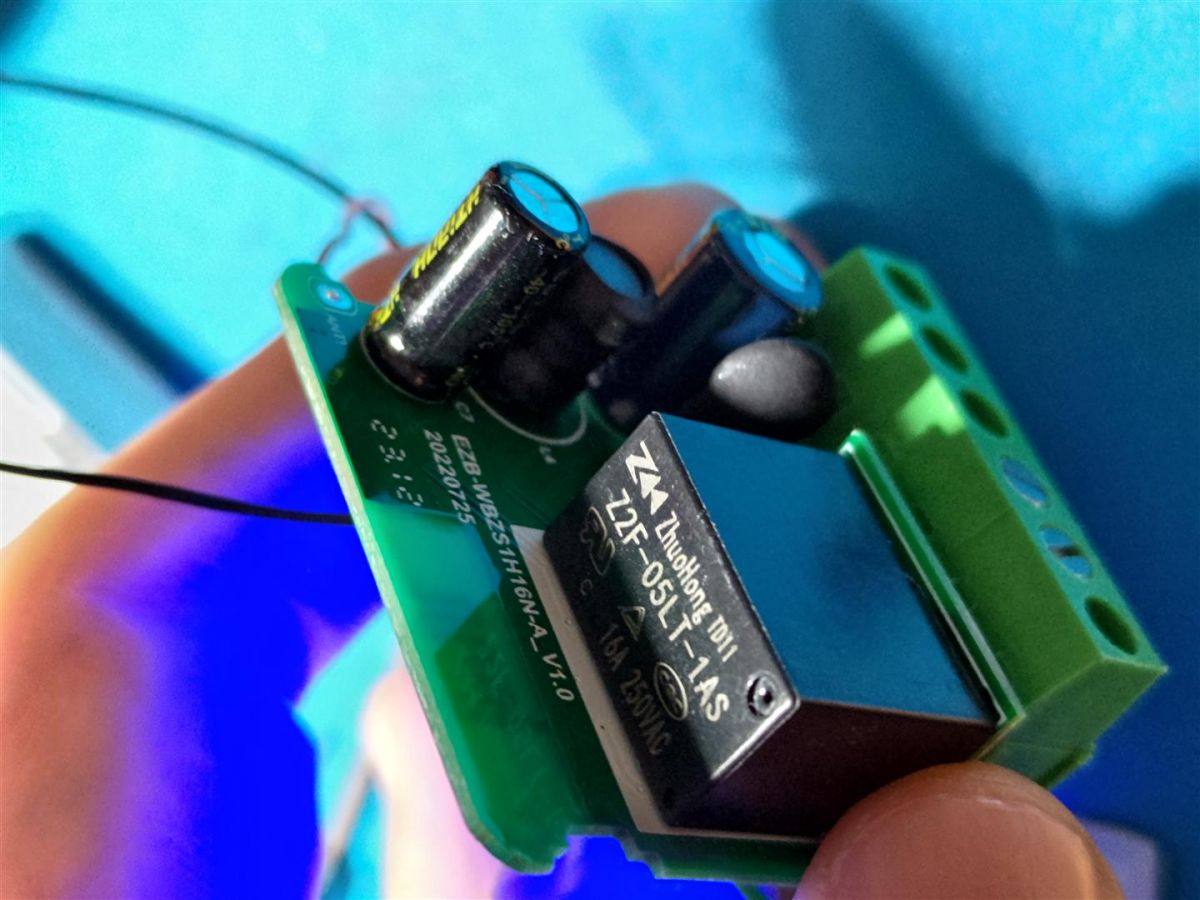
    Smart Mini Switch 2-way from UNSH model EZB-WBZS1H16N-A V1.0 based on BK7231N.

    Basic Information


    Brand: UNSH - Tuya
    Model: EZB-WBZS1H16N-A V1.0
    Chip: BK7231N on board
    Seller: AliExpress 16A Tuya WiFi Smart Switch 2-way

    Photos


    [BK7231N] (DIY) Mini Smart Switch UNSH SS8839-16A-W
    [BK7231N] (DIY) Mini Smart Switch UNSH SS8839-16A-W
    [BK7231N] (DIY) Mini Smart Switch UNSH SS8839-16A-W

    but different board layout and pins
    Relay has marking but should be 16A
    and soldering space for 433 MHz chip and antenna

    Pin settings for this device.

    LED_n - 6 - PWM0 - ch0
    Btn - 8 - PWM2 - ch0
    TglChanOnTgl - 14 - - ch0
    Rel - 15 - - ch0

    [BK7231N] (DIY) Mini Smart Switch UNSH SS8839-16A-W

    Flashing-Uploading OpenBeken firmware


    Used tuya-cloudcutter to flash OpenBK
    Followed this instructions tuya-cloudcutter INSTRUCTIONS.md
    and video Flash OTA using tuya-cloudcutter
    OpenBK7231N_UG_1.15.673.bin (CCtr flash)
    > By firmware version and name
    > 1.2.1 - BK7231N / oem_bk7231n_control_switch
    > Tuya generic
    > Mini Smart Switch

    Requirements:

    Acer E3-111 netbook with Debian 11 on external disk (disabled SmartBoot to enable Linux to boot )
    with docker on debian
    to install GitHub tuya-cloudcutter
    Firmware latest ...UG...

    ! This smart switch connects power line N-out and S1 together that makes it unsafe for use other than with the classic wall switch !


    I would like to thank everyone who enabled this to work
    Elektroda and OpenBeken Team
    tuya-cloudcutter Team
    and all of enthusiast who are posting and filming their work
  • #5 20737342
    fot201113
    Level 2  
    Posts: 3
    Rate: 1
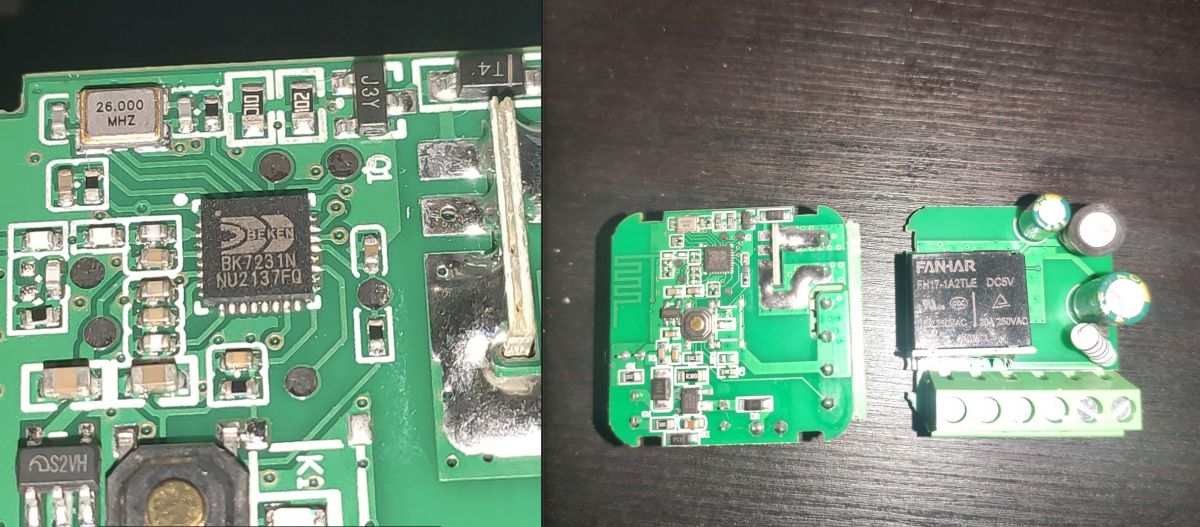
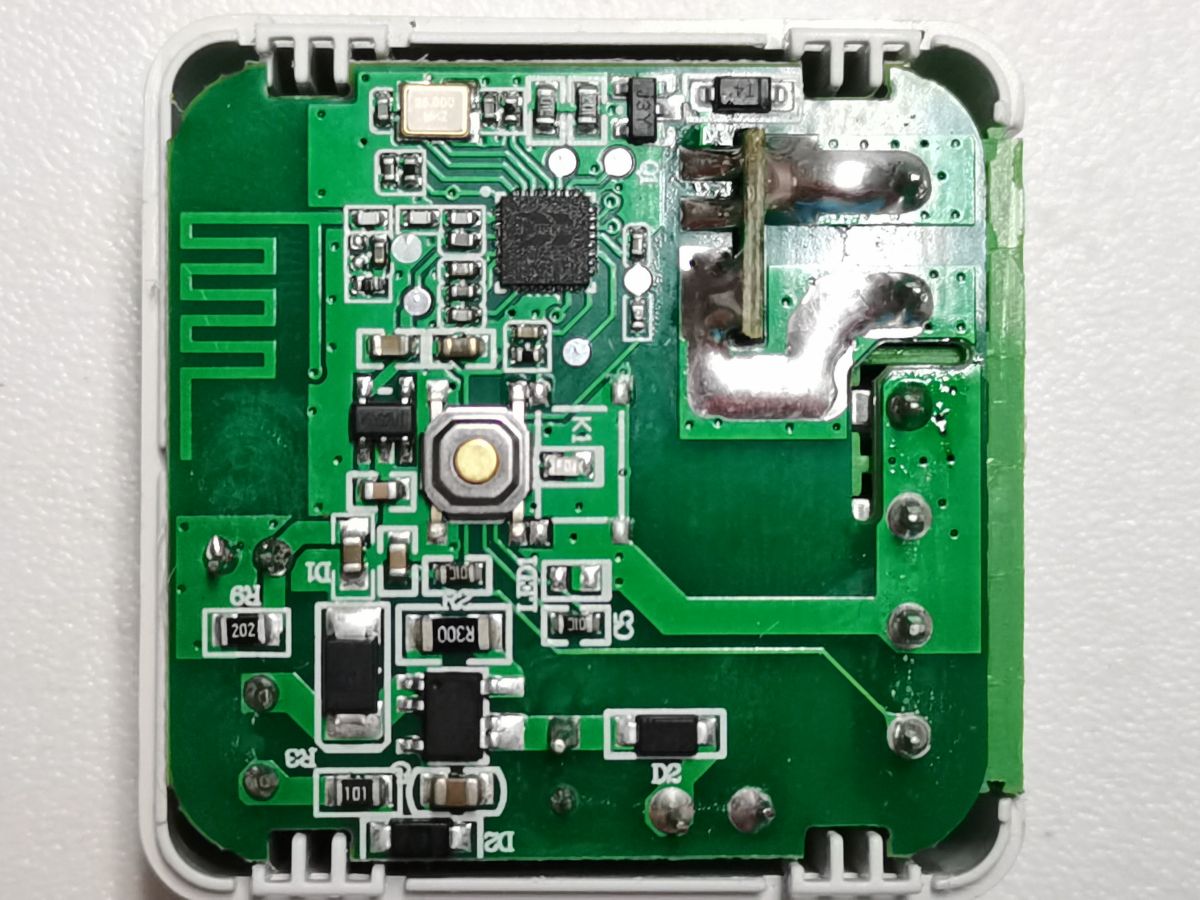
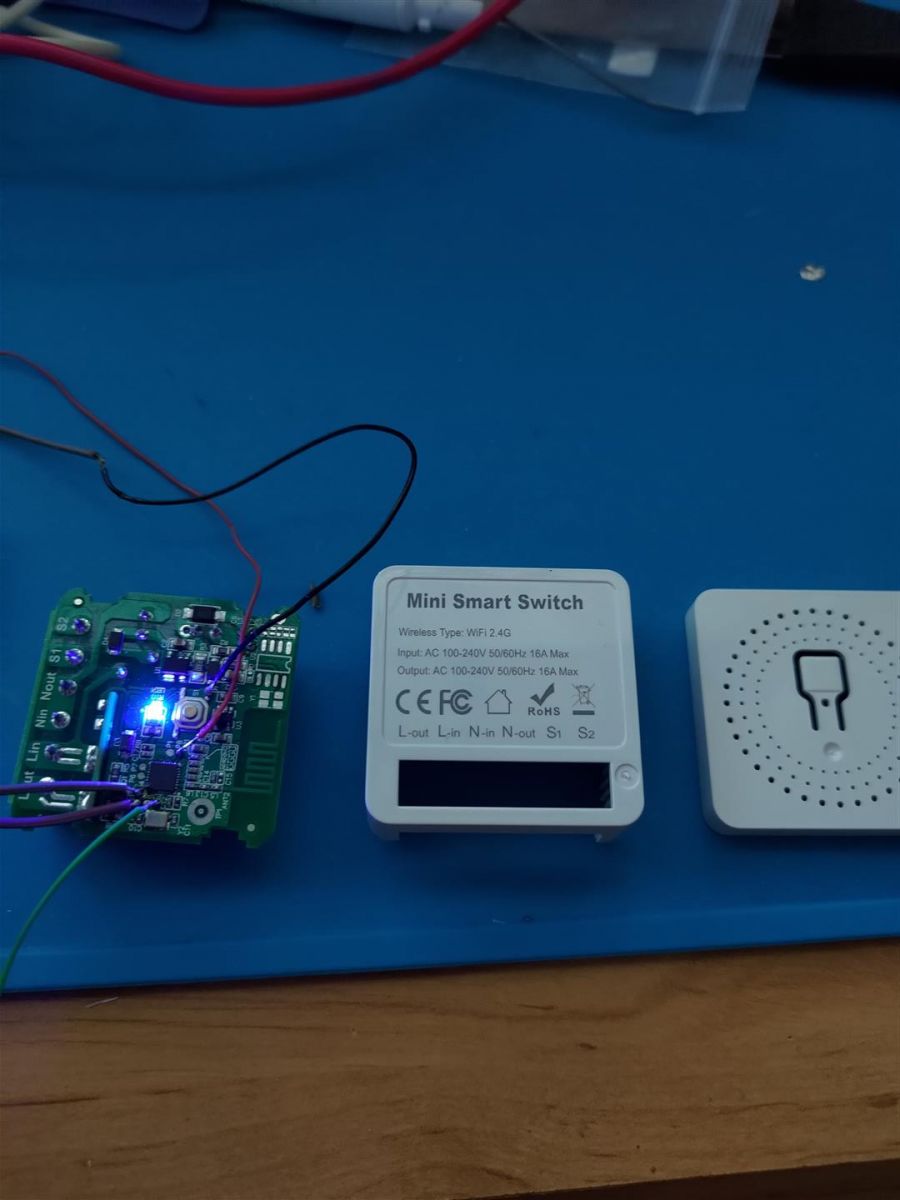
    Close-up of a Mini Smart Switch circuit board with visible components and chip.
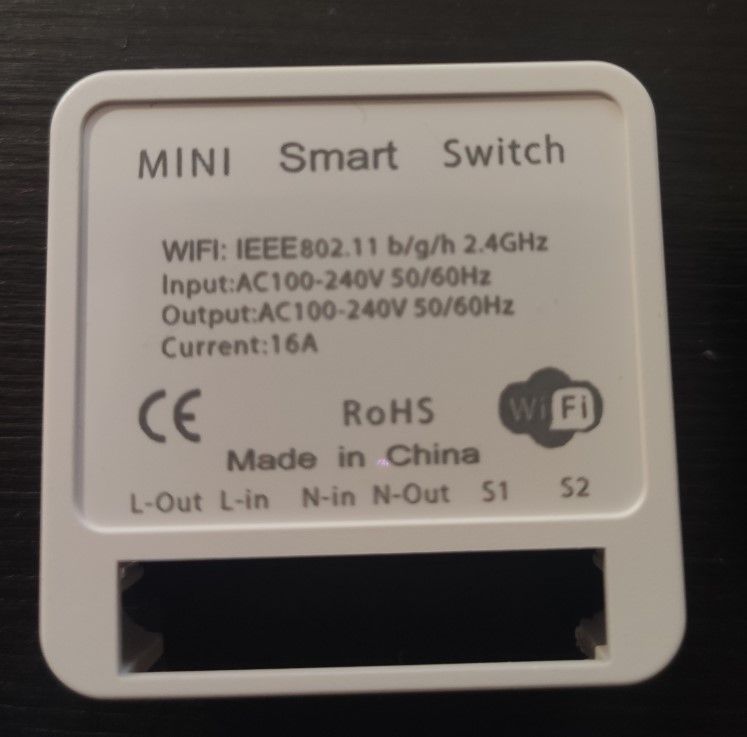
    Back view of a Mini Smart Switch with specification and connection information.
    I opened 2 new Mini Smart Switches and they seem to be this version here. Can anyone help me locate the flashing pins?
  • #6 20737346
    p.kaczmarek2
    Moderator Smart Home
    Posts: 14677
    Help: 656
    Rate: 12705
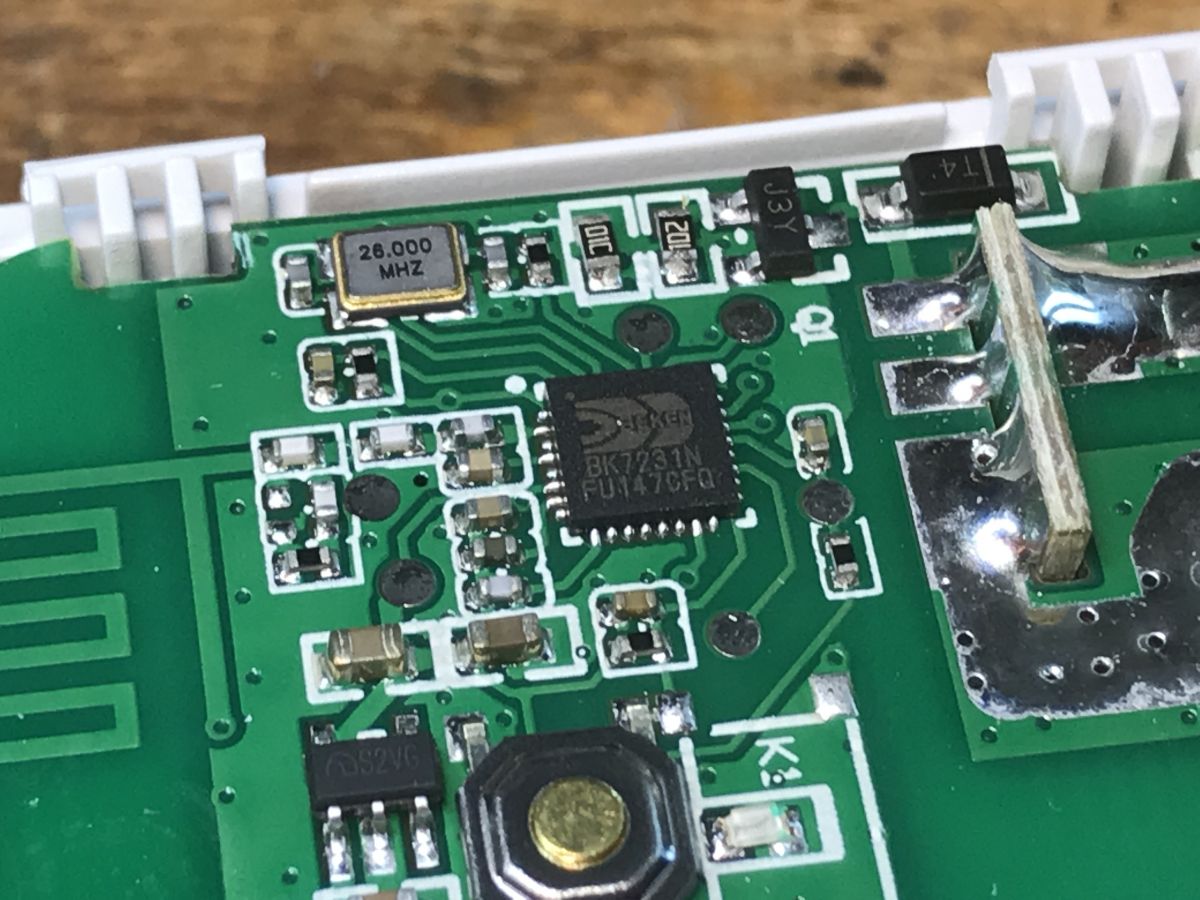
    So you have the same board as me?
    Close-up of a circuit board with electronic components and 26.000 MHz text.
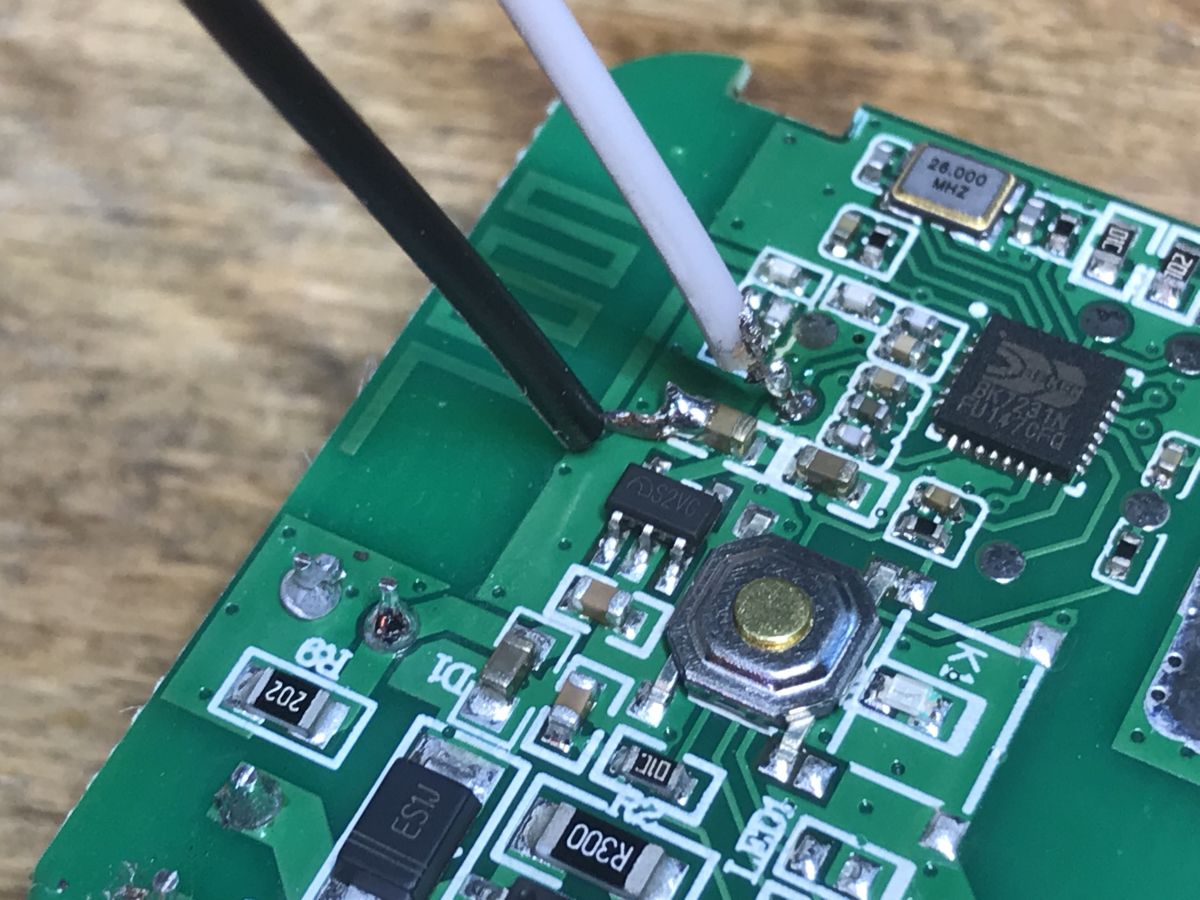
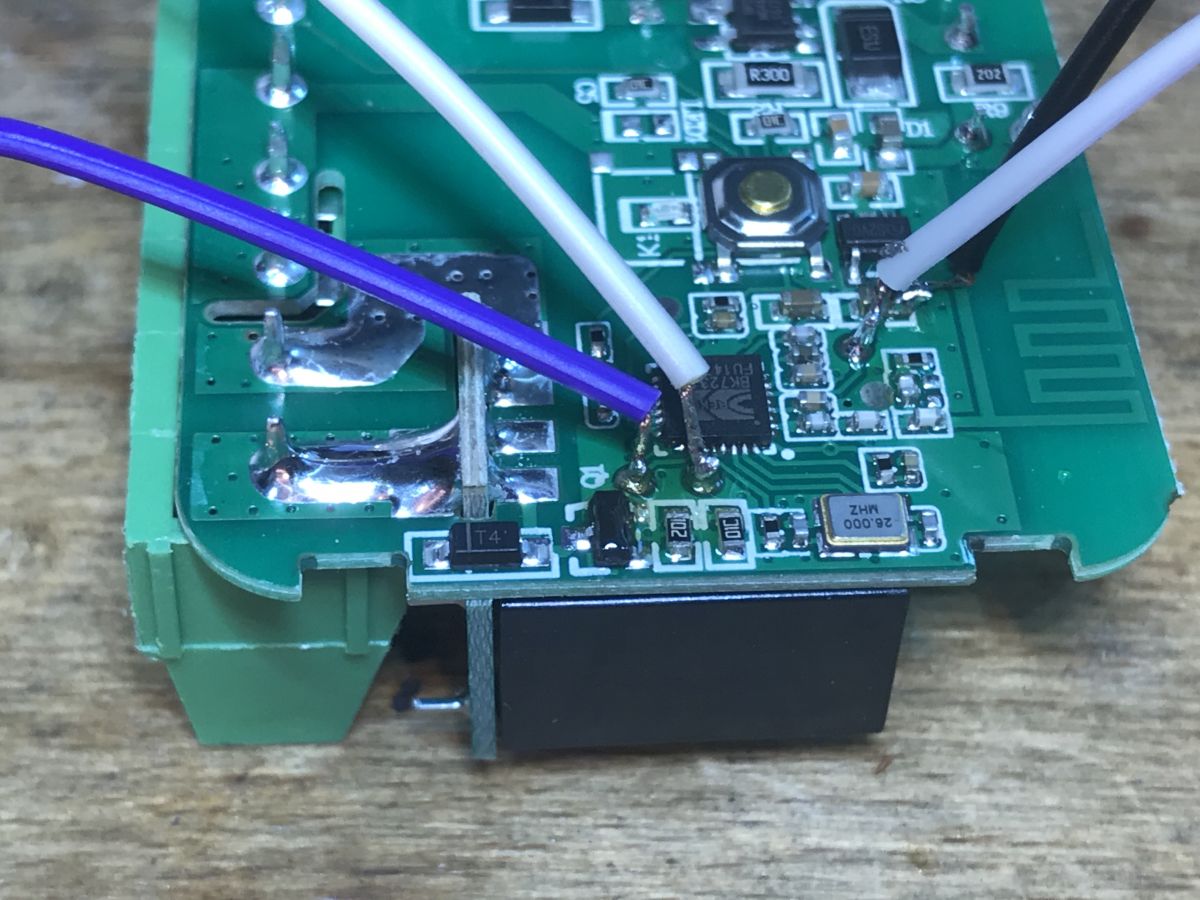
    Here is GND (black) and 3.3V (white):
    Close-up of a circuit board with connected GND (black) and 3.3V (white) wires.
    Here is RX and TX:
    Close-up of a circuit board with connected wires.
    It's a small world.
    Helpful post? Buy me a coffee.
  • #7 20737347
    fot201113
    Level 2  
    Posts: 3
    Rate: 1
    hahah that was blazing fast!!
    thanks a lot!!!
  • ADVERTISEMENT
  • #8 20797138
    elbuit
    Level 6  
    Posts: 10
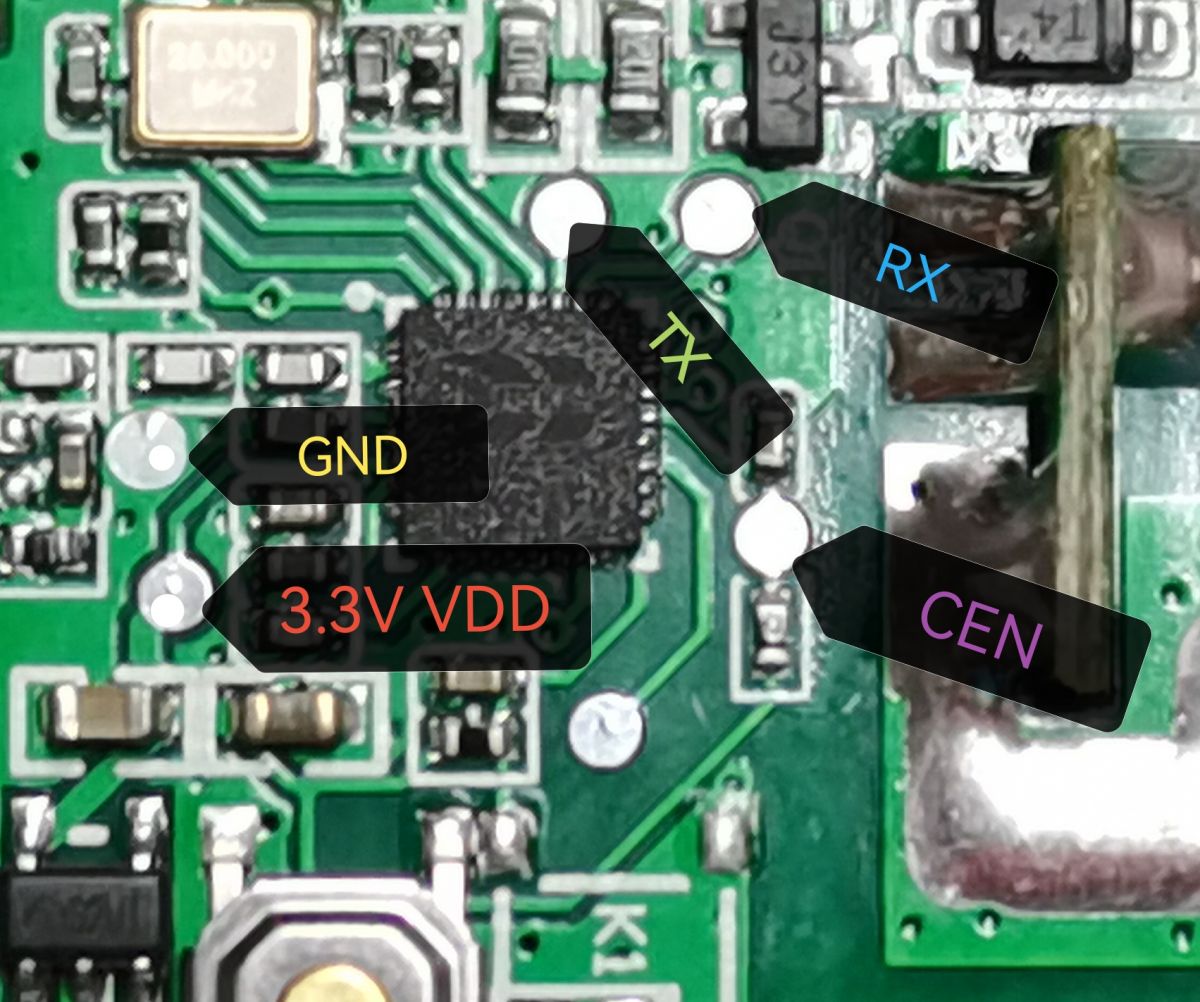
    Rate: 7
    Same device with same pins but it came with tuya V1.3.10 firmware, so I couldn't use tuya cloudcutter.
    But It worked with serial port:
    Close-up of a circuit board with pin labels: GND, 3.3V VDD, TX, RX, CEN.
    Circuit board of a device with electronics and components.

    Thanks.
  • #9 20797170
    p.kaczmarek2
    Moderator Smart Home
    Posts: 14677
    Help: 656
    Rate: 12705
    Those devices are so easily openable that for me the "soldering" method is actually easier than the cloudcutter. Of course, in case of devices like light bulbs, cloudcutter may be preferrable, but for simple cases I really prefer just wires.
    Helpful post? Buy me a coffee.
  • #10 20842297
    cyrax4
    Level 3  
    Posts: 4
    Rate: 2
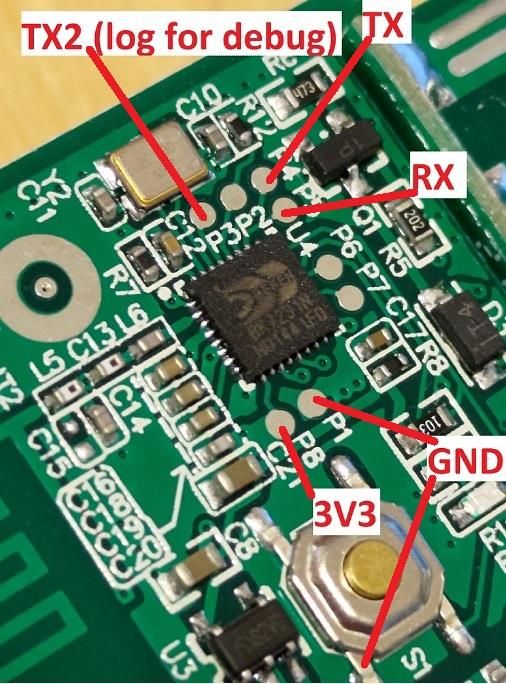
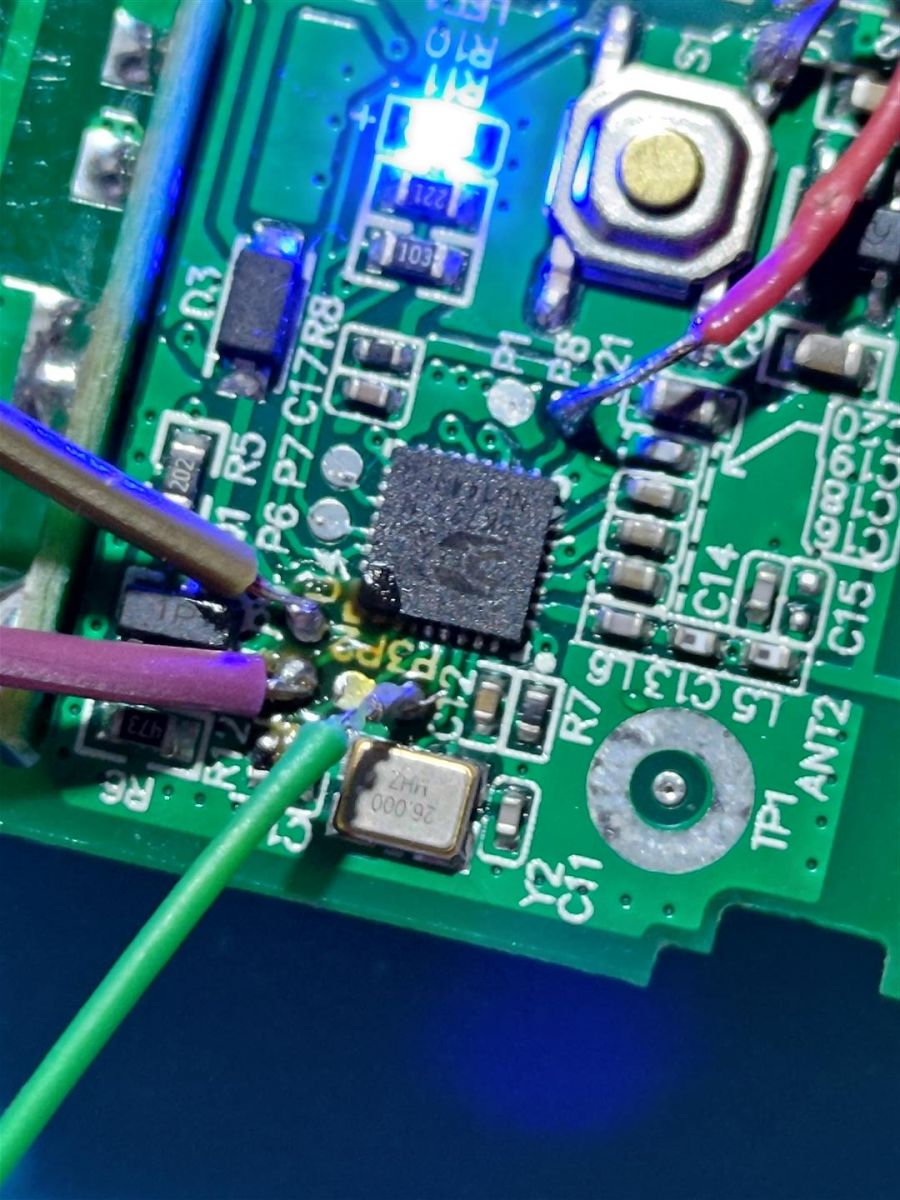
    Very similar device, but different pads. Flashed with CP2102 USB UART. Ground soldering is easier at the switch however P1 pad also working (I used the switch).

    Important: CP2102 don't provide enough juice to power it up so had to solder TX2 for debugging. Anyhow it is not necessary if UART debug not needed.

    Model: EZB-WBZS1H16N-A V1.0
    Chip: BK7231N
    Device: https://www.aliexpress.com/item/1005005021644441.html
    ROM: OpenBK7231N_QIO_1.17.308.bin (latest at the time of flashing)

    GPIO pinout:
    P6 - WifiLed_n - ch0
    P8 - Btn_Tgl_All - ch0
    P14 - TglChanOnTgl - ch1
    P15 - Rel - ch1

    JSON:

    Code: JSON
    Log in, to see the code


    Printed circuit board and casing of a mini smart switch on a blue workspace mat.Close-up of a circuit board with connectors and a relay on a blue background.Close-up of a circuit board with labels TX2, TX, RX, GND, and 3V3.Close-up of a circuit board with electronic components, including wires and chips.
  • #11 20842308
    p.kaczmarek2
    Moderator Smart Home
    Posts: 14677
    Help: 656
    Rate: 12705
    Thanks, can you include JSON template from the OBK Web App?
    Helpful post? Buy me a coffee.
  • #12 20842347
    cyrax4
    Level 3  
    Posts: 4
    Rate: 2
    If you asked me then I edited my comment :)

    As I can see you are the main developer - thank your for your efforts!
  • #13 20842524
    p.kaczmarek2
    Moderator Smart Home
    Posts: 14677
    Help: 656
    Rate: 12705
    To be precise, the thing you attached is a Tuya JSON format, not OBK JSON format, but luckily I can easily convert it with our tool: https://openbekeniot.github.io/webapp/templateImporter.html

    Code: JSON
    Log in, to see the code
    Helpful post? Buy me a coffee.
  • #14 20889653
    ChrizZz
    Level 5  
    Posts: 10
    Rate: 1
    cyrax4 wrote:
    Very similar device, but different pads. Flashed with CP2102 USB UART. Ground soldering is easier at the switch however P1 pad also working (I used the switch).

    Important: CP2102 don't provide enough juice to power it up so had to solder TX2 for debugging. Anyhow it is not necessary if UART debug not needed.

    Model: EZB-WBZS1H16N-A V1.0
    Chip: BK7231N
    Device: https://www.aliexpress.com/item/1005005021644441.html
    ROM: OpenBK7231N_QIO_1.17.308.bin (latest at the time of flashing)

    Close-up of a circuit board with labels TX2, TX, RX, GND, and 3V3.Close-up of a circuit board with electronic components, including wires and chips.


    Did you also find the CEN pad?
  • ADVERTISEMENT
  • #15 20889669
    p.kaczmarek2
    Moderator Smart Home
    Posts: 14677
    Help: 656
    Rate: 12705
    @ChrizZz to the best of my knowledge no CEN is required. I flashed hundreds of devices via wires so far and I am not using CEN for that.
    Helpful post? Buy me a coffee.
  • #16 20889698
    ChrizZz
    Level 5  
    Posts: 10
    Rate: 1
    @p.kaczmarek2 that's strange, I couldn't get a connection - do you have a how to which I should use? Just to start again with another source?
  • #17 20889702
    p.kaczmarek2
    Moderator Smart Home
    Posts: 14677
    Help: 656
    Rate: 12705
    Here are our guides:
    https://www.youtube.com/@elektrodacom
    See this playlist:
    https://www.youtube.com/watch?v=L6d42IMGhHw&list=PLzbXEc2ebpH0CZDbczAXT94BuSGrd_GoM

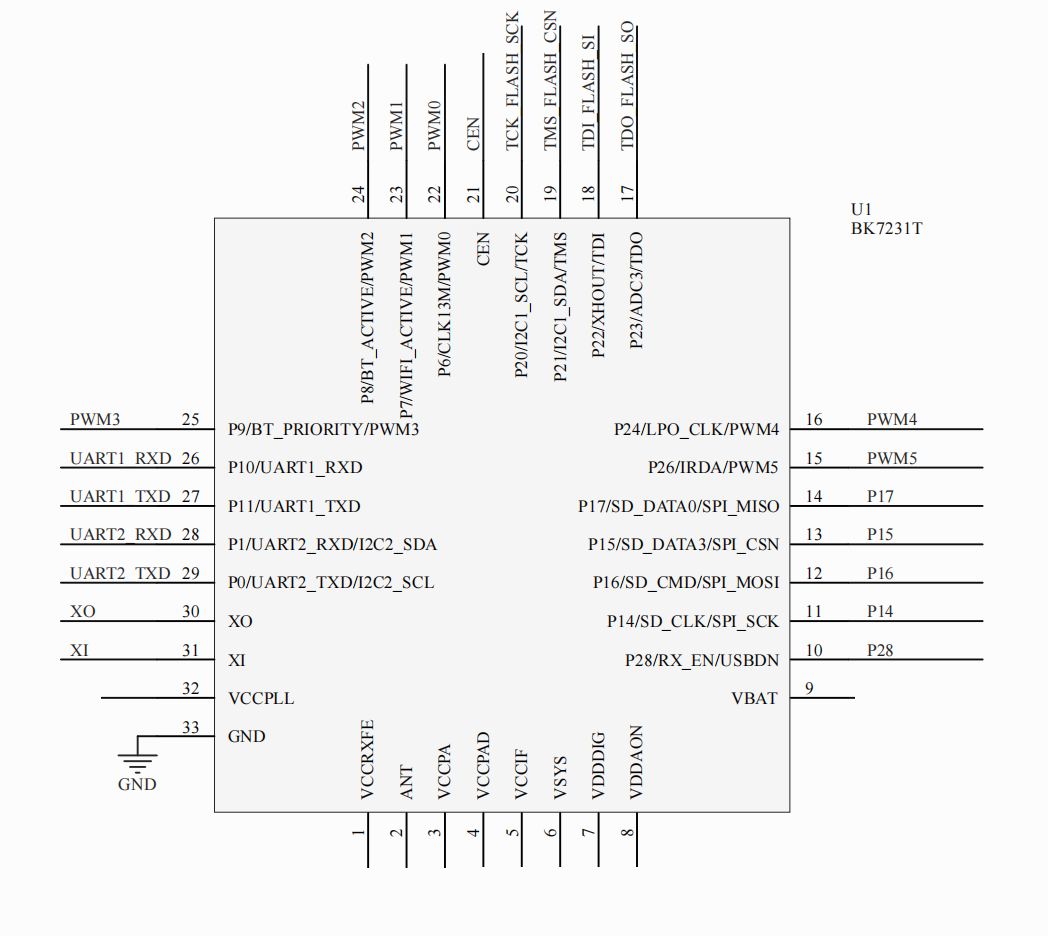
    If you really need CEN, then here is BK pinout:
    Pinout diagram of the BK7231T chip.
    You can try to use it as reference to find where CEN might be on your board.
    Helpful post? Buy me a coffee.
  • #18 20906362
    mrAtini
    Level 3  
    Posts: 4
    Hi,
    I bought a few pieces of those devices on AliExpress "Choice" (less than 2€)
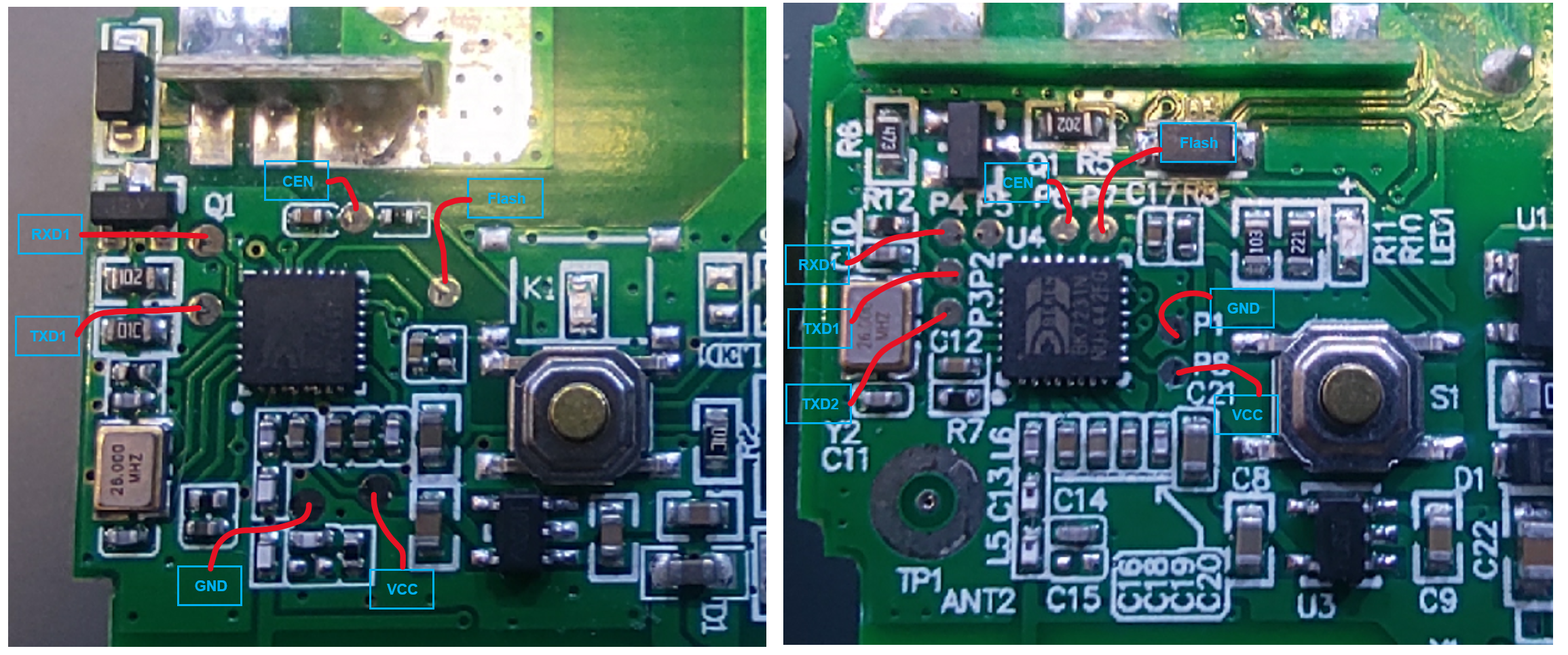
    I found that there is 2 different PCBs ( for the moment :-) )
    Here's the pinout i have:

    Two images showing circuit boards with labeled programming points and an integrated circuit.
  • #19 20906558
    p.kaczmarek2
    Moderator Smart Home
    Posts: 14677
    Help: 656
    Rate: 12705
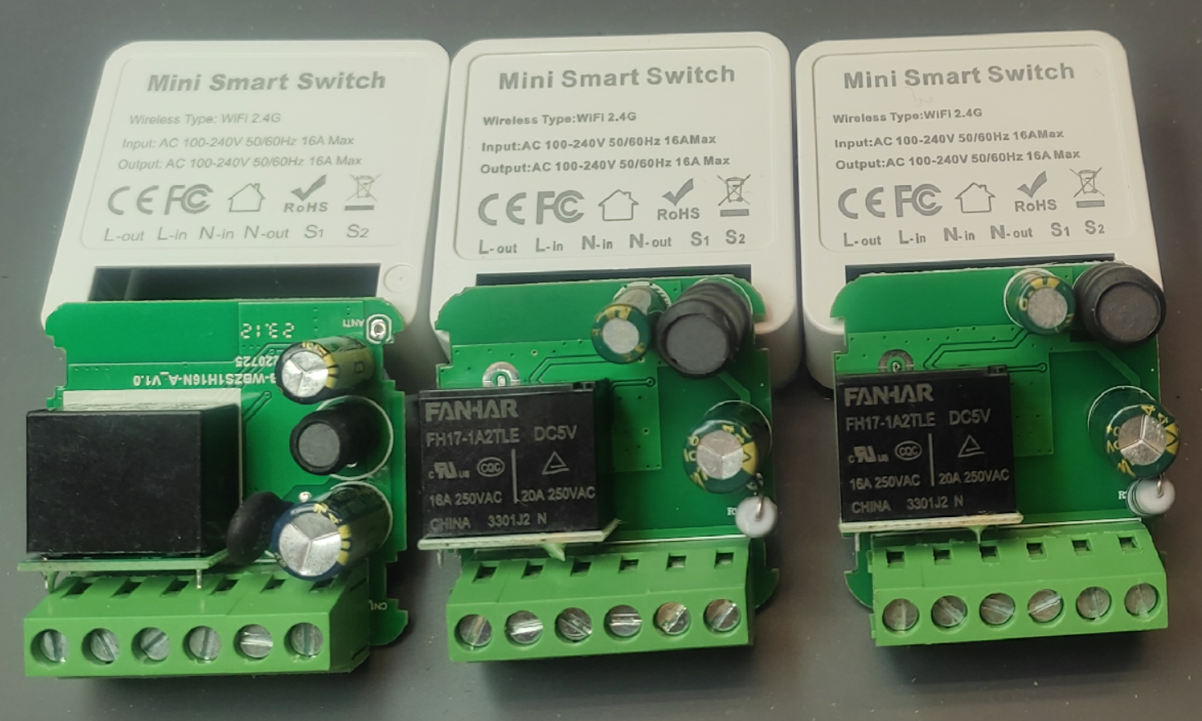
    Is there any way to tell which is which from the outside? I don't know, maybe one is 10A version and second 16A?
    Helpful post? Buy me a coffee.
  • ADVERTISEMENT
  • #20 20906629
    mrAtini
    Level 3  
    Posts: 4
    Unfortunately no. From the outside they are exactly the same (and 16A for both)
    Three mini smart switches with visible circuit boards and electrical components on a table.
  • #21 20906683
    p.kaczmarek2
    Moderator Smart Home
    Posts: 14677
    Help: 656
    Rate: 12705
    Wait, the new one has a varistor but it's missing fusible resistor?
    Helpful post? Buy me a coffee.
  • #22 20906820
    mrAtini
    Level 3  
    Posts: 4
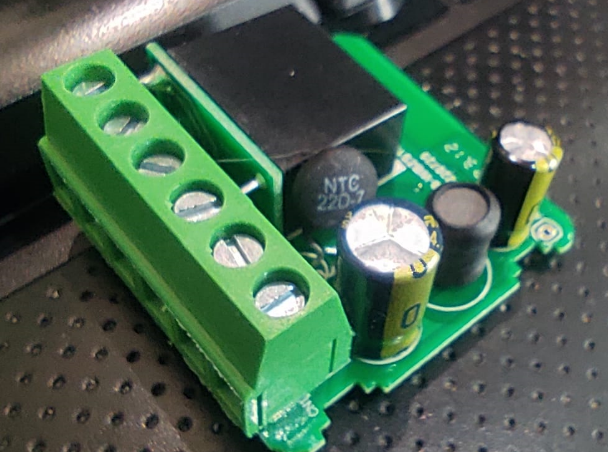
    It's a 22ohms NTC replacing the 10ohms resistor (not fusilble) .
    I do not understand yet why they chose an NTC (R goes down when t° increases)
    Close-up of a PCB with electronic components, including a 22-ohm NTC and capacitors.
  • #23 20991422
    pkkrusty
    Level 2  
    Posts: 3
    I have this type, but found that the relay is on GPIO 7, rather than GPIO 8. I bought the power meter variety, is there a template for making that work?

    I'm just getting started with OpenBeken, and was able to flash via the pads successfully, but then had trouble getting the unit to stay alive while i configured the pins. It would crash after 30 seconds. But once the pins were defined correctly, it seems more stable.

    Also the unit seems quite warm, even with no load attached. Is that normal? I have put PowerSave 1 in the startup commands.
  • #24 20992272
    p.kaczmarek2
    Moderator Smart Home
    Posts: 14677
    Help: 656
    Rate: 12705
    Power metering is supported. Which metering chip is inside, BL0942 or BL0937?
    Please try to extract the config:
    https://www.youtube.com/watch?v=WunlqIMAdgw

    How did the pins affect the device, what config made it crash? It's the first time I've hear about something like that.

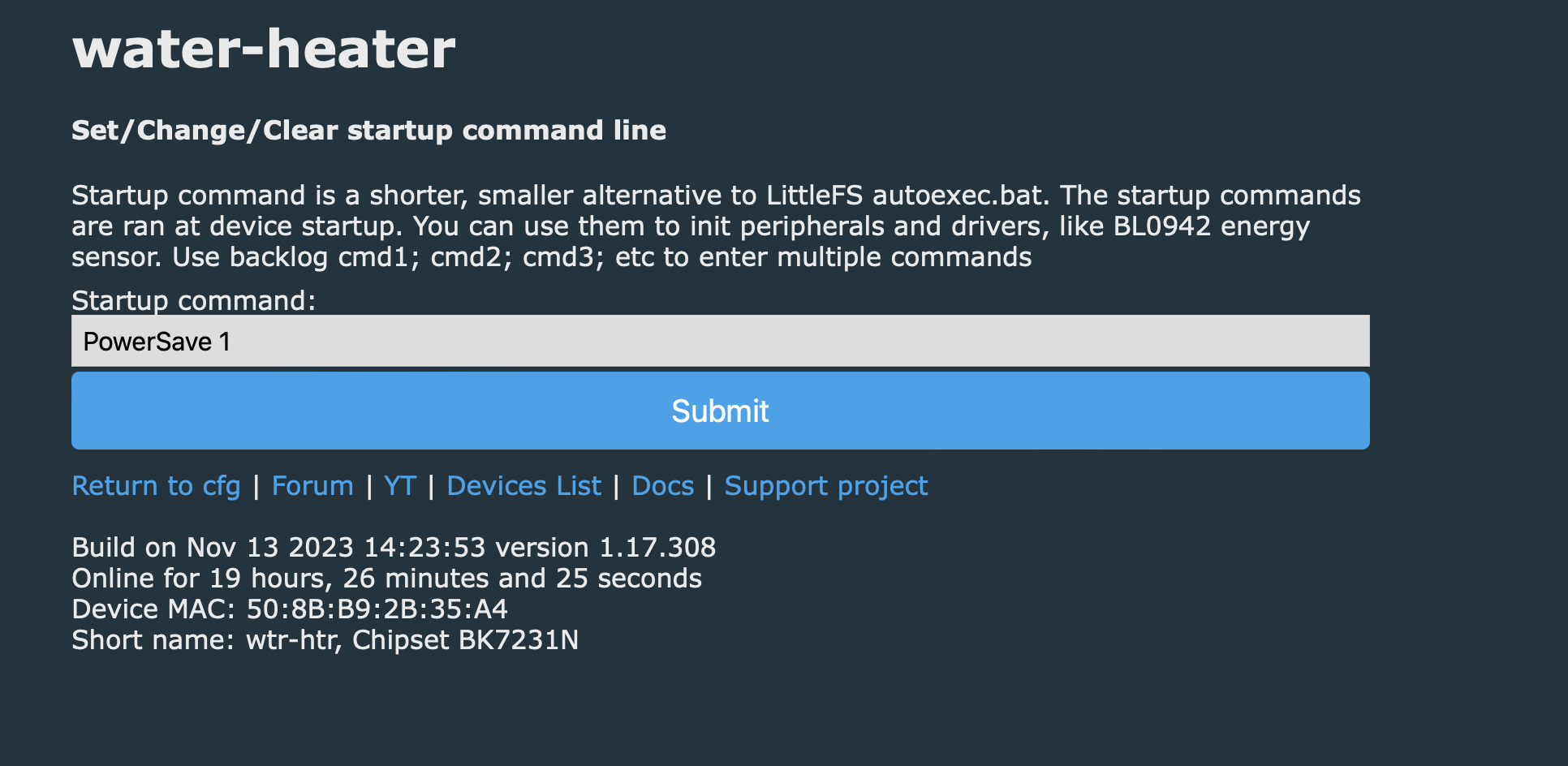
    How did you put PowerSave 1 in startup commands? Maybe it's not run?
    Helpful post? Buy me a coffee.
  • #25 20992948
    pkkrusty
    Level 2  
    Posts: 3
    Configuration interface with startup command PowerSave 1 for a water-heater device.

    My config is as follows:
    ```
    {
    "vendor": "Tuya",
    "bDetailed": "0",
    "name": "Full Device Name Here",
    "model": "enter short model name here",
    "chip": "BK7231N",
    "board": "TODO",
    "flags": "0",
    "keywords": [
    "TODO",
    "TODO",
    "TODO"
    ],
    "pins": {
    "6": "TglChanOnTgl;0",
    "7": "Rel;0",
    "23": "Btn;0",
    "26": "LED;0"
    },
    "command": "PowerSave 1",
    "image": "https://obrazki.elektroda.pl/YOUR_IMAGE.jpg",
    "wiki": "https://www.elektroda.com/rtvforum/topic_YOUR_TOPIC.html"
    }
    ```

    Power monitor chip is BL0942. I entered "startDriver BL0942" and now I can see measurements on main page. Amazing!
  • #26 21040987
    Tilator
    Level 12  
    Posts: 137
    Help: 2
    Rate: 13
    mrAtini wrote:
    Hi,
    I bought a few pieces of those devices on AliExpress "Choice" (less than 2€)
    I found that there is 2 different PCBs ( for the moment :-) )
    Here's the pinout i have:

    Two images showing circuit boards with labeled programming points and an integrated circuit.


    There seems to be a "flash" pad it the second picture. Do I need it somehow to flash this device?
  • #27 21041271
    p.kaczmarek2
    Moderator Smart Home
    Posts: 14677
    Help: 656
    Rate: 12705
    I don't know what this person means. You need only RX, TX and optionally CEN.
    See our BK7231 flasher:
    https://github.com/openshwprojects/BK7231GUIFlashTool
    You can also check out BK7231N and BK7231T video guides here:
    https://www.youtube.com/playlist?list=PLzbXEc2ebpH0CZDbczAXT94BuSGrd_GoM
    Helpful post? Buy me a coffee.
  • #28 21045001
    Tilator
    Level 12  
    Posts: 137
    Help: 2
    Rate: 13
    I bough four of them two have BK7231N and the other two T34. I have not managed to flash a single one yet. Whatever I do.

    I'm now waiting for a new TTL adapter. My gear is quite old. I suppose I already ruind one of those T34 devices by getting a partial flash making only a corrupt boot loader.
  • #29 21066589
    tonyb62
    Level 8  
    Posts: 37
    Help: 1
    Rate: 3
    Hi all,
    I've come across another variation of this "Mini Smart Switch" from AliExpress.
    All major components are on the top of the board, was able to flash it with my needle probe jig.
    Doesn't have power monitoring as far as i can see, T34 BK7231N chip.
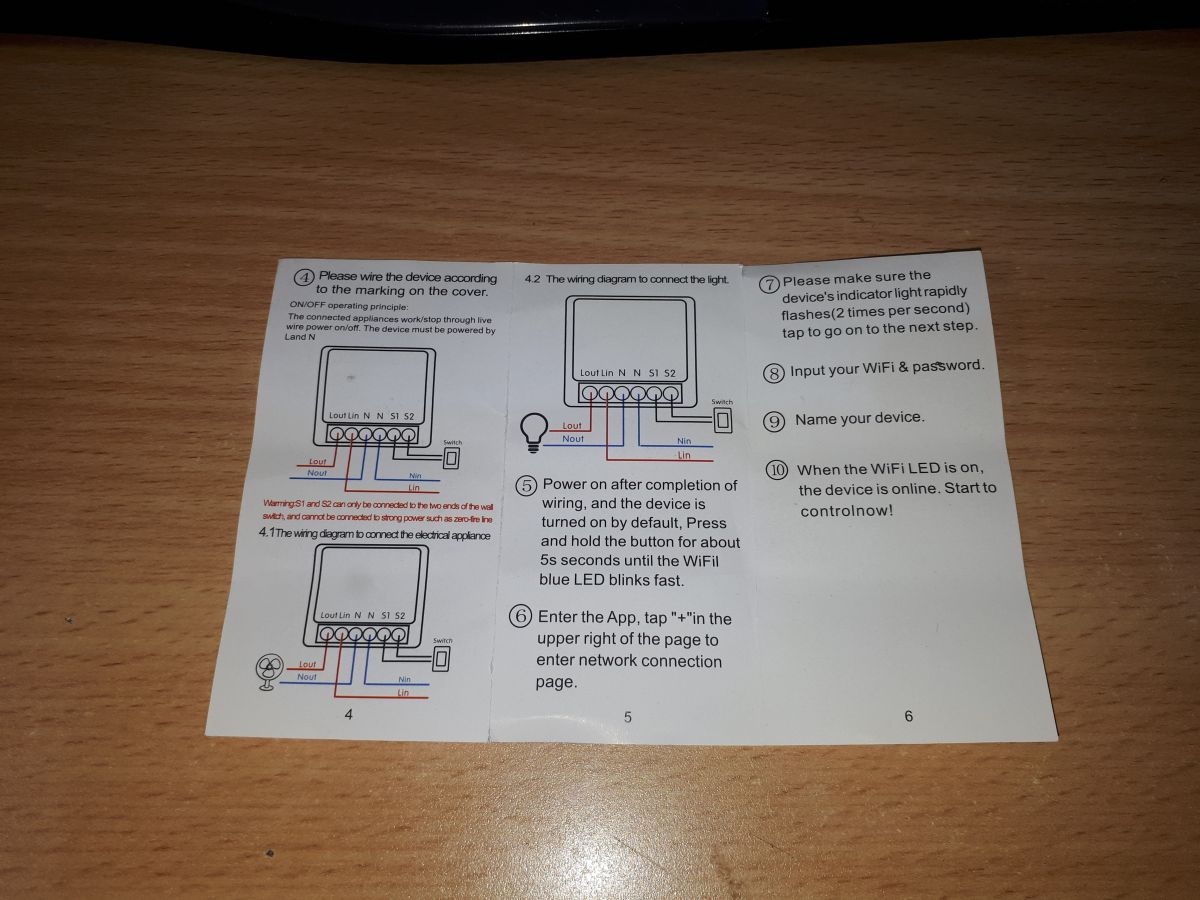
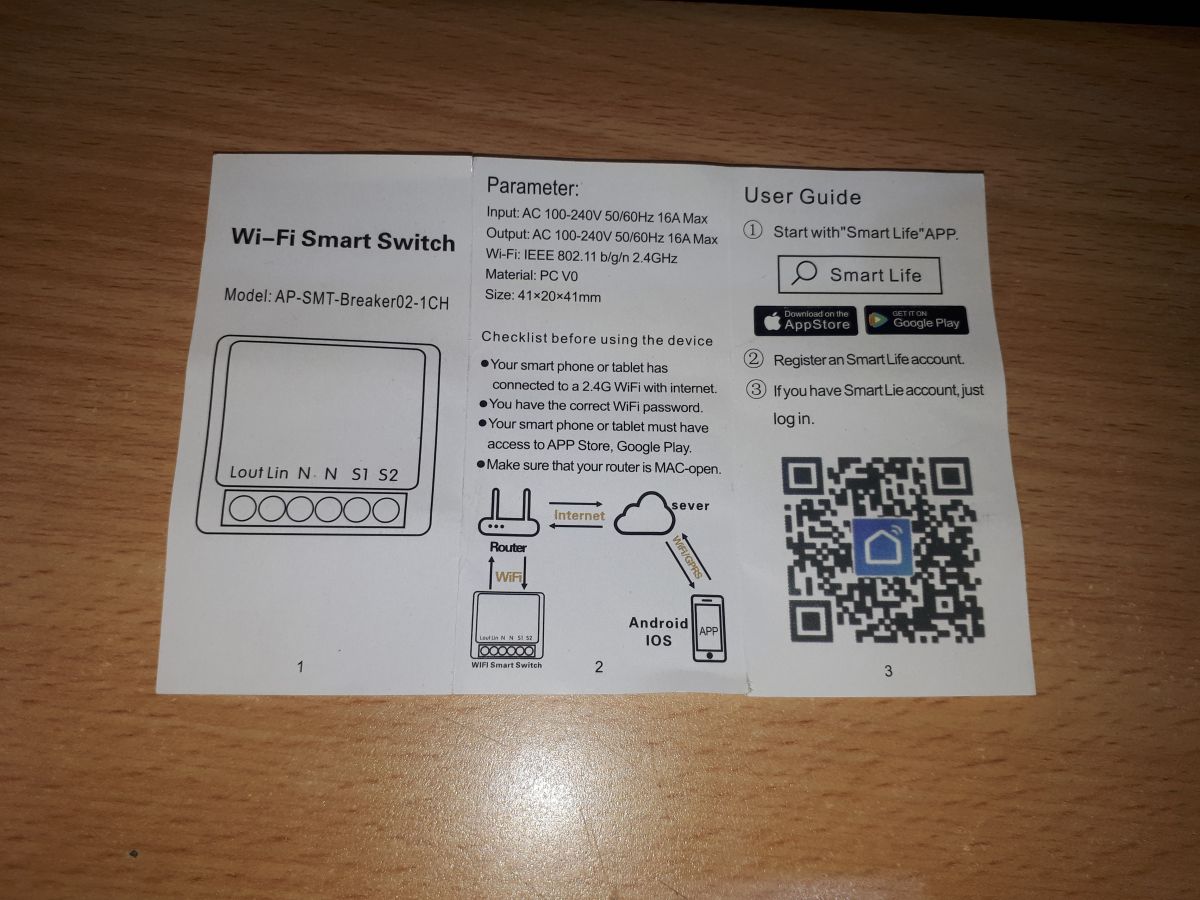
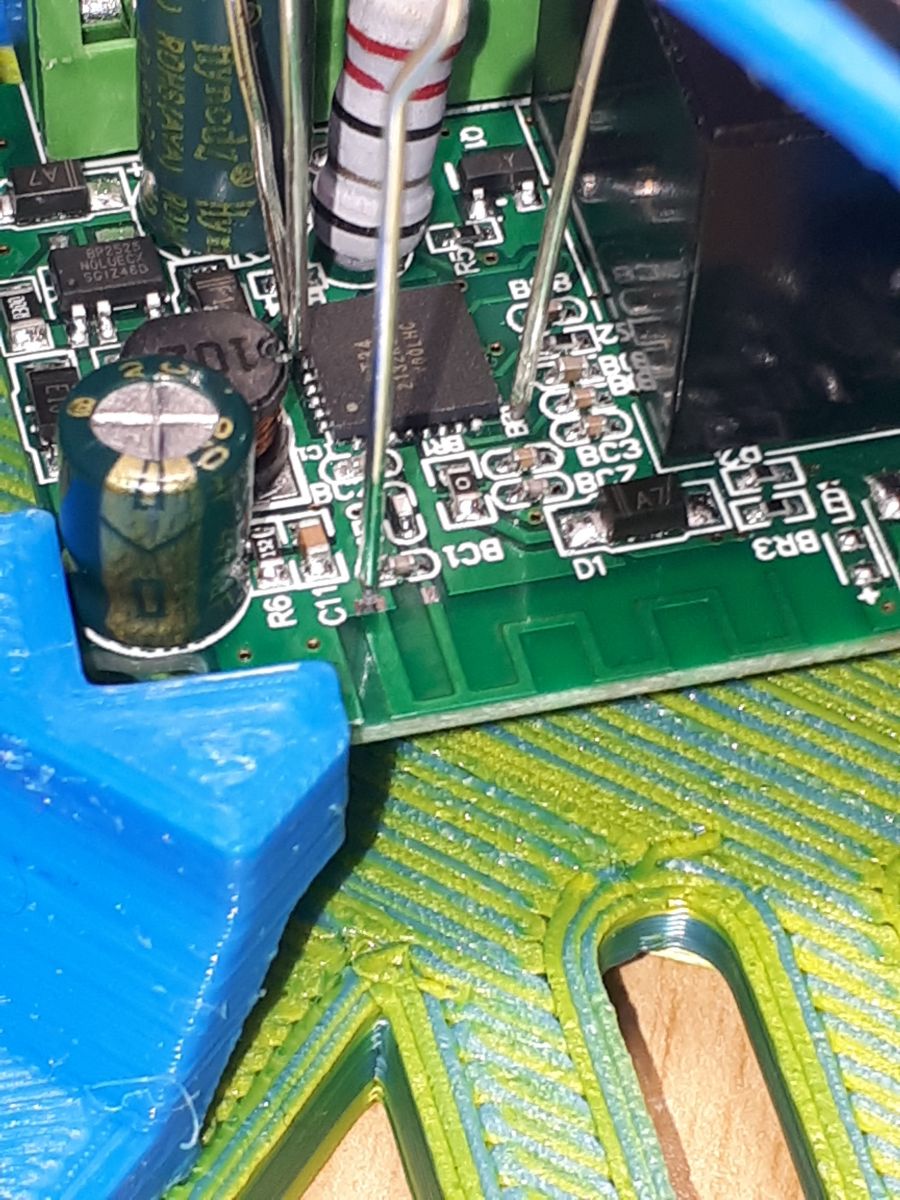
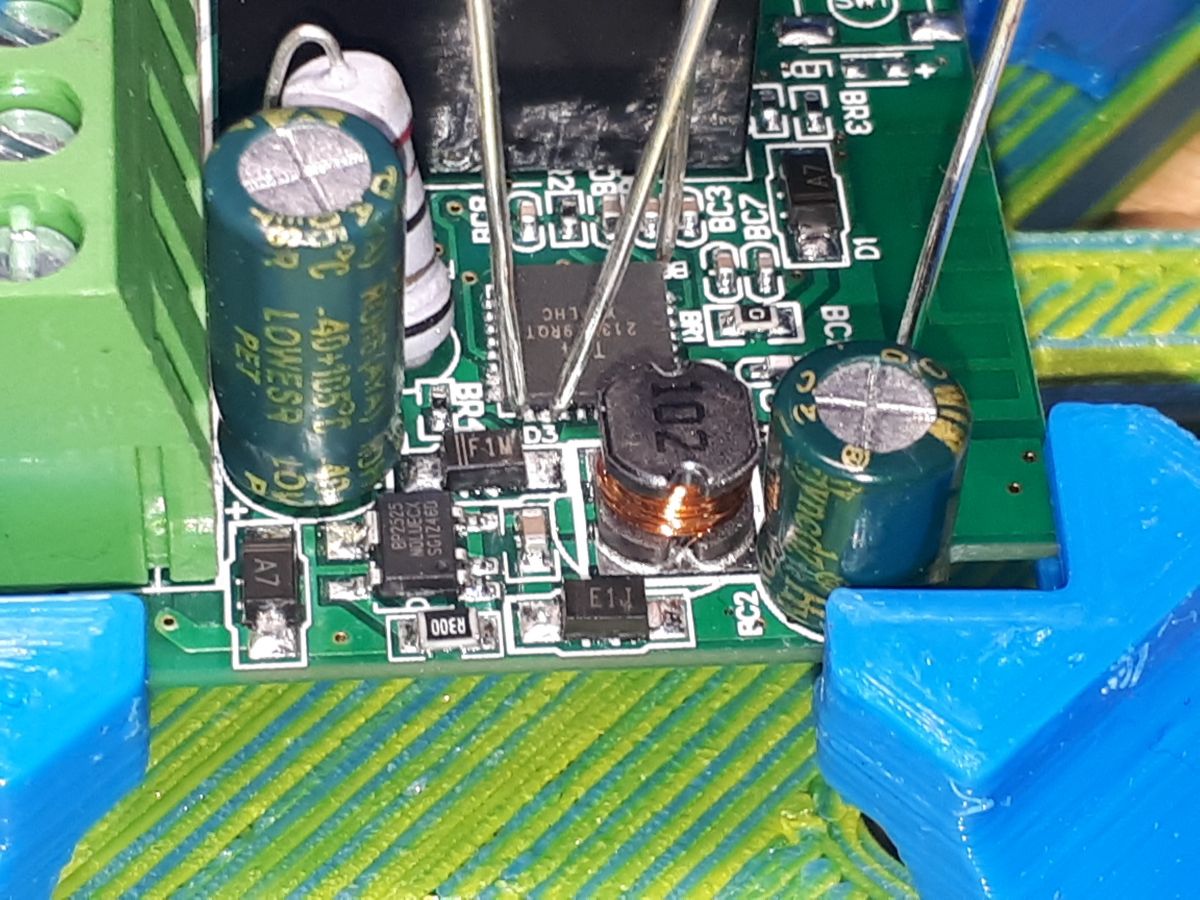
    Instruction manual for Mini Smart Switch with connection diagrams. User manual for Mini Smart Switch from AliExpress. Close-up of a circuit board with visible electronic components and a needle probe. Close-up of a Mini Smart Switch circuit board with visible electronic components. Mini Smart Switch PCB with components on top, placed in a specialized holder. Home setup with an electronics board and clamps on a desk.

    Working Config
    {
    "vendor": "Tuya",
    "bDetailed": "0",
    "name": "AP-SMT-Breaker02-CH1",
    "model": "enter short model name here",
    "chip": "BK7231N",
    "board": "TODO",
    "flags": "1024",
    "keywords": [
    "TODO",
    "TODO",
    "TODO"
    ],
    "pins": {
    "6": "WifiLED_n;1",
    "14": "TglChanOnTgl;1",
    "15": "Rel;1",
    "24": "Btn;1"
    },
    "command": "backlog PowerSave 1",
  • #30 21066615
    Tilator
    Level 12  
    Posts: 137
    Help: 2
    Rate: 13
    tonyb62 wrote:
    Hi all,
    I've come across another variation of this "Mini Smart Switch" from AliExpress.


    I have two of those too. TX is connected to component BR4.

    You can also try Btn_Tgl_All as P14.
📢 Listen (AI):

Topic summary

✨ Discussion about teardown, flashing, and OpenBeken/OpenBK configuration of UNSH/Tuya DIY Mini Smart Switches based on BK7231N. Multiple hardware variants are identified, including SS8839-16A-W and EZB-WBZS1H16N-A V1.0, with different PCB layouts, pin mappings, and some units including power monitoring. Users share working GPIO assignments for relay, button, toggle input, and WiFi LED, and report successful flashing via tuya-cloudcutter or serial UART using CP2102/BK7231GUIFlashTool, often without needing CEN. PowerSave 1 is recommended for stability, and BL0942 metering is enabled with startDriver BL0942 on monitored versions. The thread also covers issues with Tuya firmware 1.3.10, flash access, deepsleep behavior, and differences between BL0942 and BL0937-based devices.
Summary generated by AI based on the discussion content.

FAQ

TL;DR: 15 Q&A, “PowerSave 1” and serial flashing solve the main UNSH SS8839-16A-W BK7231N problems for OpenBeken users: OTA works on Tuya 1.2.1, but firmware 1.3.10 usually needs UART pads, and pinouts vary between P8, P7, P15, and T34 boards. [#20797138]

Why it matters: The same AliExpress 16A Mini Smart Switch listing can ship different PCBs, so copying one template without checking the board can break relay, LED, button, or metering behavior.

Alternative Works when Typical pins or tool Thread result
tuya-cloudcutter OTA Tuya 1.2.1, BK7231N, oem_bk7231n_control_switch Mini Smart Switch profile OpenBeken 1.15.648 or 1.15.673 flashed without soldering
Serial UART flashing Tuya 1.3.10 or OTA failure RX, TX, GND, 3.3V; CEN usually optional Worked after cloudcutter failed
ESPHome custom firmware BK7231N target build generic-bk7231n-qfn32-tuya Uploaded without CEN

Key insight: Identify the exact PCB before configuring OpenBeken. Devices sold as the same 16A Mini Smart Switch used at least relay pins P8, P7, and P15, plus BL0942 power-monitor variants.

Quick Facts

  • The original UNSH SS8839-16A-W teardown used BK7231N on a custom PCB, not a replaceable Tuya module, and cost €3.63 from AliExpress. [#20524167]
  • Two SS8839-16A-W boards from the same seller used different relay pins: one used P8, while another used P7. [#20537640]
  • EZB-WBZS1H16N-A V1.0 used another layout: LED_n on P6, button on P8, wall toggle on P14, and relay on P15. [#20538893]
  • Tuya firmware 1.3.10 blocked tuya-cloudcutter for one user, but serial flashing through the board pads worked. [#20797138]
  • Power-monitor versions can use BL0942; OpenBeken showed measurements after running startDriver BL0942. [#20992948]

How do I flash OpenBeken on the UNSH SS8839-16A-W Mini Smart Switch with a BK7231N chip using tuya-cloudcutter?

Use tuya-cloudcutter with the Mini Smart Switch BK7231N profile for Tuya firmware 1.2.1.
  1. Pair the switch in SmartLife or Tuya first.
  2. Select 1.2.1 - BK7231N / oem_bk7231n_control_switch and flash OpenBK7231N_UG_1.15.648.bin or later.
  3. If the device misses cloudcutterflash, create a second AP with internet, enter Wi-Fi credentials, then resume cloudcutter.
The first reported flash needed patience and a temporary router AP. [#20524167]

What GPIO pin template should I use for the UNSH SS8839-16A-W when the relay is on P8 versus P7?

Use P8 for the first SS8839-16A-W board, and P7 for the later same-order board. P8 variant: P6 TglChanOnTgl, P8 Rel, P23 Btn, P26 LED, all on channel 0. P7 variant: P6 TglChanOnTgl, P7 Rel, P23 Btn, P26 LED, all on channel 0. The thread confirms both came from the same seller, order, and package. [#20537640]

Why do some AliExpress Mini Smart Switches with the same UNSH 16A listing have different PCB layouts and different OpenBeken pinouts?

The listing shipped multiple internal PCB revisions under the same 16A Mini Smart Switch product. The thread shows SS8839-16A-W boards with relay on P8 or P7, plus EZB-WBZS1H16N-A V1.0 boards with relay on P15. Later buyers also found two visually identical 16A devices with different PCBs. From outside, one contributor reported no reliable difference between two 16A versions. [#20906629]

What is tuya-cloudcutter and how does it perform OTA flashing on BK7231N Tuya devices?

tuya-cloudcutter is an OTA flashing tool that replaces compatible Tuya firmware without opening the device. "tuya-cloudcutter is a flashing workflow that targets vulnerable Tuya cloud pairing behavior, lets users select a firmware profile, and uploads OpenBeken over Wi-Fi instead of UART, when the stock firmware still supports that route." In this thread it used the BK7231N oem_bk7231n_control_switch profile and Mini Smart Switch selection. [#20524167]

What is OpenBeken and how is it used with BK7231N or T34-based Tuya smart switches?

OpenBeken is replacement firmware used to run BK7231N and T34 Tuya switches locally. "OpenBeken is open firmware for Beken-based IoT devices that maps GPIO roles, starts device drivers, and replaces Tuya cloud firmware with a configurable local web application." The thread shows OpenBK7231N builds from 1.15.648 to 1.17.308, including BK7231N and T34 Mini Smart Switch variants. [#20842297]

How do I locate RX, TX, GND, and 3.3V flashing pads on BK7231N Mini Smart Switch boards?

Open the case, identify the matching board photos, and use the marked UART pads. One board used black for GND, white for 3.3V, and separate pads for RX and TX. Another tip used S1 as GND, reducing small solder points to three: RX, TX, and 3.3V. Always disconnect mains first, because the device uses high voltage. [#20737346]

Serial flashing vs tuya-cloudcutter: which method is better for easily opened Tuya Mini Smart Switches?

Serial flashing is often easier for these switches because the case opens easily. An OpenBeken developer wrote: “for simple cases I really prefer just wires.” Cloudcutter remains useful for harder-to-open devices such as bulbs. For this Mini Smart Switch, several users flashed successfully with CP2102 or UART pads after opening the enclosure. [#20797170]

Why does Tuya firmware 1.3.10 prevent using tuya-cloudcutter, and what serial flashing method works instead?

Tuya 1.3.10 blocked cloudcutter in the reported device, so UART flashing worked instead. One user had the same pins but stock Tuya V1.3.10 firmware and could not use tuya-cloudcutter. They flashed over the serial port using the exposed pads. Later examples with 1.3.10 also used RX, TX, GND, and 3.3V instead of OTA. [#20797138]

What does the CEN pad do on BK7231N devices, and when is it actually needed for flashing?

CEN is a reset-related pad, but these Mini Smart Switches usually flash without it. "CEN is a BK7231 control pad used for reset or boot control during flashing, but the thread repeatedly shows UART flashing with only RX, TX, GND, and 3.3V." One developer said he flashed hundreds of devices via wires without using CEN. [#20889669]

How do I configure power monitoring on a BK7231N Mini Smart Switch that uses the BL0942 metering chip?

Start the BL0942 driver in OpenBeken and use the relay template for that PCB. For one power-monitor version, the working pins were P6 TglChanOnTgl, P7 Rel, P23 Btn, and P26 LED. After entering startDriver BL0942, measurements appeared on the OpenBeken main page. Add the command in startup if you want it after each reboot. [#20992948]

What is the BL0942 chip and how does OpenBeken read voltage, current, and power from it?

BL0942 is the metering chip used by some power-monitor Mini Smart Switch variants. "BL0942 is an energy-metering IC that reports electrical measurements to firmware, letting OpenBeken display voltage, current, power, and energy when the BL0942 driver is started." The thread identifies BL0942 inside a power-meter variant and confirms OpenBeken measurements after startDriver BL0942. [#20992948]

Why should I add PowerSave 1 to startup commands on BK7231N smart switches, and how do I set it correctly in OpenBeken?

Add PowerSave 1 because BK7231N switches can otherwise overheat or need repair later. The recommended startup command is PowerSave 1; use backlog when combining it with other commands. One working T34/BK7231N-style config used backlog PowerSave 1. Another user reported warmth with no load attached and had already placed PowerSave 1 in startup. [#20525130]

What safety issue is caused by the Mini Smart Switch connecting N-out and S1 together?

The switch connects N-out and S1 together, making non-classic switch wiring unsafe. The teardown warns that this design is “unsafe for use other than with the classic wall switch.” The device handles mains voltage, so open or flash it only while disconnected from the power line. This warning appears in multiple board revisions. [#20524167]

How do I flash ESPHome firmware to a BK7231N Mini Smart Switch, and what board setting should I use?

Build ESPHome for generic-bk7231n-qfn32-tuya and upload it over UART. A user first confirmed OpenBK worked, then created an ESPHome project using: bk72xx: board: generic-bk7231n-qfn32-tuya They uploaded successfully without touching CEN. This was on a BK7231N Mini Smart Switch after serial flashing experiments. [#21126030]

How can I use BK7231GUIFlashTool to flash a custom ESPHome BIN instead of an OpenBeken BIN?

Use BK7231GUIFlashTool as the UART flasher and select the custom ESPHome BIN file. The thread points users to BK7231GUIFlashTool for BK7231 serial flashing, then confirms ESPHome firmware was uploaded to BK7231N without CEN. If flashing stalls, use only RX, TX, GND, and 3.3V first, then power-cycle the module; do not short the supply rail. [#21125858]
Summary generated by AI based on the discussion content.
ADVERTISEMENT