logo elektroda
logo elektroda
X
logo elektroda

OpenBeken on Action LSC 8W 700lm RGB + 2700-6500K E27 LED bulb

b_st 552 25
ADVERTISEMENT
📢 Listen (AI):
  • I bought a couple of these and managed to get it working with OpenBeken:
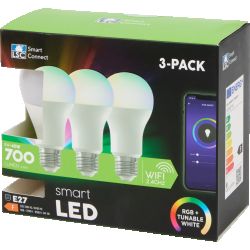
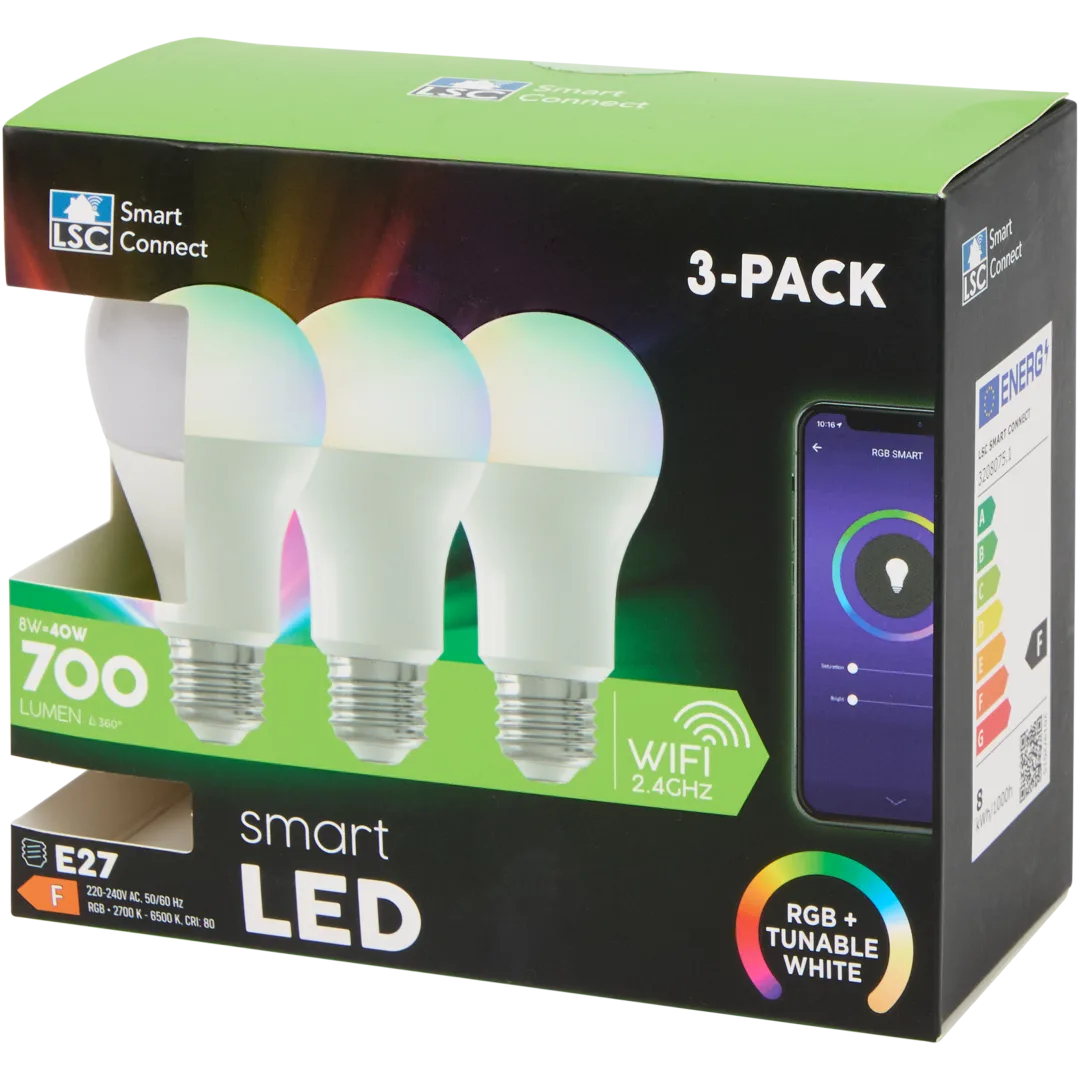
    Three LSC Smart LED RGB+CCT light bulbs in a 3-pack retail box

    Some info:
    Webshop link
    - Datasheet
    - Product code: 3208075
    - CBLC5 module with BK7231N
    - LED driver (U2) is a SM2185N
    - The 3v3 for the CBLC5 module is provided by a BP2571 buck converter.

    This post has a really good description how to disassemble this device: https://www.elektroda.com/news/news3948374.html
    To remove the metal threads, I simply screwed the bulb into a socket and gently pushed the bulb off the socket.

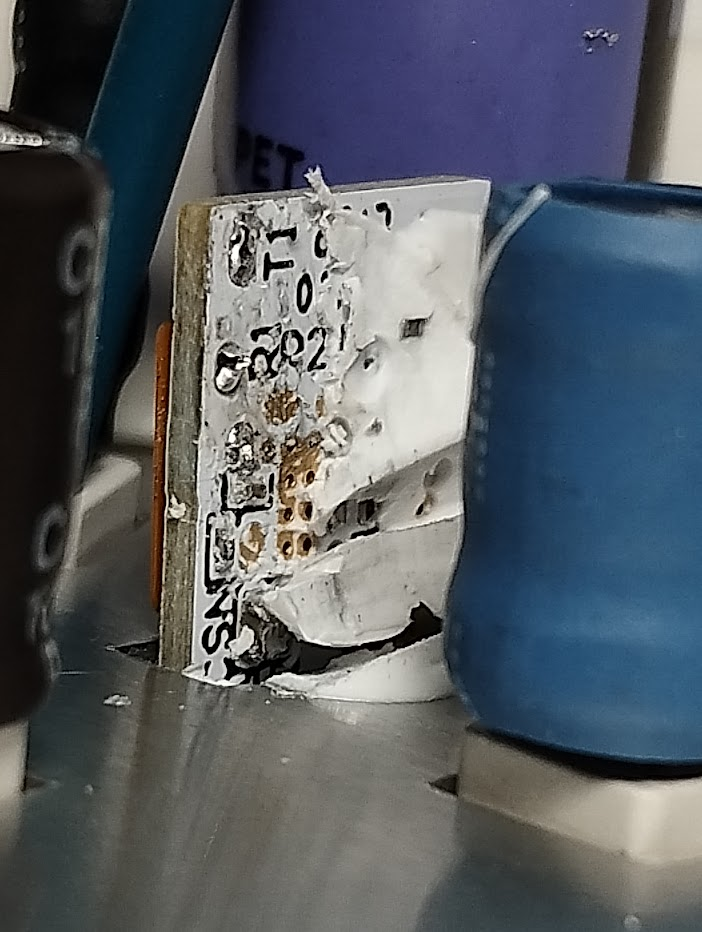
    To program it, it is at least necessary to solder wires on the UART TX and RX pads of the CBLC5 module. To get to the pins it is sometimes necessary to remove the white glue a little bit. The picture below shows the pads T1 and R1 (sorry for the mess, this was already after I desoldered the wires again). There is also a reset pad, but it is not necessary connect if you use the right tool to program.
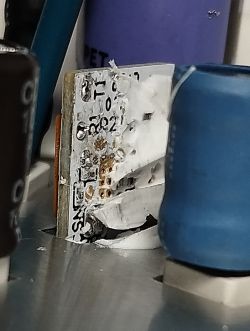
    Close-up of PCB showing UART pads T1 and R1 with white service adhesive

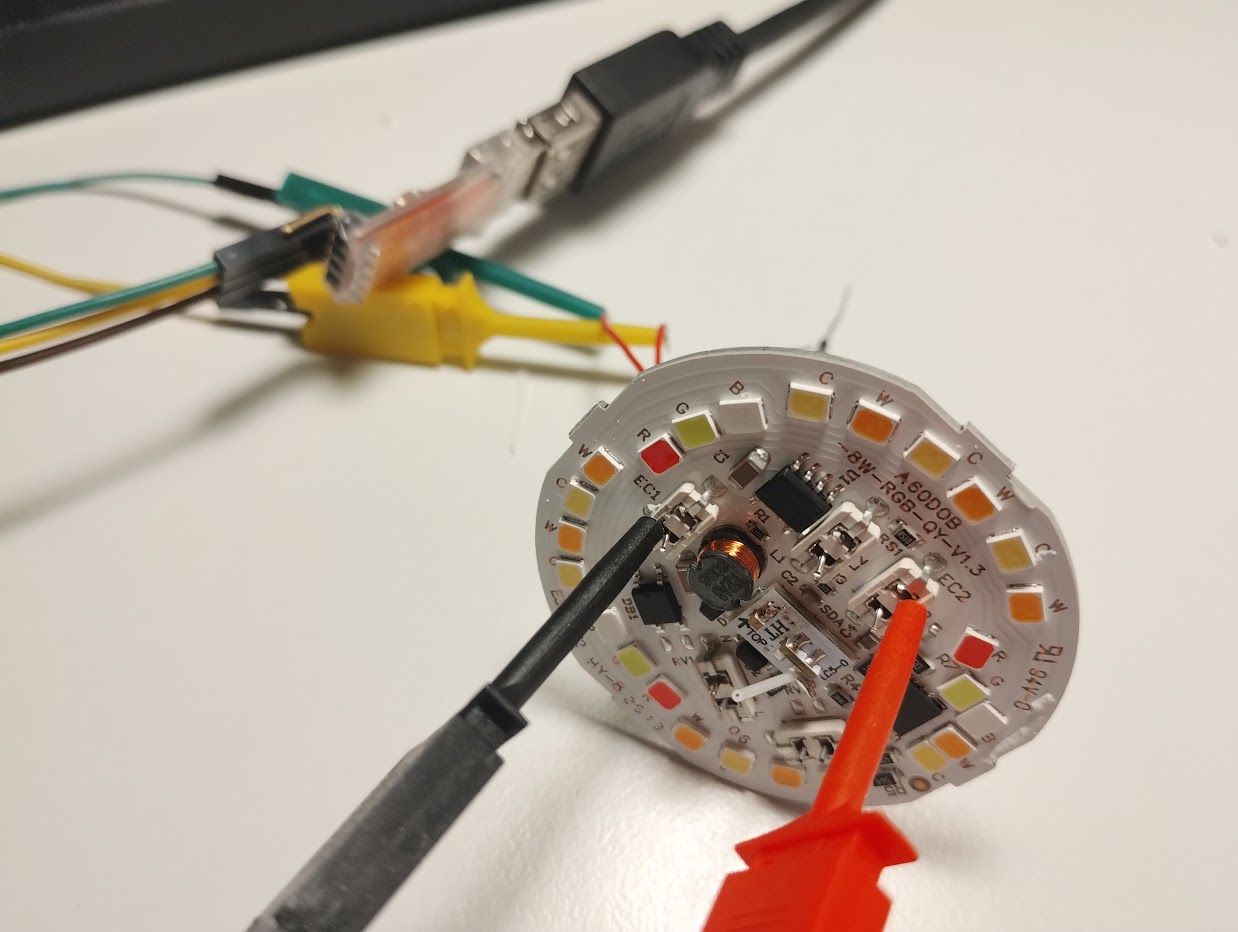
    If you have clamps it is not necessary to solder wires to power the device. I found the following two locations are easy to clamp and are connected straight to the GND and VCC of the CBLC5 module.
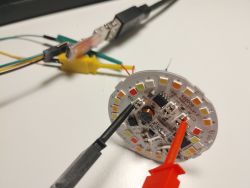
    RGBW LED board with probes and wires connected to UART interface

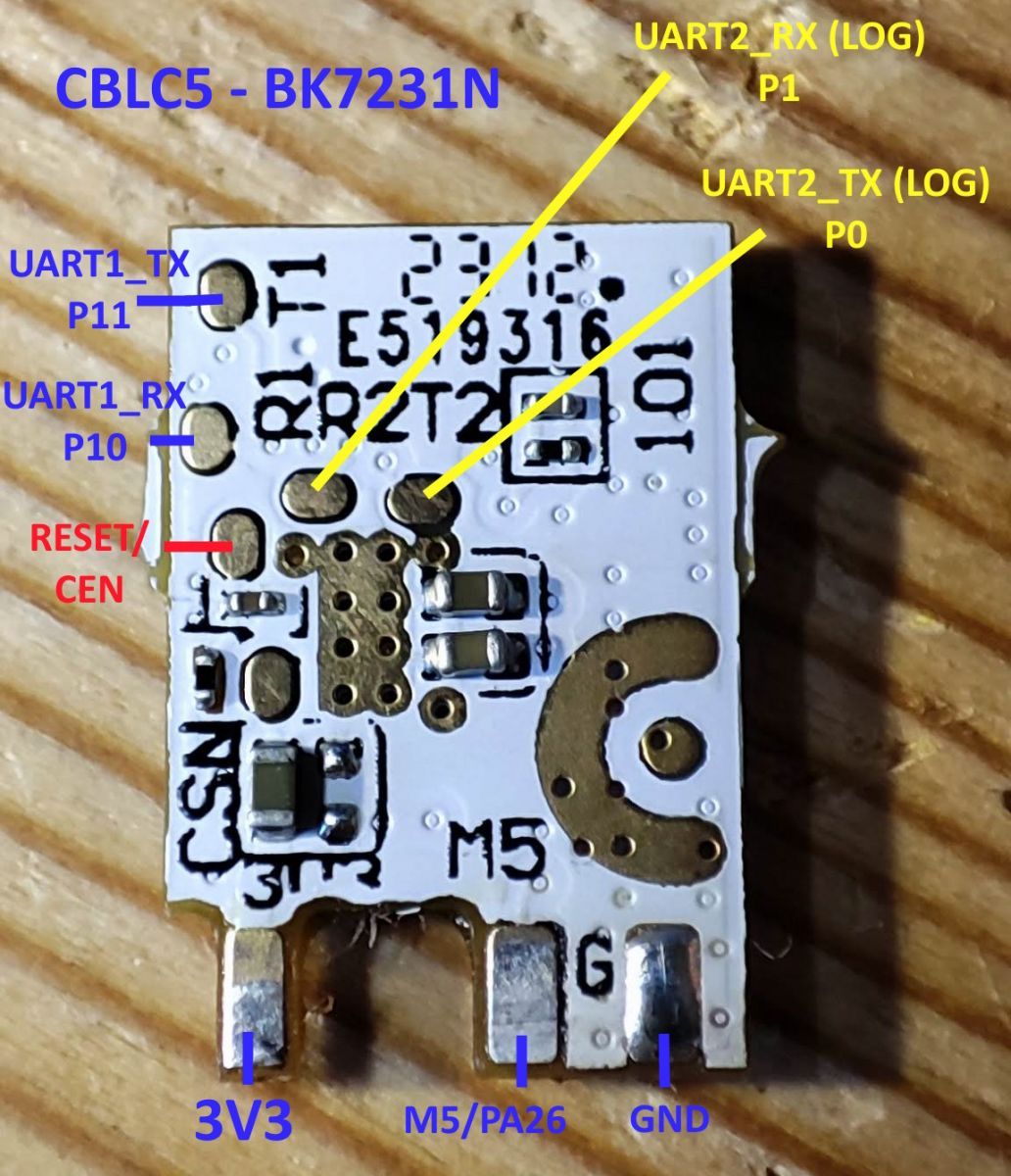
    Here is a pinout of the CBLC5 module I found on the internet:
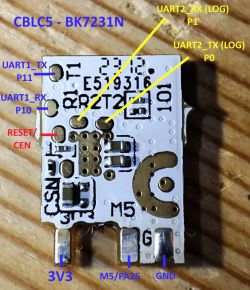
    CBLC5 module with pin labels for UART, power, and reset on a wooden surface

    Initially I failed to get the programming to work. It turns out that the device really, really needs the correct voltage. Often the 3.3V supply of USB - UART adapters do not deliver enough current. But even when I used a separate LDO to provide the power programming failed because I had too many wires and connections between the LDO and the CBLC5 module, causing a voltage drop which was too large.

    To program the firmware, I used this tool: https://github.com/tuya-cloudcutter/bk7231tools It doesn't need the reset line to be connected (earlier I used hid_download_py, but it does need the reset line).
    Code: Bash
    Log in, to see the code


    Edit: Note that version 1.18.245 or newer is required.

    When OpenBeken is running, the following steps were necessary to get the light working:

    1. Configure Module:
    - Set P24 (PWM4) to SM2235DAT,
    - Set P26 (PWM5) to SM2235CLK.
    2. Configure General/Flags: Select Flag 4 - [LED] Force show RGBCW controller (for example, for SM2135 LEDs, or for DGR sender),
    3. Restart the device.
    4. Execute this command to swap the Cool and Warm, Red and Blue, channels.
    Code: Text
    Log in, to see the code

    5. Execute a command to configure the correct clock I2C speed (the default is too fast)
    Code: Text
    Log in, to see the code

    6. Execute this command to set the correct currents (8 mA for RGB leds, 15 mA for white cold and warm). The default settings are too high, I guess this will really shorten the life of your LED bulb if you don't set this.
    Code: Text
    Log in, to see the code


    WARNING: The SM2235_Map command is persistent, the mapping is stored in the configuration in flash memory. The SM2235_Current command is NOT stored in the configuration, and therefore it is necessary to add it as a startup command.
    ANOTHER WARNING: Do not use Flag 12 ([LED] Remember LED driver state (RGBCW, enable, brightness, temperature) after reboot). The state of the LED driver is restored _BEFORE_ startup commands are executed, so the LEDs will run with too much current after a reboot. This has been fixed in version 1.18.245, the current settings are applied immediately if the command is executed now.

    This worked fine for the first bulb that I programmed. However, the other two showed weird behavior. Initially the LED worked correctly, but after some time setting a color resulted in white light or vice verse. Even turining off the light failed more often than not (it just changed to a random color or brightness).

    Because I initially didn't know about the need to configure the correct current with SM2235_Current (and I didn't make a backup), I bought another one and attached a scope to figure out which current settings the original firmware applies (the first two bytes are 11011000 00010010). I also noticed that the I2C bus runs at about 50 kHz. I didn't measure the I2C clock of OpenBeken, but I noticed that the firmware probably uses a clock of 400 or 500 kHz. The SM2185N datasheet specifies that I should work with 1000 kHz, but lowering the clock rate solved the problem anyway.

    I created a pull request to make the I2C clock frequency configurable with a command: https://github.com/openshwprojects/OpenBK7231T_App/pull/1928

    Edit: change is merged, it is possible to configure a I2C clock that has no problems with this command:
    Code: Text
    Log in, to see the code


    Code: JSON
    Log in, to see the code

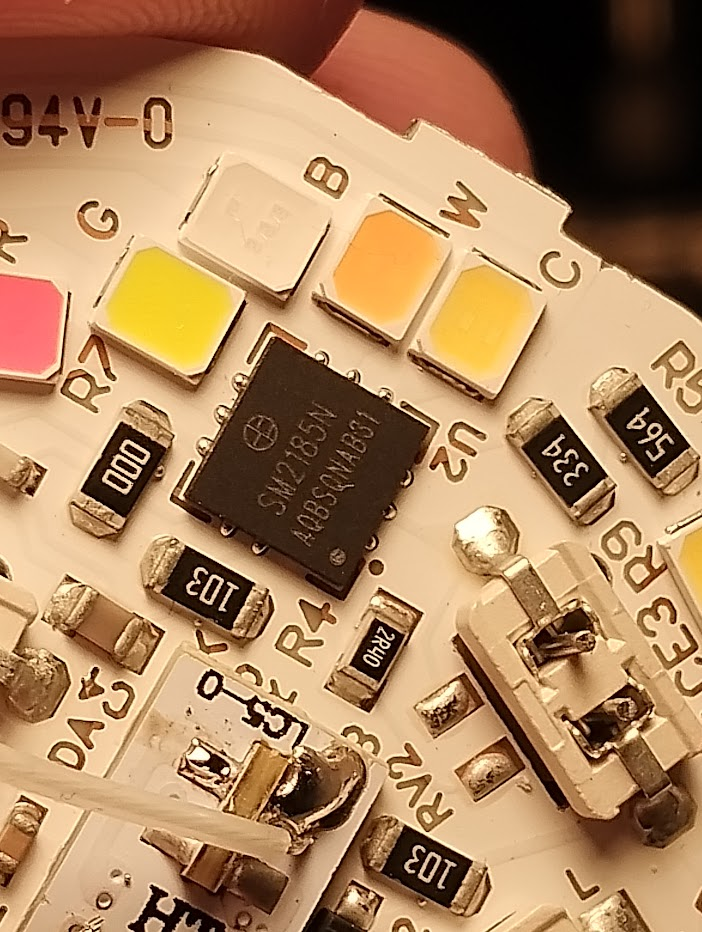
    Here is picture of the LED controller IC
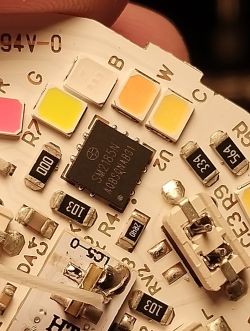
    Close-up of SM2185N chip on LED driver board with labeled RGB and white LEDs

    Another posts that helped me: https://www.elektroda.com/rtvforum/topic4014350.html
    Cool? Ranking DIY
    About Author
    b_st
    Level 3  
    Offline 
    b_st wrote 11 posts with rating 5, helped 1 times. Been with us since 2026 year.
  • ADVERTISEMENT
  • #2 21799111
    p.kaczmarek2
    Moderator Smart Home
    Thanks for sharing. Also, this looks like an important insight:
    b_st wrote:

    ANOTHER WARNING: Do not use Flag 12 ([LED] Remember LED driver state (RGBCW, enable, brightness, temperature) after reboot). The state of the LED driver is restored _BEFORE_ startup commands are executed, so the LEDs will run with too much current after a reboot.


    Well, I think I can easily move it to execute later, but then, wouldn't it overwrite settings from startup command?

    Maybe it would be better to adjust the default values to lower?

    Still, it's just a fraction of second, I think. Hopefully not enough to cause serious issue.

    For now, I've opened a PR proposal, it lowers default currents for SM2135 and SM2235.
    https://github.com/openshwprojects/OpenBK7231T_App/pull/1929
    What do you think, shall it be merged?
    @insmod @divadiow thoughts?
    Helpful post? Buy me a coffee.
  • #3 21799240
    insmod
    Level 29  
    >>21799111
    I think it's better to keep them as it is, except SM2135 CW (lower it to 10ma).
    That way they'll be default datasheet currents.
    As a way to fix this, move https://github.com/openshwprojects/OpenBK7231...d7b4dadf144bad5ceab0287/src/user_main.c#L1411
    to https://github.com/openshwprojects/OpenBK7231...d7b4dadf144bad5ceab0287/src/user_main.c#L1273

    Or start driver and set currents in early.bat?
  • #4 21799252
    p.kaczmarek2
    Moderator Smart Home
    I've been thinking about moving NewLED_RestoreSavedStateIfNeeded but I am worried that we will lose some part of control because of it, With NewLED_RestoreSavedStateIfNeeded called first, users can have custom script that overrides set colors, and with it moved, it will overwrite settings from script..

    But again, is there any real use case to this? Anyone who wants to control colors via script won't set "remember last state" flag.

    So maybe indeed the best solution is to move NewLED_RestoreSavedStateIfNeeded?

    Added after 1 [minutes]:

    Ahh, I remembered something else. I think we had a report , some long time ago, saying that NewLED_RestoreSavedStateIfNeeded has to be done before delay, otherwise a LED blink is visible when rebooting. Hmm, we would need to check. @divadiow do you have any bulbs?
    Helpful post? Buy me a coffee.
  • #5 21799279
    insmod
    Level 29  
    What do you think about moving early.bat execution after starting drivers? Plus change it from exec to startScript.
  • #6 21799334
    p.kaczmarek2
    Moderator Smart Home
    No strong feelings one way or the other, I think there are barely any use cases for early.bat. Maybe except... configuring some stuff that started drivers depend on?

    Still, the cost of adding third script call is very small, so maybe it's better to keep early as it is and introduce something like, I don't know, poststart? post.bat? Still, wouldn't want users to create post.bat with the idea of calling HTTP POST and getting it accidentally callled after drivers start...,
    Helpful post? Buy me a coffee.
  • ADVERTISEMENT
  • #7 21799335
    b_st
    Level 3  
    p.kaczmarek2 wrote:
    Still, it's just a fraction of second, I think. Hopefully not enough to cause serious issue.

    I'm afraid this is not the case (at least, as far as I can tell after enabling the debug log in SM2235_Write(). Commands are only sent to the LED controller if a new setting (brightness, color, etc) is made. Changing the current setting doesn't cause a new command to be sent to the LED controller. So the LEDs run on the default current until the brightness/color/etc is changed.

    p.kaczmarek2 wrote:
    But again, is there any real use case to this? Anyone who wants to control colors via script won't set "remember last state" flag.

    FYI: My solution is to always enable the LEDs using the startup command. In case my home automation system fails, I can always turn on a light by switching it off and on again. As a positive side effect this overwrites the current settings with the correct values.
  • #8 21799945
    divadiow
    Level 37  
    p.kaczmarek2 wrote:
    @divadiow do you have any bulbs?

    yes
  • #9 21799955
    p.kaczmarek2
    Moderator Smart Home
    b_st wrote:
    Changing the current setting doesn't cause a new command to be sent to the LED controller. So the LEDs run on the default current until the brightness/color/etc is changed.

    Ahh, that's it! I think it should be sent when current is changed! Do you agree? That can be our solution.
    Helpful post? Buy me a coffee.
  • ADVERTISEMENT
  • #10 21799994
    b_st
    Level 3  
    >>21799955 Yep, sounds like a decent solution.

    What is the approach you have in mind? Implement it in the driver itself (drv_sm2235.c)? That would require the driver to remember the last values passed to SM2235_Write() and repeat everything except the new current setting. Not sure if that conflicts with anything in cmd_newLEDDriver.c. I didn't dive too deep into that code yet.

    Added after 51 [minutes]:

    I made a PR anyway: https://github.com/openshwprojects/OpenBK7231T_App/pull/1931
  • #11 21800089
    p.kaczmarek2
    Moderator Smart Home
    It's certainly nice to see someone helping with PRs, as we are maintaining this project in free time, but I am not sure about this approach. This is too local, and same bug is in the other drivers as well.

    Maybe we could save I2C LED driver color in LED_I2CDriver_WriteRGBCW and then add LED_I2CDriver_Refresh() and call that Refresh from current change handlers of each driver?
    Helpful post? Buy me a coffee.
  • #12 21800102
    b_st
    Level 3  
    Sure, no problem. I think I understand your argument, that was the reason why I was asking for how to approach this. I'll look into your idea if that's all right for you.
  • #13 21800103
    p.kaczmarek2
    Moderator Smart Home
    We could also skip the "save colors in new array" part and try to call again apply_smart_light, but I am not sure if it would be safe.
    Helpful post? Buy me a coffee.
  • #14 21800122
    b_st
    Level 3  
    I couldn't say at the moment if it is safe, that's one hell of a function ;) What do you mean with 'safe'? Any unwanted side effects? Anyway, there is another driver that calls this function from a command function: PixelAnim_SetAnim() in drv_pixelAnim.c.
    I added a call to apply_smart_light() in SM2235_Current(), and it seems to work fine. When I set the 'restore LED state after reboot flag' setting the correct current from the startup command works.

    Added after 58 [minutes]:

    On the other hand, some other quick thoughts:
    - In terms of responsibilities it would be better IMHO to implement this in the LED controller drivers (eg drv_sm2235.c). It is the responsibility of those drivers to 'know' how and when to set current. E.g. some controllers have a separate message to set the current.
    - It feels a bit weird to call this specific function from a driver. The drivers shouldn't know about the existence of cmd_newLEDDriver.c, right?
    - It is necessary to make a change to most drivers anyway.
  • #15 21800146
    p.kaczmarek2
    Moderator Smart Home
    I got another idea:
    https://github.com/openshwprojects/OpenBK7231T_App/pull/1932
    Can you check? With smooth lerp and without it.

    Added after 9 [hours] 56 [minutes]:

    @divadiow @b_st let me know what's the state of it, whether I can merge it.
    Helpful post? Buy me a coffee.
  • ADVERTISEMENT
  • #16 21800577
    b_st
    Level 3  
    Sure! I'll try to find time to test this in the evening. Looks like this should work.

    Sorry to bother you with this, but if it was my decision I would go for the solution to solve this in the drivers, not in the LED logic. I just have a few hours of experience with the codebase, but as far as I can tell cmd_newLEDDriver.c isn't really a 'driver', but more like logic which translates things like brightness and temperature settings to RGBCW values (over time, in case of lerping). It kind of is (or at least could be*) completely hardware-independent. With this change the code gets more complicated, only to solve 'someone elses' problem. Now this code suddenly has to know that there exists some hardware that sometimes needs to repeat the RGBCW values _again_, just to update some other irrelevant parameter. That should be the problem of the LED current controller driver.

    If you want to implement it like this anyway: It seems like the if-statement in LED_ResendCurrentColors() is redundant with for example this one. Maybe you could consider to instead of adding a new function, remove the finalRGBCW parameter from LED_I2CDriver_WriteRGBCW(), and put the if-statement over there. I think this might help making other functions such as apply_smart_light() a bit simpler in the future as well. This would require to do another cleanup though: the function CMD_LEDDriver_WriteRGBCW() must be moved from drv_sm2135.c to cmd_newLEDDriver.c, because it can no longer pass an argument to LED_I2CDriver_WriteRGBCW() but has to write to finalColors directly.

    * = Currently the code seems to know about the difference between PWM and current control ICs, but I think you could move that out of this code as well.
  • #17 21800732
    p.kaczmarek2
    Moderator Smart Home
    No problem, I'm open to new suggestions. Can you update PR with your new proposed fix?

    b_st wrote:
    Now this code suddenly has to know that there exists some hardware that sometimes needs to repeat the RGBCW values _again_, just to update some other irrelevant parameter. That should be the problem of the LED current controller driver.

    Well, I am aware about this, and I am aware that's not perfect situation, but that's a sacrifice I'm ready to take. There is no possible scenario where LED I2C driver exists but there is no generic LED driver. Theoretically, it is certainly possible, but for me it's more important to avoid extra variable in RAM. That's because we have single build for most of the drivers, so adding those 16 bytes to RAM would add them for everybody, for people with relay devices, with PWM bulbs, with TuyaMCU, etc. If I go with such RAM-wasting approach, we will soon have to split firmware into even more variants.

    You are totally correct with your point, but you may be coming from different background, I don't know, Java, C#?

    Still, if you have a nicer idea, I'm open to considering it
    Helpful post? Buy me a coffee.
  • #18 21801379
    b_st
    Level 3  
    Your RAM argument sounds like a valid one, didn't realize that indeed all the drivers are always preset. That's a feature which is much appreciated IMO, makes it very easy to use. However, even 256 Kbyte is a lot for a microcontroller, I guess it will be hard to maintain this without introducing something like an allocation mechanism.

    I tested your change. Seems to work without problems as expected.

    p.kaczmarek2 wrote:
    You are totally correct with your point, but you may be coming from different background, I don't know, Java, C#?

    Not quite. I've done some amount of Java in the past, but my main business is embedded systems. Lots of microcontrollers, embedded Linux, C, Rust, etc.
  • #19 21801831
    p.kaczmarek2
    Moderator Smart Home
    Hmm ok, let's say, I will merge it for now, but if any suggestion arise, I'm open to changing it. Same goes for other parts of code - if you have any idea how to make it more elegant, while keeping it efficient, I'll be happy to hear you out! OpenBeken is a firmware made by community for community, so you can easily be a part of it - no need to wait long in queue, I'm here every day, ready to help with PRs.

    To be more precise - not ALL drivers are always present, we have obk_config.h where we enable/disable drivers, but still, driver code, if enabled in build, is still present in build (same as global vars, etc), so we try to keep it efficient.
    Helpful post? Buy me a coffee.
  • #20 21803278
    b_st
    Level 3  
    p.kaczmarek2 wrote:
    but if any suggestion arise, I'm open to changing it.

    I spent quite some time to implement the suggestion that I made, but it's clearly a bit harder than I thought to get this done. I thought the purposes of both finalColors and led_rawLerpCurrent was enough that I could eliminate one of them. But that seems not to be the case. Also, seems that there is a lot of background knowledge here that I'm missing. For example, LED_SetFinalRGBCW() enforces that either RGB leds are enabled or CW, never both. But at the other hand, LED_SetFinalRGBW() allows to enable them at the same time.

    The PR for making the soft I2C clock configurable is still open. Is there anything needed from my side from here to get it merged? Not in a hurry, no worries. Just curious what the process is.
  • #21 21803346
    p.kaczmarek2
    Moderator Smart Home
    Quote:

    Necessary to get a RGB LED bulb working (Action LSC SMART GLS A60 SMD 220-240V 8W 700lm RGB + 2700-6500K E27). It has a SM2185N controller, which seems to work with the SM2235 driver. However because the frequency of the CLK line is too high, the SM2185N controller often misinterprets frames. When turning on or off the LED, changing the brightness or color random thing happen.

    Therefore, this change makes it possible to lower the clock frequency using a new command: SoftI2C_SetClkPeriod. The default period is 4, setting it to 40 seems to be fine.

    This change also removes a duplicate definition of SM2135_DELAY.

    I will make a forum post with more details about this device.

    Ah, I see, interesting idea. I wasn't aware about SM2185N. So, are you sure it's worth to add command for that? Not just globally bump delay up?

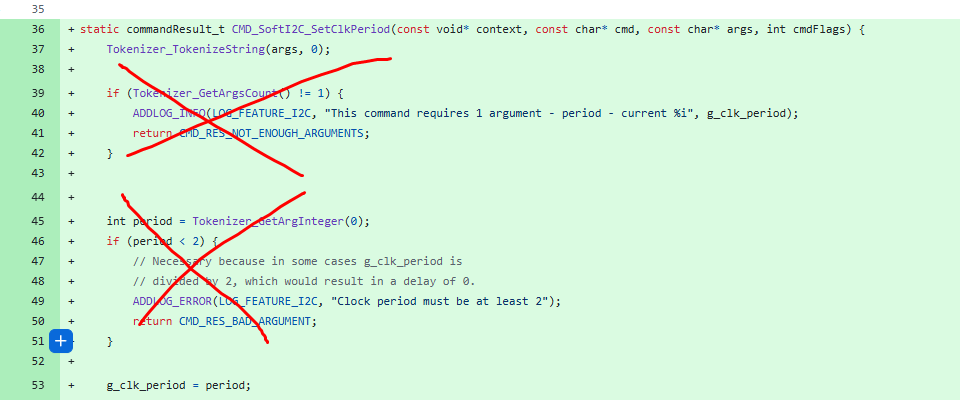
    Ok, I can agree for a command, but I require a change. Look, here is how we check arguments:
    Code: C / C++
    Log in, to see the code

    So this needs to be changed:
    Screenshot of code editor showing modified C function CMD_SoftI2C_SetClkPeriod
    To be more precise:
    - let our automatic message handle it without argument
    - if set lower than 2, I'd say, just clamp to 2, or just allow 0 , as in "no delay"
    The motivation is simple - you're adding an advanced command that 1% of users will know about, and we are already forced to split binaries into variants because we are running out of flash. I didn't check, but I think that at least 50% of flash increase is from the strings in your patch. And keeping binary small is important for us, it also breaks LFS on BK7231T when flash size grows, and if I remember correctly, it also silently breaks BL602 OTA.
    Helpful post? Buy me a coffee.
  • #22 21803364
    b_st
    Level 3  
    p.kaczmarek2 wrote:
    So, are you sure it's worth to add command for that? Not just globally bump delay up?

    Ah, I solved this with a command because I assumed just changing the default clock might break other drivers. But probably this is a bit too cautious. I agree this is indeed a bit of an 'advanced' command, so that might be a good reason to try to avoid this.
  • #23 21803372
    p.kaczmarek2
    Moderator Smart Home
    @insmod, what do you think, do we merge this command? I think we can, as long as requested changes are made.
    Helpful post? Buy me a coffee.
  • #25 21803401
    b_st
    Level 3  
    All right! I made the changes as requested.
  • #26 21804195
    b_st
    Level 3  
    Thanks for your time and merging the changes. I updated the initial post with the fixes.
📢 Listen (AI):

Topic summary

The discussion focuses on successfully running OpenBeken firmware on the Action LSC 8W 700lm RGB + 2700-6500K E27 LED bulb, which uses a CBLC5 module with the BK7231N chip. Key hardware details include the SM2185N LED driver and a BP2571 buck converter supplying 3.3V to the CBLC5 module. Disassembly involves removing metal threads by screwing the bulb into a socket and gently detaching it, with UART TX and RX pads on the CBLC5 module requiring soldered wires for programming. The reset pad is optional if the correct programming tool is used. A linked pull request proposes lowering default current values for SM2135 and SM2235 LED drivers to improve startup behavior, addressing concerns about potential overwriting of settings during initialization.
Summary generated by the language model.
ADVERTISEMENT