logo elektroda
logo elektroda
X
logo elektroda

[Youtube] WinnerMicro W600/Air602 DIY Weather Station with OpenBeken and DHT11 guide step by step

p.kaczmarek2 3078 2

TL;DR

  • The project turns a WinnerMicro W600 or Air602 board into a simple weather station with OpenBeken and a DHT11 sensor.
  • It walks through OBK programming, Wi‑Fi pairing, a LED-and-button example, and DHT11 support for humidity and temperature readings.
  • The setup uses the DHT11 sensor, 3.3V power from the Air602 board, and the W600 platform firmware-burning step over UART.
  • Humidity and temperature data can be published via MQTT to Home Assistant or any other MQTT broker.
  • Home Assistant Discovery is not covered, and the video points to a separate pairing tutorial.
Generated by the language model.
ADVERTISEMENT
📢 Listen (AI):
  • [Youtube] WinnerMicro W600/Air602 DIY Weather Station with OpenBeken and DHT11 guide step by step
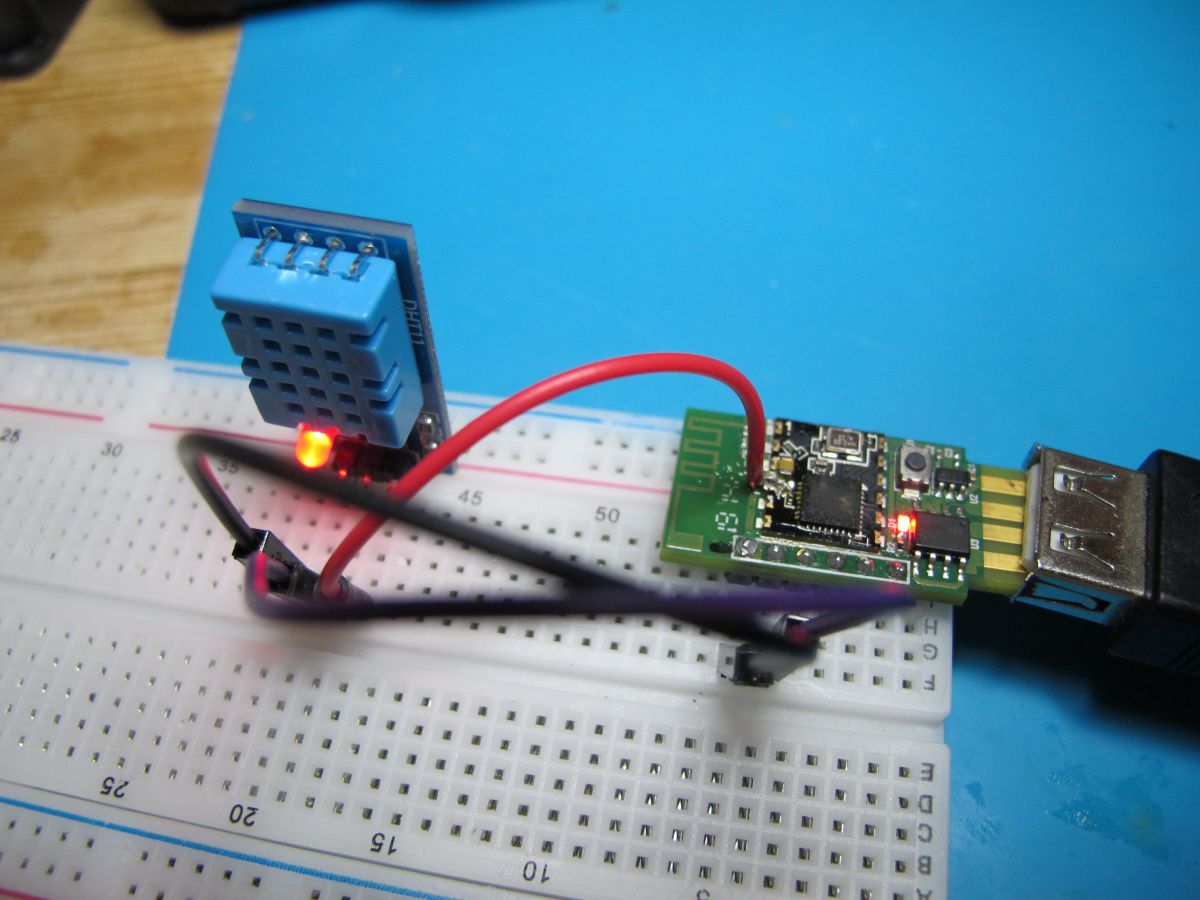
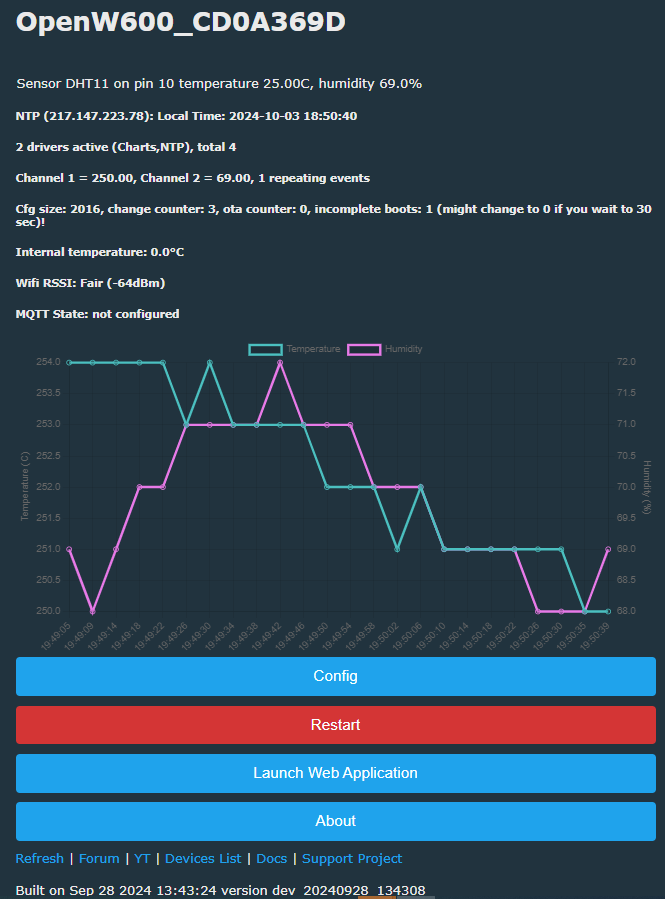
    Here's a step by step guide showing how to use OpenBeken to create a simple Weather station with DHT11 sensor. The guide covers OBK programming (for W600 platform), initial setup (pairing with WiFi), then shows a short example showing how to use a LED and Button with OBK, and finally, covers DHT11 support to get humidity and temperature reading, which can be later published via MQTT to Home Assistant or any other MQTT broker.
    Some miscellaneous steps, like Air602 pinout or a method to get 3.3V from Air602 board are also included in the video.


    The Home Assistant Discovery (pairing) is not covered in the video. We have separate tutorial about that:
    https://www.youtube.com/watch?v=pkcspey25V4
    Here are some useful links related to the project.
    Project repository:
    https://github.com/openshwprojects/OpenBK7231T_App
    W600 flash tool wm_tool.exe:
    https://github.com/openshwprojects/OpenW600/tree/master/tools
    OBK releases:
    https://github.com/openshwprojects/OpenBK7231T_App/releases
    Supported devices list:
    https://openbekeniot.github.io/webapp/devicesList.html

    Thank you for watching. Keep in mind that the same approach (with only difference being the firmware burning via UART step) can be done also on other supported platforms, like BK7231, BL602, W800, etc. Have fun!


    Update 2026
    As of 2026, this platform read/write is also supported by our flash tool:
    https://github.com/openshwprojects/BK7231GUIFlashTool
    The connection (soldering, wires), is the same, but you can use our tool instead of the legacy one.
    Please check it out and use it instead of legacy tools, let us know how it works for you!

    Cool? Ranking DIY
    Helpful post? Buy me a coffee.

    About Author
    p.kaczmarek2
    Moderator Smart Home
    Offline 
    p.kaczmarek2 wrote 14412 posts with rating 12357, helped 650 times. Been with us since 2014 year.
  • ADVERTISEMENT
  • #3 21811296
    p.kaczmarek2
    Moderator Smart Home
    Posts: 14412
    Help: 650
    Rate: 12357
    Update 2026
    As of 2026, this platform read/write is also supported by our flash tool:
    https://github.com/openshwprojects/BK7231GUIFlashTool
    The connection (soldering, wires), is the same, but you can use our tool instead of the legacy one.
    Please check it out and use it instead of legacy tools, let us know how it works for you!
    Helpful post? Buy me a coffee.
📢 Listen (AI):

FAQ

TL;DR: Build a Wi-Fi weather station in 25 minutes, logging ±2 °C/±5 %RH DHT11 readings [Aosong, 2023]; “flashing W600 is one-click easy” [Elektroda, p.kaczmarek2, post #20573775] Use OpenBeken firmware, Air602 board and MQTT to stream data.

Why it matters: A $4 board plus free firmware turns into a networked sensor that slots straight into Home Assistant.

Quick Facts

• MCU: WinnerMicro W600, 80 MHz Cortex-M3, 288 KB SRAM [WinnerMicro, 2022] • OpenBeken W600 binary ≈ 340 KB flash, 46 KB RAM at boot [OpenBeken Release, 2024] • DHT11 range 0–50 °C, 20–90 %RH; accuracy ±2 °C/±5 %RH [Aosong, 2023] • Air602 board price: US $2–4 (Oct 2024) [AliExpress List, 2024] • Flash/logic voltage: 3.3 V only [Elektroda, p.kaczmarek2, post #20573775]

What parts are required for the OpenBeken Air602 weather station?

You need an Air602 (W600) development board, a DHT11 sensor, a 3.3 V USB-TTL adapter, three jumper wires, and a 5 V USB power source. Optional: one LED and one push-button for extra GPIO tests [Elektroda, p.kaczmarek2, post #20573775]

How do I flash OpenBeken onto the Air602?

  1. Hold the BOOT pin low and reset the board.
  2. In Upgrade Tools, select the OpenBeken W600 BIN, 0x000000 address, 115 200 bps.
  3. Click Start; wait for the 100 % bar, then power-cycle the board. Total time ≈ 30 s.

How is the DHT11 wired to the Air602?

Connect DHT11 VCC to 3.3 V, GND to GND, and DATA to GPIO 8 (default). Enable the internal pull-up in software; no external resistor needed [Elektroda, p.kaczmarek2, post #20573775]

How do I read temperature and humidity in OpenBeken?

In the web console run: SetPinRole 8 DHT11; SetPinChannel 8 1. Readings appear under “Sensors” every 2 s and publish via MQTT if enabled [OpenBeken Docs, 2024].

Can I push the data straight into Home Assistant?

Yes. Enable MQTT in OpenBeken, then copy the broker IP, user, and password. Home Assistant auto-discovers the payload when you toggle ‘HomeAssistantDiscovery 1’ in the console [OpenBeken Docs, 2024].

What power supply does the Air602 need?

The module runs at 3.3 V and draws up to 120 mA during Wi-Fi TX bursts [WinnerMicro, 2022]. Steady 500 mA USB supplies are adequate.

Common flashing errors and fixes?

‘Sync failed’ usually means BOOT pin left high—hold it low. A verified but non-booting board often indicates 5 V applied to GPIOs; the W600 is not 5 V-tolerant [WinnerMicro, 2022]. "Always double-check your meter before bricking hardware," warns one maintainer [Elektroda, divadiow, post #21249449]

How accurate is DHT11 versus DHT22?

DHT11 offers ±2 °C and ±5 %RH, sampling every second [Aosong, 2023]. DHT22 improves to ±0.5 °C and ±2 %RH but costs about 3× more [Adafruit, 2024].

Can I reuse the firmware on other chips or sensors?

OpenBeken builds exist for BK7231, BL602, W800 and more; only the UART flashing step differs [Elektroda, p.kaczmarek2, post #20573775] Any GPIO-based sensor supported in OBK (e.g., DS18B20, PIR) works after role assignment.

What resources does OpenBeken occupy on the W600?

The current release uses ≈ 340 KB flash and 46 KB RAM, leaving 60 KB RAM free for user tasks [OpenBeken Release, 2024]. An update with TLS will trim free RAM to about 28 KB.
Generated by the language model.
ADVERTISEMENT