
logo elektroda
logo elektroda
X
logo elektroda
Dostępna jest polska wersja

Czy wolisz polską wersję strony elektroda?

Nie, dziękuję Przekieruj mnie tam

[BK7231N ] Teardown of TH08 LCD Calendar/clock/temperature/humidity, 3xAAA battery, backlight

morgan_flint 43893 254

TL;DR

  • TH08-CBU-ATH20-V2 is a LCD calendar/clock/temperature/humidity unit with a BK7231N CBU module, BL55070 LCD driver, and ATH20 sensor.
  • U3 appears to be the Tuya MCU, while U8 with a 32.768 kHz crystal likely handles RTC and LCD/backlight control, and Q1 switches Wi‑Fi power.
  • It runs from 3xAAA cells at 4.5V and was bought for 4.49€ as a Choice offer.
  • The Tuya app shows a 1 hour update interval, and pairing can fail because the device connects only briefly between updates.
Generated by the language model.
ADVERTISEMENT
📢 Listen (AI):
  • #241 21625858
    divadiow
    Level 38  
    Posts: 5065
    Help: 438
    Rate: 893
    still only those IDs

    Code: JSON

    Log in, to see the code
  • ADVERTISEMENT
  • #242 21626813
    bogdanelhh
    Level 4  
    Posts: 8
    Rate: 6
    It seems that after recharging the batteries stopped working and I had to reflash it. Is there something I can do to prevent this from happening ?
  • ADVERTISEMENT
  • #243 21693614
    sebgarske
    Level 6  
    Posts: 9
    Help: 1
    Rate: 1
    >>21626813 I'm facing the same issue on all 4 of them. It seems to be an issue with the wifi module. Logging is kind of hard to obtain since I have to desolder the pins again
  • ADVERTISEMENT
  • #244 21694711
    sebgarske
    Level 6  
    Posts: 9
    Help: 1
    Rate: 1
    I was able to collect some logs via TX2. The MCU RX/TX and Pin 8 are disconnected:

    V:BK7231N_1.0.1
    REG:cpsr     spsr     r13      r14
    SVC:000000D3          00401C1C 000033AC
    IRQ:000000d2 00000010 00401e0c eee356f7
    FIR:000000d1 00000010 00401ffc f9c5abad
    SYS:000000df          0040192c 00000158
    ST:00000000
    J 0x10000
    bk_misc_init_start_type 0 0
    prvHeapInit-start addr:0x4144f0, size:113424
    [Flash]id:0xeb6015
    sctrl_sta_ps_init
    cset:0 0 0 0
    OpenBK7231N, version 1.18.176
    Entering initLog()...
    Commands registered!
    initLog() done!
    Info:MAIN:Main_Init_Before_Delay
    undefined instruction
    Current regs:
    r00:0xdd3000e2
    r01:0x00000000
    r02:0x005dd352
    r03:0x00000052
    r04:0x005dd300
    r05:0xffbf767f
    r06:0x003ff1ce
    r07:0xdd300000
    r08:0x08080808
    r09:0x09090909
    r10:0x10101010
    
    fp :0x11111111
    ip :0xffe38350
    sp :0x00406070
    lr :0x0080006e
    pc :0x0080006e
    SPSR:0x800000ff
    CPSR:0x800000db
    
    separate regs:
    SYS:cpsr r8-r14
    0x800000df
     0x08080808
    0x09090909
    0x10101010
    0x11111111
    0xffe38350
    0x00415618
    0x003ff1b7
    IRQ:cpsr spsr r8-r14
    0x800000d2
    0x6000001f
    0x08080808
     0x09090909
     0x10101010
    0x11111111
    0xffe38350
    0x004078a8
    0x003ffd70
    
    FIR:cpsr spsr r8-r14
    0x800000d1
    0x00000010
    0x00000000
    0x00000000
    0x00000000
    0x00000000
    0x00000000
    0x004068b8
    0xf9c5abad
    
    ABT:cpsr spsr r8-r14
    0x800000d7
    0x00000010
    0x08080808
    0x09090909
    0x10101010
    0x11111111
    0xffe38350
    0x004060b8
    0x9980fef0
    
    UND:cpsr spsr r8-r14
    0x800000db
    0x800000ff
    0x08080808
    0x09090909
    0x10101010
    0x11111111
    0xffe38350
    0x00406068
    0x0080006e
    
    SVC:cpsr spsr r8-r14
    0x800000d3
    0x200000df
    0x08080808
    0x09090909
    0x10101010
    0x11111111
    0xffe38350
    0x00408078
    0x0008b360
    
    shutdown...
  • #245 21695699
    fjcns
    Level 6  
    Posts: 9
    To connect the wires for serial communication between the CBU and the programmer, connect the CBU's RX to the programmer's TX, which is also connected to the MCU's TX. The MCU will want to communicate when powered, interfering with serial communication. The CBU's TX connects to the programmer's RX, which is also the MCU's RX.

    From what I understand about the thermostat, the MCU only updates on startup and when there is a change in temperature or humidity to save battery power.

    When working at the bench with a light over the board, a soldering iron/soldering station nearby, and soldering wires to the board, increases the temperature on the board, even drafts can make the MCU want to communicate more often, thus interfering with serial communication.

    After soldering the wires, with the thermostat connected and the CBU powered directly with 3V so that the MCU doesn't cut off its power, let the board stabilize its temperature.

    This way, the MCU performs the initial communication and stops interfering with the serial communication.

    In my case, it wasn't necessary to desolder the MCU pins.
  • ADVERTISEMENT
  • #246 21696663
    morgan_flint
    Level 14  
    Posts: 251
    Help: 4
    Rate: 60
    fjcns wrote:
    In my case, it wasn't necessary to desolder the MCU pins.

    In some cases, I've also had success without interrupting the connection between WiFi module and MCU, but I also managed to kill an MCU's TX pin. I think it's advisable to interrupt at least the connection between MCU's TX and WiFi module's RX to avoid the programmer and the MCU "fighting" each other to send different levels, if the MCU decides to wake up and send info while you're programming
  • #247 21696685
    sebgarske
    Level 6  
    Posts: 9
    Help: 1
    Rate: 1
    >>21695699 I know that and already managed to flash 4 of them. My problem is rather that after some amount of time when the batteries are empty and I replace them the CBU crashes on startup. You can obtain the logs via TX2/RX2. To rule out the MCU as a cause I disconnected it. It seems something is off in OpenBeken. Most concerning is this: "undefined instruction" right before the crash.
  • #248 21745721
    nogard0
    Level 1  
    Posts: 1
    Rate: 2
    >>21696685
    I had exactly the same issue.
    The first device I encountered this with got bricked before I managed to debug it and figure out what was actually going on.

    A few months later I ordered another one, flashed it successfully, and everything worked perfectly — until the batteries ran out. I found it about 5 days later (the screen was still working fine, showing 2 out of 3 bars, but as soon as it tried to sync and power up the MCU, the battery indicator dropped to 1 bar).

    Of course, it didn’t boot after replacing the batteries. I’m quite sure the corruption happens after many failed boot attempts when the battery is too low. The MCU has exactly 10 seconds to start communication with the TuyaMCU, otherwise it is forcibly restarted by it.

    I reflashed it, and when it still didn’t start, I connected TX2/RX2 — it turned out the device boots only up to the point where it tries to read the Boot Count from flash:

    Spoiler:
    
    .....
    [Flash]id:0xeb6015
    sctrl_sta_ps_init
    cset:0 0 0 0
    OpenBK7231N, version 1.18.206
    Entering initLog()...
    Commands registered!
    initLog() done!
    Info:MAIN:Main_Init_Before_Delay
    <hangs here>


    So my current theory is that repeated brownouts while accessing the flash cause permanent corruption.

    In the end, I recompiled the firmware with
    #define DISABLE_FLASH_VARS_VARS

    and as soon as I flashed that, it started working normally again.

    Now it doesn’t store any runtime state or count restarts (so it has no protection if Wi-Fi fails to connect), but for this particular device that’s completely fine — and it should also prevent the same issue when the batteries run out next time.

    Here’s my fork of the latest version, rebuilt with DISABLE_FLASH_VARS_VARS:
    https://github.com/nogard0/OpenBK7231T_App/releases/tag/1.18.207.1

    And here’s my current autoexec.bat:
    Spoiler:
    clearIO
    PowerSave 1
    startDriver NTP
    // ntp_setServer pool.ntp.org
    ntp_setServer 192.168.40.1
    
    // EEST time zone
    alias winter_time ntp_timeZoneOfs 2
    alias summer_time ntp_timeZoneOfs 3
    
    winter_time
    
    // summertime
    alias check1 if $month>3 then summer_time
    alias check2 if $month==3&&31-$mday+$day<=6&&$day>0 then summer_time
    alias check3 if $month==3&&31-$mday+$day<=6&&$day=0&&$hour>=2 then summer_time
    
    // wintertime
    alias check4 if $month>10 then winter_time
    alias check5 if $month==10&&31-$mday+$day<=6&&$day>0 then winter_time
    alias check6 if $month==10&&31-$mday+$day<=6&&$day=0&&$hour>=3 then winter_time
    
    alias set_time backlog check1;check2;check3;check4;check5;check6
    
    startDriver TuyaMCU
    startDriver tmSensor
    
    setChannelType 1 temperature_div10
    linkTuyaMCUOutputToChannel 1 val 1
    
    setChannelType 2 Humidity
    linkTuyaMCUOutputToChannel 2 val 2
    
    setChannelType 3 ReadOnlyLowMidHigh
    setChannelLabel 3 "Batt_state"
    linkTuyaMCUOutputToChannel 3 val 3
     
    waitfor NTPState 1
    set_time
  • #249 21752721
    flecom
    Level 1  
    Posts: 1
    I've got one of these with a BK7238, flashed it with openbk and made an autoexec that looks like this:
    clearIO
    PowerSave 1
    startDriver NTP
    ntp_setServer 192.168.1.1
    
    // EDT-EST time zone
    alias winter_time ntp_timeZoneOfs -5
    alias summer_time ntp_timeZoneOfs -4
    
    winter_time
    
    // summertime
    alias check1 if $month>3 then summer_time
    alias check2 if $month==3&&31-$mday+$day<=6&&$day>0 then summer_time
    alias check3 if $month==3&&31-$mday+$day<=6&&$day=0&&$hour>=2 then summer_time
    
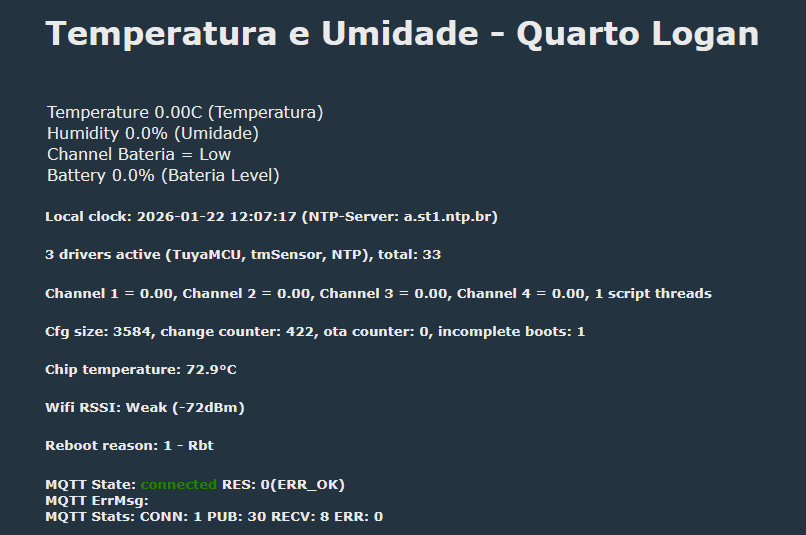
    // wintertime
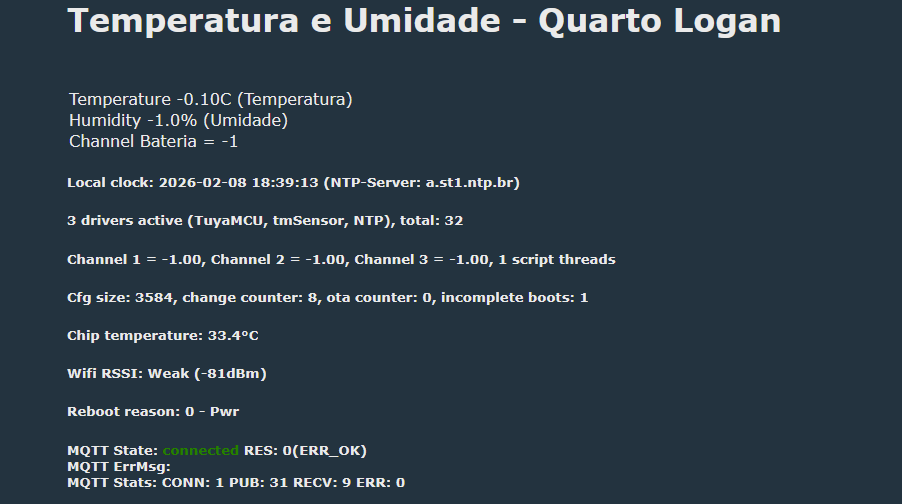
    alias check4 if $month>10 then winter_time
    alias check5 if $month==10&&31-$mday+$day<=6&&$day>0 then winter_time
    alias check6 if $month==10&&31-$mday+$day<=6&&$day=0&&$hour>=3 then winter_time
    
    alias set_time backlog check1;check2;check3;check4;check5;check6
    
    startDriver TuyaMCU
    delay_s 2
    uartSendHex 55AA001000070101090400010026
    startDriver tmSensor
    
    setChannelType 1 temperature_div10
    linkTuyaMCUOutputToChannel 1 val 1
    
    setChannelType 2 Humidity
    linkTuyaMCUOutputToChannel 2 val 2
    
    setChannelType 3 ReadOnlyLowMidHigh
    setChannelLabel 3 "Batt_state"
    linkTuyaMCUOutputToChannel 3 val 3
     
    waitfor NTPState 1
    set_time
    
    // now wait for MQTT
    waitFor MQTTState 1
    // now wait for channel 1 to become non zero
    // if channel 1 is still 0, loop, wait 0.1s and check again
    again:
    delay_s 0.1
    if $CH1==0 then goto again
    publish DATA {"ROOM":"1","TEMPERATURE":$CH1,"HUMIDITY":$CH2}


    but all the data in the web ui is 0s... and the log all I see tons of this:

    Info:TuyaMCU:Consumed 20 unwanted non-header byte in Tuya MCU buffer
    Info:TuyaMCU:Skipped data (part) 00 00 00 00 00 00 00 00 00 00 00 00 00 00 00 00 00 00 00 00 
    Info:TuyaMCU:Consumed 20 unwanted non-header byte in Tuya MCU buffer
    Info:TuyaMCU:Skipped data (part) 00 00 00 00 00 00 00 00 00 00 00 00 00 00 00 00 00 00 00 00 
    Info:TuyaMCU:Consumed 40 unwanted non-header byte in Tuya MCU buffer
    Info:TuyaMCU:Skipped data (part) 00 00 00 00 00 00 00 00 00 00 00 00 00 00 00 00 00 00 00 00 00 00 00 00 00 00 00 00 00 00 00 00 00 00 00 00 00 00 00 00 
    Info:TuyaMCU:Consumed 20 unwanted non-header byte in Tuya MCU buffer
    Info:TuyaMCU:Skipped data (part) 00 00 00 00 00 00 00 00 00 00 00 00 00 00 00 00 00 00 00 00 
    Info:TuyaMCU:Consumed 20 unwanted non-header byte in Tuya MCU buffer
    Info:TuyaMCU:Skipped data (part) 00 00 00 00 00 00 00 00 00 00 00 00 00 00 00 00 00 00 00 00 
    Info:TuyaMCU:Consumed 20 unwanted non-header byte in Tuya MCU buffer
    Info:TuyaMCU:Skipped data (part) 00 00 00 00 00 00 00 00 00 00 00 00 00 00 00 00 00 00 00 00 
    Info:TuyaMCU:Consumed 20 unwanted non-header byte in Tuya MCU buffer
    Info:TuyaMCU:Skipped data (part) 00 00 00 00 00 00 00 00 00 00 00 00 00 00 00 00 00 00 00 00 
    Info:TuyaMCU:Consumed 20 unwanted non-header byte in Tuya MCU buffer
    Info:TuyaMCU:Skipped data (part) 00 00 00 00 00 00 00 00 00 00 00 00 00 00 00 00 00 00 00 00 
    Info:TuyaMCU:Consumed 40 unwanted non-header byte in Tuya MCU buffer
    Info:TuyaMCU:Skipped data (part) 00 00 00 00 00 00 00 00 00 00 00 00 00 00 00 00 00 00 00 00 00 00 00 00 00 00 00 00 00 00 00 00 00 00 00 00 00 00 00 00 
    Info:TuyaMCU:Consumed 20 unwanted non-header byte in Tuya MCU buffer
    Info:TuyaMCU:Skipped data (part) 00 00 00 00 00 00 00 00 00 00 00 00 00 00 00 00 00 00 00 00 
    Info:TuyaMCU:Consumed 20 unwanted non-header byte in Tuya MCU buffer
    Info:TuyaMCU:Skipped data (part) 00 00 00 00 00 00 00 00 00 00 00 00 00 00 00 00 00 00 00 00 
    Info:TuyaMCU:Consumed 20 unwanted non-header byte in Tuya MCU buffer
    Info:TuyaMCU:Skipped data (part) 00 00 00 00 00 00 00 00 00 00 00 00 00 00 00 00 00 00 00 00


    i verified the connections between the tuyamcu and the wifi module are ok, any hints?
  • #250 21762087
    p.kaczmarek2
    Moderator Smart Home
    Posts: 14622
    Help: 655
    Rate: 12639
    Don't do this:
    
    if $CH1==0 then goto again
    

    It looks like an attempt to avoid data publish before measurement, but it could be easier maybe, if you measure often, just save the previous measurement in flash (Set channel startup value) to -1 so the value is remembered.

    uartSendHex 55AA001000070101090400010026

    This was never required with tmSnsor I think
    Helpful post? Buy me a coffee.
  • #251 21810847
    GoldMember
    Level 12  
    Posts: 26
    Rate: 1
    flecom wrote:
    I've got one of these with a BK7238, flashed it with openbk and made an autoexec that looks like this:


    I also bought one and it has BK7238 (T1-U-HL). Flashed it sucesfully but can't get readings. Did you manage to make it working?
  • #252 21816310
    tadeu1
    Level 5  
    Posts: 80
    Help: 2
    Rate: 3
    I trick to still alive the wifi module, its leave CEN to 3.3 (high)

    Added after 1 [hours] 17 [minutes]:

    >>20945212

    its necessary to leave the wire?
    its same as mine
    can you share you config, autoexec, flag etc please!

    Added after 1 [hours] 35 [minutes]:

    hey guys, i read all the 9 pages and still very confuse for me
    mine is the same as this one for
    https://www.elektroda.com/rtvforum/topic4000657-210.html#21599220 @blacksun2

    1-What is the correct config for autoexec?
    2-also the flags
    3-I have to leave the mcu tx and rx connect to the CBU module?
    4-the display not sync the time
    mine is show 0 in the web, in the screen its ok (not the time)


    my acutal autoexec, I try almost all autoexec from this topic
    clearIO
    PowerSave 1

    // NTP BRAZIL
    startDriver ntp
    ntp_setServer a.st1.ntp.br
    waitFor NTPState 1
    ntp_timeZoneOfs -3:00

    // flags 2 10 19 37 51
    Flags 2251937253164036
    startDriver TuyaMCU
    delay_s 2
    //uartSendHex 55AA001000070101090400010026
    startDriver tmSensor


    //tuyaMcu_setBaudRate 115200
    //tuyaMcu_defWiFiState 4


    setChannelType 1 temperature_div10
    linkTuyaMCUOutputToChannel 1 val 1
    setChannelLabel 1 "Temperatura"

    setChannelType 2 Humidity
    linkTuyaMCUOutputToChannel 2 val 2
    setChannelLabel 2 "Umidade"

    setChannelType 3 ReadOnlyLowMidHigh
    linkTuyaMCUOutputToChannel 3 val 3
    setChannelLabel 3 "Bateria"


    setChannelType 4 BatteryLevelPercent
    linkTuyaMCUOutputToChannel 4 val 4
    setChannelLabel 4 "Bateria Level"


    mqtt_broadcastItemsPerSec 20


    waitfor NTPState 1
    set_time

    // now wait for MQTT
    waitFor MQTTState 1
    // now wait for channel 1 to become non zero
    // if channel 1 is still 0, loop, wait 0.1s and check again
    again:
    delay_s 0.1
    if $CH1==0 then goto again
    publish DATA {"Temperatura":$CH1,"Umidade":$CH2,"Bateria":$CH3,"Bateria Level":$CH4}

    // this is autoexec.bat, it runs at startup, you should restart after making changes
    // target to ping
    PingHost 172.16.0.1
    // interval in seconds
    PingInterval 10
    // events to run when no ping happens
    addChangeHandler noPingTime > 600 reboot


    Screenshot of dashboard showing temperature, humidity, WiFi, and MQTT stats

    Added after 2 [hours] 44 [minutes]:
  • #253 21823245
    tadeu1
    Level 5  
    Posts: 80
    Help: 2
    Rate: 3
    I have one similar and get dpid from tuya

    
    {
    	"1": "Temperature",
    	"2": "Humidity",
    	"3": "Battery Status",
    	"9": "Temperature Unit",
    	"23": "Temperature Calibration",
    	"24": "Humidity Calibration"
    }


    {
    	"modelId": "e1n3p63s",
    	"dpids": {
    		"1": {
    			"code": "temp_current",
    			"name": "Temperature",
    			"access": "read_only",
    			"type": "value",
    			"unit": "°C",
    			"scale": 1,
    			"min": -99,
    			"max": 600
    		},
    		"2": {
    			"code": "humidity_value",
    			"name": "Humidity",
    			"access": "read_only",
    			"type": "value",
    			"unit": "%",
    			"scale": 0,
    			"min": 0,
    			"max": 100
    		},
    		"3": {
    			"code": "battery_state",
    			"name": "Battery Status",
    			"access": "read_only",
    			"type": "enum",
    			"values": [
    				"low",
    				"middle",
    				"high"
    			]
    		},
    		"9": {
    			"code": "temp_unit_convert",
    			"name": "Temperature Unit",
    			"access": "read_write",
    			"type": "enum",
    			"values": [
    				"c",
    				"f"
    			]
    		},
    		"23": {
    			"code": "temp_calibration",
    			"name": "Temperature Calibration",
    			"access": "read_write",
    			"type": "value",
    			"unit": "°C",
    			"scale": 1,
    			"min": -20,
    			"max": 20
    		},
    		"24": {
    			"code": "hum_calibration",
    			"name": "Humidity Calibration",
    			"access": "read_write",
    			"type": "value",
    			"unit": "%",
    			"scale": 0,
    			"min": -10,
    			"max": 10
    		}
    	}
    }


    Added after 4 [hours] 14 [minutes]:

    @p.kaczmarek2 @insmod @divadiow any guess on these new th08
    everything still 0 on web
    on screen the date show 0 , but the temperature and humidity its ok
  • #254 21833293
    tadeu1
    Level 5  
    Posts: 80
    Help: 2
    Rate: 3
    No ideia why just still like this


    Screenshot of “Temperatura e Umidade - Quarto Logan” dashboard with readings and MQTT status
  • #255 21837982
    auntlydia
    Level 10  
    Posts: 70
    Help: 2
    Rate: 14
    >>21745721 Hello and thanks for this post. It's been a while since I followed up on this thread and there have been lots of developments here, including new device revisions. I use three of the "old" TH08, let's call them V1 devices with the two MCU chips. I have the same issue with the brick after batteries run out: It seems when the batteries' voltage drops too low, there is one point when something is happening to prevent supplying the CBU module with sufficient power to power up and connect to WiFi. I measure 0.3A on the device's battery terminals when supplying 4.5V to it with my PSU after this happens. After erasing and reflashing firmware, it fluctuates between 0.3 and 0.7A and the WiFi connects. So, as @nogard0 suggested when saying "brownouts", my guess is that there is some issue with OpenBK going to failsafe mode after 5 failed attempts to connect to WiFi and then putting the CBU into Hotspot mode. I tried to keep the button pressed while searching for the Hotspot but it didn't work.

    This is normally not a big problem when remembering to replace the batteries around every 6 weeks or in the best case just use a stable 4 to 5VDC power supply. But when forgetting to replace them on time, reflashing seems necessary.

    I will try the fork you provided and see if it helps. Also, keeping soldered wires for easier connection outside the housing would simplify the reflashing.

    I don't have deep insight on how the standard OpenBK firmware could handle to avoid all this, but would it technically be possible? With a command in autoexec or a flag?

    Also, great work on modifying the autoexec to automatically determine summer or winter time =) Thank you!
📢 Listen (AI):

Topic summary

✨ The discussion centers on the teardown, firmware modification, and protocol analysis of the TH08 LCD calendar/clock/temperature/humidity sensor powered by 3xAAA batteries with backlight, based on the BK7231N chip. The device is identified as a newer version of the TH06 model, featuring a TuyaMCU module communicating via a low-power Tuya serial protocol (version 00). Users successfully flashed OpenBK firmware without desoldering, enabling temperature, humidity, and battery monitoring with MQTT integration and NTP time synchronization. Key challenges included understanding the MCU-module communication, especially time synchronization commands and power management to optimize battery life. The MCU sends commands such as ObtainDPCache and ObtainLocalTime, with the WiFi module responding accordingly. Firmware updates improved battery consumption by ensuring the WiFi module powers down promptly after data transmission. The device’s RTC (U8) communicates with the MCU (U3) over a serial or I2C-like interface, with ongoing efforts to decode this traffic. Users experimented with modifying battery power sources, including LiPo and USB power mods with step-down regulators, confirming device operation at voltages between 3.3V and 4.5V. The Tuya app lacks options to adjust sensor reporting intervals, and attempts to change polling times via Tuya protocol commands were unsuccessful, likely due to firmware limitations. Serial sniffing and analysis tools like TuyaMCU Analyzer and SniffUART were used to decode dpIDs, confirming dpID 1 as temperature, dpID 2 as humidity, dpID 3 as battery state, and dpID 9 as Celsius/Fahrenheit setting. Firmware versions and MCU versions were compared, revealing some early versions had display update issues. The community contributed to improving OpenBK firmware to handle specific Tuya commands, including proper responses to WiFi signal strength queries, enhancing power management. MQTT integration with Home Assistant was refined, including battery level display improvements using LowMidHigh channel types. OTA updates and configuration changes require keeping the WiFi module powered, achievable via long button presses or hardware modifications. Attempts to use Tuya-cloudcutter for remote flashing were unsuccessful due to lack of matching profiles. Some users reported issues with sensor readings showing zero after flashing, possibly due to hardware revisions or firmware mismatches. Overall, the device is well-supported by OpenBK firmware with active community development focusing on power optimization, protocol decoding, and integration with home automation platforms.
Generated by the language model.

FAQ

TL;DR: For TH08/TH08B owners who want OpenBeken without killing battery life, the key fix is low-power Tuya handling: battery life improved from 3 days to nearly 2 months, and one contributor confirmed, "the MCU turns off the module as soon as the last packet from the module is received" after the protocol fix. [#20802807]

Why it matters: This FAQ turns a 9-page reverse-engineering thread into a practical flashing, recovery, and configuration reference for BK7231/BK7238-based TH08 sensors.

Option Power behavior reported in thread Typical result
Original Tuya firmware about 6 weeks to nearly 2 months on batteries Best battery life, cloud-dependent
Early OpenBeken builds about 3 days on 3xAAA NiMH Functional, but poor low-power handling
Updated OpenBeken after low-power packet fix about 2 weeks on alkalines with level still high, or close to original behavior Best cloud-free compromise

Key insight: The TH08 is not a simple Wi-Fi sensor. A separate TuyaMCU controls sensor reads, LCD updates, and power to the Wi-Fi module, so flashing and battery life both depend on handling that MCU correctly. [#20723152]

Quick Facts

  • The original TH08 teardown identified 3xAAA power, a 2.8 V main rail, BK7231N-based CBU Wi-Fi module, AHT20-class temperature/humidity sensing, and BL55070 LCD driving on PCB TH08-CBU-ATH20-V2 2023/07/22. [#20723152]
  • Measured battery-state thresholds on one TH08 were High→Medium at 4.0 V and Medium→Low at 3.1 V; below 3.0 V the 2.8 V regulator output started to drop and the LCD dimmed. [#20804228]
  • Reported prices were €11.79 advertised and €4.49 paid on AliExpress for the original TH08 listing. [#20723152]
  • A USB power mod worked with a USB-C socket + step-down regulator set to 4.2 V, and another user later confirmed operation even from 5 V without regulator overheating. [#20791566]
  • Home Assistant update behavior on original firmware was not hourly-only in practice: users observed about 2-minute updates on change and about 15–17 minutes when values stayed stable. [#20724719]

How do I flash OpenBeken on the TH08 or TH08B battery temperature and humidity sensor without bricking the CBU/BK7231 module?

Flash it as a TuyaMCU device, not as a standalone Wi-Fi sensor. 1. Back up the original firmware first. 2. Isolate the Wi-Fi module from the TuyaMCU or the MCU will fight the UART. 3. Power the CBU directly at 3.3 V for flashing, then restore the cut or lifted connections before normal use. Several users reported flashing failure around 70% unless RX/TX and sometimes CEN were isolated, while backup reads could still succeed. [#20918829]

Which traces or pins need to be cut, lifted, or isolated on the TH08 PCB so the TuyaMCU does not interfere with UART flashing?

On the original TH08, isolate at least the MCU-to-CBU UART path, and often CEN too. The proven methods were: cut the traces between the MCU and the RX1/TX1 pads, or lift the MCU pin tied to CEN so the TuyaMCU cannot reset the CBU during flashing. On later TH08B-style boards, users reported that lifting or isolating pin 8/CEN was often the decisive fix, while some revisions still needed RX/TX isolation as well. [#20929625]

What is TuyaMCU in the TH08 design, and how does it communicate with the CBU Wi-Fi module and the LCD controller?

"TuyaMCU" is a secondary microcontroller that manages the sensor, LCD logic, backlight, and low-power behavior, while the CBU handles Wi-Fi only. In the first TH08 teardown, the MCU talked to the CBU over RX1/TX1, read the sensor over I2C, and coordinated with a separate display/RTC-related IC. That split design is why OpenBeken must emulate the low-power serial protocol instead of driving the whole device directly. [#20723152]

What is a dpID in the Tuya protocol, and how do I find the correct dpIDs for temperature, humidity, battery, and unit conversion on TH08 variants?

"dpID" is a Tuya data-point identifier that names one device value or setting, such as temperature, humidity, or unit selection, and defines its type and range. On the original TH08, thread captures confirmed dpID 1 = temperature, 2 = humidity, 3 = battery state, and 9 = °C/°F unit. Users found them by UART sniffing with TuyaMCUAnalyzer, Tuya IoT developer pages, or firmware/config extraction from backups. [#20729519]

Why does the TH08 show temperature and humidity as zero in OpenBeken even though the LCD still displays valid readings?

That usually means OpenBeken is not receiving valid TuyaMCU packets, even though the standalone MCU still updates the LCD. The most common causes were wrong UART conditions, artificial CBU power during testing, wrong baud assumptions, or a bad RX solder joint. One user fixed zeros immediately after repairing the MCU RX connection and then saw normal Tuya packets such as dpID 1 = 264 and dpID 2 = 11 in the log. [#21002511]

How should autoexec.bat be configured for a TH08 or TH08B so OpenBeken reports temperature, humidity, battery state, and NTP time correctly?

Start NTP, TuyaMCU, and tmSensor, then map channels 1/2/3 to dpIDs 1/2/3 with temperature_div10, Humidity, and ReadOnlyLowMidHigh. A working baseline was: startDriver TuyaMCU, startDriver tmSensor, startDriver NTP, ntp_setServer ..., ntp_timeZoneOfs ..., setChannelType 1 temperature_div10, linkTuyaMCUOutputToChannel 1 val 1, setChannelType 2 Humidity, linkTuyaMCUOutputToChannel 2 val 2, setChannelType 3 ReadOnlyLowMidHigh, linkTuyaMCUOutputToChannel 3 val 3. For some variants, adding tuyaMcu_defWiFiState 4 solved missing reports. [#20893860]

Why does the TH08 keep losing Wi-Fi or become inaccessible after the batteries run down, and what reflashing or configuration steps recover it?

Low battery can leave the CBU in a bad state after repeated failed boots. Multiple users reported a pattern where the LCD still worked, the Wi-Fi icon flashed, but OpenBeken no longer brought up Wi-Fi or AP mode until the CBU was erased and reflashed. One later workaround was rebuilding with flash runtime variables disabled, because the suspected failure mode was repeated brownouts corrupting flash during boot-count or state writes. [#21745721]

What causes the TH08 battery life to drop from weeks on original Tuya firmware to only a few days on some OpenBeken builds?

Early OpenBeken builds did not finish the low-power Tuya handshake the way the MCU expected, so the Wi-Fi module stayed on far too long. Users measured the module staying awake for more than 1 minute on some OpenBeken builds instead of about 10 seconds on stock firmware, and battery life dropped to about 3 days on rechargeable AAA cells. That was traced to missing or wrong low-power protocol packets, not to the sensor itself. [#20746981]

How was the missing low-power Tuya packet handled so the MCU powers off the Wi-Fi module promptly and saves battery on TH08?

The fix was to implement the missing low-power reply that the MCU expected when it queried router signal strength near the end of the wake cycle. Before that fix, OpenBeken answered incorrectly and the MCU kept the CBU alive while waiting. After the new handling landed in later 1.17.30x builds, users confirmed the MCU now cut power to the Wi-Fi module immediately after the last packet, restoring near-stock low-power behavior. [#20796796]

How can I keep the TH08 Wi-Fi module awake long enough to access the OpenBeken web interface, run OTA updates, or change settings?

Use the device’s own wake behavior or temporarily bypass power control. A long button press can keep the module awake long enough for OTA and settings on many TH08 units, and some users also forced the CBU on by wiring the module ground or supply directly past the MCU-controlled switch. On one tested build, a long press held the module awake for about 92 seconds, which was enough for web access and changes. [#21072200]

Which dpID or raw Tuya command changes the TH08 display from °F to °C, and how do I send it from OpenBeken?

On TH08 variants discussed in the thread, dpID 9 is the temperature-unit selector. When normal state writes did not work, users succeeded by sending the raw packet 55AA001000070101090400010026 after a short delay, for example with delay_s 2 followed by uartSendHex ... in autoexec.bat. Another contributor confirmed that packet switched the display from °F to °C reliably on their unit. [#21550660]

What is dpCache in low-power Tuya devices, and when do I need it instead of a normal tuyaMcu_sendState command?

"dpCache" is a low-power Tuya startup cache that stores selected settings in the Wi-Fi module so the MCU can fetch them immediately after wake-up, before normal cloud traffic begins. You need it for battery-powered parameters that the MCU requests with packet 0x10, especially settings it expects at boot. In OpenBeken, that means marking a mapping as dpCache and storing the linked channel persistently, rather than only pushing the value with a normal runtime tuyaMcu_sendState. [#21385904]

How do I troubleshoot NTP time sync problems on the TH08 when the display stays at 1970 or 2070 and the log shows NTP receive errors?

First fix the NTP server and time zone, because the usual cause was a bad or unreachable server address. One user used a LAN IP as NTP and kept getting NTP_CheckForReceive: Error while receiving server's msg; switching to a valid reachable server resolved the wrong 1970/2070 display time. Also set the correct offset manually, because OpenBeken in this thread did not yet auto-handle DST, so Portugal needed 0 or 1, while Spain used 1 or 2 depending on season. [#21074347]
For battery-powered room sensors like the TH08, how does Zigbee compare with Wi-Fi in terms of power consumption and long-term usability?

Zigbee is markedly better for battery life in this use case. The thread’s direct comparison was practical rather than theoretical: users saw original Wi-Fi TH08 behavior lasting 6 weeks to nearly 2 months, but poorly tuned OpenBeken Wi-Fi builds could drop to 3 days. One contributor explicitly noted that Zigbee battery devices are much more efficient because transmit power cost is far lower than conventional Wi-Fi. [#20743433]

What are the battery level thresholds on the TH08, and how safe is it to power the device from USB, LiPo, or rechargeable AAA cells instead of the original 3xAAA setup?

Measured thresholds on one TH08 were 4.0 V for High→Medium and 3.1 V for Medium→Low, with the low-battery icon appearing below 3.1 V. The same user reported stable operation from 5 V USB, while another used a 4.2 V USB-C step-down mod successfully. Rechargeable 1.2 V AAA NiMH cells worked, but early OpenBeken power handling could drain them in about 3 days; after low-power fixes, battery life improved substantially. [#20804228]
Generated by the language model.
ADVERTISEMENT


