logo elektroda
logo elektroda
X
logo elektroda

[OPL1000] Sonoff DW2 door/window opening sensor - teardown, firmware

p.kaczmarek2 11076 83

TL;DR

  • Sonoff DW2-WiFi door/window sensor uses an OPL1000 WiFi/Bluetooth microcontroller instead of RF433MHz, unlike the older DW1.
  • Inside the DW2-WiFi V1.2 board, a 6131 Hall sensor, Q1 transistor, and TH25Q80UA SPI flash sit alongside the separate WiFi module.
  • The flash was desoldered and read with a CH341 programmer; NeoProgrammer 2.2.0.3 recognized the chip with SPI ID EB6014.
  • Firmware strings suggested SDK traces, and the dumped firmware was published with links to OPL1000 SDK documentation and source.
  • The sensor pairs with eWeLink and works, but cloud cutoff is still difficult, and OpenBeken porting is only a possibility so far.
Generated by the language model.
ADVERTISEMENT
Treść została przetłumaczona polish » english Zobacz oryginalną wersję tematu
📢 Listen (AI):
  • #31 21190823
    divadiow
    Level 38  
    Posts: 5021
    Help: 438
    Rate: 891
    >>21190566

    I've flashed the opl1000_at.bin from https://github.com/Opulinks-Tech/OPL1000A2-SDK/tree/master/FW_Binary

    The Ali door sensor binary is outside of that SDK path but does reference A2 https://github.com/Opulinks-Tech/OPL1000A2-Door-Sensor-Ali-Cloud

    I'm not sure if A3 SDK is a revision of the same SDK as well as a version of the OPL1000 chip, so we should use updated A3 SDK or if each SDK is specifically for each chip type only. I note our chips have A2 printed on them.

    Added after 3 [minutes]:

    these are identical however
    https://github.com/Opulinks-Tech/OPL1000A3-SDK/blob/main/FW_Binary/opl1000_at.bin
    https://github.com/Opulinks-Tech/OPL1000A2-SDK/blob/master/FW_Binary/opl1000_at.bin

    Added after 1 [minutes]:

    each SDK readme does make a point of saying "OPL1000A3-SDK is Opulinks official software development kit for OPL1000 A3 chip" which reads like each SDK is specific to each chip revision
  • ADVERTISEMENT
  • #32 21190897
    p.kaczmarek2
    Moderator Smart Home
    Posts: 14575
    Help: 654
    Rate: 12602
    Quote:

    use GNU arm GCC tool. "Makefile" is provided for each individual example under SDK\APS_PATCH\examples folder. User can use Make tool to compile and link own application. How to install GCC development environment under Windows system please refer chapter4 of "OPL1000-SDK-Development-guide.pdf" document.

    but maybe it would be easier to:
    Quote:

    use Keil uVision 5 on Windows system. "opl1000_app_m3.uvprojx" project file is provided for each individual example under SDK\APS_PATCH\examples folder. User can open it by KeilC and add own function freely.
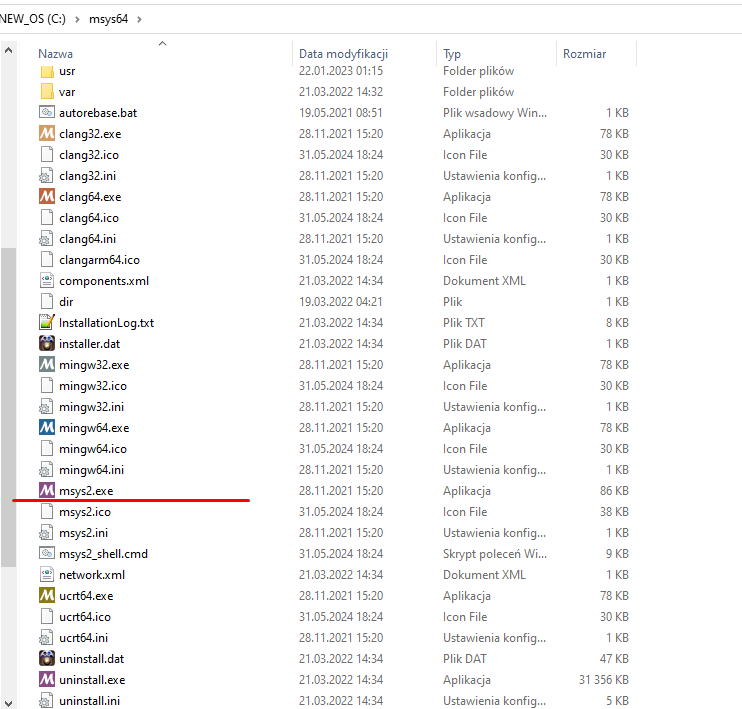
    I tried first way.
    Screenshot displaying the contents of the msys64 folder on the C drive, with the file msys2.exe highlighted.

    In msys64 do, first update:
    
    pacman -Syu
    

    then toolchain:
    
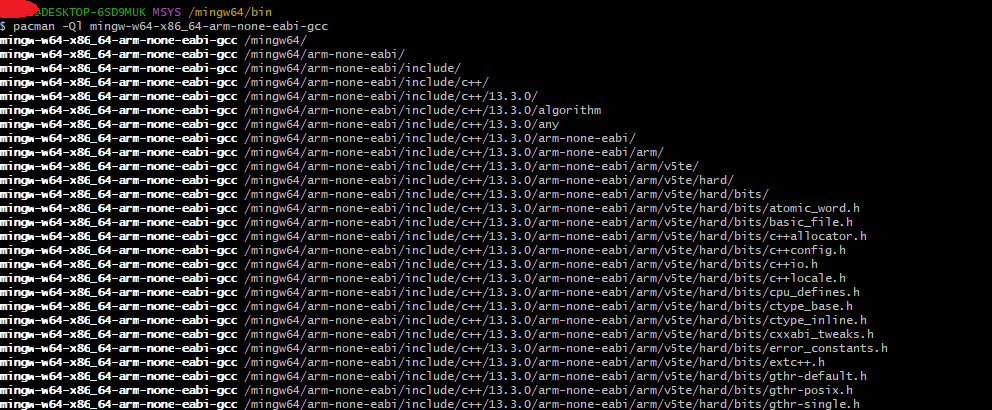
    pacman -S mingw-w64-x86_64-arm-none-eabi-gcc
    

    then you should have:
    Screenshot of an MSYS2 terminal showing mingw package installation.
    Add to path:
    
    export PATH=$PATH:/mingw64/bin 
    

    Then try in path:
    Compilation error with message fatal error: no input files.
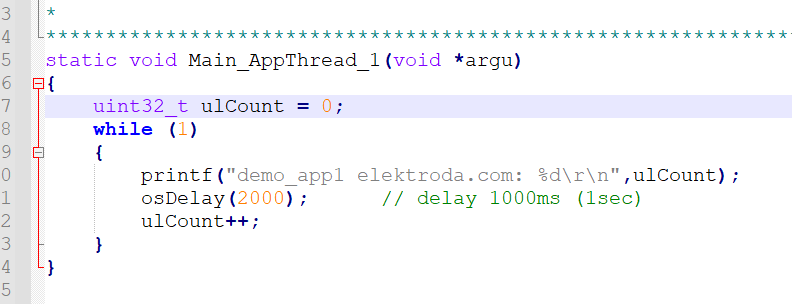
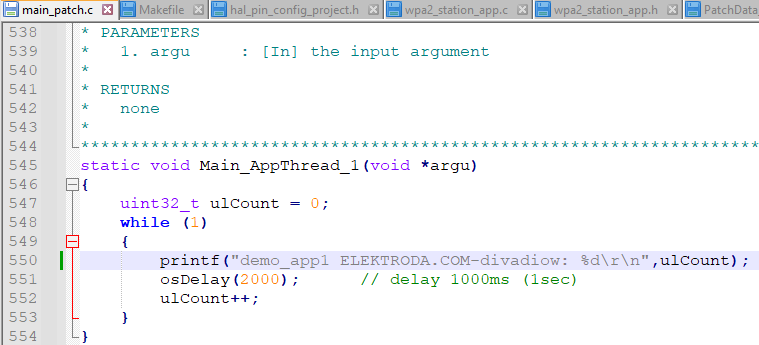
    I added log:
    Snippet of C code with a while loop.

    Now I will try to compile:
    Screenshot of a warning message during compilation in the terminal.
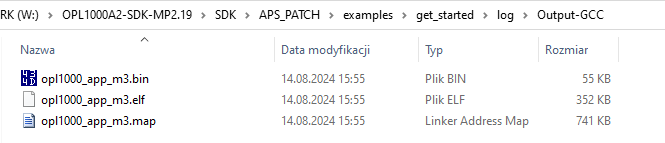
    This has been created:
    Screenshot showing a list of files in a compilation output folder.
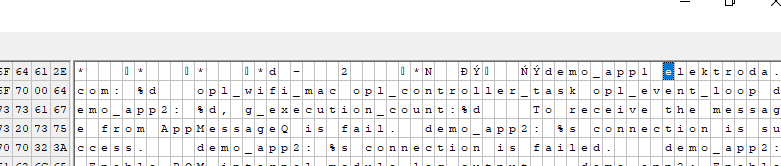
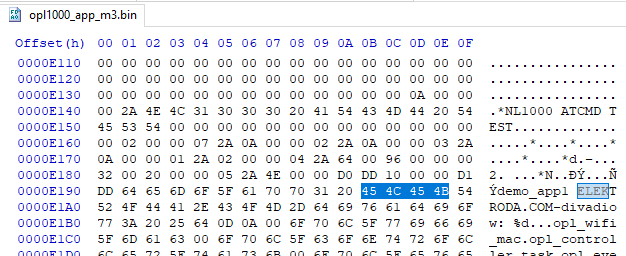
    It has elektroda in bin:
    A fragment of a binary file with ASCII text code.

    @divadiow can you try to retrace my steps and also get those binaries and then try flashing them?

    Added after 9 [minutes]:

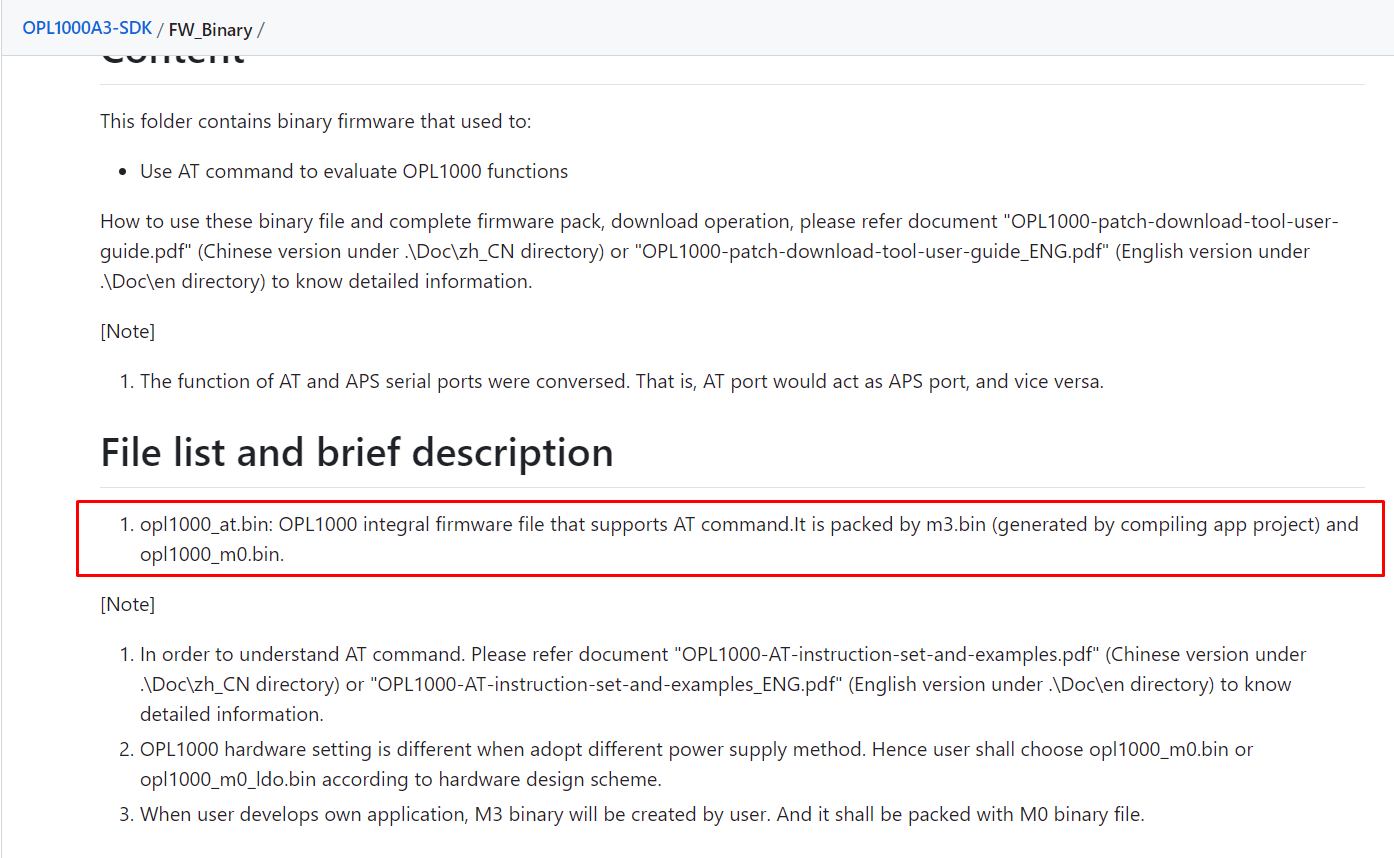
    interesting:
    Screenshot of the OPL1000A3 SDK documentation regarding binary files.
    source: https://github.com/Opulinks-Tech/OPL1000A3-SDK/tree/main/FW_Binary

    Added after 4 [minutes]:

    https://github.com/Opulinks-Tech/OPL1000A3-SDK/tree/main/FW_Pack
    Helpful post? Buy me a coffee.
  • #33 21190988
    divadiow
    Level 38  
    Posts: 5021
    Help: 438
    Rate: 891
    Oh cool. Ok thanks! I'll replicate asap
  • #34 21191011
    p.kaczmarek2
    Moderator Smart Home
    Posts: 14575
    Help: 654
    Rate: 12602
    The initial msys64 instalation was shown here:
    https://www.elektroda.com/rtvforum/topic3889041.html
    Helpful post? Buy me a coffee.
  • #36 21191291
    p.kaczmarek2
    Moderator Smart Home
    Posts: 14575
    Help: 654
    Rate: 12602
    So it compiles but does not run?

    Maybe we need to do: https://github.com/Opulinks-Tech/OPL1000A3-SDK/tree/main/FW_Pack
    Helpful post? Buy me a coffee.
  • ADVERTISEMENT
  • #37 21191325
    divadiow
    Level 38  
    Posts: 5021
    Help: 438
    Rate: 891
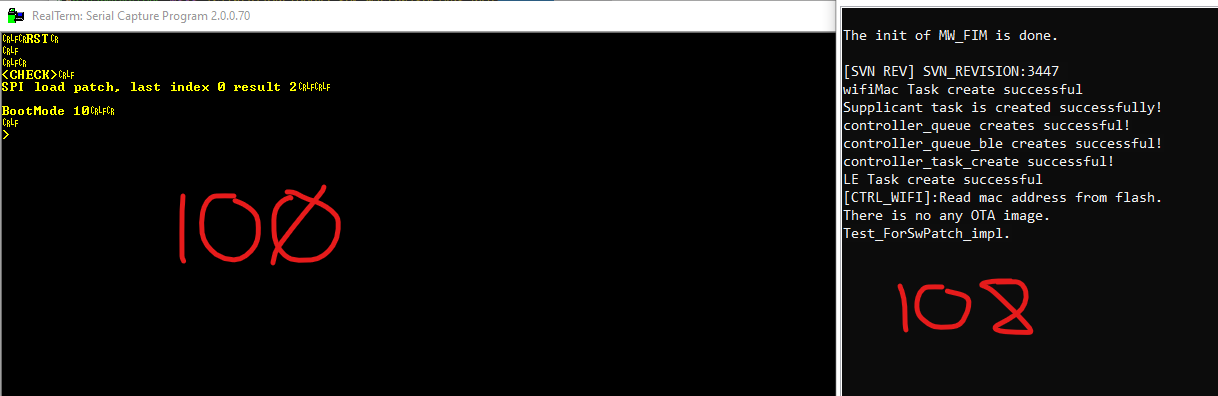
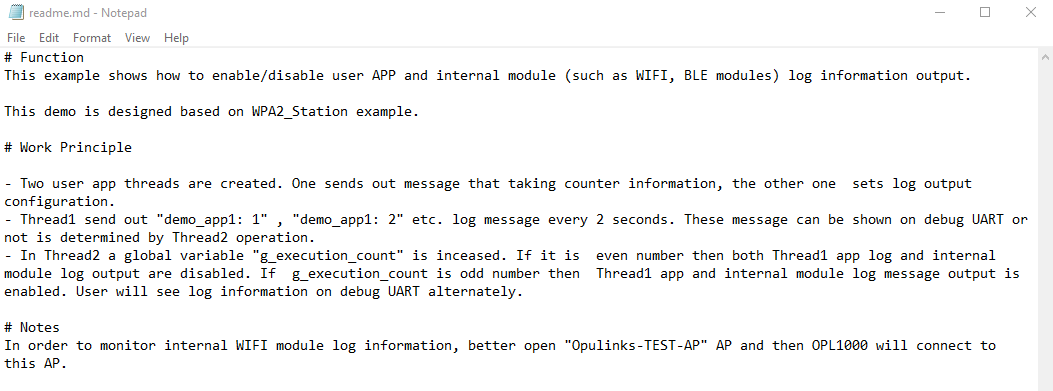
    well. I should be expecting to see "demo_app1: 1" , "demo_app1: 2" I believe:

    Screenshot of a readme.md file showing a description of the function and working principles of a demo application for APP and WIFI modules.

    Screenshot showing a code snippet with encoded message and text Opulinks-TEST-AP.

    I've an AP of Opulinks-TEST-AP / 1234abcd but nothing is joining. Tried 3 APs on different hardware - all 2.4Ghz

    Added after 4 [minutes]:

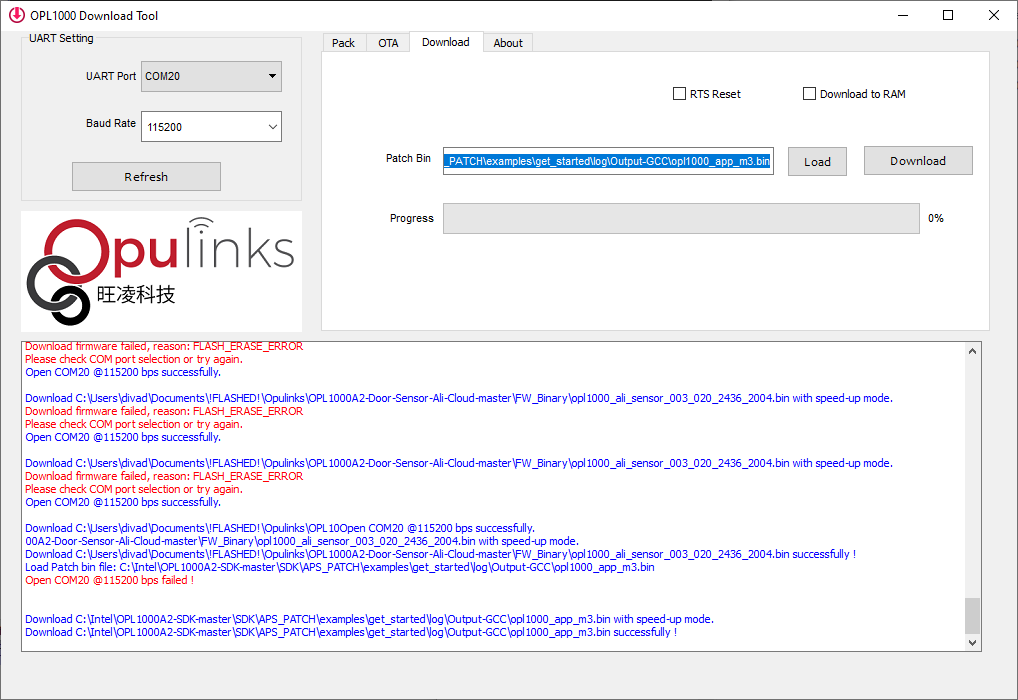
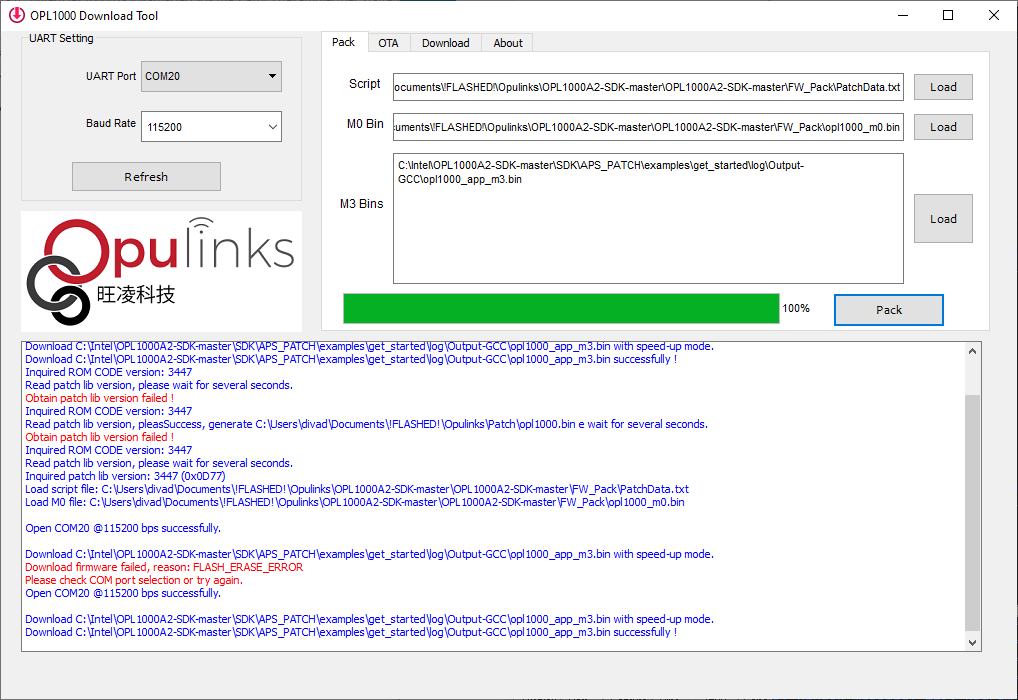
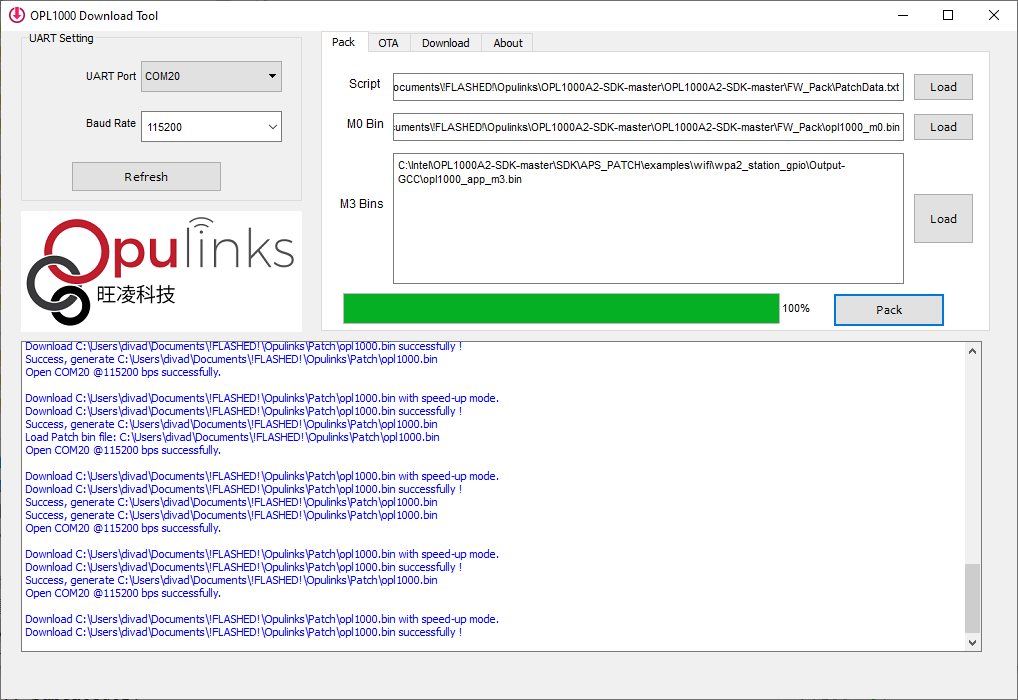
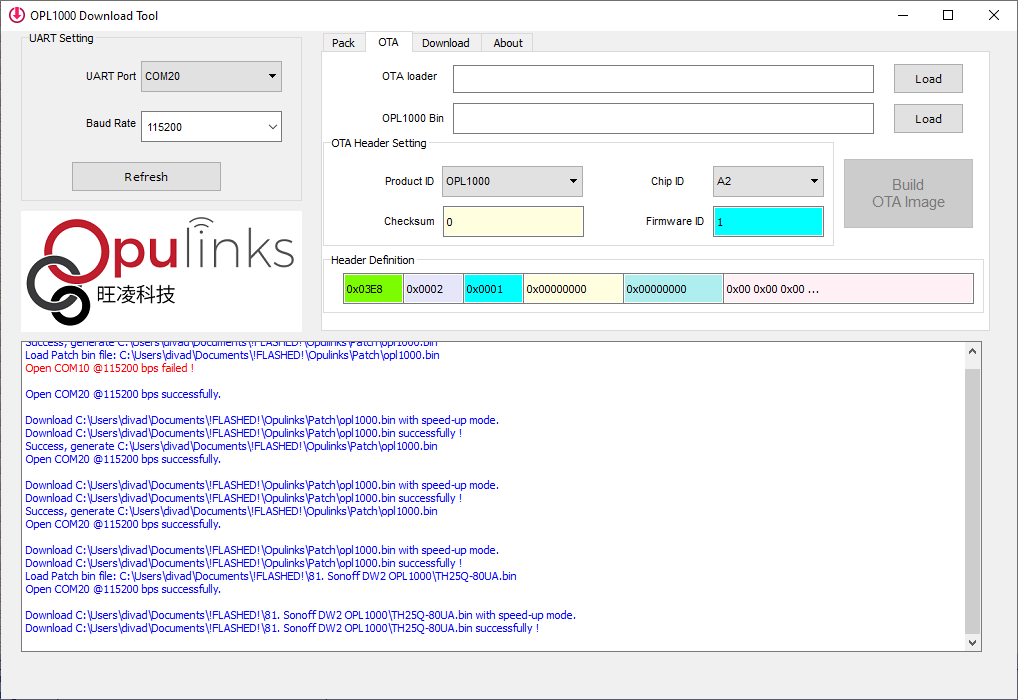
    I have packed the m3 with the m0 and used patchdata,txt as the script. boots still but no change

    Screenshot of OPL1000 Download Tool with loaded binary files and operation logs.

    Added after 24 [minutes]:

    also did A2 hello world and A3 log bins. hmmm

    Added after 8 [minutes]:

    divadiow wrote:
    A2 hello world

    https://blog.csdn.net/qq_24258593/article/details/112751210

    Added after 22 [minutes]:

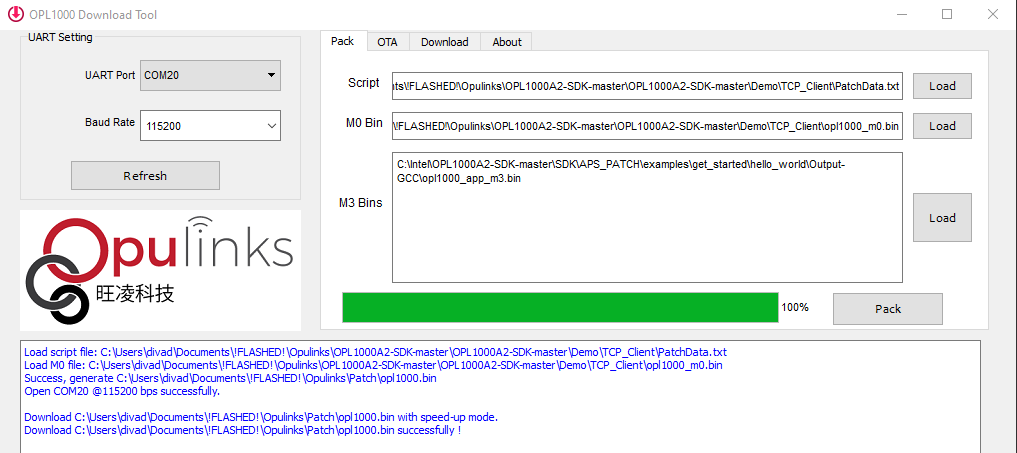
    ah, but if I use the script and m0 files as seen in that blog in the pack with my m3

    Screenshot of OPL1000 Download Tool with UART configuration and loaded files.

    then the app loads

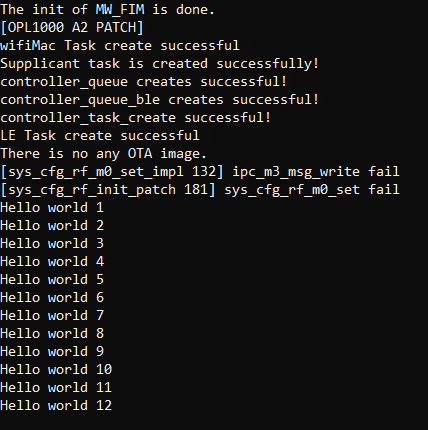
    Screenshot showing a software startup log with messages of successful task creations and errors related to the initialization of various functions.

    Added after 12 [minutes]:

    log doesn't seem to want to connect to any of the APs but does run

    Code: Text
    Log in, to see the code
  • #38 21191435
    p.kaczmarek2
    Moderator Smart Home
    Posts: 14575
    Help: 654
    Rate: 12602
    Good job! Well, there are many demos in the SDK and it seems now we can compile them all? Maybe one of them does WiFi
    Helpful post? Buy me a coffee.
  • #39 21192318
    divadiow
    Level 38  
    Posts: 5021
    Help: 438
    Rate: 891
    hmm.

    i've been playing with wpa_station and these are curious

    [sys_cfg_rf_m0_set_impl 132] ipc_m3_msg_write fail
    [sys_cfg_rf_init_patch 181] sys_cfg_rf_m0_set fail

    I'm wondering about what the 128 or 256kb flash built into the OPL1000 contains, or did contain, from factory. Are some of the addresses in PatchData.txt used not correct? where is the RF data held? What effect does having the 8mbit flash in addition to the on-board memory have on PatchData.txt? Do the demos assume only the on-board flash is present?

    There's vey little online about this chip as we know.
  • #40 21192331
    p.kaczmarek2
    Moderator Smart Home
    Posts: 14575
    Help: 654
    Rate: 12602
    Wait, before we dig into it, you're saying that STA/AP modes are not working in those samples?
    Helpful post? Buy me a coffee.
  • #41 21192333
    divadiow
    Level 38  
    Posts: 5021
    Help: 438
    Rate: 891
    spoke too soon.

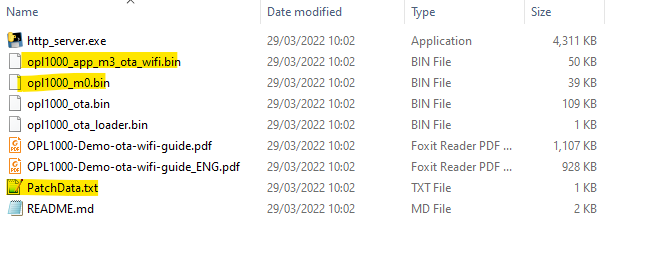
    packed and flashed this demo

    Screenshot of a folder showing various files including binary and PDF documents.

    and it can list all the APs around me

    Code: Text
    Log in, to see the code


    and connect to my test AP

    Screenshot showing a wireless clients table with MAC addresses, last IP, uptime, and signal strength.

    not sure of what this means though for the content of a patchdata file for a firmware that'll not fit on the OPL onboard memory

    Added after 1 [minutes]:

    p.kaczmarek2 wrote:
    Wait, before we dig into it, you're saying that STA/AP modes are not working in those samples?

    correct. not in the flashed binaries compiled from get_started folder

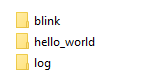
    A screenshot of a window with three folders: blink, hello_world, log.

    Added after 55 [seconds]:

    = wifi has only worked for me with precompiled binaries
  • #42 21192352
    p.kaczmarek2
    Moderator Smart Home
    Posts: 14575
    Help: 654
    Rate: 12602
    Maybe we shall try this example?
    https://github.com/Opulinks-Tech/OPL1000A3-SD...SDK/APS_PATCH/examples/wifi/wpa2_station_gpio
    Quote:

    WPA2 AP SSID and password is defined in wpa2_station_app.h
    Make sure "Opulinks-TEST-AP" AP is open when run this demo.
    Refer Doc\OPL1000-SDK-Development-guide.pdf to know how to create a new app project.

    Enter your ssid/pass here:
    https://github.com/Opulinks-Tech/OPL1000A3-SD...les/wifi/wpa2_station_gpio/wpa2_station_app.h

    Docs:
    https://github.com/Opulinks-Tech/Document/tree/master/SDK/en

    Or find other PatchData.txt?
    Attachments:
    • OPL1000-SDK-Development-guide_ENG.pdf (443.33 KB) You must be logged in to download this attachment.
    Helpful post? Buy me a coffee.
  • #43 21192439
    divadiow
    Level 38  
    Posts: 5021
    Help: 438
    Rate: 891
    ha. OK. went back to original m0 and patchdata and tried OPL1000A2-SDK-master\SDK\APS_PATCH\examples\wifi\wpa2_station_gpio
    so packing looks like

    Screenshot of OPL1000 Download Tool showing UART settings and packing process.

    and after flash

    Code: Text
    Log in, to see the code


    and the device is connected to router

    Table with MAC addresses, ACL status, last IP, uptime, and signal strength.

    Added after 9 [minutes]:

    Couldn't get the LED to light though. Looked like GPIO2 in the pic but also tried a few others
  • #44 21192459
    p.kaczmarek2
    Moderator Smart Home
    Posts: 14575
    Help: 654
    Rate: 12602
    Very good progress!

    So:
    
    OPL1000A2-SDK-master\SDK\APS_PATCH\examples\wifi\wpa2_station_gpio
    

    works and connects to WiFi
    but
    
    https://github.com/Opulinks-Tech/OPL1000A3-SDK/tree/main/SDK/APS_PATCH/examples/wifi/wpa2_station_gpio
    

    does not work?
    Helpful post? Buy me a coffee.
  • ADVERTISEMENT
  • #46 21192473
    p.kaczmarek2
    Moderator Smart Home
    Posts: 14575
    Help: 654
    Rate: 12602
    Hm ok so please do more tests so we can be sure what works and what doesn't. What's the difference between A2 and A3?


    We could really start porting OBK soon!
    Helpful post? Buy me a coffee.
  • #47 21192488
    divadiow
    Level 38  
    Posts: 5021
    Help: 438
    Rate: 891
    OK

    1.
    OPL1000A2-SDK-master\FW_Pack\PatchData.txt
    OPL1000A2-SDK-master\FW_Pack\opl1000_m0.bin
    OPL1000A2-SDK-master\SDK\APS_PATCH\examples\wifi\wpa2_station_gpio\Output-GCC\opl1000_app_m3.bin (72kb)

    = Boots + wifi connects to test AP

    2.
    OPL1000A3-SDK-main\FW_Pack\PatchData.txt
    OPL1000A3-SDK-main\FW_Pack\opl1000_m0.bin
    OPL1000A3-SDK-main\SDK\APS_PATCH\examples\wifi\wpa2_station_gpio\Output-GCC\opl1000_app_m3.bin (10kb after build?)

    = no boot

    Added after 6 [minutes]:

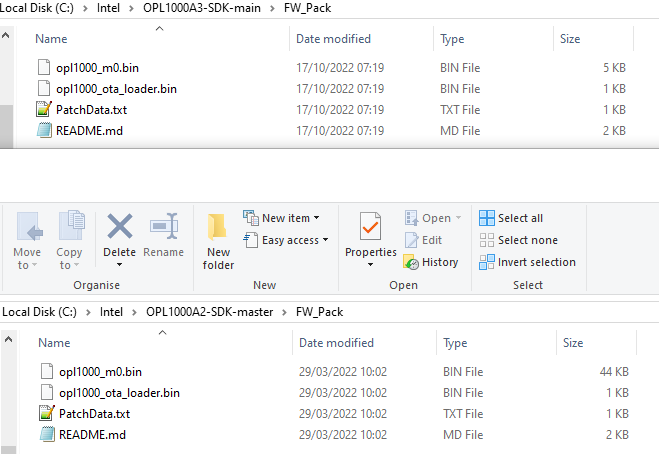
    The A2 and A3 Patchdata.txt content and the m0 files differ quite a bit

    Screenshot of two folders with SDK files for OPL1000A3 and OPL1000A2.

    Added after 22 [minutes]:

    p.kaczmarek2 wrote:
    What's the difference between A2 and A3?

    I haven't been able to find out what the technical differences are between the A2 and A3 chips
  • #48 21192899
    divadiow
    Level 38  
    Posts: 5021
    Help: 438
    Rate: 891
    I sent Opulinks some questions. Responses:

    Code: Text
    Log in, to see the code


    I have sent some follow-up questions asking for clarification.
  • #49 21192907
    p.kaczmarek2
    Moderator Smart Home
    Posts: 14575
    Help: 654
    Rate: 12602
    Wait but didn't we get A2 to run on OPL1000?
    Helpful post? Buy me a coffee.
  • ADVERTISEMENT
  • #50 21192908
    divadiow
    Level 38  
    Posts: 5021
    Help: 438
    Rate: 891
    well exactly. my question back to them is about A1 vs A2. Maybe the silkscreen is OPL1000 series, but actually it's an OPL1200 and then it makes sense we should use the A2 SDK.

    I have not tried any A1 SDK builds.

    Added after 16 [minutes]:

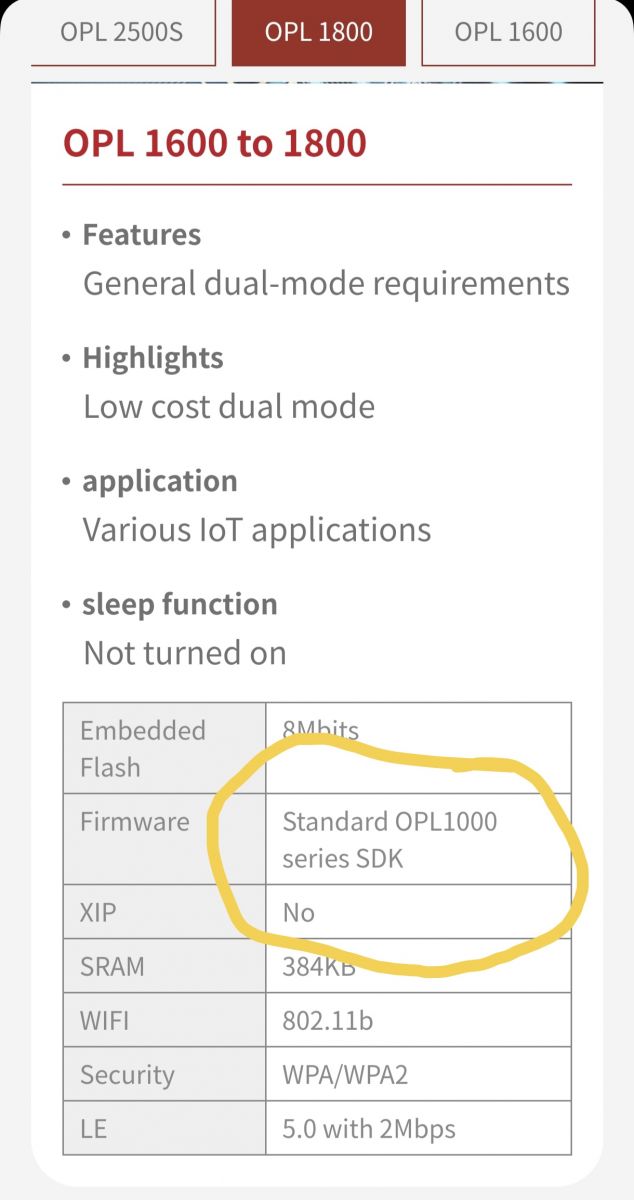
    Oh. Series indeed.

    Specification table for OPL 1600 to 1800 series.
  • #51 21192924
    p.kaczmarek2
    Moderator Smart Home
    Posts: 14575
    Help: 654
    Rate: 12602
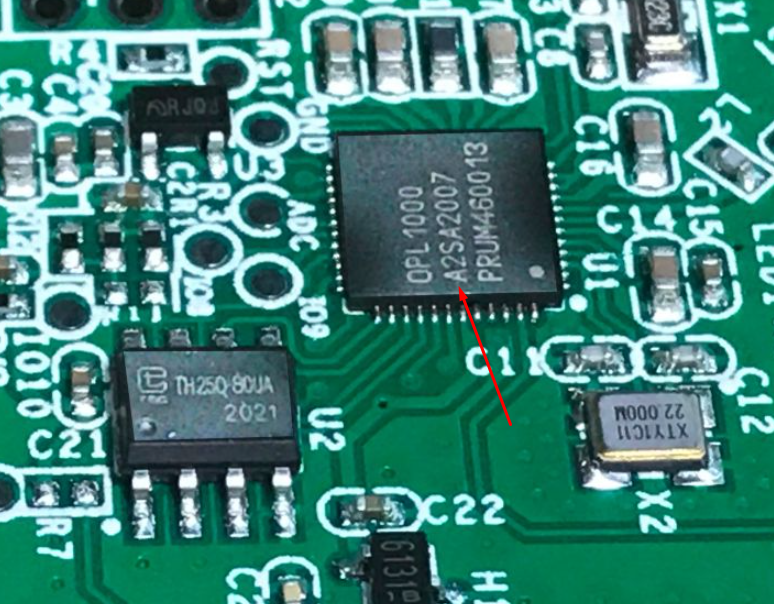
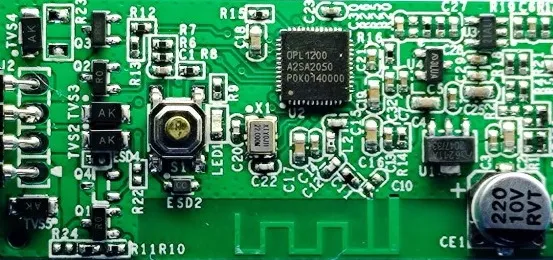
    Well, both our photos shows "A2", when you look closely...
    Close-up of a circuit board featuring a chip labeled A2SA2007.
    So I guess that's solved?

    Sadly I don't have my one already (I was flashing a batch of devices for a friend and no he is using it with original cloud) so I may need to get another one soon.

    Anyway, so in A2 SDK everything works so far?
    Helpful post? Buy me a coffee.
  • #52 21192926
    divadiow
    Level 38  
    Posts: 5021
    Help: 438
    Rate: 891
    p.kaczmarek2 wrote:
    Well, both our photos shows "A2", when you look closely...

    Yes. Indeed
    p.kaczmarek2 wrote:
    Anyway, so in A2 SDK everything works so far?


    Yes. Seems to be fine so far

    Added after 22 [minutes]:

    I hadn't clocked these different HDK resources. including OPL1200 datasheet. I've been using https://github.com/Opulinks-Tech/OPL1000-HDK/...aster/OPL1000-DataSheet-NonNDA_DS0-04-1.1.pdf

    https://github.com/Opulinks-Tech/OPL1000-HDK/tree/master

    https://github.com/Opulinks-Tech/OPL1000-HDK/...aster/OPL1200-DataSheet-NonNDA_DS0-01-1.1.pdf

    Added after 19 [minutes]:

    anyway. what even is the next step for Opulinks builds? Do you want me to try anything else?

    I haven't been able to get an LED to light, even changing code in wpa2_station_app.c to pull high all likely GPIOs

    Code: C / C++
    Log in, to see the code
  • #53 21193052
    p.kaczmarek2
    Moderator Smart Home
    Posts: 14575
    Help: 654
    Rate: 12602
    What is actually this function doing:
    Code: C / C++
    Log in, to see the code

    maybe we need more?
    https://github.com/search?q=Hal_Vic_GpioOutput&type=code

    I've found this:
    Code: C / C++
    Log in, to see the code


    So maybe you are missing a Hal_Vic_GpioDirection call?
    Helpful post? Buy me a coffee.
  • #54 21193315
    divadiow
    Level 38  
    Posts: 5021
    Help: 438
    Rate: 891
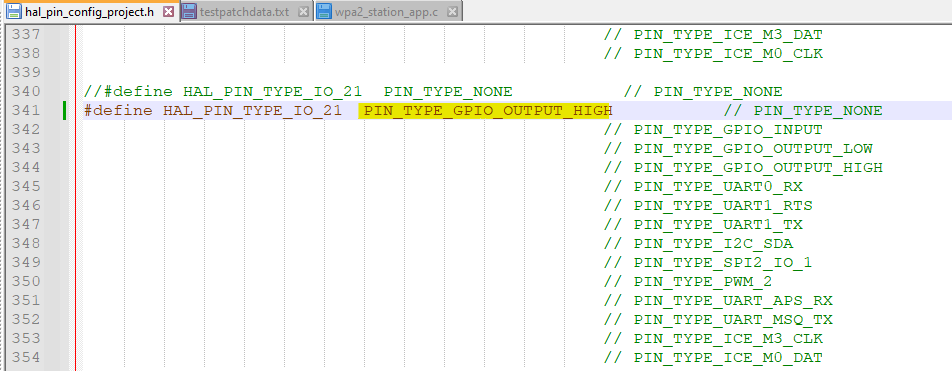
    ah. the function of the correct GPIO needed changing in hal_pin_config_project.h to PIN_TYPE_GPIO_OUTPUT_HIGH from PIN_TYPE_ICE_M3_CLK

    Screenshot showing code from the hal_pin_config_project.h file with a highlighted line defining GPIO21 as high output.

    then only the GPIO# in wpa2_station_app.c needs changing.

    Code: Text
    Log in, to see the code

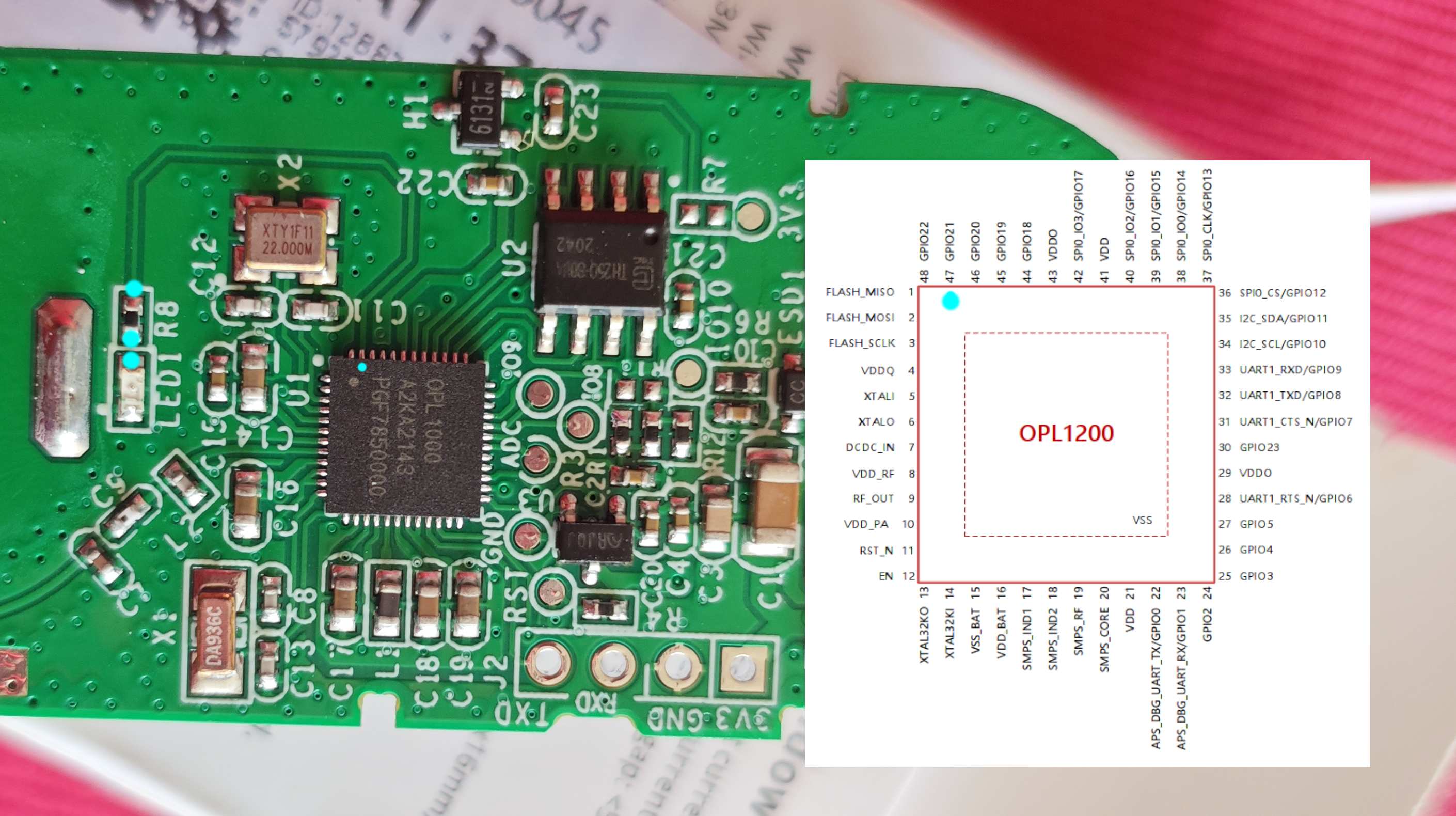
    It's clear from the traces and datasheet the LED is connected to GPIO21
    Circuit board with OPL1000 chip and OPL1200 pin diagram

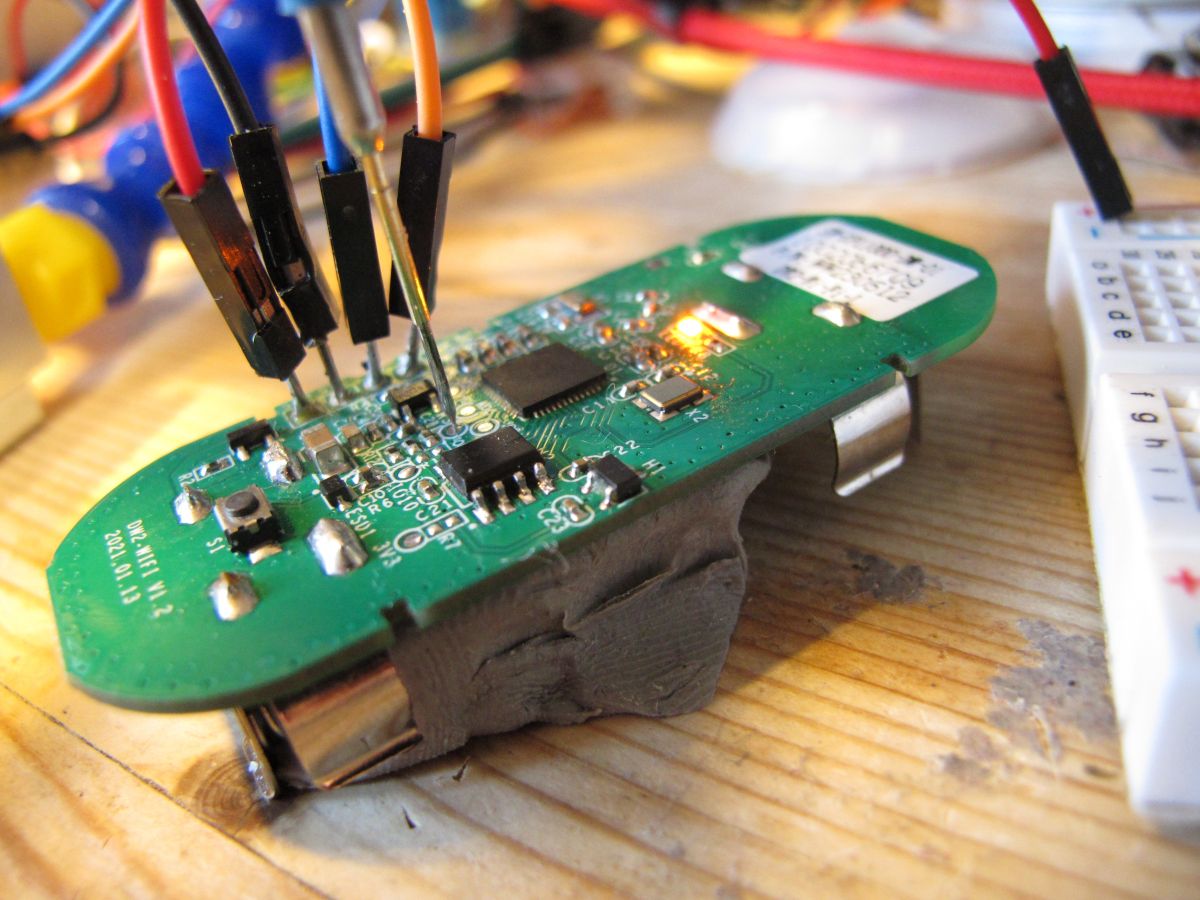
    and now LED lights when wifi is connected

    Close-up of a circuit board with several wires connected to terminals, with an LED lit nearby.

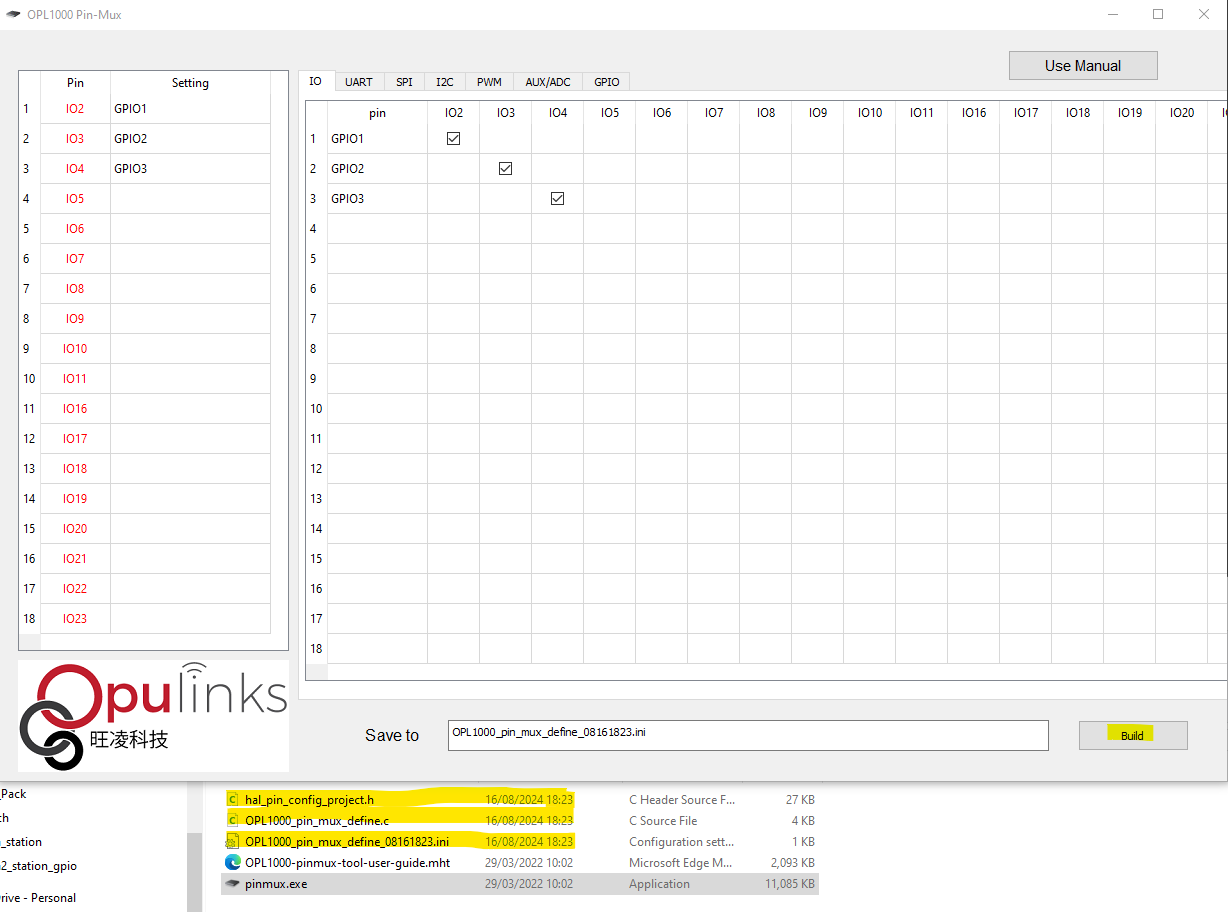
    hal_pin_config_project.h content is a product of the PinMux tool where the function of each GPIO can be set.

    the highlighted files are created on PinMux build

    View of the OPL1000 Pin-Mux program with highlighted files.
  • #55 21193451
    p.kaczmarek2
    Moderator Smart Home
    Posts: 14575
    Help: 654
    Rate: 12602
    Great! So what next?
    PWM?
    OTA?

    PWM:
    https://github.com/search?q=repo%3AOpulinks-Tech%2FOPL1000A2-SDK%20PWM&type=code

    ota:
    https://github.com/Opulinks-Tech/OPL1000A2-SD...mples/system/ota_wifi/http_ota_example.c#L398


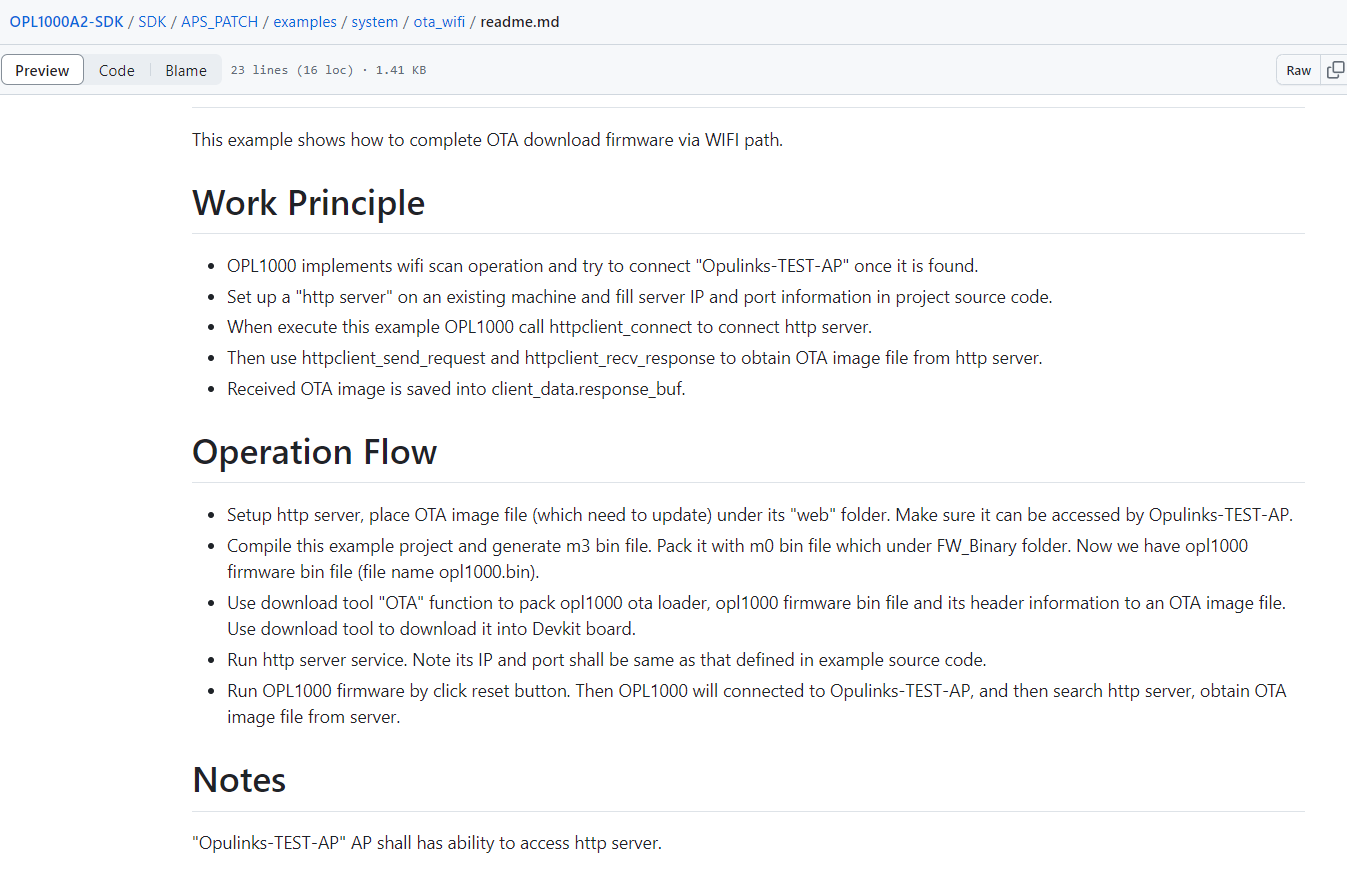
    If we can get ota_wifi demo working, we could try adding OBK to that.

    Screenshot of OPL1000A2-SDK documentation on downloading OTA firmware via WiFi.
    Just how to get OTA file...
    Helpful post? Buy me a coffee.
  • #56 21193453
    divadiow
    Level 38  
    Posts: 5021
    Help: 438
    Rate: 891
    >>21193451

    yes. the OTA demo is on my radar :)

    I was going to OTA Hello World to WPA2_GPIO or something. There's an OTA pack tab in the flash tool.

    Screenshot of OPL1000 Download Tool displaying OTA settings.
  • #57 21193456
    p.kaczmarek2
    Moderator Smart Home
    Posts: 14575
    Help: 654
    Rate: 12602
    We will also need to think about the futher OTA usage. Can the OTA file be created from commandline? Our automatic Github builds will require that....

    I will do the coding, once we have everything confirmed to work, but I don't know much about the build process on Github itself. Maybe we can just reuse the path of one of the other platforms.
    Helpful post? Buy me a coffee.
  • #58 21193536
    divadiow
    Level 38  
    Posts: 5021
    Help: 438
    Rate: 891
    p.kaczmarek2 wrote:
    Can the OTA file be created from commandline?


    not found any mention of a command line option yet. the builder exe does not accept anything cli - it just launches gui.

    pausing at this point for tonight

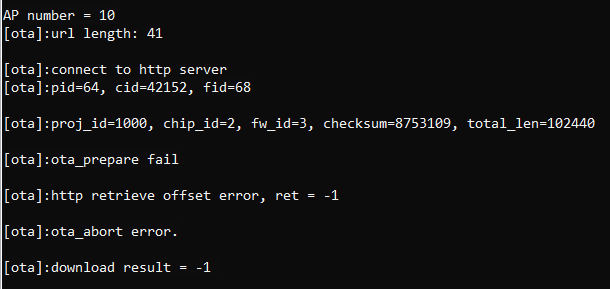
    Screenshot of error messages related to OTA download.

    http server is serving opl1000_ota.bin file download for any other device on subnet but not the DW2 yet.

    Added after 7 [hours] 49 [minutes]:

    Code: Text
    Log in, to see the code


    back to our original understanding!

    Added after 11 [minutes]:

    Oh and look https://templates.blakadder.com/unsupported/sonoff_L3.html
    Circuit board with visible OPL1200 chip.
    If OPL1200 then it's labelled as such.
  • #59 21194663
    divadiow
    Level 38  
    Posts: 5021
    Help: 438
    Rate: 891
    I am no further forward with a working OTA demo.

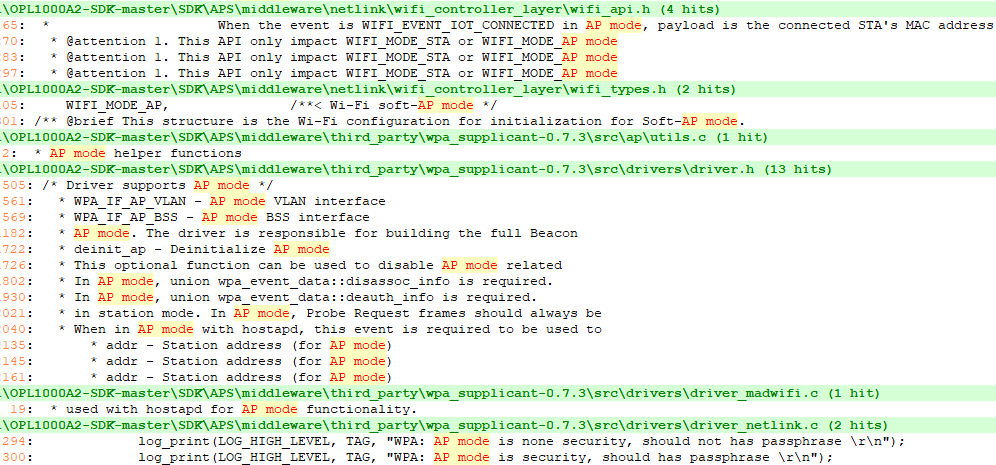
    Also a little worrying is the distinct lack of a soft-AP demo or any real mention of soft-AP mode in the documentation.

    Added after 5 [minutes]:

    some mentions

    Screenshot of C code related to AP mode API.
  • #60 21194822
    p.kaczmarek2
    Moderator Smart Home
    Posts: 14575
    Help: 654
    Rate: 12602
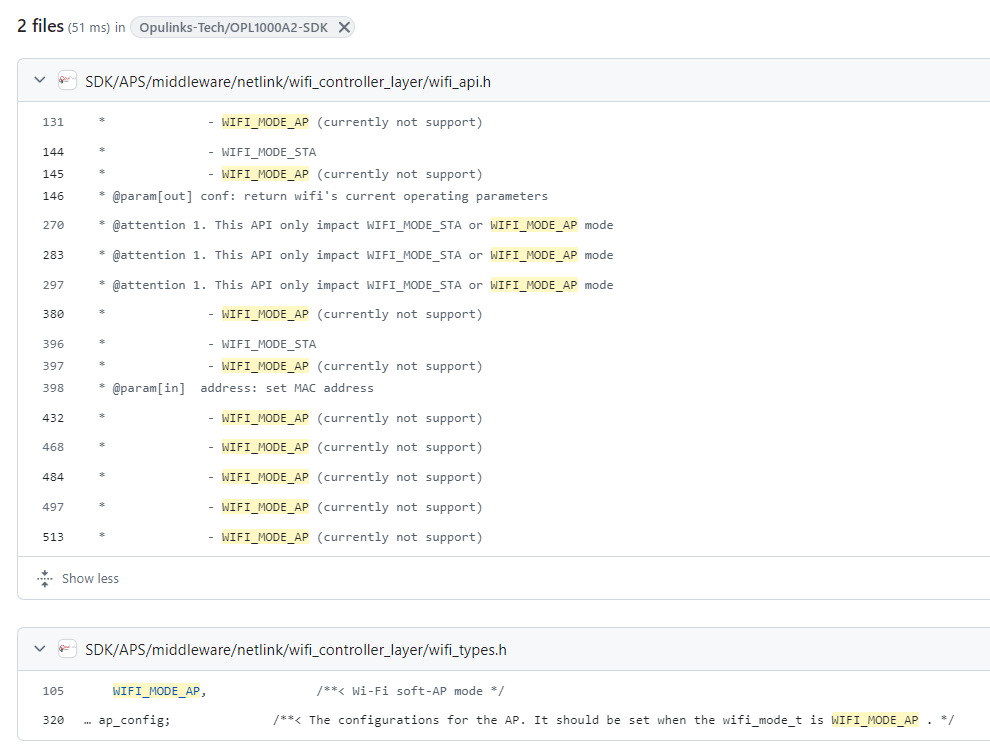
    Strange:
    Screenshot of code from the SDK repository Opulinks-Tech/OPL1000A2-SDK showing fragments related to Wi-Fi configuration.
    Did this device support AP mode pairing for the app?

    But those comments seem to be related to separate functions, not to AP mode itself..

    Here is some STA init code:
    https://github.com/Opulinks-Tech/OPL1000A2-SD...amples/protocols/tcp_client/tcp_client.c#L235
    Maybe we can change:
    - wifi_config.sta_config to wifi_config.ap_config
    - WIFI_MODE_STA to WIFI_MODE_AP

    Added after 41 [seconds]:

    Then it should create AP. The AP initialization itself is NOT listed as unsupported, so it should work.
    Helpful post? Buy me a coffee.
📢 Listen (AI):

Topic summary

✨ The discussion centers on the Sonoff DW2 door/window opening sensor based on the OPL1000 WiFi microcontroller, focusing on hardware teardown, firmware backup, and potential firmware modification. The sensor is inexpensive (~30 PLN) and uses WiFi communication, unlike its predecessor DW1 which used RF433MHz. Users confirmed the sensor transmits signals on opening but not necessarily on closing, with no firmware modification currently possible. Efforts to develop OpenBeken (OBK) support for OPL1000 are ongoing but limited by the chip's low popularity and scarce documentation. The OPL1000 SDKs (A1, A2, A3) correspond to different chip revisions or related chips (OPL1000, OPL1200, OPL1600/1800), with the DW2 sensor marked as A2 and compatible with the OPL1000A2 SDK. Firmware dumping was performed by desoldering the TH25Q-80UA 8Mbit SPI flash chip and bit-banging with FTDI, revealing AliCloud firmware with OTA capabilities and AT command support. Flashing custom firmware using the Opulinks Download Tool and compiling SDK examples (e.g., wpa2_station_gpio) was successful, enabling WiFi connection and GPIO control (e.g., LED on GPIO21). However, soft-AP mode is not supported or unclear, with pairing likely done via BLE rather than WiFi AP mode. OTA update demos were tested but initially failed due to improper firmware packaging; using the correct OTA loader and build process resolved this. Challenges remain in understanding flash memory layout, patch data usage, and full SDK utilization. Additional hardware like the E103-W08A OPL1000 module was also examined. The community is progressing toward porting OBK firmware to OPL1000 devices, with ongoing exploration of SDK examples, build environments (MSYS2), and flashing tools. Key technical issues include UART bootloader access, flash dumping, firmware compilation, OTA implementation, GPIO control, and network modes (STA/AP/BLE). The discussion includes detailed logs, code snippets, and hardware photos to support development efforts.
Generated by the language model.

FAQ

TL;DR: For under 30 PLN, the Sonoff DW2-Wi-Fi is a cheap door sensor for reverse engineers, and the thread’s key result is that "A2 SDK works" on the module marked A2. The flash was dumped, UART flashing worked, and OTA updates worked only after correct Opulinks packaging with an OTA loader. [#21196691]

Why it matters: This FAQ helps hardware hackers and OpenBeken users decide whether the DW2 is worth buying, dumping, compiling for, and eventually de-clouding.

Option Radio / setup Firmware status from thread Practical takeaway
Sonoff DW1 RF433 MHz Older design referenced by sellers Different product family, not the Wi-Fi teardown target
Sonoff DW2-Wi-Fi Wi-Fi + BLE setup flow Flash dumped, UART flashing and OTA confirmed Best current OPL1000-family test target in the thread
OPL1000 A2 SDK Matches A2-marked module Boots and connects in tests Use this SDK path first
OPL1000 A3 SDK Different family mapping Did not boot on this hardware Avoid for DW2 A2 modules

Key insight: The breakthrough was not just compiling code. The breakthrough was proving the DW2 can boot custom A2 builds, accept UART flashes, and alternate between MW_OTA [0] and MW_OTA [1] once the OTA image is packaged correctly. [#21196691]

Quick Facts

  • Case label and seller data in the thread identify the unit as DW2-Wi-Fi, with quiescent current <=40 uA and emission current <=15 mA. [#20767159]
  • The teardown identifies three core parts: an Opulinks OPL1000-family module marked A2, a TH25Q80UA SPI flash, and a 6131 Hall sensor. [#20767159]
  • The original buyer paid less than 30 PLN, which is why the DW2 attracted interest as a low-cost battery Wi-Fi sensor. [#20767159]
  • A full external flash backup was read from the 8 Mbit / 1 MB TH25Q-80UA chip, and later the same dump was flashed back successfully over UART. [#21190525]
  • OTA testing succeeded with a correctly packed image of 118,300 bytes, and the boot log then switched from MW_OTA [0] to MW_OTA [1]. [#21196691]

How do I open the Sonoff DW2-Wi-Fi door/window sensor and identify its main components like the OPL1000, TH25Q80UA flash, and Hall sensor?

Open it by removing the battery cover first, then release the two PCB retaining hooks and lift the board out. The PCB is marked DW2-WiFi V1.2 with date 2021.01.13. The main identifiable parts are the Opulinks Wi-Fi/Bluetooth module marked A2, the TH25Q80UA SPI flash, and a Hall sensor marked 6131. "Hall sensor" is a magnetic sensor that detects the nearby magnet’s position, replacing a reed switch and enabling open/close sensing with low power. The thread also notes transistor Q1 near the sensor area. [#20767159]

What is the OPL1000 and how does it differ from the OPL1200, OPL1600, and OPL1800 mentioned in the Opulinks SDKs?

The OPL1000 is an Opulinks Wi-Fi and Bluetooth microcontroller family used here as the DW2’s radio SoC. In the thread, Opulinks support mapped SDK families this way: A1 = OPL1000, A2 = OPL1200, and A3 = OPL1600 & OPL1800. The confusion came from the module being discussed as “OPL1000,” while the chip marking also showed A2. Later testing confirmed the A2 SDK worked on the DW2 hardware, so that is the practical target for this sensor. "OPL1000 family" is a Wi-Fi/BLE MCU line that uses multiple SDK branches tied to chip revisions or related parts. [#21192899]

Why does the Sonoff DW2 show up in listings with RF433 keywords when the teardown says it only uses WiFi?

Because sellers mixed the DW2 with the older DW1 in marketplace titles. The thread states that auction listings included RF433 keywords even though the examined DW2-Wi-Fi had Wi-Fi only and no 433 MHz radio. The seller’s own description explained the mismatch: the earlier DW1 version used RF433 MHz, while the offered version used Wi-Fi. So the keyword is listing carryover, not a hardware feature of the teardown unit. [#20767159]

How can I dump the Sonoff DW2 TH25Q80UA flash chip with a CH341A or FTDI bit-banging method?

You can dump it by removing the flash and reading it externally. 1. Desolder the TH25Q80UA because the thread author did not trust clip reading. 2. Read it with a CH341A in NeoProgrammer, which detected SPI ID EB6014. 3. Save the full dump, or bit-bang SPI with an FTDI adapter if needed; later posts confirmed a successful bit-banged dump after desoldering the same 8 Mbit / 1 MB chip. The original dump also revealed SDK-related strings and a PEM certificate when inspected. [#21187912]

Which Opulinks SDK should be used for the Sonoff DW2 module marked A2, and why did the A2 SDK work while the A3 SDK did not boot?

Use the OPL1000A2-SDK for the DW2 module marked A2. In direct testing, an A2 build of wpa2_station_gpio booted and joined Wi-Fi, while the A3 build did not boot on the same device. The tested working combination used A2 PatchData.txt, A2 opl1000_m0.bin, and the A2 example output binary. The thread later clarified that the module photos showed A2 on the chip, matching the SDK choice. In practice, the A2 firmware path matched the hardware layout and packing files, while A3 did not. [#21192488]

What is MW_OTA in the OPL1000 boot log, and what do messages like "This image is from MW_OTA [0]" and "MW_OTA [1]" mean?

MW_OTA is the Opulinks dual-image OTA storage area used to switch between firmware slots. In the thread, the boot log printed "This image is from MW_OTA [0]" before an update and "This image is from MW_OTA [1]" after a successful OTA flash. That shows the new image was written to the alternate slot and then executed after reboot. The same post notes that if you keep serving the OTA demo again, the device alternates between [0] and [1] on successive reboots. "MW_OTA" is firmware storage logic that keeps two bootable images for rollback-style updates. [#21196691]

Why does the OPL1000 ota_wifi demo fail with "ota_prepare fail," and how do I package the firmware correctly for OTA updates?

It fails when the OTA file is built in the wrong format. The breakthrough post showed the fix: first build normal opl1000.bin, then use Opulinks Download Tool v2.0.0 to combine it with opl1000_ota_loader.bin and generate opl1000_ota.bin in the OTA tab. After that, the OTA demo downloaded and flashed a 118,300-byte image successfully. Before that correction, the log stopped at "ota_prepare fail" even though HTTP worked. The full 1,024 KB factory backup still failed as an OTA payload, stopping around 167 KB, so raw flash dumps are not valid OTA images. [#21196691]

What steps are needed to compile and flash an OPL1000A2-SDK example like wpa2_station_gpio on a Sonoff DW2 using MSYS2 and arm-none-eabi-gcc?

Use MSYS2, install the ARM GCC toolchain, build the A2 example, then pack and flash it. 1. In msys64, run pacman -Syu and install mingw-w64-x86_64-arm-none-eabi-gcc, then add /mingw64/bin to PATH. 2. Build OPL1000A2-SDK\SDK\APS_PATCH\examples\wifi\wpa2_station_gpio with make to generate opl1000_app_m3.bin. 3. Pack it with A2 PatchData.txt and A2 opl1000_m0.bin, flash it, and the DW2 should boot, scan APs, and obtain a DHCP address such as 192.168.0.251 when credentials are correct. [#21192439]

How do I use the Opulinks Download Tool to flash OPL1000 binaries over UART, and why do I need to power-cycle the device when the tool is waiting on the COM port?

Use the Opulinks Download Tool, select the COM port and binary, then reconnect power when the tool starts waiting. The thread reports that flash start on this platform is like Beken: the DW2 enters the loader when power is reapplied while the tool is already waiting. That timing is why a power cycle is required. Tests confirmed that official binaries, AT firmware, and even full flash-chip dumps could be written this way over UART. The same workflow was used successfully with Download Tool 3.9.3.7012 for basic flashing, though OTA packaging later depended on v2.0.0. [#21190297]

Where is the Sonoff DW2 UART boot output available, and what can GPIO0 versus GPIO8 logs tell me during reverse engineering?

The DW2 exposes useful UART output on both GPIO0 and GPIO8, but they show different things. The thread states that GPIO8 has a PCB pad and prints the richer application boot log, including Wi-Fi scan activity and cloud retries. GPIO0 prints a shorter low-level boot stream such as "", "SPI load patch", and "BootMode 10". That split helps reverse engineering: GPIO0 is better for bootloader and image-slot clues, while GPIO8 is better for application behavior and pairing flow. [#21186407]

How can I control the Sonoff DW2 status LED from custom OPL1000 firmware, including the PinMux and Hal_Vic_GpioDirection settings needed for GPIO21?

Control the LED on GPIO21 after changing its PinMux role from PIN_TYPE_ICE_M3_CLK to PIN_TYPE_GPIO_OUTPUT_HIGH in hal_pin_config_project.h. The thread confirms the LED trace and datasheet mapping point to GPIO21. After that, custom code can call Hal_Vic_GpioOutput(GPIO_IDX_21, GPIO_LEVEL_HIGH) when Wi-Fi connects and drive it low on disconnect. A key lesson from the thread was that pin direction matters; output mode must be configured, not just the output level. Once corrected, the DW2 LED lit reliably on Wi-Fi connection. [#21193315]

Sonoff DW1 vs Sonoff DW2 — what are the practical differences in radio technology, cloud dependence, and firmware modification potential?

The DW1 is the older RF433 MHz design, while the DW2 uses Wi-Fi and a BLE-assisted setup flow. In practice, that means the DW2 can pair with eWeLink directly, but the thread repeatedly notes it is still cloud-dependent and was not easily cut off from the cloud at the start of the investigation. Firmware modification also differs: the DW2 needed OPL1000-family reverse engineering, flash dumping, SDK builds, and custom OTA packaging. So DW2 offers more software potential than DW1, but it also creates a much harder de-clouding path. [#20767159]

Why does the Sonoff DW2 pair in eWeLink but sometimes stay offline while looping coolkit.cc connection errors in the UART log?

It pairs because local provisioning succeeds, but it can still stay offline if the cloud connection fails. In the thread, the device paired successfully, yet the UART log looped mbedtls_net_connect() failed, ret:-0x44, HTTP connected fail, and repeated attempts to reach https://eu-dispd.coolkit.cc:443/dispatch/device. That means BLE/Wi-Fi setup and app-side registration can complete, while the sensor still cannot finish its cloud session. The practical symptom is an eWeLink device that appears added but remains offline. [#21189210]

What pairing method does the Sonoff DW2 use if it does not seem to support soft-AP mode, and how is BLE involved in WiFi setup?

The DW2 appears to use BLE for provisioning and then joins Wi-Fi as a station, not as a soft-AP. The thread notes that repeated resets never exposed an AP, and later analysis pointed to Opulinks blewifi examples where BLE handles configuration of the device’s Wi-Fi connection. One poster summarized it as BLE being the setup channel while the device is configured to connect to a Wi-Fi AP, not act as one. That explains why pairing can work even when no temporary AP is visible. [#21205368]

Which other devices have been found with OPL1000-family chips, such as the Tuya outdoor siren or Ebyte E103-W08A module, and how useful are they for OpenBeken porting and testing?

The thread found at least two useful additional targets: a Tuya outdoor 95 dB siren with solar and USB power, and the Ebyte E103-W08A module. The siren used an OPL1000 A2SA2121 chip with PUYA P25Q80H flash, making it a strong OpenBeken port candidate because it adds another real product beyond the DW2. The E103-W08A is useful for AT-command and module-level testing, but the thread called its form factor awkward and noted its small flash package. More hardware targets matter because low OPL1000 popularity was the main reason porting stalled. [#21174018]
Generated by the language model.
ADVERTISEMENT