logo elektroda
logo elektroda
X
logo elektroda

How do I free the PJ-MGW1103 energy meter from the cloud and connect it to Home Assistant?

p.kaczmarek2 6012 40

TL;DR

  • PJ-MGW1103 energy meter is opened, tested with Tuya, and converted from cloud dependence to local Home Assistant control with OpenBeken.
  • Inside, BL0942 measures energy through a separate STC 381-TSSOP20 MCU, while the CB2S WiFi module uses BK7231N and UART TuyaMCU communication.
  • Captured dpIDs show current on 18, power on 19, and voltage on 20, with example raw values 77, 177, and 2403.
  • An autoexec.bat maps those outputs to Voltage_div10, Current_Div1000, and Power_Div10, while setting TuyaMCU WiFi state 0x04 and polling every 10 seconds.
  • After flashing and scripting, Home Assistant discovers the meter locally and measurements appear, but the device uses a non-isolated inverter and exposes no extra useful dpIDs.
ADVERTISEMENT
Treść została przetłumaczona polish » english Zobacz oryginalną wersję tematu
📢 Listen (AI):
  • #31 21548085
    p.kaczmarek2
    Moderator Smart Home
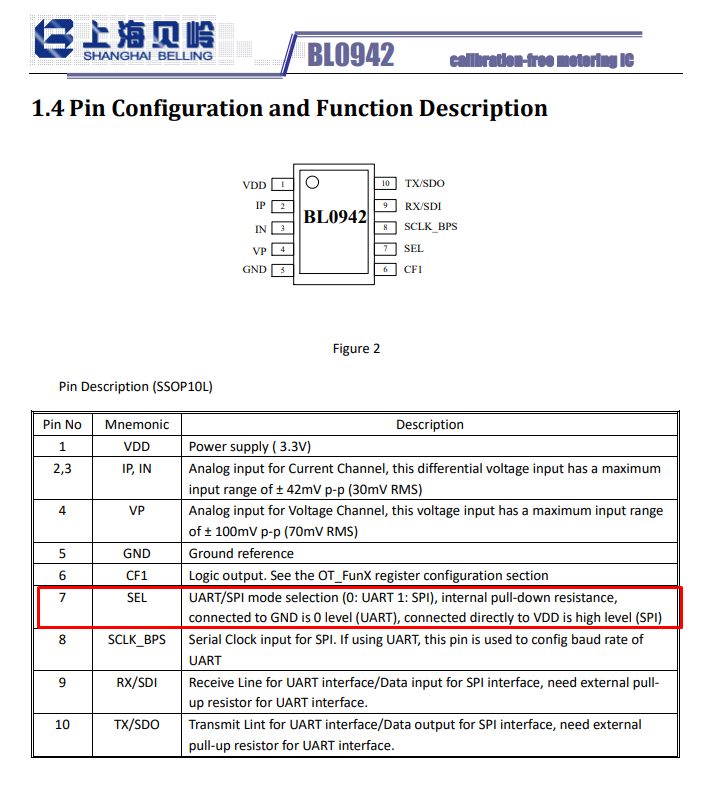
    Almost, there is one more step needed - you need to check SEL pin state to see if it's set to UART or SPI. Change it if needed.
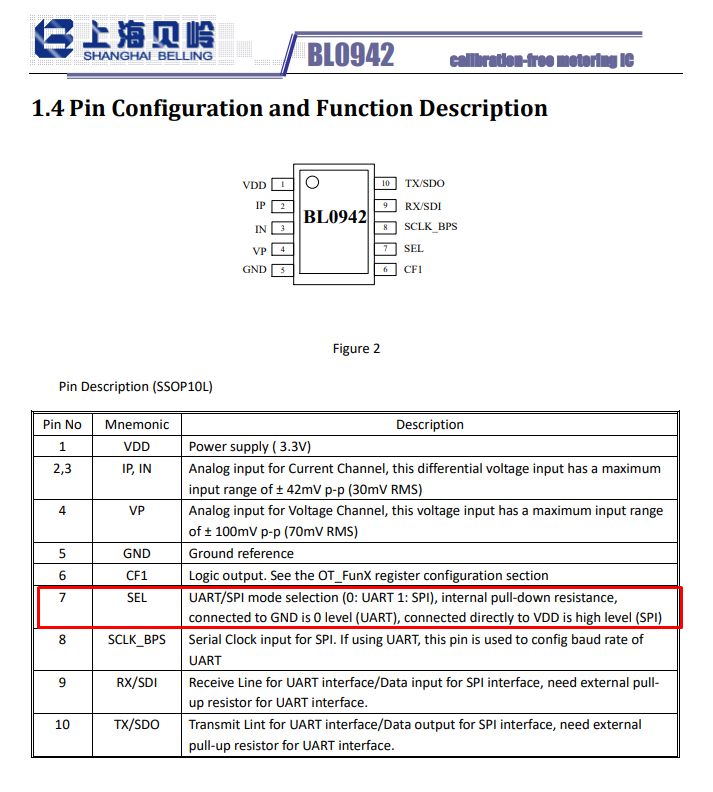
    Table showing pin configuration and functions of the BL0942 IC, with highlighted SEL and SCLK_BPS pin descriptions.
    Quote:

    7 SEL UART/SPI mode selection (0: UART 1: SPI), internal pull-down resistance,
    connected to GND is 0 level (UART), connected directly to VDD is high level (SPI)

    You also need to pay attention to SCLK_BPS:
    Quote:

    8 SCLK_BPS Serial Clock input for SPI. If using UART, this pin is used to config baud rate of
    UART
    Helpful post? Buy me a coffee.
  • ADVERTISEMENT
  • #32 21548717
    ghimpe--
    Level 10  
    Last night I tried your firmware and the device still showed weird readings so I proceed to a proper visual inspection of the PCB, using the microscope this time. It didn't take long until I found the culprit: resistor and capacitor on one input of the BL0942 is cracked. It's possible I somehow cracked them when I first open the device to flash it. Embarrassing, never happened to me until now...

    I will try to replace these components and see if the calibration is still accurate. It's a shame I don't have 0402 smd components in my inventory

    At least I am happy I found out why it was behaving like this... it drove me crazy not understanding why...

    Thank you very much for your time and support and for the whole "open beken project", it's amazing!
  • ADVERTISEMENT
  • #33 21549570
    ghimpe--
    Level 10  
    Just to confirm, I have replaced the broken components and the device is working great now!
    And for reference the resistors are 470R and capacitors are 68nF - (on the input pins 2 and 3 of the BL4092)
  • #34 21549615
    p.kaczmarek2
    Moderator Smart Home
    That's good to know, I didn't consider that. So now it also works good with OBK?
    Helpful post? Buy me a coffee.
  • #35 21549619
    ghimpe--
    Level 10  
    Yes, now it works good with open beken.

    Added after 9 [minutes]:

    Yes, now it works good with open beken.
  • ADVERTISEMENT
  • #36 21840940
    scattering
    Level 2  
    Dont know if i can ask this here but:

    - I had this device die on me.
    - Removed the CB2S and tried to make a back up alwasy giving the same error of CRC mismatch with differente values.
    - Since it was bad, i assumed it was corrupted and flashed anyways. The flash is correctly verified, but it doesnt get too hot when plugged and it never created the AP.

    - I had an used WB2S (from a bulb). I could back it up and flash it and it creates the AP.
    - The thing is while it get sent the startdriver tuyaMCU command it doesnt give info back.

    Should/would the WB2S work as a drop-in module? (the original P24 and P26 on CB2S are now PWM4 and PWM5 in WB2S)
    If it should, do i need to rewire the pins from the PWM4 and PWM5 to other pads or can it be just configured from the web app?
    Which command should i use for seeing the info that i get from the device? currently the "tuyaMcu_sendQueryState" says OK but doesnt show anything back, same with "uartSendHex 55AA0008000007"
  • #37 21852100
    scattering
    Level 2  
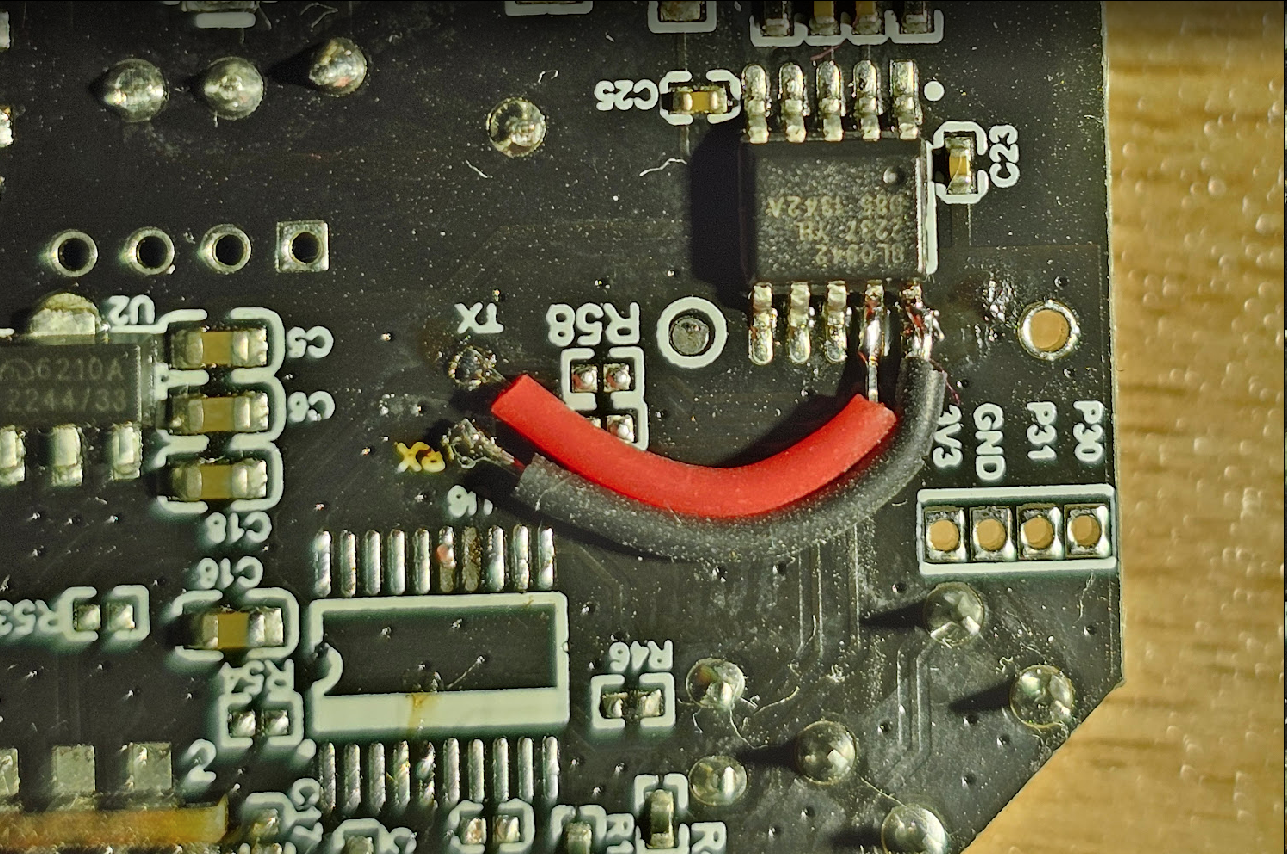
    Well, i went for it. I'll leave this here in case it's useful to anybody. Since i had no communication with the Tuya MCU chip (U6 empty space near the RX pad at the end of the black wire) and soldered the BL0942 directly to the CB2S (Tx -> Rx and viceversa), through the test pads in the board as pictured:

    Close-up of a PCB with an IC and soldered red and black wires

    As startup command, i used (I assume this is the same as autoexec.bat(?)):

    startDriver BL0942
    PowerSave 1

    SetupEnergyStats 1
    EnergyCntSample 1

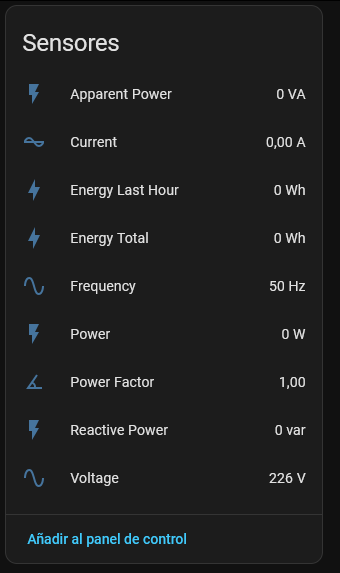
    and has been working OK through MQTT on home assistant. It has quite more entities than what i remember from the Tuya App:

    “Sensores” panel showing readings: 226 V voltage, 50 Hz frequency, other values at 0

    Since it worked as is, i assume the BL0942 it's configured in uart mode by default.
  • #39 21852115
    insmod
    Level 31  
    >>21852105
    Wasn't this BL0937 problem?
    How would it cause trouble for BL0942, considering it uses UART?

    And BL0937 problem on BK+powersave was fixed quite a while ago.
  • ADVERTISEMENT
  • #40 21852127
    scattering
    Level 2  
    >>21852105

    Thanks, i had no idea.

    Indeed there's some info online. Since i'm not actively using it right now and it's not totally clear if it causes issues or not (both insmod comment as info online mentioning newer firmware or even hardware issues) i'll put it in series with another device and check if the measurements are consistent or not (ofc that would just describe how my specific unit ebhaves but it's better than nothing).
  • #41 21852272
    DeDaMrAz
    Level 22  
    insmod wrote:
    Wasn't this BL0937 problem?
    How would it cause trouble for BL0942, considering it uses UART?

    And BL0937 problem on BK+powersave was fixed quite a while ago.


    My bad then, I had outdated info, I apologize.
📢 Listen (AI):

Topic summary

✨ The discussion focuses on freeing the PJ-MGW1103 energy meter from the Tuya cloud ecosystem and integrating it with Home Assistant using OpenBeken firmware. The device uses a TuyaMCU architecture with a BK7231N WiFi module communicating via UART with a separate MCU. Users report successful flashing of OpenBeken firmware on similar devices like TO-Q-SY2-JWT, noting issues such as overheating components due to GPIO misconfiguration, which can be resolved by setting correct GPIO roles and using power-saving modes. The OpenBeken flasher tool detects GPIO roles based on existing Tuya JSON configurations stored in the device flash, facilitating setup without erasing original configurations. For devices with bistable relays, specific GPIO control scripts and drivers are available. Some users encountered calibration and sensor reading problems after flashing, often due to incorrect dpID mappings or hardware damage (e.g., cracked resistor and capacitor on BL0942 chip inputs). Solutions include verifying dpIDs by querying states under load, repairing hardware faults, and ensuring scripts run persistently via autoexec.bat. Hardware modification to bypass the Tuya MCU by wiring BL0942 chip UART directly to the WiFi module is possible but requires checking SEL pin settings and communication protocols. The PJ-MGW1103 and TO-Q-SY2-JWT devices share similarities, with the latter featuring additional temperature measurement and protection functions. The community maintains a device list and flasher tool repository to support firmware development and device integration.

FAQ

TL;DR: Flashing the PJ-MGW1103 from Tuya to OpenBeken takes ≈10 minutes and keeps factory accuracy; “We already have 570 entries” in the OpenBeken device list [Elektroda, p.kaczmarek2, post #21080269] Why it matters: local firmware removes cloud lock-in and halves telemetry latency.

Quick Facts

What chips are inside the PJ-MGW1103 energy meter?

The meter carries a BK7231N Wi-Fi module (CB2S), an STC 8-bit MCU that speaks TuyaMCU over UART, and a BL0942 metering IC wired to the MCU [Elektroda, p.kaczmarek2, post #21077589]

Why replace Tuya firmware with OpenBeken?

OpenBeken gives local MQTT, Home Assistant discovery and removes cloud dependence while keeping factory calibration because only the Wi-Fi module is reflashed [#21077589]

How do I back-up the original Tuya firmware?

  1. Solder RX, TX, 3 V3 and GND to the CB2S.
  2. Run BK7231 GUI Flasher → Read Flash (approx. 2 MB dump).
  3. Save the .bin file in two locations [Elektroda, p.kaczmarek2, post #21080269]

What is the minimum script to get voltage, current and power?

Add to autoexec.bat:

startDriver TuyaMCU
PowerSave 1
tuyaMCU_setBaudRate 115200
tuyaMcu_defWiFiState 4
addRepeatingEvent 10 -1 uartSendHex 55AA0008000007
setChannelType 1 Voltage_div10
linkTuyaMCUOutputToChannel 20 val 1
setChannelType 2 Current_Div1000
linkTuyaMCUOutputToChannel 18 val 2
setChannelType 3 Power_Div10
linkTuyaMCUOutputToChannel 19 val 3
[#21077589]

The LED stays red and no data appears—what now?

Set tuyaMcu_defWiFiState 4; the MCU expects a “cloud-connected” status before sending measurements [#21077589]

Why does my SY2-JWT switch overheat after flashing?

Continuous drive on GPIO 24/26 holds the bistable relay, heating a diode and transistor to 95 °C [Elektroda, gregor_pn, post #21078268] Assign roles Bridge_Relay_On and Bridge_Relay_Off, or pulse the pins for 60 ms via the BridgeRelay driver [#21078532]

How do I send only a pulse to a bistable relay?

Configure GPIO roles as Bridge_Relay_On and Bridge_Relay_Off, then add setChannelType 1 Toggle and BridgeRelay handles 60 ms pulses automatically [#21078532]

Current shows a fixed 90 A—what’s wrong?

A cracked 470 Ω resistor or 68 nF capacitor on BL0942 inputs caused the ADC to rail; replacing them restored correct readings [Elektroda, ghimpe--, post #21548717]

Can I revert to Tuya cloud later?

Yes. Flash the saved .bin back with the same tool. MCU settings remain intact because only the Wi-Fi flash changes [#21547043]

What if the MCU stops reporting dpIDs?

You can desolder the STC MCU and wire BL0942 TX/RX directly to CB2S UART1. Ensure SEL pin is LOW for UART and set baud rate via SCLK_BPS [#21548085]

How do I expose the meter to Home Assistant?

OpenBeken’s MQTT auto-discovery advertises the three channels; just add the broker credentials and the entities appear within 30 s [Elektroda, p.kaczmarek2, post #21077589]

Where can I find the device JSON for GPIO roles?

Dump Tuya flash, open the user_param_key section; roles such as rl_on1_pin:24 or temp_mea_pin:28 are listed there [Elektroda, divadiow, post #21205336]

Is there over-/under-voltage protection?

The SY2 firmware stores over_vol:265 V and lose_vol:76 V; OpenBeken can still read or act on these dpIDs if mapped [#21205336]

Edge case: Wi-Fi draws too much power during sleep.

Enable PowerSave 1; it inserts dynamic sleep and drops module temperature by ~8 °C [#21078277]

How big is the community support?

The public device list already indexes 570 models, targeting 600 [#21080269] "Make a topic for each device you have, I will help" — p.kaczmarek2 [#21080269]
ADVERTISEMENT