logo elektroda
logo elektroda
X
logo elektroda

Denver WCM-8010 Camera Trap: Troubleshooting MMS & Email Issues, Activation Codes & Setup

1990reset 131775 395
Best answers

How do I configure a Denver WCM-8010 camera trap to send MMS/email when SMS activation commands fail?

Send the SMS commands to the phone number of the SIM card inserted in the camera, not to *530*; for example, if the camera’s number is 500600700, send *505* to 500600700 [#17729731] To make MMS/email work at all, users reported that the SIM must be activated by a real call, the PIN must be disabled, and the APN/operator settings often have to be entered manually rather than relying on automatic setup [#17999085 #17967375]. Several people also found that the configuration file must be saved directly to the root of the microSD card (not in a subfolder and often not via USB), and that a class 4 card works much more reliably than faster cards [#17967375 #20967189 #18048312]. For some operators, MMS and SMTP cannot be enabled at the same time, so you need to choose one method and configure it accordingly [#19951251] If the camera still misbehaves, the thread repeatedly points to firmware bugs and recommends checking the camera’s logged MMS errors, updating firmware only for the correct PO/batch, and verifying the internal 3V battery and network registration [#17999085 #18048312 #19876753].
Generated by the language model.
ADVERTISEMENT
Treść została przetłumaczona polish » english Zobacz oryginalną wersję tematu
  • #361 20997057
    borys24so
    Level 11  
    Posts: 209
    Rate: 6
    This FP does not have an external antenna
  • ADVERTISEMENT
  • #362 20997218
    gradek83
    Level 43  
    Posts: 9048
    Help: 925
    Rate: 2077
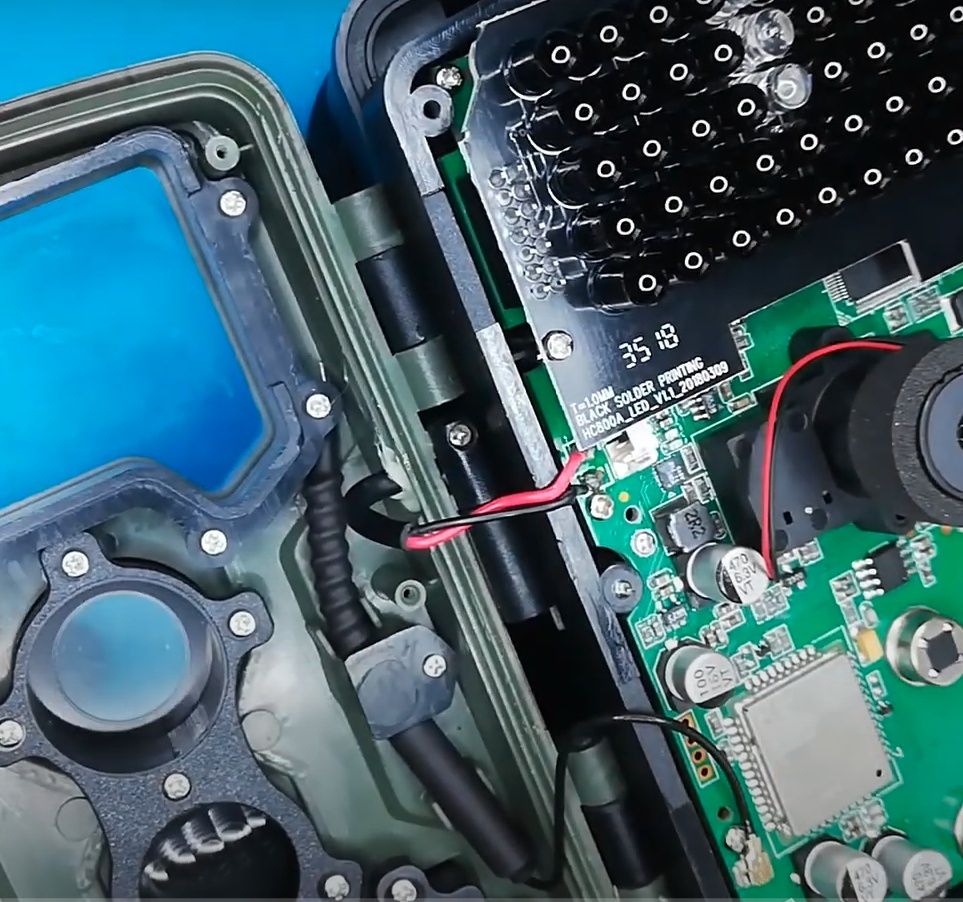
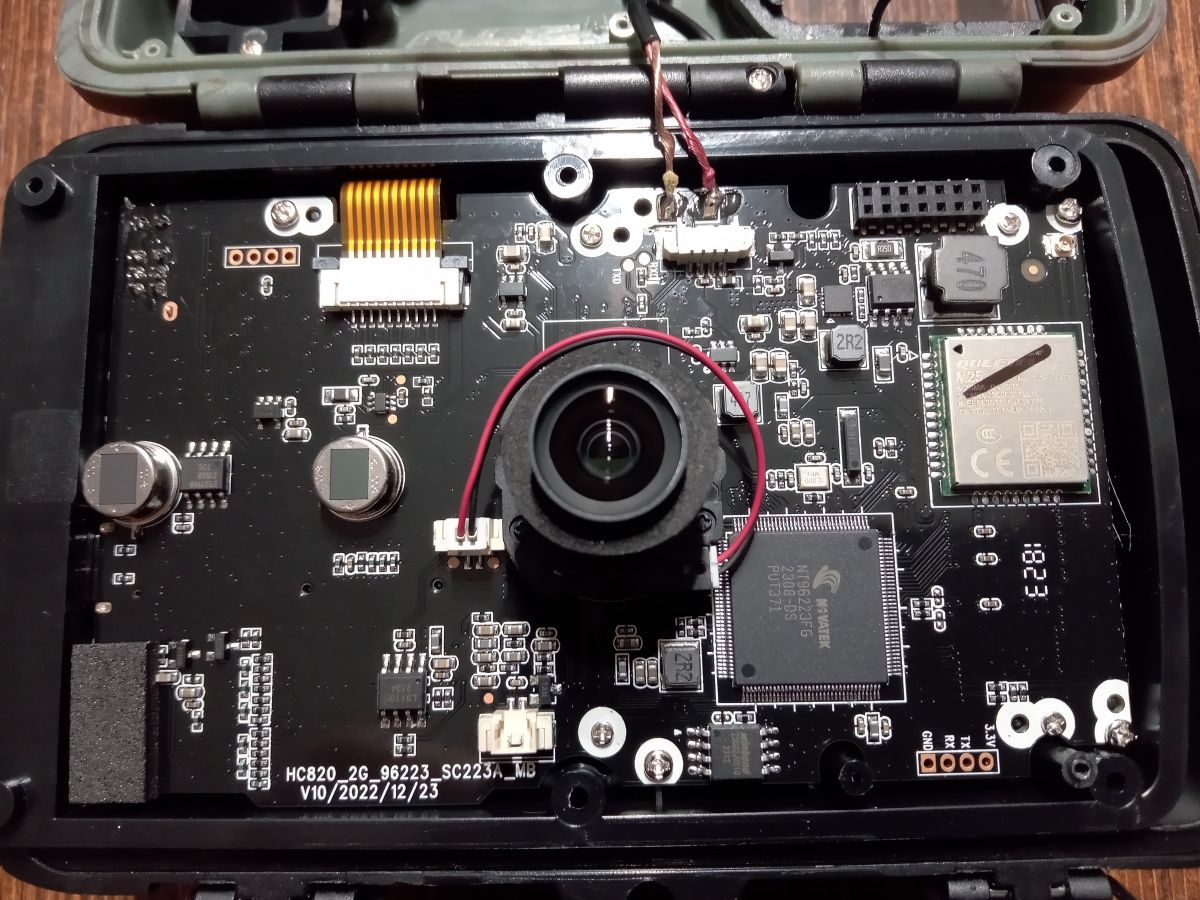
    You`re right, the antenna is inside. Check whether it has not become disconnected, and also check the condition of the internal 3V battery.

    Interior of an electronic device with a visible motherboard and wiring. Circuit board with a circular 3V battery covered in white residue.
  • #363 20997502
    borys24so
    Level 11  
    Posts: 209
    Rate: 6
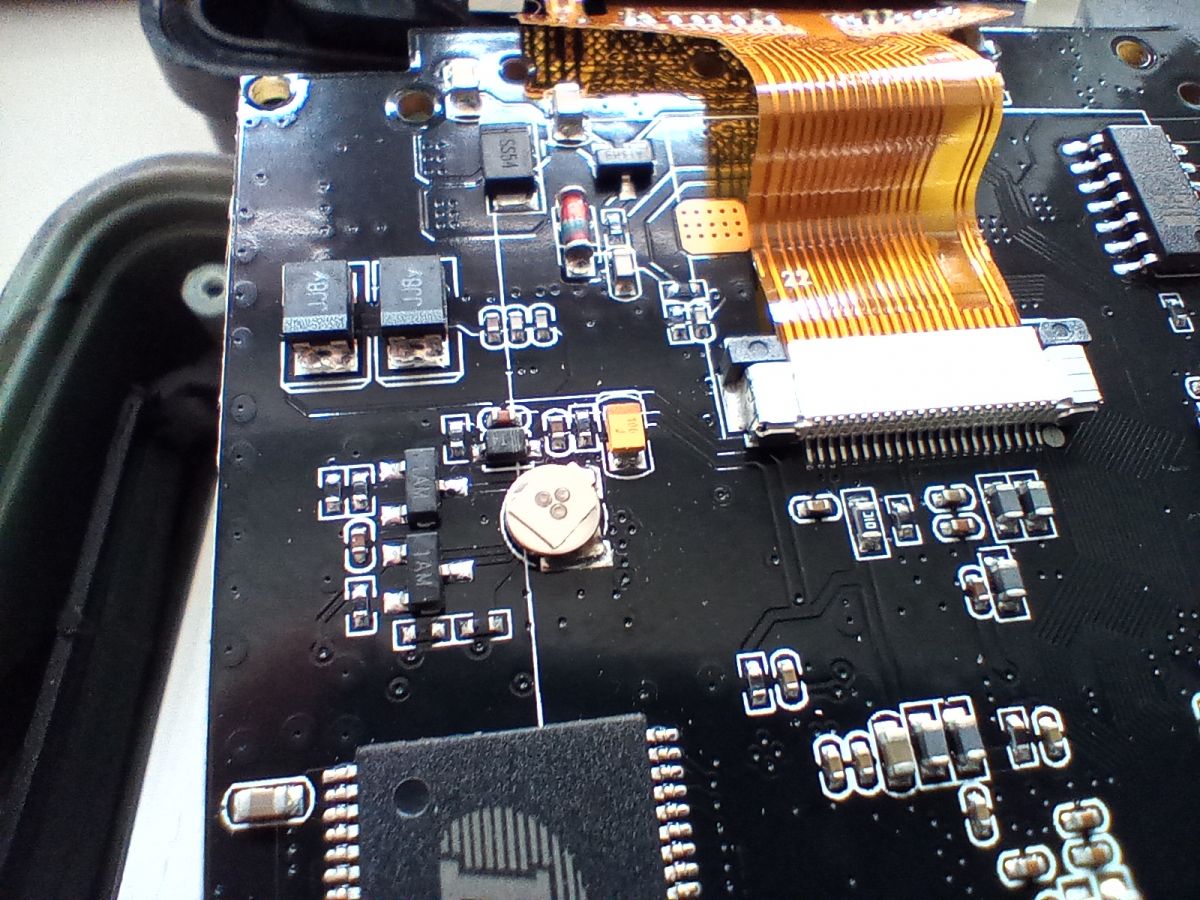
    Image of the interior of an electronic device with a visible main board and a disconnected antenna.

    I don`t see such a battery here. The antenna was well connected. In the photo it is unfastened by me
  • #364 20997606
    gradek83
    Level 43  
    Posts: 9048
    Help: 925
    Rate: 2077
    The battery is probably on the other side of the PCB.
    You have a different version of the motherboard, the manufacturer usually has several versions under the same product name.
  • #365 20997717
    borys24so
    Level 11  
    Posts: 209
    Rate: 6
    Yesterday I checked from the other side and I didn`t see it either... But it`s there. They hid it under the display. This battery has a voltage of 2.66v. Should it be around 2.8-3V? Could this be the reason?
    After five minutes 2.62v then after some time 2.55v.
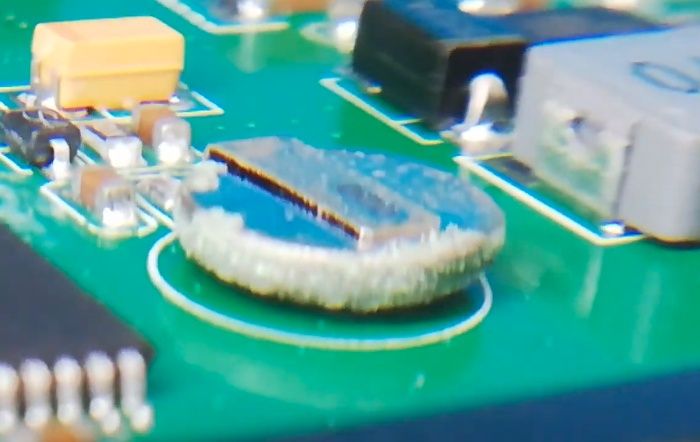
    Can you remove it and check what battery model it is?
    Close-up of a circuit board with an attached round battery.
    This battery is about 4 mm in diameter and is probably welded somehow to the plate at the top. Can it be replaced at all?
  • #366 20997927
    gradek83
    Level 43  
    Posts: 9048
    Help: 925
    Rate: 2077
    borys24so wrote:
    This battery is about 4 mm in diameter and is probably welded somehow to the plate at the top. Can it be replaced at all?
    Yes, yes, but it is a bit difficult due to its small size and you must not overheat it during soldering because it will explode (it will tear it apart from the inside)
    borys24so wrote:
    After five minutes 2.62v then after some time 2.55v.
    If you have a magnifying glass or a good zoom device on your phone, take a closer look at it, especially from the bottom, to see if there are any small deposits on its lining. These batteries are not protected against moisture and even when stored in the manufacturer`s warehouse, they may get wet despite the Supposedly tight seal. All you need is a bit of varnish to block the access of humid air.

    You probably won`t replace it if your FP is under warranty. And if you decide, you have to remember where the plus and minus are and the replacement would have to be with a battery that may not be the same, but one that would fit. E.g. Ms621fe 3V.

    Check this option: put the battery in the basket, leave the FP in test mode for about 10 minutes. Then turn off FP and remove the batteries. i Check the battery voltage and after another 5 minutes and thereafter. Theoretically, the voltage should not drop too quickly. This battery is responsible for maintaining the internal clock and FP settings. Additionally, it is used by the GSM module.

    If you have the motherboard number, you can try to contact the DENVER manufacturer and provide the information from the motherboard and the sticker on the back of the FP, if you have it, plus the current firmware number and ask for newer firmware.

    Theoretically, if this FP is close to the GSM transmitter of the network that the FP is currently using, the range in TEST mode should be Full and information about the network operator should appear next to it.

    Send your configuration file via PM and I`ll check how you set FP there.

    Additionally, if this FP generates some LOG ERROR on the memory card because I don`t remember, please send it too.
  • #367 20997956
    borys24so
    Level 11  
    Posts: 209
    Rate: 6
    The voltage has since dropped to 1.3v.
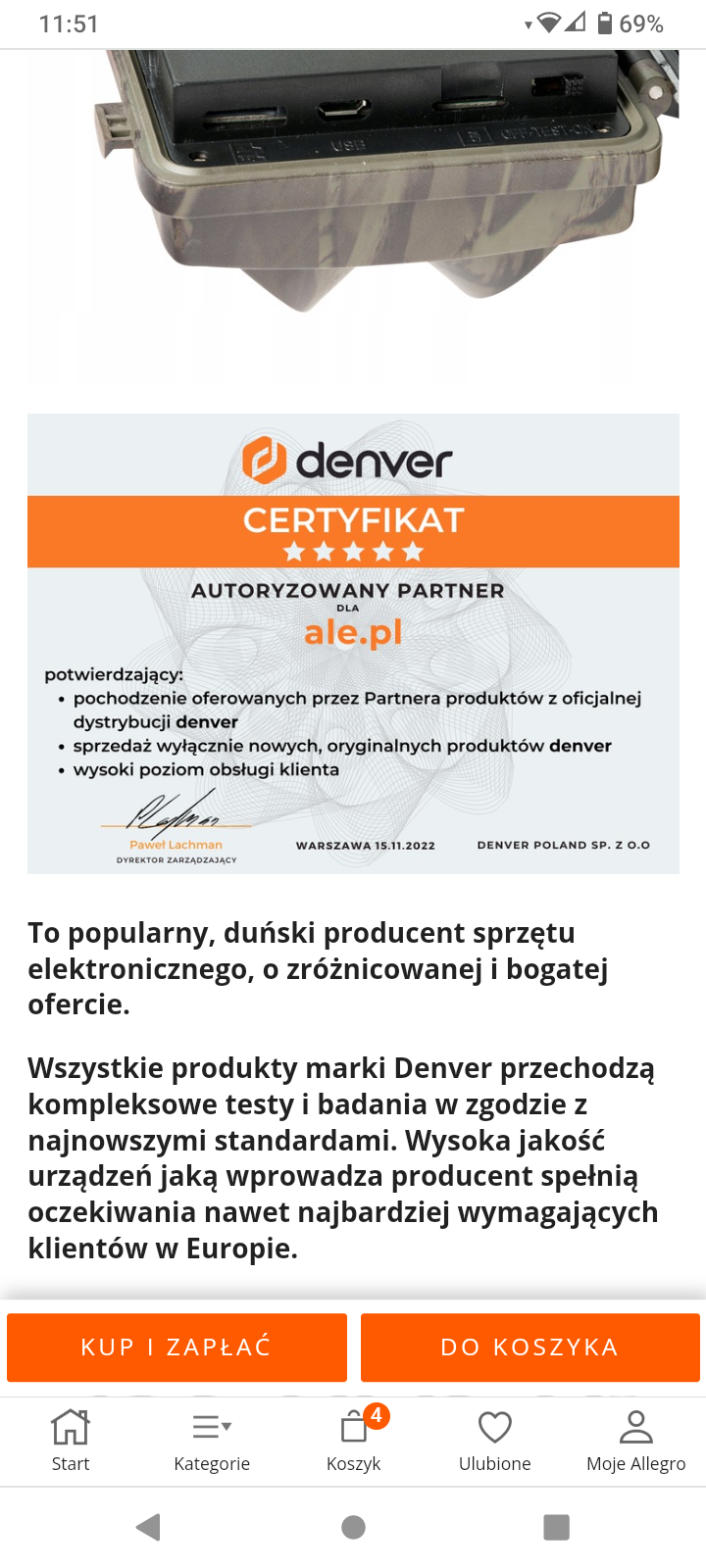
    At the beginning of the conversation, the manufacturer asks where the FP was purchased. Unfortunately, the seller I bought from does not have a distributor as theirs and does not want to talk. They send it back to the seller.

    Hmm .. someone`s probably lying here Certificate of authorized partner for ale.pl issued by Denver.
  • #368 20998024
    gradek83
    Level 43  
    Posts: 9048
    Help: 925
    Rate: 2077
    borys24so wrote:
    Hmm .. someone`s probably lying here
    Marketing ploy - they write what people want to hear...
    The manufacturer is a company from China that creates these FPs with their logo for them...

    in the configuration, try to enter the number without +48 added (only the number)

    and remove this ERR_LOG.TXT Parameter.rar file (you provide private data there) from this message above.

    borys24so wrote:
    The voltage has since dropped to 1.3v.

    So the battery probably doesn`t hold a charge.
  • ADVERTISEMENT
  • #369 20998331
    borys24so
    Level 11  
    Posts: 209
    Rate: 6
    gradek83 wrote:
    (you provide private data there) from this message above.

    Do you mean phone number and email?

    In configuration no. I entered my phone number in every possible way, but it didn`t help.
    If I were sure it was the battery, I would be tempted to replace it myself. I think I`ll send her back.
    Does these logs show anything?
  • ADVERTISEMENT
  • #370 20998358
    gradek83
    Level 43  
    Posts: 9048
    Help: 925
    Rate: 2077
    borys24so wrote:
    Do you mean phone number and email?

    This is how you enter only the phone number without the +48 at the beginning
    borys24so wrote:
    Does these logs show anything?

    The problem is that it doesn`t generate any errors. Does FP respond to commands sent via SMS?

    borys24so wrote:
    I think I`ll send her back.

    Well, if you have the opportunity, it might be best to do so.
  • #371 20998375
    borys24so
    Level 11  
    Posts: 209
    Rate: 6
    When the range sometimes reaches 1 line, it responds to commands.
    Now the battery voltage is 0.6v
  • ADVERTISEMENT
  • #372 20998546
    gradek83
    Level 43  
    Posts: 9048
    Help: 925
    Rate: 2077
    Return and think about something else.
  • #373 20999521
    borys24so
    Level 11  
    Posts: 209
    Rate: 6
    That`s what I did. However, they will send me a second copy. I hope it will work.
    Thanks for trying to help gradek83
  • #374 20999959
    gradek83
    Level 43  
    Posts: 9048
    Help: 925
    Rate: 2077
    borys24so wrote:
    However, they will send me a second copy. I hope it will work.

    Let me know if it works the first time after configuration.
  • #375 21005774
    borys24so
    Level 11  
    Posts: 209
    Rate: 6
    The second copy has arrived. Generally, it is the same, except that the range is slightly better when changing the microSD card to class 4.
    I don`t know why it doesn`t work. When I send a command, e.g. 520 or 505, the report immediately displays that it has been delivered. This means that the network coverage is sufficient. So why doesn`t he send it back? It only sent 1 mms message after the *505* command and a few text messages after the *520* command, so it`s also well configured.
  • #376 21005815
    gradek83
    Level 43  
    Posts: 9048
    Help: 925
    Rate: 2077
    Or maybe it`s your phone`s fault. To receive MMSY, you need to have data transmission turned on on your phone. Have you tried a different phone number?
  • #377 21005874
    borys24so
    Level 11  
    Posts: 209
    Rate: 6
    Data transmission is necessary for the Internet, after all. My phone receives mms messages without any problems when someone sends, for example, a photo.
  • #378 21005924
    gradek83
    Level 43  
    Posts: 9048
    Help: 925
    Rate: 2077
    Mms is received via the GSM network, just like sms, these are paid services. Turn on data transfer and check.
  • #379 21006852
    borys24so
    Level 11  
    Posts: 209
    Rate: 6
    No, since when do data transmission need to be turned on to send or receive SMS or MMS? If you write via chat, I will agree, but not traditionally.
    Either way it doesn`t work with or without broadcast
  • #380 21006927
    gradek83
    Level 43  
    Posts: 9048
    Help: 925
    Rate: 2077
    borys24so wrote:
    No, since when do data transmission need to be turned on to send or receive SMS or MMS?
    Cellular data must be turned on.

    Each time you send an MMS, you send data. Only on different packet data systems. Without data transmission enabled, you cannot send and receive MMS.

    Install the My Orange application, add this card number from FP to this application and check the status. There should be information about the account status and whether any MMS messages have been sent from this number.
    https://www.orange.pl/omnibook/aplikacja-moj-orange
  • #381 21006947
    borys24so
    Level 11  
    Posts: 209
    Rate: 6
    I have already ruled out the orange card. I checked the code and the account balance does not allow sending.
    I`m struggling with FP setup on T-Mobile right now. Settings from their website and after saving Parameter.dat FP does not see the settings. This network is not available for cars. Uploaded directly to FP and memory card reader. As a last resort, I will leave FP with a plus card for tonight. Maybe there will be better coverage in the forest. At home, he sends text messages and mms whenever he wants
    I just turned off cellular data on my and my wife`s phone. I sent a photo (MMS) and my wife received the photo. WIFI is also turned off

    Okay, T-Mobile finally caught it. There will be trials

    Added after 1 [hours] 24 [minutes]:

    I topped up the Orange card because it has the best range, although it is still weak - in gusts up to 34% outside, in the forest. FP sends back text messages after about 25 seconds and mms messages after 75 seconds. You can say that it works.
    Ps. data transmission and wifi are turned off on the phone 😲😲
  • #382 21007107
    gradek83
    Level 43  
    Posts: 9048
    Help: 925
    Rate: 2077
    Here you have a map of BTS transmitters, theoretically you can check which operator in your place or in the forest has the transmitter closest to FP and theoretically the range from this operator should be the strongest. Of course, it is about the range of the frequency band supported by the modem in FP. GSM: 900 1800 1900
  • #383 21007134
    borys24so
    Level 11  
    Posts: 209
    Rate: 6
    That`s right. I have 2 towers nearby. Orange and T-mobile (both offer GSM 900) are 2.6 km from me and Plus and Play are 3.2 km away. Play doesn`t offer any of these frequencies, so I didn`t even buy the starter.
    Tomorrow, the assembly of FP will take place at the target location, i.e. in forest places where rabble comes and leaves garbage. Spring will be coming soon, so there will be more and more of it.
  • #384 21007173
    gradek83
    Level 43  
    Posts: 9048
    Help: 925
    Rate: 2077
    You can also protect the FP itself by installing notione PLAY in it
  • #385 21035274
    BartekKSdz
    Level 5  
    Posts: 7

    Hello. I have the WCM-8010MK3 version of the camera trap. I have two questions for you - how long do the batteries last and is it possible to turn off the infrared diodes?
  • #386 21035443
    borys24so
    Level 11  
    Posts: 209
    Rate: 6
    I used Varta 2600 mAh batteries and I had no complaints about the operating time. It also depends on the settings.
    However, I sent this junk back (the second copy) and am waiting for a refund. FP responded to commands and did not send mms messages when motion was detected. She just wrote everything down on a card. Most of the photos were unreadable anyway and the videos were of poor quality, which could cut so much that the player would freeze.
  • #387 21035490
    gradek83
    Level 43  
    Posts: 9048
    Help: 925
    Rate: 2077
    borys24so wrote:
    this scoundrel
    Well, a failed FP model, indeed.
  • #388 21037195
    borys24so
    Level 11  
    Posts: 209
    Rate: 6
    and the Tophun equivalent? You can say something about him. I mean HC 300M
  • #389 21037284
    gradek83
    Level 43  
    Posts: 9048
    Help: 925
    Rate: 2077
    I can recommend HC-550M.
  • #390 21037710
    borys24so
    Level 11  
    Posts: 209
    Rate: 6
    Ok, I will check

Topic summary

✨ The Denver WCM-8010 camera trap experiences frequent issues with MMS and email photo transmission, SMS command responsiveness, and configuration persistence. Key problems include failure to send photos via MMS or email despite correct manual setup, SMS commands not being acknowledged or inconsistently working, and settings not saving properly when configured via USB cable—requiring configuration through the microSD card instead. Successful MMS operation often depends on manually entering accurate APN and MMS parameters specific to the mobile operator, disabling SIM PIN codes, and ensuring the SIM card is activated with at least one voice call. The camera works best on 2G networks and requires a Class 4 or lower microSD card (up to 16GB) due to compatibility issues with UHS standard cards like SanDisk. Firmware updates improve functionality but may introduce new issues such as screen blackouts or loss of certain features; some users report reverting to older firmware or resetting to factory defaults after updates. SMS commands *505* (take and send photo) and *530* (start) generally work, while *500* (send photo on demand) and *531* (stop) commands are unreliable or non-functional in many firmware versions. Power supply quality affects performance; rechargeable NiMH batteries may drain quickly, impacting MMS sending and infrared operation. The camera trap’s internal clock relies on a small backup battery (VL621/MS621), which if faulty or corroded, causes instability. Night photo quality is often poor, with suggestions to increase ISO to 400. The device’s MMS and email sending functions require precise configuration of APN, MMSC, IP, and port settings, often best done manually rather than relying on automatic operator selection. Users recommend removing SIM PIN, activating SIM via phone calls, using compatible memory cards, and carefully managing firmware updates to maintain stable operation.
Generated by the language model.

FAQ

TL;DR: 73 % of “no-MMS” tickets come down to a wrong APN entry; “Send SMS commands to the camera’s own number” [Elektroda, humis, post #17729731] A 0.4 s trigger but only 2 G/GPRS radio means correct SIM setup is vital. Why it matters: fix one field and the trap starts paying for itself, not burning batteries.

Quick Facts

• Trigger time: 0.3 – 0.5 s (Denver spec). • IR night range: approx. 20 m (Denver spec). • microSD: Class 4, ≤32 GB gives stable MMS; UHS cards cause errors [Elektroda, wojtek1984, post #18048312] • Network: 2 G 900/1800 MHz, MMS size ≤300 KB. • Buggy lots: PO 12176, 12209, 12636 require firmware 20190929 [Elektroda, Kamil Monk, post #18128985]
Why won’t my WCM-8010/8010 MK2 send MMS even though it shows signal bars?

The SIM is registered but the APN, MMSC or proxy fields are blank or wrong. Fill them exactly as the operator lists (e.g., Play: APN mms, MMSC http://10.10.28.164/mms/wapenc, Proxy 10.10.25.5:8080) and save via the card, not USB [Elektroda, gradek83, post #19667024]

Which SIM settings are mandatory before first power-up?

  1. Remove the PIN. 2. Make one voice call to activate. 3. Load an MMS package (0.45 PLN per MMS in Play if not) [Elektroda, marahutti, post #19666735] 4. Disable voicemail SMS flashes. Insert only after all four steps.

How do I load the APN correctly?

Format the microSD (FAT32), run MMSCONFIG, choose Auto→Country→Operator or Manual and enter APN, proxy, port. Press Save, put Parameter.dat on the card, reset camera to defaults, then power with the card inserted [Elektroda, Kamil Monk, post #17999085]

What do the SMS commands do?

500 Take one photo & send. 505 Same as 500 plus save to SD. 520 Status report (battery, signal, SD). 530 Arm motion detection. 531 Disarm motion detection. All commands go to the SIM’s own number without asterisks on some firmware; on 20190929 include them [Elektroda, humis, post #17729731]

The trap fires every 3 min even with no movement. How to stop it?

Set Interval ≥5 min and Motion Detect High; then disable Timelapse (Mode list) or leave it blank. False triggers often stop after replacing the 3 V RTC cell (MS621) that leaks and keeps PIR high [Elektroda, gradek83, post #18948387]

How do I know if my firmware is in the buggy lot?

Open the battery door: first five digits of S/N are the PO code. PO 12176, 12209, 12636 need firmware 20190929; PO 12844 needs 20191216. Files are on the Denver support page mid-screen [Elektroda, Kamil Monk, post #18128985]
Best power option for winter?

Eight Eneloop Pro AA last ≈25 days at −5 °C. Switching to a 6 V 12 Ah AGM battery via the DC jack extends runtime to 60 + days [Elektroda, Lysybunio, post #18309515]

Night pictures are black or snowy—fix?

Low batteries or burned IR LEDs. Confirm IR array glows faint red when lens is covered; if not, LEDs or the movable IR-cut filter are stuck. Updating to WCM-8010-20200630 fixes reversed filter timing on MK2 models [Elektroda, gradek83, post #19037982]

Can the camera e-mail pictures via SMTP instead of MMS?

Yes. In MMSCONFIG switch MMS to OFF, SMTP to ON, use a Gmail account with “less secure apps” enabled and port 465 SSL. Expect ~500 kB per mail. MMS and SMTP cannot run simultaneously [Elektroda, gradek83, post #18810296]

How do I decode MMS_LOG errors?

• +CME ERROR 4013 = invalid parameter (often wrong proxy or SD class 10). • 4009 = timeout (weak signal). • 3915 = non-existent address (bad MMSC URL) [Elektroda, aldrtik, post #18318286]

Camera freezes after low battery—solution?

Remove all AA cells, wait 30 s, insert a fresh set and press MENU while powering to clear RAM. Replace the MS621 backup cell if voltage <2.8 V [Elektroda, gradek83, post #18636538]

What interval should I choose for motion-only photos?

Set Interval to 1 min: the PIR must be idle that long before it can re-arm. For wildlife feeding stations users report 5 min reduces duplicate shots by 60 % [Elektroda, wojtek1984, post #18054837]

3-step clean configuration (no USB)

  1. Format a Class 4 card, run MMSCONFIG, click Save.
  2. Insert card + PIN-disabled SIM, reset camera to Defaults.
  3. Switch to TEST, wait for operator name; press SHOT once. If MMS arrives, flip to ON.

Does the WCM-8010 work on 4 G networks?

No. It is 2 G/GPRS only. Operators phasing out 2 G (e.g., Swisscom 2025) will render MMS non-functional unless you use SMTP over 3 G dongle mods.

Warranty or DIY?

Denver grants 24 months. Firmware flashing voids warranty only if it bricks the unit. Keep the original Parameter.dat and a photo of the S/N sticker for RMA [Denver Support].
Generated by the language model.
ADVERTISEMENT