logo elektroda
logo elektroda
X
logo elektroda
Dostępna jest polska wersja

Czy wolisz polską wersję strony elektroda?

Nie, dziękuję Przekieruj mnie tam

Huawei SUN2000 Inverter: WIFI Dongle Connection, Firmware Update & FusionSolar

Bob271 430437 1369
Best answers

How do I get a Huawei SUN2000 Wi‑Fi dongle online when FusionSolar shows the SDongleA as offline?

To get the dongle/configuration working, connect to the inverter’s own Wi‑Fi AP, open FusionSolar, choose “Putting the device into operation,” scan the QR code on the inverter and enter the password from the label (or the default 00000a if it was not changed) [#18928339][#19344455] If Wi‑Fi setup keeps failing, one user gave up on wireless and connected the dongle/router by Ethernet cable directly, which worked immediately [#18870485] Another user reported that installing the latest FusionSolar fixed a case where the dongle was detected but all networks looked open and no connection would complete [#19386137] During commissioning and software updates, the inverter should have DC power available; without DC, Huawei units may behave oddly and not finish configuration/update properly [#18871886]
ADVERTISEMENT
Treść została przetłumaczona polish » english Zobacz oryginalną wersję tematu
  • #301 19664761
    guzi007
    Level 12  
    I want to connect two strings of 6 400W panels to the Huawei M1. I theoretically exceed the starting voltage. I would like to add optimizers to three panels that work on one string, because they are sometimes shaded. The question is whether the HUAWEI optimizer in the event of shading will not reduce the tension in the string, which in turn turns off the entire string?
  • ADVERTISEMENT
  • #302 19674422
    mariusz.lubicz
    Level 24  
    It will reduce and will definitely turn off. Too few panels and too low voltage. In addition, the efficiency will be very poor. Instead of 98%, it could be 60%. Such an installation does not make sense.
  • #303 19682241
    migod
    Level 21  
    Sun2000 App available from Play Store. https://play.google.com/store/apps/details?id=com.huawei.inverterapp

    Apparently, it is used to manage this inverter, but I install it as version 2.2.00.050 from 2019. Someone else on the forum has it version 3.2.00.015 and he manages to connect to the inverter, and I hang on the login ..

    Have any of you encountered such a problem? I have a Samsung with Android 11.

    In general - trying to select the inverter and turn on the modbus via wifi.
  • #304 19682271
    rokbok
    Level 39  
    migod wrote:
    Generally - trying to choose the inverter


    Download the FusionHome app from the attachment, change the extension from * rar to * apk, maybe you can use it to choose the inverter.

    You can also log in to the inverter directly via the inverter WiFi, then you need to be next to it, the password and SSID for this WiFi should be on the sticker on the side of the inverter, as there is also a QR code, you can scan it and thus log in from the machine.
    Attachments:
    • FusionHome.rar (19.02 MB) You must be logged in to download this attachment.
  • ADVERTISEMENT
  • #305 19682446
    migod
    Level 21  
    Thanks for the hint. Useful.

    The app connects to the inverter and I even have an installer profile on a custom password.

    Modbus is active (protocol = modbus / baud = 9600 / com adress = 1) and yet it drops connections on port 502 / TCP, although the port itself is open.

    I use mbpoll for trial, but the modbus module in openhab2 is also not doing well ..
     mbpoll  -v


    Some of you can read modbus packages with sun2000 and if so with what soft?
  • #306 19682866
    mariusz.lubicz
    Level 24  
    I read through serial and connected 485-> eth converter, own soft.
  • #307 19682901
    guzi007
    Level 12  
    jsw wrote:
    mariusz.lubicz wrote:
    After all, the optimizers only go around the shaded panels so that the current flows through it instead of through the diodes,

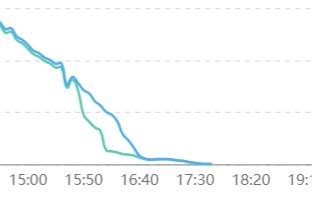
    This is not the case with Huawei optimizers. The shaded ones still produce and are not "bypassed", below are the output power graphs of two topologically distant panels. Green shaded still produces although less and less, blue is not shaded.
    The optimizer is a DC / DC converter controlled by an inverter, which communicates with it via a protocol on DC cables.
    Huawei SUN2000 Inverter: WIFI Dongle Connection, Firmware Update & FusionSolar


    Can you send us what the voltage graph looks like for a shaded module and one in full sun?
  • #308 19682939
    jsw
    Level 15  
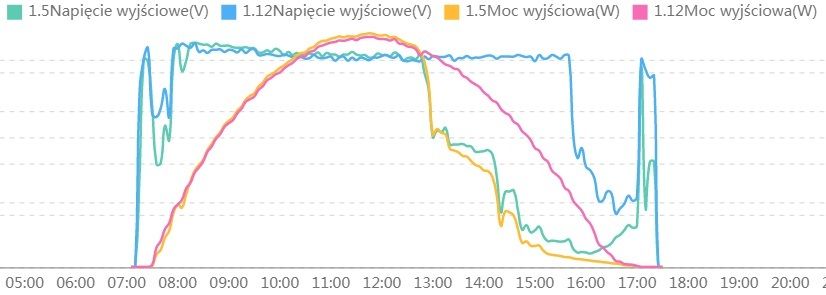
    Please, yesterday, 1.5 first shaded by a tree from the west, 1.12 more or less in the middle.
    This is the output voltage of the panel optimizers.
    Huawei SUN2000 Inverter: WIFI Dongle Connection, Firmware Update & FusionSolar
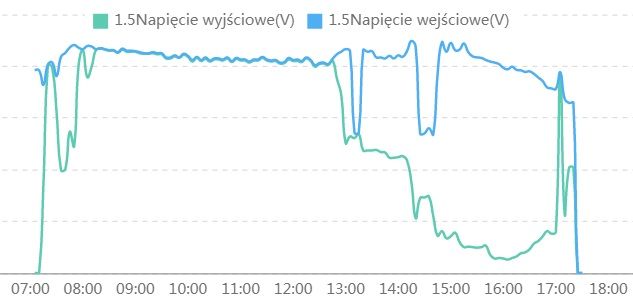
    For comparison only for the shaded panel, the input voltage of the optimizer, i.e. the voltage
    the output of the panel versus the output voltage of its optimizer - a DC / DC converter controlled by an inverter.
    You can see how the optimizer lowers the output voltage to keep the output current at the level of the entire chain.
    Huawei SUN2000 Inverter: WIFI Dongle Connection, Firmware Update & FusionSolar
  • #309 19686973
    MisiekDPx
    Level 11  
    jsw wrote:
    Please, yesterday, 1.5 first shaded by a tree from the west, 1.12 more or less in the middle.
    This is the output voltage of the panel optimizers.
    Huawei SUN2000 Inverter: WIFI Dongle Connection, Firmware Update & FusionSolar
    For comparison only for the shaded panel, the input voltage of the optimizer, i.e. the voltage
    the output of the panel versus the output voltage of its optimizer - a DC / DC converter controlled by an inverter.
    You can see how the optimizer lowers the output voltage to keep the output current at the level of the entire chain.
    Huawei SUN2000 Inverter: WIFI Dongle Connection, Firmware Update & FusionSolar

    Nice charts, with accurate scales. Can you write what kind of tool do you use to draw these charts? ?
  • #310 19687349
    jsw
    Level 15  
    Standard functionality of Fusion Solar @ PC.
  • #311 19699613
    szczukot
    Level 14  
    @jsw where exactly is this done? Is it via the www or is there any windows app?
  • #312 19699658
    Math13
    Level 14  
    szczukot wrote:
    @jsw where exactly is this done? Is it via the www or is there any windows app?


    Normally in the phone app: Fusion Solar.
    1) You indicate the installation (when you have several)
    2) "Devices" icon at the bottom
    3) You select "Inverter in a string"
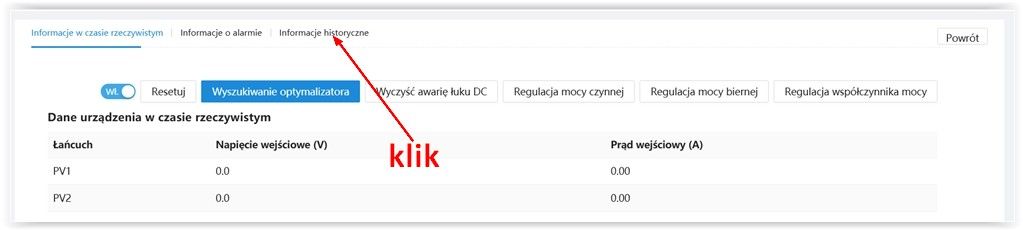
    4) "History - info" icon at the bottom
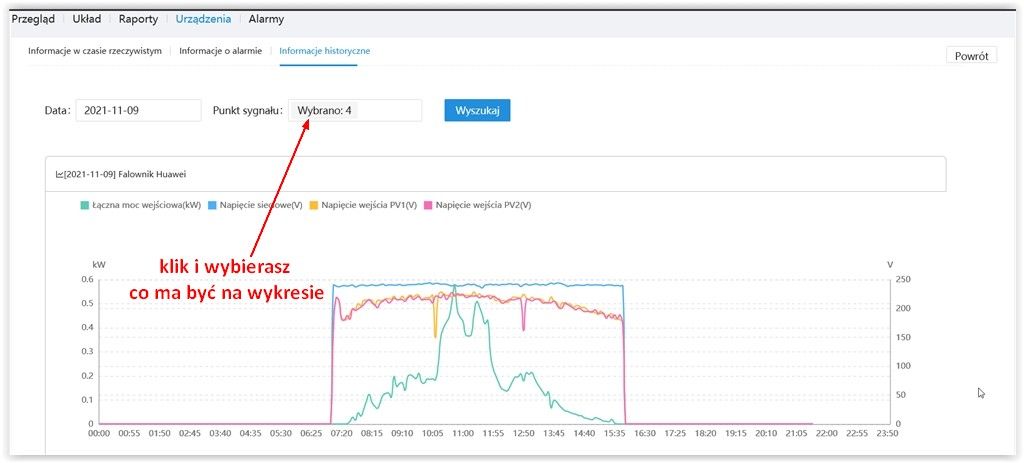
    5) You choose charts according to your preferences. ;-)
  • #313 19699708
    rokbok
    Level 39  
    szczukot wrote:
    Is it via the www or is there any windows app?


    Through the WWW in Fusion Solar, or in the app as its predecessor wrote.

    Huawei SUN2000 Inverter: WIFI Dongle Connection, Firmware Update & FusionSolar

    Huawei SUN2000 Inverter: WIFI Dongle Connection, Firmware Update & FusionSolar

    Huawei SUN2000 Inverter: WIFI Dongle Connection, Firmware Update & FusionSolar
  • #314 19700083
    szczukot
    Level 14  
    I was blind - I have never seen this link "historical information" :(

    By the way, a question, because I see information about the alarm, etc. at Wa sjakies, etc. I don't have that. Need to be on the installer account?
  • ADVERTISEMENT
  • #315 19700199
    rokbok
    Level 39  
    szczukot wrote:
    I see there at Wa sjakies info about the alarm, etc. I don't have that. Need to be on the installer account?


    Yes, the installer account, owner account is not enough to have the other options.
  • #316 19700256
    dprzyb
    Level 22  
    Yesterday I got this message:
    Quote:
    Dear customers:
    In order to provide you a better experience,
    Firmware1: SUN2000L V200R001C00SPC115 is released for the SUN2000L1 series inverters.
    Firmware2: SUN2000MA V100R001C00SPC139 is released for the SUN2000M1 / M2 series inverters.
    Firmware3: SUN2000MA V100R001C20SPC111 is released for the SUN2000M3 series inverters.
    Firmware4: FusionSolarDG V100R002C00SPC106 is released for the LUNA2000 battery.
    Firmware5: SDongle V100R001C00SPC124 is released for the Sdonge device.
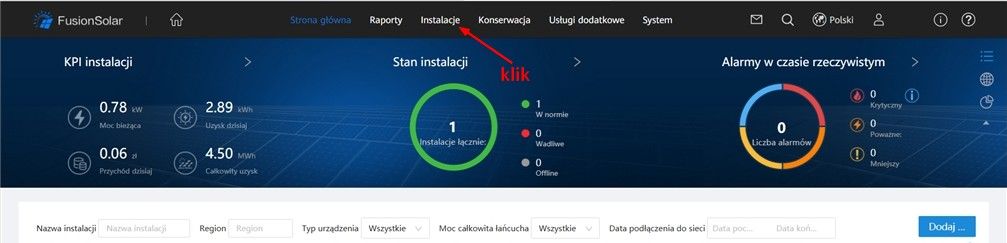
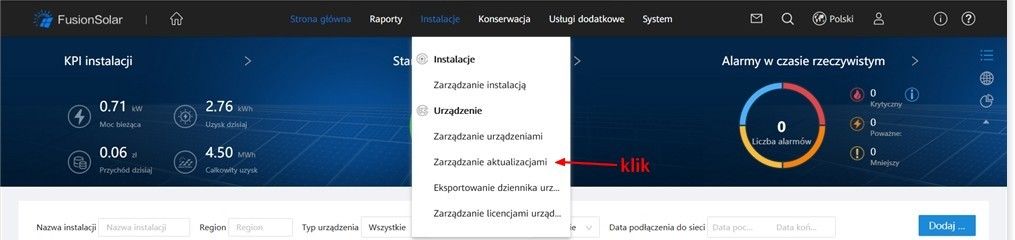
    You can find the software on this page: Plants => Upgrade Management => Device Upgrade. If you have any questions, please contact: eu_inverter_support(_at_)huawei.com.

    @rokbok - can you paste what the menu looks like in this place for you?
    And do you also need an installer account to see this "Device upgrade" function or is the owner enough but with higher privileges than mine?
  • #317 19700416
    decklen
    Level 13  
    Could someone put the software from position 2 in the inverter and 5 for the dongle for those who do not have an installer?
  • #318 19700449
    dprzyb
    Level 22  
    I don't have an installer and I read this message on the FusionSolar website.
    And I do not understand it because on the Huawei website I can only download:
    V100R001C00SPC136 for SUN2000MA
    and
    V100R001C00SPC110 for SDongle
  • #319 19700573
    rokbok
    Level 39  
    dprzyb wrote:
    @rokbok - can you paste what the menu looks like in this place for you?


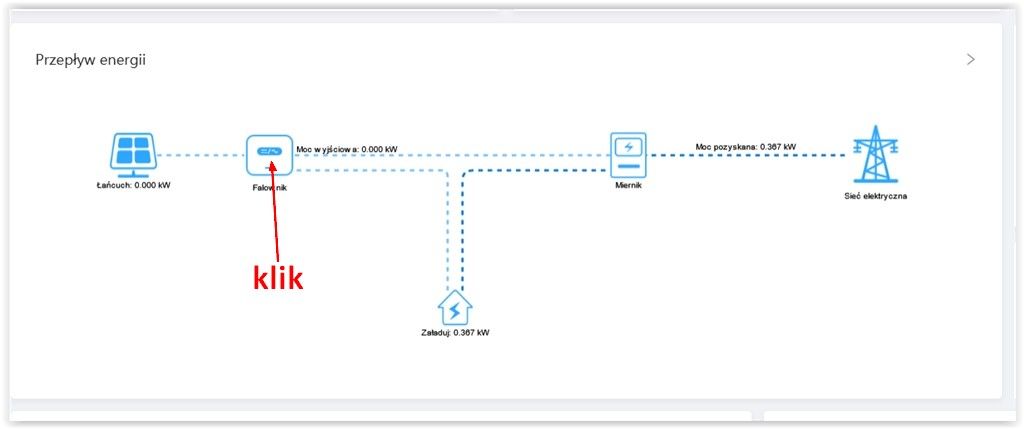
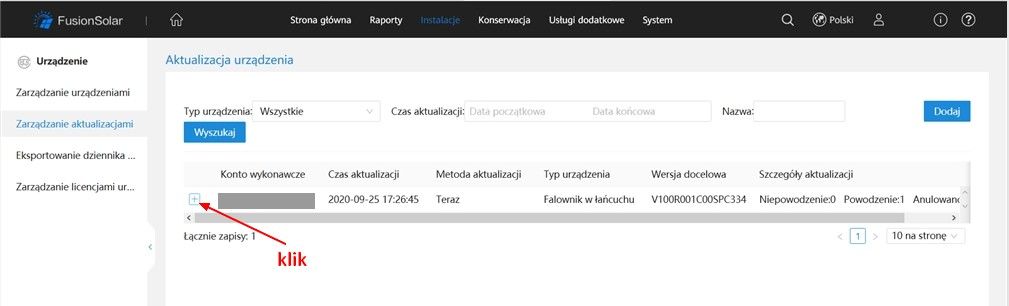
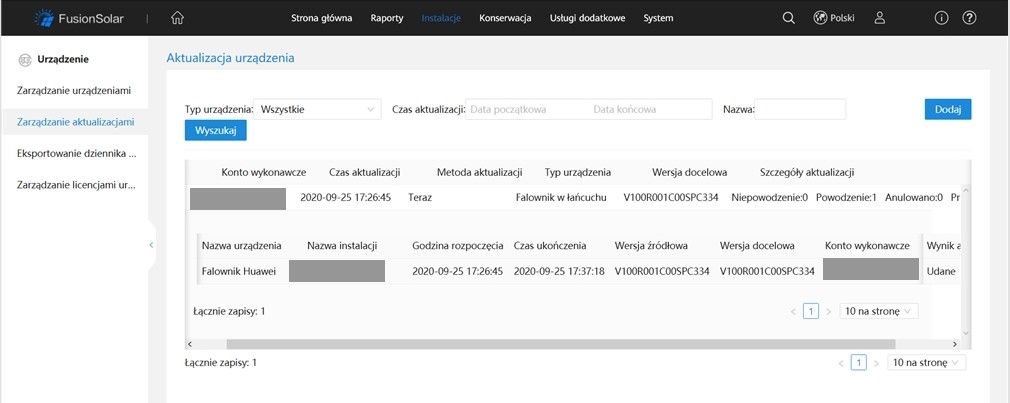
    For me, the update path is as below, if you do not have these options, they must be the installer's permission.

    Huawei SUN2000 Inverter: WIFI Dongle Connection, Firmware Update & FusionSolar

    Huawei SUN2000 Inverter: WIFI Dongle Connection, Firmware Update & FusionSolar

    Huawei SUN2000 Inverter: WIFI Dongle Connection, Firmware Update & FusionSolar

    Huawei SUN2000 Inverter: WIFI Dongle Connection, Firmware Update & FusionSolar
  • #320 19703236
    decklen
    Level 13  
    I wrote to the bottom bracket and they sent me sofas 139 and dongle 124.
    Tomorrow is an update.
  • #321 19703336
    x4robbo
    Level 12  
    I have had the update without any problems, despite one dongle and a cascade connection of 2 inverters. I also updated both the success and the dongle.
  • #322 19703408
    FroQ
    Level 12  
    decklen wrote:
    I wrote to the bottom bracket and they sent me sofas 139 and dongle 124.
    Tomorrow is an update.


    Could you upload your files to the web?

    : ?
  • ADVERTISEMENT
  • #324 19703925
    szczukot
    Level 14  
    Is there a changlog for these new packs?
    Because maybe it makes no sense to update, as nothing interesting has appeared.
  • #327 19706150
    Grzegorz38
    Level 2  
    Hello,
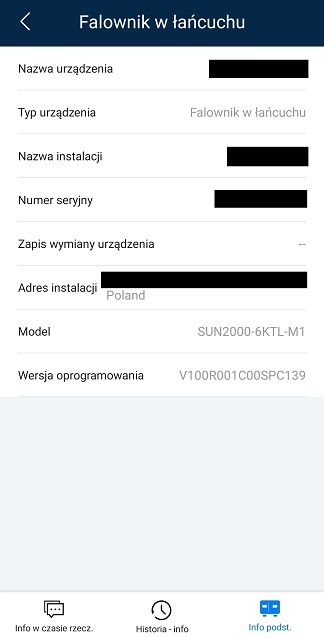
    I have a SUN2000-6KTL-M1 inverter, I recently upgraded to the V100R001C00SPC136 version, I understand that the latest soft for this inverter is V100R001C00SPC139?
    Has anyone already installed this firmware? and when it comes to the dongle, is it worth changing the soft at all? is it something my soft for dongle is V100R001C00SPC119, on the manufacturer's website I do not see it either.
  • #328 19706196
    wojton1314
    Level 1  
    I did the same as my colleague decklen, I wrote to the support, I got packages with inverter firmware and Smart Dongle.
    I did the update without any problems via FusionSolar.
    Huawei SUN2000 Inverter: WIFI Dongle Connection, Firmware Update & FusionSolar
  • #329 19706219
    Grzegorz38
    Level 2  
    Thanks, I'm just starting the update, I'm just wondering if it's worth doing this dongle
  • #330 19706251
    vlad1947
    Level 2  
    Hello
    So far, I had a preview of the work of thongs (V, A)
    Now it's gone and I can't view the charts.
    Is it due to the update?

Topic summary

✨ The discussion centers on issues and configurations related to Huawei SUN2000 series inverters, particularly focusing on WiFi dongle connectivity, firmware updates, and the FusionSolar platform. Users report successful inverter commissioning and firmware updates but face persistent problems connecting the WiFi dongle, which often blinks red and appears offline in FusionSolar. A reliable workaround is connecting the dongle via Ethernet cable to the router. Changing WiFi network credentials requires logging directly into the inverter through FusionSolar or FusionHome apps, as remote password changes are not supported. Installer accounts have broader configuration permissions than owner accounts, which often restrict access to settings such as location, currency, and power configuration. The discussion also covers optimal network code selection (e.g., Germany-VDE-AR-N-4105 for Poland), MPPT multi-peak scanning settings for shadowed panels, and string capacity configuration aligning with physical panel connections. Users note that inverter startup voltage and MPPT voltage ranges affect minimum panel string length, with debates on using 140V or 240V for calculations. Firmware updates are available but may not always be visible to all users simultaneously; some recommend downgrading FusionSolar app versions to resolve login or configuration issues. The FusionSolar platform's interface and permissions can be non-intuitive, with some users unable to modify installation parameters without installer access. Additional topics include inverter automatic shutdown due to high grid voltage, anti-PID function requiring external devices, and integration with Huawei DTSU666-H smart meters, which are often auto-detected. Overall, the thread provides practical advice on inverter setup, network configuration, firmware management, and troubleshooting communication issues with Huawei SUN2000 inverters and associated software tools.

FAQ

TL;DR: A 10-min average grid voltage ≥ 253 V forces the SUN2000 inverter to disconnect [Elektroda, lizak1983, post #19657944] “Huawei is a good inverter, I would not be afraid to install it” [Elektroda, Rhaavir, post #18871886] Latest firmware SPC136 fixes battery and startup issues.

Why it matters: Correct settings stop nuisance shutdowns, improve yield and keep the warranty intact.

Quick Facts

• Default grid code for PL installers: Germany VDE-AR-N-4105 or Custom 50 Hz with 253 V/10-min limit [Elektroda, domelek, post #19529531] • SUN2000-M0/M1: MPPT range 200–850 V; Startup 200 V; Max string current 11 A (oper.), 15 A (Isc) [Huawei Datasheet]. • Firmware: SPC136 (inverter) & SPC118 (SDongleA-05) – update in daylight, 20 min per device [Elektroda, lizak1983, post #19640000] • Wi-Fi dongle LED codes: steady green = online; red blink = no router link [Elektroda, JackRze, post #19489029] • Warranty checker: https://support.huawei.com – serial + e-mail required [Elektroda, maneks, post #19359819]

How do I change the inverter’s Wi-Fi after replacing a router?

  1. On the router set the new SSID and password identical to the old ones – the inverter reconnects automatically [Elektroda, lizak1983, post #19657944]
  2. If you prefer to edit the inverter, open the SUN2000 app, connect to the inverter’s AP, choose Maintenance > Communication > Router Wi-Fi and enter the new credentials; save and wait for the LED to turn steady green.

What causes the SUN2000 to trip on sunny days?

A 10-minute average grid voltage at the terminals above 253 V triggers disconnection per VDE-AR-N-4105 [Elektroda, lizak1983, post #19657944] High roof-top cable resistance adds 1-2 V, so measure at the inverter. Load shifting (e.g., 2 kW boiler) or DSO tap change fixes the issue.

Can I lift the 253 V reconnection limit?

Raising “Upper voltage limit when reconnecting to grid” breaches EU NC RfG and risks neighbour equipment damage. Installers and DSOs can audit logs [Elektroda, rokbok, post #19639893] Keep 253 V unless your DSO grants a written exception.

Firmware: what’s new in SPC136 and how do I install it?

SPC136 adds battery-version alarm, M1–M3 parallel support and faster offline self-check [Huawei ReleaseNotes 2021]. Download via SUN2000 or FusionSolar app (Me > Device Commissioning > Update). Stay within inverter Wi-Fi, tap Update, wait ~20 min; the inverter reboots once at ~80 % [Elektroda, MisiekDPx, post #19639882]

How do I update the SDongleA-05 Wi-Fi dongle?

Unplug the dongle, re-insert: it broadcasts “Dongle–AP”. Connect with SUN2000 app, default pwd 00000a, go to Maintenance > Update Device, choose SPC118 file and start. LED blinks fast green during upgrade, steady green when done (≈10 min) [Elektroda, lizak1983, post #19640000]

Grid code list shows only three Chinese entries – what now?

Import units lack EU presets. Select Custom 50 Hz and manually enter: U/Un 0.85 = 0 s, 1.10 = 10 min, 1.15 = 0.1 s; cos φ = 0.9 lead/lag; Q/U droop 4 % [Elektroda, domelek, post #19529531] A valid NC RfG declaration is still required for DSO acceptance.

My Wi-Fi dongle flashes red every few days – fix?

LED red blink means router unreachable. Common causes: weak signal or changed password. Move a repeater within 5 m (-55 dBm or better) [Elektroda, JackRze, post #19489219] If stable signal still fails, reboot the dongle or update its firmware (see above).

Installer owns the FusionSolar site – can I get control?

Yes. Ask the installer to delete the plant from their account, then register a new Installer account with your e-mail and inverter serial; Huawei cloud blocks duplicate serials [Elektroda, rokbok, post #19636492] Warranty remains tied to the serial, not the account.

Lost inverter password – how to reset?

Connect SUN2000 app to the inverter AP, choose “Reset Password”. You must input the 6-digit ESN from the side sticker and the current date. The default admin password resets to 00000a [Huawei Manual].

What’s the correct string current for SUN2000-M1?

Design strings so Isc ≤ 15 A and operating current ≤ 11 A. Example: 12×340 W modules give Isc 10.3 A, within limits [Elektroda, mariusz.lubicz, post #19656018] Exceeding Isc risks optimizer derating and warranty issues.

Will Huawei optimizers shut a whole string when one panel is shaded?

No. Each SUN2000-450W-P acts as a DC/DC converter. A shaded panel continues at lower power while the rest maintain maximum current [Elektroda, jsw, post #19656269] The inverter therefore keeps production and avoids hot-spot bypass.

How do I clear old alarms in FusionSolar?

Go to Device > Alarms, tap the three-dot menu, choose “Clear”. Alarms caused by firmware mismatch disappear automatically after updating both inverter and dongle [Elektroda, stratus84, post #19490242]

Edge case: inverter shows 2 V DC after switch-on – diagnosis?

Reverse-polarity MC4 crimps drop the PV voltage to ≈ 2 V and block startup [Elektroda, kravat3, post #19536568] Disconnect, verify red = + and black = – with a multimeter, then re-crimp.

Quick 3-step: add new owner without installer

  1. Installer deletes plant in FusionSolar. 2. Owner installs SUN2000 app, taps “Create Installer Account”, enters S/N and e-mail. 3. Log in, add plant, then invite personal “Owner” user. Done.
ADVERTISEMENT