logo elektroda
logo elektroda
X
logo elektroda

[BK7231N] [CB3S] [AHT20] TH01 Generic Temperature and Humidity Sensor Teardown

anthonythomas 56106 180
Best answers

How do I finish the OpenBK autoexec setup for a TH01 temperature and humidity sensor with TuyaMCU?

Add the TuyaMCU-to-channel mappings, not just the two drivers: `startDriver TuyaMCU; startDriver tmSensor; setChannelType 1 temperature_div10; linkTuyaMCUOutputToChannel 1 val 1; setChannelType 2 Humidity; linkTuyaMCUOutputToChannel 2 val 2; setChannelType 3 ReadOnlyLowMidHigh; linkTuyaMCUOutputToChannel 3 enum 3; setChannelLabel 3 Battery` [#20516557][#20516646][#20845707] dpID 1 is temperature in tenths of a degree, dpID 2 is humidity, and dpID 3 is the battery state (low/mid/high) [#20516557][#20516646] For battery-powered operation, the Wi‑Fi module is controlled by the MCU, so initial setup often needs external 3.3 V to the Wi‑Fi module; for no-MQTT use, OBK can either use `tuyaMcu_defWiFiState 0x04` or an empty MQTT host field in newer builds [#20642216][#20931402]
AI summary based on the discussion. May contain errors.
ADVERTISEMENT
  • #151 21709970
    fjk
    Level 11  
    Posts: 21
    >>21703018 I've changed autoexec to:

    startDriver tmSensor
    startDriver TuyaMCU
    tuyaMcu_setBaudRate 115200
    tuyaMcu_defWiFiState 4
    setChannelType 1 temperature_div10
    linkTuyaMCUOutputToChannel 1 val 1
    setChannelType 2 Humidity
    linkTuyaMCUOutputToChannel 2 val 2


    but it won't change anything, maybe these values are on other channels than 1 and 2? How I can find it?
  • ADVERTISEMENT
  • #152 21710040
    divadiow
    Level 38  
    Posts: 5202
    Help: 446
    Rate: 914
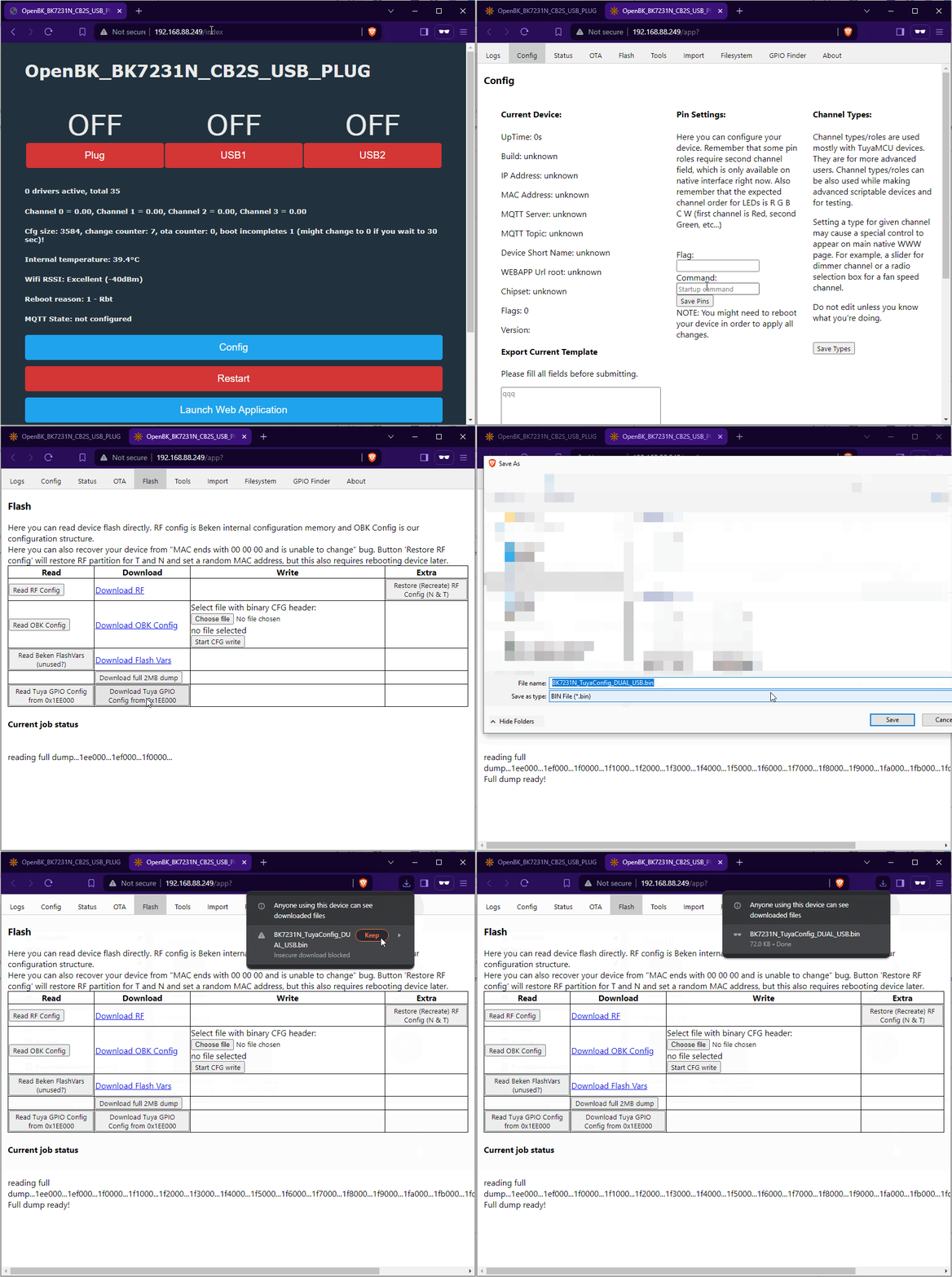
    do you have a factory firmware backup (before pairing to Tuya if you ever did) or maybe can you pull the Tuya config and post the 72kb file?

    OpenBK control panel showing Plug, USB1, and USB2 all turned OFF
  • Incorrect TuyaMCU channel mapping for dpIDs

    #153 21710362
    patanronald
    Level 4  
    Posts: 7
    Rate: 2
    Hello,
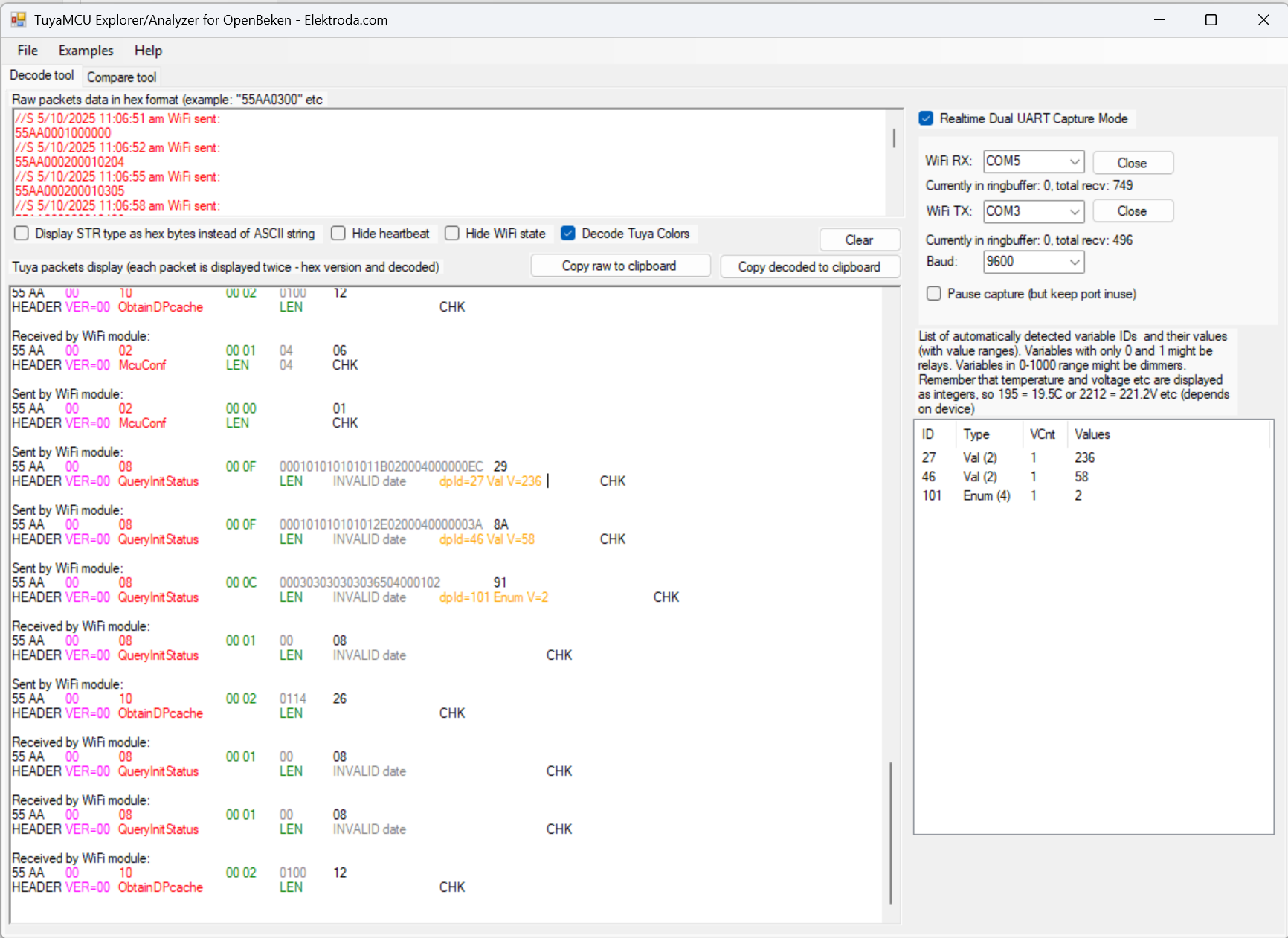
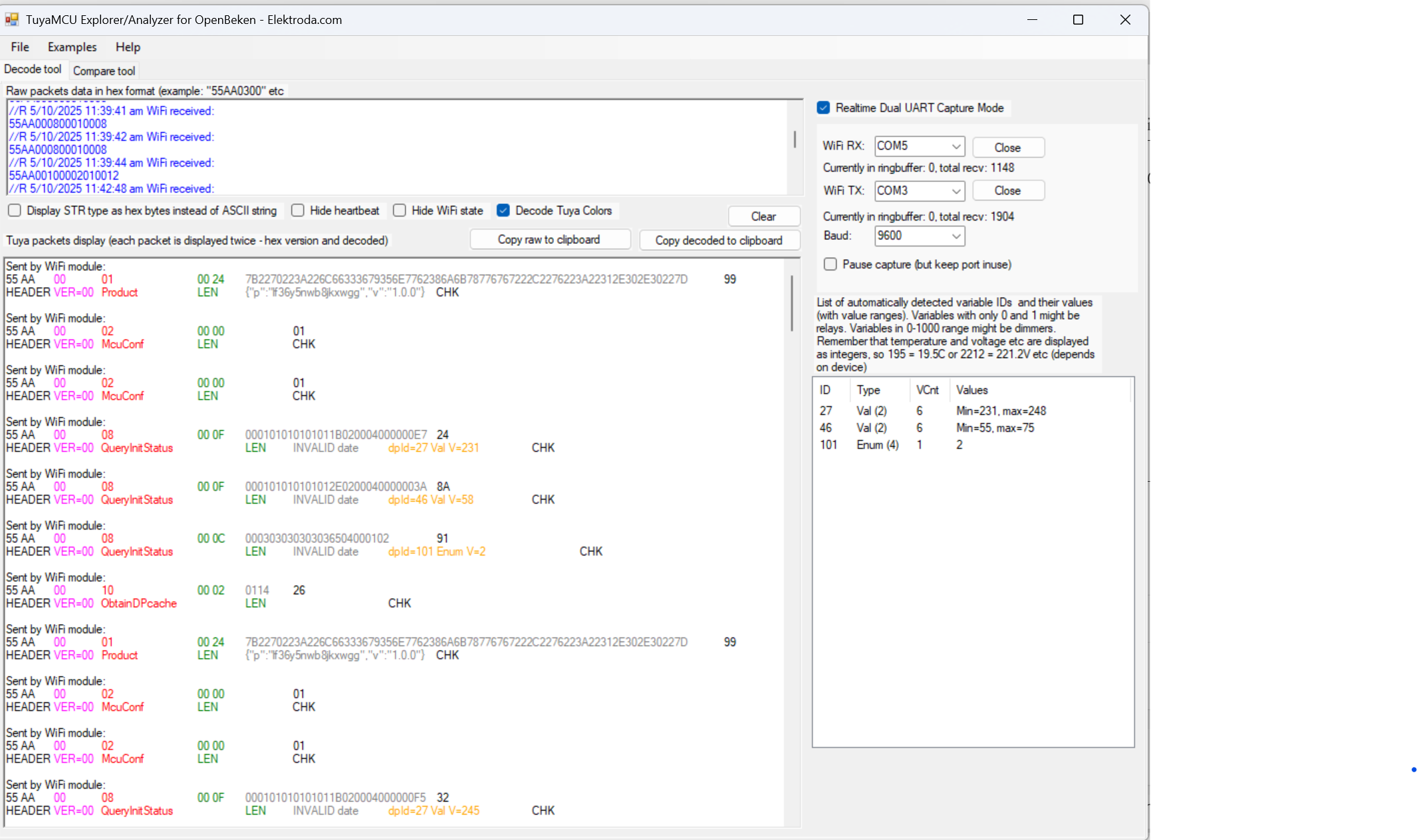
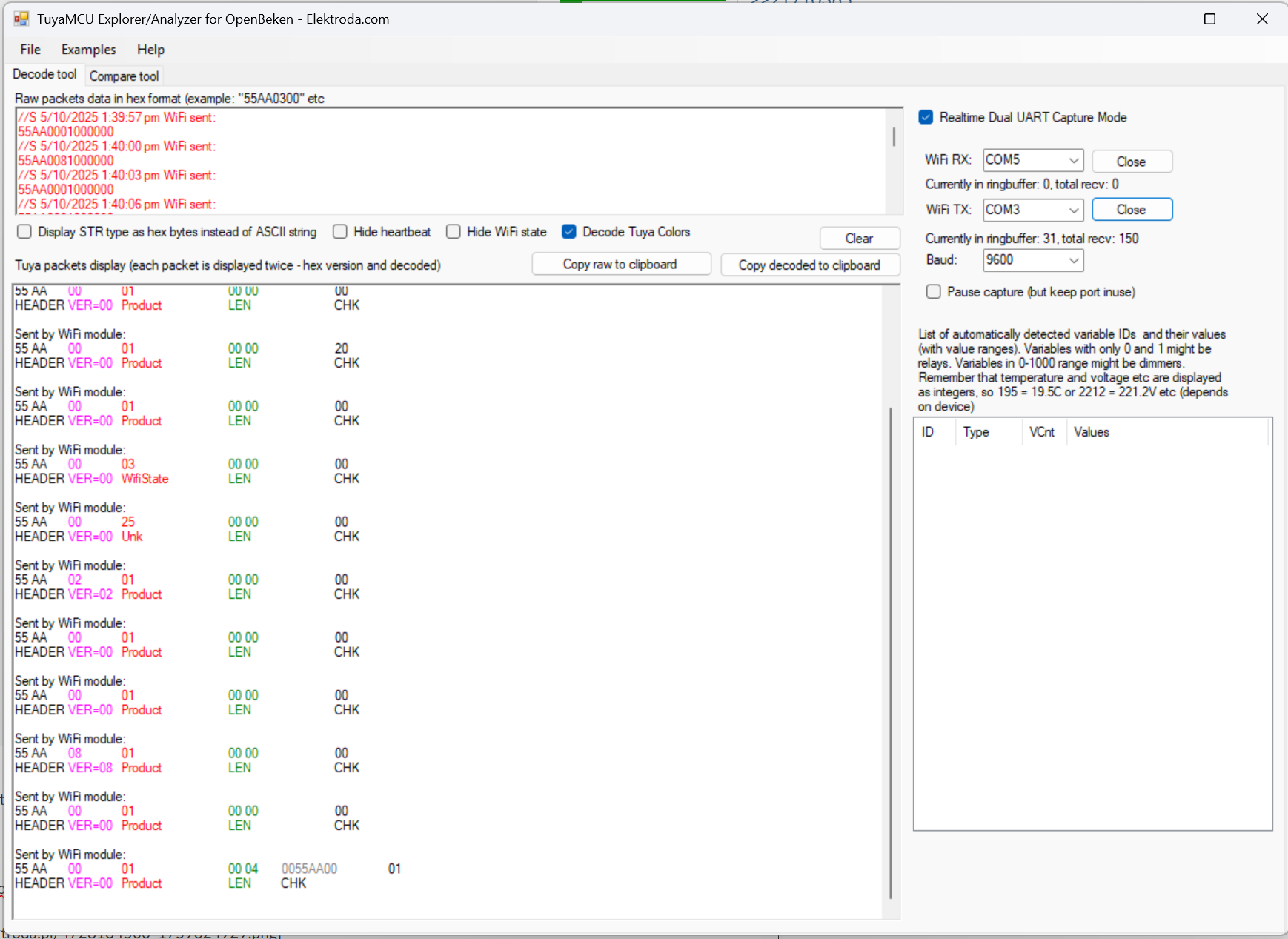
    I have a Tuya TH01 Temp and Humidity sensor. Model is ZY-TH01-CBS3_V1.0 2025-1-07. I have captured the dpID from the device using TuyaMCU analyzer.
    Screenshot of TuyaMCU Explorer displaying UART packet analysis data.
    Screenshot of TuyaMCU Explorer showing UART packet decoding in hex and ASCII

    I tried to use the below code in the Autoexec.bat. The device won't send the things to MQTT and mostly showed zero in the temp and hum field. It will only update the values once and never send the updated values after that. I have the backup of the original firmware if you require this. This is a battery powered device with a MCU chip. Sensor sends the data and goes to sleep to save battery life will be my guess. I am able to flash it and connect to my MQTT server but the temp and humidity doesn't update as you expect when it running the Tuya firmware. I am not sure what I have done wrong. I am bit lost now after I did all the research on this forum to compile the information but not sure what I did wrong.

    startDriver TuyaMCU
    startDriver tmSensor
    // dpID 27 is temperature div 10
    setChannelType 27 temperature_div10
    linkTuyaMCUOutputToChannel 27 val 27
    // dpID 46 is % humidity
    setChannelType 46 Humidity
    linkTuyaMCUOutputToChannel 46 val 46
    // dpID 101 is battery state - low(0), mid(1) and high(2)
    setChannelType 10 ReadOnlyLowMidHigh
    linkTuyaMCUOutputToChannel 101 enum 10
    setChannelLabel 10 Battery


    Should the config be like this? I am new to this so bear with me.

    startDriver TuyaMCU
    startDriver tmSensor
    // dpID 27 is temperature div 10
    setChannelType 27 temperature_div10
    linkTuyaMCUOutputToChannel 27 val 2
    // dpID 46 is % humidity
    setChannelType 46 Humidity
    linkTuyaMCUOutputToChannel 46 val 2
    // dpID 101 is battery state - low(0), mid(1) and high(2)
    setChannelType 101 ReadOnlyLowMidHigh
    linkTuyaMCUOutputToChannel 101 enum 4
    setChannelLabel 101 Battery


    Thanks for the help.
    Attachments:
    • OpenBK7231N_QIO_1.18.186.bin (1.16 MB) You must be logged in to download this attachment.
    • TuyaOrgCommunication.txt (12.01 KB) You must be logged in to download this attachment.
  • ADVERTISEMENT
  • #154 21710365
    p.kaczmarek2
    Moderator Smart Home
    Posts: 14750
    Help: 659
    Rate: 12866
    The basic approach here is to compare your traffic with original TuyaMCU traffic and see where it breaks.

    By the way, there is also an improved version of TuyaMCU driver proposed here:
    https://github.com/openshwprojects/OpenBK7231T_App/pull/1795
    Helpful post? Buy me a coffee.
  • ADVERTISEMENT
  • OpenBK firmware stops updating MCU sensor values

    #155 21710366
    patanronald
    Level 4  
    Posts: 7
    Rate: 2
    >>21710365

    What do you mean by this? How would I implement the new driver? Do you have any guide how to do this?

    How would I go about comparing the traffic with the original tuya traffic? Am I supposed to use the same analyzer software to see what is reported? If yes, I will flash the openbk firmware and test it again.

    Added after 1 [hours] 6 [minutes]:

    >>21710365

    Hello,

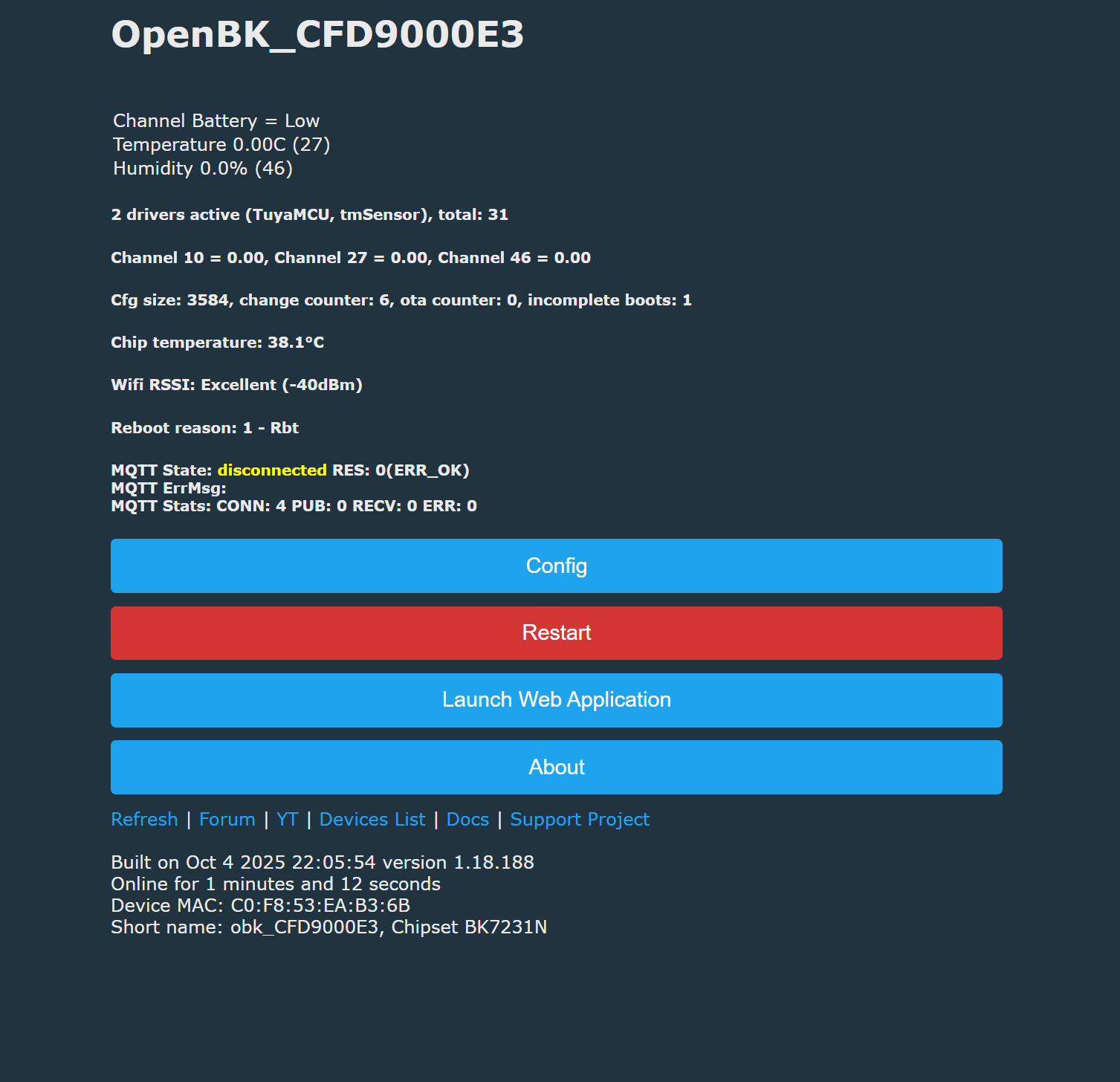
    I flashed the openopenbk version 1.18.188 and this is what i get. Looks like the MCU is not updating anymore with the values.

    OpenBK status screen showing sensor data and MQTT connection info

    Screenshot of TuyaMCU Explorer showing UART data decoding and configuration

    I am getting this in the logs

    Info:CMD:LFS_ReadFile: failed to file autoexec.bat
    Info:CMD:CMD_StartScript: failed to get file autoexec.bat

    Info:MAIN:Time 66, idle 194548/s, free 70264, MQTT 0(4), bWifi 1, secondsWithNoPing -1, socks 2/38 
    Info:MAIN:Time 67, idle 188237/s, free 70264, MQTT 0(4), bWifi 1, secondsWithNoPing -1, socks 2/38 
    Info:MAIN:Time 68, idle 189089/s, free 70264, MQTT 0(4), bWifi 1, secondsWithNoPing -1, socks 2/38 
    Info:MAIN:Time 69, idle 189937/s, free 70264, MQTT 0(4), bWifi 1, secondsWithNoPing -1, socks 2/38 
    Info:MAIN:Time 70, idle 188303/s, free 70264, MQTT 0(4), bWifi 1, secondsWithNoPing -1, socks 2/38 
    Info:GEN:dhcp=0 ip=10.10.50.23 gate=10.10.50.1 mask=255.255.255.0 mac=c0:f8:53:ea:b3:6b
    Info:GEN:sta: 1, softap: 0, b/g/n
    Info:GEN:sta:rssi=-40,ssid=IoT,bssid=9c:a2:f4:2f:3c:2c,channel=6,cipher_type:CCMP
    Info:MAIN:Time 71, idle 183905/s, free 70264, MQTT 0(4), bWifi 1, secondsWithNoPing 1, socks 2/38 
    Info:MAIN:Time 72, idle 193001/s, free 58568, MQTT 0(4), bWifi 1, secondsWithNoPing 2, socks 3/38 
    Info:MAIN:Time 73, idle 186396/s, free 70264, MQTT 0(4), bWifi 1, secondsWithNoPing 3, socks 2/38 
    Info:MAIN:Time 74, idle 202498/s, free 70264, MQTT 0(4), bWifi 1, secondsWithNoPing 4, socks 2/38 
    Info:MAIN:Time 75, idle 189384/s, free 70264, MQTT 0(4), bWifi 1, secondsWithNoPing 5, socks 2/38 
    Info:MAIN:Time 76, idle 188268/s, free 70264, MQTT 0(4), bWifi 1, secondsWithNoPing 6, socks 2/38 
    Info:MQTT:mqtt_userName mqttbroker
    mqtt_pass ********
    mqtt_clientID obk_CFD9000E3
    mqtt_host 10.10.40.106:1883
    Info:MAIN:Time 77, idle 188571/s, free 69960, MQTT 0(5), bWifi 1, secondsWithNoPing 7, socks 2/38 
    Info:MAIN:Time 78, idle 202891/s, free 58568, MQTT 0(5), bWifi 1, secondsWithNoPing 8, socks 3/38 
    Info:MAIN:Time 79, idle 190130/s, free 70264, MQTT 0(5), bWifi 1, secondsWithNoPing 9, socks 2/38 
    Info:MAIN:Time 80, idle 189402/s, free 70264, MQTT 0(5), bWifi 1, secondsWithNoPing 10, socks 2/38 
    Info:GEN:dhcp=0 ip=10.10.50.23 gate=10.10.50.1 mask=255.255.255.0 mac=c0:f8:53:ea:b3:6b
    Info:GEN:sta: 1, softap: 0, b/g/n
    Info:GEN:sta:rssi=-40,ssid=IoT,bssid=9c:a2:f4:2f:3c:2c,channel=6,cipher_type:CCMP
    Info:MAIN:Time 81, idle 187410/s, free 70048, MQTT 0(5), bWifi 1, secondsWithNoPing 11, socks 3/38 
    Info:MAIN:Time 82, idle 187442/s, free 58568, MQTT 0(5), bWifi 1, secondsWithNoPing 12, socks 3/38 
    Info:MAIN:Time 83, idle 185114/s, free 70264, MQTT 0(5), bWifi 1, secondsWithNoPing 13, socks 2/38 
    Info:MAIN:Time 84, idle 192162/s, free 70264, MQTT 0(5), bWifi 1, secondsWithNoPing 14, socks 2/38 
    Info:MAIN:Time 85, idle 186925/s, free 70048, MQTT 0(5), bWifi 1, secondsWithNoPing 15, socks 3/38 
    Info:MAIN:Time 86, idle 201132/s, free 70264, MQTT 0(5), bWifi 1, secondsWithNoPing 16, socks 2/38 
    Info:MAIN:Time 87, idle 191997/s, free 70048, MQTT 0(5), bWifi 1, secondsWithNoPing 17, socks 3/38 
    Info:MAIN:Time 88, idle 188149/s, free 70264, MQTT 0(5), bWifi 1, secondsWithNoPing 18, socks 2/38 
    Info:MAIN:Time 89, idle 193159/s, free 70264, MQTT 0(5), bWifi 1, secondsWithNoPing 19, socks 2/38 
    Info:MAIN:Time 90, idle 189824/s, free 70264, MQTT 0(5), bWifi 1, secondsWithNoPing 20, socks 2/38 
    Info:GEN:dhcp=0 ip=10.10.50.23 gate=10.10.50.1 mask=255.255.255.0 mac=c0:f8:53:ea:b3:6b
    Info:GEN:sta: 1, softap: 0, b/g/n
    Info:GEN:sta:rssi=-40,ssid=IoT,bssid=9c:a2:f4:2f:3c:2c,channel=6,cipher_type:CCMP
    Info:MAIN:Time 91, idle 186406/s, free 70264, MQTT 0(5), bWifi 1, secondsWithNoPing 21, socks 2/38 
    Info:MAIN:Main_Init_Before_Delay
    Info:CFG:####### Boot Count 81 #######
    Warn:CFG:CFG_InitAndLoad: Correct config has been loaded with 8 changes count.
    Error:CMD:no file early.bat err -2
    Info:GEN:PIN_SetupPins pins have been set up.
    Info:MAIN:Main_Init_Before_Delay done
    Info:MAIN:Main_Init_Delay
    Info:MAIN:Main_Init_Delay done
    Info:MAIN:Main_Init_After_Delay
    Info:MAIN:Using SSID [IoT]
    Info:MAIN:Using Pass [none]
    Error:HTTP:Created HTTP SV thread with (stack=2048)
    Info:MQTT:MQTT_RegisterCallback called for bT obk_CFD9000E3/ subT obk_CFD9000E3/+/set
    Info:MQTT:MQTT_RegisterCallback called for bT bekens/ subT bekens/+/set
    Info:MQTT:MQTT_RegisterCallback called for bT cmnd/obk_CFD9000E3/ subT cmnd/obk_CFD9000E3/+
    Info:MQTT:MQTT_RegisterCallback called for bT cmnd/bekens/ subT cmnd/bekens/+
    Info:MQTT:MQTT_RegisterCallback called for bT obk_CFD9000E3/ subT obk_CFD9000E3/+/get
    Info:MQTT:MQTT_RegisterCallback called for bT homeassistant/ subT homeassistant/+
    Info:CMD:CMD_StartScript: started @startup at the beginning
    Info:MAIN:Started TuyaMCU.
    Info:MAIN:Started tmSensor.
    Info:GEN:Channel 27 type changed to temperature_div10
    Info:GEN:Channel 46 type changed to Humidity
    Info:GEN:Channel 10 type changed to ReadOnlyLowMidHigh
    Info:CMD:CMD_StartScript: started autoexec.bat at the beginning
    Info:MAIN:Main_Init_After_Delay done
    Info:MAIN:Drv TuyaMCU is already loaded.
    Info:MAIN:Drv tmSensor is already loaded.
    Info:GEN:Channel 27 type changed to temperature_div10
    Info:GEN:Channel 46 type changed to Humidity
    Info:GEN:Channel 10 type changed to ReadOnlyLowMidHigh
    Info:MAIN:Time 1, idle 214547/s, free 75816, MQTT 0(0), bWifi 0, secondsWithNoPing -1, socks 2/38 
    Info:TuyaMCU:Received: 55 AA 00 01 00 24 7B 22 70 22 3A 22 6C 66 33 36 79 35 6E 77 62 38 6A 6B 78 77 67 67 22 2C 22 76 22 3A 22 31 2E 30 2E 30 22 7D 99 
    Info:TuyaMCU:ProcessIncoming[v=0]: cmd 1 (QueryProductInformation) len 43
    Info:TuyaMCU:ParseQueryProductInformation: received {"p":"lf36y5nwb8jkxwgg","v":"1.0.0"}
    Info:MAIN:Time 2, idle 186148/s, free 75816, MQTT 0(0), bWifi 0, secondsWithNoPing -1, socks 2/38 
    Info:MAIN:Time 3, idle 190115/s, free 75816, MQTT 0(0), bWifi 0, secondsWithNoPing -1, socks 2/38 
    Info:MAIN:Time 4, idle 187804/s, free 75816, MQTT 0(0), bWifi 0, secondsWithNoPing -1, socks 2/38 
    Info:MAIN:Time 5, idle 187614/s, free 75816, MQTT 0(0), bWifi 0, secondsWithNoPing -1, socks 2/38 
    Info:MAIN:Registered for wifi changes
    Info:MAIN:Connecting to SSID [IoT]
    Info:MAIN:Time 6, idle 187915/s, free 70448, MQTT 0(0), bWifi 0, secondsWithNoPing -1, socks 2/38 
    Info:MAIN:Boot complete time reached (5 seconds)
    Info:CFG:####### Set Boot Complete #######
    Info:MAIN:Time 7, idle 177329/s, free 69968, MQTT 0(0), bWifi 0, secondsWithNoPing -1, socks 2/38 
    Info:MAIN:Time 8, idle 84959/s, free 69608, MQTT 0(0), bWifi 0, secondsWithNoPing -1, socks 2/38 
    Info:MAIN:Time 9, idle 0/s, free 69608, MQTT 0(0), bWifi 0, secondsWithNoPing -1, socks 2/38 
    Info:MAIN:Time 10, idle 0/s, free 69608, MQTT 0(0), bWifi 0, secondsWithNoPing -1, socks 2/38 
    Info:GEN:dhcp=0 ip=0.0.0.0 gate=0.0.0.0 mask=0.0.0.0 mac=c0:f8:53:ea:b3:6b
    Info:GEN:sta: 0, softap: 0, b/g/n
    Info:MAIN:Main_OnWiFiStatusChange - WIFI_STA_CONNECTING - 1
    Info:MAIN:Main_OnWiFiStatusChange - WIFI_STA_CONNECTED - 4
    Info:MAIN:Time 11, idle 89685/s, free 70320, MQTT 0(0), bWifi 1, secondsWithNoPing -1, socks 2/38 
    Info:TuyaMCU:Received: 55 AA 00 02 00 00 01 
    Info:TuyaMCU:ProcessIncoming[v=0]: cmd 2 (MCUconf) len 7
    Info:TuyaMCU:ProcessIncoming: TUYA_CMD_MCU_CONF, TODO!
    Info:MAIN:Time 12, idle 185956/s, free 58664, MQTT 0(0), bWifi 1, secondsWithNoPing -1, socks 3/38 
    Info:MQTT:mqtt_userName mqttbroker
    mqtt_pass ********
    mqtt_clientID obk_CFD9000E3
    mqtt_host 10.10.40.106:1883
    Info:MAIN:Time 13, idle 188593/s, free 70272, MQTT 0(1), bWifi 1, secondsWithNoPing -1, socks 2/38 
    Info:MAIN:Time 14, idle 191465/s, free 70272, MQTT 0(1), bWifi 1, secondsWithNoPing -1, socks 2/38 
    Info:MAIN:Time 15, idle 188768/s, free 58576, MQTT 0(1), bWifi 1, secondsWithNoPing -1, socks 3/38 
    Info:MAIN:Time 16, idle 191471/s, free 70272, MQTT 0(1), bWifi 1, secondsWithNoPing -1, socks 2/38 
    Info:MAIN:Time 17, idle 187841/s, free 58576, MQTT 0(1), bWifi 1, secondsWithNoPing -1, socks 3/38 
    Info:MAIN:Time 18, idle 200908/s, free 70272, MQTT 0(1), bWifi 1, secondsWithNoPing -1, socks 2/38 
    Info:MAIN:Time 19, idle 187547/s, free 70272, MQTT 0(1), bWifi 1, secondsWithNoPing -1, socks 2/38 
    Info:MAIN:Time 20, idle 187808/s, free 70272, MQTT 0(1), bWifi 1, secondsWithNoPing -1, socks 2/38 
    Info:GEN:dhcp=0 ip=10.10.50.23 gate=10.10.50.1 mask=255.255.255.0 mac=c0:f8:53:ea:b3:6b
    Info:GEN:sta: 1, softap: 0, b/g/n
    Info:GEN:sta:rssi=-39,ssid=IoT,bssid=9c:a2:f4:2f:3c:2c,channel=6,cipher_type:CCMP
    Info:MAIN:Time 21, idle 191846/s, free 70272, MQTT 0(1), bWifi 1, secondsWithNoPing -1, socks 2/38 
    Info:MAIN:Time 22, idle 188418/s, free 70272, MQTT 0(1), bWifi 1, secondsWithNoPing -1, socks 2/38 
    Info:MAIN:Time 23, idle 189242/s, free 70272, MQTT 0(1), bWifi 1, secondsWithNoPing -1, socks 2/38 
    Info:MAIN:Time 24, idle 189071/s, free 70272, MQTT 0(1), bWifi 1, secondsWithNoPing -1, socks 2/38 
    Info:MAIN:Time 25, idle 184950/s, free 70272, MQTT 0(1), bWifi 1, secondsWithNoPing -1, socks 2/38 
    Info:MAIN:Time 26, idle 189222/s, free 70272, MQTT 0(1), bWifi 1, secondsWithNoPing -1, socks 2/38 
    Info:MAIN:Time 27, idle 201760/s, free 70272, MQTT 0(1), bWifi 1, secondsWithNoPing -1, socks 2/38 
    Info:MAIN:Time 28, idle 187830/s, free 70272, MQTT 0(1), bWifi 1, secondsWithNoPing -1, socks 2/38 
    Info:MQTT:mqtt_userName mqttbroker
    mqtt_pass ********
    mqtt_clientID obk_CFD9000E3
    mqtt_host 10.10.40.106:1883
    Info:MAIN:Time 29, idle 187993/s, free 70272, MQTT 0(2), bWifi 1, secondsWithNoPing -1, socks 2/38 
    Info:MAIN:Time 30, idle 186874/s, free 70272, MQTT 0(2), bWifi 1, secondsWithNoPing -1, socks 2/38 
    Info:GEN:dhcp=0 ip=10.10.50.23 gate=10.10.50.1 mask=255.255.255.0 mac=c0:f8:53:ea:b3:6b
    Info:GEN:sta: 1, softap: 0, b/g/n
    Info:GEN:sta:rssi=-39,ssid=IoT,bssid=9c:a2:f4:2f:3c:2c,channel=6,cipher_type:CCMP
    Info:MAIN:Time 31, idle 187659/s, free 70272, MQTT 0(2), bWifi 1, secondsWithNoPing -1, socks 2/38 
    Info:MAIN:Time 32, idle 186539/s, free 70272, MQTT 0(2), bWifi 1, secondsWithNoPing -1, socks 2/38 
    Info:MAIN:Time 33, idle 190499/s, free 70272, MQTT 0(2), bWifi 1, secondsWithNoPing -1, socks 2/38 
    Info:MAIN:Time 34, idle 188438/s, free 70272, MQTT 0(2), bWifi 1, secondsWithNoPing -1, socks 2/38 
    Info:MAIN:Time 35, idle 188665/s, free 70272, MQTT 0(2), bWifi 1, secondsWithNoPing -1, socks 2/38 
    Info:MAIN:Time 36, idle 190442/s, free 70272, MQTT 0(2), bWifi 1, secondsWithNoPing -1, socks 2/38 
    Info:MAIN:Time 37, idle 190093/s, free 70272, MQTT 0(2), bWifi 1, secondsWithNoPing -1, socks 2/38 
    Info:MAIN:Time 38, idle 187248/s, free 70272, MQTT 0(2), bWifi 1, secondsWithNoPing -1, socks 2/38 
    Info:MAIN:Time 39, idle 192060/s, free 70272, MQTT 0(2), bWifi 1, secondsWithNoPing -1, socks 2/38 
    Info:MAIN:Time 40, idle 198188/s, free 70272, MQTT 0(2), bWifi 1, secondsWithNoPing -1, socks 2/38 
    Info:GEN:dhcp=0 ip=10.10.50.23 gate=10.10.50.1 mask=255.255.255.0 mac=c0:f8:53:ea:b3:6b
    Info:GEN:sta: 1, softap: 0, b/g/n
    Info:GEN:sta:rssi=-40,ssid=IoT,bssid=9c:a2:f4:2f:3c:2c,channel=6,cipher_type:CCMP
    Info:MAIN:Time 41, idle 184308/s, free 70272, MQTT 0(2), bWifi 1, secondsWithNoPing -1, socks 2/38 
    Info:MAIN:Time 42, idle 188046/s, free 70272, MQTT 0(2), bWifi 1, secondsWithNoPing -1, socks 2/38 
    Info:MAIN:Time 43, idle 197041/s, free 70272, MQTT 0(2), bWifi 1, secondsWithNoPing -1, socks 2/38 
    Info:MAIN:Time 44, idle 187810/s, free 70272, MQTT 0(2), bWifi 1, secondsWithNoPing -1, socks 2/38 
    Info:MQTT:mqtt_userName mqttbroker
    mqtt_pass ********
    mqtt_clientID obk_CFD9000E3
    mqtt_host 10.10.40.106:1883
    Info:MAIN:Time 45, idle 190428/s, free 70064, MQTT 0(3), bWifi 1, secondsWithNoPing -1, socks 2/38 
    Info:MAIN:Time 46, idle 188381/s, free 70272, MQTT 0(3), bWifi 1, secondsWithNoPing -1, socks 2/38 
    Info:MAIN:Time 47, idle 184983/s, free 70272, MQTT 0(3), bWifi 1, secondsWithNoPing -1, socks 2/38 
    Info:MAIN:Time 48, idle 189765/s, free 70272, MQTT 0(3), bWifi 1, secondsWithNoPing -1, socks 2/38 
    Info:MAIN:Time 49, idle 185735/s, free 70272, MQTT 0(3), bWifi 1, secondsWithNoPing -1, socks 2/38 
    Info:MAIN:Time 50, idle 187398/s, free 70272, MQTT 0(3), bWifi 1, secondsWithNoPing -1, socks 2/38 
    Info:GEN:dhcp=0 ip=10.10.50.23 gate=10.10.50.1 mask=255.255.255.0 mac=c0:f8:53:ea:b3:6b
    Info:GEN:sta: 1, softap: 0, b/g/n
    Info:GEN:sta:rssi=-39,ssid=IoT,bssid=9c:a2:f4:2f:3c:2c,channel=6,cipher_type:CCMP
    Info:MAIN:Time 51, idle 190260/s, free 58576, MQTT 0(3), bWifi 1, secondsWithNoPing -1, socks 3/38 
    Info:MAIN:Time 52, idle 207086/s, free 70272, MQTT 0(3), bWifi 1, secondsWithNoPing -1, socks 2/38 
    Info:MAIN:Time 53, idle 187836/s, free 70272, MQTT 0(3), bWifi 1, secondsWithNoPing -1, socks 2/38 
    Info:MAIN:Time 54, idle 188893/s, free 70272, MQTT 0(3), bWifi 1, secondsWithNoPing -1, socks 2/38 
    Info:MAIN:Time 55, idle 188896/s, free 70272, MQTT 0(3), bWifi 1, secondsWithNoPing -1, socks 2/38 
    Info:MAIN:Time 56, idle 185287/s, free 70272, MQTT 0(3), bWifi 1, secondsWithNoPing -1, socks 2/38 
    Info:MAIN:Time 57, idle 189042/s, free 70272, MQTT 0(3), bWifi 1, secondsWithNoPing -1, socks 2/38 
    Info:MAIN:Time 58, idle 185260/s, free 70272, MQTT 0(3), bWifi 1, secondsWithNoPing -1, socks 2/38 
    Info:MAIN:Time 59, idle 187313/s, free 58576, MQTT 0(3), bWifi 1, secondsWithNoPing -1, socks 3/38 
    Info:MAIN:Time 60, idle 187946/s, free 70272, MQTT 0(3), bWifi 1, secondsWithNoPing -1, socks 2/38 
    Info:GEN:dhcp=0 ip=10.10.50.23 gate=10.10.50.1 mask=255.255.255.0 mac=c0:f8:53:ea:b3:6b
    Info:GEN:sta: 1, softap: 0, b/g/n
    Info:GEN:sta:rssi=-39,ssid=IoT,bssid=9c:a2:f4:2f:3c:2c,channel=6,cipher_type:CCMP
    Info:MQTT:mqtt_userName mqttbroker
    mqtt_pass ********
    mqtt_clientID obk_CFD9000E3
    mqtt_host 10.10.40.106:1883
    Info:MAIN:Time 61, idle 188176/s, free 70272, MQTT 0(4), bWifi 1, secondsWithNoPing -1, socks 2/38 
    Info:MAIN:Time 62, idle 185002/s, free 70272, MQTT 0(4), bWifi 1, secondsWithNoPing -1, socks 2/38 
    Info:MAIN:Time 63, idle 189179/s, free 58576, MQTT 0(4), bWifi 1, secondsWithNoPing -1, socks 3/38 
    Info:MAIN:Time 64, idle 188279/s, free 70272, MQTT 0(4), bWifi 1, secondsWithNoPing -1, socks 2/38 
    Info:MAIN:Time 65, idle 188543/s, free 70272, MQTT 0(4), bWifi 1, secondsWithNoPing -1, socks 2/38 
    Info:MAIN:Time 66, idle 191496/s, free 70272, MQTT 0(4), bWifi 1, secondsWithNoPing -1, socks 2/38 
    Info:MAIN:Time 67, idle 189686/s, free 70272, MQTT 0(4), bWifi 1, secondsWithNoPing -1, socks 2/38 
    Info:MAIN:Time 68, idle 192970/s, free 70272, MQTT 0(4), bWifi 1, secondsWithNoPing -1, socks 2/38 
    Info:MAIN:Time 69, idle 189482/s, free 58576, MQTT 0(4), bWifi 1, secondsWithNoPing -1, socks 3/38 
    Info:MAIN:Time 70, idle 185578/s, free 70272, MQTT 0(4), bWifi 1, secondsWithNoPing -1, socks 2/38 
    Info:GEN:dhcp=0 ip=10.10.50.23 gate=10.10.50.1 mask=255.255.255.0 mac=c0:f8:53:ea:b3:6b
    Info:GEN:sta: 1, softap: 0, b/g/n
    Info:GEN:sta:rssi=-39,ssid=IoT,bssid=9c:a2:f4:2f:3c:2c,channel=6,cipher_type:CCMP
    Info:MAIN:Time 71, idle 188910/s, free 70272, MQTT 0(4), bWifi 1, secondsWithNoPing 1, socks 2/38 
    Info:MAIN:Time 72, idle 185873/s, free 70272, MQTT 0(4), bWifi 1, secondsWithNoPing 2, socks 2/38 
    Info:MAIN:Time 73, idle 185531/s, free 58576, MQTT 0(4), bWifi 1, secondsWithNoPing 3, socks 3/38 
    Info:MAIN:Time 74, idle 185488/s, free 70272, MQTT 0(4), bWifi 1, secondsWithNoPing 4, socks 2/38 
    Info:MAIN:Time 75, idle 186952/s, free 70272, MQTT 0(4), bWifi 1, secondsWithNoPing 5, socks 2/38 
    Info:MAIN:Time 76, idle 196811/s, free 70272, MQTT 0(4), bWifi 1, secondsWithNoPing 6, socks 2/38 
    Info:MQTT:mqtt_userName mqttbroker
    mqtt_pass ********
    mqtt_clientID obk_CFD9000E3
    mqtt_host 10.10.40.106:1883
    Info:MAIN:Time 77, idle 187492/s, free 70272, MQTT 0(5), bWifi 1, secondsWithNoPing 7, socks 2/38 
    Info:MAIN:Time 78, idle 207389/s, free 70272, MQTT 0(5), bWifi 1, secondsWithNoPing 8, socks 2/38 
    Info:MAIN:Time 79, idle 189274/s, free 58576, MQTT 0(5), bWifi 1, secondsWithNoPing 9, socks 3/38 
    Info:MAIN:Time 80, idle 185275/s, free 70272, MQTT 0(5), bWifi 1, secondsWithNoPing 10, socks 2/38 
    Info:GEN:dhcp=0 ip=10.10.50.23 gate=10.10.50.1 mask=255.255.255.0 mac=c0:f8:53:ea:b3:6b
    Info:GEN:sta: 1, softap: 0, b/g/n
    Info:GEN:sta:rssi=-40,ssid=IoT,bssid=9c:a2:f4:2f:3c:2c,channel=6,cipher_type:CCMP
    Info:MAIN:Time 81, idle 187499/s, free 70272, MQTT 0(5), bWifi 1, secondsWithNoPing 11, socks 2/38 
    Info:MAIN:Time 82, idle 188423/s, free 70272, MQTT 0(5), bWifi 1, secondsWithNoPing 12, socks 2/38 
    Info:MAIN:Time 83, idle 188854/s, free 70272, MQTT 0(5), bWifi 1, secondsWithNoPing 13, socks 2/38 
    Info:MAIN:Time 84, idle 188969/s, free 70272, MQTT 0(5), bWifi 1, secondsWithNoPing 14, socks 2/38 
    Info:MAIN:Time 85, idle 192199/s, free 58576, MQTT 0(5), bWifi 1, secondsWithNoPing 15, socks 3/38 
    Info:MAIN:Time 86, idle 186170/s, free 70272, MQTT 0(5), bWifi 1, secondsWithNoPing 16, socks 2/38 
    Info:MAIN:Time 87, idle 190580/s, free 70272, MQTT 0(5), bWifi 1, secondsWithNoPing 17, socks 2/38 
    Info:MAIN:Time 88, idle 190596/s, free 70272, MQTT 0(5), bWifi 1, secondsWithNoPing 18, socks 2/38 
    Info:MAIN:Time 89, idle 188188/s, free 58576, MQTT 0(5), bWifi 1, secondsWithNoPing 19, socks 3/38 
    Info:MAIN:Time 90, idle 187663/s, free 70272, MQTT 0(5), bWifi 1, secondsWithNoPing 20, socks 2/38 
    Info:GEN:dhcp=0 ip=10.10.50.23 gate=10.10.50.1 mask=255.255.255.0 mac=c0:f8:53:ea:b3:6b
    Info:GEN:sta: 1, softap: 0, b/g/n
    Info:GEN:sta:rssi=-40,ssid=IoT,bssid=9c:a2:f4:2f:3c:2c,channel=6,cipher_type:CCMP
    Info:MAIN:Time 91, idle 186358/s, free 70272, MQTT 0(5), bWifi 1, secondsWithNoPing 21, socks 2/38 
    Info:MAIN:Main_Init_Before_Delay
    Info:CFG:####### Boot Count 82 #######
    Warn:CFG:CFG_InitAndLoad: Correct config has been loaded with 8 changes count.
    Error:CMD:no file early.bat err -2
    Info:GEN:PIN_SetupPins pins have been set up.
    Info:MAIN:Main_Init_Before_Delay done
    Info:MAIN:Main_Init_Delay
    Info:MAIN:Main_Init_Delay done
    Info:MAIN:Main_Init_After_Delay
    Info:MAIN:Using SSID [IoT]
    Info:MAIN:Using Pass [none]
    Error:HTTP:Created HTTP SV thread with (stack=2048)
    Info:MQTT:MQTT_RegisterCallback called for bT obk_CFD9000E3/ subT obk_CFD9000E3/+/set
    Info:MQTT:MQTT_RegisterCallback called for bT bekens/ subT bekens/+/set
    Info:MQTT:MQTT_RegisterCallback called for bT cmnd/obk_CFD9000E3/ subT cmnd/obk_CFD9000E3/+
    Info:MQTT:MQTT_RegisterCallback called for bT cmnd/bekens/ subT cmnd/bekens/+
    Info:MQTT:MQTT_RegisterCallback called for bT obk_CFD9000E3/ subT obk_CFD9000E3/+/get
    Info:MQTT:MQTT_RegisterCallback called for bT homeassistant/ subT homeassistant/+
    Info:CMD:CMD_StartScript: started @startup at the beginning
    Info:MAIN:Started TuyaMCU.
    Info:MAIN:Started tmSensor.
    Info:GEN:Channel 27 type changed to temperature_div10
    Info:GEN:Channel 46 type changed to Humidity
    Info:GEN:Channel 10 type changed to ReadOnlyLowMidHigh
    Info:CMD:CMD_StartScript: started autoexec.bat at the beginning
    Info:MAIN:Drv TuyaMCU is already loaded.
    Info:MAIN:Drv tmSensor is already loaded.
    Info:GEN:Channel 27 type changed to temperature_div10
    Info:GEN:Channel 46 type changed to Humidity
    Info:GEN:Channel 10 type changed to ReadOnlyLowMidHigh
    Info:MAIN:Main_Init_After_Delay done
    Info:MAIN:Time 1, idle 218324/s, free 75808, MQTT 0(0), bWifi 0, secondsWithNoPing -1, socks 2/38 
    Info:TuyaMCU:Received: 55 AA 00 01 00 24 7B 22 70 22 3A 22 6C 66 33 36 79 35 6E 77 62 38 6A 6B 78 77 67 67 22 2C 22 76 22 3A 22 31 2E 30 2E 30 22 7D 99 
    Info:TuyaMCU:ProcessIncoming[v=0]: cmd 1 (QueryProductInformation) len 43
    Info:TuyaMCU:ParseQueryProductInformation: received {"p":"lf36y5nwb8jkxwgg","v":"1.0.0"}
    Info:MAIN:Time 2, idle 189389/s, free 75808, MQTT 0(0), bWifi 0, secondsWithNoPing -1, socks 2/38 
    Info:MAIN:Time 3, idle 191214/s, free 75808, MQTT 0(0), bWifi 0, secondsWithNoPing -1, socks 2/38 
    Info:MAIN:Time 4, idle 189976/s, free 75808, MQTT 0(0), bWifi 0, secondsWithNoPing -1, socks 2/38 
    Info:MAIN:Time 5, idle 191131/s, free 75808, MQTT 0(0), bWifi 0, secondsWithNoPing -1, socks 2/38 
    Info:MAIN:Registered for wifi changes
    Info:MAIN:Connecting to SSID [IoT]
    Info:MAIN:Time 6, idle 183992/s, free 70064, MQTT 0(0), bWifi 0, secondsWithNoPing -1, socks 2/38 
    Info:MAIN:Boot complete time reached (5 seconds)
    Info:CFG:####### Set Boot Complete #######
    Info:MAIN:Time 7, idle 182524/s, free 69952, MQTT 0(0), bWifi 0, secondsWithNoPing -1, socks 2/38 
    Info:MAIN:Time 8, idle 85103/s, free 69592, MQTT 0(0), bWifi 0, secondsWithNoPing -1, socks 2/38 
    Info:MAIN:Time 9, idle 0/s, free 69592, MQTT 0(0), bWifi 0, secondsWithNoPing -1, socks 2/38 
    Info:MAIN:Time 10, idle 0/s, free 69592, MQTT 0(0), bWifi 0, secondsWithNoPing -1, socks 2/38 
    Info:GEN:dhcp=0 ip=0.0.0.0 gate=0.0.0.0 mask=0.0.0.0 mac=c0:f8:53:ea:b3:6b
    Info:GEN:sta: 0, softap: 0, b/g/n
    Info:MAIN:Main_OnWiFiStatusChange - WIFI_STA_CONNECTING - 1
    Info:MAIN:Main_OnWiFiStatusChange - WIFI_STA_CONNECTED - 4
    Info:MAIN:Time 11, idle 91824/s, free 70320, MQTT 0(0), bWifi 1, secondsWithNoPing -1, socks 2/38 
    Info:TuyaMCU:Received: 55 AA 00 02 00 00 01 
    Info:TuyaMCU:ProcessIncoming[v=0]: cmd 2 (MCUconf) len 7
    Info:TuyaMCU:ProcessIncoming: TUYA_CMD_MCU_CONF, TODO!
    Info:MAIN:Time 12, idle 190393/s, free 70360, MQTT 0(0), bWifi 1, secondsWithNoPing -1, socks 2/38 
    Info:MQTT:mqtt_userName mqttbroker
    mqtt_pass ********
    mqtt_clientID obk_CFD9000E3
    mqtt_host 10.10.40.106:1883
    Info:MAIN:Time 13, idle 194905/s, free 58368, MQTT 0(1), bWifi 1, secondsWithNoPing -1, socks 3/38 
    Info:MAIN:Time 14, idle 190858/s, free 70272, MQTT 0(1), bWifi 1, secondsWithNoPing -1, socks 2/38 
    Info:MAIN:Time 15, idle 191674/s, free 58560, MQTT 0(1), bWifi 1, secondsWithNoPing -1, socks 3/38 
    Info:MAIN:Time 16, idle 193651/s, free 70272, MQTT 0(1), bWifi 1, secondsWithNoPing -1, socks 2/38 
    Info:MAIN:Time 17, idle 192405/s, free 70272, MQTT 0(1), bWifi 1, secondsWithNoPing -1, socks 2/38 
    Info:MAIN:Time 18, idle 192210/s, free 70272, MQTT 0(1), bWifi 1, secondsWithNoPing -1, socks 2/38 
    Info:MAIN:Time 19, idle 197469/s, free 70272, MQTT 0(1), bWifi 1, secondsWithNoPing -1, socks 2/38 
    Info:MAIN:Time 20, idle 194425/s, free 70272, MQTT 0(1), bWifi 1, secondsWithNoPing -1, socks 2/38 
    Info:GEN:dhcp=0 ip=10.10.50.23 gate=10.10.50.1 mask=255.255.255.0 mac=c0:f8:53:ea:b3:6b
    Info:GEN:sta: 1, softap: 0, b/g/n
    Info:GEN:sta:rssi=-39,ssid=IoT,bssid=9c:a2:f4:2f:3c:2c,channel=6,cipher_type:CCMP
    Info:MAIN:Time 21, idle 188736/s, free 58560, MQTT 0(1), bWifi 1, secondsWithNoPing -1, socks 3/38 
    Info:MAIN:Time 22, idle 191202/s, free 70272, MQTT 0(1), bWifi 1, secondsWithNoPing -1, socks 2/38 
    Info:MAIN:Time 23, idle 193383/s, free 70272, MQTT 0(1), bWifi 1, secondsWithNoPing -1, socks 2/38 
    Info:MAIN:Time 24, idle 194336/s, free 70272, MQTT 0(1), bWifi 1, secondsWithNoPing -1, socks 2/38 
    Info:MAIN:Time 25, idle 192459/s, free 70272, MQTT 0(1), bWifi 1, secondsWithNoPing -1, socks 2/38 
    Info:MAIN:Time 26, idle 194235/s, free 70272, MQTT 0(1), bWifi 1, secondsWithNoPing -1, socks 2/38 
    Info:MAIN:Time 27, idle 191499/s, free 70272, MQTT 0(1), bWifi 1, secondsWithNoPing -1, socks 2/38 
    Info:MAIN:Time 28, idle 190842/s, free 70272, MQTT 0(1), bWifi 1, secondsWithNoPing -1, socks 2/38 
    Info:MQTT:mqtt_userName mqttbroker
    mqtt_pass ********
    mqtt_clientID obk_CFD9000E3
    mqtt_host 10.10.40.106:1883
    Info:MAIN:Time 29, idle 193400/s, free 70272, MQTT 0(2), bWifi 1, secondsWithNoPing -1, socks 2/38 
    Info:MAIN:Time 30, idle 191080/s, free 70272, MQTT 0(2), bWifi 1, secondsWithNoPing -1, socks 2/38 
    Info:GEN:dhcp=0 ip=10.10.50.23 gate=10.10.50.1 mask=255.255.255.0 mac=c0:f8:53:ea:b3:6b
    Info:GEN:sta: 1, softap: 0, b/g/n
    Info:GEN:sta:rssi=-40,ssid=IoT,bssid=9c:a2:f4:2f:3c:2c,channel=6,cipher_type:CCMP
    Info:MAIN:Time 31, idle 189979/s, free 70272, MQTT 0(2), bWifi 1, secondsWithNoPing -1, socks 2/38 
    Info:MAIN:Time 32, idle 192341/s, free 70272, MQTT 0(2), bWifi 1, secondsWithNoPing -1, socks 2/38 
    Info:MAIN:Time 33, idle 192471/s, free 70272, MQTT 0(2), bWifi 1, secondsWithNoPing -1, socks 2/38 
    Info:MAIN:Time 34, idle 191316/s, free 70272, MQTT 0(2), bWifi 1, secondsWithNoPing -1, socks 2/38 
    Info:MAIN:Time 35, idle 190236/s, free 70272, MQTT 0(2), bWifi 1, secondsWithNoPing -1, socks 2/38 
    Info:MAIN:Time 36, idle 200107/s, free 70272, MQTT 0(2), bWifi 1, secondsWithNoPing -1, socks 2/38 
    Info:MAIN:Time 37, idle 191829/s, free 70272, MQTT 0(2), bWifi 1, secondsWithNoPing -1, socks 2/38 
    Info:MAIN:Time 38, idle 194117/s, free 70272, MQTT 0(2), bWifi 1, secondsWithNoPing -1, socks 2/38 
    Info:MAIN:Time 39, idle 194222/s, free 70272, MQTT 0(2), bWifi 1, secondsWithNoPing -1, socks 2/38 
    Info:MAIN:Time 40, idle 191956/s, free 70272, MQTT 0(2), bWifi 1, secondsWithNoPing -1, socks 2/38 
    Info:GEN:dhcp=0 ip=10.10.50.23 gate=10.10.50.1 mask=255.255.255.0 mac=c0:f8:53:ea:b3:6b
    Info:GEN:sta: 1, softap: 0, b/g/n
    Info:GEN:sta:rssi=-39,ssid=IoT,bssid=9c:a2:f4:2f:3c:2c,channel=6,cipher_type:CCMP
    Info:MAIN:Time 41, idle 187373/s, free 58560, MQTT 0(2), bWifi 1, secondsWithNoPing -1, socks 3/38 
    Info:MAIN:Time 42, idle 192023/s, free 70272, MQTT 0(2), bWifi 1, secondsWithNoPing -1, socks 2/38 
    Info:MAIN:Time 43, idle 193619/s, free 70272, MQTT 0(2), bWifi 1, secondsWithNoPing -1, socks 2/38 
    Info:MAIN:Time 44, idle 194523/s, free 70272, MQTT 0(2), bWifi 1, secondsWithNoPing -1, socks 2/38 
    Info:MQTT:mqtt_userName mqttbroker
    mqtt_pass ********
    mqtt_clientID obk_CFD9000E3
    mqtt_host 10.10.40.106:1883
    Info:MAIN:Time 45, idle 195329/s, free 58560, MQTT 0(3), bWifi 1, secondsWithNoPing -1, socks 3/38 
    Info:MAIN:Time 46, idle 189252/s, free 70272, MQTT 0(3), bWifi 1, secondsWithNoPing -1, socks 2/38 
    Info:MAIN:Time 47, idle 192804/s, free 70272, MQTT 0(3), bWifi 1, secondsWithNoPing -1, socks 2/38 
    Info:MAIN:Time 48, idle 191465/s, free 70272, MQTT 0(3), bWifi 1, secondsWithNoPing -1, socks 2/38 
    Info:MAIN:Time 49, idle 193134/s, free 58560, MQTT 0(3), bWifi 1, secondsWithNoPing -1, socks 3/38 
    Info:MAIN:Time 50, idle 199987/s, free 70272, MQTT 0(3), bWifi 1, secondsWithNoPing -1, socks 2/38 
    Info:GEN:dhcp=0 ip=10.10.50.23 gate=10.10.50.1 mask=255.255.255.0 mac=c0:f8:53:ea:b3:6b
    Info:GEN:sta: 1, softap: 0, b/g/n
    Info:GEN:sta:rssi=-40,ssid=IoT,bssid=9c:a2:f4:2f:3c:2c,channel=6,cipher_type:CCMP
    Info:MAIN:Time 51, idle 190251/s, free 70272, MQTT 0(3), bWifi 1, secondsWithNoPing -1, socks 2/38 
    Info:MAIN:Time 52, idle 188040/s, free 70272, MQTT 0(3), bWifi 1, secondsWithNoPing -1, socks 2/38 
    Info:MAIN:Time 53, idle 192539/s, free 70272, MQTT 0(3), bWifi 1, secondsWithNoPing -1, socks 2/38 
    Info:MAIN:Time 54, idle 193207/s, free 70272, MQTT 0(3), bWifi 1, secondsWithNoPing -1, socks 2/38 
    Info:MAIN:Time 55, idle 194177/s, free 70272, MQTT 0(3), bWifi 1, secondsWithNoPing -1, socks 2/38 
    Info:MAIN:Time 56, idle 202425/s, free 70272, MQTT 0(3), bWifi 1, secondsWithNoPing -1, socks 2/38 
    Info:MAIN:Time 57, idle 190556/s, free 70272, MQTT 0(3), bWifi 1, secondsWithNoPing -1, socks 2/38 
    Info:MAIN:Time 58, idle 193348/s, free 70272, MQTT 0(3), bWifi 1, secondsWithNoPing -1, socks 2/38 
    Info:MAIN:Time 59, idle 202326/s, free 70272, MQTT 0(3), bWifi 1, secondsWithNoPing -1, socks 2/38 
    Info:MAIN:Time 60, idle 194751/s, free 70272, MQTT 0(3), bWifi 1, secondsWithNoPing -1, socks 2/38 
    Info:GEN:dhcp=0 ip=10.10.50.23 gate=10.10.50.1 mask=255.255.255.0 mac=c0:f8:53:ea:b3:6b
    Info:GEN:sta: 1, softap: 0, b/g/n
    Info:GEN:sta:rssi=-40,ssid=IoT,bssid=9c:a2:f4:2f:3c:2c,channel=6,cipher_type:CCMP
    Info:MQTT:mqtt_userName mqttbroker
    mqtt_pass ********
    mqtt_clientID obk_CFD9000E3
    mqtt_host 10.10.40.106:1883
    Info:MAIN:Time 61, idle 186784/s, free 70272, MQTT 0(4), bWifi 1, secondsWithNoPing -1, socks 2/38 
    Info:MAIN:Time 62, idle 195522/s, free 70272, MQTT 0(4), bWifi 1, secondsWithNoPing -1, socks 2/38 
    Info:MAIN:Time 63, idle 190377/s, free 70272, MQTT 0(4), bWifi 1, secondsWithNoPing -1, socks 2/38 
    Info:MAIN:Time 64, idle 191564/s, free 70272, MQTT 0(4), bWifi 1, secondsWithNoPing -1, socks 2/38 
    Info:MAIN:Time 65, idle 191887/s, free 70272, MQTT 0(4), bWifi 1, secondsWithNoPing -1, socks 2/38 
    Info:MAIN:Time 66, idle 194484/s, free 70272, MQTT 0(4), bWifi 1, secondsWithNoPing -1, socks 2/38 
    Info:MAIN:Time 67, idle 193079/s, free 70272, MQTT 0(4), bWifi 1, secondsWithNoPing -1, socks 2/38 
    Info:MAIN:Time 68, idle 187858/s, free 70272, MQTT 0(4), bWifi 1, secondsWithNoPing -1, socks 2/38 
    Info:MAIN:Time 69, idle 193527/s, free 70272, MQTT 0(4), bWifi 1, secondsWithNoPing -1, socks 2/38 
    Info:MAIN:Time 70, idle 188969/s, free 70272, MQTT 0(4), bWifi 1, secondsWithNoPing -1, socks 2/38 
    Info:GEN:dhcp=0 ip=10.10.50.23 gate=10.10.50.1 mask=255.255.255.0 mac=c0:f8:53:ea:b3:6b
    Info:GEN:sta: 1, softap: 0, b/g/n
    Info:GEN:sta:rssi=-40,ssid=IoT,bssid=9c:a2:f4:2f:3c:2c,channel=6,cipher_type:CCMP
    Info:MAIN:Time 71, idle 188932/s, free 70272, MQTT 0(4), bWifi 1, secondsWithNoPing 1, socks 2/38 
    Info:MAIN:Time 72, idle 193726/s, free 70272, MQTT 0(4), bWifi 1, secondsWithNoPing 2, socks 2/38 
    Info:MAIN:Time 73, idle 190840/s, free 70272, MQTT 0(4), bWifi 1, secondsWithNoPing 3, socks 2/38 
    Info:MAIN:Time 74, idle 192224/s, free 58560, MQTT 0(4), bWifi 1, secondsWithNoPing 4, socks 3/38 
    Info:MAIN:Time 75, idle 190446/s, free 70272, MQTT 0(4), bWifi 1, secondsWithNoPing 5, socks 2/38 
    Info:MAIN:Time 76, idle 194492/s, free 70272, MQTT 0(4), bWifi 1, secondsWithNoPing 6, socks 2/38 
    Info:MQTT:mqtt_userName mqttbroker
    mqtt_pass ********
    mqtt_clientID obk_CFD9000E3
    mqtt_host 10.10.40.106:1883
    Info:MAIN:Time 77, idle 192622/s, free 70272, MQTT 0(5), bWifi 1, secondsWithNoPing 7, socks 2/38 
    Info:MAIN:Time 78, idle 191945/s, free 58560, MQTT 0(5), bWifi 1, secondsWithNoPing 8, socks 3/38 
    Info:MAIN:Time 79, idle 189697/s, free 70272, MQTT 0(5), bWifi 1, secondsWithNoPing 9, socks 2/38 
    Info:MAIN:Time 80, idle 191847/s, free 70272, MQTT 0(5), bWifi 1, secondsWithNoPing 10, socks 2/38 
    Info:GEN:dhcp=0 ip=10.10.50.23 gate=10.10.50.1 mask=255.255.255.0 mac=c0:f8:53:ea:b3:6b
    Info:GEN:sta: 1, softap: 0, b/g/n
    Info:GEN:sta:rssi=-40,ssid=IoT,bssid=9c:a2:f4:2f:3c:2c,channel=6,cipher_type:CCMP
    Info:MAIN:Time 81, idle 190428/s, free 70272, MQTT 0(5), bWifi 1, secondsWithNoPing 11, socks 2/38 
    Info:MAIN:Time 82, idle 192043/s, free 58560, MQTT 0(5), bWifi 1, secondsWithNoPing 12, socks 3/38 
    Info:MAIN:Time 83, idle 189710/s, free 70272, MQTT 0(5), bWifi 1, secondsWithNoPing 13, socks 2/38 
    Info:MAIN:Time 84, idle 193422/s, free 70272, MQTT 0(5), bWifi 1, secondsWithNoPing 14, socks 2/38 
    Info:MAIN:Time 85, idle 190919/s, free 70272, MQTT 0(5), bWifi 1, secondsWithNoPing 15, socks 2/38 
    Info:MAIN:Time 86, idle 194801/s, free 70272, MQTT 0(5), bWifi 1, secondsWithNoPing 16, socks 2/38 
    Info:MAIN:Time 87, idle 192796/s, free 70272, MQTT 0(5), bWifi 1, secondsWithNoPing 17, socks 2/38 
    Info:MAIN:Time 88, idle 191331/s, free 58560, MQTT 0(5), bWifi 1, secondsWithNoPing 18, socks 3/38 
    Info:MAIN:Time 89, idle 189843/s, free 70272, MQTT 0(5), bWifi 1, secondsWithNoPing 19, socks 2/38 
    Info:MAIN:Time 90, idle 194661/s, free 70272, MQTT 0(5), bWifi 1, secondsWithNoPing 20, socks 2/38 
    Info:GEN:dhcp=0 ip=10.10.50.23 gate=10.10.50.1 mask=255.255.255.0 mac=c0:f8:53:ea:b3:6b
    Info:GEN:sta: 1, softap: 0, b/g/n
    Info:GEN:sta:rssi=-40,ssid=IoT,bssid=9c:a2:f4:2f:3c:2c,channel=6,cipher_type:CCMP
    Info:MAIN:Time 91, idle 187665/s, free 70272, MQTT 0(5), bWifi 1, secondsWithNoPing 21, socks 2/38 


    Added after 9 [hours] 19 [minutes]:

    @p.kaczmarek2
  • #156 21710627
    p.kaczmarek2
    Moderator Smart Home
    Posts: 14750
    Help: 659
    Rate: 12866
    Maybe OTA removed autoexec.bat
    Helpful post? Buy me a coffee.
  • autoexec.bat loads but sensor data still missing

    #157 21711224
    patanronald
    Level 4  
    Posts: 7
    Rate: 2
    @p.kaczmarek2

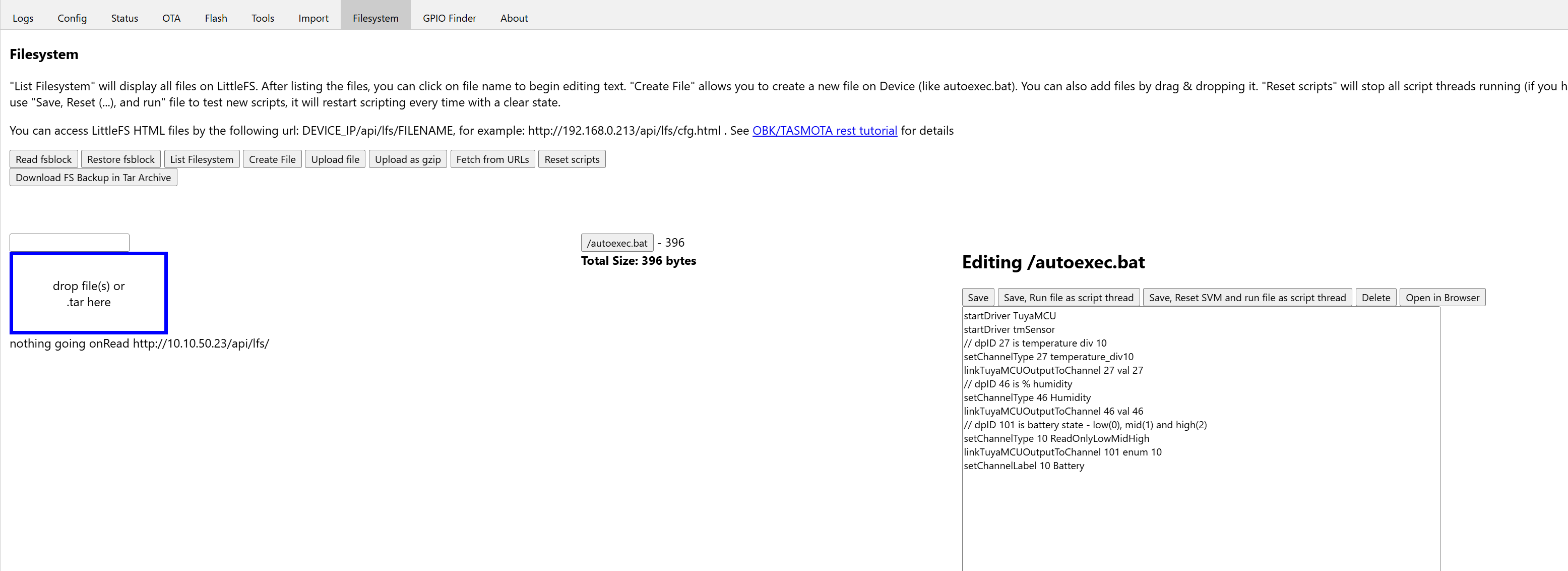
    How can i check that? I did create autoexec.bat using the application because it wasn't there after the flash.

    Editing autoexec.bat file in Tasmota UI with configuration script visible

    This hasn't helped the situation though. Any other tips?

    I did something and autoexec.bat loaded now but the results hasn't changed. Here is the logs.

    Info:MAIN:Main_Init_Before_Delay
    Info:CFG:####### Boot Count 86 #######
    Warn:CFG:CFG_InitAndLoad: Correct config has been loaded with 8 changes count.
    Error:CMD:no file early.bat err -2
    Info:GEN:PIN_SetupPins pins have been set up.
    Info:MAIN:Main_Init_Before_Delay done
    Info:MAIN:Main_Init_Delay
    Info:MAIN:Main_Init_Delay done
    Info:MAIN:Main_Init_After_Delay
    Info:MAIN:Using SSID [IoT]
    Info:MAIN:Using Pass [none]
    Error:HTTP:Created HTTP SV thread with (stack=2048)
    Info:MQTT:MQTT_RegisterCallback called for bT obk_CFD9000E3/ subT obk_CFD9000E3/+/set
    Info:MQTT:MQTT_RegisterCallback called for bT bekens/ subT bekens/+/set
    Info:MQTT:MQTT_RegisterCallback called for bT cmnd/obk_CFD9000E3/ subT cmnd/obk_CFD9000E3/+
    Info:MQTT:MQTT_RegisterCallback called for bT cmnd/bekens/ subT cmnd/bekens/+
    Info:MQTT:MQTT_RegisterCallback called for bT obk_CFD9000E3/ subT obk_CFD9000E3/+/get
    Info:MQTT:MQTT_RegisterCallback called for bT homeassistant/ subT homeassistant/+
    Info:CMD:CMD_StartScript: started @startup at the beginning
    Info:MAIN:Started TuyaMCU.
    Info:MAIN:Started tmSensor.
    Info:GEN:Channel 27 type changed to temperature_div10
    Info:GEN:Channel 46 type changed to Humidity
    Info:GEN:Channel 10 type changed to ReadOnlyLowMidHigh
    Info:CMD:CMD_StartScript: started autoexec.bat at the beginning
    Info:MAIN:Main_Init_After_Delay done
    Info:MAIN:Drv TuyaMCU is already loaded.
    Info:MAIN:Drv tmSensor is already loaded.
    Info:GEN:Channel 27 type changed to temperature_div10
    Info:GEN:Channel 46 type changed to Humidity
    Info:GEN:Channel 10 type changed to ReadOnlyLowMidHigh
    Info:MAIN:Time 1, idle 217189/s, free 75808, MQTT 0(0), bWifi 0, secondsWithNoPing -1, socks 2/38 
    Info:TuyaMCU:Received: 55 AA 00 01 00 24 7B 22 70 22 3A 22 6C 66 33 36 79 35 6E 77 62 38 6A 6B 78 77 67 67 22 2C 22 76 22 3A 22 31 2E 30 2E 30 22 7D 99 
    Info:TuyaMCU:ProcessIncoming[v=0]: cmd 1 (QueryProductInformation) len 43
    Info:TuyaMCU:ParseQueryProductInformation: received {"p":"lf36y5nwb8jkxwgg","v":"1.0.0"}
    Info:MAIN:Time 2, idle 187857/s, free 75808, MQTT 0(0), bWifi 0, secondsWithNoPing -1, socks 2/38 
    Info:MAIN:Time 3, idle 191301/s, free 75808, MQTT 0(0), bWifi 0, secondsWithNoPing -1, socks 2/38 
    Info:MAIN:Time 4, idle 190791/s, free 75808, MQTT 0(0), bWifi 0, secondsWithNoPing -1, socks 2/38 
    Info:MAIN:Time 5, idle 189923/s, free 75808, MQTT 0(0), bWifi 0, secondsWithNoPing -1, socks 2/38 
    Info:MAIN:Registered for wifi changes
    Info:MAIN:Connecting to SSID [IoT]
    Info:MAIN:Time 6, idle 183594/s, free 70440, MQTT 0(0), bWifi 0, secondsWithNoPing -1, socks 2/38 
    Info:MAIN:Boot complete time reached (5 seconds)
    Info:CFG:####### Set Boot Complete #######
    Info:MAIN:Time 7, idle 180196/s, free 69960, MQTT 0(0), bWifi 0, secondsWithNoPing -1, socks 2/38 
    Info:MAIN:Time 8, idle 86411/s, free 69600, MQTT 0(0), bWifi 0, secondsWithNoPing -1, socks 2/38 
    Info:MAIN:Time 9, idle 0/s, free 69600, MQTT 0(0), bWifi 0, secondsWithNoPing -1, socks 2/38 
    Info:MAIN:Time 10, idle 0/s, free 69600, MQTT 0(0), bWifi 0, secondsWithNoPing -1, socks 2/38 
    Info:GEN:dhcp=0 ip=0.0.0.0 gate=0.0.0.0 mask=0.0.0.0 mac=c0:f8:53:ea:b3:6b
    Info:GEN:sta: 0, softap: 0, b/g/n
    Info:MAIN:Main_OnWiFiStatusChange - WIFI_STA_CONNECTING - 1
    Info:MAIN:Main_OnWiFiStatusChange - WIFI_STA_CONNECTED - 4
    Info:MAIN:Time 11, idle 89242/s, free 70312, MQTT 0(0), bWifi 1, secondsWithNoPing -1, socks 2/38 
    Info:TuyaMCU:Received: 55 AA 00 02 00 00 01 
    Info:TuyaMCU:ProcessIncoming[v=0]: cmd 2 (MCUconf) len 7
    Info:TuyaMCU:ProcessIncoming: TUYA_CMD_MCU_CONF, TODO!
    Info:MAIN:Time 12, idle 188769/s, free 70352, MQTT 0(0), bWifi 1, secondsWithNoPing -1, socks 2/38 
    Info:MQTT:mqtt_userName mqttbroker
    mqtt_pass ********
    mqtt_clientID obk_CFD9000E3
    mqtt_host 10.10.40.106:1883
    Info:MAIN:Time 13, idle 193261/s, free 58568, MQTT 0(1), bWifi 1, secondsWithNoPing -1, socks 3/38 
    Info:MAIN:Time 14, idle 181921/s, free 70264, MQTT 0(1), bWifi 1, secondsWithNoPing -1, socks 2/38 
    Info:MAIN:Time 15, idle 190775/s, free 70264, MQTT 0(1), bWifi 1, secondsWithNoPing -1, socks 2/38 
    Info:MAIN:Time 16, idle 194353/s, free 70264, MQTT 0(1), bWifi 1, secondsWithNoPing -1, socks 2/38 
    Info:MAIN:Time 17, idle 192437/s, free 70264, MQTT 0(1), bWifi 1, secondsWithNoPing -1, socks 2/38 
    Info:MAIN:Time 18, idle 191140/s, free 70264, MQTT 0(1), bWifi 1, secondsWithNoPing -1, socks 2/38 
    Info:MAIN:Time 19, idle 190309/s, free 70264, MQTT 0(1), bWifi 1, secondsWithNoPing -1, socks 2/38 
    Info:MAIN:Time 20, idle 191237/s, free 70040, MQTT 0(1), bWifi 1, secondsWithNoPing -1, socks 2/38 
    Info:GEN:dhcp=0 ip=10.10.50.23 gate=10.10.50.1 mask=255.255.255.0 mac=c0:f8:53:ea:b3:6b
    Info:GEN:sta: 1, softap: 0, b/g/n
    Info:GEN:sta:rssi=-40,ssid=IoT,bssid=9c:a2:f4:2f:3c:2c,channel=6,cipher_type:CCMP
    Info:MAIN:Time 21, idle 188191/s, free 70264, MQTT 0(1), bWifi 1, secondsWithNoPing -1, socks 2/38 
    Info:MAIN:Time 22, idle 192102/s, free 70264, MQTT 0(1), bWifi 1, secondsWithNoPing -1, socks 2/38 
    Info:MAIN:Time 23, idle 196340/s, free 70264, MQTT 0(1), bWifi 1, secondsWithNoPing -1, socks 2/38 
    Info:MAIN:Time 24, idle 192303/s, free 70264, MQTT 0(1), bWifi 1, secondsWithNoPing -1, socks 2/38 
    Info:MAIN:Time 25, idle 193103/s, free 70264, MQTT 0(1), bWifi 1, secondsWithNoPing -1, socks 2/38 
    Info:MAIN:Time 26, idle 191560/s, free 70264, MQTT 0(1), bWifi 1, secondsWithNoPing -1, socks 2/38 
    Info:MAIN:Time 27, idle 191204/s, free 70048, MQTT 0(1), bWifi 1, secondsWithNoPing -1, socks 3/38 
    Info:MAIN:Time 28, idle 194338/s, free 70264, MQTT 0(1), bWifi 1, secondsWithNoPing -1, socks 2/38 
    Info:MQTT:mqtt_userName mqttbroker
    mqtt_pass ********
    mqtt_clientID obk_CFD9000E3
    mqtt_host 10.10.40.106:1883
    Info:MAIN:Time 29, idle 188803/s, free 70264, MQTT 0(2), bWifi 1, secondsWithNoPing -1, socks 2/38 
    Info:MAIN:Time 30, idle 190458/s, free 70264, MQTT 0(2), bWifi 1, secondsWithNoPing -1, socks 2/38 
    Info:GEN:dhcp=0 ip=10.10.50.23 gate=10.10.50.1 mask=255.255.255.0 mac=c0:f8:53:ea:b3:6b
    Info:GEN:sta: 1, softap: 0, b/g/n
    Info:GEN:sta:rssi=-42,ssid=IoT,bssid=9c:a2:f4:2f:3c:2c,channel=6,cipher_type:CCMP
    Info:MAIN:Time 31, idle 188546/s, free 70264, MQTT 0(2), bWifi 1, secondsWithNoPing -1, socks 2/38 
    Info:MAIN:Time 32, idle 193740/s, free 70264, MQTT 0(2), bWifi 1, secondsWithNoPing -1, socks 2/38 
    Info:MAIN:Time 33, idle 192959/s, free 70264, MQTT 0(2), bWifi 1, secondsWithNoPing -1, socks 2/38 
    Info:MAIN:Time 34, idle 193280/s, free 70264, MQTT 0(2), bWifi 1, secondsWithNoPing -1, socks 2/38 
    Info:MAIN:Time 35, idle 196580/s, free 70264, MQTT 0(2), bWifi 1, secondsWithNoPing -1, socks 2/38 
    Info:MAIN:Time 36, idle 191670/s, free 70048, MQTT 0(2), bWifi 1, secondsWithNoPing -1, socks 3/38 
    Info:MAIN:Time 37, idle 189770/s, free 70264, MQTT 0(2), bWifi 1, secondsWithNoPing -1, socks 2/38 
    Info:MAIN:Time 38, idle 191550/s, free 70264, MQTT 0(2), bWifi 1, secondsWithNoPing -1, socks 2/38 
    Info:MAIN:Time 39, idle 191954/s, free 70264, MQTT 0(2), bWifi 1, secondsWithNoPing -1, socks 2/38 
    Info:MAIN:Time 40, idle 194831/s, free 70264, MQTT 0(2), bWifi 1, secondsWithNoPing -1, socks 2/38 
    Info:GEN:dhcp=0 ip=10.10.50.23 gate=10.10.50.1 mask=255.255.255.0 mac=c0:f8:53:ea:b3:6b
    Info:GEN:sta: 1, softap: 0, b/g/n
    Info:GEN:sta:rssi=-43,ssid=IoT,bssid=9c:a2:f4:2f:3c:2c,channel=6,cipher_type:CCMP
    Info:MAIN:Time 41, idle 189320/s, free 70264, MQTT 0(2), bWifi 1, secondsWithNoPing -1, socks 2/38 
    Info:MAIN:Time 42, idle 191935/s, free 70264, MQTT 0(2), bWifi 1, secondsWithNoPing -1, socks 2/38 
    Info:MAIN:Time 43, idle 193998/s, free 70264, MQTT 0(2), bWifi 1, secondsWithNoPing -1, socks 2/38 
    Info:MAIN:Time 44, idle 189596/s, free 70264, MQTT 0(2), bWifi 1, secondsWithNoPing -1, socks 2/38 
    Info:MQTT:mqtt_userName mqttbroker
    mqtt_pass ********
    mqtt_clientID obk_CFD9000E3
    mqtt_host 10.10.40.106:1883
    Info:MAIN:Time 45, idle 193393/s, free 70264, MQTT 0(3), bWifi 1, secondsWithNoPing -1, socks 2/38 
    Info:MAIN:Time 46, idle 186487/s, free 70264, MQTT 0(3), bWifi 1, secondsWithNoPing -1, socks 2/38 
    Info:MAIN:Time 47, idle 194398/s, free 70264, MQTT 0(3), bWifi 1, secondsWithNoPing -1, socks 2/38 
    Info:MAIN:Time 48, idle 192791/s, free 70264, MQTT 0(3), bWifi 1, secondsWithNoPing -1, socks 2/38 
    Info:MAIN:Time 49, idle 192323/s, free 61656, MQTT 0(3), bWifi 1, secondsWithNoPing -1, socks 3/38 
    Info:MAIN:Time 50, idle 191437/s, free 70264, MQTT 0(3), bWifi 1, secondsWithNoPing -1, socks 2/38 
    Info:GEN:dhcp=0 ip=10.10.50.23 gate=10.10.50.1 mask=255.255.255.0 mac=c0:f8:53:ea:b3:6b
    Info:GEN:sta: 1, softap: 0, b/g/n
    Info:GEN:sta:rssi=-43,ssid=IoT,bssid=9c:a2:f4:2f:3c:2c,channel=6,cipher_type:CCMP
    Info:MAIN:Time 51, idle 184159/s, free 70264, MQTT 0(3), bWifi 1, secondsWithNoPing -1, socks 2/38 
    Info:MAIN:Time 52, idle 189580/s, free 70264, MQTT 0(3), bWifi 1, secondsWithNoPing -1, socks 2/38 
    Info:MAIN:Time 53, idle 185430/s, free 70264, MQTT 0(3), bWifi 1, secondsWithNoPing -1, socks 2/38 
    Info:MAIN:Time 54, idle 190941/s, free 70264, MQTT 0(3), bWifi 1, secondsWithNoPing -1, socks 2/38 
    Info:MAIN:Time 55, idle 188721/s, free 70264, MQTT 0(3), bWifi 1, secondsWithNoPing -1, socks 2/38 
    Info:MAIN:Time 56, idle 189014/s, free 70264, MQTT 0(3), bWifi 1, secondsWithNoPing -1, socks 2/38 
    Info:MAIN:Time 57, idle 199876/s, free 70264, MQTT 0(3), bWifi 1, secondsWithNoPing -1, socks 2/38 
    Info:MAIN:Time 58, idle 192976/s, free 70264, MQTT 0(3), bWifi 1, secondsWithNoPing -1, socks 2/38 
    Info:MAIN:Time 59, idle 189833/s, free 70264, MQTT 0(3), bWifi 1, secondsWithNoPing -1, socks 2/38 
    Info:MAIN:Time 60, idle 194136/s, free 70264, MQTT 0(3), bWifi 1, secondsWithNoPing -1, socks 2/38 
    Info:GEN:dhcp=0 ip=10.10.50.23 gate=10.10.50.1 mask=255.255.255.0 mac=c0:f8:53:ea:b3:6b
    Info:GEN:sta: 1, softap: 0, b/g/n
    Info:GEN:sta:rssi=-43,ssid=IoT,bssid=9c:a2:f4:2f:3c:2c,channel=6,cipher_type:CCMP
    Info:MQTT:mqtt_userName mqttbroker
    mqtt_pass ********
    mqtt_clientID obk_CFD9000E3
    mqtt_host 10.10.40.106:1883
    Info:MAIN:Time 61, idle 186427/s, free 70264, MQTT 0(4), bWifi 1, secondsWithNoPing -1, socks 2/38 
    Info:MAIN:Time 62, idle 190130/s, free 69680, MQTT 0(4), bWifi 1, secondsWithNoPing -1, socks 2/38 
    Info:MAIN:Time 63, idle 191525/s, free 70264, MQTT 0(4), bWifi 1, secondsWithNoPing -1, socks 2/38 
    Info:MAIN:Time 64, idle 189839/s, free 70264, MQTT 0(4), bWifi 1, secondsWithNoPing -1, socks 2/38 
    Info:MAIN:Time 65, idle 190149/s, free 70264, MQTT 0(4), bWifi 1, secondsWithNoPing -1, socks 2/38 
    Info:MAIN:Time 66, idle 194037/s, free 70264, MQTT 0(4), bWifi 1, secondsWithNoPing -1, socks 2/38 
    Info:MAIN:Time 67, idle 191280/s, free 70264, MQTT 0(4), bWifi 1, secondsWithNoPing -1, socks 2/38 
    
  • #158 21711952
    fjk
    Level 11  
    Posts: 21
    >>21710040
    Yes, I have. dump attached
    I never paired it with Tuya, later I can also add config file.
    Attachments:
    • readResult_BK7231N_QIO_2025-16-9-19-17-15.bin (2 MB) You must be logged in to download this attachment.
  • TuyaMCU dPID mapping for temperature, humidity, battery

    #159 21712395
    patanronald
    Level 4  
    Posts: 7
    Rate: 2
    @fjk

    Try my autostart.bat config from here. Your bin file has the following dpID's as below. Hope you can get yours going? Any chance you can take a picture of PCB board?

    startDriver TuyaMCU
    startDriver tmSensor
    // dpID 27 is temperature div 10
    setChannelType 27 temperature_div10
    linkTuyaMCUOutputToChannel 27 val 27
    // dpID 46 is % humidity
    setChannelType 46 Humidity
    linkTuyaMCUOutputToChannel 46 val 46
    // dpID 101 is battery state - low(0), mid(1) and high(2)
    setChannelType 10 ReadOnlyLowMidHigh
    linkTuyaMCUOutputToChannel 101 enum 10
    setChannelLabel 10 Battery
  • Working TuyaMCU channel mapping for TH01 sensor

    #160 21712870
    fjk
    Level 11  
    Posts: 21
    >>21710040 >>21712395
    This code finally works for me:
    startDriver TuyaMCU
    startDriver tmSensor
    setChannelType 27 temperature_div10
    linkTuyaMCUOutputToChannel 27 val 27
    setChannelType 46 Humidity
    linkTuyaMCUOutputToChannel 46 val 46
    setChannelType 10 ReadOnlyLowMidHigh
    linkTuyaMCUOutputToChannel 101 enum 10
    setChannelLabel 10 Battery

    I'm tried to extract values with TuyaMCU analyzer but it crashes when I choose file to analyze, and BKFlasher shows no info about dpID's
    Here is pic of my board >>21703002
  • ADVERTISEMENT
  • #161 21712873
    patanronald
    Level 4  
    Posts: 7
    Rate: 2
    @fjk I am glad it works for you. I was able to get all the dpIDs but doesn't work for me. The sensor doesn't wake up and update the temp and humidity for me.

    Looks like your board is different to mine but same dpIDs.
  • #162 21712966
    fjk
    Level 11  
    Posts: 21
    >>21712873 Maybe try on battery power, I read that sometimes sensors shows zero on main power.
  • #163 21713542
    patanronald
    Level 4  
    Posts: 7
    Rate: 2
    @fjk I tried powering it using battery and external power using the battery terminals. No luck. Do you mind sharing what you have done in your setup?
  • #164 21715131
    fjk
    Level 11  
    Posts: 21
    >>21713542 I'm only use that config mentioned above, I tried to extract channels with TuyaMCU analyzer but it crashes. I tried lot of configs and finally this one which channels 27 and 46 works. Maybe you have different channels?
  • bkflasher needs only WiFi set before flashing

    #165 21715512
    patanronald
    Level 4  
    Posts: 7
    Rate: 2
    >>21715131

    The script I gave you is the correct one because I pulled the dpIDs from the chip I had. I used the analyzer to grab the right config. I also decrypted your bin file to get the dpID for your chip which is same as mine.

    Added after 6 [hours] 21 [minutes]:

    >>21715131

    I got it working. I found the issue.

    If I used the bkflasher tool and configured all the obk settings before flashing it didn't work. I had to just set WiFi SSID and password and leave everything empty. Flash the firmware on the device and manually set the startup config and MQTT settings on the web page.

    Just leaving the problems I had for someone can try to see if that works for them.
  • LocalTuya tool reveals Tuya device datapoints

    #166 21745509
    Bulloro
    Level 1  
    Posts: 1
    I apologize if this has been posted somewhere else on the forum; at least I didn't see it in this thread.
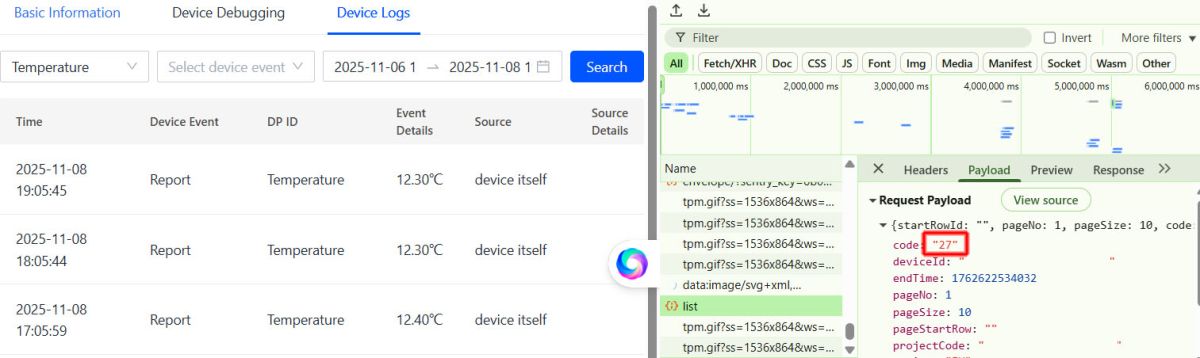
    I was having a hard time determining the dpIDs of several different Tuya devices when I finally discovered this: LocalTuya Device Datapoints
    The prerequisites are a Tuya developer account and the device in question must have been connected to the Tuya Cloud. After that, all you need is a browser.

    Device temperature logs and network request details showing code “27”
  • #167 21760608
    io2345
    Level 10  
    Posts: 273
    Help: 1
    Rate: 7
    Those TH-versions with Display (like this TH03 Pro: Link) are not supported, I guess?
  • Zigbee version uses ZTU module, not WiFi

    #168 21761982
    p.kaczmarek2
    Moderator Smart Home
    Posts: 14750
    Help: 659
    Rate: 12866
    It depends on what you mean... you linked to Zigbee version, that one:
    [BK7231N] [CB3S] [AHT20] TH01 Generic Temperature and Humidity Sensor Teardown
    It has ZTU module, it's Zigbee module, it can't connect to WiFi.

    Or are you asking about WiFi TH's with LCD screen? I think they work in OBK:
    https://www.elektroda.com/rtvforum/topic3942730.html
    But, again, as I said many times - WiFi battery powered devices are in general hard to flash, Zigbee is easier to pair with HA in that manner.It
    Helpful post? Buy me a coffee.
  • #169 21762017
    io2345
    Level 10  
    Posts: 273
    Help: 1
    Rate: 7
    >>21761982 Ah, ok. Didn't stumble over the mentioned thread. It's quite old, but obviously the device is working. I've been looking for TH03, as this has standard battery AAA. Probably better in terms of battery life. How long does the battery last on the TH06? I'm afraid that this model is no longer selled, anyway.
  • #170 21797918
    Magnetz
    Level 4  
    Posts: 3
    I have the CHT8310-based board. How can I set the reporting interval?
  • Battery failure may have corrupted the sensor firmware

    #171 21830618
    fjk
    Level 11  
    Posts: 21
    I have several of them; I managed to flash them all, and they worked with no problems for several months with Home Assistant. However, a few weeks ago, the batteries in two of them died, and I was never able to connect to them again. After replacing the batteries, they no longer connect to Home Assistant. I also tried flashing them with the latest firmware, but it didn't change anything. Even when I connect them directly to a 3.3 V power supply, they no longer appear as APs. What could be causing this? Is there any way to view the logs when the device boots?
  • #172 21830635
    divadiow
    Level 38  
    Posts: 5202
    Help: 446
    Rate: 914
    >>21830618

    this is the known low-battery issue that somehow bricks the unit. the fix is to re-flash factory backup and then OBK convert again
  • #173 21830954
    fjk
    Level 11  
    Posts: 21
    >>21830635 Thanks, I don't know that is known issue. So how much time I have to replace battery when it is discharged? :) Maybe you have original dump? I lost my copy somewhere :(
  • #175 21831097
    p.kaczmarek2
    Moderator Smart Home
    Posts: 14750
    Help: 659
    Rate: 12866
    Didn't @insmod said it's related to old flashvars, which are now not used?
    Helpful post? Buy me a coffee.
  • #176 21831111
    insmod
    Level 31  
    Posts: 1432
    Help: 168
    Rate: 455
    >>21831097
    I don't know it EF would fix it. The problem is with flash write at low voltage, not with OBK.
    And different chips have different integrated flash modules. Some can work at lower voltage, some can't.
  • Flash writes fail below 2V on battery power

    #177 21831115
    DeDaMrAz
    Level 23  
    Posts: 620
    Help: 34
    Rate: 130
    insmod wrote:
    >>21831097
    I don't know it EF would fix it. The problem is with flash write at low voltage, not with OBK.
    And different chips have different integrated flash modules. Some can work at lower voltage, some can't.


    In my experience none of them will work under 1.8V especially on batteries, because of the chemistry that voltage will drop even lower when WiFi kicks in so my recommendation is not to run anything under 2V.
  • #178 21831164
    fjk
    Level 11  
    Posts: 21
    >>21830968 OK, thanks. Too bad this sensor only reports "low", "mid", "high". Is there a method to know the exact voltage? And why is it no longer working after the battery replacement?
  • #179 21831230
    DeDaMrAz
    Level 23  
    Posts: 620
    Help: 34
    Rate: 130
    Set the alarm to trigger on low level.

    And it's not working after batteries are replaced because flash storage got corrupted so you'll have to repeat the flashing process and setup - most likely.
  • #180 21831389
    p.kaczmarek2
    Moderator Smart Home
    Posts: 14750
    Help: 659
    Rate: 12866
    @insmod maybe hardcode battery check before flashvars write?
    Helpful post? Buy me a coffee.

Topic summary

✨ Discussion of tearing down and flashing a TH01 generic temperature/humidity sensor based on BK7231N/CB3S with an AHT20 sensor and TuyaMCU. The main challenge was getting OpenBK7231N/OpenBeken working with the battery-powered TuyaMCU design: flashing often required cutting the MCU TX/RX traces or otherwise isolating the Wi‑Fi module, and the module could only be configured reliably when powered externally at 3.3 V because the MCU switches Wi‑Fi power off to save battery. Logs showed TuyaMCU dpIDs for temperature, humidity, and battery state; temperature was mapped as dpID 1 with value/10, humidity as dpID 2, and battery state as dpID 3 using a LowMidHigh/enum channel type. MQTT/Home Assistant setup was discussed, including channel mapping, discovery, templates, and the need to avoid double scaling when using the OBK temperature_div10 channel type. Later posts covered variants with different dpIDs, AHT30/CHT8315 sensors, flashing issues, log collection, and battery-life improvements such as quick connect, static IP, reduced boot timeout, and AHT2X_Cycle interval tuning.
AI summary based on the discussion. May contain errors.

FAQ

TL;DR: TH01 users get 3 core dpIDs; "you have to divide it by 10" for temperature. This FAQ helps OpenBeken users flash BK7231N/CB3S TH01 sensors, map TuyaMCU data, avoid 0 readings, and publish to MQTT/Home Assistant. [#20516557]

Why it matters: A TH01 can flash successfully yet still fail if TuyaMCU power control, UART isolation, dpIDs, or MQTT timing are wrong.

Option What the thread reports Practical impact
WiFi TH01 with TuyaMCU CB3S/CBU wakes for short reporting windows Harder flashing, shorter battery life
Zigbee TH sensor Mentioned as preferred for these sensors Easier battery use with Home Assistant
BLE THB2/BTHome Used with ESP32 Bluetooth proxy Good battery alternative to WiFi
Direct OBK deep sleep Only after removing/bypassing MCU design More invasive hardware work

Key insight: In the stock TH01 design, the MCU controls WiFi-module power. Configure TuyaMCU/tmSensor while externally powering CB3S, then test on batteries so the MCU sends real sensor frames.

Quick Facts

  • Original TH01 TuyaMCU logs show dpID 1 as raw 200, meaning 20.0 °C, and dpID 2 as 73% humidity. [#20516504]
  • A working basic OpenBeken mapping uses temperature_div10 on channel 1 and Humidity on channel 2. [#20516646]
  • Battery state is an enum: low, middle, high; later users mapped it as values 0, 1, and 2. [#20845859]
  • For difficult flashing, users cut RX/TX traces, supplied 3.3 V directly, and sometimes succeeded after changing ground wiring or retrying. [#20627237]
  • For faster battery wakes, users enabled WiFi quick connect, reduced boot-ok time from 5 s to 3 s, and used static IP. [#20768091]

How do I flash OpenBeken on a Tuya TH01 temperature and humidity sensor with a BK7231N CB3S module?

Flash it like other BK7231N devices, but isolate or control the TuyaMCU path first.
  1. Solder 3.3 V, GND, TX, RX, and optionally CEN.
  2. Use BK7231 GUI Flash Tool with the BK7231N firmware.
  3. After flashing, power CB3S directly at 3.3 V for configuration.
Some boards flash without cutting traces. Others need RX/TX cut, CB3S desoldering, or MCU disconnection. Use TX-to-RX and RX-to-TX wiring, and keep all grounds common. [#20626343]

What autoexec.bat configuration maps TH01 TuyaMCU dpIDs for temperature, humidity, and battery state in OpenBeken?

Use TuyaMCU, tmSensor, and link each dpID to an OpenBeken channel. For the common TH01 mapping, dpID 1 is temperature divided by 10, dpID 2 is humidity, and dpID 3 is battery state. TuyaMCU is a serial-device driver that exchanges Tuya datapoints with a separate MCU, using UART frames instead of direct GPIO sensor reads. For newer variants, dpID 27 can be temperature, dpID 46 humidity, and dpID 101 battery. Map dpID 101 to a channel below 64, such as channel 10. [#21442987]

Why does a battery-powered TH01 sensor show 0 temperature and 0 humidity when the WiFi module is powered externally?

It shows 0 because the MCU may not perform a real measurement cycle during external WiFi-only power. The TH01 MCU normally wakes the WiFi module, sends sensor frames, waits for reporting, then removes power. External 3.3 V keeps CB3S awake outside that sequence. Configure OpenBeken while externally powered. Then disconnect external power and run on batteries. The MCU should wake the module for about 30 seconds during reporting windows and send the actual values. [#20642216]

How can I find the correct TuyaMCU dpIDs for a TH01 sensor using TuyaMCUAnalyzer or a Tuya firmware dump?

Capture the original UART traffic or inspect a Tuya firmware/config dump. TuyaMCUAnalyzer can decode dpIDs from the factory protocol frames. Users identified common sets such as 1/2/3 and newer sets such as 27/46/101. A factory dump can also reveal datapoints when analyzer tools work. If tools crash, compare logs from original firmware and OpenBeken. LocalTuya Device Datapoints also helped after connecting the device to Tuya Cloud. [#21745509]

What is TuyaMCU and how does it control the WiFi module in battery-powered Tuya temperature sensors?

TuyaMCU is the separate low-power controller that manages measurements and WiFi power. TuyaMCU is a board-level microcontroller system that talks to the WiFi module over UART, controls wake/report/sleep timing, and saves battery by switching the module off. In TH01-style sensors, the SOIC MCU controls a transistor or power path. It powers CB3S only when it wants to report temperature, humidity, or battery data. [#21402357]

What is tmSensor in OpenBeken and why is it needed for TuyaMCU battery temperature sensors?

tmSensor enables OpenBeken’s battery TuyaMCU sensor workflow. tmSensor is an OpenBeken driver mode that coordinates TuyaMCU battery sensor reporting, expecting short wake windows and mapped datapoints instead of continuous sensor polling. Start it with startDriver tmSensor after startDriver TuyaMCU. Without it, the device may not follow the expected temperature-sensor reporting sequence or may wait in the wrong state. [#20642216]

Why might BK7231 GUI Flash Tool fail with “Getting bus failed” or UART buffer errors when flashing a TH01 sensor?

The flasher can fail when the MCU still drives the same UART lines. The thread shows “Getting bus failed” cases fixed by cutting RX/TX traces at the MCU. Other failures came from unstable 3.3 V power, grounding mistakes, baud-rate sensitivity, or GUI-tool environment issues. One user reached 100% after changing the USB-serial ground connection. Another was advised to try hid_download_py, which also works on Windows. [#20627443]

When do I need to cut RX/TX traces, desolder the CB3S module, or disconnect the MCU before flashing a Tuya TH01?

Do it when the MCU interferes with UART flashing. TuyaMCU devices often share TX1/RX1 between the WiFi module and the MCU. If flashing fails repeatedly, isolate that link. Valid options are cutting traces and restoring them, desoldering the BK7231 module, or temporarily desoldering the SOIC MCU. Some TH01 boards flash without this step, but the thread documents several boards that required RX/TX cuts. [#20626343]

How do I configure MQTT and Home Assistant discovery for an OpenBeken TH01 sensor?

Set MQTT host, credentials, base topic, and enable Home Assistant discovery after mapping channels. A manual Home Assistant YAML example used obk1F70E60F/1/get for temperature and obk1F70E60F/2/get for humidity. If the entity does not appear under MQTT devices, search Home Assistant entities directly. One user found the sensors existed even though they were not visible where expected. Redo discovery after changing channel types. [#20845795]

Why does enabling Flag 33 or using a Home Assistant value_template make TH01 temperature values appear divided twice?

It happens because both OpenBeken and Home Assistant apply the same divide-by-10 conversion. temperature_div10 or Flag 33 can publish 213 as 21.3 °C. A Home Assistant template multiplying by 0.1 again turns 21.3 into 2.13. Use one conversion path only. Remove the Home Assistant value_template if OpenBeken already publishes the scaled temperature. [#20517650]

How can I get TuyaMCU debug logs in the OpenBeken Web App for a TH01 sensor?

Enable full TuyaMCU logging before starting the driver. Put logfeature 12 1 and loglevel 6 before startDriver TuyaMCU in autoexec.bat. Then open the Web App logs while the MCU powers the module. If no TuyaMCU frames appear, check baud rate, UART port selection, flag 26, and whether the board actually has a TuyaMCU. Some variants required 115200 baud. [#21552004]

What is the difference between CB3S, CBU, BK7231N, and BK7231T modules in Tuya temperature and humidity sensors?

CB3S and CBU are Tuya WiFi module boards; BK7231N and BK7231T are Beken chip families used on such modules. The thread’s TH01 units mainly used BK7231N CB3S or CBU. Firmware choice must match the chip. Users flashed BK7231N binaries for CB3S/CBU units discussed here. Some sensors used CHT8310, CHT8315, AHT20, or AHT30, changing the driver or dpID approach. [#20873676]

WiFi vs Zigbee vs BLE temperature sensors: which is better for Home Assistant battery life and reliability?

Zigbee or BLE is usually better for battery sensors; WiFi works but needs careful tuning. One user preferred Zigbee after seeing poor battery life with frequent WiFi updates. Later posts suggested BLE THB2 with BTHome and an ESP32 Bluetooth proxy. WiFi TH01 sensors remain useful where only WiFi coverage exists. Expect more flashing effort and shorter battery life than Zigbee or BLE alternatives. [#20588120]

How can I improve battery life on OpenBeken TuyaMCU temperature sensors using quick connect, static IP, MQTT settings, and battery ACK delay?

Improve battery life by reducing connection time and MQTT traffic during each wake. Enable WiFi quick connect, use static IP, and reduce boot-ok time from 5 s to 3 s or even 1 s after testing. Set mqtt_broadcastItemsPerSec 9 to push data faster. Disable diagnostic broadcasts by unsetting flags 2 and 10. Newer builds also support tuyaMcu_setBatteryAckDelay to delay the ACK sent back to the MCU. [#21651099]

How can I publish OpenBeken TH01 MQTT data to ThingSpeak with custom topics like channels/myid/publish and selected fields?

The thread asks for ThingSpeak publishing, but gives no confirmed working OpenBeken command recipe. The requested payload was channels/myid/publish with fields like field1=$CH1&field2=$CH3. OpenBeken normally publishes channel topics such as base/1/get. For ThingSpeak, use a broker bridge, automation, or script that repackages OBK MQTT messages into ThingSpeak’s required topic and field format. The thread also asked whether connected broadcasts can be disabled. [#21339167]
AI summary based on the discussion. May contain errors.
ADVERTISEMENT