logo elektroda
logo elektroda
X
logo elektroda

[BL602] How to flash Magic Home over WiFi without soldering

alwas 20787 90
ADVERTISEMENT
Treść została przetłumaczona polish » english Zobacz oryginalną wersję tematu
📢 Listen (AI):
  • #91 21787740
    divadiow
    Level 38  
    Posts: 4882
    Help: 427
    Rate: 869
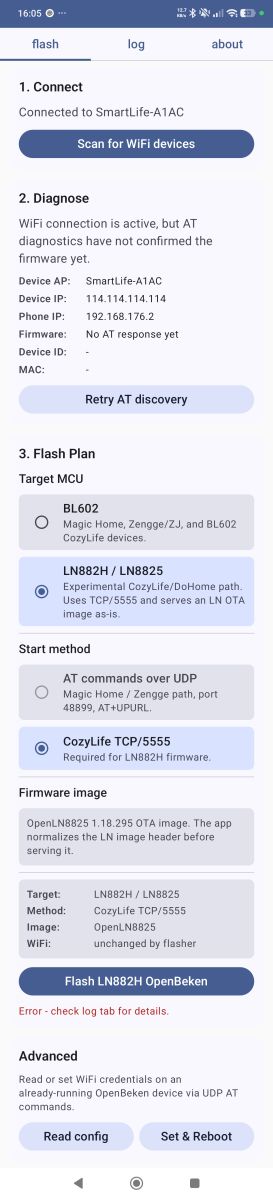
    I updated and rebuilt mhflasher. Tested OTA exploit worked OK to vulnerable MagicHome dump. Packaged with OpenBL602 1.18.230. Unsigned debug build.
    Attachments:
    • mhflasher-debug.zip (8.02 MB) You must be logged in to download this attachment.
  • ADVERTISEMENT
📢 Listen (AI):

Topic summary

✨ The discussion focuses on flashing Magic Home devices equipped with the BL602 chip over WiFi without soldering, using the manufacturer's OTA mechanism redirected to a custom server. The procedure involves resetting the device to factory settings by cycling power, hosting the OpenBeken firmware OTA binary on a local HTTP server, and sending an AT command to the device to initiate the firmware download and installation. Users report success with this method on certain BL602 devices, notably Magic Home RGB controllers, using tools like netcat and PowerShell for serving the firmware and sending commands. Challenges include firmware version compatibility, with newer Zengge firmwares apparently patched against OTA flashing exploits, resulting in errors like "+ok=up_ErrType" or no response. Some devices require specific partition tables or flash size considerations (2MB vs 4MB flash). Debugging via UART logs is recommended to diagnose boot and WiFi AP startup issues. The community also explores similar flashing approaches for related chips such as LN882H, LN8825B, BK7231N, and XR809/XR872, noting differences in communication ports, protocols (JSON over UDP/TCP), and firmware architectures (RISC-V vs ARM). JSON-based command protocols on UDP/TCP ports (e.g., 5555, 6095) are used for device communication and OTA initiation in CozyLife and Ewelink devices. Some users successfully restored factory firmware dumps and then flashed OpenBeken firmware, achieving AP mode broadcasting. However, issues persist with saving settings post-flash and AP visibility. The latest OpenBL602 builds work on some devices but may require partition table adjustments. Overall, the OTA flashing method without soldering is feasible but depends heavily on device firmware version, chip variant, and correct command syntax. Physical flashing remains a fallback for patched or incompatible devices.
Generated by the language model.

FAQ

TL;DR: With 0 solder joints and "back ok" as the key success reply, this method lets Magic Home BL602 owners push an OpenBeken OTA file over the device’s own AP using UDP port 48899 and a local HTTP server. It suits users who want a faster no-solder path, but only on firmware that still accepts the vendor OTA trigger. [#21056057]

Why it matters: This gives BL602 Magic Home owners a real no-solder upgrade path, while also showing exactly where newer Zengge firmware blocks it.

Method Hardware access Main transport Typical result in thread Recovery path
Magic Home OTA exploit No UDP 48899 + local HTTP Works on some BL602 firmwares Restore dump or solder later
mhflasher on Android No Automates same OTA path Works on vulnerable devices Same limits as OTA exploit
UART / BLDevCube flashing Yes Serial flashing Most reliable overall Full dump restore possible
Factory dump restore Yes Serial flashing Confirmed working on 2 MB dumps Returns device to stock

Key insight: The no-solder path is real, but it is firmware-dependent. Older Magic Home BL602 builds can fetch and install an OTA image from your own server, while newer builds such as 33_227_20231220_ZG-BL return OTA errors and appear patched. [#21418610]

Quick Facts

  • Magic Home BL602 AP mode in the thread uses device IP 10.10.123.3, client IP 10.10.123.4, and listens for AT commands on UDP port 48899. [#21056057]
  • The Linux example serves the OTA file on HTTP port 1111, then triggers download with AT+UPURL=http://10.10.123.4:1111/...; users reported success after about 1 minute. [#21056057]
  • A confirmed vulnerable OTA session wrote about 427,676 bytes and then rebooted into OpenBeken; the UART log showed ota download is done! before reset. [#21063222]
  • Factory BL602 dumps discussed here are typically 2 MB, while some dev boards use 4 MB flash; that mismatch matters for restore tests and partition handling. [#21063112]
  • BL602 UART logs in the thread used 2,000,000 baud, and weak power from a USB-to-UART adapter was called out as a cause of missing AP behavior after flashing. [#21586157]

How do you flash a Magic Home BL602 controller to OpenBeken over WiFi without soldering using the manufacturer's OTA mechanism?

You reset the controller, join its AP, host the OTA file locally, and trigger the vendor OTA URL over UDP. 1. Power-cycle the device 4 times to factory reset, then connect to the LEDnetXXXXXXXXX AP. 2. Serve OpenBL602_...OTA.bin.xz.ota on a local HTTP server, often on port 1111. 3. Send AT+UPURL=http://10.10.123.4:1111/update?... to 10.10.123.3:48899. A working device replies back ok, then usually reboots after about 1 minute and appears as OpenBL602_XXXXXXXX. [#21056057]

Which OpenBeken file should I download for a BL602 WiFi-only flash, and why does it need to be the .ota build instead of the regular binary?

Download the BL602 OTA package, for example OpenBL602_1.17.553_OTA.bin.xz.ota, not the plain .bin. The OTA method calls the manufacturer’s updater, so it expects an OTA-formatted image rather than a raw UART-flash binary. The thread explicitly says to choose the version for the BL602 chip and OTA. A regular OpenBL602_...bin is used for wired flashing through tools like BLDevCube, not for the WiFi-only exploit path. [#21056057]

What do the BL602 Magic Home AT commands AT+LVER and AT+UPURL do, and how are they used during the WiFi flashing process?

AT+LVER reads the installed firmware version, and AT+UPURL tells the device where to fetch an update. In the working example, AT+LVER returned +ok=33_48_20201219_ZG-BL from UDP port 48899. AT+UPURL then pointed the device at a local HTTP URL on 10.10.123.4:1111 so it could download and install OpenBeken. "AT+UPURL is a device OTA trigger that makes the stock firmware fetch a new image from a supplied URL, using the vendor update path rather than UART flashing." [#21056057]

Why does a Magic Home BL602 device reply with +ok=up_ErrType, +ok=up_ErrHttp, or just a blank +ok= when I try the OTA exploit?

Those replies mean the OTA request was accepted syntactically but failed at validation, transport, or reboot stage. +ok=up_ErrType appeared on newer or incompatible Magic Home firmware, including 33_227_20231220_ZG-BL, and on a 35_162_20220801_ZG-BL-BP101 device that did not exploit. +ok=up_ErrHttp points to a fetch or URL issue. A blank +ok= can happen before reboot; one user saw it before disconnect, but the HTTP listener never received a request. Check firmware version, URL reachability, exact query format, and whether that device family still accepts custom OTA payloads. [#21245497]

What is mhflasher, and how does it automate the Magic Home BL602 OTA flashing procedure on Android?

mhflasher is an Android app that automates the same Magic Home BL602 OTA exploit described for Linux. It connects to the device AP, checks whether UDP communication works on port 48899, and sends the OTA trigger without needing manual terminal commands. The source code was shared publicly, and APKs were said to be in the releases folder. Later, an updated build was reported tested with OpenBL602 1.18.230 and confirmed to work on vulnerable Magic Home dumps. [#21787740]

How can I serve the OpenBL602 OTA file from Windows with PowerShell and send the UDP command with Packet Sender instead of using Linux netcat?

Use PowerShell as a one-shot HTTP listener and Packet Sender for the UDP packet. 1. Start an HttpListener on port 1111 and serve OpenBL602_...OTA.bin.xz.ota. 2. Connect your PC to the device AP, usually with the controller at 10.10.123.3 and your PC at 10.10.123.4. 3. In Packet Sender, send AT+UPURL=http://10.10.123.4:1111/update?version=...&beta,pierogi as UDP to port 48899. The thread reports you should see the upload, an OK, then a reboot into OpenBeken. [#21063222]

Why do some newer Zengge or Magic Home BL602 firmware versions like 33_227_20231220_ZG-BL appear patched against the OTA method?

They appear patched because the same OTA trigger that works on older builds fails early on newer ones. A tested device on 33_227_20231220_ZG-BL returned +ok=+ok=up_ErrType, and its UART log showed *system:ota fail after comparing the OpenBeken version string against stock values. Another user also suspected newer versions had been patched against custom firmware via OTA. The thread’s working pattern is clear: exploit success depends on firmware family and date, not just on using a BL602 chip. [#21418610]

What is BLDevCube, and how is it used to dump, restore, or flash factory firmware on BL602 devices?

BLDevCube is Bouffalo Lab’s serial flashing tool for BL602, used here for full-dump backup, factory restore, and wired OpenBeken flashing. Users restored 2 MB factory images, flashed raw OpenBL602 .bin files, and tested full-image writes from address 0x0 or app-region writes from 0x10000. One successful restore to a 4 MB dev board from a 2 MB Magic Home dump booted the stock LED... AP and even paired in the app. That made BLDevCube the main recovery tool when OTA failed. [#21063112]

How does the Magic Home BL602 OTA method compare with soldering and UART flashing in terms of reliability and recovery options?

The OTA method is faster and needs no soldering, but UART flashing is more reliable and easier to recover from. OTA works only when the stock firmware still accepts the vendor update trigger on UDP 48899. Wired flashing with BLDevCube can restore a full factory dump, write OpenBL602 directly, and recover devices that no longer expose an AP. If you have only 3 devices and a patched build, one user concluded it was quicker to use a soldering iron than keep spoofing OTA traffic. [#21418610]

What troubleshooting steps help when OpenBL602 flashes successfully but the OpenBL602_XXXXX AP never appears afterward?

Check power, boot wiring, partition layout, and UART logs before assuming the image is bad. The thread suggests using a stable 3.3 V supply instead of powering from a weak USB-to-UART adapter, disconnecting the BOOT pin after flashing, and capturing serial output at 2,000,000 baud. One responder also supplied a fixed 2 MB partition table for BL602 tests. "OpenBL602_XXXXX AP never appears" usually means the app booted incorrectly or the radio config is wrong, not that the flash write itself failed. [#21592996]

Why is the OpenBL602 firmware file much smaller than a full 2 MB factory dump, and what flash regions are intentionally left untouched?

The OpenBL602 file is smaller because it only replaces the application area, not the whole flash chip. A maintainer explained that full-chip overwrites would destroy RF calibration, MAC address data, Tuya GPIO config on supported platforms, and existing OpenBeken settings. That is why a release binary can be under 1 MB while the stock backup is 2 MB. The design is intentional, and it matches the goal of preserving board-specific data outside the main firmware partition. [#21586062]

How can I restore a BL602 device back to its factory firmware from a backup dump if OpenBeken flashing or configuration goes wrong?

Write the saved factory dump back with BLDevCube, then reboot and verify the original AP returns. The thread confirms a full 2 MB backup can restore a Magic Home BL602 to stock behavior, including the factory LEDnet... AP and normal app pairing. One user called this a tested dump-and-restore path for putting BL602 devices back to factory firmware. If OpenBeken config is broken, a full restore is the recommended reset path before trying another flash. [#21063222]

What is the CozyLife local JSON protocol on UDP 6065 and TCP 5555, and how is it different from the Magic Home AT-command method on UDP 48899?

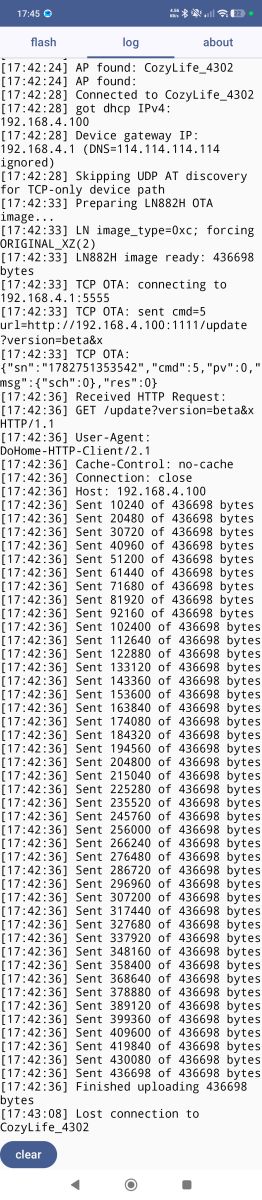
CozyLife uses JSON messages on UDP 6065 and TCP 5555, while Magic Home uses plain-text AT commands on UDP 48899. A working CozyLife query looked like {"cmd":0,"pv":0,"sn":"...","msg":{}} and returned JSON with fields such as did, pid, mac, ip, and res. "CozyLife local JSON protocol is a device-control API that exchanges structured JSON commands and responses, unlike Magic Home’s short AT strings sent to the vendor pairing port." The thread also tied CozyLife cmd:5 to OTA experiments. [#21068684]

What should I try when a flashed Magic Home or OpenBL602 device disappears from both AP mode and my home WiFi after a failed setup?

First restore factory power-cycling, then inspect UART logs, and be ready to reflash from backup. A user who lost both the AP and home WiFi after setup was advised that AP mode may not recover with power cycling alone if the device crashes or stores bad settings. Another thread segment recommends watching serial logs, verifying power from the normal 5–28 V input, and restoring the original dump if needed. If the device stays silent, wired recovery is the practical next step. [#21264185]

How could the Sonoff DIY mode REST API or eWeLink update mechanism be investigated as a no-solder flashing path for BL602 Sonoff plugs and bulbs?

Investigate it by entering Sonoff DIY mode, capturing traffic, and testing whether its REST OTA endpoint accepts a local firmware URL. The thread mentions a BL602 smart plug exposing Sonoff DIY mode after holding the button for 5 seconds, with official documentation describing a RESTful API that includes OTA actions. eWeLink devices were also noted to use different ports and sometimes SSL, so packet capture and version checks are essential. The same no-solder idea may work, but the thread does not yet show a confirmed OpenBeken flash on Sonoff BL602 hardware. [#21188184]
Generated by the language model.
ADVERTISEMENT