logo elektroda
logo elektroda
X
logo elektroda

uProg - small, fast, portable AVR programmer with SD

manekinen 159940 364

TL;DR

  • uProg is a small, portable AVR programmer with SD/MMC storage for flashing, reading, and verifying AVR flash, EEPROM, fusebits, and lockbits.
  • It uses FAT16/FAT32 cards, a 6-pin ISP connector, a 4-button menu, automatic SCK selection up to 4 MHz, and a built-in bootloader for self-update.
  • The PCB measures 44 x 39 x 5.5 mm and writes at 12.5 kB/s while reading at 14.5 kB/s.
  • It was fully tested with tiny13, tiny45, tiny2313, mega8, mega88, mega16, mega32, mega328, and mega644, but HEX files are guaranteed only up to 64 kB.
  • Battery operation is limited: startup can draw up to 100 mA, the target is not powered through VCC, and removing the card during use can corrupt files.
Generated by the language model.
ADVERTISEMENT
Treść została przetłumaczona polish » english Zobacz oryginalną wersję tematu
📢 Listen (AI):
  • #211 10116989
    marcin44430
    Level 16  
    Posts: 233
    Help: 3
    Rate: 345
    The contacts coincide. Maybe the display is damaged?
  • ADVERTISEMENT
  • #212 10117121
    manekinen
    Level 29  
    Posts: 1629
    Help: 76
    Rate: 2360
    Of course you have to copy the contents of this directory. When you insert the card without files or if you copy them incorrectly, the system will probably hang when turning on. Without a card, it should show an error message.

    I asked if you tried to adjust the contrast. It's best to increase it. The display is unlikely to be damaged if it shows anything. Where did you get it? From me or the phone?

    A clear photo of the board and the way of mounting the display will be helpful.
  • ADVERTISEMENT
  • #213 10117221
    marcin44430
    Level 16  
    Posts: 233
    Help: 3
    Rate: 345
    And how to increase that contrast. The display is not damaged, I have just checked it in the cell it comes from. For now, I can't take a picture, but it's rather ok. I checked it several times. For now, the display is solidly stuck with tape, and the contact is made as here
    uProg - small, fast, portable AVR programmer with SD

    Added after 57 [minutes]:

    I increased the contrast in the config file to the max (FF) and still the same. When switching on the display, a dash will blink more than once, it will blink more than once as if it were a picture.

    This time I corrected.
    The next so sloppy post will be rewarded with a warning.
    I also suggest that you read the instructions for posting photos on the forum.
    CMS
  • #214 10117645
    garlinski
    Level 13  
    Posts: 68
    Help: 4
    Rate: 5
    What kind of SD card do you have? - uProg not being able to read the configuration from the card will not change the contrast on the display. In my example, I had to add the "read-only" attribute to the configuration file, otherwise after removing the card and inserting it into the PC, the default value was returned, perhaps cold solder or bad contact with the card.?
  • ADVERTISEMENT
  • #215 10117901
    marcin44430
    Level 16  
    Posts: 233
    Help: 3
    Rate: 345
    I have a 2GB SANDISK card. But a Uprog without a card should also start.

    Added after 1 [minutes]:

    Cold February, I don't think I checked everything with a buzer with 10X.
  • #216 10118003
    manekinen
    Level 29  
    Posts: 1629
    Help: 76
    Rate: 2360
    Buddy, is there a transition on the board from the Prock legs to the contacts? I am asking because someone had a case that the grommet on the PCB did not connect, and it was a shallow one from me. Unfortunately, there can be such a nasty passage that has a life of its own.

    Tile in what version? You can add the led as it is in version 1.2, and during startup the led should blink 2 times quickly. At least it will be known that the system is correctly programmed.
  • #217 10118939
    mlassota
    Level 18  
    Posts: 372
    Help: 11
    Rate: 85
    Hello
    According to me, you have a good display, but most likely your inverter powering the contrast does not work.
    what voltage do you have on pin 7 of the display - the one that is connected only to the capacitor (relative to GND) From what you know, you need to change the setting in the Config file to the "original" display
    What kind of contrast capacitors do you have? 100n? Maybe it's not enough ...
    Regards
    M.
  • #218 10119752
    marcin44430
    Level 16  
    Posts: 233
    Help: 3
    Rate: 345
    manekinen wrote:
    Buddy, is there a transition on the board from the Prock legs to the contacts? I am asking because someone had a case that the grommet on the PCB did not connect, and it was a shallow one from me. Unfortunately, there can be such a nasty passage that has a life of its own.

    I checked the transitions as my colleague says, from the feet to the contacts.

    manekinen wrote:
    Tile in what version? You can add the led as it is in version 1.2, and during startup the led should flash 2 times quickly. At least it will be known that the system is correctly programmed.

    I have a PCB in version 1.2 made by myself. It looks like the system is correctly programmed because the LED is blinking. And if the LED is blinking when turning on, it means that nothing is visible on my display during startup, and these dashes are blinking when turning off.

    Added after 8 [minutes]:

    mlassota wrote:
    Hello
    According to me, you have a good display, but most likely your inverter powering the contrast does not work.
    what voltage do you have on pin 7 of the display - the one that is connected only to the capacitor (relative to GND) From what you know, you need to change the setting in the Config file to the "original" display
    What kind of contrast capacitors do you have? 100n? Maybe it's not enough ...
    Regards
    M.

    On the 7th pin of the display I have 5.27 V.
    I have 200nF for contrast capacitor, but I tried even with 1uF, but it did not work.
  • #219 10119792
    manekinen
    Level 29  
    Posts: 1629
    Help: 76
    Rate: 2360
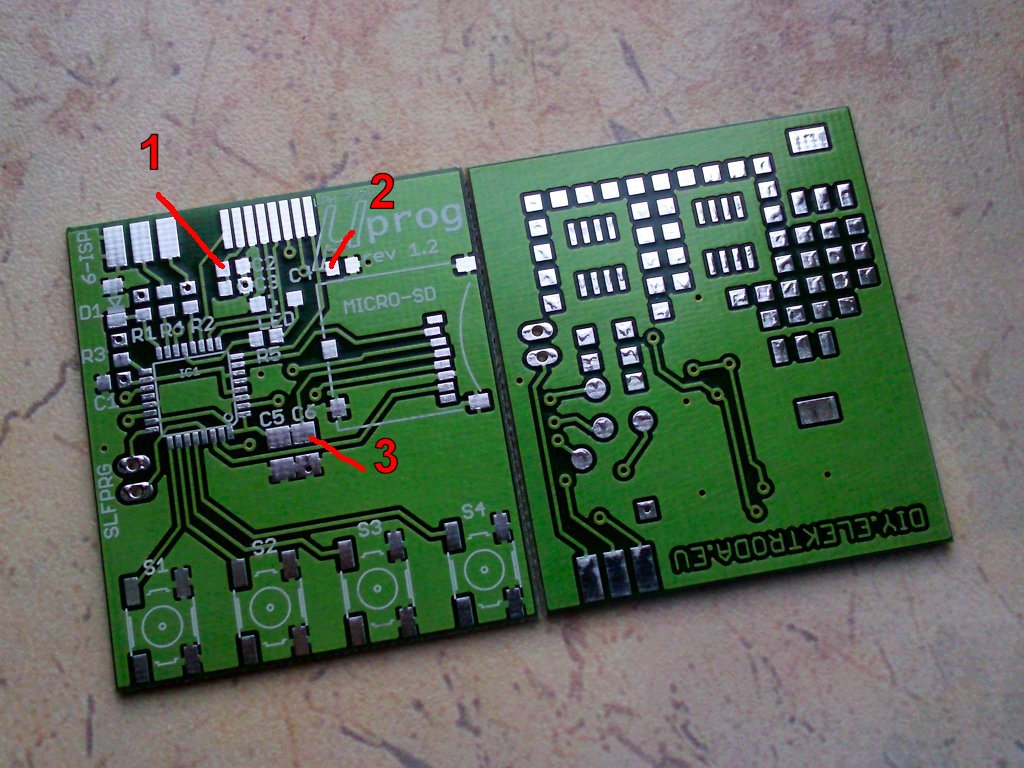
    Ok, turn on and measure the voltages:
    uProg - small, fast, portable AVR programmer with SD

    Another idea that comes to my mind is that maybe you have put the BIN file from the update on the card to the main directory and the programmer just starts in the bootloader mode.

    Added after 2 [minutes]:

    Oh, 5.27V on the display is a bit too little, I don't remember exactly, it should be around 7V. Does increasing the contrast in the file increase the tension? Because it should.

    I hope that the capacitor C5 + C6 is at least 20uF? Although it may not be enough for a 2GB card.
  • #220 10119847
    marcin44430
    Level 16  
    Posts: 233
    Help: 3
    Rate: 345
    manekinen wrote:
    Ok, turn on and measure the voltages:
    uProg - small, fast, portable AVR programmer with SD

    Another idea that comes to my mind is that maybe you have put the BIN file from the update on the card to the main directory and the programmer just starts in the bootloader mode.

    1-5.27V
    2-3.32V
    3-3.32V

    manekinen wrote:
    Oh, 5.27V on the display is a bit too little, I don't remember exactly, it should be around 7V. Does increasing the contrast in the file increase the tension? Because it should.

    I already have the contrast to the max (FF) and it is 5.27V, but when I reduce the contrast, the voltage also drops.

    manekinen wrote:
    I hope that the capacitor C5 + C6 is at least 20uF? Although it may not be enough for a 2GB card.

    The capacitor is 22uF.
  • #221 10119872
    manekinen
    Level 29  
    Posts: 1629
    Help: 76
    Rate: 2360
    If the voltage fluctuates, it means that the file from the card is being read and we can only blame the display. Maybe it is not LPH7779 but a similar one? Have you tried to change the display type in the config?

    Try also in the dark to perform some operation on the prock, write or read flash, see if something is happening (i.e. creating a file on the card or at least resetting the target chip). If it's okay, it really remains the display.

    You can also measure the voltage on pin 7 of the display when it is in the phone.
  • #222 10119962
    marcin44430
    Level 16  
    Posts: 233
    Help: 3
    Rate: 345
    manekinen wrote:
    If the voltage fluctuates, it means that the file from the card is being read and we can only blame the display. Maybe it is not LPH7779 but a similar one? Have you tried to change the display type in the config?

    Rather it is LPH7779 for sure, as I took it out of the NOKI 3310, I have already changed the display type and nothing.

    manekinen wrote:
    Try also in the dark to perform some operation on the prock, write or read flash, see if something is happening (i.e. creating a file on the card or at least resetting the target chip). If it's okay, then the real display remains.

    I tried to feel the flash in the dark as you wrote and it worked, i.e. a file on the SD card in the flash folder was created.

    manekinen wrote:
    You can also measure the voltage on pin 7 of the display when it is in the phone.

    For now, I do not have how to do it because the contacts that were next to the display are soldered to the Uprog. But I think today or tomorrow I will buy a new original display and we'll see. :cry:
  • #223 10120014
    manekinen
    Level 29  
    Posts: 1629
    Help: 76
    Rate: 2360
    Maybe the display has a different driver and needs some extra command or something. Although uProg sends the same commands as the phone also 0x05 which enables pcd8544 compatibility mode for other drivers.

    For me, the contrast voltage is 8.17V with good contrast. At the maximum setting, there is something around 10V which is already dangerous for the LCD.

    5.27V - there must be a problem here.

    Do such an experiment that after turning on the system, connect the 3.3V power supply to point "2", that is to the display power supply.

    There is still the BIAS setting, you can play with it, change from 0x10 to 0x17. Although I bet on contrast.
  • #224 10120070
    marcin44430
    Level 16  
    Posts: 233
    Help: 3
    Rate: 345
    Applying voltage to "2" does nothing.
  • ADVERTISEMENT
  • #225 10120084
    manekinen
    Level 29  
    Posts: 1629
    Help: 76
    Rate: 2360
    Okay, that's the last idea. Feed some 7-8V from your own power supply to pin 7 of the LCD. It should work normally after all.

    I see you have my favorite metric in your avatar :)
  • #226 10120309
    marcin44430
    Level 16  
    Posts: 233
    Help: 3
    Rate: 345
    After applying power to pin 7, the LCD starts to freak out, some vertical stripes light up, everything lights up, etc.
    Tomorrow there will be a display because today they closed my shop. :)

    Added after 51 [minutes]:

    Setting the BIAS didn't help either.
  • #227 10123259
    marcin44430
    Level 16  
    Posts: 233
    Help: 3
    Rate: 345
    I bought a new LCD and now, regardless of the settings and whether the card is inserted or not, on the 7th pin I have 12.11VA on the display and nothing can be seen. :cry:
  • #228 10125560
    manekinen
    Level 29  
    Posts: 1629
    Help: 76
    Rate: 2360
    I really don't know what could be there anymore. You need to take some good photos of the tile and send it.
  • #229 10125893
    marcin44430
    Level 16  
    Posts: 233
    Help: 3
    Rate: 345
    Yesterday I made a new PCB and still the same, now I have 2.25V on the 7th pin, regardless of the settings. But don't let your friend bother, one day I will order a PCB from you and buy a new microprocessor. work. :D
  • #230 10125895
    drzasiek
    CNC specialists
    Posts: 2212
    Help: 106
    Rate: 3233
    1. I have not seen the program, but improperly set Fusebits can also mess here.
    The driver must be reset within a certain (I don't remember exactly how much now) time, otherwise it may be damaged. Bad coffee grounds = bad times.
    2. What is your current VOUT capacitor at the LCD? You said you tried 1 uF, but is it still like that? Have you changed back to a smaller one. In my opinion, 1 uF is the minimum.
  • #231 10126228
    marcin44430
    Level 16  
    Posts: 233
    Help: 3
    Rate: 345
    I have 1uF all the time.
  • #232 10126376
    manekinen
    Level 29  
    Posts: 1629
    Help: 76
    Rate: 2360
    crackle - a lot of people have already built it, the 200nF converter capacitor works great for all of them.

    As for the tea leaves - the system will definitely work with the 1MHz setting. I wasn't the only one who checked it :)

    A colleague is probably making some stupid mistake, and this is what he does not see :(


    And here's a little update - PDI is slowly moving :) It is a hard nut to crack, Atmel makes it difficult to learn about this protocol ... hides data, intentionally misleads etc.


  • #233 10129424
    ut1wpr
    Level 2  
    Posts: 2
    Regards - very well done!
    I have a question after tea leaves.
    I read from the description:
    Quote:
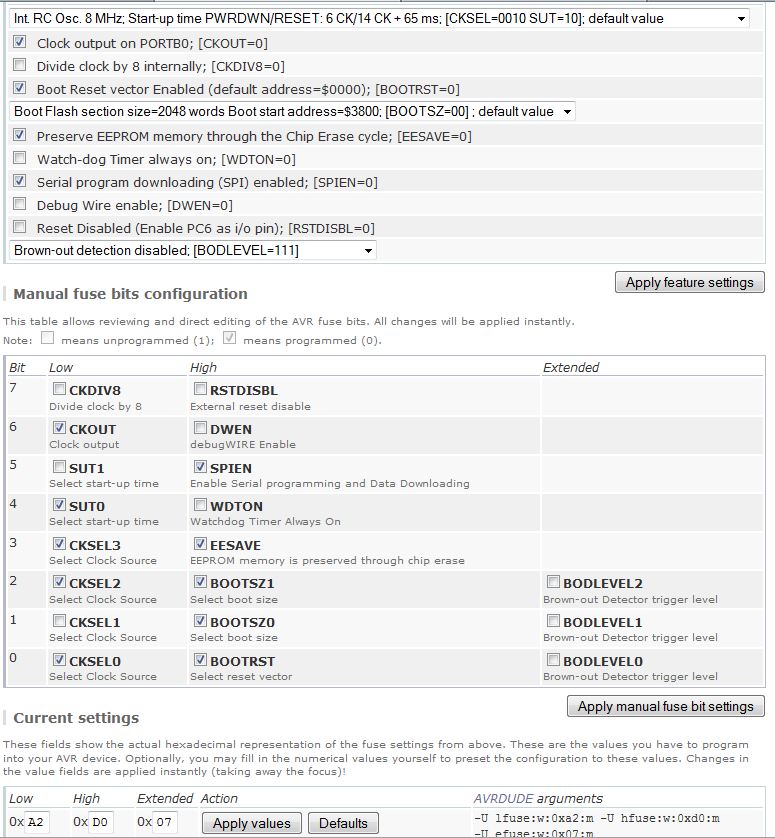
    Fusebity: Ext: 07, high :D 0, low: A2
    (internal 8MHz oscillator without / 8 split, CLKO output on, 2.7V brown-out detection, reset vector to bootloader address, 4kB bootloader memory, EESAVE on)
    but i understood from fuse calculator www.engbedded.com/fusecalc/ that 07 means that divisions are turned on, and 87 - not turned on. So how little would this extended byte to software 07 or 87 be?
    Dear for the answer,
    ---
    Vic / ut1wpr
  • #234 10129682
    piotrva
    VIP Meritorious for electroda.pl
    Posts: 6409
    Help: 625
    Rate: 734
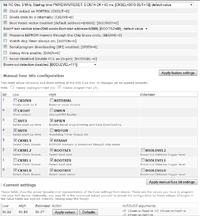
    I do not know how and under which model my colleague entered it, but under ATMgea328P (as it is in uProg) the settings look like this:
    uProg - small, fast, portable AVR programmer with SD
  • #235 10129715
    manekinen
    Level 29  
    Posts: 1629
    Help: 76
    Rate: 2360
    If you are programming avrdude, write Ext: 07, high :D 0, low: A2
    If another program, write Ext: FF, high :D 0, low: A2

    I don't know why, but avrdude misinterprets unused bits as "0".
  • #236 10129765
    ut1wpr
    Level 2  
    Posts: 2
    piotrva wrote:
    I do not know how and under which model my colleague entered it, but under ATMgea328P (as it is in uProg) the settings look like this:
    uProg - small, fast, portable AVR programmer with SD
    Yes, now I saw the confusion.
    But from the author the bodlevel mal was bull 2.7, and in the zdience I saw non. It is not very familiar to us, they will work in such settings.
    Dear,
    Vic

    Added after 8 [minutes]:

    manekinen wrote:
    If you are programming avrdude, write Ext: 07, high :D 0, low: A2
    If another program, write Ext: FF, high :D 0, low: A2

    I don't know why, but avrdude misinterprets unused bits as "0".

    Thank you very much. I make up for it AVReal-USB I would very much like to make it a PROG for a colleague-invalida (after apoplexy) who is just as amateur and very interested in software.

    Please forgive me for my bad Polish. :(

    One more time in the day,
    Vic
  • #237 10165254
    marcin44430
    Level 16  
    Posts: 233
    Help: 3
    Rate: 345
    Hello.
    And can I use atmega328 without the letter P instead of atmega328P?
  • #238 10165308
    manekinen
    Level 29  
    Posts: 1629
    Help: 76
    Rate: 2360
    As far as I know, it should work normally on the current load. But I didn't check.
  • #239 10165736
    marcin44430
    Level 16  
    Posts: 233
    Help: 3
    Rate: 345
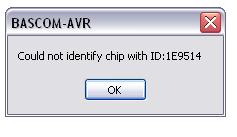
    Now I have such a problem that I get this message in the bascom. And I have a question whether the reason may be that Atmega328 is not on the bascom list, but Atmega328P is on the list.
    uProg - small, fast, portable AVR programmer with SD

    Added after 1 [hours] 40 [minutes]:

    It looks like no program supports atmega328.

    Added after 52 [minutes]:

    I have no idea what to do anymore. I bought a PCB from the author, everything was carefully assembled and programmed for the 3rd time and still the same. You can't see anything on the display, and you can perform various operations blindly.
  • #240 10166643
    manekinen
    Level 29  
    Posts: 1629
    Help: 76
    Rate: 2360
    Overall this atmega328 is somehow little available and nothing is known about it unless some short series has gone. But it has a different signature. I think that if you oil this message and try to save the batch, it will be ok.

    marcin44430 wrote:
    It looks like no program supports atmega328.

    I don't know if avrdude and usbasp support it, but avrstudio has it on the list, and of course uProg supports it ;) And bascom doesn't even have a config file for it, but from what I read, the compilation on atmega328P also works on a regular one - although I haven't checked it.

    Added after 3 [minutes]:

    marcin44430 wrote:
    I have no idea what to do anymore. I bought a PCB from the author, everything was carefully assembled and programmed for the 3rd time and still the same. You can't see anything on the display, and you can perform various operations blindly.

    I have no idea what these displays are about. This is the first time I see something like this :( If you want, you can send it all to me, I will check it in my free time.
📢 Listen (AI):

Topic summary

✨ The discussion revolves around the uProg, a compact and portable AVR programmer that utilizes SD cards for firmware storage. Users express admiration for its design and functionality, highlighting its small size (44 x 39 x 5.5 mm) and fast programming speeds (write: 12.5kB/s, read: 14.5kB/s). Several users inquire about compatibility with various components, such as different LCD displays (notably the Nokia 3310's LPH7779), and the ability to program various AVR microcontrollers, including the ATmega328P and ATtiny series. Issues with SD card compatibility, particularly with SDHC cards, are frequently mentioned, as well as problems related to fusebit settings and display contrast. Suggestions for improvements include adding a battery charging system, enhancing the user interface, and providing better documentation for setup and troubleshooting. The community shares experiences with different configurations, troubleshooting tips, and modifications to enhance the programmer's capabilities.
Generated by the language model.

FAQ

TL;DR: uProg writes AVR flash at 12.5 kB/s and reads at 14.5 kB/s; “The best results can be obtained with BIN files” [Elektroda, manekinen, post #9597772] Why it matters: those rates cut on-site firmware updates to under six seconds for a 64 kB image.

Quick Facts

• Foot-print: 44 × 39 × 5.5 mm, 5 mA menu current [Elektroda, manekinen, post #9597772] • Peak write: 12.5 kB/s; verify read-back 14.5 kB/s [Elektroda, manekinen, post #9597772] • Supported cards: 128 MB – 2 GB SD/MMC, FAT16/32 (SDHC in roadmap) [Elektroda, manekinen, post #9597772] • Stand-by draw: 0.10 µA; boot surge ≤ 100 mA (card-dependent) [Elektroda, manekinen, post #9597772] • Tested MCUs: ATtiny13 → ATmega2561; auto SCK 4 MHz-62.5 kHz [Elektroda, manekinen, post #9597772]
How do I enter fusebits without a PC?

Choose Fusebits → Manual. UP/DN scroll each hex digit, RI confirms, LE cancels. Default factory bytes are pre-loaded for safety [Elektroda, manekinen, post #9693727]

Why does verification fail after long cables?

Auto-speed starts at 4 MHz SCK and steps down on first error. A 30 cm ribbon may still pass the signature test but corrupt data. Limit length to ≤ 20 cm or set Max SCK=3 in config.ini (250 kHz) [Elektroda, manekinen, post #9597772]

‘File too big’ when flashing ATtiny25—work-around?

Bug in size parser affects HEX < 2 kB. Convert to BIN or pad file, then flash successfully [Elektroda, manekinen, post #10377528] A fix is scheduled in the next release.

How can I speed up the programmer itself?

Set OSCBoost bit0=1 and OSCCAL to F0-FF. At 16 MHz average write rate rises 28 % but some MCUs require SCK capped to 2 MHz [Elektroda, mlassota, post #10118939]

What’s the typical failure after reverse-biasing C5?

Tantalum C5 stripe denotes +. Reversed part shorts the SD rail, overheats, and can burn the PCB within 3 s [Elektroda, krzycho123, post #9826229]

Is Li-ion charging supported on-board?

PCB 1.2 exposes SO8 and SOT-223 pads so you can add MCP73831 charger and LDO. Factory firmware doesn’t monitor charge; add external LED or ADC mod as in user build [Elektroda, MatygaD, post #9773466] A native charger is on the roadmap.

Quick How-To: update uProg firmware from SD

  1. Copy new BIN as 000.bin to card root. 2. Insert card and power-on; blank screen confirms bootloader mode. 3. Press RI to flash; after reboot the splash shows the new version [Elektroda, manekinen, post #9597772]

Edge-case: what if the LCD shows only a dash?

A single dash means uProg shut down. If it appears at power-up, SD Vcc is below 2.7 V; recharge battery or replace C4 [Elektroda, marcin44430, post #10116045]
Generated by the language model.
ADVERTISEMENT