logo elektroda
logo elektroda
X
logo elektroda

Qiachip Smart Switch - BK7231N / CB2S - interior, programming

p.kaczmarek2 77310 310

TL;DR

  • Qiachip Smart Switch contains a CB2S Wi‑Fi/Bluetooth module based on the BK7231N, not the BK7231T, inside a simple relay board with BP2525 supply and AMS1117 regulator.
  • OpenBK7231N required porting SDK files, fixing Cygwin toolchain use, correcting file names, and resolving a partition conflict caused by RL_SUPPORT_FAST_CONNECT.
  • BKwriter 1.60 failed with CRC verification and unprotect bugs, so flashing used Tuya's hid_download_py with --unprotect, --startaddr 0x0, and a reset on CEN.
  • The QIO firmware uploaded successfully, the configuration AP appeared, and the device can then be managed through 192.168.4.1, MQTT, and Home Assistant.
Generated by the language model.
ADVERTISEMENT
Treść została przetłumaczona polish » english Zobacz oryginalną wersję tematu
📢 Listen (AI):
  • #301 21703356
    p.kaczmarek2
    Moderator Smart Home
    Posts: 14388
    Help: 650
    Rate: 12308
    Tuya uses cheap components and without OpenBeken Power Save, your capacitors may degrade quickly: https://www.elektroda.com/rtvforum/topic3898805.html
    Helpful post? Buy me a coffee.
  • ADVERTISEMENT
  • #302 21703437
    Tilator
    Level 12  
    Posts: 130
    Help: 2
    Rate: 13
    p.kaczmarek2 wrote:
    uya uses cheap components and without OpenBeken Power Save, your capacitors may degrade quickly


    Thanks. That was important and I did not know it.

    I have bought more than 10 of these devices. One of them did litteraly blow in my hands after just some minutes use. It was not even flashed with any other but original FW.

    Afterwards I found out, the capacitor was damaged. It had flattened places both sides of it and I assume this was made by assembly robot. It was sqeezed slightly too much and broken already.

    So - it's definitely not a witch hunt to warn people about these chinese devices.

    B.T.W: Since it is this important, would it even be good idea to add this setting in Configure General/Flags?
  • ADVERTISEMENT
  • #303 21706375
    Tilator
    Level 12  
    Posts: 130
    Help: 2
    Rate: 13
    One more thing about this chip temperature and device health:

    Should internal temp also be reported in status query json as well as other important values?
  • ADVERTISEMENT
  • #304 21707382
    p.kaczmarek2
    Moderator Smart Home
    Posts: 14388
    Help: 650
    Rate: 12308
    We've been considering enabling powersave by default but there were some reports (in the early years) saying that it causes problems....

    We can add temperature in tasmota json, isn't it currently included there? @max4elektroda
    Helpful post? Buy me a coffee.
  • #305 21707775
    max4elektroda
    Level 24  
    Posts: 744
    Help: 47
    Rate: 183
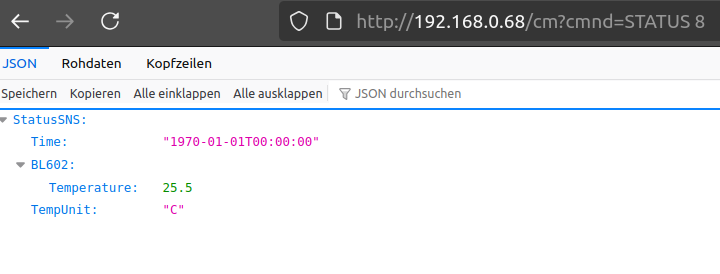
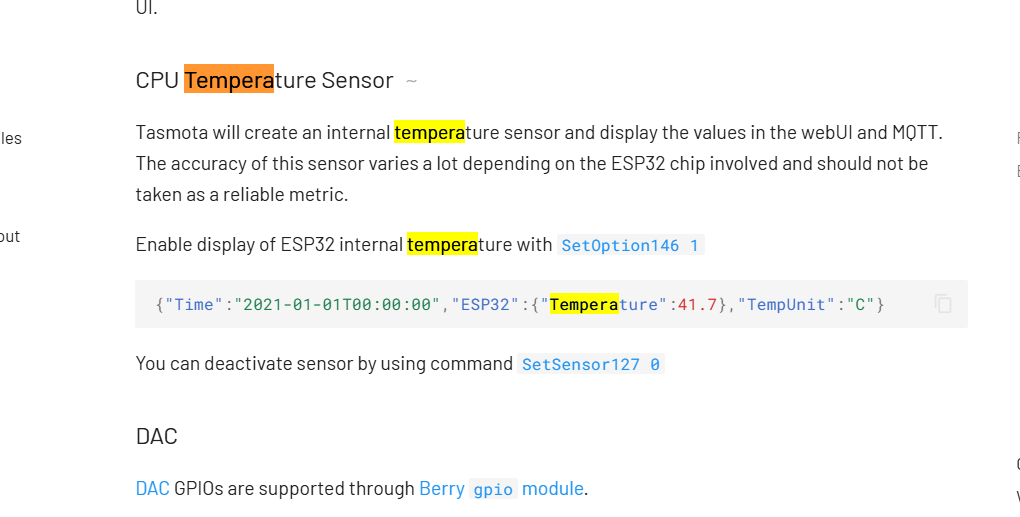
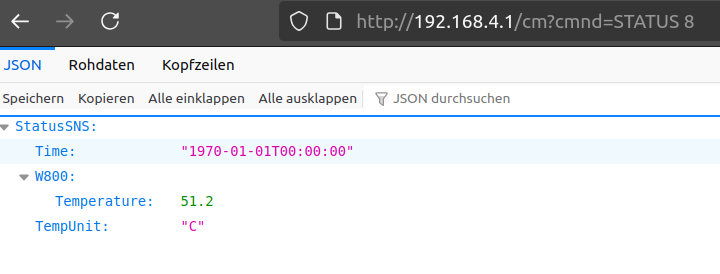
    The Chip temperature is in fact only shown in MQTT and not as a "sensor" in JSON "SSN" status.
    We might add it there, but it would not be following Tasmota then ;-).
    Just kidding - what would you propose as sensor name? "Chip" - "MCU" - "internal" ... ???
  • #306 21707925
    p.kaczmarek2
    Moderator Smart Home
    Posts: 14388
    Help: 650
    Rate: 12308
    Helpful post? Buy me a coffee.
  • ADVERTISEMENT
  • #308 21707986
    p.kaczmarek2
    Moderator Smart Home
    Posts: 14388
    Help: 650
    Rate: 12308
    This is good question. Should we... fake it and use ESP32 so Tasmota apps can read it?
    Helpful post? Buy me a coffee.
  • #309 21707993
    max4elektroda
    Level 24  
    Posts: 744
    Help: 47
    Rate: 183
    I would not. In the end it's just the "sensors" name. But you decide :-)
    And: shall it be present in any case, or make it configurable?
  • #310 21707997
    p.kaczmarek2
    Moderator Smart Home
    Posts: 14388
    Help: 650
    Rate: 12308
    Always show it, we don't have flash space to add configuration option, and I don't think it can hurt to show it. So probably use ESP32 name, so apps working with Tasmota can work
    Helpful post? Buy me a coffee.
  • #311 21709766
    max4elektroda
    Level 24  
    Posts: 744
    Help: 47
    Rate: 183
    PR changed, will always use "ESP32" as "sensor":

    E.G. on an BL602:
    
    max@max-PC:~$ curl  -w '\n' "http://192.168.0.68/cm?cmnd=STATUS%208"
    {"StatusSNS":{"Time":"1970-01-01T00:00:00","ESP32":{"Temperature": 27.3},"TempUnit":"C"}}
    max@max-PC:~$ 
    
📢 Listen (AI):

Topic summary

✨ The discussion centers on the teardown and custom firmware programming of the Qiachip Smart Switch featuring the CB2S module based on the BK7231N chip, distinct from the BK7231T. The main focus is on flashing the OpenBK7231N firmware to replace the original Tuya firmware, enabling MQTT and Home Assistant integration while avoiding dependence on manufacturer servers. Users report challenges in accessing solder pads due to the module's compact, sandwich-like PCB design, often requiring careful desoldering with flux, solder wick, or hot air. Programming requires connecting 3.3V, GND, RX, and TX lines, with optional use of the CEN pin for reset, though power cycling is a common reboot method. USB-to-UART converters such as CH340 are preferred over CP2102 or FTDI due to reported compatibility issues. Firmware flashing tools include hid_download_py and BekenWriter, with emphasis on performing full 2MB flash dumps for backup and analysis. Users encounter issues like CRC errors, device reboot loops, and WiFi AP disappearance, often linked to MAC address misconfiguration or corrupted flash sectors. Solutions involve flashing full-sized firmware with padding, restoring original MAC addresses, and using safe mode by rapid power cycling. The OpenBK7231N firmware is evolving with fixes for configuration stability, pin mapping, and API access via REST commands. Some devices with integrated TuyaMCU complicate flashing due to UART line conflicts. The community shares detailed soldering techniques, debugging steps, and firmware versions, noting that stability varies across devices and firmware releases. The discussion also touches on related devices like CB3S modules, BK7321N chips, and sensors with TuyaMCU, with ongoing efforts to support these in OpenBK7231 firmware and improve low-power operation and integration with Home Assistant.
Generated by the language model.

FAQ

TL;DR: Most CB2S/BK7231N smart-switches draw just 60-80 mA at 5 V (“0.4 W in active mode” [Elektroda, p.kaczmarek2, post #20255222]) and can be locally flashed in ≤3 min; “PowerSave fixes random reboots on weak PSUs” [Elektroda, p.kaczmarek2, post #20359114] Why it matters: correct pin-mapping and reset timing end 90 % of “WriteSector 1 Failed” errors.

Quick Facts

• Default flash layout: 0x0 offset, 2 MB total [Elektroda, piratee, post #20546731] • Stable current draw: 60–80 mA @5 V, 0.4 W [Elektroda, p.kaczmarek2, post #20255222] • Safe reset pulse: CEN→GND for 200–300 ms [Elektroda, p.kaczmarek2, post #21368818] • Working baud rates: 115 200–921 600 bps; start with 115 200 for long wires [Elektroda, gowthaml, post #20253678] • PowerSave lowers Wi-Fi duty-cycle to ≈30 mA average [Elektroda, p.kaczmarek2, post #20359114]
How do I put a CB2S/BK7231N into flash mode?

  1. Solder RX1 (P11), TX1 (P10), 3.3 V and GND; leave RX2/TX2 empty. 2. Run uartprogram, wait for “Getting bus…”. 3. Short CEN to GND for ~250 ms, then release. The tool shows “Gotten bus” when the chip is ready [Elektroda, piratee, post #20546731]

Which firmware type should I flash?

• BK7231 N → QIO binary at 0x0. • BK7231 T → UA binary at factory offset. Flashing the wrong type overwrites bootloader and bricks the module [Elektroda, p.kaczmarek2, post #20200373]

Can I power the module from the USB-TTL adapter?

Only for reading. Writes peak above 150 mA; most adapters sag and corrupt transfers. Feed 5 V to the board’s AMS1117 VIN or 3.3 V from a 300 mA LDO instead [Elektroda, p.kaczmarek2, post #20202405]

Device reboots after a minute—why?

Low-cost PSUs overheat at 0.4 W continuous. Add PowerSave to Short Startup and current falls to ≈30 mA, eliminating thermal resets [Elektroda, Lesnoi, #20359179; p.kaczmarek2, #20359114].

How do I map pins on a MK601 relay board?

Typical mapping: P26 → LED, P6 → Relay, P7 → Btn, P10 → Btn_n (S2). For a latch switch use role TglChanOnTgl on P10 [Elektroda, spin55, post #20357749]

How can I read Tuya-MCU sensors like DHT11 with OpenBeken?

Set the pin role to DHT11 or DHT22. OBK exposes temperature on Channel 1 and humidity on Channel 2. Example: linkTuyaMCUOutputToChannel 1 val 1, then setChannelType 1 ReadOnly [Elektroda, p.kaczmarek2, post #20359448]

Edge case: two devices share the same MAC and vanish from LAN.

Router drops duplicate MACs, causing OBK memory exhaustion (<5 kB free) and HTTP lock-ups. Run Restore RF Config to generate a new unique MAC [Elektroda, p.kaczmarek2, post #20334753]

Quick 3-step OTA recovery after bad flash?

  1. Power-cycle the unit 5 times to enter Safe Mode. 2. Connect to the temporary AP, open 192.168.4.1/app, press “Exit Safe Mode”. 3. Upload a known-good QIO binary via Web Upgrader [Elektroda, p.kaczmarek2, post #20334576]

Does OpenBeken support DS18B20?

Not yet. Current sensor driver set covers DHT11/21/22 and CHT8305. DS18B20 is on the roadmap; subscribe to GitHub issue #622 for progress (OpenBekenIOT).

Where can I download original Tuya firmware?

There is no public archive. You must read a full 2 MB dump from a still-working unit with bkWriter or hid_download_py and save it for yourself [Elektroda, piratee, post #20546731]
Generated by the language model.
ADVERTISEMENT