logo elektroda
logo elektroda
X
logo elektroda
Dostępna jest polska wersja

Czy wolisz polską wersję strony elektroda?

Nie, dziękuję Przekieruj mnie tam

[BK7231N ] Teardown of TH08 LCD Calendar/clock/temperature/humidity, 3xAAA battery, backlight

morgan_flint 43893 254

TL;DR

  • TH08-CBU-ATH20-V2 is a LCD calendar/clock/temperature/humidity unit with a BK7231N CBU module, BL55070 LCD driver, and ATH20 sensor.
  • U3 appears to be the Tuya MCU, while U8 with a 32.768 kHz crystal likely handles RTC and LCD/backlight control, and Q1 switches Wi‑Fi power.
  • It runs from 3xAAA cells at 4.5V and was bought for 4.49€ as a Choice offer.
  • The Tuya app shows a 1 hour update interval, and pairing can fail because the device connects only briefly between updates.
Generated by the language model.
ADVERTISEMENT
📢 Listen (AI):
  • #91 20797516
    p.kaczmarek2
    Moderator Smart Home
    Posts: 14622
    Help: 655
    Rate: 12639
    @morgan_flint nothing was changed in relation to RSSI, but maybe you need to do HASS discovery again?
    Do you have any non-TuyaMCU devices, can you check if HASS Discovery helps, and if not, check when the problem started?

    Unfortunatelly we don't take in account winter time yet, so you need to change it manually.

    Regarding configuration issue - maybe there is some kind of way to force TuyaMCU to stay on when we want to change config?
    Helpful post? Buy me a coffee.
  • ADVERTISEMENT
  • #92 20797751
    morgan_flint
    Level 14  
    Posts: 251
    Help: 4
    Rate: 60
    p.kaczmarek2 wrote:
    @morgan_flint nothing was changed in relation to RSSI, but maybe you need to do HASS discovery again?

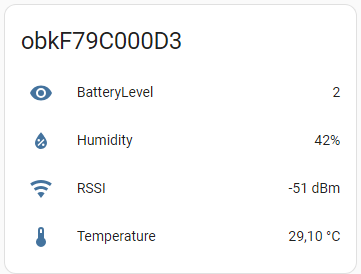
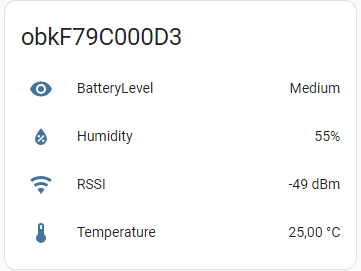
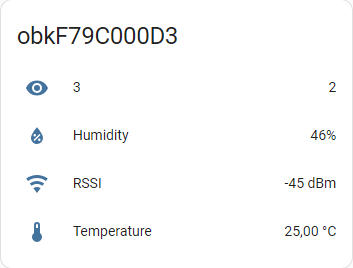
    Bingo! I didi it again and now it shows RSSI:
    A screenshot from Home Assistant showing MQTT device data with icons for humidity, RSSI, and temperature.

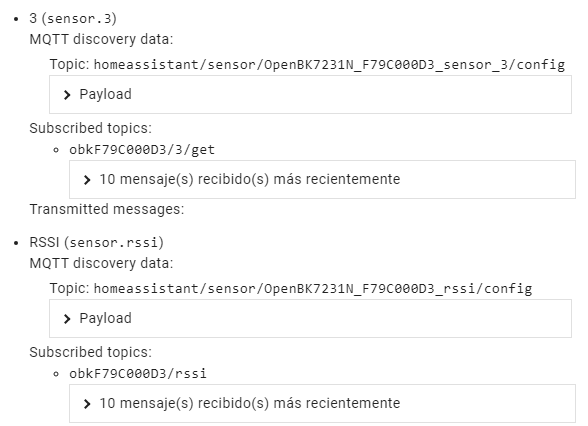
    This is what appears under MQTT info in HomeAssistant:
    Screenshot showing MQTT data in HomeAssistant.

    p.kaczmarek2 wrote:
    Unfortunatelly we don't take in account winter time yet, so you need to change it manually

    Ok

    p.kaczmarek2 wrote:
    Regarding configuration issue - maybe there is some kind of way to force TuyaMCU to stay on when we want to change config?

    As I said in my previous post, bypassing Q1 to GND keeps the module on (this device switches on and off the module on the GND side, contrary to others that do it on the Vcc side), and this way the web interface is available and you can do FW updates, change the configuration, etc. I've checked in TuyaMCUAnalyzer that, while doing this, the module keeps sending "55AA0001000000" to the MCU every few seconds with no response from the MCU, it must be because the MCU only listens to the module after powering it on, not as a routine.

    For a "software" solution, if the original FW supports OTA update (probably it does), there must be something in the Tuya protocol for the module to ask the MCU to keep it on during that process, but I don't think is worth working on it, as the "hardware" solution is simple enough
  • #93 20797763
    p.kaczmarek2
    Moderator Smart Home
    Posts: 14622
    Help: 655
    Rate: 12639
    That "3" on your screenshot, isn't it possible to change it with a setChannelLabel to a more meaningful name?
    Helpful post? Buy me a coffee.
  • #94 20800273
    morgan_flint
    Level 14  
    Posts: 251
    Help: 4
    Rate: 60
    Done:
    Device status panel with battery level and environmental data.

    Added setChannelLabel 3 Battery level to autoexec.bat and launched Start Home Assistant Discovery afterwards.

    Also updated fw to 305
  • #95 20800307
    p.kaczmarek2
    Moderator Smart Home
    Posts: 14622
    Help: 655
    Rate: 12639
    Also, isn't there already a "Low Mid High" or something like that channel type, which would display a string instead of a number in HA?
    Helpful post? Buy me a coffee.
  • #96 20800558
    morgan_flint
    Level 14  
    Posts: 251
    Help: 4
    Rate: 60
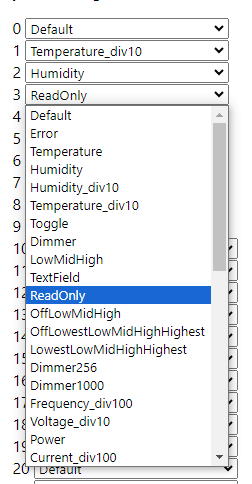
    These are the possibilities in "Channel types": Dropdown list showing available channel types in a user interface.

    I will try with "LowMidHigh"

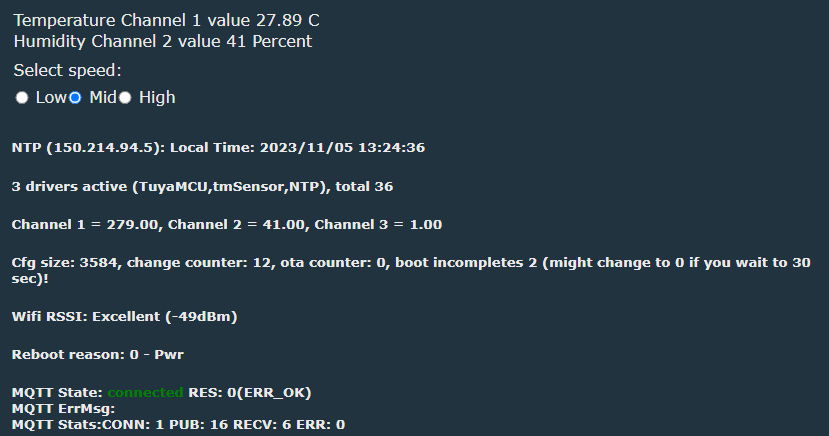
    EDIT: Changed "setChannelType 3 ReadOnly" to "setChannelType 3 LowMidHig" in autoexec.bat. The main page changed to this:
    Screenshot of the interface with channel information and MQTT settings.

    But, in Home Assistant, "BatteryLevel" disappears, even after executing "Home Assistant Discovery" several times

    Changed autoexec back to "setChannelType 3 ReadOnly" and the battery level reappeared in Home Assistant.

    Looking at the new "control" in the web interface, I understand "lowMidHig" is intended for something you can control, not a (read only) measurement

    For me it's OK to have 1-2 as BatteryLevel instead of a string; I'm not really sure of the range of this measurement, maybe0-1-2 or 1-2-3 0r even 0-1-2-3, I should use a variable power supply and start lowering voltage from 4.5V to see when it changes, and how does it change
  • #97 20800668
    p.kaczmarek2
    Moderator Smart Home
    Posts: 14622
    Help: 655
    Rate: 12639
    You are correct, but if you check our docs:
    https://github.com/openshwprojects/OpenBK7231T_App/blob/main/docs/channelTypes.md
    You can see that we also have:
    
    ReadOnlyLowMidHigh	Like LowMidHigh, but just read only
    

    Maybe that one can work for you.
    Helpful post? Buy me a coffee.
  • #98 20801203
    morgan_flint
    Level 14  
    Posts: 251
    Help: 4
    Rate: 60
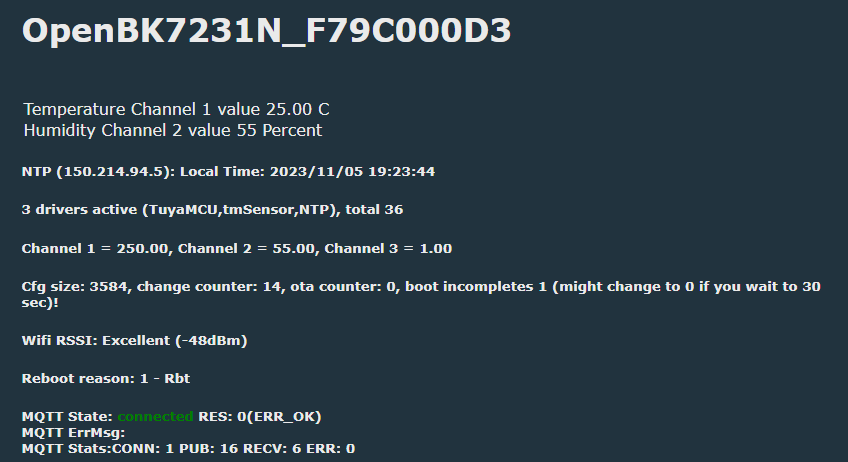
    I've just tried it:
    Screenshot of the OpenBK7231N interface displaying temperature and humidity parameters and connection details. Information panel displaying battery level, humidity, RSSI, and temperature.

    Now we still have to check that 1 is really "Medium". I'm feeding it with a small LiPo which is now 3.9V and the battery low icon isn't showing on the screen, so it could be really "Medium" (the device is designed for 3 * 1.5V batteries)
  • #99 20801209
    p.kaczmarek2
    Moderator Smart Home
    Posts: 14622
    Help: 655
    Rate: 12639
    Thanks, I can also see that the rounding problem (occasional roundings like 25.02000000000001) is gone?
    Helpful post? Buy me a coffee.
  • ADVERTISEMENT
  • #100 20801318
    morgan_flint
    Level 14  
    Posts: 251
    Help: 4
    Rate: 60
    p.kaczmarek2 wrote:
    Thanks, I can also see that the rounding problem (occasional roundings like 25.02000000000001) is gone?

    Yes, at least, I haven't seen it since a long time ago.

    EDIT: I'm now feeding it from 5V, the channel 3 value is 2 and showing "High" in Home Assistant. Now, I'll have to find the low voltage threshold...

    Added after 47 [minutes]:

    morgan_flint wrote:
    As I said in my previous post, bypassing Q1 to GND keeps the module on (this device switches on and off the module on the GND side, contrary to others that do it on the Vcc side), and this way the web interface is available and you can do FW updates, change the configuration, etc. ...

    For a "software" solution, if the original FW supports OTA update (probably it does), there must be something in the Tuya protocol for the module to ask the MCU to keep it on during that process, but I don't think is worth working on it, as the "hardware" solution is simple enough


    I've just found another possibility: With a long press of the button (until the light turns off), the Tuya MCU keeps the module on indefinitely, so it's possible to access the web interface for configuration or OTA FW update. A short press on the button reverts it to its normal state.
  • #101 20802120
    p.kaczmarek2
    Moderator Smart Home
    Posts: 14622
    Help: 655
    Rate: 12639
    I have observed something similiar on TuyaMCU door sensonrs, but in their case I had to press button multiple times to keep them awake, it was like each button was keeping it awake, but I may be wrong.

    Okay, what's next, is your TH08 now working better, now that I added the missing packet?
    Helpful post? Buy me a coffee.
  • ADVERTISEMENT
  • #102 20802807
    morgan_flint
    Level 14  
    Posts: 251
    Help: 4
    Rate: 60
    p.kaczmarek2 wrote:
    Okay, what's next, is your TH08 now working better, now that I added the missing packet?

    Yes, perfect! The MCU turns off the module as soon as the last packet from the module is received, so now the battery should last the same as with the original FW (I thought I had already reported that). Thank you very much!

    For me, the only thing pending is measuring the thresholds between battery levels (in principle, just for the sake of knowing it, although it might be good to know when using with LiPos, to avoid over-discharging them)..

    Ah! And maybe restructuring the first post, to summarize everything we've found out.
  • ADVERTISEMENT
  • #103 20804228
    morgan_flint
    Level 14  
    Posts: 251
    Help: 4
    Rate: 60
    morgan_flint wrote:
    the only thing pending is measuring the thresholds between battery levels

    I did it:
    High-medium: 4V
    Medium-low: 3.1V Under this threshold the low battery icon shows on screen.

    Under 3V the main regulator output starts dropping from 2.8V and the display starts dimming, so it needs 0.2V of minimum voltage drop to work properly. I haven't measured the other regulator, which is only for the backlight.

    Added after 6 [minutes]:

    auntlydia wrote:
    Any voltage between 3.3V and 4.5V should be safe to use, personally I wouldn't want to go higher than that. It may be fine though, but who knows for how long. I prefer to be safe on this one.

    As I said here, I've tried 5V with no issues and no heating on the voltage regulators; I think 5V should be safe (only 0.2V over alkalines, as a fresh alkaline battery is 1.6V so 4.8V in total), although I haven't been able to identify the voltage regulators and find their datasheets.

    In conclusion, the device can be powered also by USB and/or a LiPo battery without problems.
  • #104 20804716
    auntlydia
    Level 10  
    Posts: 70
    Help: 2
    Rate: 14
    Wow guys, I just read the latest posts here and I'm amazed! I will try to flash new firmware right away and set the other parameter to get "low/medium/high" reading for battery level instead of the numbers. If the battery now lasts as long as with original FW (3x1.2V batteries already running almost two months now), I might even consider not to do a USB mod. Also, thanks @morgan_flint for testing it with 5V; in that case we don't even need stepdown converters but can just install a USB-C or Micro socket.

    I can also confirm what @p.kaczmarek2 said about button press with other TuyaMCU devices (TH01 temperature sensor and W06 water leak sensor): as long as the button is pressed, it will keep up the wifi connection and we can make FW adjustments. With the TH08, even one short button press was enough to keep it on long enough to upgrade FW OTA. But not sure if it works with the newer FW, but either a long button press or repeatedly every 2 seconds or so should keep it active as with the other MCU sensors.

    So I'll be testing the new FW now and post an update after a while and see how long the batteries last.

    Thanks a lot @p.kaczmarek2 and @morgan_flint for keeping up the good work and digging into the FW improvement!! It's amazing =)
  • #105 20804880
    p.kaczmarek2
    Moderator Smart Home
    Posts: 14622
    Help: 655
    Rate: 12639
    Thanks, however, for the record, I will mention that this:
    auntlydia wrote:
    set the other parameter to get "low/medium/high" reading for battery level instead of the numbers

    This actually was in OBK for the very long time already. We have multiple channel types working correctly with HASS Discovery.
    Helpful post? Buy me a coffee.
  • #106 20805344
    auntlydia
    Level 10  
    Posts: 70
    Help: 2
    Rate: 14
    Yea, I haven't read the documentation careful enough I guess. A very nice feature btw, which I applied to my other TH01 sensors as well. By the way, is it possible to set timers for devices in OpenBK? To turn them on/off automatically repeatedly? I found this function in Tasmota but not in OpenBK so far.

    Another note on the RSSI feature that has been added in recent firmware updates (or at least it showed up in my MCU devices after I updated to 1.17.306 and did new HASS discovery): for both my TH08 and TH01 devices, the data is not sent to HASS, but the status remains "Unknown".
    However this changes if I force constant WiFi connection e.g. by long button press until it refreshes, then the status changes to the correct value in HASS. This method worked for my TH01 devices. For TH08 it worked if button is pressed long during HASS discovery. Once HASS or mqtt is restarted, this value is lost again and won't be transfered with normal use of the device. I suppose the WiFi connection that is made by the sensor is too short for this request to be handled and transferred. It is not a problem at all, but I just want to mention it in case other users experience the same issue.
  • #107 20805352
    p.kaczmarek2
    Moderator Smart Home
    Posts: 14622
    Help: 655
    Rate: 12639
    auntlydia wrote:
    Yea, I haven't read the documentation careful enough I guess. A very nice feature btw, which I applied to my other TH01 sensors as well. By the way, is it possible to set timers for devices in OpenBK? To turn them on/off automatically repeatedly? I found this function in Tasmota but not in OpenBK so far.

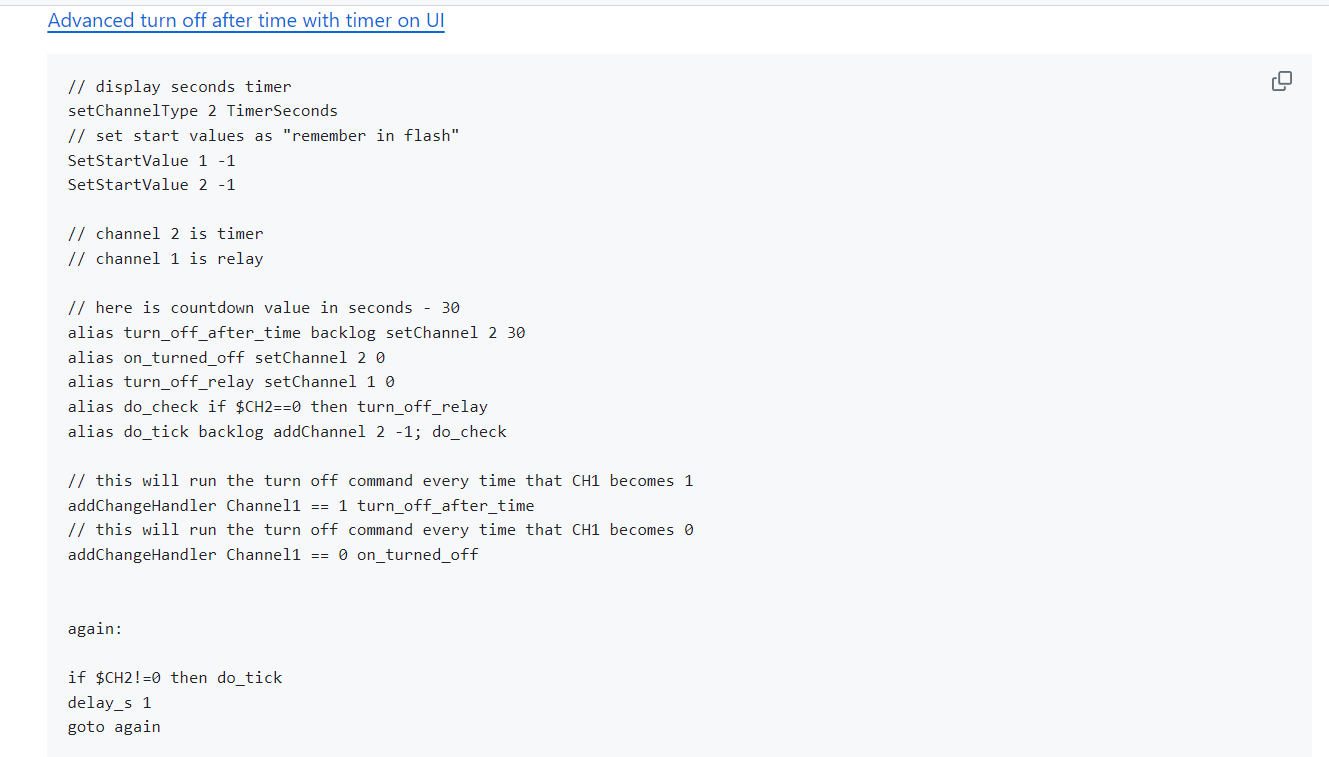
    Timers can be created in many ways and they are fully scriptable.
    https://github.com/openshwprojects/OpenBK7231T_App/blob/main/docs/autoexecExamples.md
    For example:
    Screenshot of script code with comments for a timer in the UI.

    auntlydia wrote:

    Another note on the RSSI feature that has been added in recent firmware updates (or at least it showed up in my MCU devices after I updated to 1.17.306 and did new HASS discovery): for both my TH08 and TH01 devices, the data is not sent to HASS, but the status remains "Unknown".
    However this changes if I force constant WiFi connection e.g. by long button press until it refreshes, then the status changes to the correct value in HASS. This method worked for my TH01 devices. For TH08 it worked if button is pressed long during HASS discovery. Once HASS or mqtt is restarted, this value is lost again and won't be transfered with normal use of the device. I suppose the WiFi connection that is made by the sensor is too short for this request to be handled and transferred. It is not a problem at all, but I just want to mention it in case other users experience the same issue.

    can you try adding something like:
    
    mqtt_broadcastItemsPerSec 10
    

    or 20, etc, to your autoexec.bat and try again? How much time does it have to broadcast?
    Helpful post? Buy me a coffee.
  • #108 20805366
    auntlydia
    Level 10  
    Posts: 70
    Help: 2
    Rate: 14
    p.kaczmarek2 wrote:
    Timers can be created in many ways and they are fully scriptable.


    Thanks! I will have a look into that. I was just looking in the web interface, but I will try to figure out how the commands for autoexec.bat work for timers.

    p.kaczmarek2 wrote:
    can you try adding something like:
    Code: text Expand Select all Copy to clipboard
    mqtt_broadcastItemsPerSec 10

    or 20, etc, to your autoexec.bat and try again? How much time does it have to broadcast?


    I tried both 10 and 20 but there is no change. The time of active connection is approx. 5 seconds.
  • #109 20805416
    p.kaczmarek2
    Moderator Smart Home
    Posts: 14622
    Help: 655
    Rate: 12639
    What is your current autoexec.bat @auntlydia ? Maybe we can try to force-publish something. Do you have waitFor MQTT?
    Helpful post? Buy me a coffee.
  • #110 20805434
    auntlydia
    Level 10  
    Posts: 70
    Help: 2
    Rate: 14
    p.kaczmarek2 wrote:
    What is your current autoexec.bat @auntlydia ? Maybe we can try to force-publish something. Do you have waitFor MQTT?


    startDriver NTP
    // starts the NTP driver (network time)
    startDriver TuyaMCU
    // starts the TuyaMCU driver
    startDriver tmSensor
    //starts the tmSensor driver
    ntp_setServer 192.168.86.1
    // sets the preferred NTP time server IP adress
    ntp_timeZoneOfs 1
    // corrects time zone by hour value +/- (time zone offset)
    setChannelType 1 temperature_div10
    //sets the type of channel 1 (selected freely) to temperature times 10 (i.e. 23.5C written as 235 integer, as this notation is used by Tuya), thanks to which OpenBeken knows how to display its value on the panel
    linkTuyaMCUOutputToChannel 1 val 1
    // maps dpID from TuyaMCU (variable identifier) 1 to channel 1, value type. In this particular device, dpID 1 is temperature. dpID roles vary by device
    setChannelType 2 Humidity
    // sets channel 2 type to humidity
    linkTuyaMCUOutputToChannel 2 val 2
    // as before, here dpID 2 is humidity
    linkTuyaMCUOutputToChannel 3 val 3
    setChannelType 3 ReadOnlyLowMidHigh
    setChannelLabel 3 "Battery Level"
    mqtt_broadcastItemsPerSec 20


    that's my current autoexec.bat

    should I include waitFor MQTT?
  • #111 20820474
    duycaf
    Level 3  
    Posts: 3
    Hello Guys,
    I have such a device and is not connecting anymore to app, probably problems with wifi.
    Is there anything I can do?
  • #112 20820485
    auntlydia
    Level 10  
    Posts: 70
    Help: 2
    Rate: 14
    duycaf wrote:
    Hello Guys,
    I have such a device and is not connecting anymore to app, probably problems with wifi.
    Is there anything I can do?


    Hi, are you using it with Tuya App? Or have you flashed OpenBK to the chip?

    I think another user here reported that it occurred that the device didn't connect anymore after flashing at some point. It happened to me as well, so I had to re-flash and it worked again without problems since.

    If you use Tuya only, they only options I see is delete it from the app and configure again, long button press should help to reset it to factory, you might wanna double check the instructions manual. Or maybe try some fresh batteries first?

    Cheers
  • #113 20824256
    morgan_flint
    Level 14  
    Posts: 251
    Help: 4
    Rate: 60
    auntlydia wrote:
    ...I suppose the WiFi connection that is made by the sensor is too short for this request to be handled and transferred. It is not a problem at all, but I just want to mention it in case other users experience the same issue.

    I have already noticed that; the RSSI level gets updated only every long time. I thought it was because it really didn't change so much.

    auntlydia wrote:
    The time of active connection is approx. 5 seconds.

    From what I remember when I did the scans, the MCU turns the module off as soon as it receives the last packet from the module (the one that was added in version 302). As this message is related to RSSI strength, it seems the module doesn't have time to send the corresponding MQTT message before being shut down. A possibility would be to delay a bit this last packet or simply wait to send it until the MQTT message has been sent. Is waitFor MQTT intended for this?

    BTW, have been using the device with OBK uninterruptedly for the last two weeks with fresh alkalines and the battery level remains high (4.3V); the battery consumption issues seem to have gone since version 302. Thanks!
  • #114 20824261
    auntlydia
    Level 10  
    Posts: 70
    Help: 2
    Rate: 14
    I tried with waitFor MQTT - no change unfortunately.

    I just checked the active time by watching the Log window. the message transfer stops after approx. 5 seconds. It should be actually enough to send small data package. but maybe the transfer isn't triggered?
  • #115 20837619
    kuncy7
    Level 9  
    Posts: 34
    Help: 1
    Rate: 6
    Hi,
    Can this device be converted using tuya-cloudcutter?
  • #116 20837627
    p.kaczmarek2
    Moderator Smart Home
    Posts: 14622
    Help: 655
    Rate: 12639
    It's really hard to tell whether a given device is supported by a Tuya cloudcutter. You can always give it a try and check if any of the existing profiles is matching. What is the Tuya firmware version shown in the Tuya app? Just please do not update Tuya firmware if you want to flash this device remotely.

    You can also search Tuya-cloudcutter profiles on our devices list, select the "cloudcutter profile" from the drop down list:
    https://openbekeniot.github.io/webapp/devicesList.html
    Helpful post? Buy me a coffee.
  • #117 20838882
    kuncy7
    Level 9  
    Posts: 34
    Help: 1
    Rate: 6
    I was hoping it was this device: https://tuya-cloudcutter.github.io/api/device...-temperature-and-humidity-sensor-display.json
    Main module: V2.1.5
    MCU module: V1.0.0

    I'll try using tuya-cloudcutter and let you know how it goes.

    [Edit]
    I tried tuya-cloudcutter and unfortunately it ends like this:
    
    Scanning for open Tuya SmartLife AP
    .........
    Found access point name: "SmartLife-18E5", trying to connect...
    Device 'wlan0' successfully activated with 'db9376fc-df67-4f25-b1d3-f3018e49cb32'.
    Connected to access point.
    ================================================================================
    [!] The profile you selected did not result in a successful exploit.
    ================================================================================
    

    Where can I get a valid profile?
  • #118 20892743
    vikicha
    Level 3  
    Posts: 4
    Hello Guys
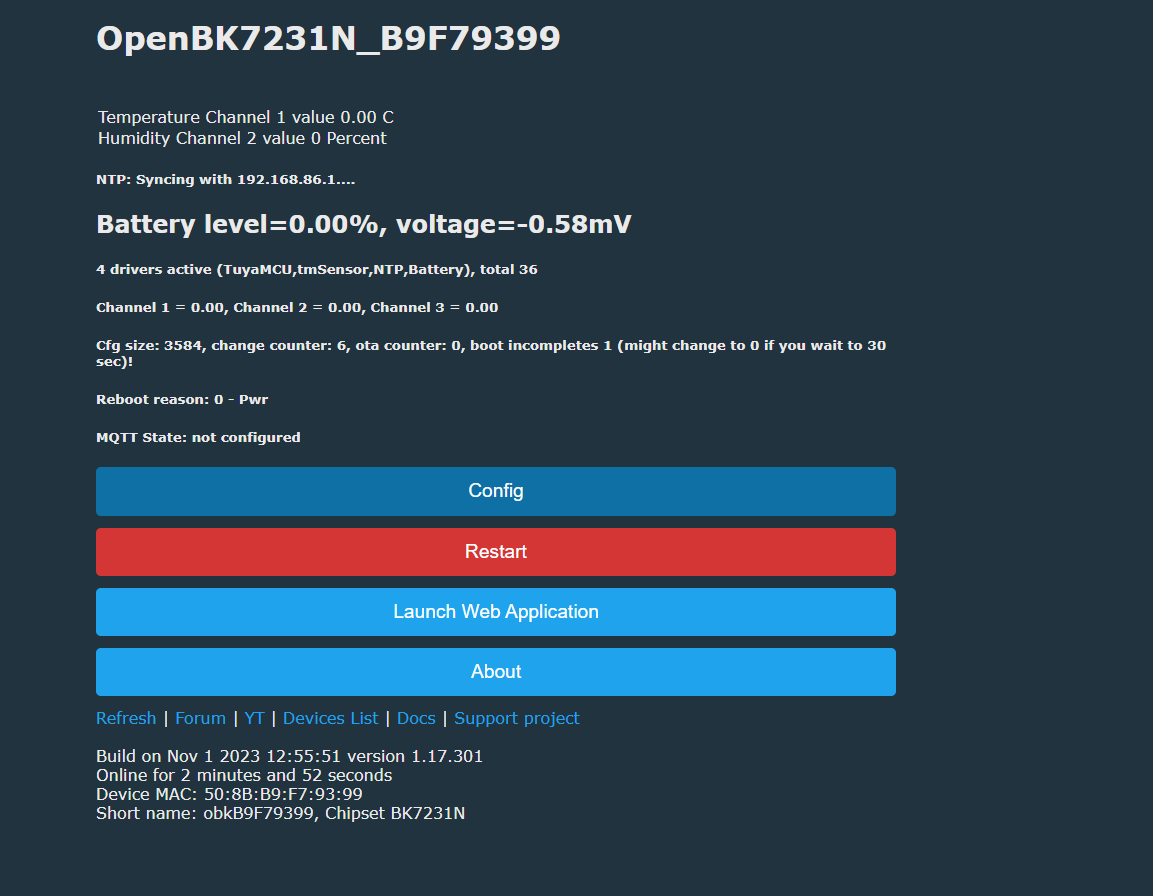
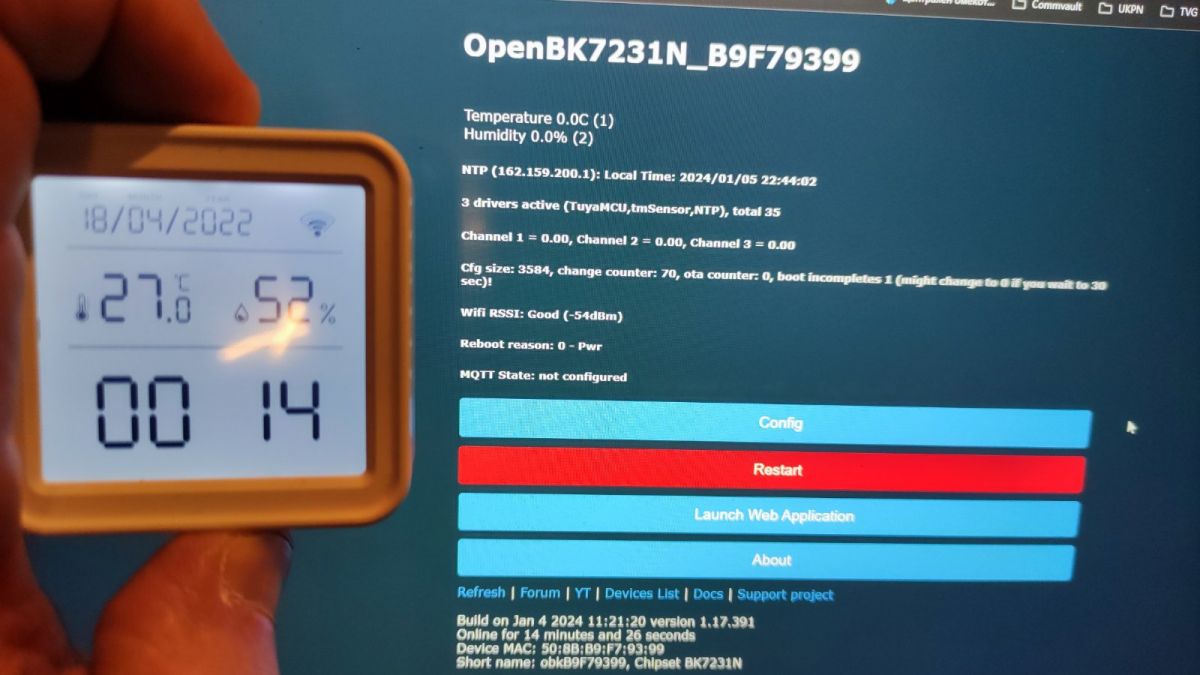
    I try TH08 with OpenBK but it did not read sensor, it just show zeroes.
    Screenshot of the OpenBK7231N interface showing no sensor readings.
    Also i try to flash it on PCB directly but it did not work, i have to desolder it and then the flash is successful.
    Can you help with the sensor?
  • #119 20892770
    auntlydia
    Level 10  
    Posts: 70
    Help: 2
    Rate: 14
    are you sure it is the same device? also, you may wanna try the current firmware 1.17.391 - I have multiple of those devices and they all work perfectly fine. The problem that a sensor shows zero values happened to me when I forced the device in keeping wifi connection by keeping the button pressed. maybe they have changed the design of the pcbs? it might be worth taking a look at the pcb pictures and compare.
  • #120 20892912
    vikicha
    Level 3  
    Posts: 4
    i think it is the same device or i'm wrong.
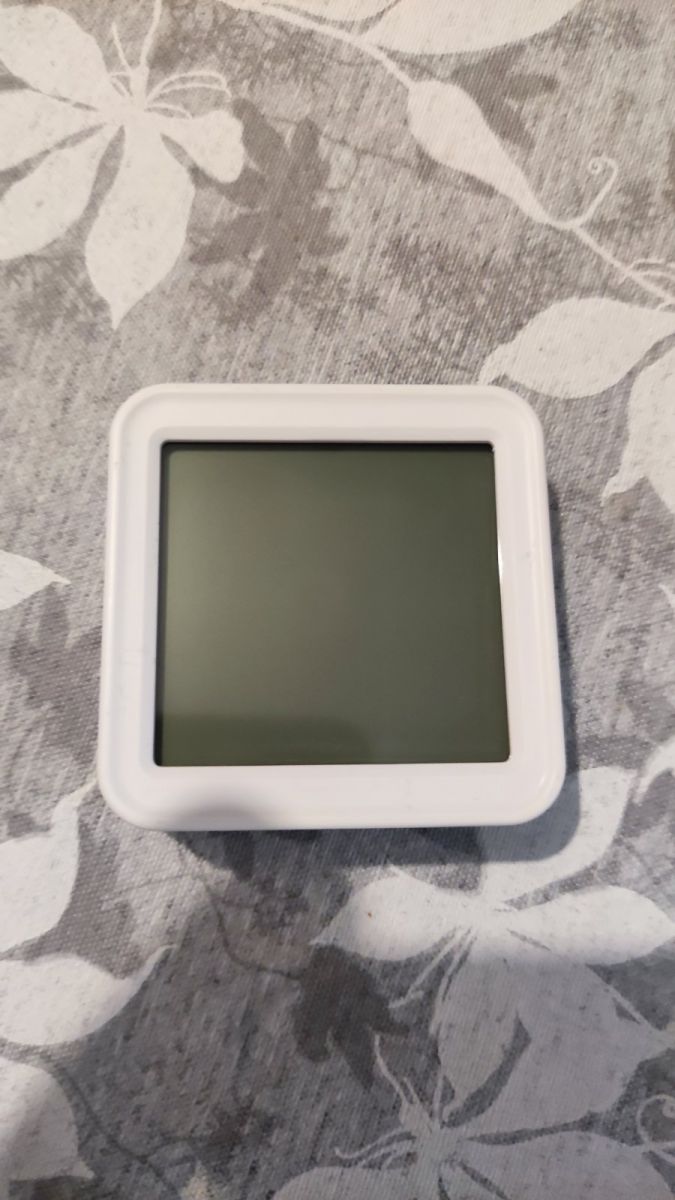
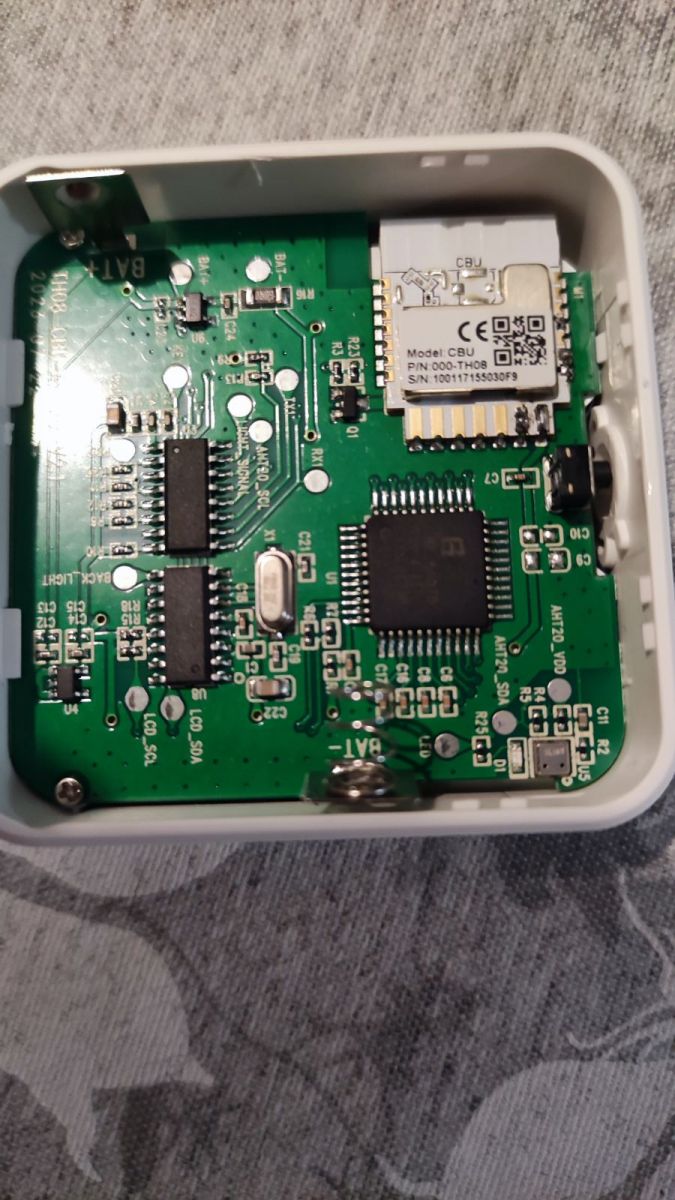
    LCD display in a white frame on a gray floral pattern background. Internal view of an electronic device with a visible main board and CBU module.
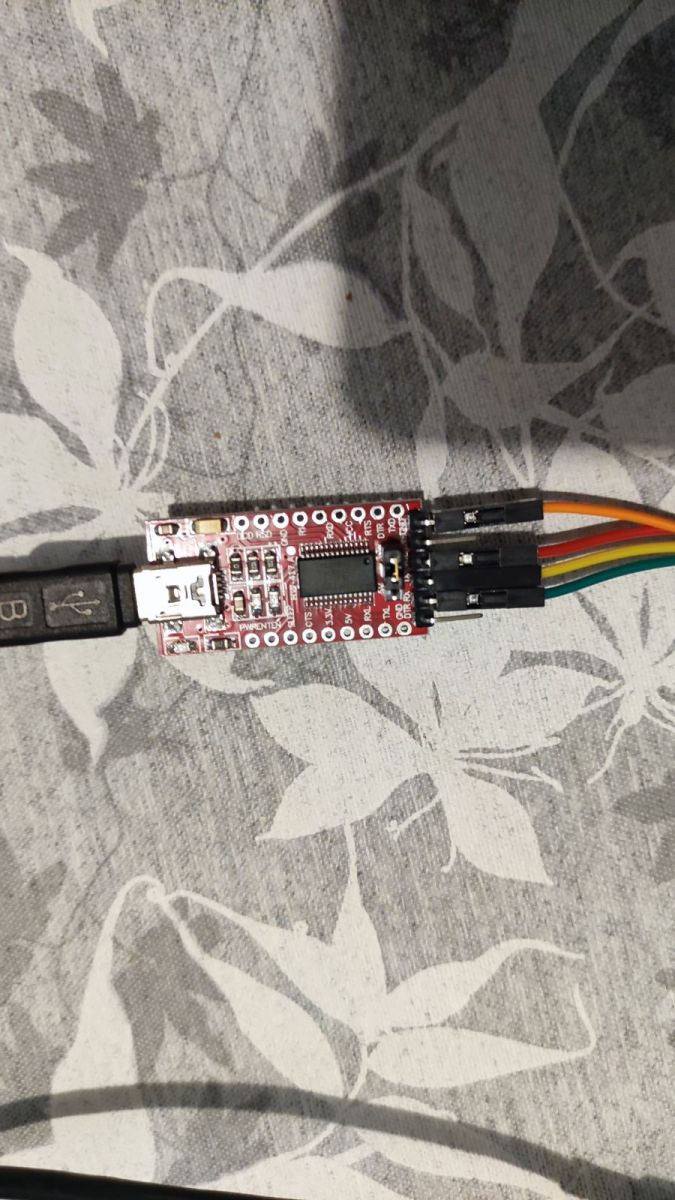
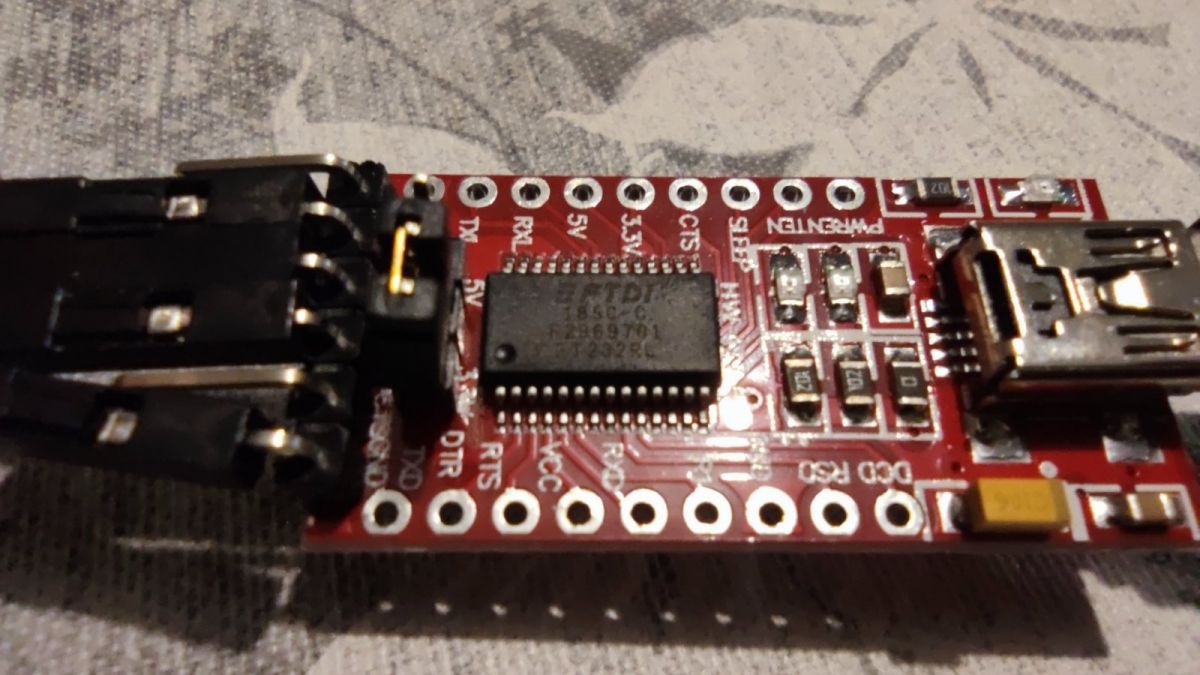
    and this is the UART i used for flash.
    USB to UART converter module with connected wires. Red circuit board with FTDI chip and connectors.
    i try the latest OBK 1.17.391 firmware but it is the same, no sensor readings only zeroes.

    Config in autoexec.bat is.

    startDriver NTP
    // starts the NTP driver (network time)
    startDriver TuyaMCU
    // starts the TuyaMCU driver
    startDriver tmSensor
    //starts the tmSensor driver
    ntp_setServer 192.168.86.1
    // sets the preferred NTP time server IP adress
    ntp_timeZoneOfs 1
    // corrects time zone by hour value +/- (time zone offset)
    setChannelType 1 temperature_div10
    //sets the type of channel 1 (selected freely) to temperature times 10 (i.e. 23.5C written as 235 integer, as this notation is used by Tuya), thanks to which OpenBeken knows how to display its value on the panel
    linkTuyaMCUOutputToChannel 1 val 1
    // maps dpID from TuyaMCU (variable identifier) 1 to channel 1, value type. In this particular device, dpID 1 is temperature. dpID roles vary by device
    setChannelType 2 Humidity
    // sets channel 2 type to humidity
    linkTuyaMCUOutputToChannel 2 val 2
    // as before, here dpID 2 is humidity
    linkTuyaMCUOutputToChannel 3 val 3
    setChannelType 3 ReadOnlyLowMidHigh
    setChannelLabel 3 "Battery Level"
    mqtt_broadcastItemsPerSec 20

    [Edit]
    Also date and time seems synced from NTP but not pushed to LCD

    The image shows a computer screen displaying information about the OpenBK7231N device and an LCD display with temperature and humidity readings.
📢 Listen (AI):

Topic summary

✨ The discussion centers on the teardown, firmware modification, and protocol analysis of the TH08 LCD calendar/clock/temperature/humidity sensor powered by 3xAAA batteries with backlight, based on the BK7231N chip. The device is identified as a newer version of the TH06 model, featuring a TuyaMCU module communicating via a low-power Tuya serial protocol (version 00). Users successfully flashed OpenBK firmware without desoldering, enabling temperature, humidity, and battery monitoring with MQTT integration and NTP time synchronization. Key challenges included understanding the MCU-module communication, especially time synchronization commands and power management to optimize battery life. The MCU sends commands such as ObtainDPCache and ObtainLocalTime, with the WiFi module responding accordingly. Firmware updates improved battery consumption by ensuring the WiFi module powers down promptly after data transmission. The device’s RTC (U8) communicates with the MCU (U3) over a serial or I2C-like interface, with ongoing efforts to decode this traffic. Users experimented with modifying battery power sources, including LiPo and USB power mods with step-down regulators, confirming device operation at voltages between 3.3V and 4.5V. The Tuya app lacks options to adjust sensor reporting intervals, and attempts to change polling times via Tuya protocol commands were unsuccessful, likely due to firmware limitations. Serial sniffing and analysis tools like TuyaMCU Analyzer and SniffUART were used to decode dpIDs, confirming dpID 1 as temperature, dpID 2 as humidity, dpID 3 as battery state, and dpID 9 as Celsius/Fahrenheit setting. Firmware versions and MCU versions were compared, revealing some early versions had display update issues. The community contributed to improving OpenBK firmware to handle specific Tuya commands, including proper responses to WiFi signal strength queries, enhancing power management. MQTT integration with Home Assistant was refined, including battery level display improvements using LowMidHigh channel types. OTA updates and configuration changes require keeping the WiFi module powered, achievable via long button presses or hardware modifications. Attempts to use Tuya-cloudcutter for remote flashing were unsuccessful due to lack of matching profiles. Some users reported issues with sensor readings showing zero after flashing, possibly due to hardware revisions or firmware mismatches. Overall, the device is well-supported by OpenBK firmware with active community development focusing on power optimization, protocol decoding, and integration with home automation platforms.
Generated by the language model.

FAQ

TL;DR: For TH08/TH08B owners who want OpenBeken without killing battery life, the key fix is low-power Tuya handling: battery life improved from 3 days to nearly 2 months, and one contributor confirmed, "the MCU turns off the module as soon as the last packet from the module is received" after the protocol fix. [#20802807]

Why it matters: This FAQ turns a 9-page reverse-engineering thread into a practical flashing, recovery, and configuration reference for BK7231/BK7238-based TH08 sensors.

Option Power behavior reported in thread Typical result
Original Tuya firmware about 6 weeks to nearly 2 months on batteries Best battery life, cloud-dependent
Early OpenBeken builds about 3 days on 3xAAA NiMH Functional, but poor low-power handling
Updated OpenBeken after low-power packet fix about 2 weeks on alkalines with level still high, or close to original behavior Best cloud-free compromise

Key insight: The TH08 is not a simple Wi-Fi sensor. A separate TuyaMCU controls sensor reads, LCD updates, and power to the Wi-Fi module, so flashing and battery life both depend on handling that MCU correctly. [#20723152]

Quick Facts

  • The original TH08 teardown identified 3xAAA power, a 2.8 V main rail, BK7231N-based CBU Wi-Fi module, AHT20-class temperature/humidity sensing, and BL55070 LCD driving on PCB TH08-CBU-ATH20-V2 2023/07/22. [#20723152]
  • Measured battery-state thresholds on one TH08 were High→Medium at 4.0 V and Medium→Low at 3.1 V; below 3.0 V the 2.8 V regulator output started to drop and the LCD dimmed. [#20804228]
  • Reported prices were €11.79 advertised and €4.49 paid on AliExpress for the original TH08 listing. [#20723152]
  • A USB power mod worked with a USB-C socket + step-down regulator set to 4.2 V, and another user later confirmed operation even from 5 V without regulator overheating. [#20791566]
  • Home Assistant update behavior on original firmware was not hourly-only in practice: users observed about 2-minute updates on change and about 15–17 minutes when values stayed stable. [#20724719]

How do I flash OpenBeken on the TH08 or TH08B battery temperature and humidity sensor without bricking the CBU/BK7231 module?

Flash it as a TuyaMCU device, not as a standalone Wi-Fi sensor. 1. Back up the original firmware first. 2. Isolate the Wi-Fi module from the TuyaMCU or the MCU will fight the UART. 3. Power the CBU directly at 3.3 V for flashing, then restore the cut or lifted connections before normal use. Several users reported flashing failure around 70% unless RX/TX and sometimes CEN were isolated, while backup reads could still succeed. [#20918829]

Which traces or pins need to be cut, lifted, or isolated on the TH08 PCB so the TuyaMCU does not interfere with UART flashing?

On the original TH08, isolate at least the MCU-to-CBU UART path, and often CEN too. The proven methods were: cut the traces between the MCU and the RX1/TX1 pads, or lift the MCU pin tied to CEN so the TuyaMCU cannot reset the CBU during flashing. On later TH08B-style boards, users reported that lifting or isolating pin 8/CEN was often the decisive fix, while some revisions still needed RX/TX isolation as well. [#20929625]

What is TuyaMCU in the TH08 design, and how does it communicate with the CBU Wi-Fi module and the LCD controller?

"TuyaMCU" is a secondary microcontroller that manages the sensor, LCD logic, backlight, and low-power behavior, while the CBU handles Wi-Fi only. In the first TH08 teardown, the MCU talked to the CBU over RX1/TX1, read the sensor over I2C, and coordinated with a separate display/RTC-related IC. That split design is why OpenBeken must emulate the low-power serial protocol instead of driving the whole device directly. [#20723152]

What is a dpID in the Tuya protocol, and how do I find the correct dpIDs for temperature, humidity, battery, and unit conversion on TH08 variants?

"dpID" is a Tuya data-point identifier that names one device value or setting, such as temperature, humidity, or unit selection, and defines its type and range. On the original TH08, thread captures confirmed dpID 1 = temperature, 2 = humidity, 3 = battery state, and 9 = °C/°F unit. Users found them by UART sniffing with TuyaMCUAnalyzer, Tuya IoT developer pages, or firmware/config extraction from backups. [#20729519]

Why does the TH08 show temperature and humidity as zero in OpenBeken even though the LCD still displays valid readings?

That usually means OpenBeken is not receiving valid TuyaMCU packets, even though the standalone MCU still updates the LCD. The most common causes were wrong UART conditions, artificial CBU power during testing, wrong baud assumptions, or a bad RX solder joint. One user fixed zeros immediately after repairing the MCU RX connection and then saw normal Tuya packets such as dpID 1 = 264 and dpID 2 = 11 in the log. [#21002511]

How should autoexec.bat be configured for a TH08 or TH08B so OpenBeken reports temperature, humidity, battery state, and NTP time correctly?

Start NTP, TuyaMCU, and tmSensor, then map channels 1/2/3 to dpIDs 1/2/3 with temperature_div10, Humidity, and ReadOnlyLowMidHigh. A working baseline was: startDriver TuyaMCU, startDriver tmSensor, startDriver NTP, ntp_setServer ..., ntp_timeZoneOfs ..., setChannelType 1 temperature_div10, linkTuyaMCUOutputToChannel 1 val 1, setChannelType 2 Humidity, linkTuyaMCUOutputToChannel 2 val 2, setChannelType 3 ReadOnlyLowMidHigh, linkTuyaMCUOutputToChannel 3 val 3. For some variants, adding tuyaMcu_defWiFiState 4 solved missing reports. [#20893860]

Why does the TH08 keep losing Wi-Fi or become inaccessible after the batteries run down, and what reflashing or configuration steps recover it?

Low battery can leave the CBU in a bad state after repeated failed boots. Multiple users reported a pattern where the LCD still worked, the Wi-Fi icon flashed, but OpenBeken no longer brought up Wi-Fi or AP mode until the CBU was erased and reflashed. One later workaround was rebuilding with flash runtime variables disabled, because the suspected failure mode was repeated brownouts corrupting flash during boot-count or state writes. [#21745721]

What causes the TH08 battery life to drop from weeks on original Tuya firmware to only a few days on some OpenBeken builds?

Early OpenBeken builds did not finish the low-power Tuya handshake the way the MCU expected, so the Wi-Fi module stayed on far too long. Users measured the module staying awake for more than 1 minute on some OpenBeken builds instead of about 10 seconds on stock firmware, and battery life dropped to about 3 days on rechargeable AAA cells. That was traced to missing or wrong low-power protocol packets, not to the sensor itself. [#20746981]

How was the missing low-power Tuya packet handled so the MCU powers off the Wi-Fi module promptly and saves battery on TH08?

The fix was to implement the missing low-power reply that the MCU expected when it queried router signal strength near the end of the wake cycle. Before that fix, OpenBeken answered incorrectly and the MCU kept the CBU alive while waiting. After the new handling landed in later 1.17.30x builds, users confirmed the MCU now cut power to the Wi-Fi module immediately after the last packet, restoring near-stock low-power behavior. [#20796796]

How can I keep the TH08 Wi-Fi module awake long enough to access the OpenBeken web interface, run OTA updates, or change settings?

Use the device’s own wake behavior or temporarily bypass power control. A long button press can keep the module awake long enough for OTA and settings on many TH08 units, and some users also forced the CBU on by wiring the module ground or supply directly past the MCU-controlled switch. On one tested build, a long press held the module awake for about 92 seconds, which was enough for web access and changes. [#21072200]

Which dpID or raw Tuya command changes the TH08 display from °F to °C, and how do I send it from OpenBeken?

On TH08 variants discussed in the thread, dpID 9 is the temperature-unit selector. When normal state writes did not work, users succeeded by sending the raw packet 55AA001000070101090400010026 after a short delay, for example with delay_s 2 followed by uartSendHex ... in autoexec.bat. Another contributor confirmed that packet switched the display from °F to °C reliably on their unit. [#21550660]

What is dpCache in low-power Tuya devices, and when do I need it instead of a normal tuyaMcu_sendState command?

"dpCache" is a low-power Tuya startup cache that stores selected settings in the Wi-Fi module so the MCU can fetch them immediately after wake-up, before normal cloud traffic begins. You need it for battery-powered parameters that the MCU requests with packet 0x10, especially settings it expects at boot. In OpenBeken, that means marking a mapping as dpCache and storing the linked channel persistently, rather than only pushing the value with a normal runtime tuyaMcu_sendState. [#21385904]

How do I troubleshoot NTP time sync problems on the TH08 when the display stays at 1970 or 2070 and the log shows NTP receive errors?

First fix the NTP server and time zone, because the usual cause was a bad or unreachable server address. One user used a LAN IP as NTP and kept getting NTP_CheckForReceive: Error while receiving server's msg; switching to a valid reachable server resolved the wrong 1970/2070 display time. Also set the correct offset manually, because OpenBeken in this thread did not yet auto-handle DST, so Portugal needed 0 or 1, while Spain used 1 or 2 depending on season. [#21074347]

For battery-powered room sensors like the TH08, how does Zigbee compare with Wi-Fi in terms of power consumption and long-term usability?

Zigbee is markedly better for battery life in this use case. The thread’s direct comparison was practical rather than theoretical: users saw original Wi-Fi TH08 behavior lasting 6 weeks to nearly 2 months, but poorly tuned OpenBeken Wi-Fi builds could drop to 3 days. One contributor explicitly noted that Zigbee battery devices are much more efficient because transmit power cost is far lower than conventional Wi-Fi. [#20743433]

What are the battery level thresholds on the TH08, and how safe is it to power the device from USB, LiPo, or rechargeable AAA cells instead of the original 3xAAA setup?

Measured thresholds on one TH08 were 4.0 V for High→Medium and 3.1 V for Medium→Low, with the low-battery icon appearing below 3.1 V. The same user reported stable operation from 5 V USB, while another used a 4.2 V USB-C step-down mod successfully. Rechargeable 1.2 V AAA NiMH cells worked, but early OpenBeken power handling could drain them in about 3 days; after low-power fixes, battery life improved substantially. [#20804228]
Generated by the language model.
ADVERTISEMENT