logo elektroda
logo elektroda
X
logo elektroda
Dostępna jest polska wersja

Czy wolisz polską wersję strony elektroda?

Nie, dziękuję Przekieruj mnie tam

Beken BK7231/BK7252 SPI flashing and recovery - new flasher tool and protocol specs

p.kaczmarek2 10458 298

TL;DR

  • BK7231GUIFlashTool v98+ adds CH341-based SPI flashing and recovery for Beken BK7231/BK7252 chips, including bricked devices with overwritten bootloaders.
  • The tool uses CH341 DLL C# bindings to toggle CEN via D2, reset the chip, send 0xD2, then flash Beken chips like generic SPI memory.
  • Connections use P20, P21, P22, and P23 for SCK, CSN, SI, and SO, with CEN wired to D2 and the CH341 jumper set to I2C mode.
  • A sample read identifies JEDEC ID FF-EF-40-16 and a 4096 KB flash, and the same tool can Read, Write, Verify, and Erase firmware.
  • If CH341 is not detected or CEN toggle fails, check driver configuration, jumper position, SPI wiring, and power before trying Beken SPI mode again.
Generated by the language model.
ADVERTISEMENT
📢 Listen (AI):
  • #211 21821133
    p.kaczmarek2
    Moderator Smart Home
    Why not move flash vars elsewhere on BK7238 and update offset in obk?
    Helpful post? Buy me a coffee.
  • ADVERTISEMENT
  • #213 21821592
    max4elektroda
    Level 24  
    max4elektroda wrote:
    But at least a first try to fix the things you mentioned (rl_on\d+_pin and rl_off\d+_pin)

    Added some code to use regex finding these keys instead of looping through the numbers.

    For now, mainly coded, not tested thoroughly, not sure if it's even ready for a PR......

    https://github.com/MaxineMuster/OBK_webapp/tree/templateparser


    Made some more changes and (hopefully) improvements to "templateParser.js".
    Now all cases from "TuyaConfig.cs" should be here, too + added code for (seldom) "sel_pin_lv: 0" needing BL0937SEL_n.

    Also tried to fix import.vue "ignoring" WebApp source, but always loading "https://openbekeniot.github.io/webapp/templateParser.js" and "https://openbekeniot.github.io/webapp/tuyaExporter.js".
    Since I wanted this to work even in strange configs, I had to find the location, from which script was loaded.
    For me it now worked with both on a single machine, e.g. simulators web interface running on default port 80 and WebApp served locally e.g. on port 8080.
    Just had to make sure, httpd will send "Access-Control-Allow-Origin: *"...

    But let's get sure about some questions:

    rl_on1_pin / rl_off1_pin: What is the correct role? BridgeFWD/BridgeREV or Rel/Rel_n ??
    r_pin/g_pin/b_pin/c_pin/w_pin: What's the correct channel to use? templateParser.js assigns 1 to 5, C# code in TuyaConfig.cs assigns 0 to 4 (though in description it's 1 - 5):

                       case "r_pin":
                            desc += "- LED Red (Channel 1) on P" + value + Environment.NewLine;
                            tg?.setPinRole(value, PinRole.PWM);
                            tg?.setPinChannel(value, 0);
                            break;
                        case "g_pin":
                            desc += "- LED Green (Channel 2) on P" + value + Environment.NewLine;
                            tg?.setPinRole(value, PinRole.PWM);
                            tg?.setPinChannel(value, 1);
                            break;
                        case "b_pin":
                            desc += "- LED Blue (Channel 3) on P" + value + Environment.NewLine;
                            tg?.setPinRole(value, PinRole.PWM);
                            tg?.setPinChannel(value, 2);
                            break;
                        case "c_pin":
                            desc += "- LED Cool (Channel 4) on P" + value + Environment.NewLine;
                            tg?.setPinRole(value, PinRole.PWM);
                            tg?.setPinChannel(value, 3);
                            break;
                        case "w_pin":
                            desc += "- LED Warm (Channel 5) on P" + value + Environment.NewLine;
                            tg?.setPinRole(value, PinRole.PWM);
                            tg?.setPinChannel(value, 4);
                            break;
    
  • #214 21823610
    divadiow
    Level 38  
    max4elektroda wrote:
    rl_on1_pin / rl_off1_pin: What is the correct role? BridgeFWD/BridgeREV or Rel/Rel_n ??
    there's this maybe pivotal moment here https://www.elektroda.com/rtvforum/topic4000770.html#20869388

    I can't find an obvious change to templateParser.js to coincide.

    My feeling is that this detection should be BridgeFWD/BridgeREV and not Rel/Rel_n

    lt detects it as bistable / H-Bridge if there is no normal relay pin and both ON and OFF drive pins exist

    Added after 40 [minutes]:

    hmm, there must be quite a few more out there to be added too. eg:

    https://www.elektroda.com/rtvforum/topic4093780.html#21790729

    in the json we see

    Code: Text
    Log in, to see the code


    chip_type:2 = HLW8032
  • #215 21833060
    divadiow
    Level 38  
    OK. I hope this is a step forward. It took ages to get it right 😫

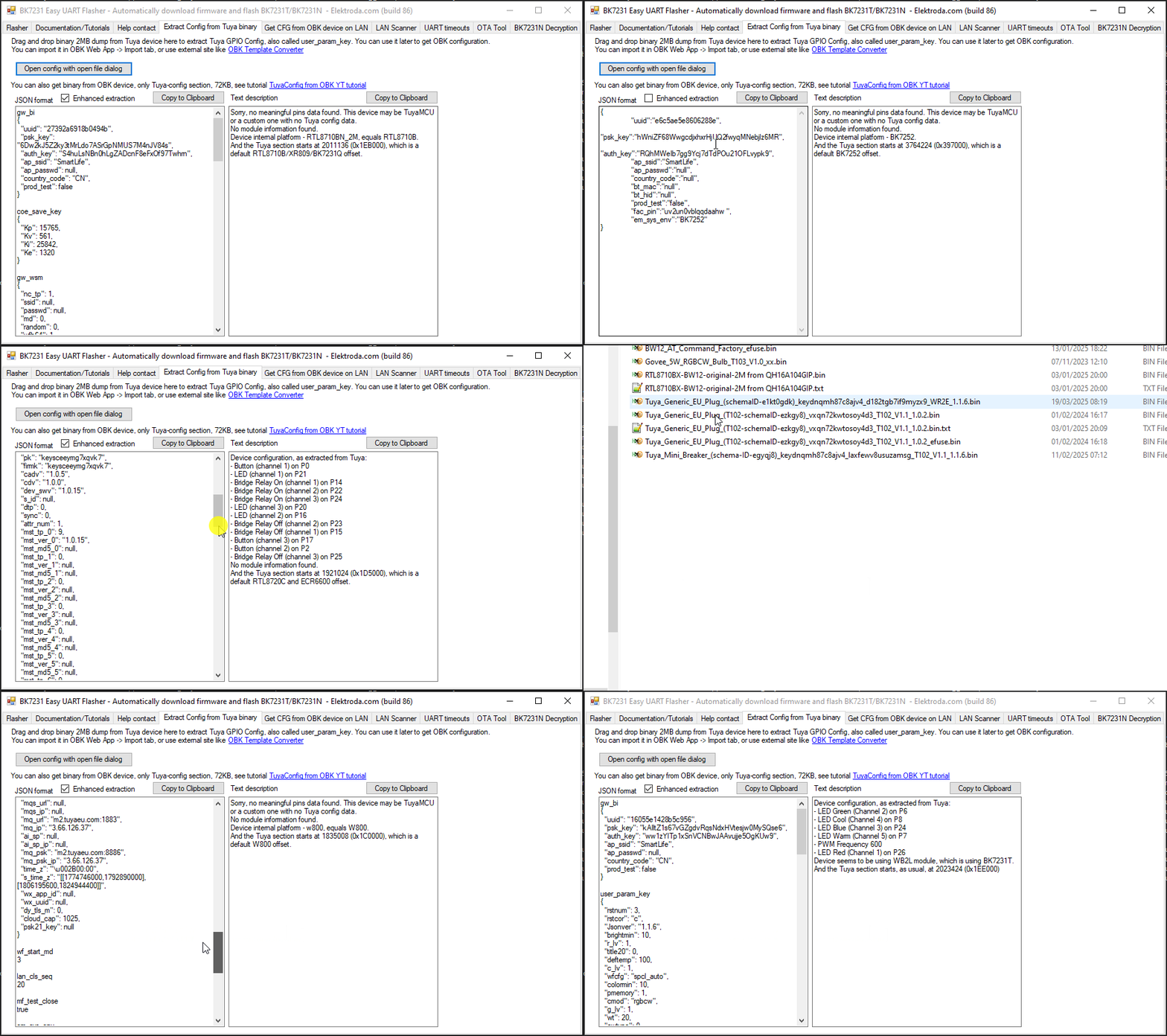
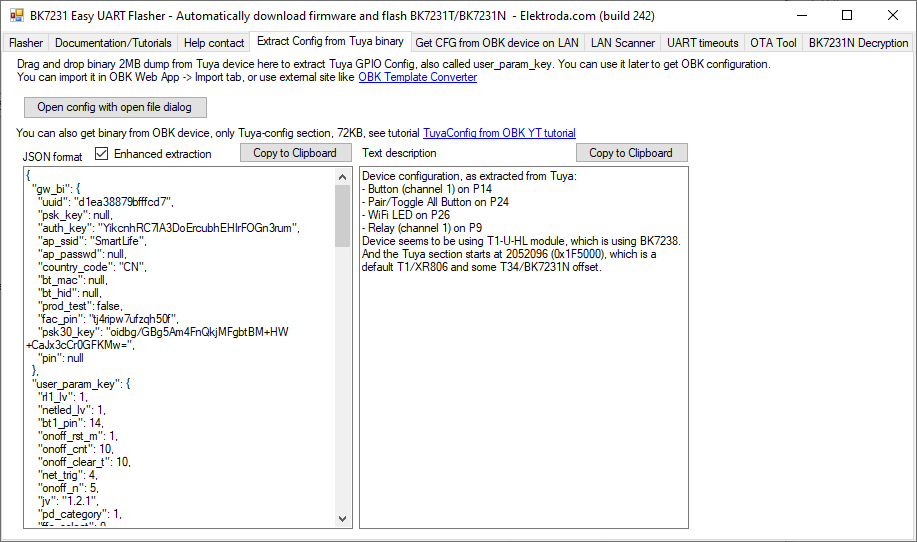
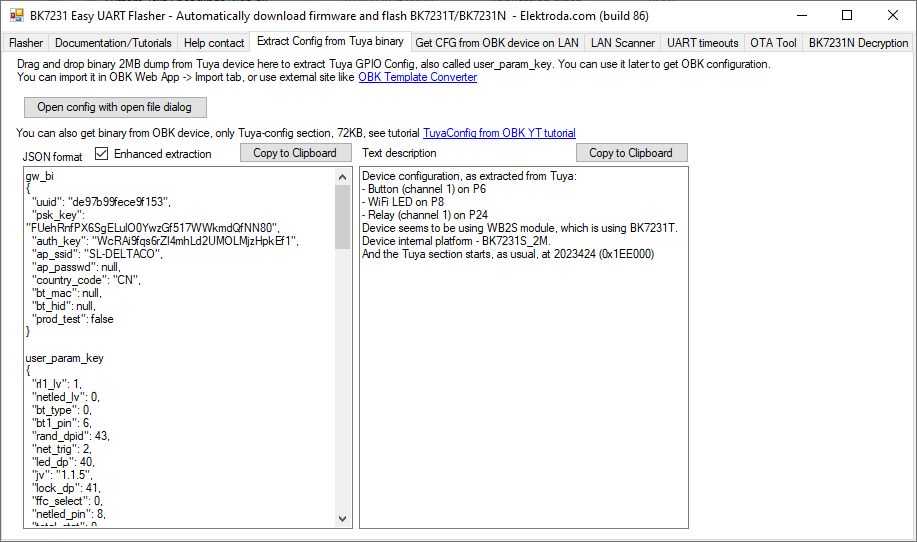
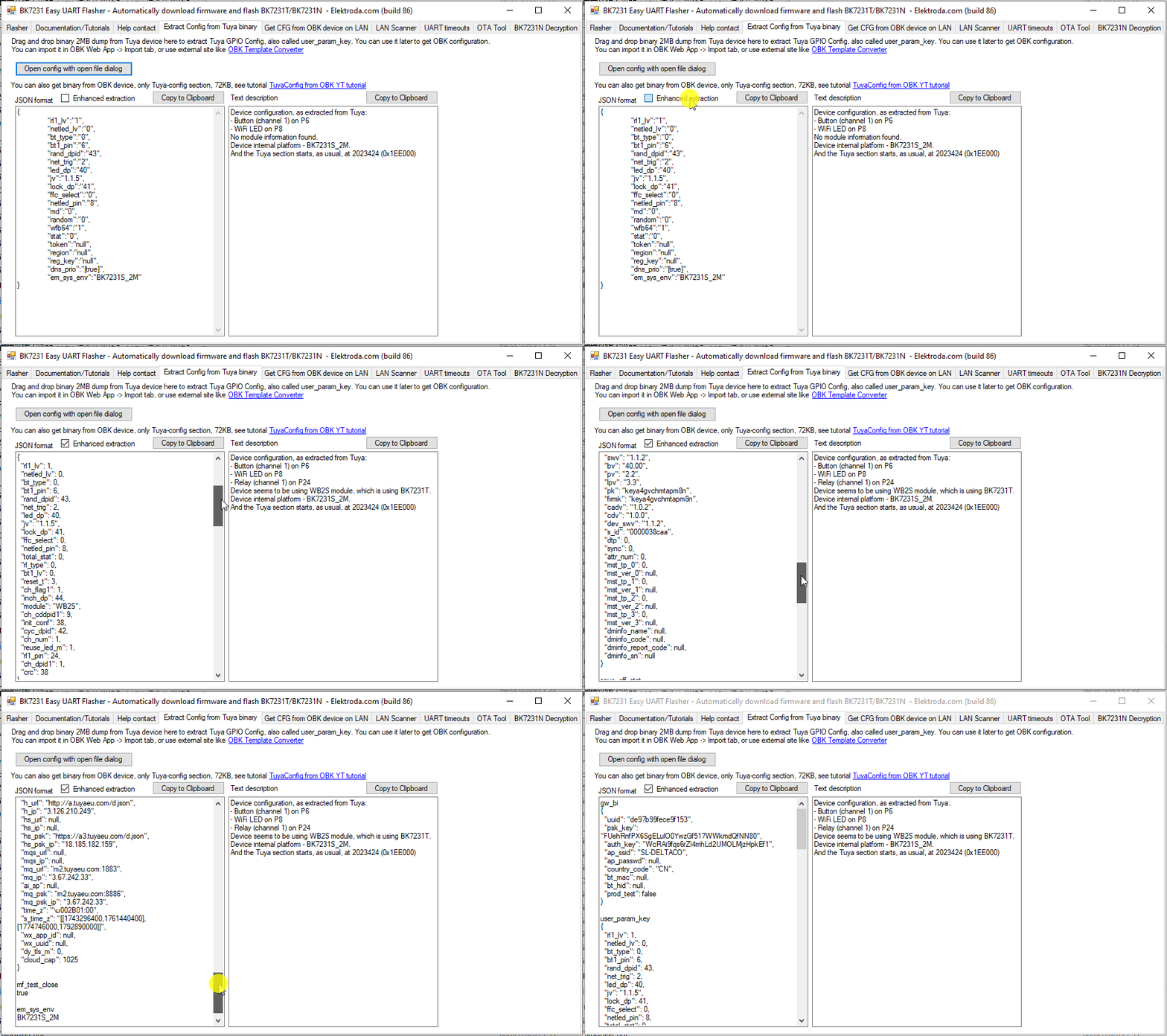
    Enhanced extraction toggle in Easy Flasher to pretty-json and present all decoded blocks in the Tuya KV.

    Screenshot of BK7231 Easy UART Flasher showing JSON configuration and a text description panel

    Works on all the encryption methods Easy Flasher now handles. Enhanced extraction box will also re-run the text description pipeline, when checked, so missing pin translations should appear. I attach two dumps where the traditional extraction did not catch all/any so you can see this in action.

    Screenshot of BK7231 Easy UART Flasher showing JSON output and a device configuration text description

    The traditional presentation layer has not been changed and I have tested the "automatically configure OBK on flash write" function still works, though it doesn't benefit from the enhanced extraction findings.

    more dump demos:
    Screenshot of BK7231 Easy UART Flasher showing Tuya JSON config on the left and a text description panel on the right

    https://github.com/openshwprojects/BK7231GUIFlashTool/pull/104
    Attachments:
    • Tuya_Deltaco_EUPlug_(SH-P01_schemaID-0000038caa)_keya4gvchmtapm8n_4r94tdtavlfeiwvp_WB2S_1.1.2.bin (2 MB) You must be logged in to download this attachment.
    • TOMADA - AESSY.bin (2 MB) You must be logged in to download this attachment.
  • ADVERTISEMENT
  • #216 21833299
    p.kaczmarek2
    Moderator Smart Home
    Nice, but can you merge those JSON blocks into single JSON? It seems that text area content currently (entirely) is not a valid JSON
    Helpful post? Buy me a coffee.
  • #217 21833305
    divadiow
    Level 38  
    like this for example?

    Code: JSON
    Log in, to see the code


    Added after 1 [hours] 19 [minutes]:

    nevermind. working on it :)
  • #219 21833408
    divadiow
    Level 38  
    cool
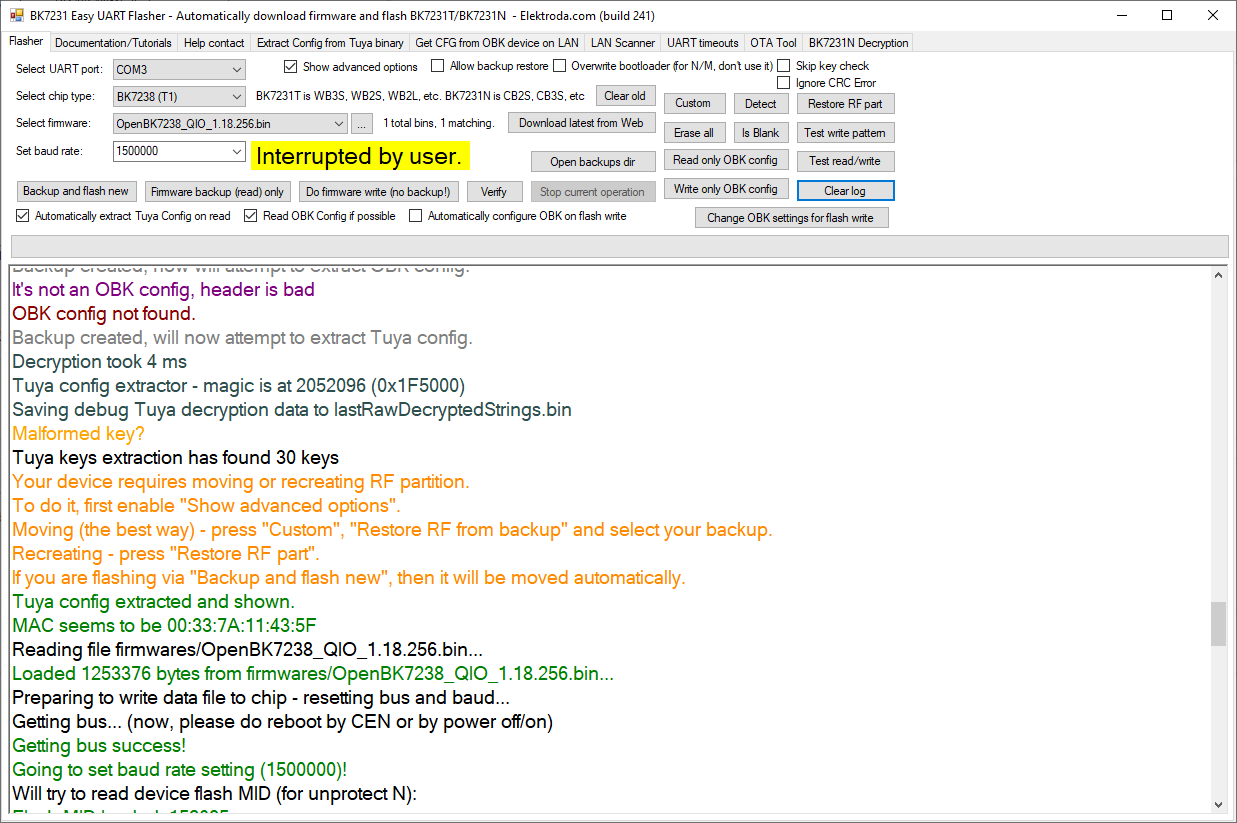
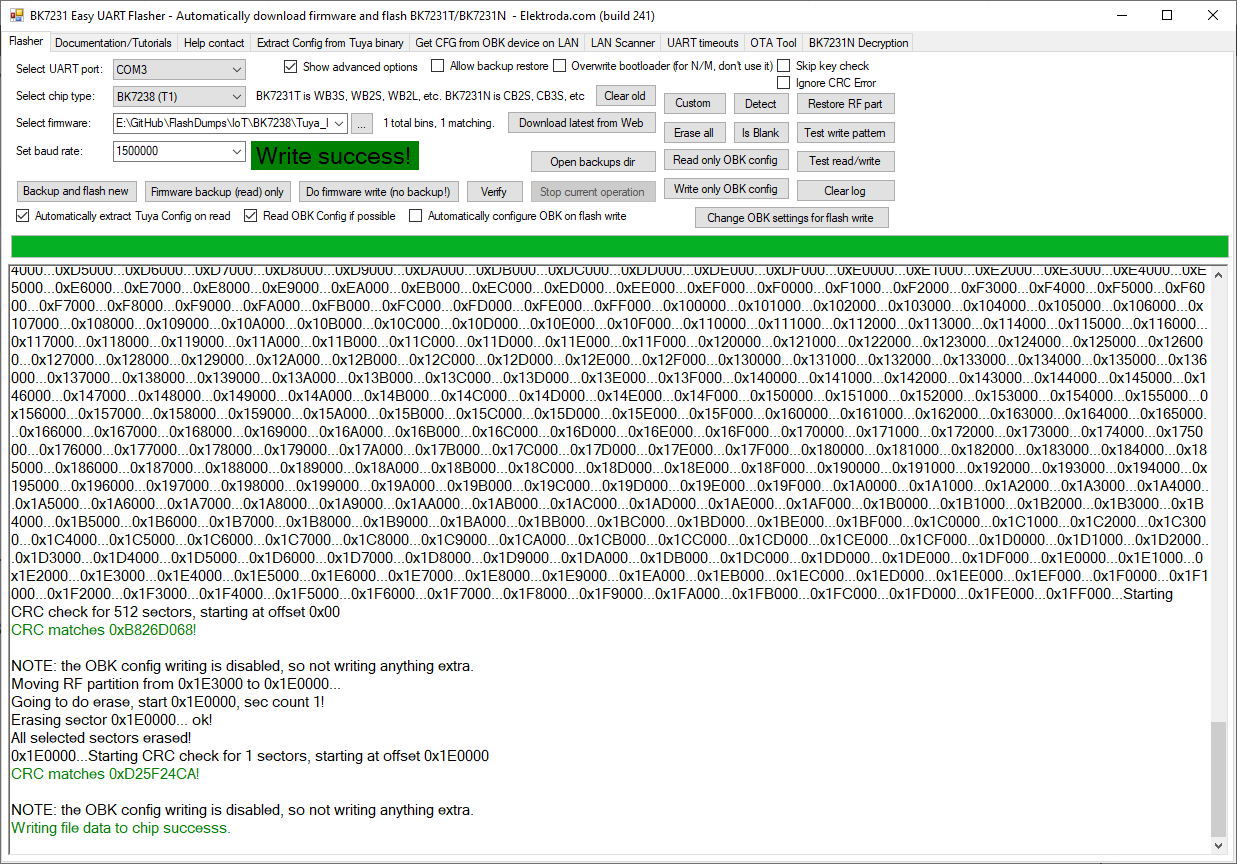
    Screenshot of BK7231 Easy UART Flasher with log output and the message “Interrupted by user.” Screenshot of BK7231 Easy UART Flasher showing “Write success!” and flashing operation logs.

    Added after 2 [minutes]:

    insmod wrote:
    Accidentally included read/write logging changes in BK7231Flasher

    generally, I tend to prefer more logging
  • #220 21833414
    insmod
    Level 31  
    >>21833408
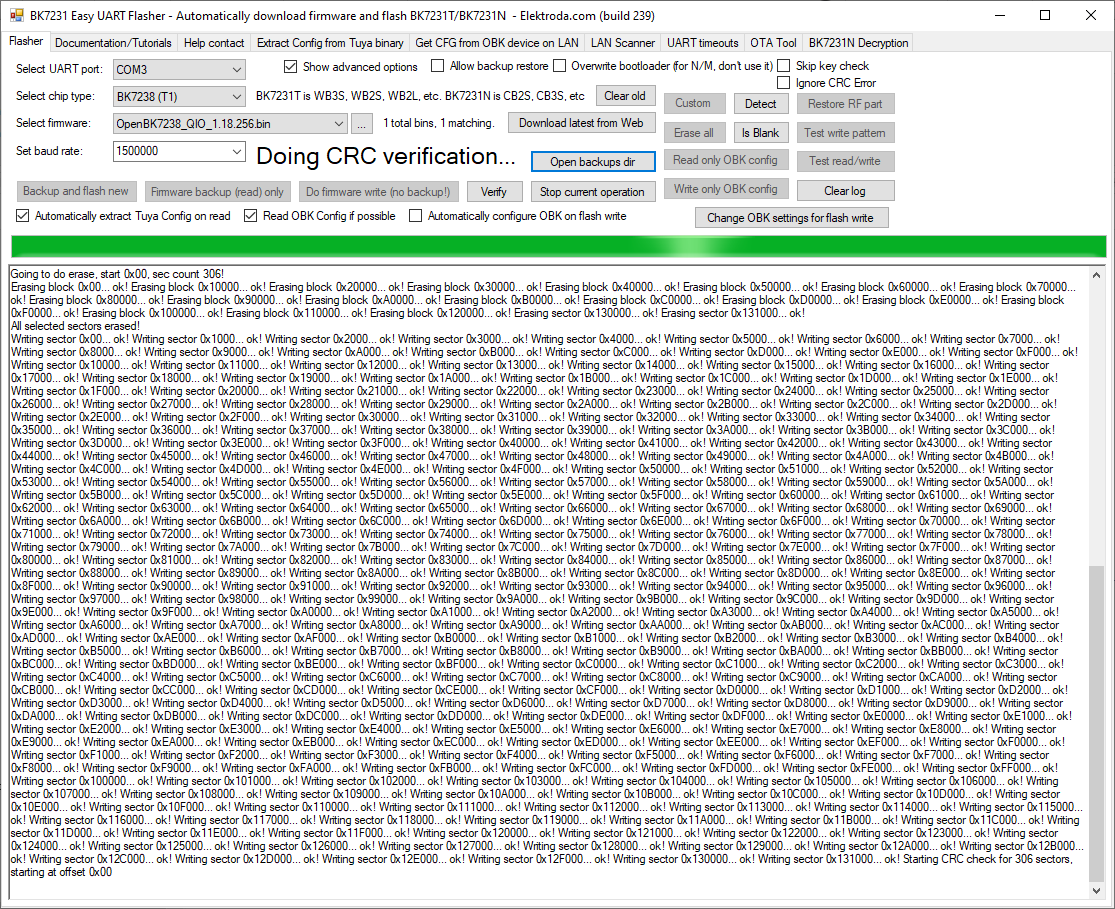
    Well, it's basically the same, except removed "Writing sector" / "Reading" and "ok!". Much more compact without them.
  • #221 21833416
    divadiow
    Level 38  
    ah i see. yes, much better removed. before:
    Screenshot of BK7231 Easy UART Flasher showing erase/write logs and “Doing CRC verification…” status.
  • #223 21833419
    divadiow
    Level 38  
    insmod wrote:


    we totally do. was going to add, but wasn't sure if all other changes to the big vue PR were seen as good or horrible :)
    I haven't finished..

    Added after 1 [hours] 13 [minutes]:

    divadiow wrote:
    nevermind. working on it


    -Emit enhanced KV output as a single valid JSON document rather than concatenated blocks
    -Improve JSON presentation readability by relaxing unnecessary unicode escapes in display output
    -Add a final JSON validity check with a safe fall-back serialiser

    Screenshot of BK7231 Easy UART Flasher showing JSON configuration output and a text description panel

    eg
    Code: JSON
    Log in, to see the code


    Code: JSON
    Log in, to see the code


    Code: JSON
    Log in, to see the code


    Code: JSON
    Log in, to see the code
  • #224 21833470
    insmod
    Level 31  
    Would it work when user_param_key is corrupted? (see Tuya_4AC+4USB_Power_Strip_(schemaID-0000037bjk)_key7qn3agvymujfp_WBR3_1.0.7.bin)
  • ADVERTISEMENT
  • #225 21833478
    divadiow
    Level 38  
    insmod wrote:
    Tuya_4AC+4USB_Power_Strip_(schemaID-0000037bjk)_key7qn3agvymujfp_WBR3_1.0.7.bin


    non-enhanced
    Code: JSON
    Log in, to see the code


    enhanced
    Code: JSON
    Log in, to see the code


    Added after 3 [minutes]:

    Code: Text
    Log in, to see the code


    that message is from the traditional extraction rather than the enhanced bit
  • ADVERTISEMENT
  • #226 21833869
    p.kaczmarek2
    Moderator Smart Home
    So I merged this for now:
    https://github.com/OpenBekenIOT/webapp/pull/264/changes
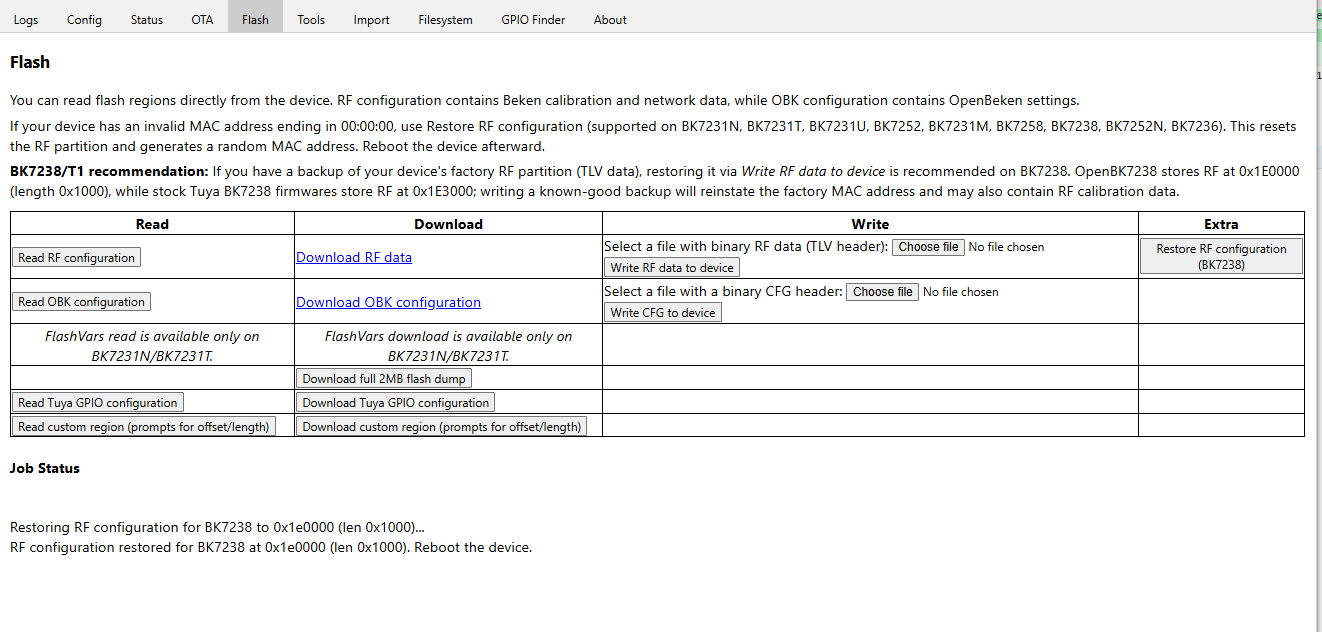
    Can we add RF restore to Web App separatel, without first merging cosmetic PR?
    Helpful post? Buy me a coffee.
  • #227 21834229
    divadiow
    Level 38  
    p.kaczmarek2 wrote:
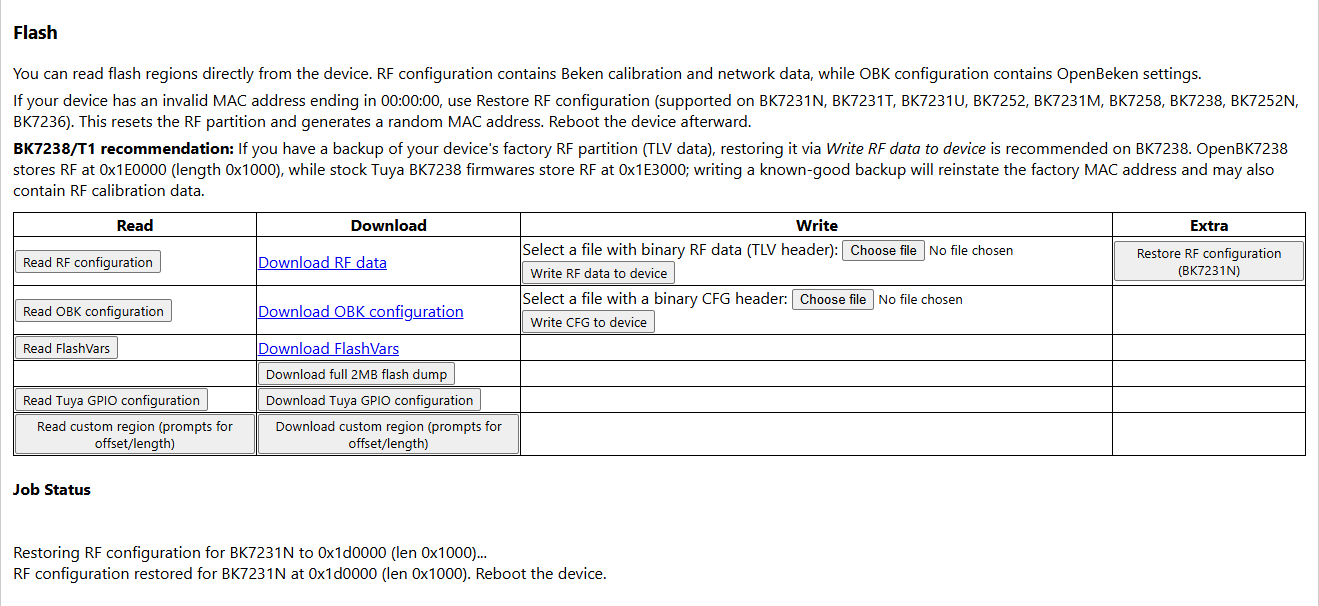
    Can we add RF restore to Web App separatel, without first merging cosmetic PR?
    working on something now. will submit for review shortly

    Added after 51 [minutes]:

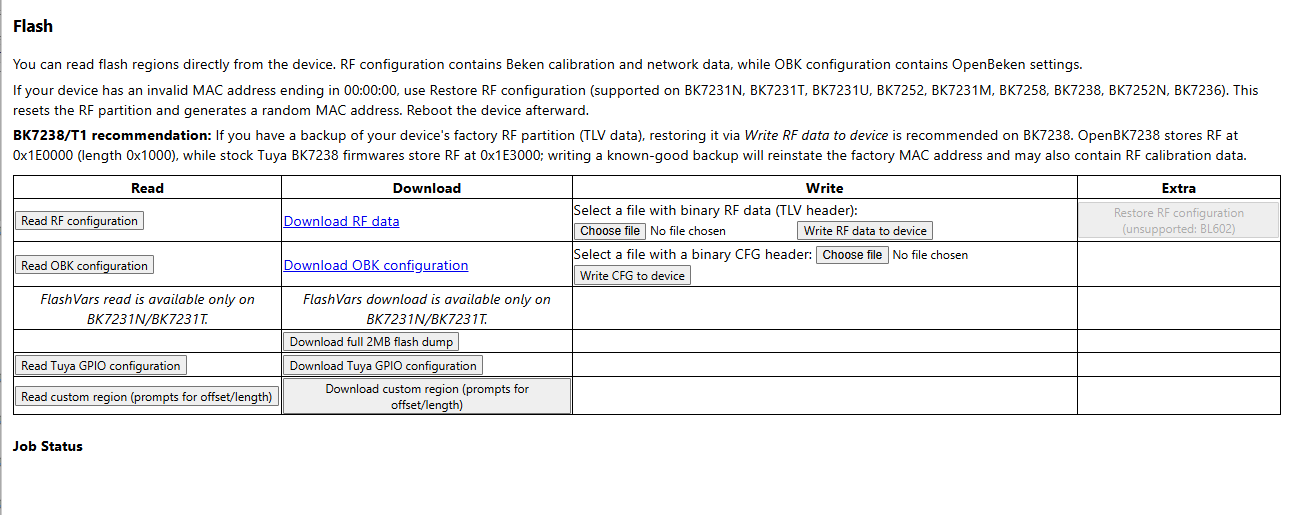
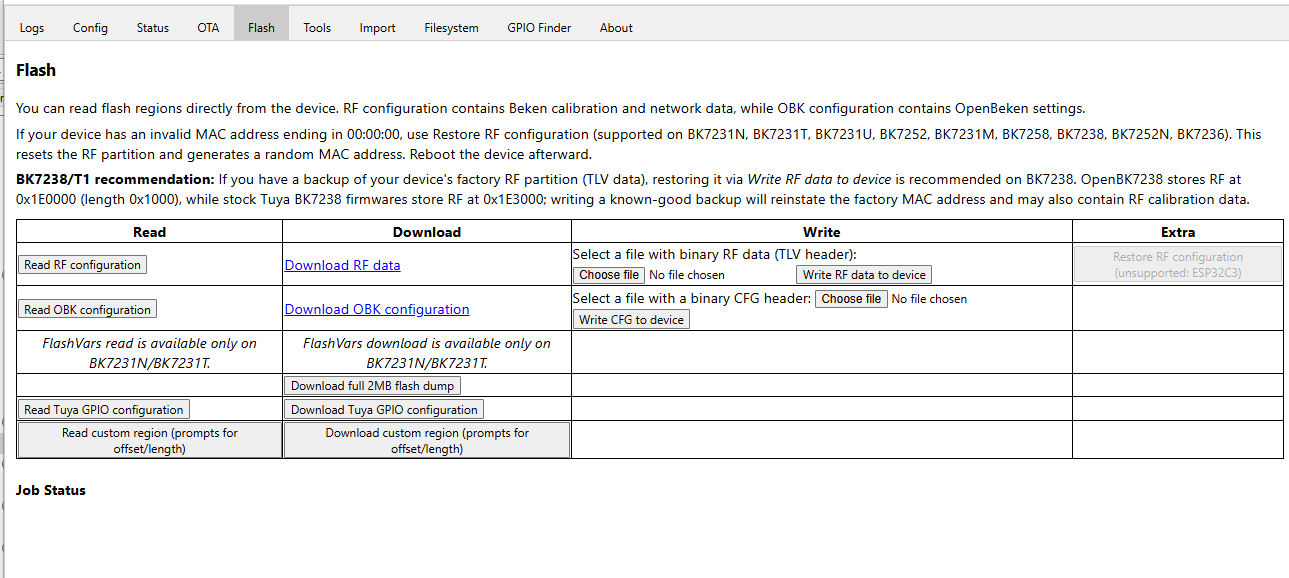
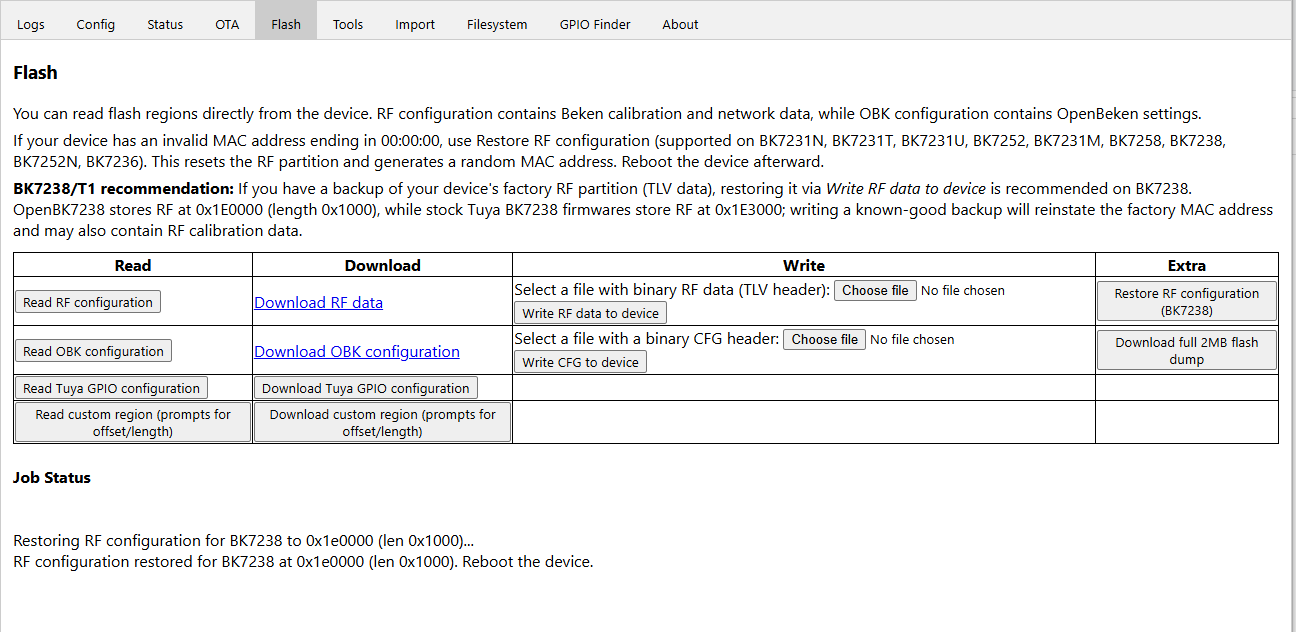
    Restore RF now supports BK7231N, BK7231T, BK7231U, BK7252, BK7231M, BK7258, BK7238, BK7252N, BK7236. bytes and offsets are from https://github.com/openshwprojects/BK7231GUIF...b/main/BK7231Flasher/Utils/RFPartitionUtil.cs

    Restore RF button is only active for supported chipsets, current chipset shown on button. Additional logging to job status for chipset/offset being written for.

    FlashVars read/download only active for BK7231T/N

    Screenshot of Flash tab in a web app with a “Restore RF configuration (BK7238)” button.

    Screenshot of a “Flash” page with RF/OBK read-write table and “Restore RF configuration” button

    tested RF restore on N and 7238

    BL602:
    Screenshot of a web app for reading, downloading, writing, and restoring RF/OBK flash data for Beken chips

    ESP32C3
    Screenshot of the “Flash” tab showing a table with read, download, and write options for RF/OBK configuration

    https://github.com/OpenBekenIOT/webapp/pull/266
  • #228 21834307
    insmod
    Level 31  
    What do you think about storing those byte arrays as base64 strings? Would save some space for those that store web app on their devices.
    Flash vars can be removed altogether?
  • #229 21834328
    divadiow
    Level 38  
    removed FlashVars and made bytes base64. saved 6-7k. restored RF to BK7238 and read-back is exactly 3 bytes different.

    Screenshot of “Flash” tab with RF/CFG read/write options and BK7238 restore buttons

    is mention of all Bekens a little overkill for now?
  • #230 21835324
    p.kaczmarek2
    Moderator Smart Home
    I'm adding simple command line interface to flasher.
    Helpful post? Buy me a coffee.
  • #231 21836541
    p.kaczmarek2
    Moderator Smart Home
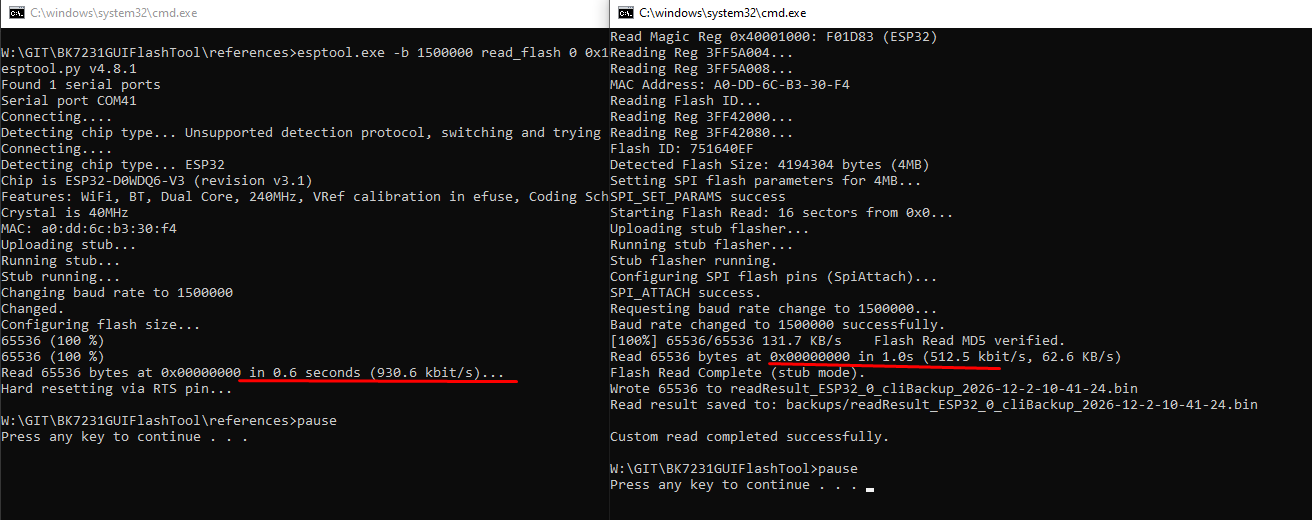
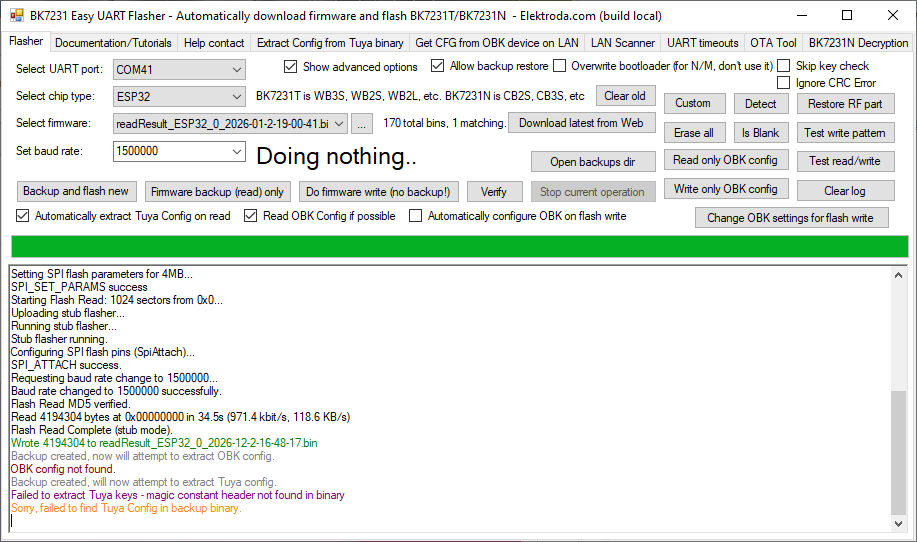
    ESP32 stub support, but not as fast as esptool yet
    Screenshot of two cmd.exe windows showing esptool.py logs for reading an ESP32 flash memory

    Added after 6 [hours] 6 [minutes]:

    @divadiow
    Screenshot of BK7231 Easy UART Flasher showing ESP32 flash read log and config-related error messages
    Helpful post? Buy me a coffee.
  • #232 21836862
    divadiow
    Level 38  
    very nice. what device/dump are you playing with?
  • #233 21837442
    p.kaczmarek2
    Moderator Smart Home
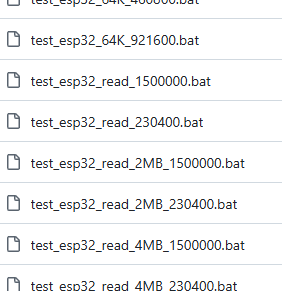
    Generic ESP32 development board. ESP32 stub should be able to read and write. I also added command line mode and test function.
    File manager list of BAT files named test_esp32_64K and test_esp32_read variants
    I will probably first also normalize command line arguments to be 1:1 as in esptool.

    New release should be ready. Let me know if ESP32 read/write (fast version with ram stub) works for you, and is command line bat working as well?
    Helpful post? Buy me a coffee.
  • #234 21837513
    divadiow
    Level 38  
    OK, will try stuff. manual download boot mode or should it do it itself?
  • #235 21837568
    p.kaczmarek2
    Moderator Smart Home
    On my boards with RTS, it's fully automatic. RTS CTS reset is supported.

    By the way, should it also work for NiceMCU? I'll try it next and add if possible. @insmod
    Helpful post? Buy me a coffee.
  • #236 21837601
    insmod
    Level 31  
    >>21837568
    Not only for NiceMCU, but for any beken that has RTS wired to CEN (and without thread sleep)
  • #237 21837684
    divadiow
    Level 38  
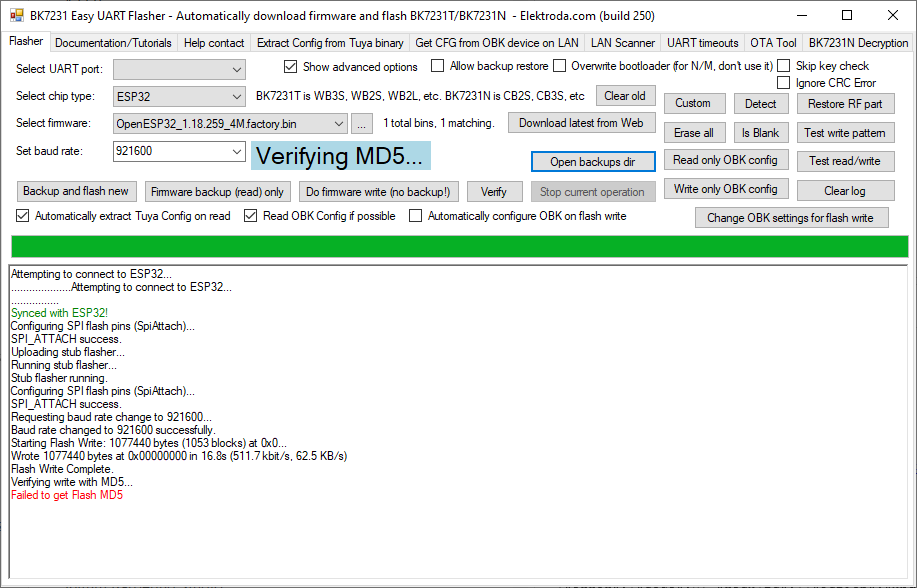
    interesting, I always need to manually do download mode on my ESP-WROOM-32 board.
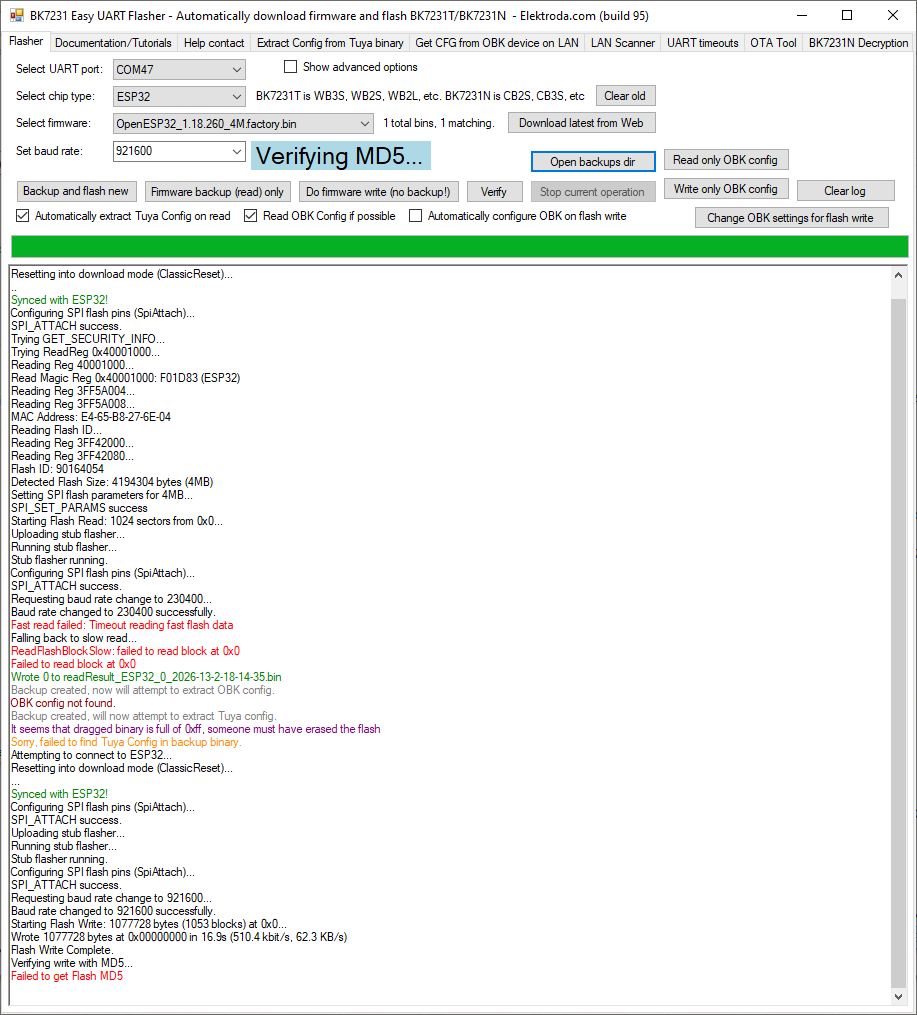
    Screenshot of BK7231 Easy UART Flasher showing ESP32 flashing log and error “Failed to get Flash MD5”.

    esptool is OK though
    Code: Text
    Log in, to see the code


    Added after 4 [hours] 31 [minutes]:

    threw ESP32 flasher code at LLM and with this code my ESP32 does its IO0/RST dance successfully
    https://github.com/openshwprojects/BK7231GUIF...in...divadiow:BK7231GUIFlashTool:esp?expand=1

    writing works but read always stops at the same point though at any baud. not explored why, just wanted to see if the reset could be made to catch

    Screenshot of BK7231 Easy UART Flasher showing ESP32 flashing log on COM47 and an MD5 verification error.
  • #238 21838015
    p.kaczmarek2
    Moderator Smart Home
    Interesting, any thoughts @insmod ?

    We can accept your change but you need to put it into a separate class... but I am suprised, for me reset works on my LilyGO T-CAN485 and on my nodemcu 32.
    Helpful post? Buy me a coffee.
  • #239 21838042
    divadiow
    Level 38  
    p.kaczmarek2 wrote:
    We can accept your change but you need to put it into a separate class.


    hmm, it was more a sloppy test to see what it would take to get working.

    Added after 47 [minutes]:

    split it out. no idea if it's generally better or just better for my specific board though - still not sure what's happening with my read. does this build work for you?
    https://github.com/divadiow/BK7231GUIFlashTool/actions/runs/22002549255

    I'll see if I've got another original ESP32

    Added after 17 [minutes]:

    wow. ok. my ESP32 is just a little sensitive it seems. moved off USB hub. build 250 does work :)

    interesting my build seemed to catch OK on hub though.
  • #240 21838164
    p.kaczmarek2
    Moderator Smart Home
    Wait, so.. the way you access DTR pins matter? C# api does not work on hub but winapi does? I was sure it goes through the same API...

    Anyway, is that one ready to merge?
    https://github.com/openshwprojects/BK7231GUIFlashTool/pull/104
    Helpful post? Buy me a coffee.
📢 Listen (AI):

Topic summary

✨ BK7231GUIFlashTool version 98 and later introduces a new SPI flashing method for Beken BK7231/BK7252 devices using only a CH341 SPI programmer. This method enables recovery of bricked devices with overwritten bootloaders and functions as a general-purpose SPI flasher supporting various memory chips. The approach builds on previous SPI programming techniques using Python and Banana Pi, adapting them for CH341 hardware and C# implementation. Required hardware includes a CH341 programmer and soldering tools for wire attachment. Recent user feedback on version 98 highlights issues such as the tool requiring a COM port selection in SPI mode, lack of CH341A detection warnings, and missing ch341dll.dll errors. The developer has addressed the COM port requirement and plans to add the missing DLL, requesting further debugging via Visual Studio to handle CH341 initialization exceptions.
Generated by the language model.

FAQ

TL;DR: New BK7231GUIFlashTool v98+ adds SPI flashing for Beken chips; sample 4,096 KB flash detected. “Only a CH341 SPI programmer is required.” Use CH341A D2 to toggle CEN, send 0xD2, then read/write like generic SPI. [Elektroda, p.kaczmarek2, post #21711721]

Why it matters: It lets you recover bricked BK7231/BK7252 devices without a working bootloader, using low‑cost tools.

Who this is for: DIYers, repair techs, and firmware engineers asking how to unbrick or mass‑flash Beken SoCs via SPI with a CH341A and the latest tool.
Quick Facts

What exactly is the new Beken SPI flashing method and what do I need?

The tool drives CH341A as an SPI master, resets BK via CEN on D2, sends 0xD2 to enter BK’s SPI-memory mode, then treats the chip like a standard SPI flash. You need a CH341A (jumper at I2C), 3.3 V power, and wiring for P20–P23 (SCK/CSN/SI/SO) plus CEN. Select “Beken SPI” in BK7231GUIFlashTool v98+. “Only a CH341 SPI programmer is required.” [Elektroda, p.kaczmarek2, post #21711721]

How do I wire CH341A to BK7231/BK7252 for SPI mode?

Connect CH341A SCK→P20, CS0→P21, MOSI→P22 (SI), MISO→P23 (SO), and D2→CEN. Keep MOSI→SI and MISO→SO mapping. Provide GND and target power. Some boards have pads labeled CE/TCK/TMS/TDI/TDO that map to CEN/SCK/CSN/SI/SO respectively. [Elektroda, p.kaczmarek2, post #21711721]

How do I reliably enter BK SPI mode? (3‑step)

  1. Use CH341 D2 to pull CEN low then high to reset the BK chip. 2. Stream 0xD2 bytes repeatedly over SPI. 3. Issue 0x9F and confirm a valid JEDEC response; then proceed to Read/Write/Erase. [Elektroda, p.kaczmarek2, post #21711721]

I get “Failed to open CH341 device” or “Failed to toggle CEN.” What should I check?

Confirm CH341A is jumpered to I2C, recognized by Windows, and the D2 wire is soldered to CEN. Re‑seat USB, power the target, and verify SPI lines. The tool logs these errors when CH341 isn’t detected or CEN can’t be driven; fix wiring or driver, then retry. [Elektroda, p.kaczmarek2, post #21711721]

The app says “missing ch341dll.dll” or quits in SPI mode—how do I fix that?

Place CH341DLL.DLL alongside the GitHub build, or build from source in Visual Studio. Earlier builds could exit if CH341A wasn’t present; recent fixes improved handling, but adding the DLL resolved missing‑library errors during testing. [Elektroda, divadiow, post #21712310]

Do I need to select a COM port for SPI flashing?

No. As of v99, SPI mode does not require a COM port. This was confirmed after fixes; previous v98 prompts were removed. Ensure CH341A is connected; SPI operations run without a serial port. [Elektroda, divadiow, post #21712310]

What does the Verify button do?

Verify compares flash contents against the firmware file currently selected in the tool. Use it after Write or Erase to confirm success. “Verify verifies against selected firmware.” [Elektroda, p.kaczmarek2, post #21712551]

Can this recover a bricked BK7252 camera?

Yes. After wiring CEN and SPI lines, use Beken SPI mode to read/erase/write. The author provides a BK7252 camera recovery example using this exact method with CH341A and the new flasher. [Elektroda, p.kaczmarek2, post #21711721]

Can I use CH341 Programmer or NeoProgrammer once SPI mode is active?

Yes. After the 0xD2 hand‑off, the BK behaves like a generic SPI flash. You can then operate with common SPI flash tools (CH341 Programmer or NeoProgrammer) if you prefer. [Elektroda, p.kaczmarek2, post #21711721]

Linux support: what baud rates are stable under mono?

Mono 6.12 worked for testers. They reported stable operation at 921,600 baud; 1,500,000 worked on Windows, but they lowered to 921,600 on Linux. LAN Scanner and release downloader also worked. [Elektroda, insmod, post #21712663]

The tool shows a 4,096 KB device. Is that normal for these chips?

Yes. A sample JEDEC ID FF‑EF‑40‑16 decoded to 4,096 KB and printed by the tool. That confirms JEDEC read and size decoding in SPI mode. Actual sizes vary by module; always check the tool’s detected flash size. [Elektroda, p.kaczmarek2, post #21711721]

How do I just switch a BK device into SPI mode without reading or writing?

Use the new “Detect” button. It performs a zero‑length custom operation to toggle CEN and send the 0xD2 sync, placing the chip in SPI mode for use with other SPI tools. [Elektroda, p.kaczmarek2, post #21731041]

I flashed many times and now erase fails. What should I try?

Expand Unprotect logic before erase, similar to AsProgrammer. A contributor noted needing stronger Unprotect after many BK7252 cycles. Add an Unprotect/Status-Register release step, then retry the erase/write. [Elektroda, p.kaczmarek2, post #21714737]

What is OpenBeken (OBK) in this context?

OpenBeken is an open‑source firmware used across supported Wi‑Fi MCUs in this ecosystem. The author uses OBK devices for testing and demos, including camera boards and remote flashing concepts. [Elektroda, p.kaczmarek2, post #21714427]

Can I flash a BK device over Wi‑Fi/TCP instead of USB?

Yes, a Wi‑Fi flasher demo proxies UART over TCP and controls CEN via an OBK device. It’s a separate utility that mirrors the BK UART routines, useful when PC‑to‑target wiring is hard. [Elektroda, p.kaczmarek2, post #21720013]

Any known edge cases or failure symptoms I should expect?

If CH341DLL is missing, some GitHub builds previously exited. On mono/Linux, 1,500,000 baud may fail while 921,600 works. Also, after heavy cycling, protection bits may block erase until Unprotect expands. Address each symptom as noted, then retry. [Elektroda, divadiow, post #21712310]
Generated by the language model.
ADVERTISEMENT