logo elektroda
logo elektroda
X
logo elektroda

Internet radio and audio file player on ESP32-S3

MAJSTER XXL 167127 1834
ADVERTISEMENT
Treść została przetłumaczona polish » english Zobacz oryginalną wersję tematu
📢 Listen (AI):
  • #1381 21715427
    simw
    Level 27  
    efi222 wrote:
    I've strayed from the topic, but maybe someone will be keen on such radio 'trinkets'
    .
    I for one am keen, as with all audio lights. :)
  • ADVERTISEMENT
  • #1382 21715603
    robgold
    Level 21  
    @hevet
    Write something more regarding this point. -> " instead of wifi manager a simple AP portal, you can add and save an unlimited list of wifi networks"
    I would also be happy to replace this wifi manager.

    @MAJSTER XXL
    Replying on the subject of FLAC playback. It's not a decoder problem but a TCP mechanism in which ESP fetches and buffers itself data over wifi. Therefore the swap files for FLAC streaming playback is a recompiled network part. This was described in the old schreibfaul examples.

    I guess the coolest thing about this project is that it's another autumn/winter radio project that will probably fill time in my studio. And the fact that everyone has taken a slightly different path in the development of this project only adds to the flavour. I personally, for example, very often use the built-in web server and phone to change stations because I have the phone at hand and the remote control not always anymore. At work, I generally have one tab open with the radio's website, because it's more convenient.

    @Mis
    Are you talking about that 3.5 inch panel with ESP that someone showed on FB yoRadio ? With that unusual controller and touch ?
  • #1384 21715743
    hevet
    Level 17  
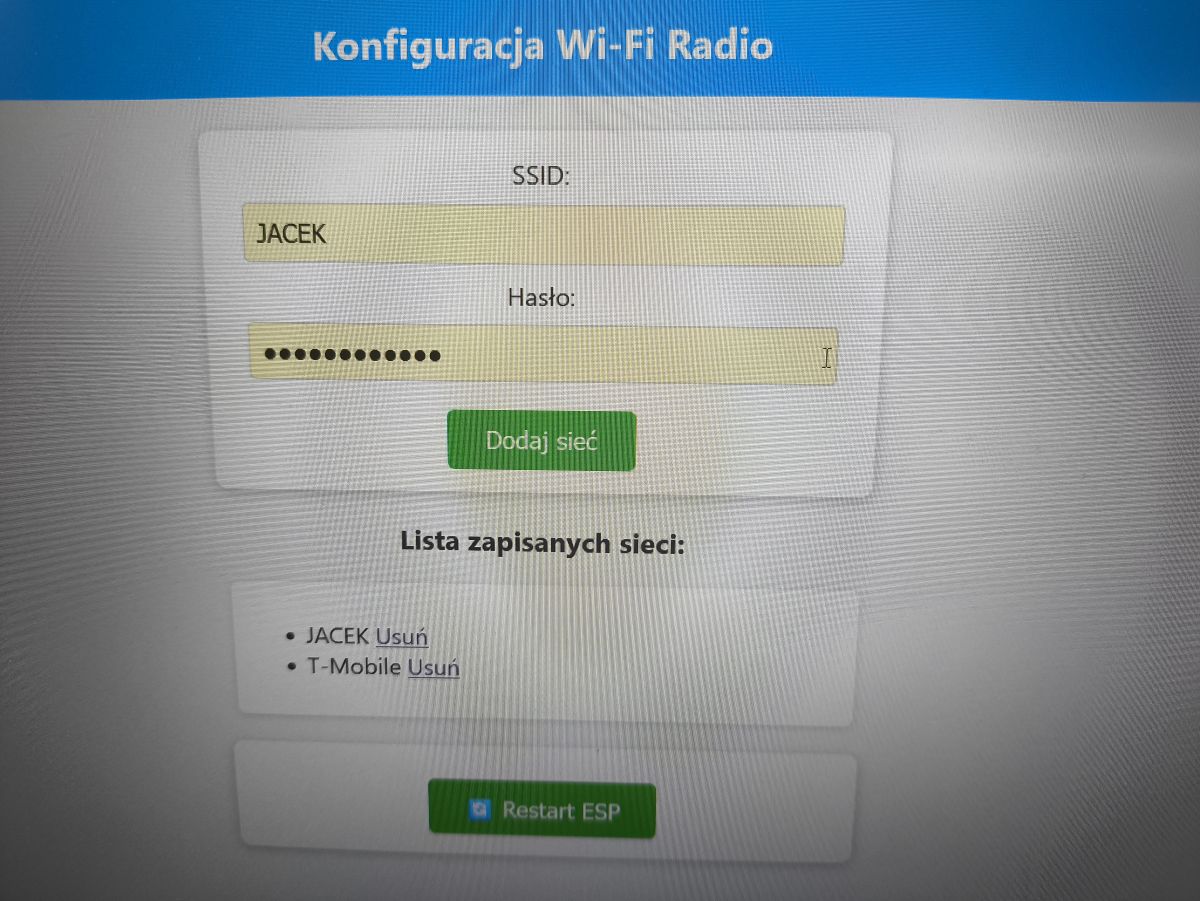
    @robgold something like this, an extension for the wifimulti library.
    Wi-Fi setup panel with login form and list of saved networks

    In the evening, more I can send you, because now I have no way to send the code.
  • ADVERTISEMENT
  • #1385 21717055
    and32jar
    Level 14  
    Mis wrote:
    If anyone would be interested in a yoRadio modification that pushed this project forward a bit, I committed something like this.
    Quite a few changes and fixes, SPDIF, OPUS and VORBIS decoders, station finder, full polish, naming, weather ect.
    The code is on github: https://github.com/romekb/yoRadio_spdif
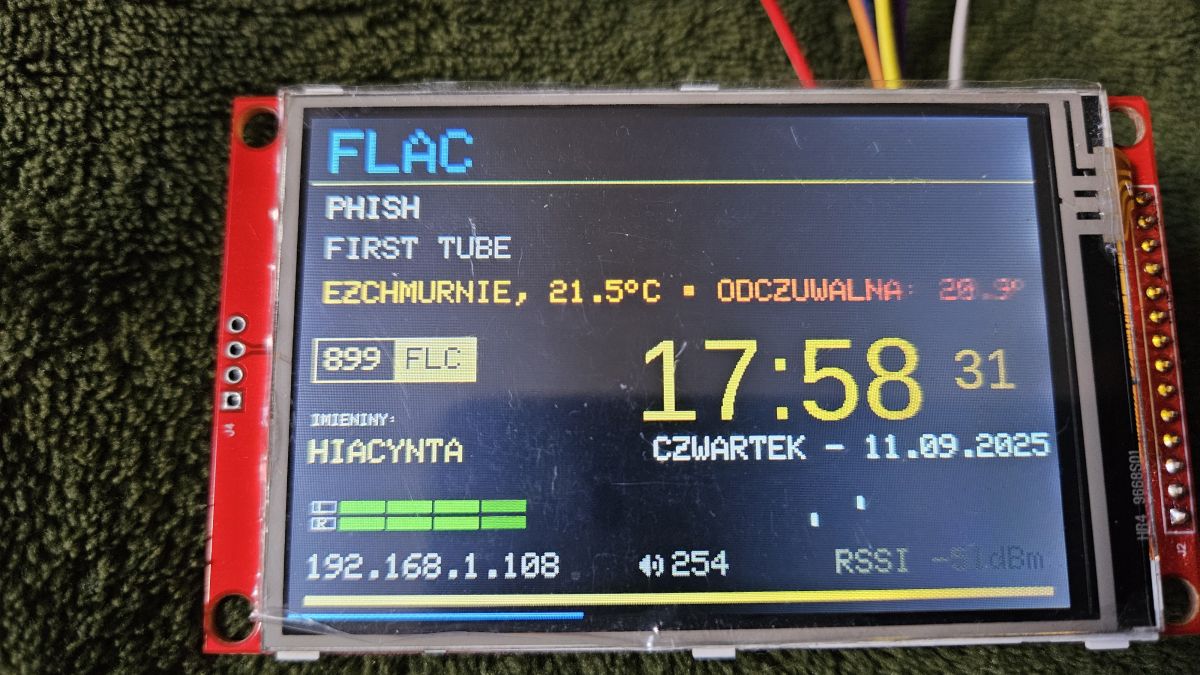
    And this is what it looks like:
    yoRadio display screen showing station, song, weather, date, and time .

    And a short video:
    https://youtu.be/0B93uhm7WAI

    I have two such radios made based on two versions of Chinese CYD displays on a standard ESP32 (with a PSRAM cube glued on the wires, because without PSRAM it runs poorly). Of course on ESP32S3 there will be no problem as well as on WROVER modules. Now a Chinese panel with ESP32S3 and a 3.5'' 480x320 IPS display + capacitive touch, but with a slightly unusual TFT controller, is coming to me. I should be able to get this working, and of course the code will be on github.

    What the fuck do you think you've done?
    You've ripped it off and dotted the I.D. - man the "NAMEDAYS" file. - I created it myself by sitting on it for hours and you are impersonating - likewise just look in widgets.cpp and the function " VU WIDGET" you didn't even remove the comments of the Hungarian @Várai Tamás
    So if you insert something and want to shine then write that file such and such you have from .... and your modifications are in the files .....
    even "clock_tts" in its pure form you didn't delete - and whose function you didn't learn....
    when sharing something with someone you have to describe it ie :
    since in myoptions.h you inserted the entry:
    #define CLOCK_TTS_ENABLED false // Enabled (true) or disabled (false)

    this and you need to give others a full picture of further functions such as:

    #define CLOCK_TTS_ENABLED true // Enabled (true) or disabled (false)
    #define CLOCK_TTS_LANGUAGE "EN"
    #define CLOCK_TTS_INTERVAL_MINUTES 30 // time interval


    there was already a guy on aledrogo listing and uploading software he didn't write

    here is the proof where @Várai Tamás and I share our work
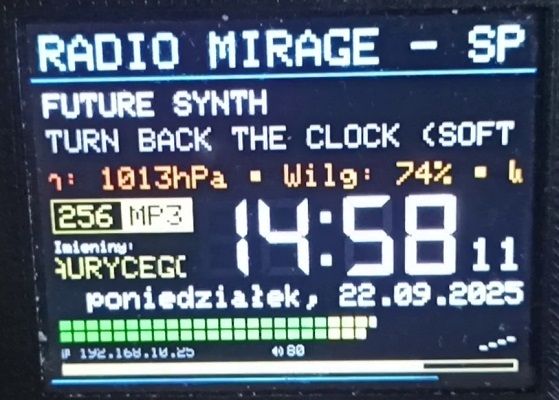
    LCD screen showing time, date, weather, IP address, RSSI, and system data

    I'm writing to make people aware that someone creates with someone else, sits for hours and others like "leeches" brag that "they" - yes, but they have taken


    Moderated By ArturAVS:

    I understand your colleague's agitation, but this does not exempt you from the culture of speech.
    3.1.5-3.1.7 Dissemination of content contrary to the principles of social conduct and good morals.
    .
  • #1386 21717102
    MAJSTER XXL
    Level 29  
    Please do not continue to post about yoradio and similar clones in this topic, as it is about to become quite a mess.
  • #1387 21717108
    hevet
    Level 17  
    I am also in favour, you have Facebook groups, argue there.
  • #1388 21717177
    Mis
    Level 14  
    I don't feel like arguing.
    I wrote clearly in the README "New version based on yoRadio_ESP32-S3_N16R8_ILI9488_v0.9.720_V-Tom_v04.2.zip file."
    So I didn't hack it, I just made my own version based on the above, freely available.
    I'm not telling anyone to use it. BTW this "your" so defended version has SPDIF, VORBIS, OPUS and all those other fixes listed in README.md ?
    If you would take some trouble and look at the branch "OLD" you would know that it was based on the official soft, and since I liked the Tom version visually I used it as a base for modifications.

    And this is my last word on the subject. I will not write any more here.
  • ADVERTISEMENT
  • #1389 21718039
    MAJSTER XXL
    Level 29  
    Today I made and improved the free input from the numeric buttons from the remote control for station number / folder number / file number selection.
    For this purpose I used a new button on the remote control
    Code: C / C++
    Log in, to see the code
    .
    and from now on, when using the player, this remote control command starts the folder list display with the currently playing folder highlighted, then you can scroll with the up/down arrows on the remote. When the player screen is in the mode of displaying the data of the file being played, you can scroll with the up/down arrows through the entire list of files in that folder, or you can use the numeric keypad to enter the appropriate number to jump directly to the file in question.
    So if you have a button on your remote that can be assigned to display the folder list then you can use it and test it. I had to do this because I couldn't control the indexes when scrolling through folders / files. Now it seems to work as expected. Earlier support for scrolling folders with bank selection scroll buttons no longer works.
    The current code has flown on github:

    https://github.com/sarunia/ESP32_internet_radio_v3
  • #1390 21720379
    DJCheester
    Level 27  
    Hi Majster, have you managed to get the memory of the last track and the display mode (countdown options) and Play mode (playback options Play random Play repeat all Play repeat one)?

    It's already autumn so I'm slowly starting to analyse your code.

    Greetings....
  • #1391 21723831
    robgold
    Level 21  
    Welcome,

    I have uploaded on Github GitHub Dzikakuna version Evo 3.18.21

    What's new ?
    - I have improved the radio's response to station listing from the IR remote control. Now the radio displays a list of stations by selecting the currently playing station, only the next press scrolls up and down.
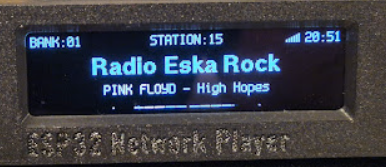
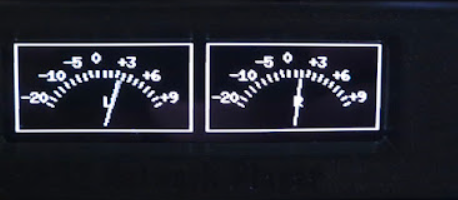
    - I added Mode 3 - this is a simplified mode with station information displayed in a centred way, plus a miniature VU meter at the bottom.
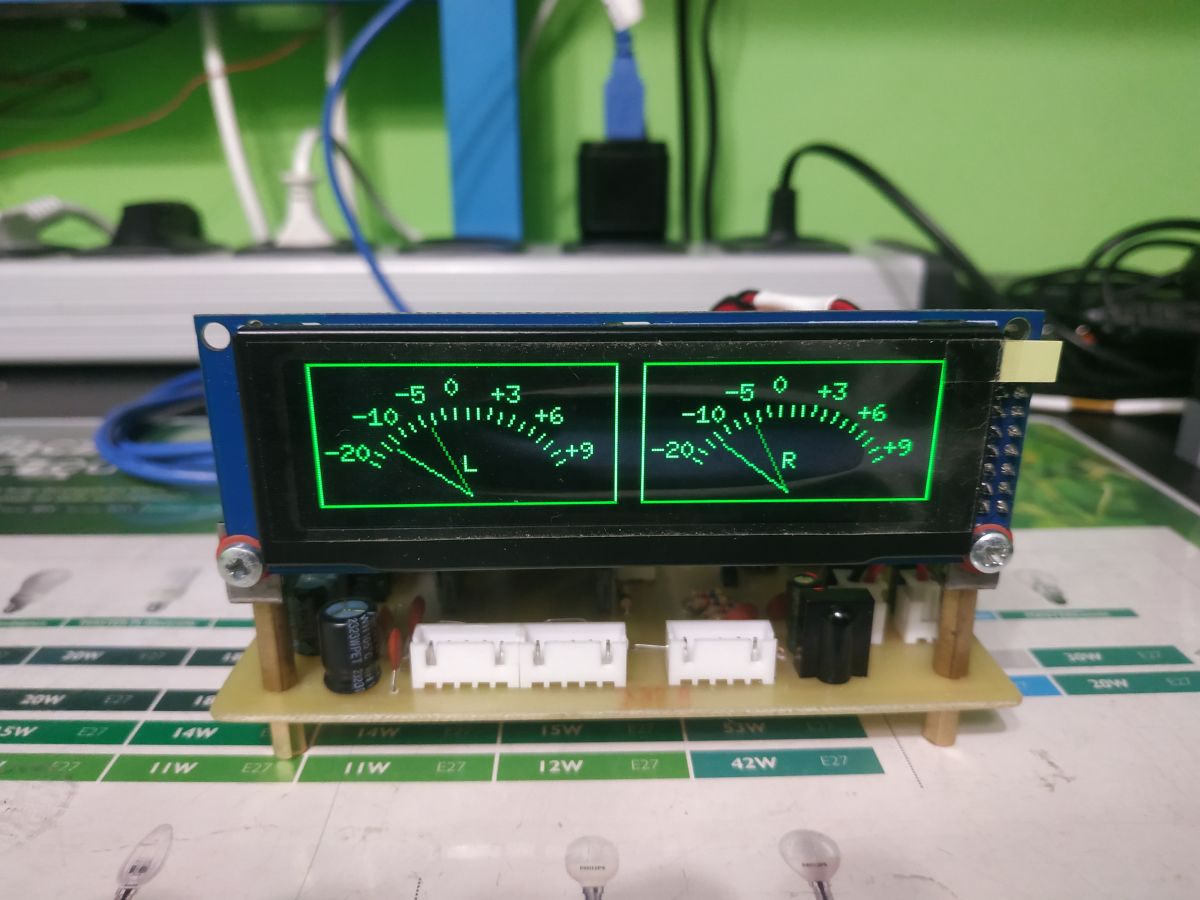
    - I experimentally added Mode 4 - for fans of the slogan "no LED will sell" there is a full-screen VU meter in the form of simulated analogue pointers

    This is the last version working on the old Audio and Core ESP32 libraries.
    From version 3.19 onwards, only the ESP-audioI2S-master 3.4.2 and higher audio libraries will be supported (changes in the way information about the playing station is communicated) and core ESP32 3.2.0 and higher. At the moment, I'm sticking with 3.2.0 because this version has improved wip and netif files, which makes it possible to listen to "streaming" stations in FLAC format.
    Version 3.19 will probably be released on Github later this weekend.

    Two analog-style VU meters with white needles on black background .
    ESP32 Network Player display showing Radio Eska Rock and Pink Floyd's High Hopes playing
  • ADVERTISEMENT
  • #1392 21724065
    Lechuuu
    Level 13  
    @robgold It looks great. Just need to centre the station information when switching stations and it will be elegant.
  • #1393 21724309
    DJCheester
    Level 27  
    I'm in love with these uvmeters 😀

    Revelation and respect for such refinement of the software.

    Dual-channel VU meter on an LCD mounted on a prototype board .

    Greetings....

    Added after 3 [minutes]:

    robgold wrote:
    This is the last version working on the old ESP32 Audio and Core libraries.
    From version 3.19 onwards only the ESP-audioI2S-master 3.4.2 and higher audio libraries will be supported (changes in the way information about the playing station is transmitted) and core ESP32 3.2.0 and higher. At the moment, I'm sticking with 3.2.0 because this version has improved wip and netif files, which makes it possible to listen to "streaming" stations in FLAC format.
    Version 3.19 will probably be released on Github later this weekend.
    .

    Tell me if the higher libraries require a 64bit comp ? Because if so, unfortunately I won't install Arduino 2.x and that's where the fun ends for me. If it is not possible on Win32.

    Greetings ...
  • #1394 21724453
    irysbox
    Level 13  
    I got interested in the topic of my own YoRadio, but the first day and I'm already fed up, not to mention ChatGPT. Arduino installation, libraries installed I pretty much grasp, at least I think so, while compiling and coding in the YoRadio tab is some kind of massacre :) I have an ESP32-S3-N16R8 board with two USBs, and I've reached the point that it connects to my WiFi, but it doesn't connect to the radio for the hell of it. The link I have is good, ChatGPT gives me commands from the ESP8266 that the library from the ESP32 doesn't have in it. When I replace it with this audio.h, the radio doesn't connect and on and on and on. I've already given up. Maybe someone has a step-by-step guide on what to do and how to do it, which library to make something work and at least play one station automatically :)
  • #1395 21724557
    DJCheester
    Level 27  
    Hello, this topic is not about YoRadio only there are two projects being developed here by colleague Robgold on an OLED display and colleague MajstraXXL who has a project on an LCD screen.

    The installation of the Arduino environment with step by step libraries has already been covered several times in the topic, look back mainly in the initial pages and you will find.

    And if you are referring to the YoRadio project, we do not develop it here.

    Greetings...
  • #1396 21724722
    irysbox
    Level 13  
    Ok, I was more concerned with the technology itself than the design, and this one after reviewing is cool too, maybe even too elaborate for me, but ok, I understand that the upload file is the .ino files, and is this file concerning specific devices defined in the .h file also here, because I don't see if you have to define it yourself somehow. Day 2 I'm getting familiar with this, so please don't be angry.
    I understand the environment first, libraries in the appropriate versions, just don't know why they made it so complicated that there are several directories where these libraries can go.
    It would be useful and in points what and how and where, then a project package for the desktop and what comes next.
    As for the display, I'm aiming for an LCD2004 on I2C, can it be done on that? Or on such https://pl.aliexpress.com/item/10050090421778...in.60.70ea1c24MSyJQQ&gatewayAdapt=glo2pol
  • #1397 21724777
    DJCheester
    Level 27  
    Hello we are not angry 😀

    In short you download from Robgold's Github the whole package there you have the ino file for the Arduino environment.
    For this Robgold provides the libraries you need to have.

    You install the Arduino IDE I have 32 bit so 1.8.19 or on win64 the latest version.

    I'll look for the manual I used to do this.

    Added after 8 [minutes]: .

    I attach

    Done some time ago, probably versions of libraries have changed and files have appeared to solve the playback of FLAAC streams generally according to these instructions you should compile correctly and upload the soft.

    On his Github Robgold gives the contents of the SD card and the ESP32 settings when winning you currently need to check this as it seems to have changed since the instructions were written.

    In addition Robgold also has these files for FLAAC streams on their Github

    As for the installation of the files I asked colleagues here at the time

    https://www.elektroda.pl/rtvforum/topic4041603-750.html#21456503

    Read the topic from then on because I think these files were for version 3.05 but someone seems to have found one later and for a newer version.

    Oh and you don't put the remote codes permanently in the sketch as I wrote in the instructions once because it was an old version of the radio, now you compile as is and the file with the codes is on the remote.txt card and there you enter your codes and this file you upload to the SD card.

    Greetings ....
  • #1399 21724907
    irysbox
    Level 13  
    But tell me, if I replace it with the lcd2004 or the 24x2, is it a lot of work apart from redefining the ports? I don't really need to control the remote control and many banks of songs. I would prefer something simple with the nice look of your displays but, for example, I would like the radio list to be downloaded from the SD and I could edit the file myself by text.

    I am usually of the opinion that the simpler the better as long as it is pleasing to the eye and I would have fun with it for other uninitiated :)

    the parts are coming and i just found this long 24x2 plus for this i2c 2 rows i would like to try it but i don't know if i can do it so far as for 2 days of reading i just managed to load the soft evo to the board and a white led lit up which hits my eyes :) i haven't had this yet :)

    Mr foreman maybe the control with the remote control alone is even ok these banks of stations and songs it has here from the card I understand ?
  • #1400 21725362
    grzes_dst
    Level 11  
    "MAJSTER XXL" I have a question regarding the software ESP32_internet_radio_v3 I can't connect to the radio via the website this is the case in the Robgold software.
    Is it me or is it not possible at all?
  • #1401 21725372
    MAJSTER XXL
    Level 29  
    @grzes_dst at my place there is no webservice to operate the radio from the browser, unless you mean the first configuration to save the wifi network, show the screen from the serial terminal where the thing stands.

    Generally today I've taken to moving the whole v3 player into separate FilePlayer files - I've uploaded this to my github profile too.
  • #1402 21725381
    grzes_dst
    Level 11  
    @Majster XXL I meant and webservice to operate the radio as it is in @robgold's, that I do not need to have a remote control and can control the radio via the web.
    Today, I had a little trouble because I did not know why I have two buttons on one of the three remote controls, now I know and have changed the software by signing the codes to the functions.
  • #1403 21725382
    amrowek
    Level 12  
    Gentlemen how is the stability of Wi-FI on this ESP32S3?
    I'm asking because I built a radio according to YoRadio (fejs) and when I turned on the Zyxel WRE2205 repeater the radio started to cut, there were interruptions .The radio is on an ESP 32 board(30 pin) in the same room there is a router and a repeater which serves as a network card for a Pionk N50, it has wi fi signal broadcasting disabled, and yet.... yoradio was able to cut in.
    Have you had a similar problem with this project?
  • #1404 21725403
    DJCheester
    Level 27  
    irysbox wrote:
    I succeeded in loading the soft evo to the board and a white LED came on which hits me in the eyes like I haven't had before
    .

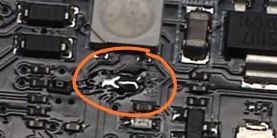
    There is a 0 Ohm resistor on the ESP next to the diode, remove it and the diode will not light up, as I remember correctly under these pins which is the diode in our case hangs the sd card that is why it lights up.

    irysbox wrote:
    tell me that replacing it with lcd2004 or this 24x2 is a lot of work except redefining the ports ?
    .

    The 2004 lcd is a simple alphanumeric character display, the connection is different either in parallel or with a pcf expander then the operation is via I2C. So much for the connection physically to the ESP.

    In the case of softwares it gets more complicated, because this display uses a different library and it is possible to use it, but all display lines have to be changed and a lot of information has to be omitted, it will look very poor.

    You would practically have to write the information display in the sketch from scratch.

    In my opinion there is no need to complicate things, my friend here in this topic you have two softys the foreman has gone in LCD and Robgold has OLED and I suggest to purchase such displays, at the Chinese these prices are not too high.

    Greetings...
  • #1405 21725406
    irysbox
    Level 13  
    You also have a white LED after uploading, because both the software and the other light up the LED after uploading, ok I read it together we wrote :)
  • #1406 21725409
    DJCheester
    Level 27  
    irysbox wrote:
    controlling just the remote control is even ok these banks of stations and tracks it has here from the card I understand ?
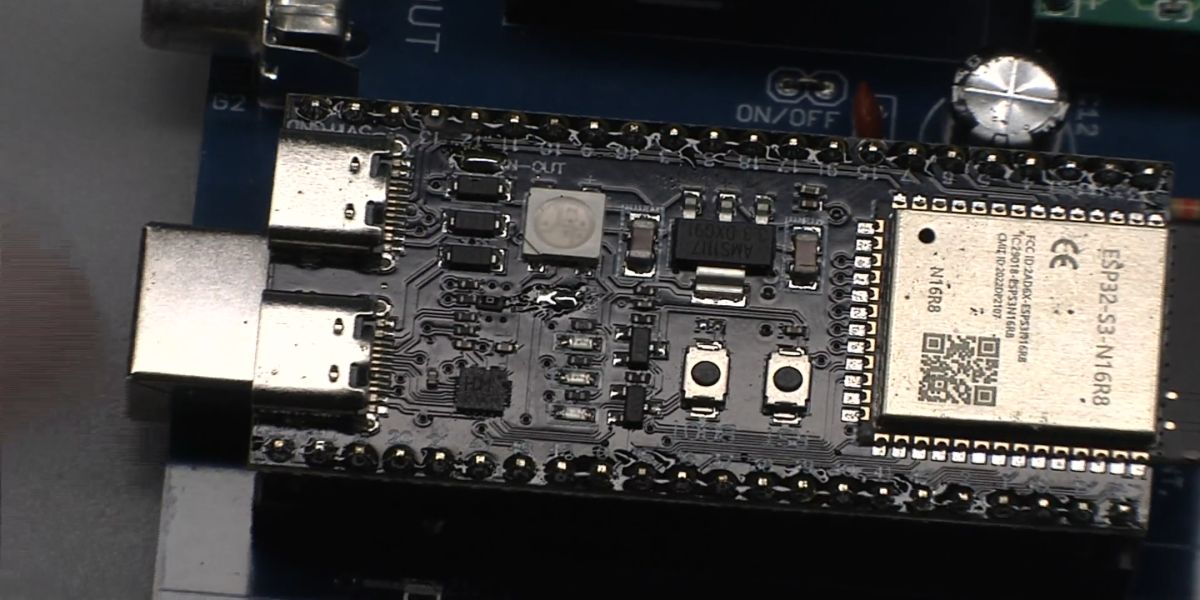
    The control is from the remote you have to assign yourself the codes from your remote to the sketch (I'm talking about the Majster software here) and compile and the remote works.

    As for the memory card, configuration files and bank files are created there, the radio after connecting to the net rips txt files of the banks to the memory card from the Majster's Github links and then uses them.

    Greetings....

    Added at 4 [minutes]:

    Unsolder this resistor

    ESP32-S3 module with SMD components, buttons, and USB-C connector visible
    Close-up of PCB with circled resistor to desolder
  • #1407 21725438
    grzes_dst
    Level 11  
    @MAJSTER XXL I need to rotate the image 180 degrees after screwing it to the front I found that the image is upside down and it is impossible to rotate the TFT because the frame of the front is made that way.
  • #1408 21725453
    MAJSTER XXL
    Level 29  
    @grzes_dst can be rotated, try any of these settings {0x48, 0x88, 0x28, 0xE8} as the value for the 0x36 command in the screen init. Look for the setting tft_command(0x36);
    tft_data(0xE8);
  • #1409 21725515
    grzes_dst
    Level 11  
    @MAJSTER XXL succeeded line 722 "tft_Data", change successful from 0xE8 to 0x28.

    Quote:
    / Image direction and orientation (MADCTL)
    tft_command(0x36);
    tft_data(0x28); // screen orientation (rotation, reflection)
  • #1410 21725743
    simw
    Level 27  
    amrowek wrote:
    Have you had a similar problem with this project?
    .
    We have had this with some ESP32 boards, it has been addressed in this thread >>21437187
📢 Listen (AI):

Topic summary

The discussion centers on the development of an internet radio and audio file player based on the ESP32-S3-WROOM-1 module, featuring a custom-designed prototype PCB with OLED display and user controls including rotary encoders and buttons. Key challenges addressed include pin spacing discrepancies in the ESP32-S3 module footprint, integration of Wi-Fi connectivity with dynamic station list updates, and handling of Polish character encoding on the OLED display. The project uses Arduino IDE (version 2.3.2) with ESP-IDF support and requires enabling PSRAM. Audio playback supports MP3, AAC, and FLAC streams, with the ESP32-audioI2S library recommended over the incompatible Audio library. Users reported issues with SPI MISO pin assignment causing bootloader conflicts, resolved by reassigning MISO to pin 35. The project incorporates WiFiManager for network configuration, EEPROM and SD card storage for saving last played station and settings, and includes plans for tone control via an external KA2107 equalizer and a CS8673 amplifier module. Problems with encoder input stability and memory limitations for Bluetooth A2DP on ESP32-S3 were noted. The community suggested alternatives like KaRadio and ESP32-MiniWebRadio projects. Debugging tips include serial terminal logs for HTTP errors and flash memory erasure to resolve boot loops. The project is open-source on GitHub, encouraging forks and modifications. Additional features under development include browser-based updates, directory navigation, and potential audio recording to SD card.
Summary generated by the language model.
ADVERTISEMENT