logo elektroda
logo elektroda
X
logo elektroda

Internet radio and audio file player on ESP32-S3

MAJSTER XXL 197316 2147
ADVERTISEMENT
Treść została przetłumaczona polish » english Zobacz oryginalną wersję tematu
📢 Listen (AI):
  • #1741 21766730
    irysbox
    Level 13  
    I've been fiddling with this remote, I already have receivers seemingly good, but it's something else because it's not reading the configuration from the card. I have a Chinese HW203, when I insert the card, I get signals from the remote all the time, some conflict is there, but connected I have ok :) Because I have checked several times, when switching on it no longer reads the card and does not write, so this type of reader is probably not good. Swapping doesn't help, so this model some Chinese :) I will try with MiniSD.
  • ADVERTISEMENT
  • #1742 21766789
    dawidkosciesza
    Level 8  
    Hello.
    I have assembled my first radio and it plays :D
    I still have to configure the remote control and create and configure the buttons on the keyboard.
    I have noticed that it is not displaying the kHZ information to me. Anyone have an idea what this could be due to? Could the lack of a sd card affect this?

    I will immediately ask about the buttons on the keyboard, what are the best resistor values for the ladder? Someone may have a ready-made version that could be plugged in and customised for themselves?
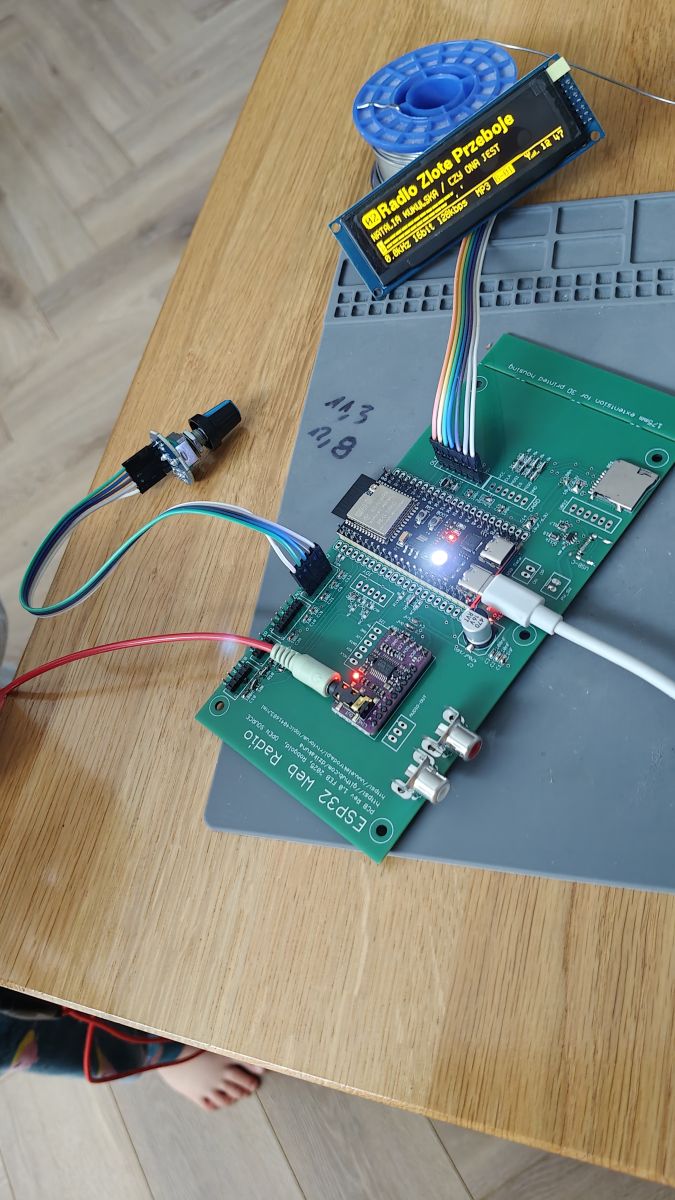
    Assembled ESP32 Web Radio board with display and connected cables
  • #1744 21766842
    robgold
    Level 22  
    >>21766730 So now I am looking at the project of my colleague @dawidkosciesz and the question occurs to me did you disable the RGB LED on the ESP board ?
    The LED is on the same PINs as the SD card maybe this causes a conflict. Second thing, Chinese readers often have strange pull-ups, different resistors. Check the reader's wiring diagram carefully.

    @dawidkosciesza the audio information is sent by the audio library. The question is what version of the library do you have ? Take a look at the terminal, you should see there the information as below. The important thing is if this is exactly what it says or if you have without (Hz) in brackets.

    Code: C / C++
    Log in, to see the code
  • #1745 21766993
    dawidkosciesza
    Level 8  
    @robgold I will check the library when I am home, I think I have ESP-audioI2S-master v3.4.2

    As for the sd card, I haven't put one in yet, I'll have to look somewhere in the junk for some old one. But good to know that you need to turn off the RGB diode.

    I'd like to put this radio into the casing from the Diora AS 502 radio, and I was thinking about changing these starting notes to the Diora logo. I guess that the image code needs to be changed. I just don't know what settings and in what to create it.
  • ADVERTISEMENT
  • #1746 21767118
    DJCheester
    Level 27  
    Welcome

    Fellow Robgold should I use this Audio_i2s_commit08.11.2025 or the October one ???
    What gives the new one because I still have the old one substituted ??
  • #1747 21767146
    robgold
    Level 22  
    >>21767118 Yes, I at my place try to test regularly the LATEST set with all commits available on the author's GitHub (Wolle), sometimes I put up threads that something is not working, sometimes I also see my colleague @hevet there with interesting finds and bugs in the library.

    Version 3.4.2 can still output SampleRate info as:
    "info: ....... SampleRate: 44100"

    therefore the program gets lost. Generally 3.4.2 has some bugs, so I recommend to download 3.4.3 and unfortunately you have to manually delete compilation files (so called *.o) and change versions in files describing the library otherwise Arduino will think that there are no changes and will not recompile this new one (there is a mistake in library description and even though it is version 3.4.3 it is still signed as 3.4.2)
  • ADVERTISEMENT
  • #1748 21767262
    DJCheester
    Level 27  
    dawidkosciesza wrote:
    Hello.
    I have assembled my first radio and it plays :D
    I still have to configure the remote control and create and configure the buttons on the keyboard.
    I have noticed that it is not displaying the kHZ information to me. Anyone have an idea what this could be due to? Could the lack of a sd card affect this?

    I will immediately ask about the buttons on the keyboard, what are the best resistor values for the ladder? Someone may have a ready-made version that could be plugged in and customised for themselves?
    Assembled ESP32 Web Radio board with display and connected cables


    Another satisfied colleague ;)

    Added after 24 [minutes]:

    Hello for me unfortunately this app does not work.

    I have from the phone the net shared for this reason also my browser did not work. Then kol Robgold corrected something and it worked. Maybe it is similar here.

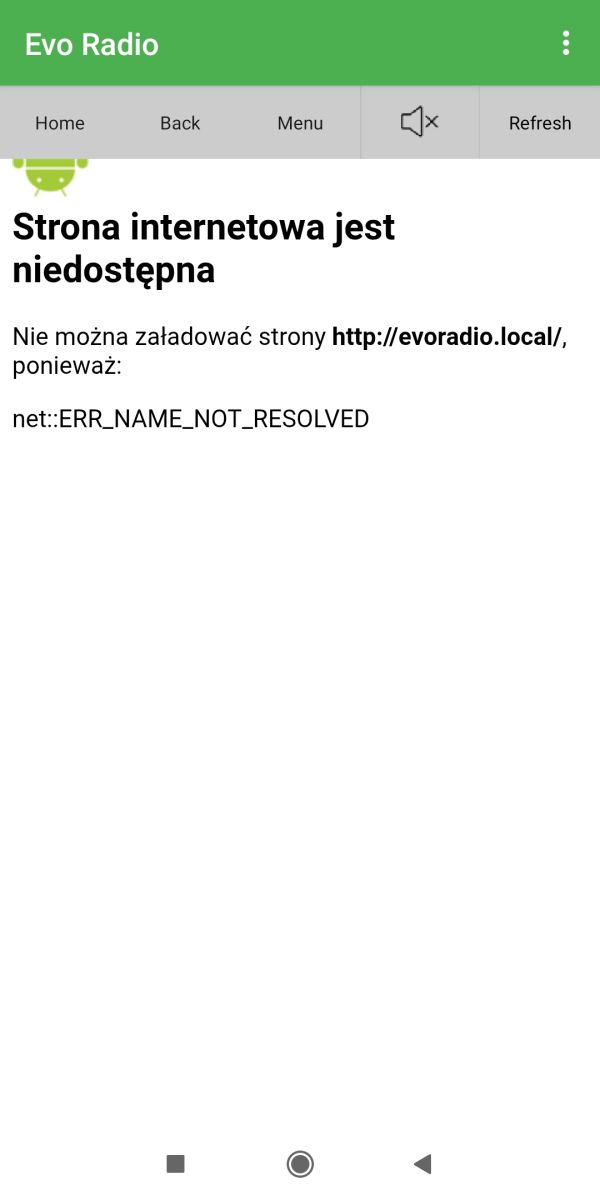
    Evo Radio app error message: Website is unavailable

    Greetings ...
  • #1749 21767317
    robgold
    Level 22  
    >>21767262 Unfortunately. As the phone works as a rotuer it at the same time does not work wifi in the client session. This is already a limitation of the phone.
  • #1750 21767332
    DJCheester
    Level 27  
    Well, it can't be done ;( pity, but there remains a website where everything works ;)
  • ADVERTISEMENT
  • #1751 21767339
    robgold
    Level 22  
    >>21767332 And does the site work for you on the same phone under adrrs ip cxy evoradio.local ? Because if the latter and mdns works then the app should work too. Click the home button at the top when you open it.
  • #1752 21767341
    DJCheester
    Level 27  
    Nothing this button does is the same
  • #1753 21767379
    dawidkosciesza
    Level 8  
    >>21766842

    I managed to read :
    info: ....... Channels: 2
    info: ....... SampleRate: 44100
    info: ....... BitsPerSample: 16
    info: ....... BitRate: 128000

    This is what it looks like. Where to get ESP32-audioI2S-master v3.4.3 from ?

    One more question. Does the power button only work when powered from the usb-c socket from the PCB?

    I have version v3.4.3 now I will try to upload it.
  • #1754 21767458
    robgold
    Level 22  
    >>21767379 Then you already have the answer, the firmware 3.19.xx looks up to the characters (Hz) and that is not there so you have 0.0Khz
    The library is on my GitHub but you can also download from the author: Link only from src directory not from official release.

    You copy the library here replacing the old files with these new ones:
    C:USERSAppDataLocalArduino15Arduino15AudioI2S-master src

    In addition, as I wrote you need to locate the sketch compilation file is somewhere here: C:USER NAMEAppDataLocalArduino sketches...............8BBC358Cthese numbers-letters will be different. Inside, delete the Audio library or preferably ALL after uploading the new library.

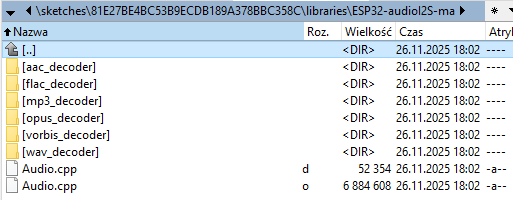
    Folder ESP32-audioI2S with decoder directories and two Audio.cpp files visible

    The POWER button is actually the Encoder2 button and if you have it on, also the Encoder 1. You have to hold them down for about 4 seconds to do Power OFF and about 300ms to do Power ON. On the remote control it works immediately OFF and ON.
  • #1755 21767466
    dawidkosciesza
    Level 8  
    I think I did everything right. Except that in my case the libraries were in the location:
    C:user_nameDocumentsArduinolibraries

    I am now compiling and uploading. We'll see if it helps ;)

    21:55:51.389 -> info: ....... Channels: 2
    21:55:51.389 -> info: ....... SampleRate (Hz): 44100
    21:55:51.389 -> info: ....... BitsPerSample: 16

    Works, thanks very much for your help :)

    And that power switch connector on the board what is it for?

    I've noticed that there is a problem playing AAC and FLAC formats, or is it just me? Although not all AAC, some work fine. And I noticed that it loses stability and resets when there is no transmission. I get a crash on radio 357 (bank1/12) It resets all the time even though there is a transmission.
  • #1756 21767506
    robgold
    Level 22  
    >>21767466 For the external power switch in the case. The USB-C that is on the board is made so that it has ESD protection and such a let's say prosthesis that you buy a cheap Chinese USB-C plug on a mini PCB and as you connect to the Data+ and Data- connector you can power from this external socket but also have a preview of the UART port. You have pictures of the case on GitHub, the STL file for 3D printing are available on GitHub Link


    Take a peek at this photo. I need to do a radio "session" but there is never time.
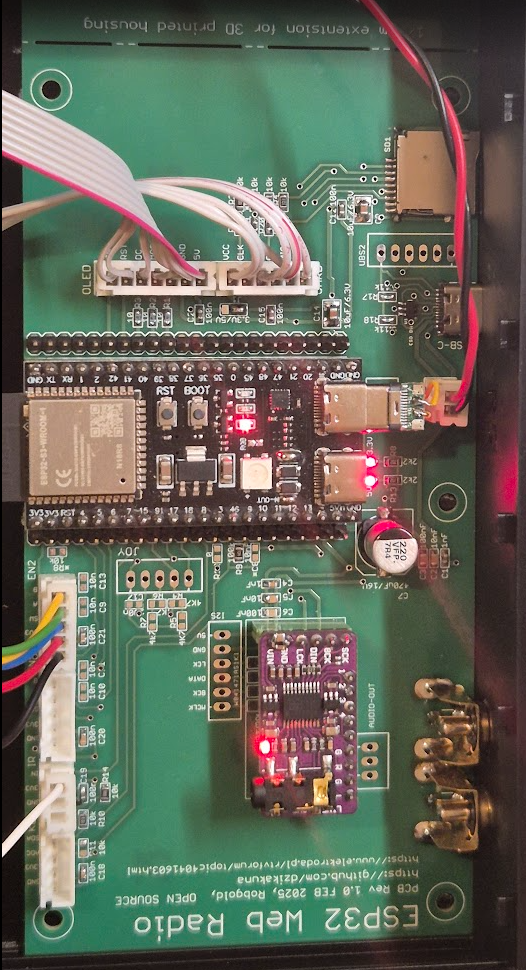
    Top view of ESP32 Web Radio PCB with connected modules and wiring inside a case.

    For high bitrate FLAC and AAC files you must firstly have ESP32 Core no higher than 3.2.0 in the Arduino and then you swap the two files responsible for the WiFi bandwidth and FLAC works beautifully up to 1500kbps. Here are the files: Link
  • #1758 21767736
    efi222
    Level 21  
    robgold wrote:
    replace the two files responsible for WiFi and FLAC throughput

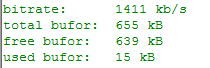
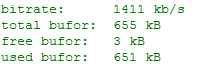
    You can extract the data from the input buffer and here you can see nicely what the patch does.
    Before patching, the buffer is practically empty and the FLAC is ripped.

    Screenshot with values: bitrate 1411 kb/s, total buffer 655 kB, free 639 kB, used 15 kB

    After patching, the buffer is practically still full.

    Screenshot of audio stats: bitrate 1411 kb/s, buffer 655 kB, free 3 kB, used 651 kB

    I call it up every two seconds:
    Code: Arduino
    Log in, to see the code
  • #1759 21767833
    irysbox
    Level 13  
    >>21766842 I've cut the jumper, I've also checked on another microSD reader, it functions similarly, so something is clashing one with the other.
  • #1760 21768126
    robgold
    Level 22  
    @hevet They work and they don't work. Because when you upgrade core ESP versions to 3.3.1 and also AsyncWeb and TCP to newer versions, for some reason the web server doesn't work on the swapped libraries (to be precise, the main page doesn't load where the websockets are - but they are not the reason for this). On the original libraries everything works but the FLAC files do not work again.

    From my tests it seems to be like this:
    coreESP 3.3.1, AsyncTCP 3.4.9, ESP AsyncWebServer, ORG libraries - web server works, FLAC does not work
    coreESP 3.3.1, AsyncTCP 3.4.9, ESP AsyncWebServer, ZMOD libraries - web server does not work, FLAC works

    coreESP 3.2.0, AsyncTCP 3.4.9, ESP AsyncWebServer, ORG libraries - web server works, FLAC does not work
    coreESP 3.2.0, AsyncTCP 3.4.9, ESP AsyncWebServer, ZMOD libraries - web server works, FLAC works


    Recompiled from scratch each time with deletion of the entire sketch for reliability.
    It seems that for the moment the only option for those listening to FLAC stations is to leave core EPS32 at 3.2.0.

    Unless you have a different experience then share with me it was not possible to get the server to work properly on 3.3.1 and with the libraries swapped.

    @irysbox show a picture of this reader that is so problematic, did you change anything in the connections ?

    @efi222 that's what these swapped recompiled bibles change. The standard is that the station on the Icecast server has a buffering setting of 5 seconds. A simple calculation (320kbsp /8 -> 40kb/s = buffer occupied within 200kb), for FLAC at 1000kbps (average) ~ 625kb and that's how much you see filled. On Smoothjazz this is how the server is set up. In Evo there is a flag "debugAudioBuffor" which triggers the "bufforAudioInfo()" function to print out information every 1sec showing what the buffer is and how much is free.

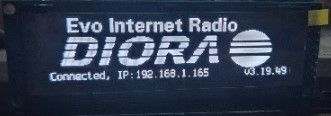
    @dawidkosciesza Logo for a colleague prepared:
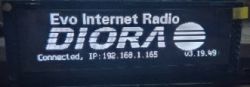
    OLED display showing Diora logo, Evo Internet Radio and IP address.
  • #1762 21768162
    robgold
    Level 22  
    >>21768128 3.2.1 - This changes things completely. You don't realise how much hope you got as I tested this :)
  • #1764 21768350
    DJCheester
    Level 27  
    robgold wrote:
    >>21767332 And does the site work for you on the same phone under adrrs ip cxy evoradio.local ? Because if the latter and mdns works then the app should work too. Click the home button at the top when you open it.


    Hello, I share the internet from my phone as a hotspot and I have two devices connected, a radio and a computer from my computer and the website works beautifully under the IP which is displayed on the radio

    http://192.168.43.161/

    I have just such and how to call or check

    http://192.168.43.161/cxy evoradio.local

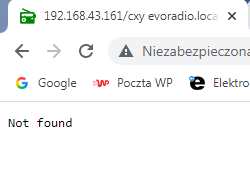
    Is this how it should be? When I paste it into the browser on my computer it looks like this and unfortunately it does not work

    http://192.168.43.161/cxy%20evoradio.local

    Browser page with a URL and “Not found” message displayed

    I would add that the site under this IP ie

    http://192.168.43.161

    The site also works on a phone in a browser.

    Greetings ....
  • #1766 21768628
    gaborbalint919
    Level 3  
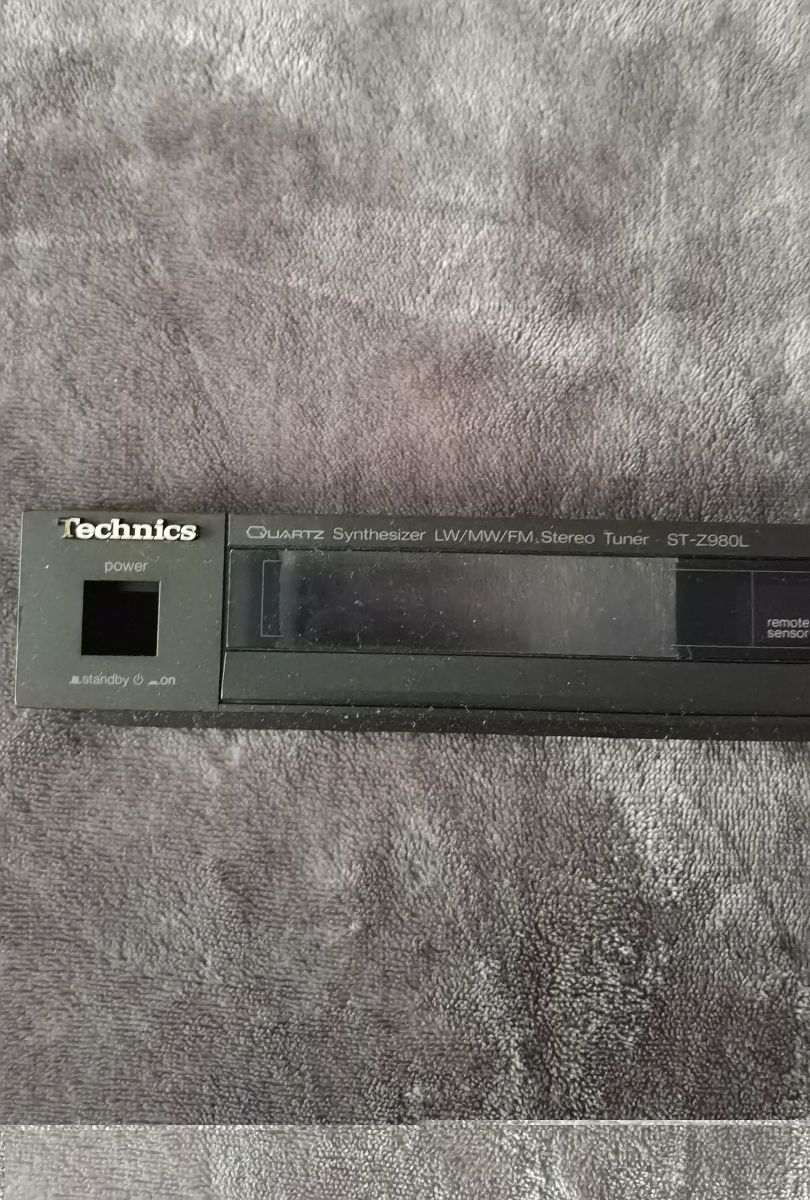
    Hello, I'm still a beginner. Could you please help me where and how I can change the boot logo?

    Added after 34 [seconds]:
  • #1767 21768985
    robgold
    Level 22  
    @gaborbalint919 What is the reason that you want to change the start logo ?
  • #1768 21769105
    gaborbalint919
    Level 3  
    >>21768985
    I want to install it in this radio and I want it to say Technics ST-Z980L when it starts up.Front panel of Technics ST-Z980L tuner with power button and LCD screen
  • #1769 21769144
    DJCheester
    Level 27  
    Very good question, I am also curious ?
  • #1770 21769281
    dawidkosciesza
    Level 8  
    robgold wrote:
    @dawidkosciesza Logo for colleague prepared:

    It is beautiful :D Thanks a lot :)

    I am now struggling with replacing these files to make the FLAC stations work and I don't have them directly in the location:
    "C:USER NAMEAppDataLocalArduino15packages32-arduino-libs-libs-release_v5.4-2f7dcd86-v1" they are still in the "lib" subfolder

    I have replaced these files and deleted the files in the sketches folder. Another attempt to compile and see :D

    Well it doesn't work, it continues to crash me on station 12 (357radio) and 51 (BBC radio). The radio catches hangs and resets.
📢 Listen (AI):

Topic summary

The discussion centers on the development of an internet radio and audio file player based on the ESP32-S3-WROOM-1 module, featuring a custom-designed prototype PCB with OLED display and user controls including rotary encoders and buttons. Key challenges addressed include pin spacing discrepancies in the ESP32-S3 module footprint, integration of Wi-Fi connectivity with dynamic station list updates, and handling of Polish character encoding on the OLED display. The project uses Arduino IDE (version 2.3.2) with ESP-IDF support and requires enabling PSRAM. Audio playback supports MP3, AAC, and FLAC streams, with the ESP32-audioI2S library recommended over the incompatible Audio library. Users reported issues with SPI MISO pin assignment causing bootloader conflicts, resolved by reassigning MISO to pin 35. The project incorporates WiFiManager for network configuration, EEPROM and SD card storage for saving last played station and settings, and includes plans for tone control via an external KA2107 equalizer and a CS8673 amplifier module. Problems with encoder input stability and memory limitations for Bluetooth A2DP on ESP32-S3 were noted. The community suggested alternatives like KaRadio and ESP32-MiniWebRadio projects. Debugging tips include serial terminal logs for HTTP errors and flash memory erasure to resolve boot loops. The project is open-source on GitHub, encouraging forks and modifications. Additional features under development include browser-based updates, directory navigation, and potential audio recording to SD card.
Summary generated by the language model.
ADVERTISEMENT