logo elektroda
logo elektroda
X
logo elektroda

Internet radio and audio file player on ESP32-S3

MAJSTER XXL 167382 1835
ADVERTISEMENT
Treść została przetłumaczona polish » english Zobacz oryginalną wersję tematu
📢 Listen (AI):
  • #1801 21772492
    supsak
    Level 11  
    Hi colleagues.
    Some time ago I was interested in the Yoradio project, I bought some modules, but I didn't manage to implement it and build a radio. Now I came across another internet radio project published on this forum. I have read everything from the beginning, from V1 to V3 version of this radio, but I am completely confused.
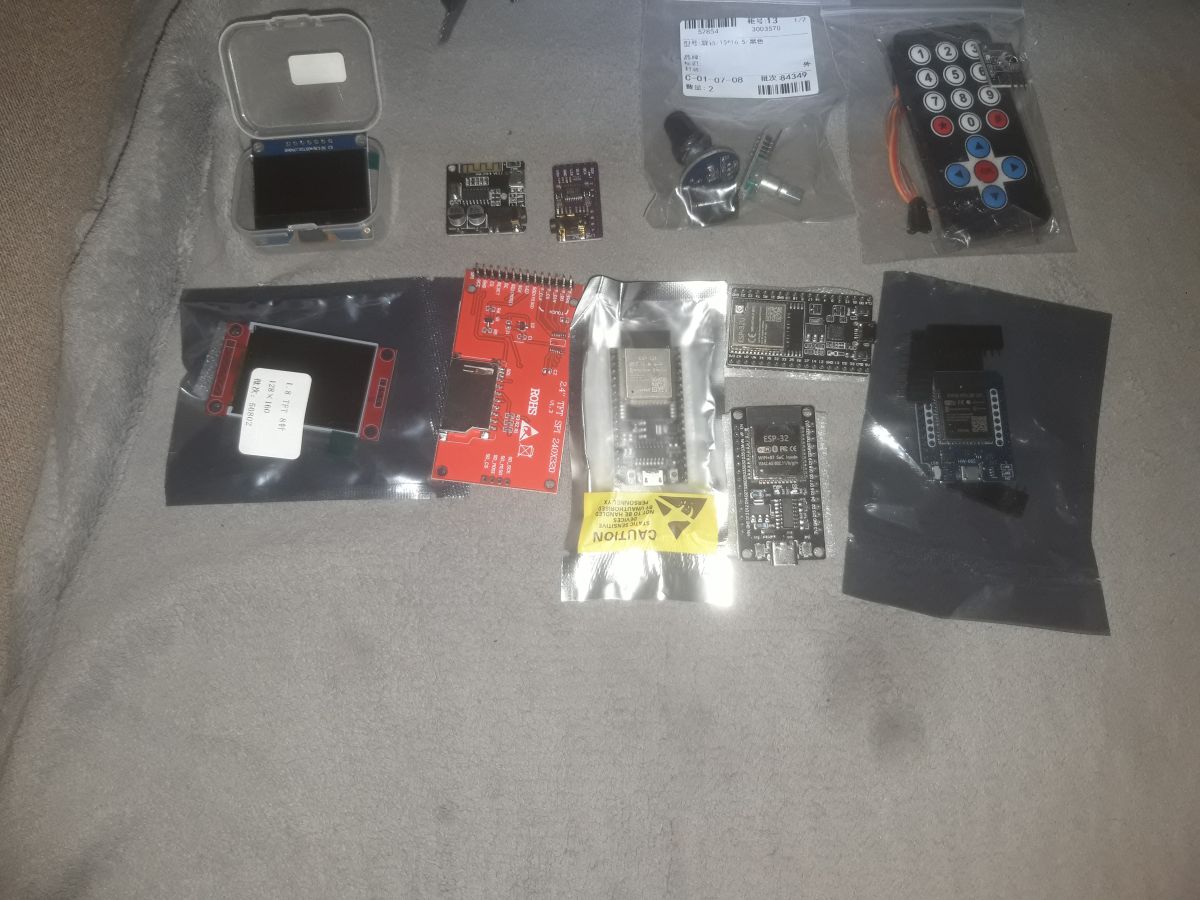
    I have these modules, displays..., I will see if they are suitable to build this radio. I didn't understand a few things...:
    - does the radio need a computer, a laptop, on for it to work? From which it downloads some more data?
    - how is it with searching, adding WIFI networks? I only need to search once and it is still stored in the ESP32 module.
    - is there any complete schematic of the radio where there are two encoders added / one to increase volume and the other to select banks and stations? /, a couple of buttons to store stations in memory and a menu button where there could be other menus without having to use the remote for basic options.
    -How is it with updating and searching for stations? Is it possible to search for Czech and Slovak stations there?
    Thanks for your reply
    Odoslať spätnú väzbu
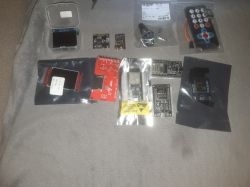
    Set of ESP32 modules, displays, encoders, and IR remote control on fabric
  • ADVERTISEMENT
  • #1802 21772518
    robgold
    Level 21  
    >>21772492 Which version of the radio do you want to build ? We have three different versions of the radio discussed in this thread:

    - colleague Mastra's version XXL v2 the first one you see in the first posts
    - my version Evo v3
    These two are compatible in terms of schematics and connections, they support the OLED 256x64 SSD1322 display

    - version of my colleague Master XXL v3 with a colour display

    All are based on the ESP32-S3 module.
  • #1803 21772528
    DJCheester
    Level 27  
    As a colleague above described ESP you have a different colour display supposedly there is but I don't know on what controller and resolution. Here the foreman's project is on a 320x480 LCD. A remote control and encoder might be suitable.

    No computer connection is required, just a wifi signal around the house. The Robgold version, on the other hand, has a web control interface whether on a computer or smartphone.

    Regards...
  • ADVERTISEMENT
  • #1804 21772545
    supsak
    Level 11  
    Hello.
    I have two colour displays: a 2.4" SPI24x320 and a second smaller 1.8" display. Both are on an ST7735 chip. For me, a project with just a Wi-Fi connection would be ideal, so which of these three versions could be used?
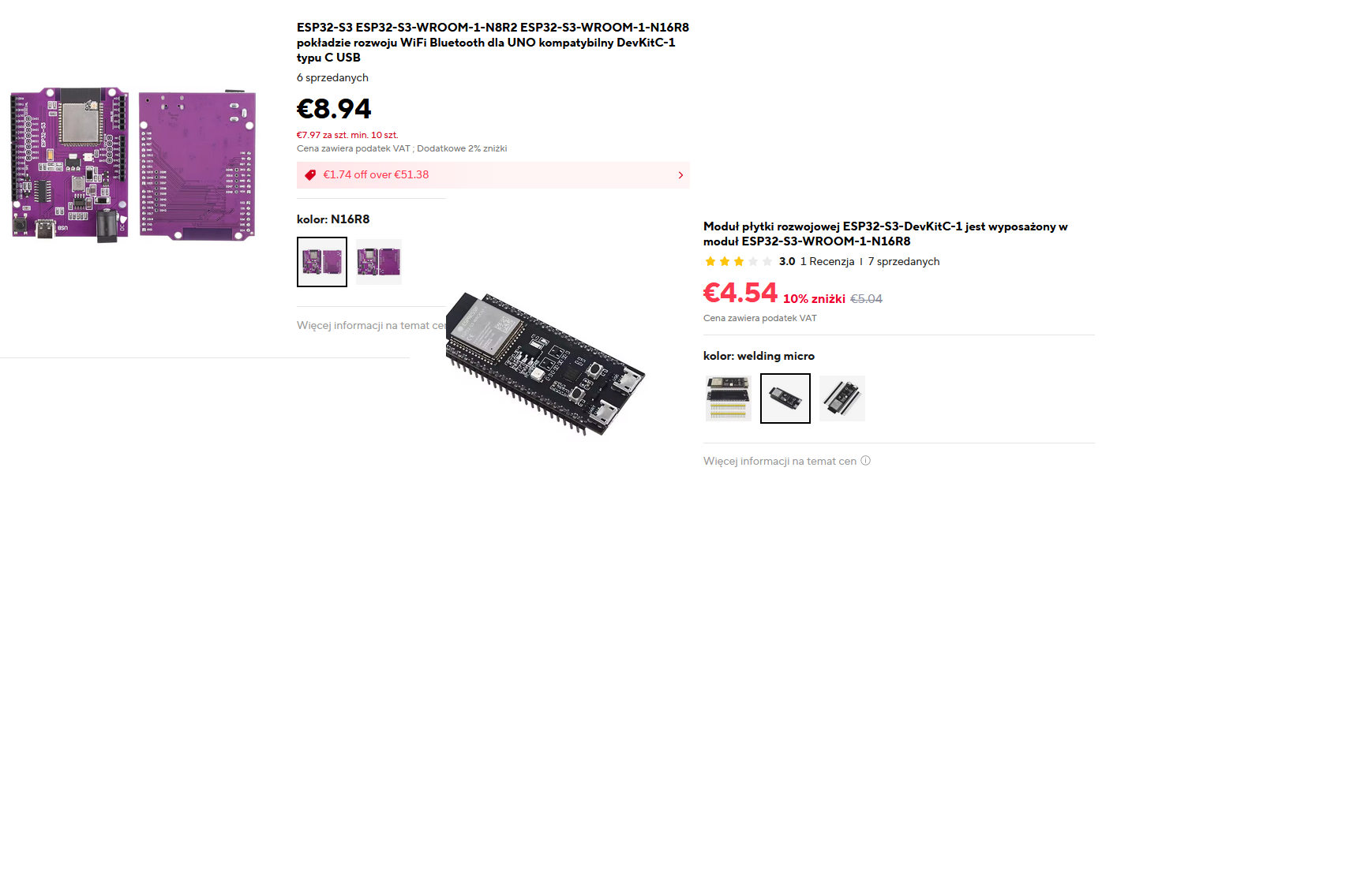
    Will I need to buy another ESP32 module? The ones I have are not suitable for this project? Can you give me a link to a suitable ESP32 module?,or perhaps a display if none of them are suitable for the project?

    Thanks.

    Added after 14 [minutes]:

    >>21772545 Larger plate would be positive? For me it's ideal as it also has the ability to connect an external Wi-Fi antenna for signal reception.
    Two ESP32-S3 development boards with prices and descriptions, top view.
  • #1805 21772610
    DJCheester
    Level 27  
    Hello ESP32 with antenna socket

    https://pl.aliexpress.com/item/1005009212121307.html

    Plus an antenna such as in the link below or innA

    https://pl.aliexpress.com/item/1005003055160772.html

    Plus I see the D/A converter you have if it's a PCM5102A it could be.

    Plus a 3.12" OLED display if you go for Robgold's colleague's version (Recommended)

    https://pl.aliexpress.com/item/1005008615548045.html

    For Robgold's colleague's version this will suffice.

    If for a colleague's version of V3 then you need to buy an LCD

    https://pl.aliexpress.com/item/1005003033844928.html

    For this in the Major's project you need a memory card i.e. you need to purchase a memory card module like this.

    https://pl.aliexpress.com/item/1005005302035188.html

    If anything is unclear, please ask.

    Greetings....

    Added after 1 [minute]:

    The display what you have has too little resolution. For a DIY project it will not be good.

    Greetings...
  • #1806 21772641
    supsak
    Level 11  
    Thanks for the links.
    I will order the ESP32 module. What display will I need for a version that doesn't require a computer or mobile phone for control?
    Probably a project from the Major
  • #1807 21772739
    DJCheester
    Level 27  
    Hi both radios do not require a computer (they are controlled by the NEC ir remote control) the only thing they require is a wifi signal and that is all.
    The Robgold project has additionally the possibility to control through the website but you don't have to use it. You can only use the remote control.

    Also, the difference is that Majstra downloads the banks from Github and you actually have his links, with Robgold you can add your own.

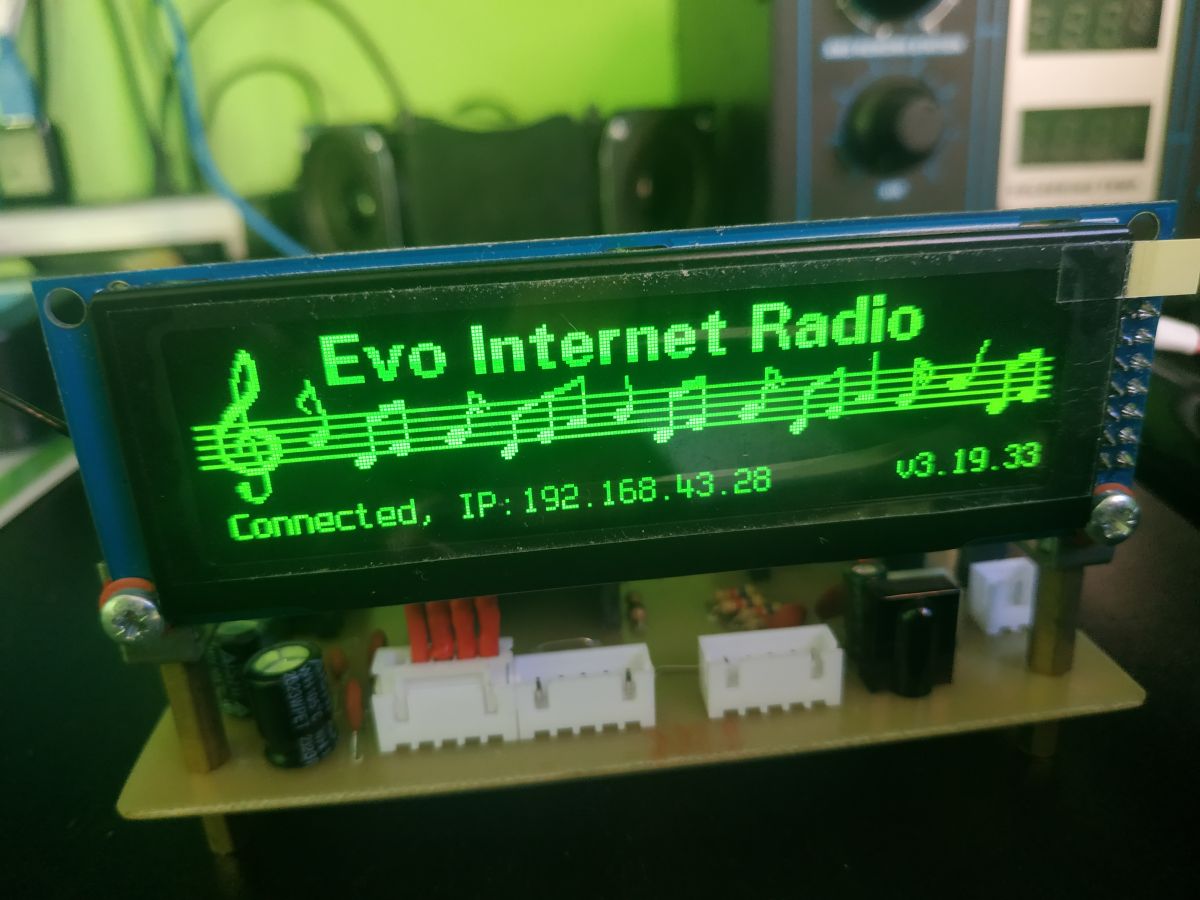
    Robgold's radio with OLED display looks like this.

    Robgold internet radio with OLED screen showing IP address and firmware version

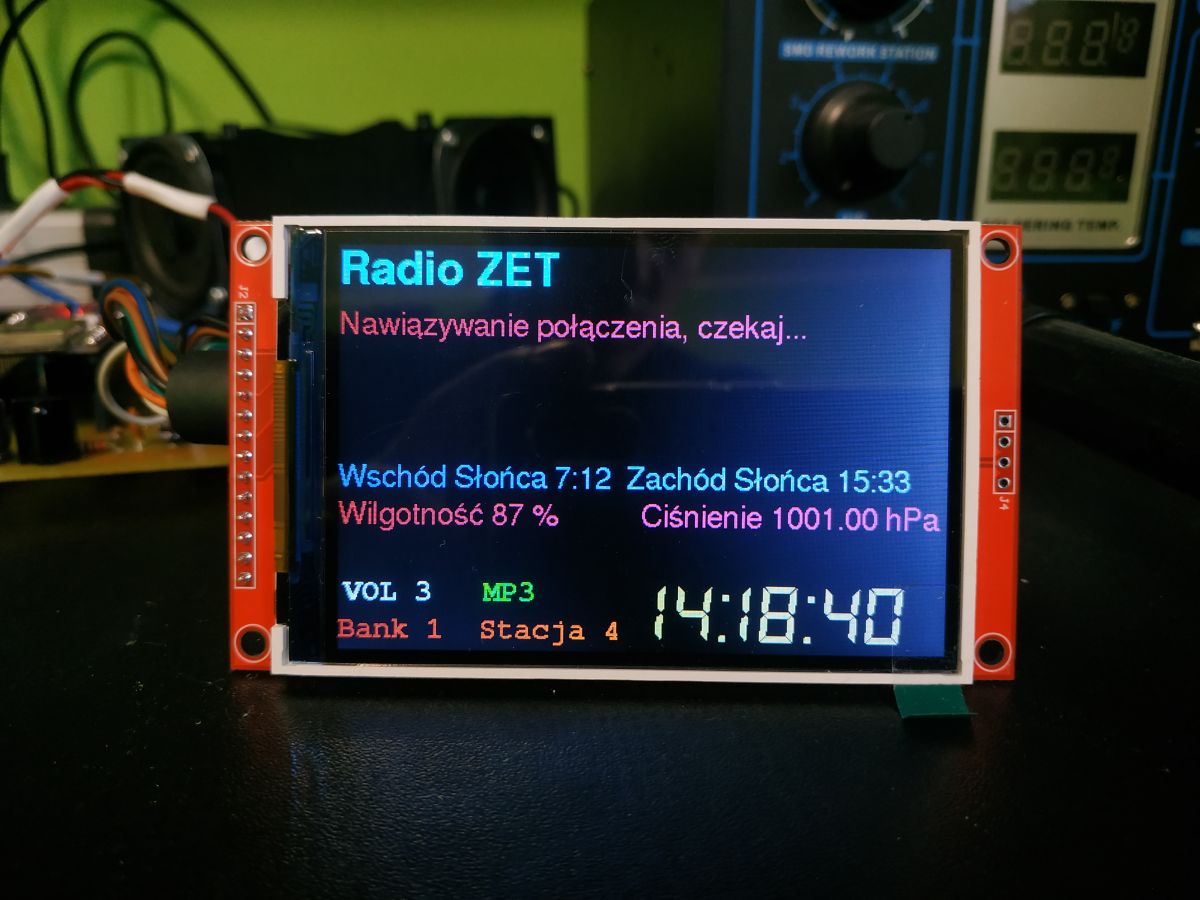
    The Major's radio looks like this and additionally has music playback from an SD card

    Color LCD screen displaying internet radio interface with weather and time info

    At Robgold's there is only a radio.

    Greetings...

    Added after 1 [minute]:

    Order the N16R8 ESP32 S3 module. Greetings...

    Added after 5 [minutes]:

    If you plan to assemble the radio also think about the PCB, colleague Robgold on his github has gerber files and you can order PCB from china but it is a PCB containing SMD components and you need to be skilled to solder it yourself.

    I, on the other hand, have made myself a PCB with prewired components and I have both the Robgold and Majster versions.

    Now I am designing another one for the Robgold version, but including two encoders.

    Regards....
  • #1808 21772760
    kula350
    Level 10  
    Does not work. Cannot compile. Library errors, declaration errors, Audio audio name missing. Does anyone have such a radio similar working. I would like to make one for myself.

    Added after 9 [minutes]:

    NOTE: the Audio library runs on architecture(/architectures) itself and may not be compatible with the current board which runs on esp32 architecture(/architectures).

    from E:1Arduino15ESP~~Internet tuner~Complete documentation version 2ESP32_radio_player_v2-mainESP32_radio_player_v2-mainESP32_radio_v2.ino:2:

    21 | DACClass(Dacc *_dac, uint32_t _dacId, IRQn_Type _isrId) :
    | ~ ^~
    | )
    C:³³³³AppData³³³ocalArduino15³³³³³ware³³³dAC.h:35:9: error: 'Dacc' does not name a type
    35 | Dacc *dac;
    | ^~~~
    C:³³³³³³³³AppData³³³ocalArduino15³³³³³³³ware³³³³³³³dAC.h:37:9: error: 'IRQn_Type' does not name a type
    37 | IRQn_Type isrId;
    | ^~~~~~~~~
    C:³³³³AppData³³³ocalArduino15³³³³³ware³³³data³³³data³³³/dAC.h: In member function 'void DACClass::enableInterrupts()':
    C:³³³_lasAppData³³³ocalArduino15packages³³³d32.3.4³³librariesAudioAudioClass/DAC.h:31:51: error: 'isrId' was not declared in this scope
    31 | void enableInterrupts() { NVIC_EnableIRQ(isrId); };
    | ^~~~~
    C:³³³³³³³³AppData³³³ocalArduino15³³³³³³³hardware³³³³³³³DAC.h:31:36: error: 'NVIC_EnableIRQ' was not declared in this scope
    31 | void enableInterrupts() { NVIC_EnableIRQ(isrId); };
    | ^~~~~~~~~~~~~~
    C:³³³³³³³³AppData³³³ocalArduino15³³³³³³³³³³³hardware³³³³³³³DAC.h: In member function 'void DACClass::disableInterrupts()':
    'isrId' was not declared in this scope
    32 | void disableInterrupts() { NVIC_DisableIRQ(isrId); };
    | ^~~~~
    C:³³³³³³³³AppData³³³ocalArduino15³³³³³³³³³³³hardware³³³³³³³DAC.h:32:36: error: 'NVIC_DisableIRQ' was not declared in this scope
    32 | void disableInterrupts() { NVIC_DisableIRQ(isrId); };
    | ^~~~~~~~~~~~~~~
    C:³³³³³³³³AppData³³³ocalArduino15³³³³³³³ware³³³³³³³3.3.4³³³³³³³³³³³ audio³³³/Audio.h: In member function 'virtual size_t AudioClass::write(uint8_t)':

    25 | virtual size_t write(uint8_t c) { /* not implemented */ };
    | ^
    E:1Arduino~Internet tuner~Complete documentation version 2ESP32_radio_player_v2-mainESP32_radio_player_v2-mainESP32_radio_v2.ino: At global scope:
    E:1Arduino~Internet Tuner~Complete Documentation Version 2ESP32_radio_player_v2-mainESP32_radio_player_v2-mainESP32_radio_v2.ino:166:1: error: 'Audio' does not name a type
    166 | Audio audio; // Object for audio and audio related functions
    | ^~~~~
    E:■Arduino~Internet Tuner~Complete Documentation Version 2ESP32_radio_player_v2-mainESP32_radio_player_v2-mainESP32_radio_v2.ino:167:1: error: 'AudioBuffer' does not name a type
    167 | AudioBuffer audioBuffer; // Audio buffer for smoother playback of streams and files
    | ^~~~~~~~~~~
    E:1Arduino~Internet tuner~Complete documentation version 2ESP32_radio_player_v2-mainESP32_radio_player_v2-mainESP32_radio_v2.ino:180:1: warning: 'template<unsigned int N> class ArduinoJson::V742PB22::StaticJsonDocument' is deprecated: use JsonDocument instead [-Wdeprecated-declarations]
    180 | StaticJsonDocument<1024> doc; // JSON size assumed to be 1024 bytes
    | ^~~~~~~~~~~~~~~~~~


    from E:‗1ArduinoJsonSrc/ArduinoJsonSrc/ArduinoJson.h:12, from E:‗1ArduinoJsonSrc/ArduinoJsonSrc/ArduinoJson.h:9, from E:‗1ArduinoJsonSrc/ArduinoJsonSrc/ArduinoJson.h:9, from E:‗1ArduinoJsonSrc/ArduinoJsonSrc/ArduinoJson.h:12:
    C:³³³³AppData³³³ocalArduino15packages³³³hardware3.3.4³³braries³³ArduinoJson³³/ArduinoJson/compatibility.hpp:63:58: note: declared here
    63 | class ARDUINOJSON_DEPRECATED("use JsonDocument instead") StaticJsonDocument
    | ^~~~~~~~~~~~~~~~~~
    E:1Arduino_ESP~~Internet tuner~~Complete documentation version 2ESP32_radio_player_v2-mainESP32_radio_player_v2-mainESP32_radio_v2.ino: In function 'void pulseISR()':
    E:1Arduino~~Internet tuner~~Complete documentation version 2ESP32_radio_player_v2-mainESP32_radio_player_v2-mainESP32_radio_v2.ino:306:47: warning: using value of assignment with 'volatile'-qualified left operand is deprecated [-Wvolatile]
    306 | if ((pulse_ready== true) && (pulse_ready9ms = true))
    | ~~~~~~~~~~~~~~~~^~~~~~~
    E:‗E:‖1Arduino - Internet Tuner - Complete Documentation Version 2ESP32_radio_player_v2-mainESP32_radio_player_v2-mainESP32_radio_v2.ino: In function 'void changeStation()':
    E:‗E:‗Arduino_ESP2-mainESP32_radio_player_v2-mainESP32_radio_v2-mainESP32_radio_v2.ino:1015:5: error: 'audio' was not declared in this scope; did you mean 'Audio'?
    1015 | audio.connecttohost(stationUrl.c_str());
    | ^~~~~
    | Audio
    E:\1Arduino~~Internet tuner~~Complete documentation version 2ESP32_radio_player_v2-mainESP32_radio_player_v2-mainESP32_radio_v2.ino: In function 'void playFromSelectedFolder()':
    E:E:Arduino_ESP_v2-main_radio_v2.ino internet~~Complete Documentation Version 2ESP32_radio_player_v2-mainESP32_radio_player_v2-mainESP32_radio_v2.ino:1717:5: error: 'audio' was not declared in this scope; did you mean 'Audio'?
    1717 | audio.connecttoFS(SD, fullPath.c_str());
    | ^~~~~
    | Audio
    E:‗E:‖Arduino - Internet Tuner - Version 2 - Documentation version 2 - E:‗E:‗E:‗E:‗E:‗E:‗E:‗E:‗E:‗E:‗E:‗E:‗E:‗E:‗E:‗E:‗E:‖': In function - void playFile()':
    E:‗E:‖Arduino~Internet Tuner~Complete Documentation Version 2ESP32_radio_player_v2-mainESP32_radio_player_v2-mainESP32_radio_v2.ino:1960:5: error: 'audio' was not declared in this scope; did you mean 'Audio'?
    1960 | audio.connecttoFS(SD, fullPath.c_str());
    | ^~~~~
    | Audio
    E:‗E:‖1Arduino -EESP~~~Internet Tuner -~Complete Documentation Version 2 - ‗EESP32_radio_player_v2-mainESP32_radio_player_v2-mainESP32_radio_v2.ino: In function - void handleEncoder1Rotation()':
    E:‗E:‗Arduino_EESP32_radio_player_v2-mainESP32_radio_player_v2-mainESP32_radio_v2.ino:2259:5: error: 'audio' was not declared in this scope; did you mean 'Audio'?
    2259 | audio.setVolume(volumeValue); // allowed range 0...21
    | ^~~~~
    | Audio
    E:‗E:‖Arduino - Internet Tuner - Complete Documentation Version 2ESP32_radio_player_v2-mainESP32_radio_player_v2-mainESP32_radio_v2.ino: In function 'void updateTimer()':
    E:‗E:‗Arduino_EESP32_radio_player_v2-mainESP32_radio_player_v2-mainESP32_radio_v2.ino:2469:22: error: 'audio' was not declared in this scope; did you mean 'Audio'?
    2469 | if (timeDisplay && audio.isRunning())
    | ^~~~~
    | Audio
    E:■Arduino~Internet tuner~Complete documentation version 2ESP32_radio_player_v2-mainESP32_radio_player_v2-mainESP32_radio_v2.ino:2541:23: error: 'audio' was not declared in this scope; did you mean 'Audio'?
    2541 | if (timeDisplay && !audio.isRunning())
    | ^~~~~
    | Audio
    E:‗E:‖Arduino~~Internet tuner~~Complete documentation version 2ESP32_radio_player_v2-mainESP32_radio_player_v2-mainESP32_radio_v2.ino: In function 'void volumeSet()':
    E:‗E:‖Arduino~Internet Tuner~Complete Documentation Version 2ESP32_radio_player_v2-mainESP32_radio_player_v2-mainESP32_radio_v2.ino:2924:3: error: 'audio' was not declared in this scope; did you mean 'Audio'?
    2924 | audio.setVolume(volumeValue); // allowed range 0...21
    | ^~~~~
    | Audio
    E:‗E:‖1Arduino -EESP~~~Internet tuner~~~Complete documentation version 2ESP32_radio_player_v2-mainESP32_radio_player_v2-mainESP32_radio_v2.ino: In function 'void loadVolumeSettings(int, int)':
    E:‗E:‗Arduino'~~Internet tuner~~Complete documentation version 2ESP32_radio_player_v2-mainESP32_radio_player_v2-mainESP32_radio_v2.ino:3075:7: error: 'audio' was not declared in this scope; did you mean 'Audio'?
    3075 | audio.setVolume(volumeValue); // allowed range 0...21
    | ^~~~~
    | Audio
    E:1Arduino~Internet tuner~Complete documentation version 2ESP32_radio_player_v2-mainESP32_radio_player_v2-mainESP32_radio_v2.ino:3112:7: error: 'audio' was not declared in this scope; did you mean 'Audio'?
    3112 | audio.setVolume(volumeValue); // allowed range 0...21
    | ^~~~~
    | Audio

    E:‗E:‗Arduino_EESP32_radio_player_v2-mainESP32_radio_player_v2-mainESP32_radio_v2.ino:3382:5: error: 'audio' was not declared in this scope; did you mean 'Audio'?
    3382 | audio.setVolume(0);
    | ^~~~~
    | Audio
    E:E:1Arduino~Internet tuner~Complete documentation version 2ESP32_radio_player_v2-mainESP32_radio_player_v2-mainESP32_radio_v2.ino:3388:5: error: 'audio' was not declared in this scope; did you mean 'Audio'?
    3388 | audio.setVolume(volumeValue);
    | ^~~~~
    | Audio
    'audio' was not declared in this scope; did you mean 'Audio'?
    3392 | Serial.println(audio.getVolume());
    | ^~~~~
    | Audio
    E:‗E:‖1Arduino -EESP~~~Internet Tuner -~Complete Documentation Version 2ESP32_radio_player_v2-mainESP32_radio_player_v2-mainESP32_radio_v2.ino: In function -Void togglePauseResume()‖:
    E:‗E:‗Arduino_EESP32_radio_player_v2-mainESP32_radio_player_v2-mainESP32_radio_v2.ino:3408:3: error: 'audio' was not declared in this scope; did you mean 'Audio'?
    3408 | audio.pauseResume(); // this function handles both states internally
    | ^~~~~
    | audio
    E:‖1Arduino -ESP~~Internet tuner~~Complete documentation version 2ESP32_radio_player_v2-mainESP32_radio_player_v2-mainESP32_radio_v2.ino: In function 'void setup()':
    'audio' was not declared in this scope; did you mean 'Audio'?
    3444 | audio.setPinout(I2S_BCLK, I2S_LRC, I2S_DOUT); // Configure pinout for I2S audio interface
    | ^~~~~
    | Audio
    E:■Arduino~Internet tuner~Complete documentation version 2ESP32_radio_player_v2-mainESP32_radio_player_v2-mainESP32_radio_v2.ino:3479:3: error: 'audioBuffer' was not declared in this scope
    3479 | audioBuffer.changeMaxBlockSize(16384); // Method call on audioBuffer object // is default 1600 for mp3 and aac, set 16384 for FLAC
    | ^~~~~~~~~~~
    E:‗1Arduino' -EESP~~~Internet tuner~~Complete documentation version 2ESP32_radio_player_v2-mainESP32_radio_player_v2-mainESP32_radio_v2.ino: In function 'void loop()':
    E:‗E:‗Arduino_EESP32_radio_player_v2-mainESP32_radio_player_v2-mainESP32_radio_v2.ino:3531:3: error: 'audio' was not declared in this scope; did you mean 'Audio'?
    3531 | audio.loop(); // Performs main loop for audio object (e.g. audio playback, audio handling)
    | ^~~~~
    | audio
    cc1plus.exe: some warnings being treated as errors
    exit status 1

    Compilation error: 'Audio' does not name a type
  • #1809 21772825
    DJCheester
    Level 27  
    And why are you compiling such an old version, there are now V3 and V3 Evo ?

    Greetings ...
  • #1810 21772826
    kula350
    Level 10  
    >>21766789 It doesn't even compile for me. It just plays on my nerves. Does anyone have a proven working one? Maybe this one?

    Added after 35 [seconds]:

    Because I don't have another one.
  • #1811 21772830
    DJCheester
    Level 27  
    For the V3 I recently put together a step-by-step guide on how to install the Arduino and all the add-ons in a pdf file. Look back in the subject line.

    Radio as far as I know already a dozen people have done or even dozens of software and compilation problems are not there as long as you follow these instructions

    Greetings....

    Added after 3 [minutes]:

    Robgold's fellow OLED V3 Evo

    https://github.com/dzikakuna/ESP32_radio_evo3/tree/main

    Colleague LCD v3

    https://github.com/sarunia/ESP32_internet_radio_v3

    Other libraries were needed for the older version.

    Note the Mayster and Robgold soft have different pin connections I am talking about the V3 and V3 Evo versions

    Greetings ...
  • ADVERTISEMENT
  • #1812 21772845
    kula350
    Level 10  
    >>21772830 Thanks, I'll get on with it.

    Added after 19 [minutes]:

    >>21772830 Hello again, There are many folders. What is each one used for? Maybe I am not understanding something. Which file to compile? I'm looking around the forum, but there are over 60 pages.
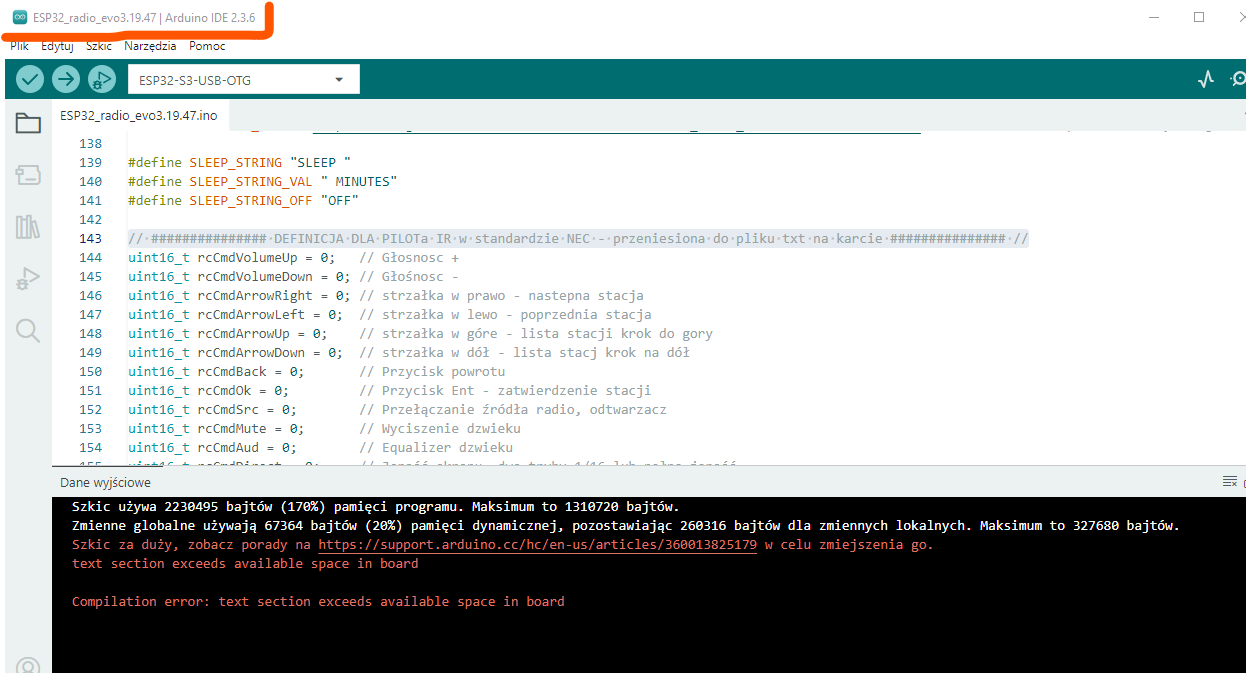
    Now I have this. It compiles from the Arduino folder. Compilation error in Arduino IDE: sketch exceeds memory limit for ESP32
  • #1813 21772868
    DJCheester
    Level 27  
    Well just set up the right tile and the file you have there is a PNG on github configuration you have to set up like in this screenshot.

    Because now you have it wrong.

    Greetings...

    Added after 1 [minute]:

    The board is an ESP32 S3 Dev Module
  • ADVERTISEMENT
  • #1814 21772876
    kula350
    Level 10  
    >>21772868 I do. But! Should I choose the ESP32S3 Dev Module board or the ESP32-S3_OTG, as I have one with two USB? Such as in the pictures in the configuration.
  • #1815 21772878
    DJCheester
    Level 27  
    As I wrote, the module does have an OTG socket, but it is not used in this project.

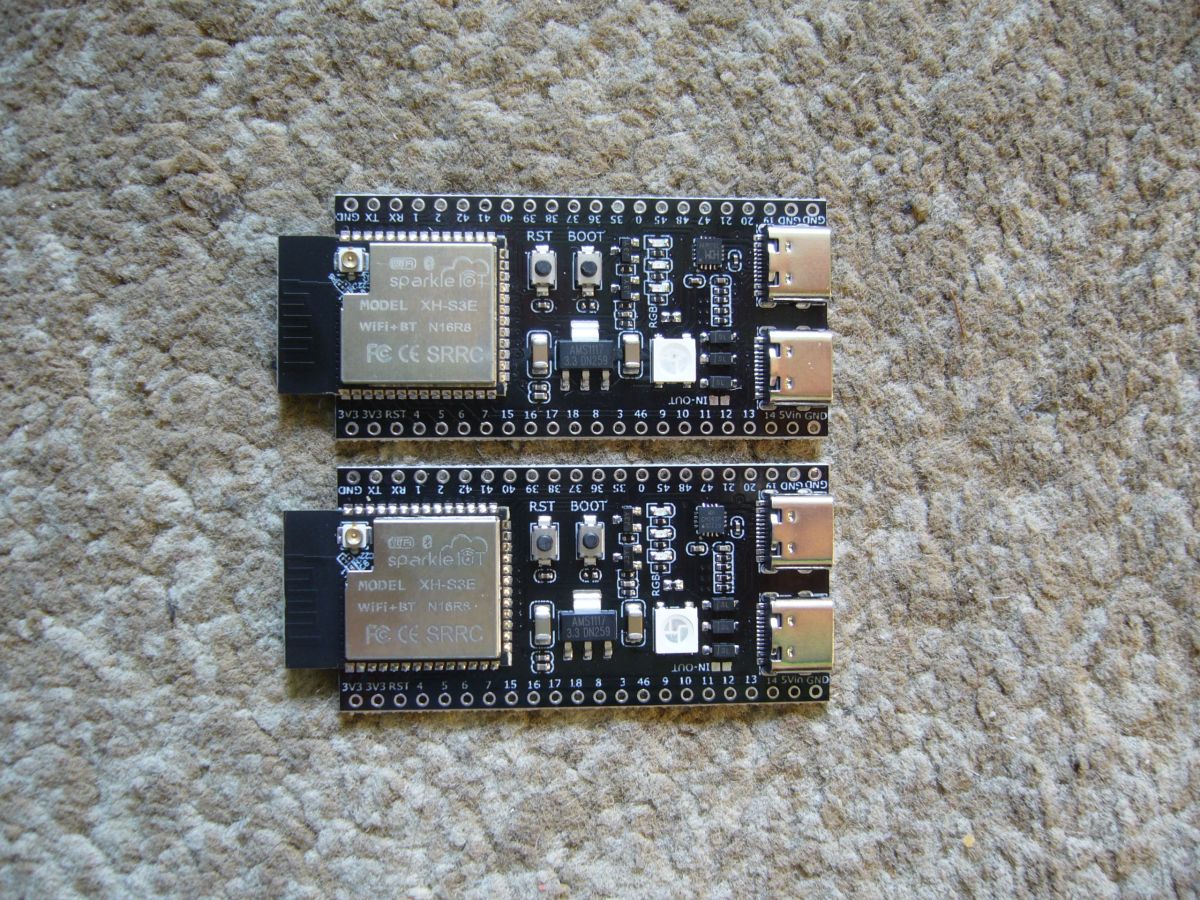
    Two Sparkle IoT XH-S3E modules with N16R8 WiFi+BT chips on carpet

    Such modules can be with or without an antenna socket. It is important that they are N16R8.

    Greetings....

    Added after 3 [minutes]:

    Oh and at startup if you have installed other versions of the libraries and ESP board as recommended then you will have problems with FLAC files and the audio library.

    Everything you need to change where and how is in this manual. I recommend that you do everything as it is written there. For example, the core or board ESP should be version 3.2.0 and not the latest version.

    Best regards...
  • #1816 21772892
    kula350
    Level 10  
    >>21772878 The compilation went. However, that was it with the settings. Now I need to find out how the WiFi is set up on the ESP32? I've never done on an ESP32. Only on the Arduino. This is my first time doing it on ESP32. And first ESP. Thanks. Greetings if I screw something up I'll get back to you.
  • #1817 21772897
    DJCheester
    Level 27  
    Well, now connect the ESP32 chip, PCM, OLED and SD card module according to the schematic. If you have any questions.

    Greetings...
  • #1819 21773042
    efi222
    Level 20  
    amrowek wrote:
    You have to do the grease yourself to short out.

    By default there is a jumper for the PCB antenna. It needs to be removed( I think)
    The components there are terribly small....
  • #1820 21773053
    DJCheester
    Level 27  
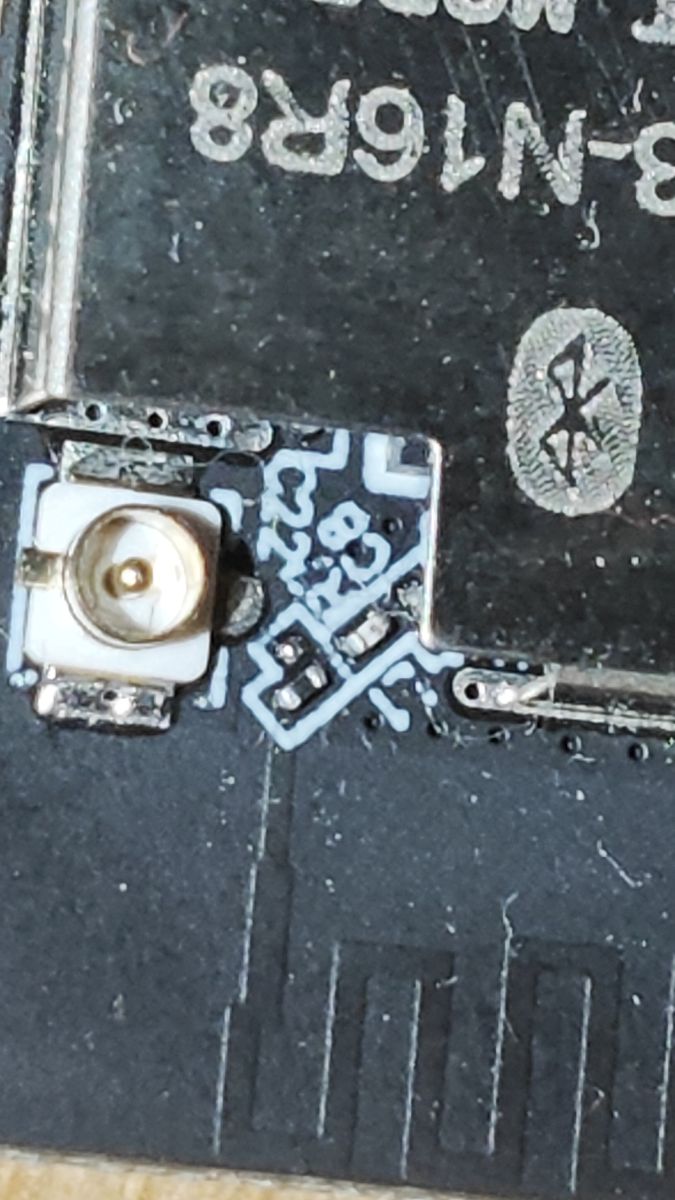
    Yes, there is a jumper for the PCB antenna, it needs to be repositioned or removed and the marked area needs to be shorted with e.g. tin.

    Regards...
  • #1821 21773101
    dawidkosciesza
    Level 8  
    Right, there is a jumper. Good to know because I'm planning to make an external antenna. I would be annoyed that it doesn't work.
    Now the question is, if I give the tin dot too big and connect the two antennas, will it affect anything?


    Close-up of an antenna connector on a PCB with visible solder bridge
  • #1822 21773114
    DJCheester
    Level 27  
    It could be worse because antennas are nasty beasts and literally everything matters there. This can 99% result in poorer coverage. Better to get it right.

    Regards...
  • #1823 21773116
    dawidkosciesza
    Level 8  
    I have a question, is it possible to wake up the radio by any other means than the encoder or remote control?
    I made myself a "Power" button on the ADC keypad, borrowed the code from the remote control under the corresponding button.
    The radio turns off but unfortunately there is no option to turn it on via the same button.
    Anyone have any idea how to solve this?
  • #1824 21773118
    efi222
    Level 20  
    dawidkosciesza wrote:
    or if you give too big a dot of tin

    Alternatively, you could try cutting a section of the path from the jumper to the PCB antenna and pouring tin over these three miniature pads.
  • #1826 21773147
    DJCheester
    Level 27  
    Sometimes on Aliexpress you can buy already with such a jumper switched to the socket.

    Greetings ...
  • #1827 21773156
    efi222
    Level 20  
    amrowek wrote:
    Is there still a dot to be erased? Which one is it, I knew about the jumper but not about .... scraping something

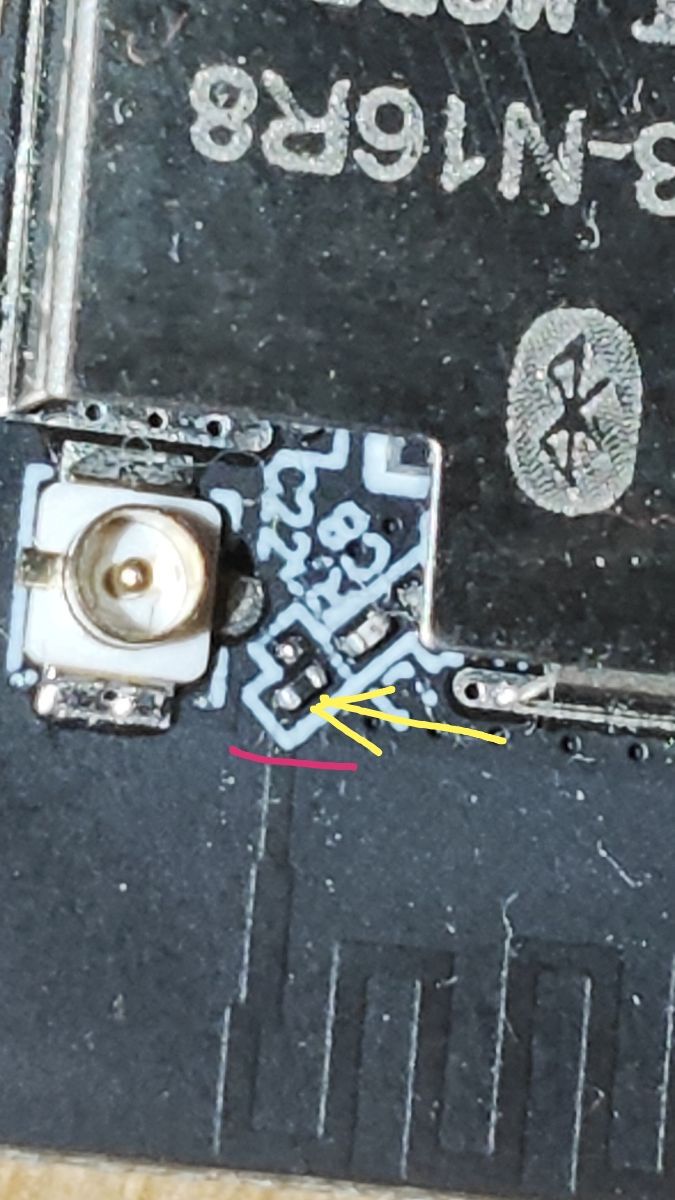
    The arrow shows a jumper which needs to be removed or moved to adjacent pads.
    You can knock out this jumper and cut the path IN place of the red line. And pour tin over these three pads above. These are such small points that I can't even grasp it under a magnifying glass :) Close-up of a PCB showing a jumper and a trace marked for cutting.
  • #1828 21773157
    robgold
    Level 21  
    @dawidkosciesza Evo has preparation for relay, power button and LED from SD card. On the pins of the JOY connector that were never used you have GPIO16, GPIO17.

    On GPIO16 you have the StandBy LED, a high state appears there when the radio is switched off.
    On GPIO17 you have a "copy" of the CS signal, when you use the rear SD reader you can connect an LED there (ground control).
    Comment out the definition of "SD_LED" and use GPIO 17 as SW_POWER.

    Code: C / C++
    Log in, to see the code


    Disable the SD_LED in the definition and replace to have the SW_POWER button on pin 17

    Code: C / C++
    Log in, to see the code


    Unfortunately you still need to improve the signal definitions in the powerOFF section. This will be done in the latest sofet. And currently it doesn't work for you because the ADC reading is done in the main loop and this loop is "dead" in power off mode. This one button must be from outside the ADC matrix.

    Added after 1 [minute]:

    >>21773156 And are you sure it is a jumper ? After all, there could be a resistor there, a coil some kind of antenna matching circuit. Let's not exaggerate the size of a normal 0402 or 0201 component :)
  • #1829 21773168
    dawidkosciesza
    Level 8  
    >>21773157

    Thanks a lot for your help :) I understand that if I change the value to a low state then the LED will light up when the radio starts up because that would suit me better for the set up.
  • #1830 21773183
    robgold
    Level 21  
    >>21773168 This you can already set yourself freely. You only have to change the pinMode for STANDBY_LED in 2 places. For me it was supposed to be an indicator that the radio is off but still "on", because if the clock is not on, you don't know what state it is in. That is, the classic Standby LED known from audio equipment.
📢 Listen (AI):

Topic summary

The discussion centers on the development of an internet radio and audio file player based on the ESP32-S3-WROOM-1 module, featuring a custom-designed prototype PCB with OLED display and user controls including rotary encoders and buttons. Key challenges addressed include pin spacing discrepancies in the ESP32-S3 module footprint, integration of Wi-Fi connectivity with dynamic station list updates, and handling of Polish character encoding on the OLED display. The project uses Arduino IDE (version 2.3.2) with ESP-IDF support and requires enabling PSRAM. Audio playback supports MP3, AAC, and FLAC streams, with the ESP32-audioI2S library recommended over the incompatible Audio library. Users reported issues with SPI MISO pin assignment causing bootloader conflicts, resolved by reassigning MISO to pin 35. The project incorporates WiFiManager for network configuration, EEPROM and SD card storage for saving last played station and settings, and includes plans for tone control via an external KA2107 equalizer and a CS8673 amplifier module. Problems with encoder input stability and memory limitations for Bluetooth A2DP on ESP32-S3 were noted. The community suggested alternatives like KaRadio and ESP32-MiniWebRadio projects. Debugging tips include serial terminal logs for HTTP errors and flash memory erasure to resolve boot loops. The project is open-source on GitHub, encouraging forks and modifications. Additional features under development include browser-based updates, directory navigation, and potential audio recording to SD card.
Summary generated by the language model.
ADVERTISEMENT