logo elektroda
logo elektroda
X
logo elektroda

Internet radio and audio file player on ESP32-S3

MAJSTER XXL 259422 2638

TL;DR

  • Built an ESP32-S3 internet radio with an audio file player and OLED desk display, evolving through v1, v2, and v3.
  • Uses an ESP32-S3-WROOM-1, PCM5102A DAC, rotary encoders, and GitHub-hosted station lists split into banks of up to 100 stations.
  • The prototype uses a 2.42" 128x64px white OLED display, with a PCB made in Poland costing 130zl.
  • v3 adds a colour screen, weather, a calendar, RSS news from Polsat News Polska, and full remote control.
  • The first PCB had a pad-spacing mistake for the ESP32-S3-WROOM-1, so the module pins had to be bent slightly to fit.
Generated by the language model.
ADVERTISEMENT
Treść została przetłumaczona polish » english Zobacz oryginalną wersję tematu
📢 Listen (AI):
  • #2461 21858802
    DJCheester
    Level 27  
    Posts: 2049
    Help: 75
    Rate: 949
    And will you make some code/schema available ?

    Added after 1 [hour] 52 [minutes]:

    As it came to me from the beginning on a new computer with Windows 11 to install the environment for programming the radio I have made a step-by-step instruction on how to do it.
    For those who would like to set up the Arduino environment for programming the MajstraXXL and Robgold radios.
    I have included separate instructions for the two softwares to make everything clear.
    In the case of Robgold software, we don't delete the original files from the folders, we just rename them, this is to be able to return to the original files, because Majstra software works on the original files.
    In case of already installed core and Robgold libraries (I mean audioI2S library) you have to restore files with -org suffix and temporarily delete uploaded ones.
    I've made *.bat files in which I've saved the changes, so switching the Arduino environment between Robgold and Majster software comes down to running *.bat file (running bat is done when Arduino IDE is not running)
    If you want, I will also post instructions for creating such *.bat files which make programming much easier if you have both projects.

    Regards ...
    Attachments:
    • Opis - Instalacja Arduino IDE + ESP32 - Win11 - Radio ESP32 Robgold.pdf (6.5 MB) You must be logged in to download this attachment.
    • Opis - Instalacja Arduino IDE + ESP32 - Win11 - Radio ESP32 MajsterXXL.pdf (4.94 MB) You must be logged in to download this attachment.
  • ADVERTISEMENT
  • #2462 21859044
    wieslaw6504
    Level 8  
    Posts: 10
    >>21856609
    I have uploaded this new firmware Evo 3.20.04 MOD, the radio starts up, WiFi address 192.168.4.1, the computer connects and the page to give the router address cannot be displayed. Apart from that it is terribly muddy, nothing works here. Maybe I am doing something wrong. I upload other firmware and they behave normally, everything laughs.
  • #2463 21859048
    ejcon
    Level 16  
    Posts: 253
    Help: 3
    Rate: 54
    wieslaw6504 wrote:
    >>21856609
    I have uploaded this new Evo 3.20.04 MOD firmware, the radio boots up, WiFi address 192.168.4.1, the computer connects and the page to give the router address cannot be displayed. Apart from that it is terribly muddy, nothing works here. Maybe I am doing something wrong. I upload other firmware and they behave normally, everything laughs.

    See this bin, but if it goes into the page, it means that the bin was uploaded wrongly, with what do you upload?
    Attachments:
    • firmware.bin (2.51 MB) You must be logged in to download this attachment.
  • #2464 21859239
    wieslaw6504
    Level 8  
    Posts: 10
    >>21859048
    ESP-Flasher
    I've already uploaded so many times and different ones never had any problems.
    I will upload immediately and write what came out of it.

    Added after 13 [minutes]:

    >>21859239
    Not working.
    Attachments:
    • Internet radio and audio file player on ESP32-S3 Zrzut ekranu (10).png (145.97 KB) You must be logged in to download this attachment.
  • #2465 21859261
    krzychokup
    Level 11  
    Posts: 35
    Rate: 1
    The 192.168.4.1 page is not reporting ?
  • #2466 21859264
    DJCheester
    Level 27  
    Posts: 2049
    Help: 75
    Rate: 949
    Ejcon probably specified a bin to be uploaded via OTA.

    Win Robgold's soft as you write that it laughs and through the site via ota win ejcon's bin.

    Also, start using ESP Flash Download Tool to upload to ESP.

    Regards...
  • #2468 21859267
    DJCheester
    Level 27  
    Posts: 2049
    Help: 75
    Rate: 949
    >>21859261

    This is the Wifi manager page and for it to work you need another device (phone/computer) to connect to the Radio-evo hotspot which the radio puts out as it cannot find the configured router.

    Greetings...
  • ADVERTISEMENT
  • #2469 21859271
    krzychokup
    Level 11  
    Posts: 35
    Rate: 1
    If you have had anything on ESP before, he suggests cleaning SPIFFS.
  • #2470 21859272
    wieslaw6504
    Level 8  
    Posts: 10
    >>21859264
    I have also uploaded the ESP Flash Download Tool and it does not work
    But the ejcona bin works

    Added after 1 [minute]:

    >>21859272
    I have three pieces of ESP-32s3 on all of them is the same thing

    Added after 2 [minutes]:

    >>21859272
    I think I will wait for the newer version of firmwareEVO 3.20.04MOD CAL
  • #2471 21859276
    DJCheester
    Level 27  
    Posts: 2049
    Help: 75
    Rate: 949
    It's which bin doesn't work for you because I don't know now you've stated that it doesn't work and pointed to a post with ejcon content and now you're writing that it works.

    Describe exactly the problem, what are you winning like whether it compiles are or not and not one sentence answer it will be easier to guess.

    Regards...
  • #2472 21859278
    wieslaw6504
    Level 8  
    Posts: 10
    >>21859271
    i clean SPIFFS
  • #2474 21859299
    wieslaw6504
    Level 8  
    Posts: 10
    >>21859276
    ESP32_radio_evo3.20.04. works loads the page through the browser and on the other hand this EVO 3.20.04MOD CAL does not work.
  • #2475 21859302
    DJCheester
    Level 27  
    Posts: 2049
    Help: 75
    Rate: 949
    hevet wrote:
    It's the same one all the time, I just keep modifying it.


    @hevet any chance of getting the radio code from you ?

    Greetings...
  • #2476 21859308
    wieslaw6504
    Level 8  
    Posts: 10
    >>21859299
    I think I'll leave it alone for now
    this is what it looks like after uploading

    Added after 49 [seconds]:

    >>21859308
    Attachments:
    • Internet radio and audio file player on ESP32-S3 Zrzut ekranu (11).png (114.84 KB) You must be logged in to download this attachment.
    • Internet radio and audio file player on ESP32-S3 Zrzut ekranu (12).png (120.81 KB) You must be logged in to download this attachment.
  • ADVERTISEMENT
  • #2478 21859333
    hevet
    Level 18  
    Posts: 346
    Rate: 47
    I do not plan to for the time being.
  • ADVERTISEMENT
  • #2479 21859432
    supsak
    Level 13  
    Posts: 81
    Rate: 5
    >>21858689

    Hi, I am not sure, but on GPI0 18 v verzija Robgold 3.20.04 there is no control, there is fixed 0,3V.

    Added after 8 [minutes]:

    >>21855332

    Hi.
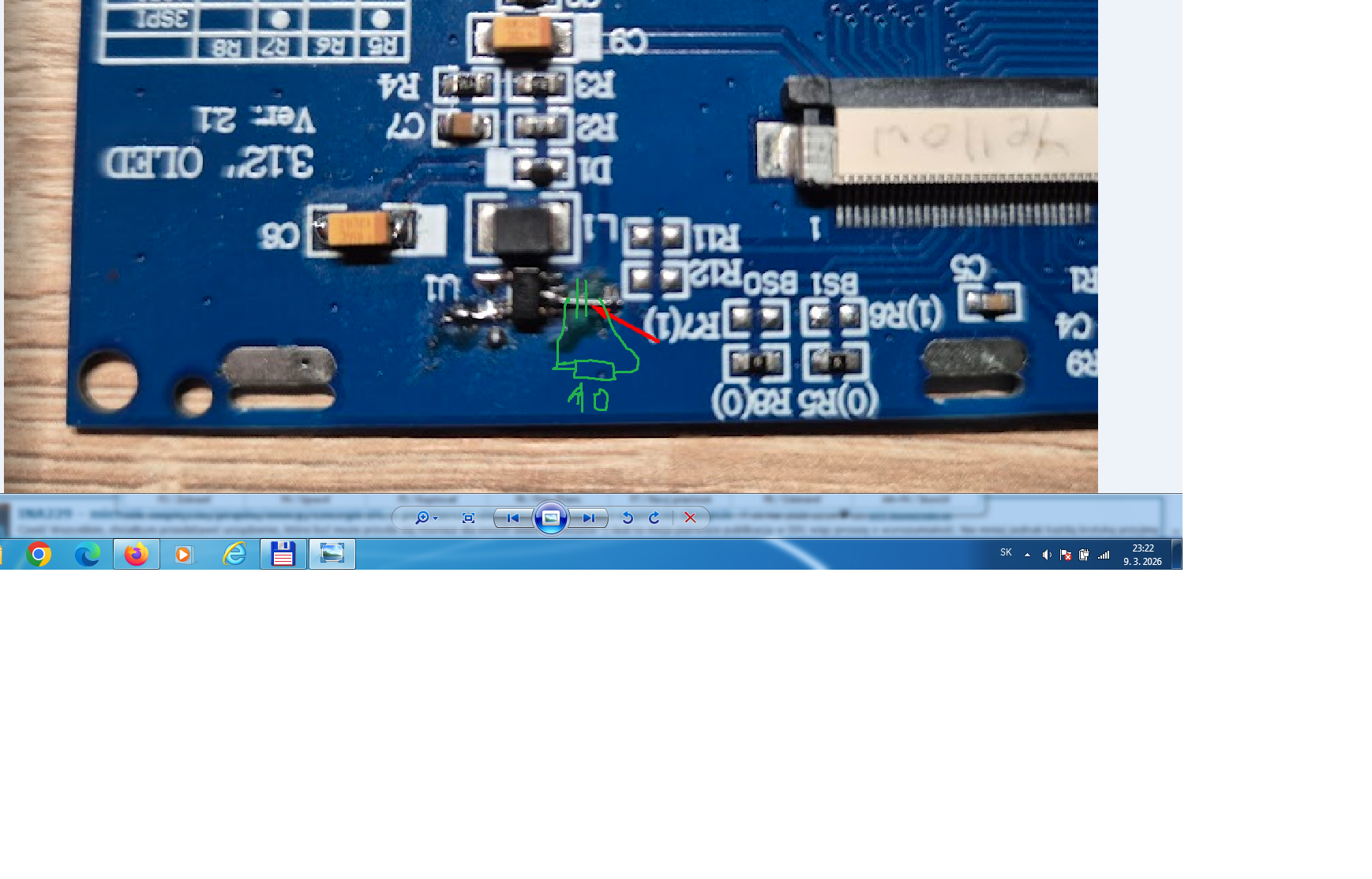
    Myslalesz tu do vyswjetlaca dp massy vstavicz 10 ohm rezistor a to brzecenje, brucanje przestane slychacz?

    Close-up of a blue PCB with SMD parts and handwritten markings indicating a 10-ohm resistor

    Added after 7 [minutes]:

    >>21855200

    Standby LED
    The standby LED has an additional functionality. As in equipment from e.g: Marantz, Denon it flashes during start-up, as the radio already opens the preset bank and starts playing stream the LED goes out. If for some reason we do not have a WiFi connection, the LED will start flashing quickly to inform us of the problem. Apart from this, the standard function of the standby LED is that it lights up when the radio enters power OFF mode.

    At my place it flashes during start-up, then remains on steady as I press the remote control button. v StANBY-POWER OFF nesvjeczi.
    What is needed to make it work as you describe?
  • #2480 21859499
    robgold
    Level 23  
    Posts: 698
    Help: 10
    Rate: 284
    >>21858802 @DJCheester I'm not convinced that you can't use for compiling Majster libraries to FLAC. Especially as I now compile them myself and I know that it agrees correctly the core number with the number from which the library was recompiled. I will download the Majster soft and check it out then this library swap seems unjustified.

    @supsak
    There is no control on GPIO18 in Evo as of today. Perhaps colleague Ejcon added something in his version I will only add it.

    In OLED a resistor MAXIMUM of 2.2 Ohms and 1-1.5 Ohms is recommended.
    Start by adding 10 Ohm in the DAC power supply ground. Raising the converter ground will always have a negative effect on the converter voltage.
  • #2481 21859537
    ejcon
    Level 16  
    Posts: 253
    Help: 3
    Rate: 54
    >>21859432
    This is in my Evo Modification
  • #2482 21859547
    supsak
    Level 13  
    Posts: 81
    Rate: 5
    Hi.
    I have now a 10 ohm resistor to ground on the OLED-display, I think it is too much... I have to change the VU meter is no longer visible, it flashes, switching on the banks is not correct.
  • #2483 21859588
    DJCheester
    Level 27  
    Posts: 2049
    Help: 75
    Rate: 949
    robgold wrote:
    I'm not convinced that you can't use for compiling the Majster libraries to FLAC. Especially as I now compile them myself and I know that the core number matches correctly with the number from which the library was recompiled. I will download the Majster soft and check it, then this replacement of libraries seems unjustified.


    Now with your modifications it may be fine I have to check it out, but before when I had your files the Majster soft compiled uploaded but took a few minutes to connect or didn't connect at all and didn't download the stream.

    Now if it's good you can actually have the swap permanently.

    Regards....
  • #2484 21861062
    grzes_dst
    Level 12  
    Posts: 74
    Rate: 7
    Colleagues, I have been using @robgold's 3.18.13 softwares for a very long time, recently uploaded 3.19.70 and now 3.20.04. Unfortunately in the first softwares after some time the SD card stopped being detected and in these next ones it is the same.
    The reader and the card are functional, when connected to the receiver with @MAJSTER XXL's software it reads from the SD card and I don't know what could be the reason for not detecting SD cards in @robgold's sofet.
    Question: in the new 3.20.04 firmware I would like to enable the ADC keyboard option to control instead of the encoder with up/down arrows, forward/reverse, OK, and 3 buttons e.g. to store 3 stations. I am using the board of my colleague @DJCheester.
    Is it possible to connect an ADC keyboard on @DJCheester's board with one encoder?
  • #2485 21861068
    DJCheester
    Level 27  
    Posts: 2049
    Help: 75
    Rate: 949
    This is how you connect 3v3 GPIO9 and GND and the keyboard will work.
    There is no pin out on a separate socket.

    As for the card you probably have disabled in the software when compiling, do you win the bin files or compile yourself ?

    Greetings ...
  • #2486 21861090
    grzes_dst
    Level 12  
    Posts: 74
    Rate: 7
    The latest soft 3.20.04 j and 3.18.13 were compiled and uploaded in Arduino, while 3.17.70 was uploaded from a bin file.
    As for the keyboard because I haven't played with it yet, am I doing a grid on the resistors?
    Didn't colleague @DJCheester consider improving the board design for the new GPIO9 and LED capabilities?
  • #2487 21861113
    DJCheester
    Level 27  
    Posts: 2049
    Help: 75
    Rate: 949
    As for the keyboard not enough people use it/ leds are in the latest project ;)
    It is possible that also the keyboard will be released in the end it is JST 3-pin only

    Greetings ...
  • #2488 21861118
    grzes_dst
    Level 12  
    Posts: 74
    Rate: 7
    I have not used a keyboard so far either, and it would have been easier to connect to JST 3 instead of making a spider.
    As for the leds, it's true, they are in the latest design and probably some people will use this option.

    Best regards...
  • #2489 21861143
    DJCheester
    Level 27  
    Posts: 2049
    Help: 75
    Rate: 949
    There is a designed LED and a power button.
    In addition, potentiometers on the input of the PAM8403 because the signal is currently too high.

    Greetings...
  • #2490 21861144
    robgold
    Level 23  
    Posts: 698
    Help: 10
    Rate: 284
    >>21861062 As of this software version, the AUTOSTORAGE function has been introduced. You have to define manually in the configuration whether you want to use an SD card or SPIFFS memory or both at the same time and the radio should automatically detect the card.

    Code: C / C++
    Log in, to see the code


    If you are 100% sure that you will always use an SD card then you can set as below:

    Code: C / C++
    Log in, to see the code


    The BIN file you have on GitHub is compiled under SSD1322 display, 1x encoder, AS-AutoStorage enabled. SD card should work 100% on it -> ESP32_radio_evo3.20.04_SSD1322_1ENC_AS.bin


    For the keyboard to work you still need a 22-24k PULLUP resistor on the input and a 100nF capacitor to ground.
    The ADC input is GPIO 9 as below. The keypad itself needs to be enabled in the radio settings.
    Code: C / C++
    Log in, to see the code


    Since version 3.20.04 there are presets, you can program in each bank the first stations from 1-10 as your favourites and with one click on the buttons 0-9 the radio will select the appropriate station. The presets function must also be activated in the radio settings.
📢 Listen (AI):

Topic summary

✨ The discussion centers on the development of an internet radio and audio file player based on the ESP32-S3-WROOM-1 module, featuring a custom-designed prototype PCB with OLED display and user controls including rotary encoders and buttons. Key challenges addressed include pin spacing discrepancies in the ESP32-S3 module footprint, integration of Wi-Fi connectivity with dynamic station list updates, and handling of Polish character encoding on the OLED display. The project uses Arduino IDE (version 2.3.2) with ESP-IDF support and requires enabling PSRAM. Audio playback supports MP3, AAC, and FLAC streams, with the ESP32-audioI2S library recommended over the incompatible Audio library. Users reported issues with SPI MISO pin assignment causing bootloader conflicts, resolved by reassigning MISO to pin 35. The project incorporates WiFiManager for network configuration, EEPROM and SD card storage for saving last played station and settings, and includes plans for tone control via an external KA2107 equalizer and a CS8673 amplifier module. Problems with encoder input stability and memory limitations for Bluetooth A2DP on ESP32-S3 were noted. The community suggested alternatives like KaRadio and ESP32-MiniWebRadio projects. Debugging tips include serial terminal logs for HTTP errors and flash memory erasure to resolve boot loops. The project is open-source on GitHub, encouraging forks and modifications. Additional features under development include browser-based updates, directory navigation, and potential audio recording to SD card.
Generated by the language model.
ADVERTISEMENT