logo elektroda
logo elektroda
X
logo elektroda
Dostępna jest polska wersja

Czy wolisz polską wersję strony elektroda?

Nie, dziękuję Przekieruj mnie tam

How to flash LN882H with open source Tasmota/Esphome style firmware - backup procedure included

p.kaczmarek2 66210 297

TL;DR

  • LN882H modules can be flashed over UART with open-source Tasmota/Esphome-style firmware to free cloud-controlled devices and integrate them with Home Assistant.
  • Wire module TX, RX, GND, 3V3, and BOOT/GPIOA9 to ground, and keep GPIOA9 low throughout the entire flashing process.
  • Backup uses `python LN882H_Flash_Dumper.py COMx flashdump`, and the firmware flash command is `LN882H_CMD_Tool.exe COMx download flash 921000 0x0 flashimage.bin`.
  • After flashing, power-cycle the module, disconnect BOOT from ground, and open 192.168.4.1 to configure it like other OpenBeken/Tasmota-style devices.
  • A reliable external 3.3V supply is recommended because powering directly from the USB-to-UART adapter’s 3.3V pin may fail.
Generated by the language model.
ADVERTISEMENT
📢 Listen (AI):
  • #211 21072601
    divadiow
    Level 38  
    Posts: 5065
    Help: 438
    Rate: 893
    Very cool. I've been spying on your PR to see how it's going!
  • ADVERTISEMENT
  • #212 21072603
    p.kaczmarek2
    Moderator Smart Home
    Posts: 14622
    Help: 655
    Rate: 12638
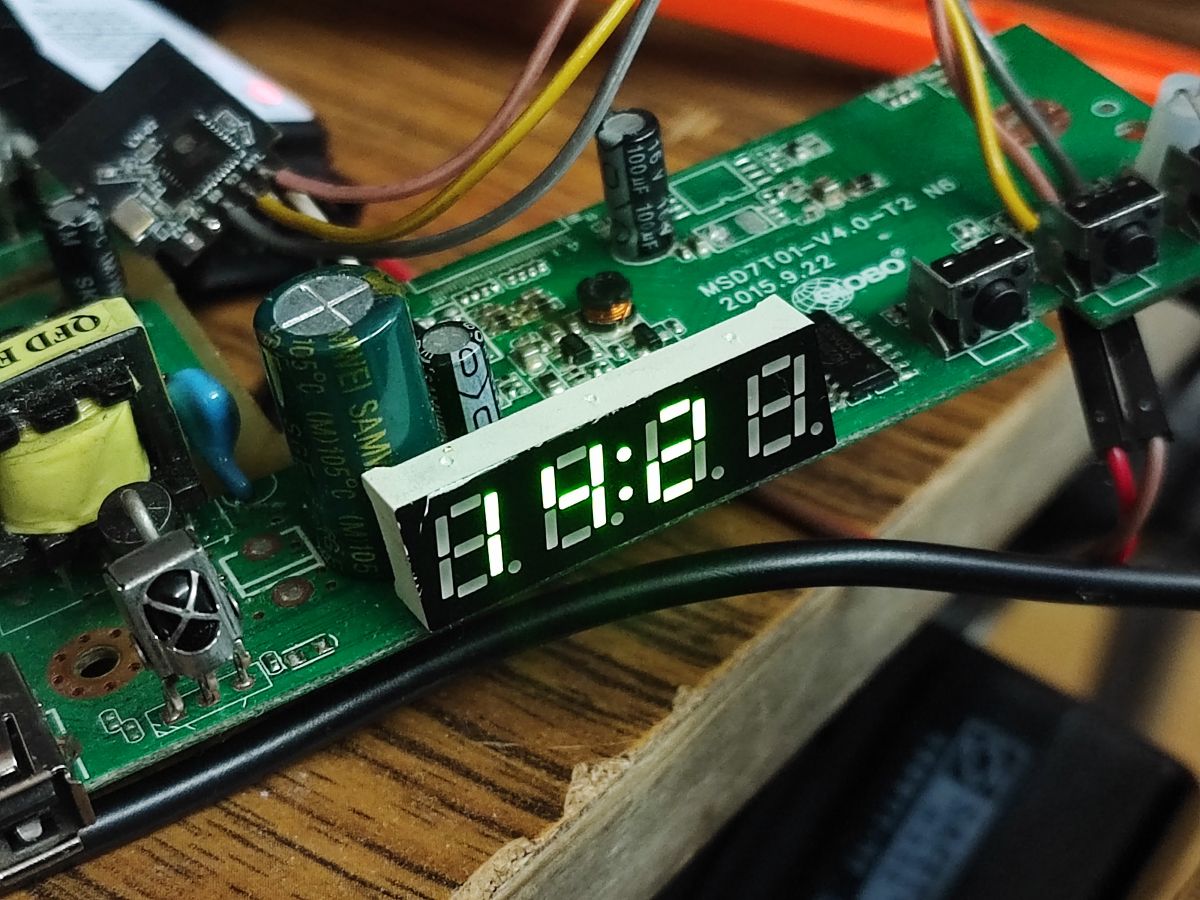
    My PR is very chaotic because I don't even have compiler setup locally and I am doing other things in the background but I finally managed to get stuff displayed.
    LED display showing digits 8.8.8.8 on a circuit board.
    To simplify things, I have a "shared TMGN driver" which supports multiple similiar display controllers like TM1637, TM1638, GN6932, etc.

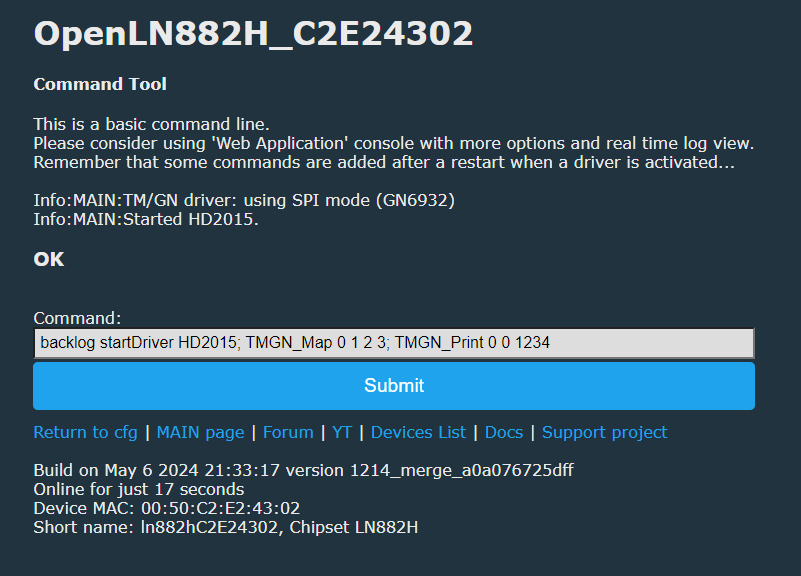
    Added after 27 [minutes]:

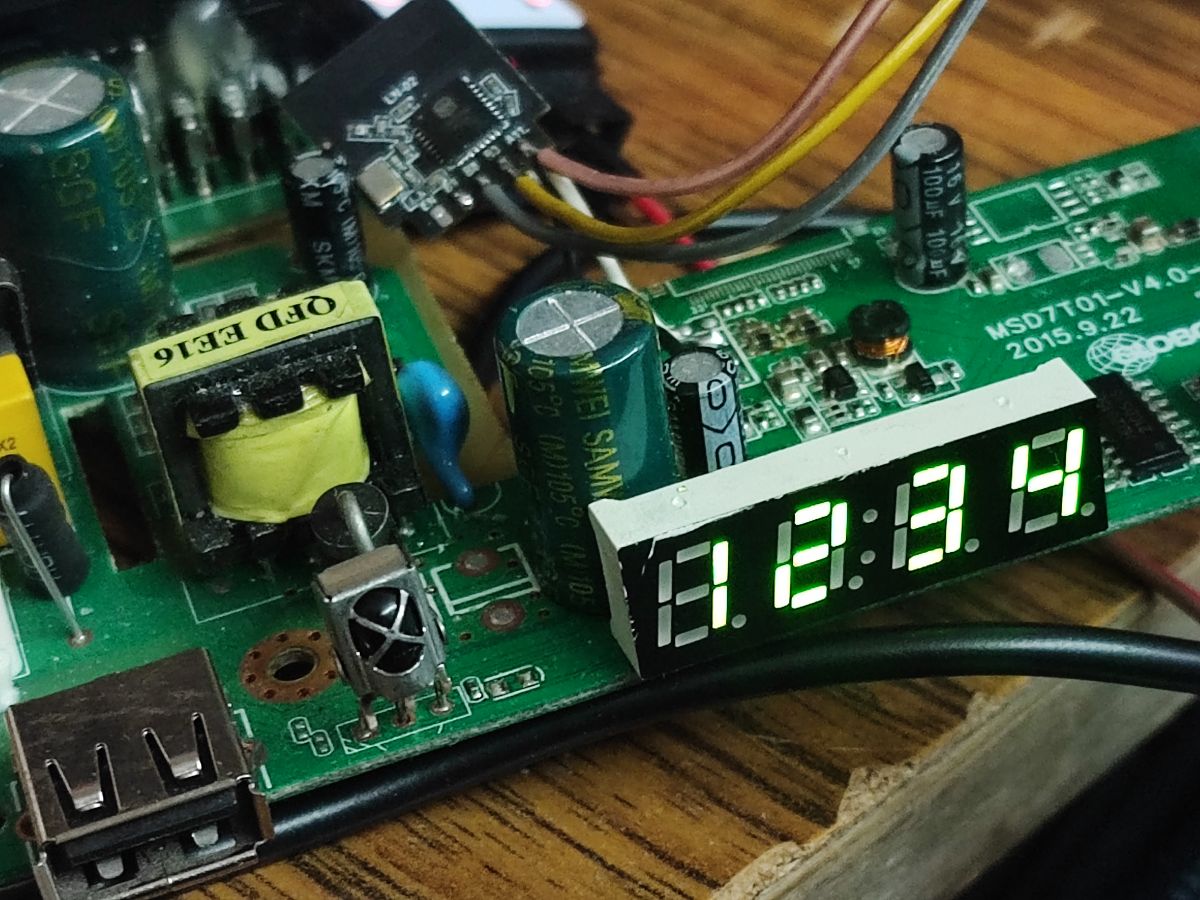
    Ok it's working I guess:
    Screenshot of a command line tool for managing display drivers.
    Close-up of a circuit board with an LED display showing numbers 1.8.9.4.
    Helpful post? Buy me a coffee.
  • #213 21072807
    max4elektroda
    Level 24  
    Posts: 756
    Help: 48
    Rate: 187
    p.kaczmarek2 wrote:
    >>21072408
    Guys, do you have B9 gpio working on your LN882Hs? For me, it's in high state all the time and OBK can't control it.

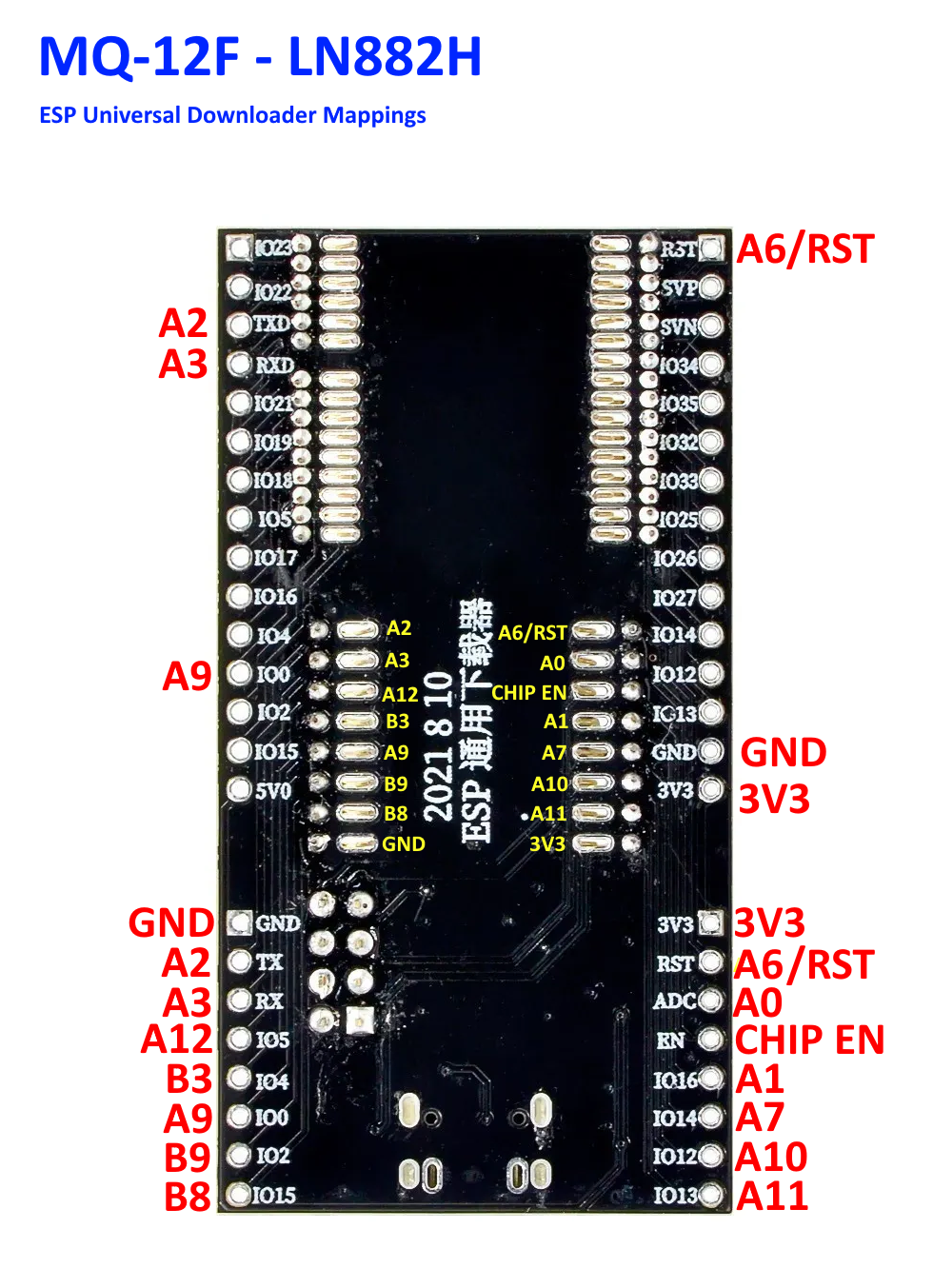
    That's probably, because B9 is Tx1 (so you will find your serial logs there on a physical port - at least this is where I get my logs from ;-))
    TX1 I/O UART_TX1 pin for log printing, corresponding to the GPIOB9 pin (pin 30) of the IC.
  • #214 21072817
    divadiow
    Level 38  
    Posts: 5065
    Help: 438
    Rate: 893
    indeed, but why isn't it controllable? are RX/TX GPIOs always fixed high? The datasheet says FULLMUX, like other controllable GPIOs...
  • #215 21072820
    p.kaczmarek2
    Moderator Smart Home
    Posts: 14622
    Help: 655
    Rate: 12638
    max4elektroda wrote:
    [
    That's probably, because B9 is Tx1 (so you will find your serial logs there on a physical port - at least this is where I get my logs from ;-))
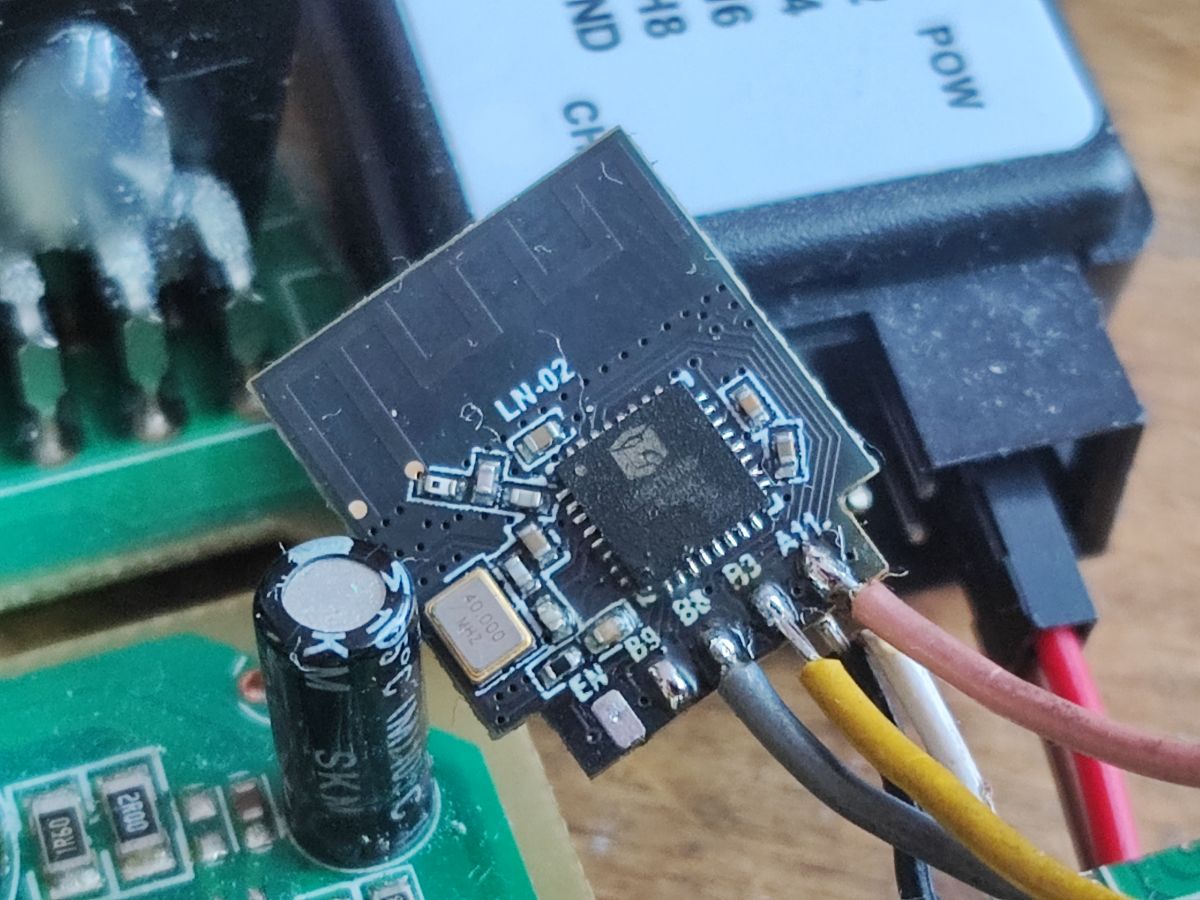
    Wait, but my module has TX and RX on the other side... so there are two UART ports, like on Beken? Well, that makes sense...
    Helpful post? Buy me a coffee.
  • #216 21072827
    max4elektroda
    Level 24  
    Posts: 756
    Help: 48
    Rate: 187
    Yes, there are two UARTS. On my WL2S module, the ports are on the back and labeled accordingly:

    https://obrazki.elektroda.pl/7439873600_1708165255.jpg

    So I think they are defined as UART somwhere, making any other setting useless.
    At least, I didn't even see glitches in serial log, if I change B09 in UI ...
  • #217 21072943
    p.kaczmarek2
    Moderator Smart Home
    Posts: 14622
    Help: 655
    Rate: 12638
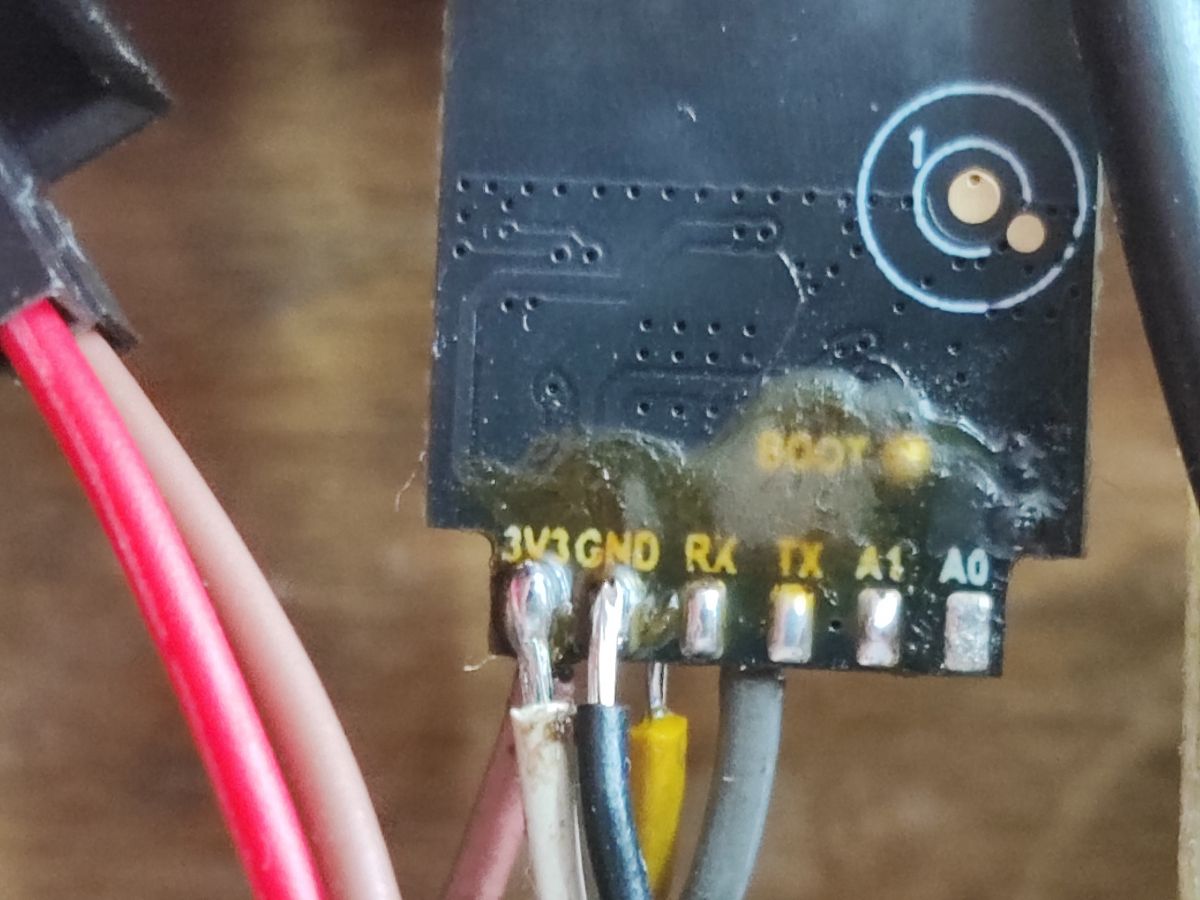
    Well, my module is different, you can see that I have B9 on the back and I was suprised that this B9 was not working:
    Electronic circuit board with connected logic analyzer and additional components. Image of an electronic module with B9 marking, with wires soldered to terminals. Close-up of an electronic module with visible pin labels: 3V3, GND, RX, TX, A1, A0.
    Helpful post? Buy me a coffee.
  • #218 21073113
    max4elektroda
    Level 24  
    Posts: 756
    Help: 48
    Rate: 187
    That's why I pointed out, that I had the advantage of my module having the UART ports labeled not as gpio pin but as Rx/Tx.
    So I would call it: "works as designed" ;-)

    And I can only tell, that I like this feature: If you connect a 3.3V com port, you will be able to see the log with the unusual settings "921600 8N1".
    That's very useful e.g. to see if there are WiFi problems, which you obviously can't see in the JS apps Log section...
  • #220 21073179
    max4elektroda
    Level 24  
    Posts: 756
    Help: 48
    Rate: 187
    Piorun2002 wrote:
    >>21070551
    I turned off some test MQTT options (hass / tele discovery) and it seems to work well
    [...]
    after enabling the options:
    Flag 27 - [HASS] Invoke HomeAssistant discovery on change to ip address, configuration
    Flag 30 - [MQTT] Enable Tasmota TELE etc publishes (for ioBroker etc)


    the problem started occurring again
    @Piorun2002 : Could you please try if this issue also occurs, if you use this functions with a release image (without LFS)?
  • ADVERTISEMENT
  • #221 21073185
    p.kaczmarek2
    Moderator Smart Home
    Posts: 14622
    Help: 655
    Rate: 12638
    As far as I know the MQTT instability is a well-known issue that spreads accross many SDKs and it's related to the multithreading in LWIP.

    @valeklubomir fixed it on BK7231N platform some time ago by updating LWIP:
    https://github.com/openshwprojects/OpenBK7231N/pulls?q=is%3Apr+is%3Aclosed
    https://github.com/openshwprojects/OpenBK7231N/pull/3
    Some things like LWIP_ASSERT_CORE_LOCKED were added and it increased the stability.

    There is also a smaller stability fix possible for LWIP MQTT:
    https://github.com/openshwprojects/OpenBL602/commit/c73dcaab7e73ab68b29bd20a3b5d4c0992902c1d
    ... but from I can see, it's already applied to LN882H:
    https://github.com/openshwprojects/OpenLN882H/commit/15fde0f403e408eab6ffa31d0e5711e97c37afe2

    Of course, I am not saying that I am certain that this is the cause of the instability, but I know it was for BK7231N..
    Helpful post? Buy me a coffee.
  • ADVERTISEMENT
  • #222 21083012
    vovatvset
    Level 4  
    Posts: 4
    Hi! How do I reset password web ui? the original firmware does not reset the password web ui(
  • ADVERTISEMENT
  • #223 21083723
    max4elektroda
    Level 24  
    Posts: 756
    Help: 48
    Rate: 187
    The OpenLN882H firmware usually has no password...
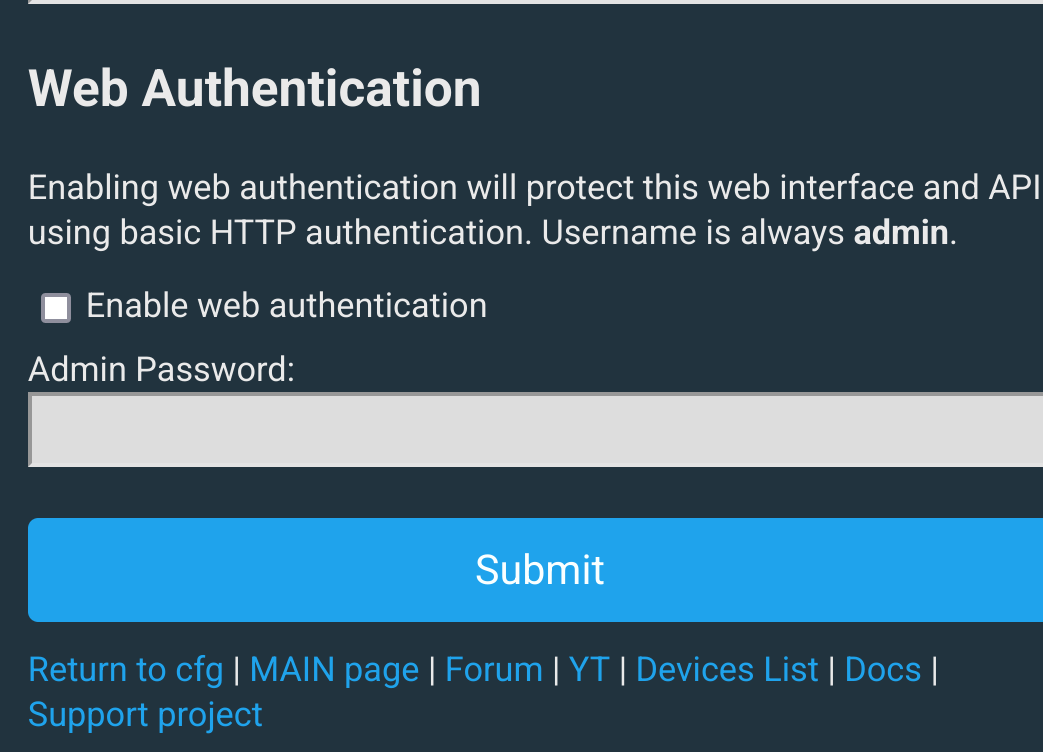
    So, did you configure Web authentication here or do you mean how to reset a password in the original firmware?
  • #224 21083773
    p.kaczmarek2
    Moderator Smart Home
    Posts: 14622
    Help: 655
    Rate: 12638
    I think he has set password for OBK web ui and now tries to remove it. Well, that could be problematic! Flashing original firmware may not overwrite the config partition. He may need a custom OBK build that will let him to remove the password or change it to something else...
    Helpful post? Buy me a coffee.
  • #225 21083917
    max4elektroda
    Level 24  
    Posts: 756
    Help: 48
    Rate: 187
    Shouldn't it just be "remove the check in OBK GUI" and the password is no longer used?? Web authentication configuration interface with an empty password field.

    Added after 19 [minutes]:

    Or is the question: how to remove an unknown password?
  • #226 21083958
    p.kaczmarek2
    Moderator Smart Home
    Posts: 14622
    Help: 655
    Rate: 12638
    I think he forgot his password and now he is trying to hack into his own device. That can be problematic.
    Helpful post? Buy me a coffee.
  • #227 21084157
    max4elektroda
    Level 24  
    Posts: 756
    Help: 48
    Rate: 187
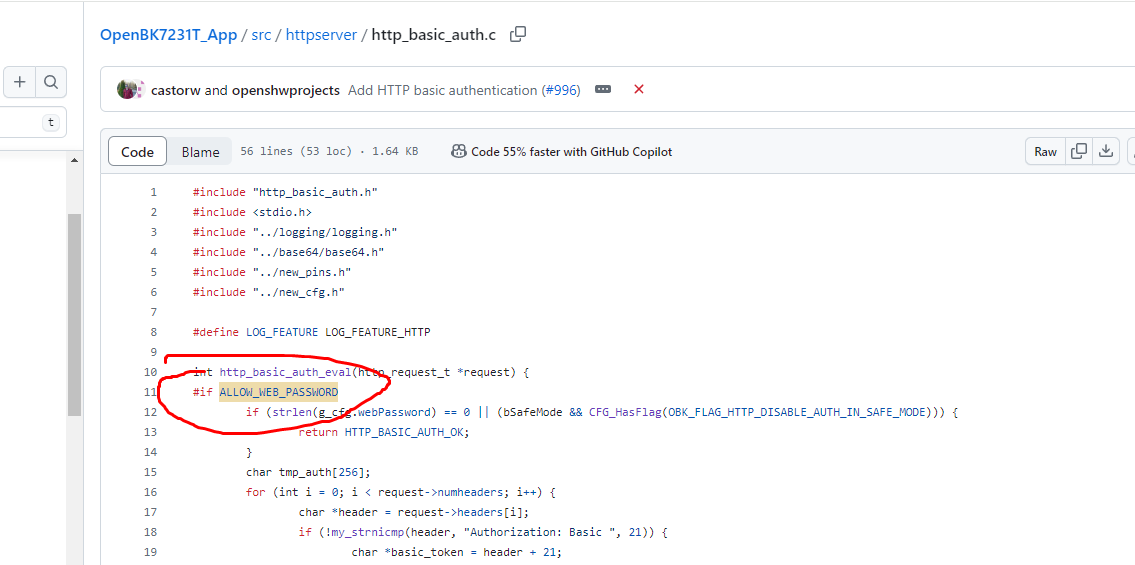
    I see. We might be able to provide a quick solution in changing this code to always ignore auth in safe mode

    https://github.com/openshwprojects/OpenBK7231...lob/main/src/httpserver/http_basic_auth.c#L12

    But this has the drawback, that the config is revealed.
    A better idea would be, only to allow a "full reset" of all settings and password in one.

    So what about something like it's done on Fritzbox: during the first x minutes, you can initiate a reset if password is wrong?

    Of course, it could also be something like a special clear config image, which will erase "all" settings and then starts in safe mode to allow OTA for a regular image. This would mean that there is no change in "regular" releases
  • #229 21084206
    p.kaczmarek2
    Moderator Smart Home
    Posts: 14622
    Help: 655
    Rate: 12638
    This file is responsible for auth:
    https://github.com/openshwprojects/OpenBK7231T_App/blob/main/src/httpserver/http_basic_auth.c
    There is a define for that:
    Screenshot of the source code in the http_basic_auth.c file on GitHub.
    If you compile without ALLOW_WEB_PASSWORD defined, any connection will be accepted.
    You can also just manually edit code to accept any password. Then flash via UART.

    Here is a guide showing how you can compile OBK online, without any setup on your PC:
    https://www.elektroda.pl/rtvforum/topic4033833.html#20946719
    Helpful post? Buy me a coffee.
  • #230 21084699
    max4elektroda
    Level 24  
    Posts: 756
    Help: 48
    Rate: 187
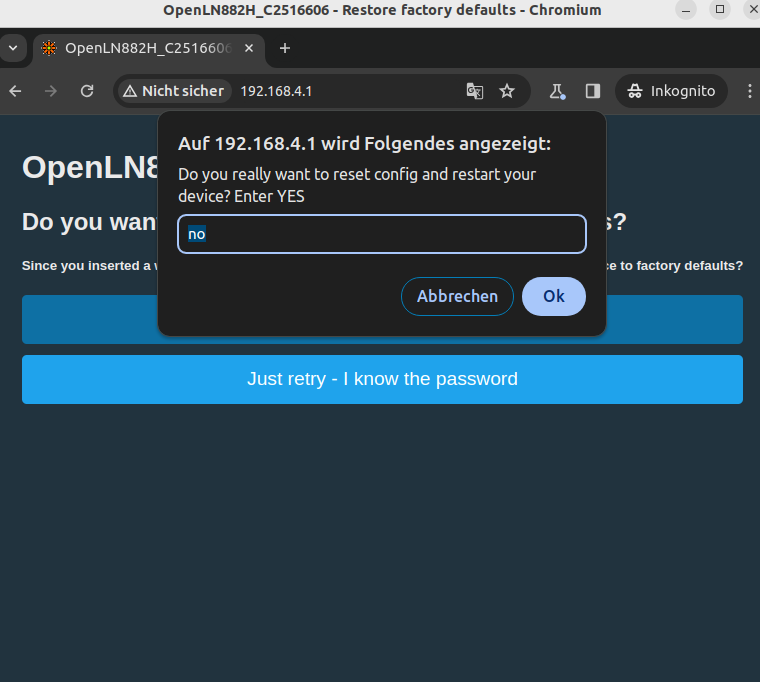
    I tried to implement a "general" possibility to reset the configuration, if "http auth" fails more than x times during the first minutes after startup.
    If you have a git account, you can download the "artifacts" there, containing an image for LN882H, too.
    https://github.com/openshwprojects/OpenBK7231T_App/pull/1240

    If you reset the device and give a wrong password more than 5 times, you will be asked if you like to reset the configuration of the device....


    Device configuration reset dialog box in the browser.
  • #231 21085363
    vovatvset
    Level 4  
    Posts: 4
    I'm new and I don't know how to build the firmware. Here, no matter who, can I build a firmware without a web password for ln882h

    Added after 1 [hours] 45 [minutes]:

    >>21084699
    Thanks, I'll check this method.
  • #232 21085618
    max4elektroda
    Level 24  
    Posts: 756
    Help: 48
    Rate: 187
    If you dont have a git account, here the two images (OTA and UART) for LN882H
    Attachments:
    • OpenBK7231T_App_1240_merge_3e934fccc8ca.zip (734.98 KB) You must be logged in to download this attachment.
  • #233 21085644
    Piorun2002
    Level 15  
    Posts: 268
    Rate: 25
    max4elektroda wrote:
    If you reset the device and give a wrong password more than 5 times, you will be asked if you like to reset the configuration of the device....

    I think that, for security reasons, there should be a flag to enable/disable this functionality in the configuration
  • #234 21085669
    p.kaczmarek2
    Moderator Smart Home
    Posts: 14622
    Help: 655
    Rate: 12638
    vovatvset wrote:
    I'm new and I don't know how to build the firmware. Here, no matter who, can I build a firmware without a web password for ln882h

    This is why have guides for beginners here: https://www.elektroda.com/rtvforum/topic4033833.html#20946719

    max4elektroda wrote:
    |
    While this looks good and sounds useful, it's still a potential security breach. Can you encapsulate your code into something like #ifdef ENABLE_OBK_AUTH_RECOVERY ? Then I will happily merge your changes.
    Helpful post? Buy me a coffee.
  • #235 21085703
    max4elektroda
    Level 24  
    Posts: 756
    Help: 48
    Rate: 187
    This is discussable, one could argue, you usually don't know in advance, whether you will loose your password ;-) - just kidding.

    I tried to make a proposal with a decent measure of a calculated risk:
    You will need (kind of) physical access to the device to restart it: the mechanism will only work the first x seconds after a restart (in PR: 180 seconds) .
    If this is implemented, the time should be a compromise:
    - need for this procedure (lost password) will usually mean you have to repower it
    - it might take some time from the device to your browser to configure it.

    You can't reset the web password (and so expose the settings) but only do a full reset of all settings.

    My idea behind this proposal: a person who has physical access to restart the device can usually do whatever he/she wants with the device.
    So resetting it was not so much of an additional risk (I thought) ...

    Added after 2 [minutes]:

    p.kaczmarek2 wrote:
    Can you encapsulate your code into something like #ifdef ENABLE_OBK_AUTH_RECOVERY ? Then I will happily merge your changes.

    Sure, no problem.

    Added after 4 [minutes]:

    As an additional point: I first thought of "you need to press the button during the procedure".
    But since we don't handle some fixed devices with known properties (a single module might even have none) I thought of this alternative.
  • #237 21085784
    Piorun2002
    Level 15  
    Posts: 268
    Rate: 25
    max4elektroda wrote:
    As an additional point: I first thought of "you need to press the button during the procedure".

    now is an option: "Enable web authentication"
    so you can add the "Disable password reset" extension
    when setting a password, you decide whether you want to disable this option
    that would be very intuitive
  • #238 21085902
    max4elektroda
    Level 24  
    Posts: 756
    Help: 48
    Rate: 187
    Piorun2002 wrote:
    so you can add the "Disable password reset" extension
    when setting a password, you decide whether you want to disable this option
    that would be very intuitive

    Yes, indeed, very good point to decide here!
    I'll try make this possible, another flag would probably the best for this.
  • #239 21085906
    p.kaczmarek2
    Moderator Smart Home
    Posts: 14622
    Help: 655
    Rate: 12638
    I can agree for a flag, but would that flag be on or off by default?
    Helpful post? Buy me a coffee.
  • #240 21085933
    max4elektroda
    Level 24  
    Posts: 756
    Help: 48
    Rate: 187
    I would vote for the reset be possible in default (so on/off depends on if it's "enable possible config reset" or "disable possible config reset").

    But there are arguments for both:

    If there haven't been too many questions about lost passwords, it doesn't seem a big issue
    It's a possible security breach

    As stated above: everyone with physical access can do more harm than resetting the configuration
    It's only possible for a very short period of time
    We are talking about web auth with plain HTTP, so everyone in the network can read the credentials (they are only encoded but not encrypted)

    It should work as a simple way to overcome a possible lost password, so in my opinion, if disabled by default it won't be a help).
    At least at the moment I think most users are willing to flash a precompiled image but not to compile one themselves. If that was the case I would vote for completely disable it and every user with a forgotten password could easily compile a recovery image.

    I will accept all decisions and code it as you like ;-)

    All in all it was not too much of work, so even if it doesn't at all make it's way to the image, it's not a big deal.
📢 Listen (AI):

Topic summary

✨ The discussion focuses on flashing LN882H modules with open-source firmware similar to Tasmota/Esphome, enabling cloud-free operation and integration with Home Assistant. Flashing requires a USB to UART converter with reliable 3.3V power supply, connecting module TX to UART RX, RX to TX, GND to GND, and 3.3V to 3.3V. Users report challenges including access to the BOOT pin, interference from board components on RX/TX lines, and the necessity of short wiring to ensure stable flashing. Various USB to UART converters (CH340, FT232RL, PL2303, CP2101) have differing success rates; CH340 and CP2101 are recommended over some FTDI and PL2303 adapters. Correct baud rate (115200) and running the flashing tool from non-system drives (e.g., D:) improve success. The LN882H_CMD_Tool is used for flashing and dumping firmware; flashing requires power cycling and keeping BOOT grounded during operations. Users successfully dumped firmware but often encountered "Fail. Error downloading file" during flashing, resolved by adjusting baud rate, shortening cables, and using compatible USB-UART adapters.

Power-saving features are under active development; enabling PowerSave mode reduces power consumption and device temperature but may cause WiFi connection issues in some firmware versions. PowerSave commands can be set via startup commands or command tool, with better effect when applied directly via command tool. Temperature monitoring shows LN882H devices run hot (up to 74°C) without load, improved by PowerSave mode. Integration with energy metering (BL0937) is affected by PowerSave due to interrupt handling. Static IP assignment is currently unimplemented in firmware. DHT sensor support is partially implemented; drivers require manual start commands, and pin mapping must be correct. NTP client requires manual driver start and supports server IP configuration via commands. Safe mode can be triggered by power cycling to reset device settings. Firmware and tools are evolving with ongoing commits addressing power management, filesystem (LittleFS), and device stability.

Overall, flashing LN882H modules demands careful hardware setup, compatible USB-UART adapters, correct flashing parameters, and power cycling. Firmware features like power saving, sensor support, and network configuration are improving but still have limitations. Community contributions and testing continue to enhance LN882H open-source firmware usability and integration.
Generated by the language model.

FAQ

TL;DR: Need to flash LN882H and keep a recovery path? Use 5 wires and keep BOOT low; as one expert put it, "BOOT is like IO0". First dump the original flash, then write the regular firmware binary over UART, usually at 115200 baud if higher speeds fail. This FAQ is for OpenBeken/OpenLN882H users who need a practical flash, backup, OTA, and recovery workflow. [#20923772]

Dlaczego to ma znaczenie: LN882H can run cloud-free firmware, but success depends more on wiring discipline, baud rate, and power cycling than on the chip itself.

Opcja Typowe użycie Co działało w praktyce Główne ryzyko
LN882H_CMD_Tool.exe Flashowanie UART w Windows Często ruszało po zmianie na 115200 Błąd Fail. Error downloading file.
LN882H_Flash_Dumper.py Backup flash i OTP Tworzy dump przed zmianą firmware Długi odczyt, wymaga poprawnego BOOT
OTA z Web App Aktualizacja już działającego OBK Chrome/Chromium działały stabilniej niż Firefox Firefox mógł wywołać crash OTA
BK7231GUIFlashTool Nowsze narzędzie GUI Wspierane dla LN882H od aktualizacji 2026 Nadal wymaga tego samego okablowania

Najważniejszy wniosek: Najczęstsza przyczyna nieudanego flashowania LN882H nie była w module, tylko w procedurze: BOOT musi pozostać niski, po każdej próbie trzeba odłączyć i podłączyć zasilanie, a zejście do 115200 baud często rozwiązywało zapis. [#20958664]

Quick Facts

  • LN882H flashuje się przez UART podobnie do ESP8266: potrzebne są połączenia TX, RX, GND, 3.3V i BOOT/GPIOA9, a GPIOA9 musi pozostać w stanie niskim przez cały proces. [#20905518]
  • W praktyce zapis przy 2,000,000 baud często kończył się błędem, a kilka osób potwierdziło sukces dopiero po przejściu na 115200 baud. [#20958664]
  • PowerSave na LN882H potrafił mocno obniżyć temperaturę: w jednym teście spadek wyniósł z 64.0°C do 36.0°C po PowerSave 2, kosztem większych opóźnień sieciowych. [#21055421]
  • LittleFS jest systemem plików flash, który przechowuje pliki i skrypty, z odpornością na restart oraz małym narzutem pamięci. Na LN882H dodanie LittleFS zwiększało rozmiar binarki o około 42 KB. [#21069454]
  • OTA na LN882H bywało niestabilne w Firefox; po naprawce przetestowano poprawny update z buildu 1441_merge_6d6a6086fa18 do OpenLN882H_1.17.789_OTA.bin właśnie w Firefox 132.0.2. [#21332121]

How do I flash an LN882H module over UART and make a full backup of the original firmware first?

Flashowanie i backup robi się w dwóch etapach. 1. Podłącz TX↔RX, RX↔TX, GND, 3.3V oraz BOOT/GPIOA9 do GND. 2. Zrób kopię poleceniem python LN882H_Flash_Dumper.py COMx flashdump; narzędzie zapisze dump flash i OTP. 3. Wgraj nowy firmware poleceniem LN882H_CMD_Tool.exe COMx download flash 921000 0x0 flashimage.bin, a po zakończeniu odłącz BOOT od masy i zrestartuj zasilanie. Po starcie urządzenie wystawia AP na 192.168.4.1. [#20905518]

What is the BOOT pin on LN882H, and why does GPIOA9 have to stay low during the whole flashing process?

BOOT na LN882H to pin wejścia do bootloadera, a w praktyce jest nim GPIOA9. Musi pozostać niski przez cały proces, bo tylko wtedy układ pozostaje w trybie programowania; autor porównał go wprost: „BOOT is like IO0.” Odłączenie BOOT w trakcie potrafi przerwać procedurę lub zablokować kolejną próbę do czasu pełnego odcięcia zasilania. Dlatego BOOT zwiera się do GND przed podaniem zasilania i trzyma nisko do końca flashowania. [#20923772]

Why does LN882H_CMD_Tool show "Fail. Error downloading file." and what fixes actually worked, like using 115200 baud, shorter wires, or a different USB-to-TTL adapter?

Najczęściej ten błąd znikał po zmianie parametrów transmisji i procedury zasilania. Skuteczne poprawki to: użycie 115200 zamiast 2000000, skrócenie przewodów, pełne odłączenie zasilania i USB-TTL po każdej nieudanej próbie oraz podmiana adaptera USB-UART. Pomagało też upewnienie się, że wgrywany jest zwykły plik binarny, a nie plik OTA. Kilku użytkowników potwierdziło, że samo ustawienie 115200 natychmiast rozwiązało Fail. Error downloading file. [#20996463]

Which USB-to-UART adapters work best for LN882H flashing, and how do CH340, CP2101, FT232RL, PL2303, and NodeMCU compare in practice?

Najlepiej wypadały adaptery CH340 i CP2101, ale LN882H bywa wybredny. W wątku potwierdzono sukces na CH340, CP2101, adapterach FTDI w części konfiguracji oraz nawet na NodeMCU ESP8266 z CH340. FT232RL działał u jednych, a u innych nie; PL2303 też działał, ale częściej zgłaszano z nim problemy. Jeden użytkownik potwierdził, że LN882H można było flashować przez NodeMCU z CH340, a inny odzyskał stabilność dopiero po przejściu z FTDI na CH430/CH340. [#20958756]

What is LittleFS in OpenBeken/OpenLN882H, and what features depend on it on the LN882H platform?

LittleFS to system plików w pamięci flash, potrzebny do plików takich jak autoexec.bat, skryptów i funkcji opartych o lokalny storage. Na początku LN882H go nie miał, więc przycisk „List Filesystem” nic nie pokazywał, a tworzenie plików nie działało realnie. Po późniejszym wdrożeniu potwierdzono, że pliki przetrwały kilka aktualizacji OTA. Dodanie LittleFS zwiększało rozmiar binarki LN882H o około 42 KB, ale odblokowywało skrypty i trwałe pliki konfiguracyjne. [#21069454]

How can I flash an LN882H module without desoldering it from the PCB, and what board connections can interfere with RX, TX, or BOOT access?

Da się flashować bez wylutowania, jeśli masz fizyczny dostęp do BOOT i nic nie obciąża linii RX/TX. Problemem bywają przyciski, kondensatory debounce, ścieżki do innych układów lub trudny dostęp do samego BOOT. W takich przypadkach trzeba czasem przeciąć ścieżkę, usunąć kondensator albo bardzo precyzyjnie dolutować cienki przewód tylko na czas programowania. W wątku potwierdzono też przypadek, gdzie moduł LN-02 udało się zaprogramować in-circuit bez wylutowania i bez cięcia RX/TX. [#20924089]

What’s the difference between the regular LN882H firmware binary and the OTA file, and which one should be used for UART flashing versus Web App updates?

Do UART używa się zwykłego pliku binarnego, a do aktualizacji przez Web App używa się pliku OTA. Pomylenie ich jest częstą przyczyną błędów flashowania. Wprost zalecono: wybierz poprawny plik binarny do flashowania, nie plik OTA. Ta różnica wracała też przy Web App, gdzie użytkownicy trafiali na nie-OTA pliki i update nie przechodził. Reguła jest prosta: UART = pełny bin, Web App = OTA.bin. [#20955856]

How do I recover an LN882H device when I can no longer access the web UI, including safe mode, erase commands, and reflashing original firmware?

Najpierw spróbuj safe mode przez 5 szybkich cykli zasilania. 1. Wyłącz i włącz urządzenie 5 razy z krótką przerwą. 2. Po wejściu w safe mode połącz się z AP i popraw konfigurację. 3. Jeśli to nie pomoże, użyj LN882H_CMD_Tool.exe COM# flash erase_all albo wgraj z powrotem oryginalny firmware z backupu. W jednym przypadku dopiero reflashing oryginalnego firmware przywrócił dostęp do sieci domowej, gdy urządzenie po zmianach nie wracało do UI. [#21021640]

Why does changing the MAC address on some LN882H devices make them disappear from the network, and how can I verify the new IP afterward?

Po zmianie MAC urządzenie zwykle dostaje nowy lease DHCP, więc znika spod starego adresu IP. Samo ustawienie MAC może działać poprawnie, ale po zapisie trzeba szukać nowego IP w routerze albo skanerze sieci. Jeden użytkownik potwierdził zmianę MAC bez problemu i dodał, że trzeba upewnić się, że adres MAC jest prawidłowy, a następnie sprawdzić nowy adres w routerze. Jeśli urządzenie nadal znika, warto wrócić do dumpu i powtórzyć konfigurację od zera. [#20996463]

What is PowerSave on LN882H in OpenBeken, and how do PowerSave 0, 1, and 2 affect temperature, current draw, Wi-Fi stability, and BL0937 energy metering?

PowerSave zmniejsza pobór prądu i temperaturę LN882H, ale wpływa na sieć i pomiar energii. PowerSave 0 to tryb bez oszczędzania. PowerSave 1 obniżał temperaturę i prąd umiarkowanie. PowerSave 2 dawał największy efekt, np. spadek z 64.0°C do 36.0°C, ale podnosił ping do 56–73 ms i mógł psuć pomiary BL0937 oraz powodować reconnecty Wi‑Fi. Dla pojedynczego modułu raportowano też spadek poboru z około 90 mA do 50 mA przy trybie 1 i 35 mA przy trybie 2. [#21064064]

Why doesn’t static IP work on LN882H builds, and what is currently unimplemented in the wifi_init_sta code path?

Static IP nie działał, bo ścieżka LN882H była wtedy po prostu niezaimplementowana. Wprost wskazano funkcję wifi_init_sta(const char* oob_ssid, const char* connect_key, obkStaticIP_t *ip) jako miejsce wymagające aktualizacji w pliku hal_wifi_ln882h.c. Dlatego wpisy statycznego IP były ignorowane, a urządzenie wracało do DHCP. Dopóki ten fragment nie został uzupełniony, jedynym praktycznym obejściem było przypisanie stałego adresu po stronie routera. [#20997185]

How do I start and configure extra drivers like NTP, DHT, SSDP, or Wemo on LN882H, including backlog commands and startup command syntax?

Sterowniki uruchamiasz komendami, a kilka poleceń łączysz przez backlog. Przykład: backlog startDriver ntp; ntp_timeZoneOfs +2 albo backlog startDriver SSDP; startDriver Wemo. NTP wymaga ręcznego startu, a serwer ustawia się komendą ntp_setServer <IP>. DHT był obsługiwany per-pin, ale w części buildów LN882H nie był jeszcze aktywny. Wemo wymagał startu sterownika i sprawdzenia, czy działa endpoint /setup.xml, bo sam komunikat „OK” nie gwarantował wykrycia przez Alexę. [#21028427]

Why does OTA updating LN882H often fail in Firefox but work in Chrome or Chromium, and what was the root cause of the HTTP/OTA crash?

Problem nie leżał w samym pliku OTA, tylko w błędzie obsługi bufora HTTP/OTA po stronie LN882H. Firefox częściej wysyłał nagłówki i payload w układzie, który ujawniał błąd: kod OTA zbierał dane do bufora 4 KB, ale nie sprawdzał poprawnie sytuacji, gdy pojedynczy fragment mógł zapełnić bufor więcej niż raz. To kończyło się zapisem poza pamięcią i crashem wątku HTTP Clie. Po poprawce autorzy potwierdzili udane OTA w Firefox 132.0.2. [#21332121]

What’s the best way to remove or recover a forgotten OpenBeken web password on an LN882H device without losing control of it permanently?

Najpewniejsza metoda to wgranie przez UART builda bez wymuszania hasła albo builda recovery. Wskazano plik http_basic_auth.c i opcję kompilacji bez ALLOW_WEB_PASSWORD, co powoduje akceptację każdego połączenia. Później pojawiła się też wersja recovery: po restarcie i ponad 5 błędnych próbach logowania urządzenie mogło zaproponować pełny reset konfiguracji. To rozwiązanie było traktowane ostrożnie ze względów bezpieczeństwa, więc najbezpieczniejszy pozostaje własny build ratunkowy flashowany przez UART. [#21084206]

How can I flash LN882H from Linux or macOS instead of Windows, and which tools from the thread support that workflow?

Na Linuxie pojawiło się natywne narzędzie LN882Loader, opublikowane jako projekt do flashowania LN882H bez Windows. Wcześniej użytkownicy próbowali Wine, QEMU i VirtualBox z mieszanymi wynikami; GUI pod Windows działało w VM, ale bywało zawodne. Dla Windows później polecano też GUI flash tool, natomiast w samym wątku jedynym jasno wskazanym rozwiązaniem linuksowym był właśnie LN882Loader. Dla macOS nie podano gotowego natywnego narzędzia, więc praktyczna ścieżka z wątku to Linux tool albo Windows VM. [#21376296]
Generated by the language model.
ADVERTISEMENT