logo elektroda
logo elektroda
X
logo elektroda

Tuya WiFi IR T1-3S - does the module support OpenBeken? UART logs, chip identification

Nargo 3774 100
ADVERTISEMENT
Treść została przetłumaczona polish » english Zobacz oryginalną wersję tematu
  • #61 21631216
    p.kaczmarek2
    Moderator Smart Home
    Ok I did a short tutorial on IR for BK7238 (or any supported platform, in general):
    NiceMCU BK7238/T1 IR remote control support presentation tutorial - Home Assistant automations
    Helpful post? Buy me a coffee.
  • ADVERTISEMENT
  • Helpful post
    #62 21634367
    divadiow
    Level 37  
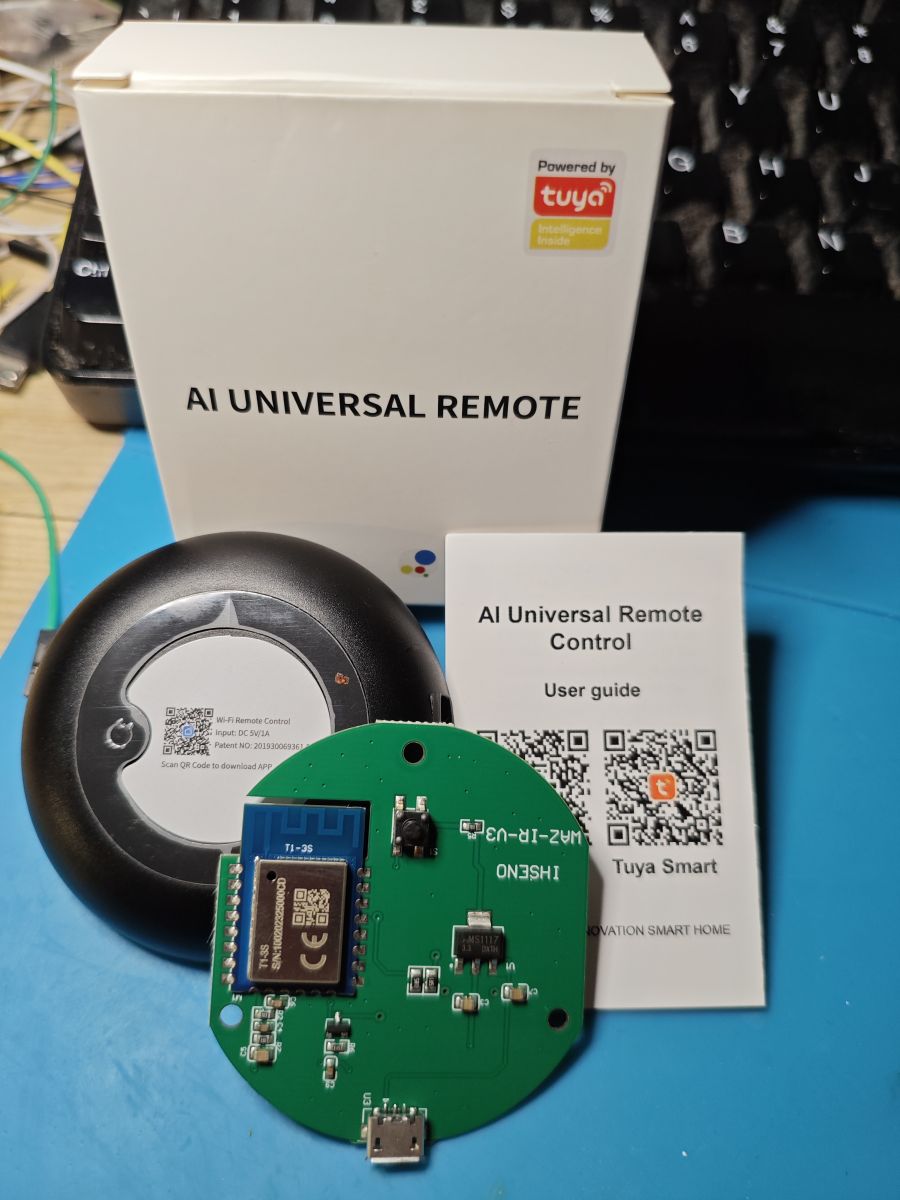
    T1-3S type now.

    AI Universal Remote with box, user guide, and PCB featuring T1-3S module

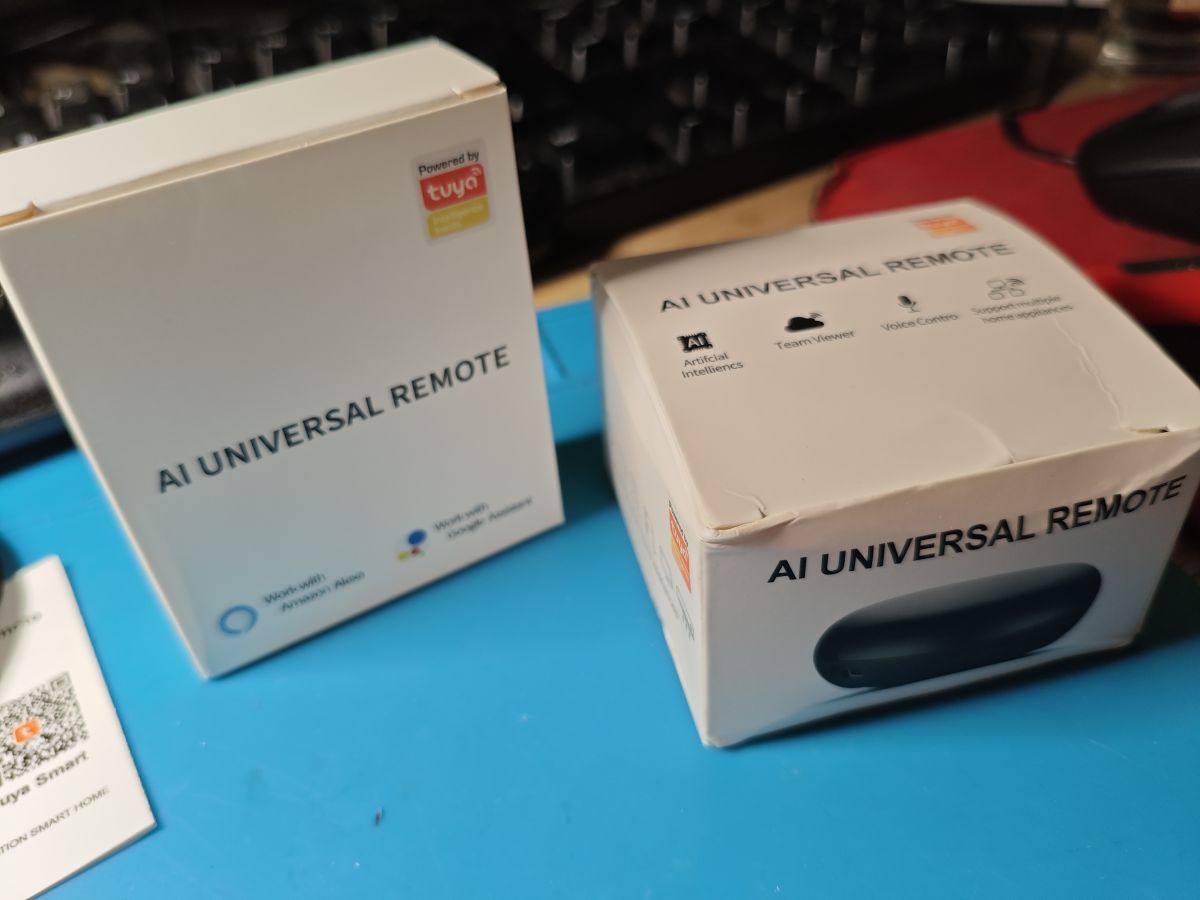
    T1-3S comes in different box (left)

    Two different AI Universal Remote packages on a blue surface
  • ADVERTISEMENT
  • #63 21634377
    p.kaczmarek2
    Moderator Smart Home
    Yes! How did you manage it? Is EasyFlasher working for you?
    Helpful post? Buy me a coffee.
  • #64 21634456
    divadiow
    Level 37  
    p.kaczmarek2 wrote:
    Yes! How did you manage it?


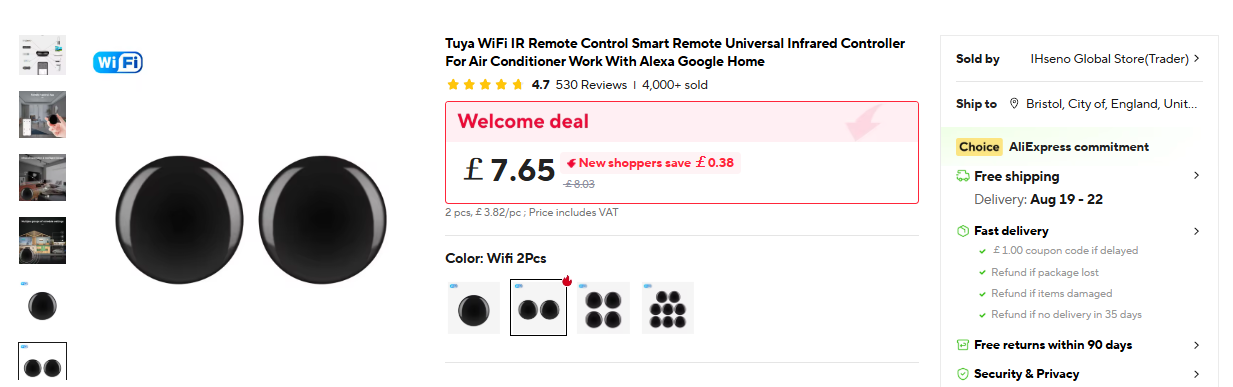
    the 2-pack deal
    Two round black Tuya WiFi IR remotes, 2-pack set on product page

    https://www.aliexpress.com/item/1005007804859733.html

    p.kaczmarek2 wrote:
    Is EasyFlasher working for you?

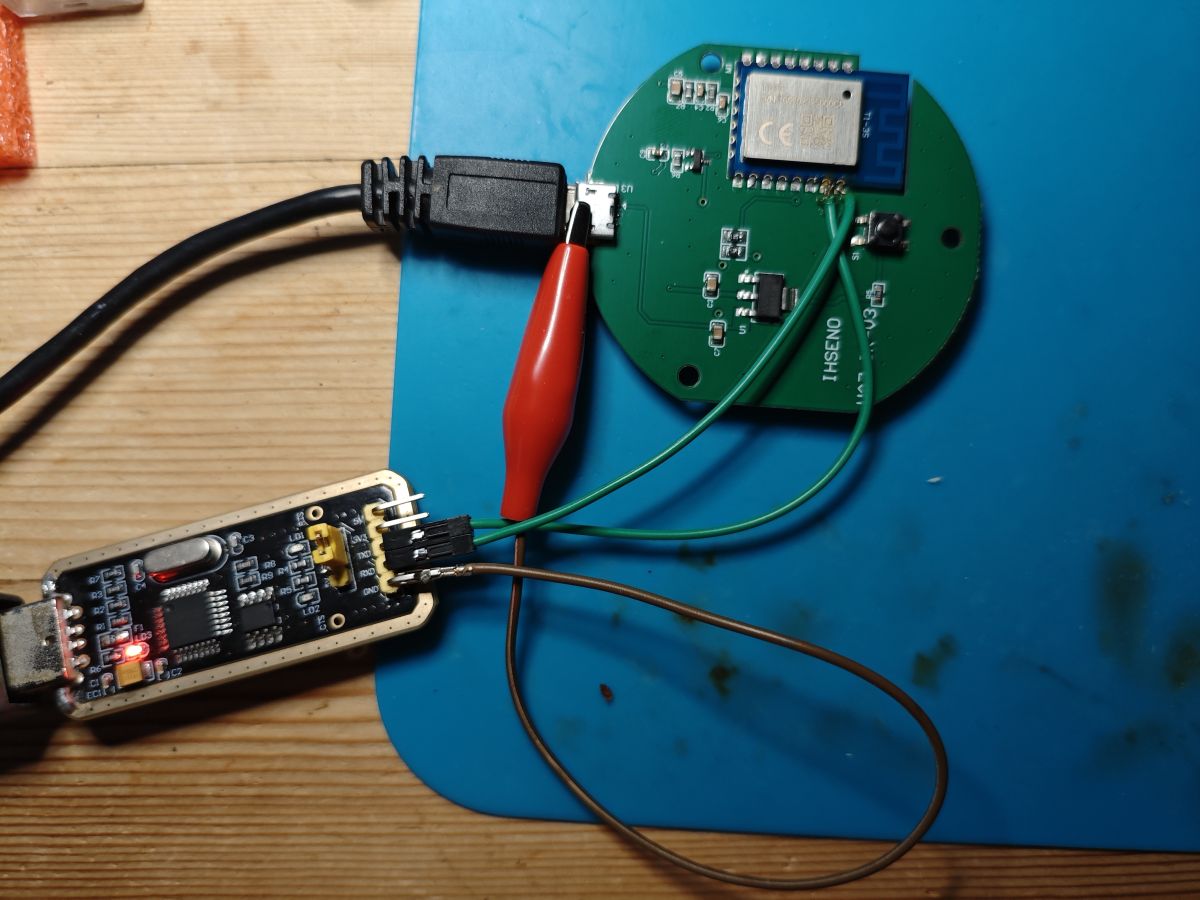
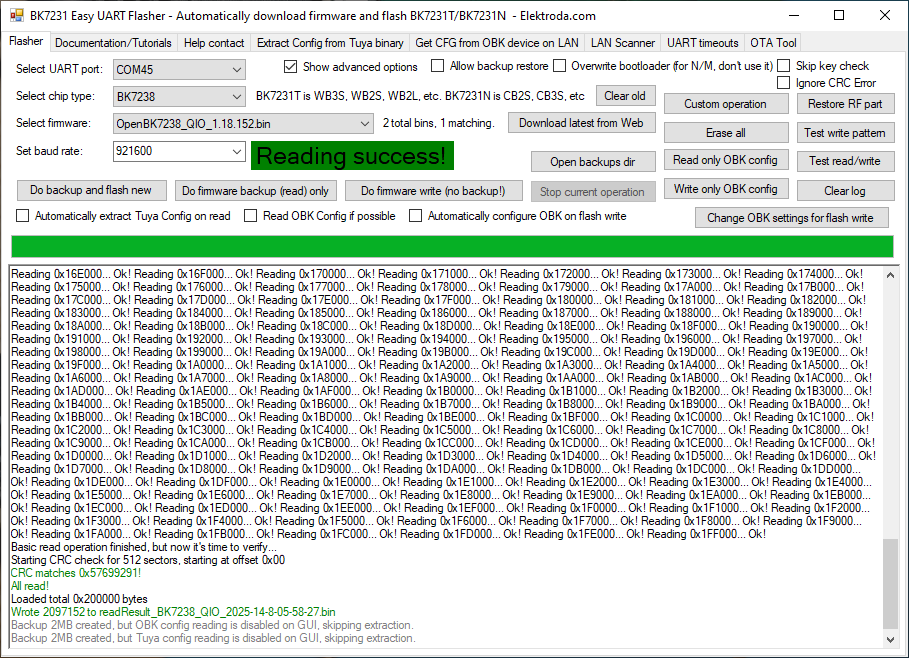
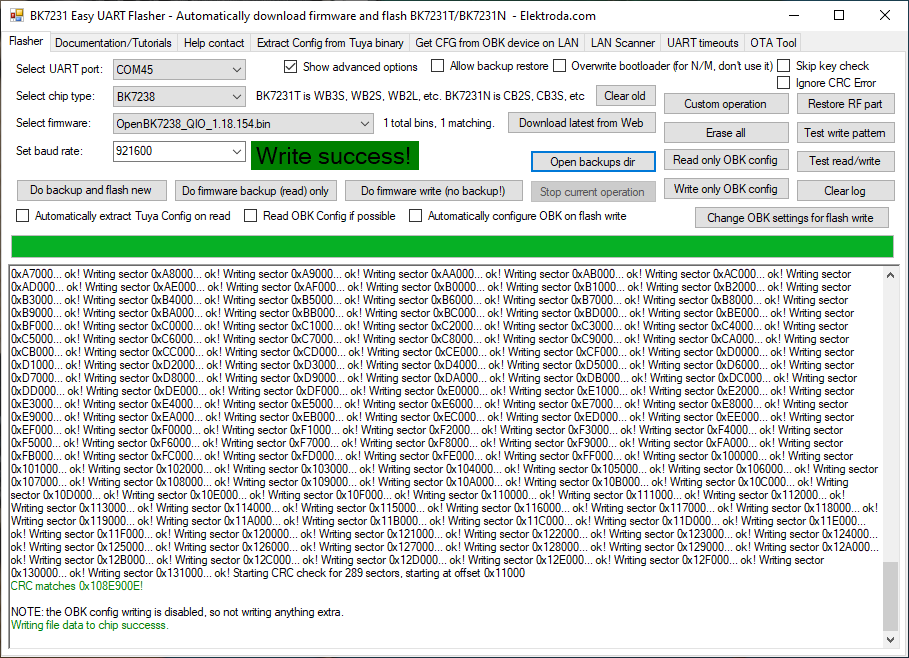
    yes. only soldered TX1/RX1. Clippy GND. USB powered.

    ESP module connected to USB-TTL adapter and circular PCB via jumper wires

    BK7231 Easy UART Flasher interface with Reading success! message

    BK7231 Easy UART Flasher window showing Write success! message and write log.

    regarding submitted template, I think P26 would be better as WifiLED instead of LED and P9 as BtnScriptOnly (and some scripted use) instead of dInput

    Added after 33 [minutes]:

    OTA is not successful if you keep Tuya bootloader. I think users need to be aware they might need to overwrite bootloader. or a variant is released that caters for Tuya download partition, if standard (not looked).

    BK7231 Easy UART Flasher window with “Write success!” message displayed

    It's also not obvious how users can choose a variant solely from Easy Flasher. They would need to know to go to second releases list and to copy file to \firmwares folder in EF first.

    IR1 driver - Toshiba DVD/VHS device remote power button

    Code: Text
    Log in, to see the code


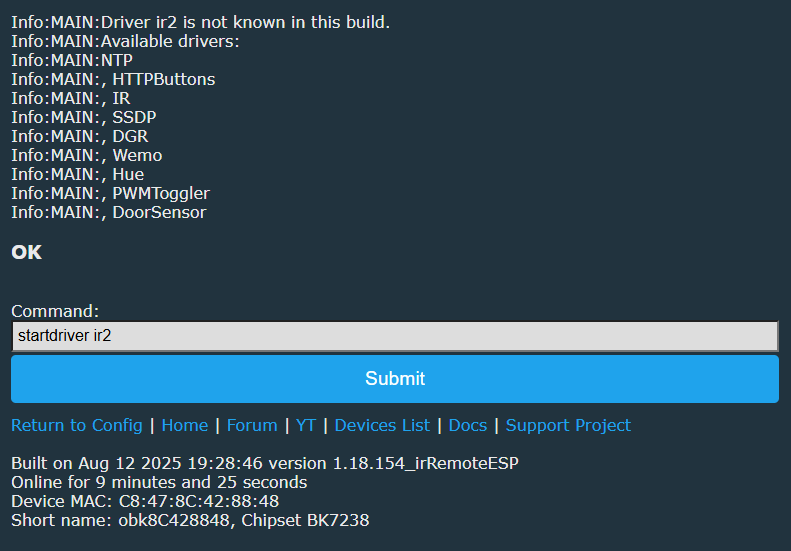
    IR2
    doesn't seem to exist in 1.18.154_irRemoteESP

    ESP config screen showing message that ir2 driver is not known in this build

    Added after 1 [hours] 10 [minutes]:

    wait, standard IR driver in irRemoteESP release is the irRemoteESP8266 library?
  • ADVERTISEMENT
  • #65 21634532
    p.kaczmarek2
    Moderator Smart Home
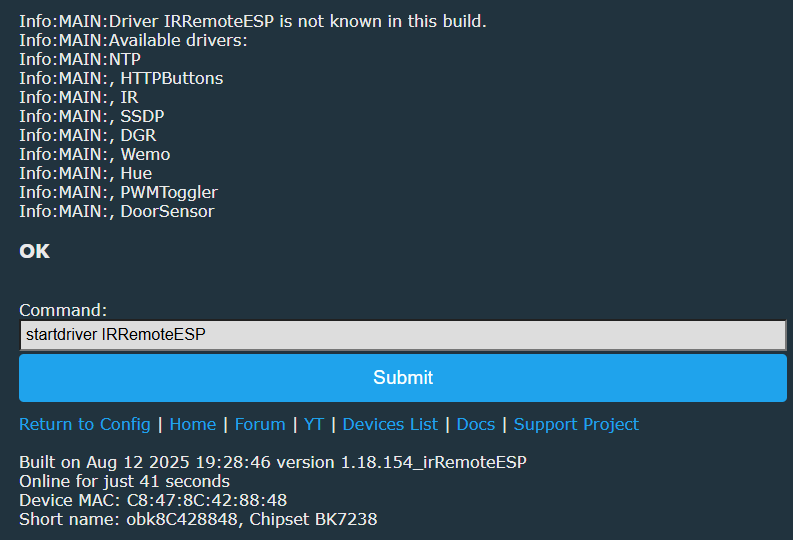
    In IrRemoteESP, the IR driver is IRRemoteESP. In original OBK, IR driver is Arduino-IRRemote.

    IR2 driver is just a little experiment I made with @DeDaMrAz and it was presented in my IR tutorial:
    https://www.elektroda.com/rtvforum/topic4062643.html
    https://www.elektroda.com/rtvforum/topic4063469.html

    Why original bootloader is not working with our OTA RBL? So.... we probably can just add "T1" option to flasher and then silently enable bootloader overwrite?
    Helpful post? Buy me a coffee.
  • #66 21634539
    divadiow
    Level 37  
    p.kaczmarek2 wrote:
    In IrRemoteESP, the IR driver is IRRemoteESP

    hmm

    OpenBK7238 web interface showing IRRemoteESP driver not known in this build

    Added after 10 [minutes]:

    p.kaczmarek2 wrote:
    Why original bootloader is not working with our OTA RBL?

    unsure yet. OpenBK7238 does OTA to 132000. Can't yet see obvious rbl header or 01PE partition information in pain-text in bootloader in factory dump.

    OTA fail with factory BL was same with Tuya soil tester with T1

    Quote:
    OpenBK7238 flashed over the top of factory firmware. I chose to overwrite the bootloader because keeping the factory BL meant OTA updates were not successful.


    https://www.elektroda.com/rtvforum/topic4133895.html
  • #67 21634550
    p.kaczmarek2
    Moderator Smart Home
    I meant... when you have IrRemoteESP build, then when you do:
    
    startDriver IR
    

    Then this IR driver is infact IRRemoteESP.
    Helpful post? Buy me a coffee.
  • #68 21634560
    divadiow
    Level 37  
    lol ok ok. that clears that up. thanks

    so for comparison to standard IR driver, with IRRemoteESP driver - same Toshiba power button:

    Code: Text
    Log in, to see the code


    Added after 10 [minutes]:

    divadiow wrote:
    p.kaczmarek2 wrote:
    Why original bootloader is not working with our OTA RBL?


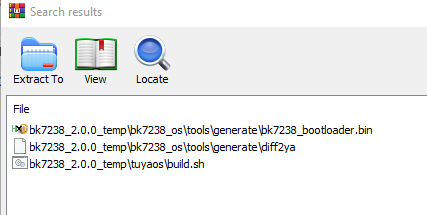
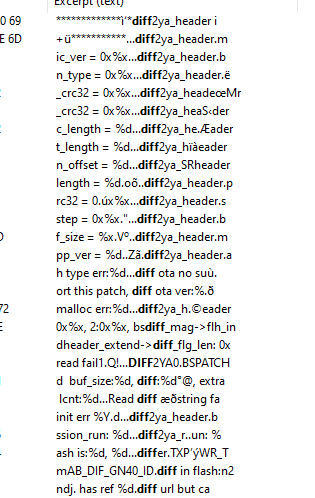
    not expecting rbl but diff2ya something?
    Archive manager window showing three firmware tool files for bk7238

    Screenshot showing fragment of source code text with “diff2ya” headers visible.

    so maybe T1 needs to have bootloader overwritten as standard?
  • ADVERTISEMENT
  • #69 21747038
    everglade
    Level 5  
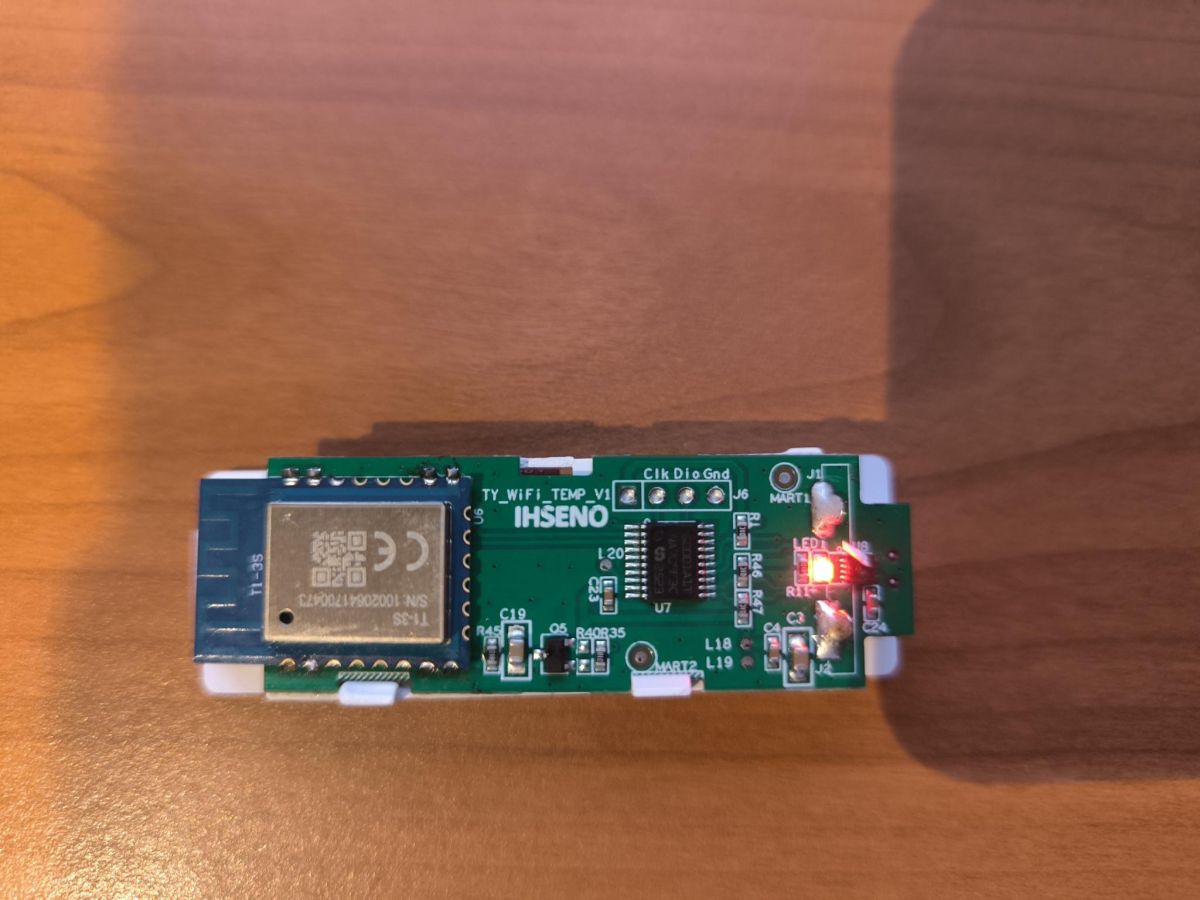
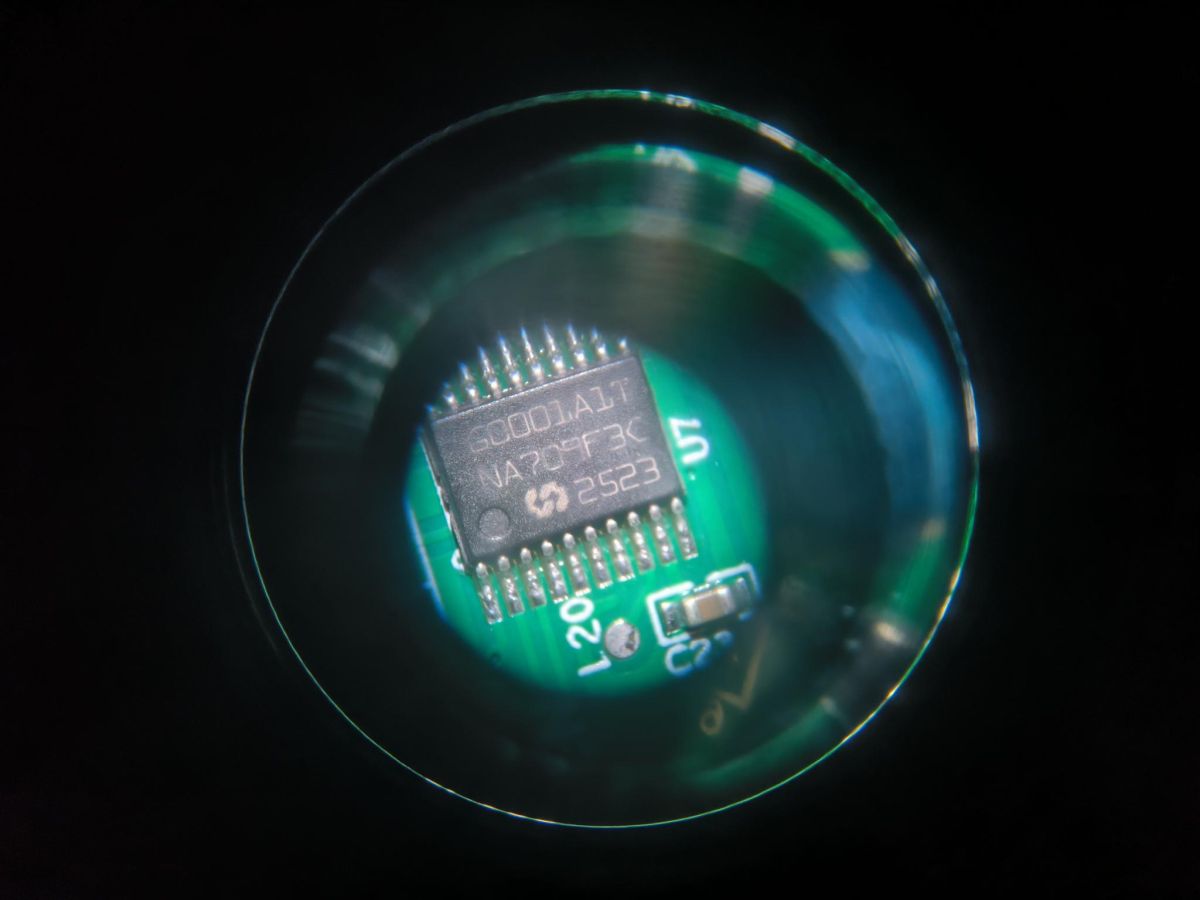
    @p.kaczmarek2 I have bought a new deivce, IHSENO TY_WIFI_TEMP_V1 wifi controlled temperature and humidity sensor. It had a T1-3S. I have attached photos of the board and the unknown microcontroller.

    I had to desolder the T1-3S from the board to flash it with OpenBeken - the TX1/RX1 ports are used by the microcontroller. It is now visible in Home Assistant via MQTT. Annoyingly, this device automatically turns on for 15 seconds and then turns off - so you have to work quickly when configuring, unless you desolder again! This is controlled at the base microcontroller level. Pressing the reset button can force it to start.

    Can anyone help me to try and get the temperature/humidity data from the UART stream from the microcontroller (coming into the T1-3S on pin 15 and 16 (which correspond to P10 and P11 on the IC). What I select in the OpenBeken device config page?


    IHSEN WiFi electronic module with red LED indicator lit
    Microscopic close-up of an integrated circuit on a green PCB
    Screenshot of microcontroller pin configuration for P10 and P11
  • Helpful post
    #70 21747714
    divadiow
    Level 37  
    that's a TuyaMCU device so you'll not be setting assignments in the config page but rather running the TuyaMCU driver and setting up dpIDs relevant to your device

    Guides and examples:

    TuyaMCU flashing, setup and configuration guide - configure dpIDs for Home Assistant
    https://www.elektroda.com/rtvforum/topic4038151.html

    TuyaMCU protocol - communication between the microcontroller and the WiFi module
    https://www.elektroda.com/rtvforum/topic3880546.html

    OpenBeken and TuyaMCU dimmer - configuration guide/tutorial
    https://www.elektroda.com/rtvforum/topic3898502.html

    Extracting DpIDs for TUYA MCU devices
    https://www.elektroda.com/rtvforum/topic4021129.html

    How to get dpID list of types and values for flashed TuyaMCU devices with OpenBeken
    https://www.elektroda.com/rtvforum/topic4049908.html

    How to make TuyaMCU device send more data points? Why are dpIDs not sent? Processing by the Wi-Fi...
    https://www.elektroda.com/rtvforum/topic4089722.html

    Scripting the behaviour of TuyaMCU relay OpenBeken - custom buttons, timers, events, countdown
    https://www.elektroda.com/rtvforum/topic4009196.html

    Post your factory firmware backup, if you took one and it was taken before/if paired with Tuya app, and we can extract the dpID info too.
  • #71 21747734
    everglade
    Level 5  
    Hi there,

    Thanks for clarifying the device is TuyaMCU - I didn't even know this existed! I have attached the backup.

    I have attempted to work out the dpID list as described here Link.html but this doesn't really work. The only tuyaMCU information I receive after issuing the tuyaMcu_sendQueryState is this:


    Info:TuyaMCU:Consumed 7 unwanted non-header byte in Tuya MCU buffer
    Info:TuyaMCU:Skipped data (part) EC EC EC EC EC EC EC


    The basic firmware is extremely annoying - by the time the device starts, connects to wifi and mqtt, you only have about five seconds before it turns off!!! I wish I could disable this annoyance.
  • #72 21747744
    divadiow
    Level 37  
    how are you powering the device at the moment? I tend to solder direct to Tuya module GND/VCC so the TuyaMCU can't cut power (I think they usually cut ground)
  • #73 21747748
    insmod
    Level 29  
    I see 115200 baud in your backup's config.
    Ensure "tuyaMcu_setBaudRate 115200" is executed before tuyaMcu_sendQueryState.
  • #74 21747749
    divadiow
    Level 37  
    everglade wrote:
    The only tuyaMCU information I receive after issuing the tuyaMcu_sendQueryState is this


    try

    Code: Text
    Log in, to see the code
  • #75 21747753
    everglade
    Level 5  
    >>21747744

    So you would solder jumper wires from the gnd and 3.3v pins on the MCU and power it that way?

    I'm powering it from the inbuilt battery supply, two AAA so 3.3V.
  • #76 21747754
    divadiow
    Level 37  
    everglade wrote:
    So you would solder jumper wires from the gnd and 3.3v pins on the MCU and power it that way?

    for setup/testing yes. 3.3v and GND on T1-3S
  • #77 21747767
    everglade
    Level 5  
    >>21747754

    Thanks. Powered now, no restarting.

    I have saved the following in autoexec.bat via the web interface.

    startDriver TuyaMCU
    startDriver tmsensor
    tuyaMcu_setBaudRate 115200
    tuyaMcu_defWiFiState 4
    tuyaMcu_sendQueryState

    However, when I send the tuya_Mcy_sendQueryState, I get no response. I also have another browser tab with http://192.168.20.189/cm?cmnd=DP open, when I refresh this window, I get a Error:CMD:cmd DP NOT found (args ) return in the log.

    I have flag 19, 46 and 47 configured for the device settings.
  • #78 21747784
    divadiow
    Level 37  
    how about without tmsensor start?

    also, continuity OK from RX/TX still to TuyaMCU? no shorts etc. There's also flag 26
  • #79 21747791
    everglade
    Level 5  
    I have got some log stuff here but I can't make heads nor tails of it!!

    Info:TuyaMCU:Skipped data (part) F8 F8 F8 F8 
    Info:TuyaMCU:Received: 55 AA 03 00 00 01 01 04 
    Info:TuyaMCU:ProcessIncoming[v=3]: cmd 0 (Hearbeat) len 8
    ExtraDebug:TuyaMCU:TuyaMCU heartbeat_valid = 1, product_information_valid=0, self_processing_mode = 1, wifi_state_valid = 0, wifi_state_timer=11
    ExtraDebug:TuyaMCU:Will send TUYA_CMD_QUERY_PRODUCT.
    Info:TuyaMCU:Received: 55 AA 03 01 00 46 7B 22 70 22 3A 22 70 78 72 6D 78 79 35 7A 7A 7A 68 66 6B 6C 78 68 22 2C 22 76 22 3A 22 31 2E 30 2E 30 22 2C 22 6D 22 3A 31 2C 22 6D 74 22 3A 31 2C 22 6E 22 3A 30 2C 22 6C 6F 77 22 3A 31 2C 22 73 6D 22 3A 30 7D D7 
    Info:TuyaMCU:ProcessIncoming[v=3]: cmd 1 (QueryProductInformation) len 77
    Info:TuyaMCU:ParseQueryProductInformation: received {"p":"pxrmxy5zzzhfklxh","v":"1.0.0","m":1,"mt":1,"n":0,"low":1,"sm":0}
    ExtraDebug:TuyaMCU:TuyaMCU heartbeat_valid = 1, product_information_valid=1, self_processing_mode = 1, wifi_state_valid = 0, wifi_state_timer=11
    ExtraDebug:TuyaMCU:Will send TUYA_CMD_MCU_CONF.
    Info:TuyaMCU:Received: 55 AA 03 02 00 00 04 
    Info:TuyaMCU:ProcessIncoming[v=3]: cmd 2 (MCUconf) len 7
    Info:TuyaMCU:ProcessIncoming: TUYA_CMD_MCU_CONF, TODO!
    ExtraDebug:TuyaMCU:TuyaMCU heartbeat_valid = 1, product_information_valid=1, self_processing_mode = 1, wifi_state_valid = 0, wifi_state_timer=11
    ExtraDebug:TuyaMCU:Will send TUYA_CMD_QUERY_STATE (state_updated==false, try 0).
    ExtraDebug:TuyaMCU:TuyaMCU heartbeat_valid = 1, product_information_valid=1, self_processing_mode = 1, wifi_state_valid = 0, wifi_state_timer=11
    Info:TuyaMCU:Received: 55 AA 03 00 00 01 01 04 
    Info:TuyaMCU:ProcessIncoming[v=3]: cmd 0 (Hearbeat) len 8
    ExtraDebug:TuyaMCU:TuyaMCU heartbeat_valid = 1, product_information_valid=1, self_processing_mode = 1, wifi_state_valid = 0, wifi_state_timer=11
    ExtraDebug:TuyaMCU:Will send TUYA_CMD_QUERY_STATE (state_updated==false, try 1).
    ExtraDebug:TuyaMCU:TuyaMCU heartbeat_valid = 1, product_information_valid=1, self_processing_mode = 1, wifi_state_valid = 0, wifi_state_timer=11
    ExtraDebug:TuyaMCU:TuyaMCU heartbeat_valid = 1, product_information_valid=1, self_processing_mode = 1, wifi_state_valid = 0, wifi_state_timer=12
    ExtraDebug:TuyaMCU:Will send TUYA_CMD_QUERY_STATE (state_updated==false, try 3).
    ExtraDebug:TuyaMCU:TuyaMCU heartbeat_valid = 1, product_information_valid=1, self_processing_mode = 1, wifi_state_valid = 0, wifi_state_timer=12
    ExtraDebug:TuyaMCU:TuyaMCU heartbeat_valid = 1, product_information_valid=1, self_processing_mode = 1, wifi_state_valid = 0, wifi_state_timer=13
    ExtraDebug:TuyaMCU:Will send TUYA_CMD_QUERY_STATE (state_updated==false, try 5).
    Info:TuyaMCU:Received: 55 AA 03 00 00 01 01 04 
    Info:TuyaMCU:ProcessIncoming[v=3]: cmd 0 (Hearbeat) len 8
    Info:TuyaMCU:Received: 55 AA 03 00 00 01 01 04 
    Info:TuyaMCU:ProcessIncoming[v=3]: cmd 0 (Hearbeat) len 8
    Info:TuyaMCU:Received: 55 AA 03 00 00 01 01 04 
    Info:TuyaMCU:ProcessIncoming[v=3]: cmd 0 (Hearbeat) len 8
    Info:TuyaMCU:Received: 55 AA 03 00 00 01 01 04 
    Info:TuyaMCU:ProcessIncoming[v=3]: cmd 0 (Hearbeat) len 8
  • #80 21747814
    p.kaczmarek2
    Moderator Smart Home
    Ok, quick correction - tmSensor is required along with TuyaMCU for battery powered devices, but tuyaMcu_sendQueryState is not supported there. TuyaMCU battery powered devices are hard to work with and they don't allow state query, you have to follow their protocol exactly and they only send data if you do it as expected.

    It may be a good hint to keep channels used for TuyaMCU battery powered data persistent (-1 startup value) or make sure to publish their values after they are sent by MCU, to avoid sending zeroes.
    Helpful post? Buy me a coffee.
  • #81 21747822
    everglade
    Level 5  
    >>21747814

    Adding startDriver tmsensor, I cannot see any tuyaMCU data being displayed.

    How does one find out what the 'protocol' used is? I have no idea what channels are in use, to set that -1 flag, or how to publish the values after they sent to the MCU.

    Is this something to put into the 'too hard' box (i.e. the bin?) xD
  • #82 21747830
    divadiow
    Level 37  
    Tuya reports your device dpIDs to be:

    Code: JSON
    Log in, to see the code
  • #83 21747831
    DeDaMrAz
    Level 21  
    everglade wrote:
    Is this something to put into the 'too hard' box (i.e. the bin?) xD


    Actually not, it can be tricky but if you went all the way to this point you can make it work.

    Added after 4 [minutes]:

    startDriver TuyaMCU
    startDriver tmsensor
    tuyaMcu_setBaudRate 115200
    tuyaMcu_defWiFiState 4
    
    // dpID 1 is tempererature div 10
    setChannelType 1 temperature_div10
    linkTuyaMCUOutputToChannel 1 val 1
    // dpID 2 is % humidity
    setChannelType 2 Humidity
    linkTuyaMCUOutputToChannel 2 val 2


    Let's start with this for autoexec, reboot the device and report what you get on the index page.
  • #84 21747857
    everglade
    Level 5  
    >>21747831

    Cool community! I like the persistence.

    OK, done as you said.

    wifitempsensor
    Temperature 0.00C (1)
    Humidity 0.0% (2)
    2 drivers active (TuyaMCU, tmSensor), total: 31
    Channel 1 = 0.00, Channel 2 = 0.00
    Cfg size: 3584, change counter: 16, ota counter: 0, incomplete boots: 1
    Chip temperature: 77.9°C
    Wifi RSSI: Excellent (-47dBm)
    Reboot reason: 1 - Rbt
    MQTT State: connected RES: 0(ERR_OK)
    MQTT ErrMsg:
    MQTT Stats: CONN: 1 PUB: 0 RECV: 0 ERR: 0
    Refresh | Forum | YT | Devices List | Docs | Support Project

    Built on Nov 6 2025 10:41:14 version 1.18.207
    Online for 2 minutes and 54 seconds
    Device MAC: C8:47:8C:42:88:48
    Short name: wifitempsensor, Chipset BK7238

    Not much in the way of log output for tuyaMCU:

    nfo:TuyaMCU:Consumed 6 unwanted non-header byte in Tuya MCU buffer
    Info:TuyaMCU:Skipped data (part) F8 F8 F8 F8 F8 F8 
    Info:TuyaMCU:Received: 55 AA 03 01 00 46 7B 22 70 22 3A 22 70 78 72 6D 78 79 35 7A 7A 7A 68 66 6B 6C 78 68 22 2C 22 76 22 3A 22 31 2E 30 2E 30 22 2C 22 6D 22 3A 31 2C 22 6D 74 22 3A 31 2C 22 6E 22 3A 30 2C 22 6C 6F 77 22 3A 31 2C 22 73 6D 22 3A 30 7D D7 
    Info:TuyaMCU:ProcessIncoming[v=3]: cmd 1 (QueryProductInformation) len 77
    Info:TuyaMCU:ParseQueryProductInformation: received {"p":"pxrmxy5zzzhfklxh","v":"1.0.0","m":1,"mt":1,"n":0,"low":1,"sm":0}
    Info:MAIN:Time 107, idle 181901/s, free 118352, MQTT 1(1), bWifi 1, secondsWithNoPing 23, socks 2/24 
    Info:TuyaMCU:Received: 55 AA 03 02 00 00 04 
    Info:TuyaMCU:ProcessIncoming[v=3]: cmd 2 (MCUconf) len 7
    Info:TuyaMCU:ProcessIncoming: TUYA_CMD_MCU_CONF, TODO!
    Info:TuyaMCU:Received: 55 AA 03 02 00 00 04 
    Info:TuyaMCU:ProcessIncoming[v=3]: cmd 2 (MCUconf) len 7
    Info:TuyaMCU:ProcessIncoming: TUYA_CMD_MCU_CONF, TODO!


    Added after 47 [seconds]:

    >>21747830

    Awesome work thank you.>>21747830
  • #85 21747872
    DeDaMrAz
    Level 21  
    In the webapp, go to logs, click on clear all features button, set log level to all then tick just tuyamcu and sent the "tuyaMcu_sendQueryState" command.

    Let it run for couple of seconds and repat the command and paste the log, something is odd there.
  • #86 21747895
    everglade
    Level 5  
    >>21747872

    So, I waited a total of five minutes. Here is what I received:
    Info:TuyaMCU:Consumed 7 unwanted non-header byte in Tuya MCU buffer
    Info:TuyaMCU:Skipped data (part) F8 F8 F8 F8 F8 F8 F8
    Info:TuyaMCU:Consumed 7 unwanted non-header byte in Tuya MCU buffer
    Info:TuyaMCU:Skipped data (part) F8 F8 F8 F8 F8 F8 F8


    1. Restarted
    2. Cleared all features, selected only TuyaMCU.
    3. Log level: All

    I sent that command through the command box (nb returned Info:CMD:[WebApp Cmd 'tuyaMcu_sendQueryState' Result] OK) if I reselect all logging. There is no response from this command at all.

    NB also @p.kaczmarek2 stated that the "tuyaMcu_sendQueryState" command is not supported with battery-powered devices??
  • #87 21747907
    divadiow
    Level 37  
    Hope the dpIDs I posted are correct

    I wonder if that TuyaMcu refactor PR is worth a go
  • #88 21747914
    p.kaczmarek2
    Moderator Smart Home
    everglade wrote:


    I sent that command through the command box (nb returned Info:CMD:[WebApp Cmd 'tuyaMcu_sendQueryState' Result] OK) if I reselect all logging. There is no response from this command at all.

    NB also @p.kaczmarek2 stated that the "tuyaMcu_sendQueryState" command is not supported with battery-powered devices??


    There is no such command for battery powered devices and there is no place for that, protocol is strict.

    everglade wrote:

    So, I waited a total of five minutes. Here is what I received:
    Info:TuyaMCU:Consumed 7 unwanted non-header byte in Tuya MCU buffer
    Info:TuyaMCU:Skipped data (part) F8 F8 F8 F8 F8 F8 F8
    Info:TuyaMCU:Consumed 7 unwanted non-header byte in Tuya MCU buffer
    Info:TuyaMCU:Skipped data (part) F8 F8 F8 F8 F8 F8 F8

    Battery powered TuyaMCU devices will never work correctly if you power Wi-Fi module externally.
    Read whole topic:
    https://www.elektroda.com/rtvforum/topic3975583.html
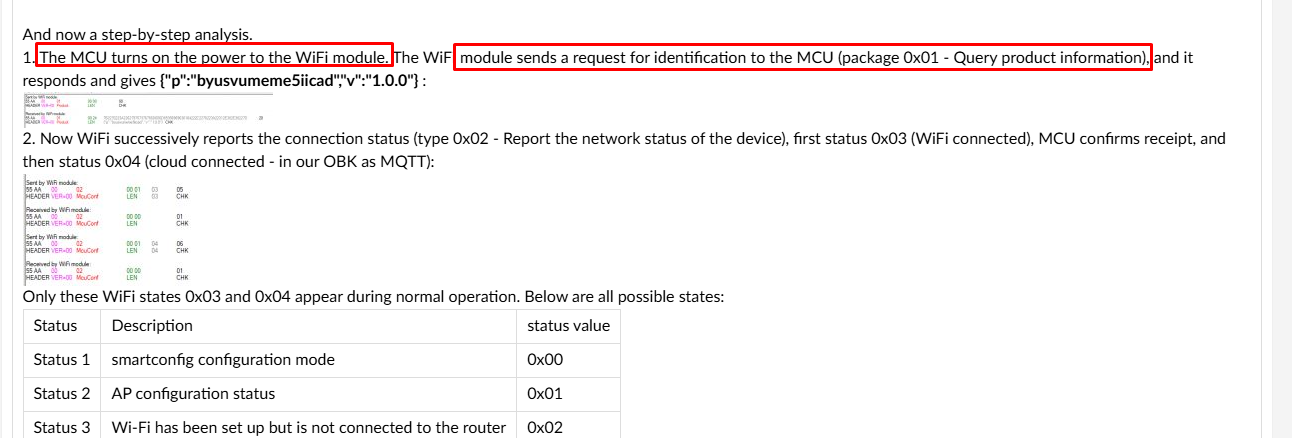
    Documentation fragment showing TuyaMCU Wi-Fi and MCU communication sequence
    As you can see in the image above, the OBK has to boot exactly after MCU turns on it power, and then tmSensor must send a packet. If you have OBK booted at different time (powered externally), it will now know when to send first packet, so transaction will not start.


    Garbage data can happen if you power Wi-Fi module externally.
    Helpful post? Buy me a coffee.
  • #89 21747933
    everglade
    Level 5  
    So, if the device is plugged in via battery, it is almost impossible to do any meaningful configuration with because the MCU powers off so soon. Almost immediately after gaining an IP address, the device will power off. This is all I manage to capture:


    Info:MAIN:Main_Init_Before_Delay
    Info:CFG:####### Boot Count 128 #######
    Warn:CFG:CFG_InitAndLoad: Correct config has been loaded with 16 changes count.
    Error:CMD:no file early.bat err -2
    Info:GEN:PIN_SetupPins pins have been set up.
    Info:MAIN:Main_Init_Before_Delay done
    Info:MAIN:Main_Init_Delay
    Info:MAIN:Main_Init_Delay done
    Info:MAIN:Main_Init_After_Delay
    Info:MAIN:Using SSID [****]
    Info:MAIN:Using Pass [****]
    Info:MQTT:MQTT_RegisterCallback called for bT obk8C428848/ subT obk8C428848/+/set
    Info:MQTT:MQTT_RegisterCallback called for bT obks/ subT obks/+/set
    Info:MQTT:MQTT_RegisterCallback called for bT cmnd/obk8C428848/ subT cmnd/obk8C428848/+
    Info:MQTT:MQTT_RegisterCallback called for bT cmnd/obks/ subT cmnd/obks/+
    Info:MQTT:MQTT_RegisterCallback called for bT obk8C428848/ subT obk8C428848/+/get
    Info:MQTT:MQTT_RegisterCallback called for bT homeassistant/ subT homeassistant/+
    Info:CMD:CMD_StartScript: started @startup at the beginning
    Info:CMD:CMD_StartScript: started autoexec.bat at the beginning
    Info:MAIN:Started TuyaMCU.
    Info:MAIN:Started tmsensor.
    Info:GEN:Channel 1 type changed to temperature_div10
    Info:GEN:Channel 2 type changed to Humidity
    Info:MAIN:Main_Init_After_Delay done
    Info:HTTP:TCP server listening
    Info:MAIN:Time 1, idle 219987/s, free 131536, MQTT 0(0), bWifi 0, secondsWithNoPing -1, socks 2/24
    Info:TuyaMCU:Received: 55 AA 03 01 00 46 7B 22 70 22 3A 22 70 78 72 6D 78 79 35 7A 7A 7A 68 66 6B 6C 78 68 22 2C 22 76 22 3A 22 31 2E 30 2E 30 22 2C 22 6D 22 3A 31 2C 22 6D 74 22 3A 31 2C 22 6E 22 3A 30 2C 22 6C 6F 77 22 3A 31 2C 22 73 6D 22 3A 30 7D D7
    Info:TuyaMCU:ProcessIncoming[v=3]: cmd 1 (QueryProductInformation) len 77
    Info:TuyaMCU:ParseQueryProductInformation: received {"p":"pxrmxy5zzzhfklxh","v":"1.0.0","m":1,"mt":1,"n":0,"low":1,"sm":0}
    Info:MAIN:Time 2, idle 161633/s, free 131536, MQTT 0(0), bWifi 0, secondsWithNoPing -1, socks 2/24
    Info:MAIN:Time 3, idle 171659/s, free 131536, MQTT 0(0), bWifi 0, secondsWithNoPing -1, socks 2/24
    Info:MAIN:Boot complete time reached (2 seconds)
    Info:CFG:####### Set Boot Complete #######
    Info:MAIN:Time 4, idle 165226/s, free 131536, MQTT 0(0), bWifi 0, secondsWithNoPing -1, socks 2/24
    Info:MAIN:Time 5, idle 168785/s, free 131536, MQTT 0(0), bWifi 0, secondsWithNoPing -1, socks 2/24
    Info:MAIN:Registered for wifi changes
    Info:MAIN:Connecting to SSID [****]
    Info:MAIN:Time 6, idle 0/s, free 120168, MQTT 0(0), bWifi 0, secondsWithNoPing -1, socks 2/24
    Info:MAIN:Time 7, idle 0/s, free 118664, MQTT 0(0), bWifi 0, secondsWithNoPing -1, socks 2/24
    Info:MAIN:Main_OnWiFiStatusChange - WIFI_STA_CONNECTED - 4
    Info:MAIN:Time 8, idle 82475/s, free 124120, MQTT 0(0), bWifi 1, secondsWithNoPing -1, socks 2/24
    Info:TuyaMCU:Received: 55 AA 03 02 00 00 04
    Info:TuyaMCU:ProcessIncoming[v=3]: cmd 2 (MCUconf) len 7
    Info:TuyaMCU:ProcessIncoming: TUYA_CMD_MCU_CONF, TODO!
    Info:MAIN:Time 9, idle 182450/s, free 123536, MQTT 0(0), bWifi 1, secondsWithNoPing -1, socks 3/24
    Info:MQTT:mqtt_userName mqtt_user
    mqtt_pass ********
    mqtt_clientID obk8C428848
    mqtt_host 192.168.10.240:1883
    Info:MAIN:Time 10, idle 184234/s, free 118376, MQTT 0(1), bWifi 1, secondsWithNoPing -1, socks 2/24
    Info:GEN:dhcp=0 ip=192.168.20.189 gate=192.168.20.1 mask=255.255.255.0 mac=c8:47:8c:42:88:48
    Info:GEN:sta: 1, softap: 0, b/g/n
    Info:GEN:sta:rssi=-48,ssid=****t,bssid=a6:93:09:15:10:40,channel=6,cipher_type:MIXED3
    Info:MQTT:mqtt_connection_cb: Successfully connected
    Info:MQTT:mqtt_subscribed to obk8C428848/+/set
    Info:MQTT:mqtt_subscribed to obks/+/set
    Info:MQTT:mqtt_subscribed to cmnd/obk8C428848/+
    Info:MQTT:mqtt_subscribed to cmnd/obks/+
    Info:MQTT:mqtt_subscribed to obk8C428848/+/get
    Info:MQTT:mqtt_subscribed to homeassistant/+
    Info:MAIN:Time 11, idle 167978/s, free 118464, MQTT 1(1), bWifi 1, secondsWithNoPing -1, socks 2/24
    Info:TuyaMCU:Received: 55 AA 03 02 00 00 04
    Info:TuyaMCU:ProcessIncoming[v=3]: cmd 2 (MCUconf) len 7
    Info:TuyaMCU:ProcessIncoming: TUYA_CMD_MCU_CONF, TODO!
    Info:MAIN:Time 12, idle 189110/s, free 118464, MQTT 1(1), bWifi 1, secondsWithNoPing -1, socks 2/24
    Info:MAIN:Time 13, idle 186308/s, free 118464, MQTT 1(1), bWifi 1, secondsWithNoPing -1, socks 2/24
    Info:MAIN:Time 14, idle 182745/s, free 118464, MQTT 1(1), bWifi 1, secondsWithNoPing -1, socks 2/24
    Info:MAIN:Time 16, idle 188996/s, free 118464, MQTT 1(1), bWifi 1, secondsWithNoPing -1, socks 2/24
    Info:MAIN:Time 19, idle 180665/s, free 118464, MQTT 1(1), bWifi 1, secondsWithNoPing -1, socks 2/24

    TempSensor and Humidity output still 0 on index page.
  • #90 21747938
    DeDaMrAz
    Level 21  
    And in that state if you press the button on the device couple of times are there any changes in the log?

    Also set flags 37 and 51 and lower the "uptime in secondes..." on the bottom of the flags page to 3.

Topic summary

The discussion concerns the Tuya WiFi IR universal remote control module T1-3S and its compatibility with OpenBeken firmware. The user attempts to identify the chip and read UART logs via TX2/RX2 pins, encountering boot messages and errors indicating possible connection or user errors rather than firmware incompatibility. Respondents suggest using OpenBeken Easy Flasher in BK7238 mode, emphasizing correct wiring, power supply considerations (not powering the WiFi module solely from USB-UART 3.3V line), and using TX1/RX1 UART pins for user data instead of TX2/RX2, which are reserved for log output. Shortening cables and ensuring common ground among USB-TTL converter, power supply, and module are recommended. Despite multiple attempts and power cycling, module readout fails, likely due to connection issues rather than lack of OpenBeken support. The chip is identified as BK7238, and the module requires proper UART interface and power setup for successful flashing or communication.
Summary generated by the language model.
ADVERTISEMENT